loom
Health Warn
- License — License: MIT
- Description — Repository has a description
- Active repo — Last push 0 days ago
- Low visibility — Only 5 GitHub stars
Code Warn
- network request — Outbound network request in app/src/api.ts
Permissions Pass
- Permissions — No dangerous permissions requested
No AI report is available for this listing yet.
Loom — local-first control plane for coding agents: one CLI, shared memory, baton handoffs across Claude Code, OpenCode, and friends.
Loom


The shared-memory layer for AI dev environments. Every coding agent — Claude Code,
OpenCode, Antigravity, Codex, … — keeps its own brain in its own files. Loom makes them
one brain: connect your ADEs, and their memory, decisions, and context become a
single shared thread that flows from one agent to the next.
Today that means Claude Code, Codex, OpenCode, Grok Code and Antigravity as full
agents, each verified against a real version, plus Kiro driven through its own
window —
see Supported agents for exactly how far each one goes, and
How memory actually reaches a model for the
part most tools gloss over.
And because a fleet you can't see is a fleet you can't trust, every turn, handoff and
route step is exported as OpenTelemetry — traces, metrics and logs — and read back
into an in-app Observatory.
Loom is not another IDE. It's the thin layer between your agents — the continuity
and memory they don't share on their own.
   CLAUDE.md      AGENTS.md      .antigravity/     ← each ADE's native memory
       │              │               │
       └──────────────┼───────────────┘   import
                      ▼
            ╔═══════════════════╗
            ║  ONE SHARED BRAIN ║   decisions · imported ADE memory · the thread
            ╚═════════╤═════════╝
                      │  projected on every handoff
       ┌──────────────┼───────────────┐
   Claude Code ──▶ OpenCode ──▶ Claude Code      ← baton carries the brain forward
     (plan)        (execute)      (review)
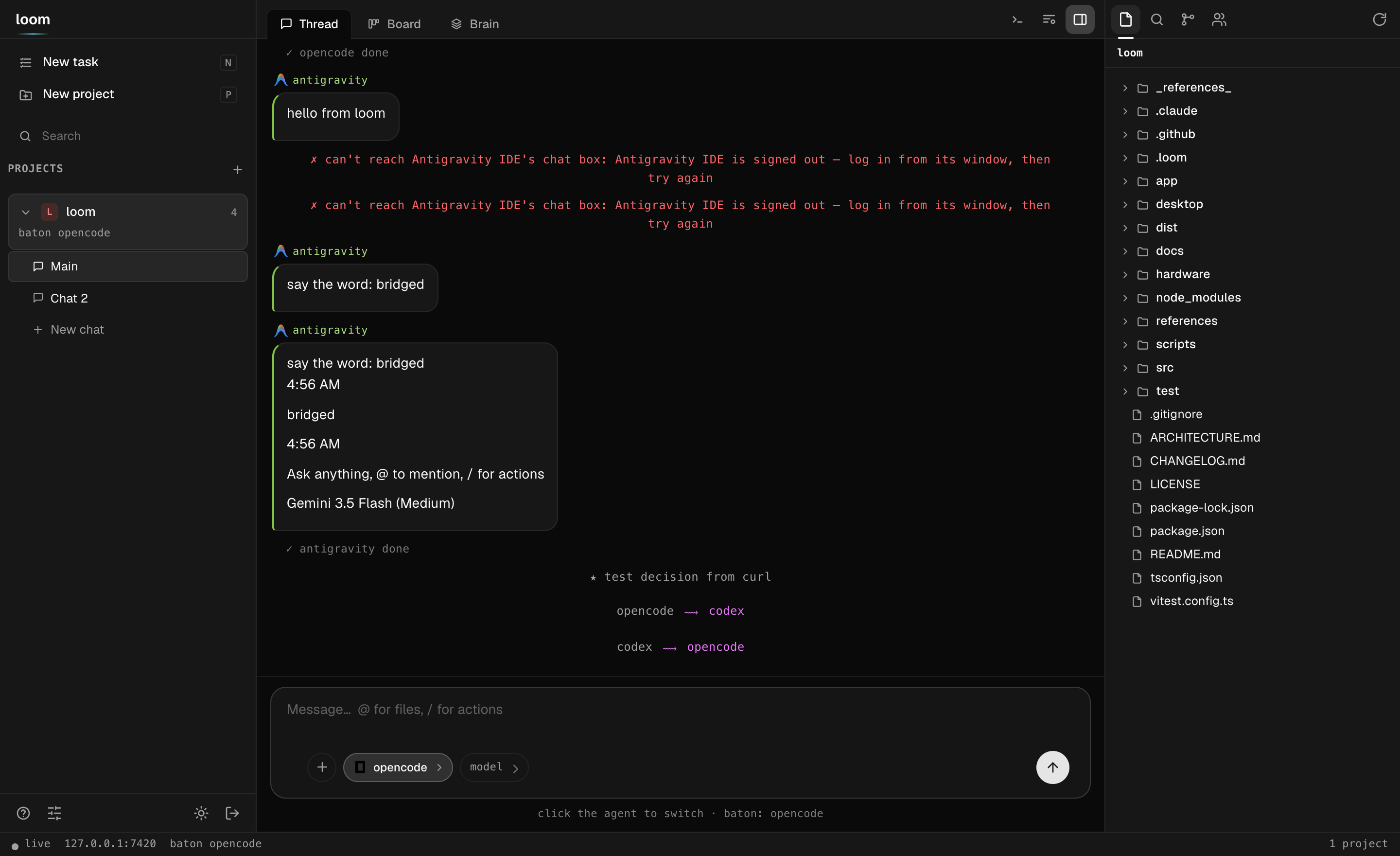
One thread over every agent — projects and chats on the left, the shared conversation in the middle, the Explorer on the right, and a composer you switch agents from without leaving the box.
Codex & GPT‑5.6
Loom is built around orchestrating OpenAI Codex as a first‑class agent — and in this
build every Codex turn runs GPT‑5.6: Codex's model, pinned in Loom's per‑project agent
config (.loom/config.json → codex → model: "gpt-5.6-terra") at high reasoning effort.
The slug is
gpt-5.6-terra, not a baregpt-5.6— that is the id Codex actually
accepts, and asking forgpt-5.6is a 400 (not supported when using Codex with a ChatGPT account). Loom's model picker asks the CLI what it supports
(codex debug models) rather than shipping a list that goes stale, which is exactly
how this got caught.
- Codex holds the baton like any other agent. The adapter
(src/adapters/codex.ts) drivescodex exec --jsonheadless:
it opens a thread, streams Codex's JSONL event log (thread.started,item.completed
→agent_message/command_execution/file_change,run_complete), and resumes
the same thread across turns so Codex keeps its own context between handoffs. - Codex reads and writes the shared brain. Before a Codex turn, Loom projects the
unified memory (imported ADE memory + decisions + the thread) into its briefing; its
replies and memory writes land back in the one shared store. So a handoff
Claude Code → Codex carries the full context, and the next agent inherits what Codex
learned. (Verified end‑to‑end: Codex recalled a value another agent set one turn
earlier, and its turns emitrun_complete+memory_add.) - Voice, on real hardware. The LoomPad is a physical ESP32‑S3 macropad, and the
loop is: press the Codex key to hand Codex the baton, hold the mic and speak, hear
the reply spoken back through the pad. It lives in this repo underhardware/orchestrator-pad/— parametric CAD,
printable STLs, the wiring diagram, the Arduino firmware and the voice backend — with
the daemon-side proxy endpoints (/api/loompad/health,/api/loompad/connect) and the
status pill that reads them. See Hardware to print and wire one. - Codex as a dev agent, too. Because Codex is a full agent, you can hand it real work
inside Loom —loom route ship "…"routes plan → Codex executes → review, the brain
flowing hop to hop.
In short: GPT‑5.6, via Codex, is one of the interchangeable minds Loom keeps in sync —
start a thread in Claude Code, hand it to Codex mid‑task, and it picks up with the whole
shared context intact.
Observability
Loom exports its agent activity as all three OpenTelemetry signals, and then reads
them back into an in-app Observatory so you never have to leave to answer "what is
the fleet doing, and what did it cost".
Backend-agnostic. Loom speaks OTLP/HTTP and nothing else — no vendor SDK, no
vendor-specific code path. Point OTEL_EXPORTER_OTLP_ENDPOINT at a Collector, Grafana,
Jaeger, SigNoz, Honeycomb, anything with a /v1/traces endpoint. An ingestion key
rides in through the standard OTEL_EXPORTER_OTLP_HEADERS, so a new destination is a
config change and never a code change.
| Signal | What Loom puts in it |
|---|---|
| Traces | every turn as gen_ai.agent.turn (model, tokens, cost, duration), tool calls, baton handoffs, route steps, memory folds — one trace per turn |
| Metrics | tokens, turn duration, turns, cost, active agents, handoffs — GenAI semantic conventions |
| Logs | every message, tool call, edit, decision and error, correlated to the span it happened inside |
The Observatory tab renders it back: a live fleet canvas, per-agent burn rate and
budgets, Span Replay with a trace waterfall, a Decisions explorer, a Logs
view, Time-Travel Replay that refolds the whole run from the event log, and
Ask — a question about your fleet, answered from its own telemetry.
Self-heal closes the loop: point your monitoring's webhook atPOST /api/webhooks/alerts (the Alertmanager shape SigNoz, Prometheus and Grafana all
send) and a firing alert takes the named agent out of rotation until it resolves. That
is the part a dashboard can't show you — it knows the alert fired, only Loom knows the
fleet reacted.
Two rules run through all of it: nothing is estimated, and absent beats invented.
Tokens and cost are what each agent's own CLI reported; an adapter that reports tokens
but no dollar figure (codex) produces no cost datapoint rather than a zero, because
zeros are indistinguishable from real cheap turns once summed.
Off with DO_NOT_TRACK=1. Full details, every variable, and how to verify it's flowing:
docs/observability.md.
Why
Every coding agent keeps its own brain. Claude Code's memory can't be read by
OpenCode; Antigravity doesn't know what you decided with Claude an hour ago. Switch
tools and you re-explain your project every time.
Other multi-agent tools answer this by keeping agents apart — each in its own
worktree, run in parallel, compare and merge. Loom makes the opposite bet: keep the
agents' memory together so work continues across them instead of forking.
- One brain across every ADE — Loom imports each agent's native memory
(CLAUDE.md,AGENTS.md, …) into a unified store, merges it with your decisions and
the shared thread, and hands the whole thing to whoever picks up next.loom memory. - The baton — exactly one agent works at a time; passing it carries the context
(interrupt-safe, memory projected, briefing armed). Not isolation — continuation. - Routes — let Loom drive the chain:
loom route ship "add dark mode"runs
plan → execute → review as one command, the brain flowing hop to hop; orloom route autolets an LLM pick each next agent. - Every surface, one daemon — a full-screen TUI, a web app, a desktop window, and a
phone app (voice input, per-prompt diffs, push) — each a paired client of the same
local daemon over your tailnet. - Local-first & yours — one
npm i -g, no account, MIT, runs headless on a server.
Install
Requires Node ≥ 22.5 (Loom's event log uses the built-in node:sqlite).
npm install -g @loompad/cli # → `loom` on your PATH
Other paths:
# one-liner from source (clones ~/.loom-src, builds, links; re-run to update)
curl -fsSL https://raw.githubusercontent.com/nickthelegend/loom/main/scripts/install.sh | bash

# straight from git
npm install -g github:nickthelegend/loom

# hackable checkout
git clone https://github.com/nickthelegend/loom.git && cd loom
npm install && npm run build && npm link
Then verify the setup:
loom doctor # checks node, agents, tailscale, daemon, and your project
Surfaces, all talking to the same daemon:
- TUI / CLI —
loom(default),loom chat,loom send, … - Desktop app (Loom Desktop) — prebuilt for
macOS, Linux, and Windows
(.dmg·.AppImage·.exe; the macOS dmg is ad-hoc signed, so right-click → Open
the first time), or build fromdesktop/:cd desktop && npm install && npm start. Either way it opens a native window that starts the daemon and
pairs itself. - Phone app (LoomPad) — install the prebuilt
loompad.apk(allow unknown
sources), open Loom, and Scan QR code from the desktop's Connect a phone.
Voice input, per-prompt diffs, push. Or build from source
(app/):cd app && npx expo install && npx expo start. - Web app — no install;
loom pair→ open the link. Same workspace in the browser.
The workspace
On a wide screen the web app (and the desktop shell around it) is a full workspace for
driving agents — still not an editor: Loom shows you the context and the agents do
the writing.
┌───────────┬────────────────────────────┬──────────────┐
│ projects  │  Thread · Board · Brain    │  Explorer    │
│  └ chats  │                            │  Search      │
│           │  the conversation, with    │  Source ctl  │
│ New task  │  Update(n files) cards ────┼─▶ diff opens │
│ New proj  │                            │  Agents      │
│ Search    ├────────────────────────────┤              │
│           │  terminal (a real shell)   │              │
└───────────┴────────────────────────────┴──────────────┘
  live · host · baton · spend                    ← status bar
- Projects + chats in the left rail: a project holds as many conversations as you
want, and they share one brain, one baton and one working tree. The agents live in
the right panel — click one to aim your next message at it, click its role to rename
the job (roles are free text: "architect", "the one that writes docs", anything). - Thread is the shared conversation; Brain is the unified memory; Board
is everything in flight. - Board is one board with three sources — GitHub, Projects, Linear —
switched from a segmented control (see GitHub & Linear, native).
GitHub is four live columns (working → needs you → in review → ready to merge); cards
come from yours (+ Task), Loom (which agents are running or blocked), and
your repo's PRs (draft, CI failed, changes requested, approved — read through your
owngh). Search issues and PRs in GitHub's own query language; Start hands an
issue to an agent. Dragging your own card really moves it; dragging a PR card only moves
where you see it — the badge keeps telling the truth, because a drag can't approve a
review or turn CI green. Each card wears its agent's own logo. - Click any change — an
Update(n files)card, or a file in Source Control — and the
diff opens to the right of the chat. It stays closed until you ask for it. - Explorer / Search / Source Control / Tasks in the right panel; every column is
drag-resizable (double-click a handle to reset). - Terminal (
Ctrl+`) is a real terminal in the project directory — a
proper pty, so the shell draws its own prompt andvim,less,htop,^C
and^Zall behave.node-ptyis optional: without it (Linux with no build
toolchain) you get a pipe-backed shell instead, wherecdand variables still
persist and^Cstill works, driven a line at a time. - New task (
n) picks a project, a task, and one agent — or several, which run
it as a pipeline, hop to hop. New project (p) adds a repo — a native folder
picker in the desktop app — and reports which ADEs it found on the host.
Settings, in one place
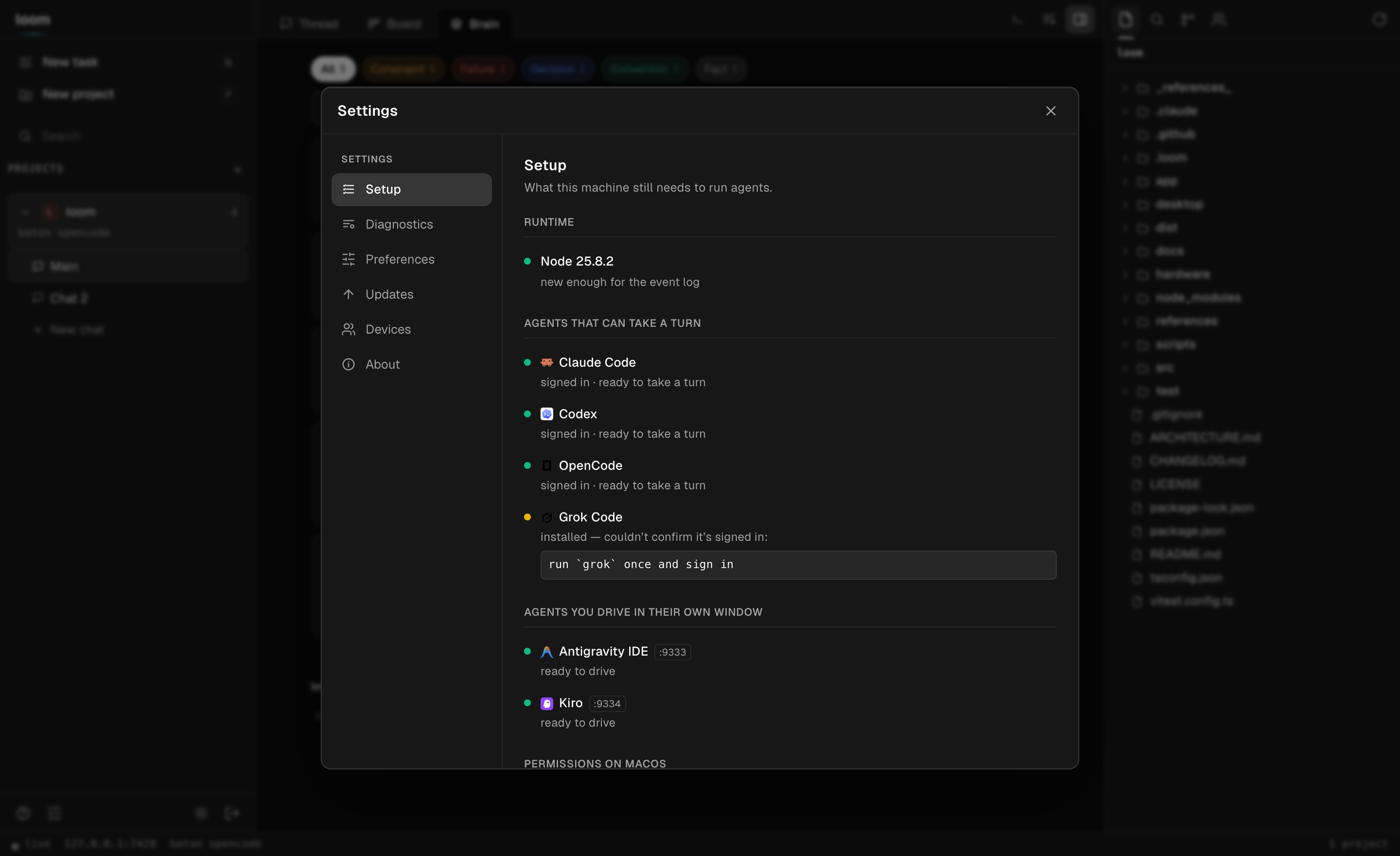
Everything about a Loom lives behind the gear in the bottom-left: Setup (what the
machine still needs to run agents), Diagnostics (loom doctor, run live on the
daemon), Updates (build rev, and how far the checkout is behind its remote),
Preferences (theme, the brain extractor, handoff brief style, default agent),
Devices (paired clients — revoke one, or pair another), and About.
GitHub & Linear, native
Browse pull requests, issues, and GitHub Project boards in-app; open a worktree from
any task; review and approve PRs; and file Linear issues with a team selector — no
context switch, no second browser tab.
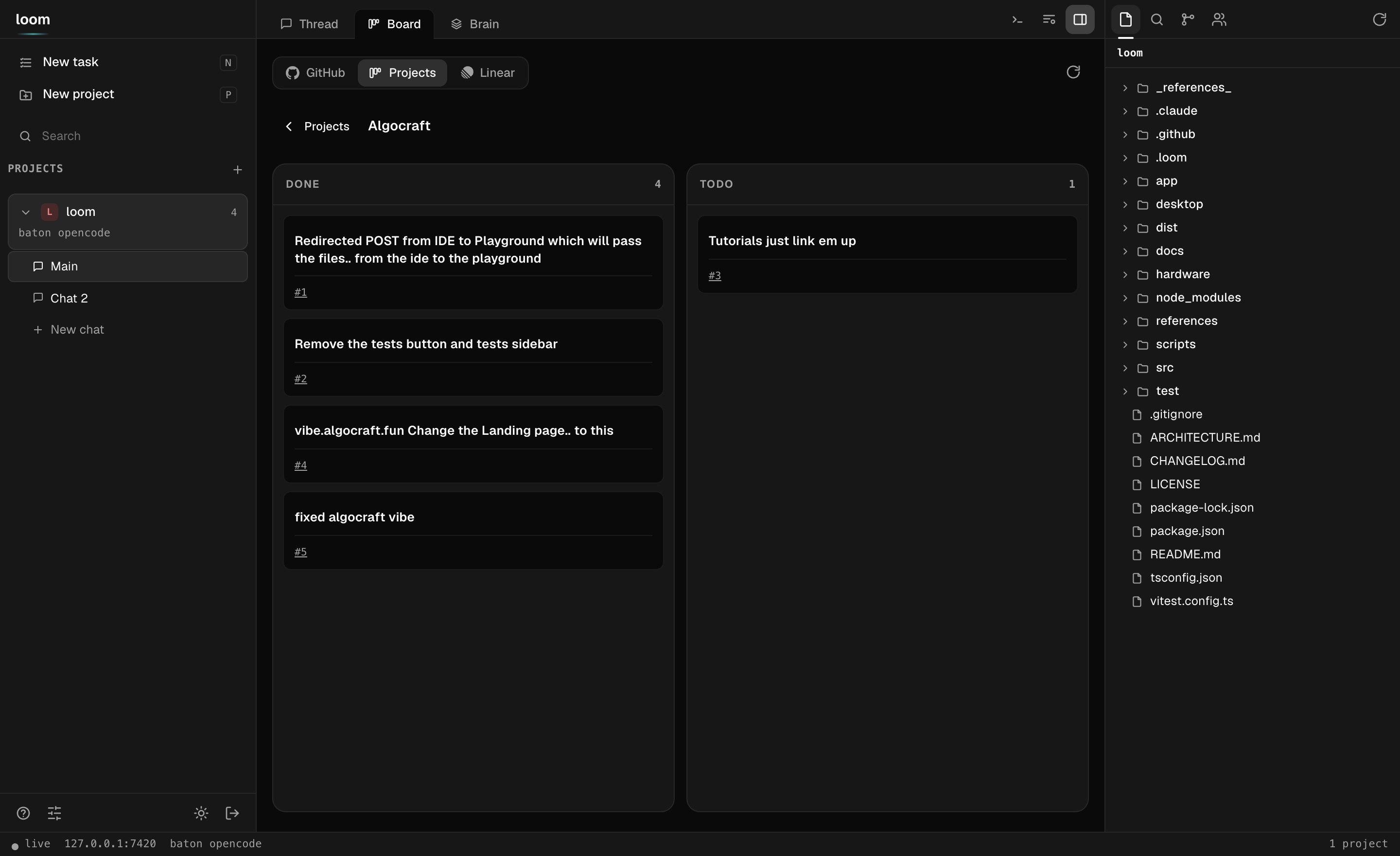
A GitHub Project (v2) board, in-app — items grouped by their Status column, each linking back to its issue or PR.
- Browse PRs, issues, and Project boards. The GitHub source is the live kanban;
the Projects source lists the owner's GitHub Project (v2) boards and lays a
project's items out by Status; search takes github.com's own query language. - Review and approve PRs in place. Open a PR's diff without leaving Loom and post the
three things a reviewer does — comment, request changes, approve. The review
is signed as you (through yourgh); approve asks first, because it publishes. - Open a worktree from any task. One click cuts a checked-out branch in its own
directory, a sibling of the repo: a PR worktree checks the branch out — forks
included — and an issue worktree cuts a fresh branch to start it. An agent can work
a PR while your main tree stays exactly where you left it. - Create Linear issues with a team selector. Pick a team, write a title and
description, file it — the new issue's identifier comes straight back.
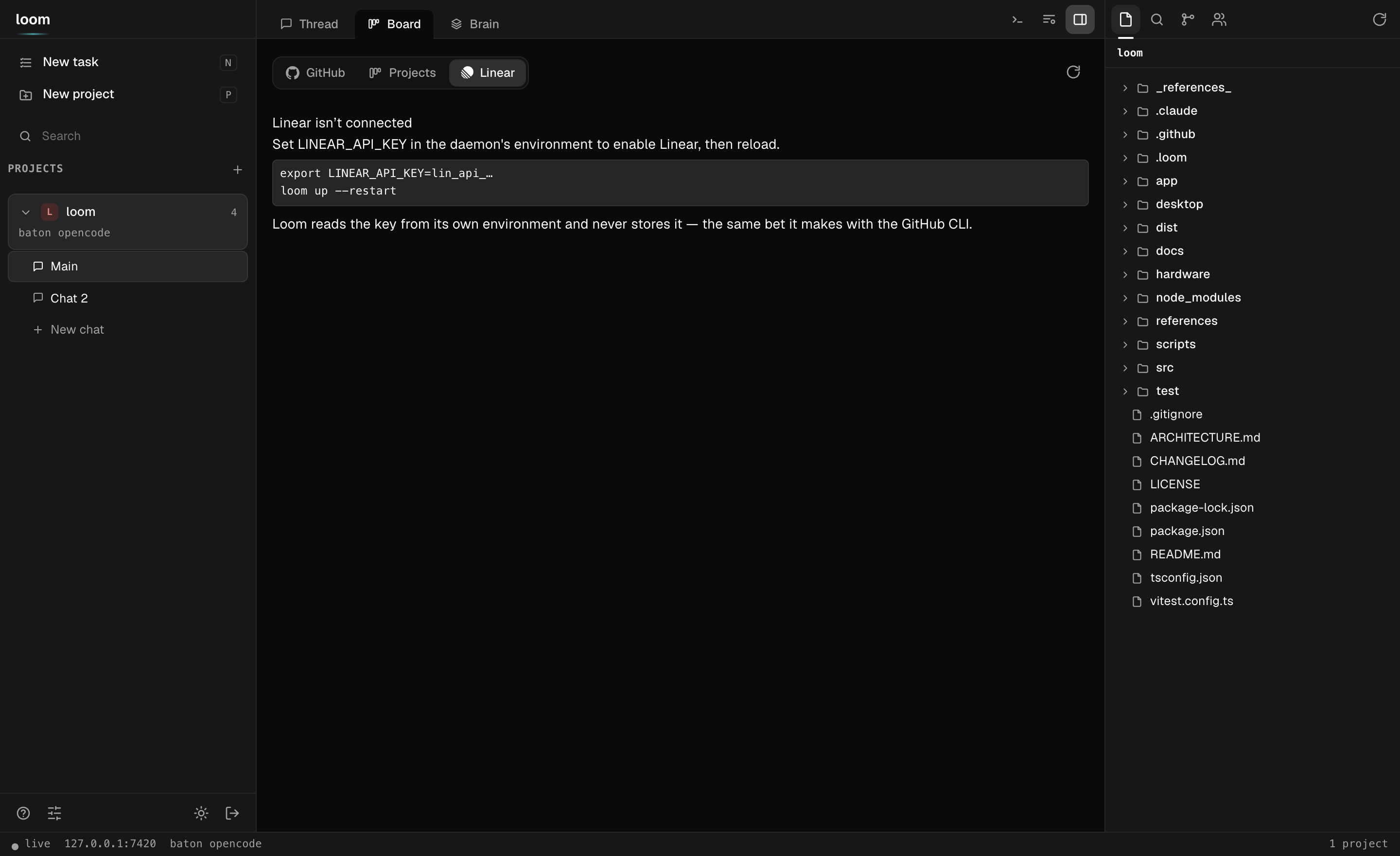
Linear is off until you connect it — and Loom tells you exactly how, because it holds no token of its own.
Loom holds no token of its own. GitHub goes through your gh CLI; Linear readsLINEAR_API_KEY from the daemon's own environment (you export it) and never stores,
logs, or transmits it anywhere else. No key → an honest "not connected", never a dead
form — the same bet the agent adapters make by shelling out to the CLIs you already have.
Quickstart
cd your-project
loom init          # detects installed agents (claude, opencode), assigns roles
loom               # opens the TUI — a tabbed workspace (Thread · Board · Brain · Diff)
  ██      ▄████▄  ▄████▄  ▄█▄▄█▄
  ██      ██  ██  ██  ██  ██▀▀██
  ██      ██  ██  ██  ██  ██  ██
  ██████  ▀████▀  ▀████▀  ██  ██
        one thread · every agent

  1 Thread   2 Board   3 Brain   4 Diff                          ↑12  pgup/pgdn
  10:44 claude-code  here's the plan: …
   ⟶ baton: claude-code → opencode
  10:45 opencode     implementing step 1 …

 ╭──────────────────────────────────────────────╮
 │ › Ask anything… "/route ship: add dark mode" │
 │ opencode · executor ⟵ baton                  │
 ╰──────────────────────────────────────────────╯
   shift+tab view · tab agent · ctrl+p palette · esc back/interrupt
   ~ my-project · baton opencode  ➤ ship 2/3
The TUI is a tabbed workspace, not just a thread:
- Thread — the conversation, streamed.
tabshifts the active agent/IDE
(claude-code → opencode → back); the handoff (interrupt-safe, memory projected, briefing
armed) happens when you hit enter, so switching is one keystroke, not a ceremony. - Board — agents, your cards, issues and PRs in the four flow columns.
- Brain — the memory the project has learned, grouped by kind (failures first), each
tagged with who learned it. - Diff — the working tree: changed files and a colourised patch.
shift+tab cycles the tabs (or /board, /brain, /diff, /thread, or the
palette); pgup/pgdn scrolls the view. ctrl+p opens the command palette
(fuzzy-filtered: jump to a view, shift to any agent, launch a named route, decision,
interrupt, pair…). esc steps back to the thread or interrupts the running turn; /help
lists the slash commands.
Prefer plain line-mode (SSH, scripts)? loom chat is the same thread as a classic REPL,
and every action also exists as a one-shot command (loom send, loom handoff, …).
Routing — multi-hop pipelines
Handoffs are unlimited and manual by default. Routes automate a chain of them:
loom route auto "add a dark-mode toggle"          # DYNAMIC: an LLM picks each hop
loom route ship "add a dark-mode toggle"          # named pipeline from config
loom route planner,executor "fix the flaky test"  # ad-hoc: roles…
loom route claude-code,opencode,claude-code "…"   # …or agent ids, any length
auto is dynamic routing: after every hop, a router looks at the task, the hop
history, and the last replies, then picks the next agent — or declares the task done.
The router is Claude (headless, small model, JSON out) with a deterministic
plan→execute→review rules engine as automatic fallback, so routes never stall on a
router failure. Every decision is logged with its reason
(➤ hop 2 → opencode (plan ready — execute it)), a hop budget caps runaways
(--max-hops, default 8), and --router rules skips the LLM entirely.
What happens per hop: interrupt-safe handoff → shared-memory projection →
briefing → the step's role instruction. Then:
- step finishes cleanly → Loom advances to the next agent automatically;
- the agent asks a question → the route pauses (
waiting_human), you get a
notification,loom route --statusand the board show the question; you answer in
the shared thread (loom send "…") and the route resumes by itself; - an agent errors or a step times out (45 min default) → the route fails loudly;
- you always outrank the route: any manual
handoff/interruptcancels it, andloom route --abortstops it and interrupts the in-flight turn.
--detach returns immediately (fire-and-notify); following with Ctrl-C also leaves the
route running server-side. One route per project at a time (the baton is one write
lock); run routes across different projects in parallel freely.
Define named pipelines in .loom/config.json — steps are roles or agent ids, and any
step can carry its own focus:
"routes": {
  "ship": ["planner", "executor", "reviewer"],
  "api-only": [
    { "step": "planner",  "instruction": "design the endpoint contract only" },
    { "step": "executor", "instruction": "only touch src/api — no schema changes" },
    "reviewer"
  ]
}
Per-step instructions are appended to the role guidance for exactly that step — the
next hop never sees them. loom init seeds a ship route automatically when it
detects at least two roles.
Commands
| Command | What it does |
|---|---|
loom |
The TUI — tabbed workspace (Thread · Board · Brain · Diff), shift+tab switches view, tab shifts agents, /-commands + ctrl+p palette inline |
loom init |
Make the current directory a Loom project (auto-detects agents) |
loom chat |
Same thread as a plain line REPL (/handoff, /interrupt, @agent) |
loom send <text> |
One-shot message (-a <agent> to address someone specific) |
loom handoff <agent> |
Pass the baton — interrupts, projects memory, briefs the target |
loom route <spec> "<task>" |
Run a pipeline (name, or a,b,c ids/roles); --status / --abort / --detach |
loom routes |
List named pipelines defined for this project |
loom interrupt |
Stop the current holder's turn (cancels an active route) |
loom decision <text> |
Record a decision into shared memory |
loom memory [import] |
The unified brain — one memory across every connected ADE |
loom log [-f] |
Show (or follow) the project event log |
loom costs |
Project spend: total + per-agent turns, $ and agent time |
loom agents / loom models <agentId> / loom projects / loom status |
Agent roster, real agent models, project board, daemon health |
loom up [--tailnet] [--restart] / loom down / loom daemon |
Daemon lifecycle (--tailnet binds to your Tailscale IP) |
loom pair |
QR deep link that pairs a phone (single-use token) |
loom clients [--revoke <id>] [--ping] |
Paired devices: list, revoke, or send a test push |
loom doctor [--json] |
Diagnose env, daemon, binding, and project config — with fixes or machine-readable JSON |
Supported agents
| Agent | Tier | Transport | Status |
|---|---|---|---|
| Claude Code | adapter (full-duplex) | headless CLI, stream-json, --resume, briefing via --append-system-prompt |
✅ verified against 2.1.83 |
| Codex | adapter (full-duplex) | codex exec --json (JSONL), exec resume <thread>; found on PATH or inside Codex.app |
✅ verified against codex-cli 0.142.4 |
| OpenCode | adapter (full-duplex) | opencode serve HTTP + SSE (/prompt, /interrupt, /event) |
✅ verified against 1.17.20 |
| Grok Code | adapter (full-duplex) | grok -p --output-format json, -r <session> |
🔶 verified against 0.2.54 — answers only, no tool or edit events (see below) |
| Antigravity | adapter (full-duplex) | agy -p headless, --conversation <id> to resume |
✅ verified against agy 1.1.6 |
| Echo | adapter (demo/tests) | in-process | ✅ |
| Kiro | bridge (driveable) | Chromium debug port — types into the real chat panel and reads the panel back | 🔶 mechanism verified; its selectors are not (see below) |
Three of those need their asterisks spelled out, because the table row is
shorter than the truth:
Codex reports tokens, never money. Its turn.completed carriesinput_tokens / output_tokens and no dollar figure, so Loom shows tokens and
no cost for Codex turns. A USD number derived from a price table we'd have to
keep current is fiction with a decimal point in it.
Grok can't show you its steps. --output-format streaming-json sounds like
it would help and doesn't: it emits thought and text deltas and a finalend, with no tool calls and no file edits — not even when the turn
demonstrably ran a shell command and wrote a file. So a Grok turn in the thread
is what it said, and git status is what it did. Inferring the edits by diffing
the tree would put guesses in the event log dressed as facts. Its permission
mode also defaults to bypassPermissions, because headless with no TTY to ask,
every other mode ends the turn Cancelled having written nothing.
Antigravity used to be a bridge, and isn't any more. Loom drove the IDE's
chat panel over the DevTools protocol: it needed the app open with a debugging
port, it could only watch, and it could never hold the baton. agy does the
whole turn headless, so Antigravity is a full agent and the GUI stopped being a
dependency. It reports no dollar cost — the CLI hands us none — so its turns
show a model and a duration and honestly nothing else. The CDP bridge is still
in the tree and still builds, so projects that name it still open; it just isn't
offered any more.
Kiro is driven, not routed. It's an Electron app with no
API; Loom connects to the debugging port, finds the chat box, types through the
input pipeline and reads back what the panel gained — the approach
antigravity_phone_chat
takes, and for the same reason: never touch the provider APIs, drive the app
that's already signed in. Launch it with--remote-debugging-port=9222 first.
The driver refuses more than it accepts, on purpose. Kiro is VS Code
family and Monaco — the editor holding your source file — is acontenteditable. Anything under .monaco-editor is never a candidate, a
candidate must be labelled like a chat box, and zero-or-several matches is a
refusal that names the fix (options.selectors.composer). Typing a prompt into
your code and pressing Enter is not a mistake an error message repairs.
What's verified is the mechanism, against a real Chromium. What is not
verified is Kiro's actual chat DOM: it shows no chat panel until you open one,
so there was no composer to read the selectors from. Reachable and driveable are
separate questions, and Loom answers both — an app with no chat panel open
replies to CDP cheerfully and reportsdriveable: false — no chat box on screen.
Adapters run a turn to completion headless and may hold the baton. Bridges only observe and receive shared-memory
projections — they never hold the write lock. That's a design decision, not a gap: GUI
agents without a stable API can't be trusted with interrupt-safe writes. See
docs/integration-notes.md for the verified surfaces.
How memory actually reaches a model
Worth being precise about, because this is the whole premise and it has a soft edge.
Loom reliably builds the shared brain (every ADE's imported memory + your decisions
- the thread) and reliably writes it to
.loom/memory/<agent>.mdon every handoff.
That part is solid and tested.
Getting it into the model's context is a different problem, and it depends on the agent:
| Agent | How the brain arrives | Strength |
|---|---|---|
| Claude Code | briefing via --append-system-prompt — the model always sees a summary (recent decisions + messages) plus a pointer to .loom/memory/claude-code.md, which it can Read |
strong — the summary is guaranteed; the full file is one tool-call away |
| Grok Code | the briefing rides in --rules, Grok's real system-prompt channel, so -p stays your clean prompt |
strong — --rules is a genuine system channel, not text in the turn |
| Codex | no --append-system-prompt on codex exec, so the briefing rides in front of your prompt — framed as an unmissable LOOM SESSION MEMORY — authoritative, read first block |
reliable — one prompt either way, but framed so it can't be mistaken for chatter |
| OpenCode | no per-prompt system field on /prompt, so the same framed block is prepended to your prompt |
reliable — delivered as an authoritative block, not loose text |
| Antigravity, Kiro | nothing tells them the file exists — Loom types into their chat box, which is not a system prompt | none — a human has to open it |
So: the summary always lands; the full brain is an invitation. An agent that
ignores the pointer works from the summary alone. If you need something remembered for
certain, put it in a decision (loom decide) — decisions ride in the briefing itself.
There's an opt-in eval (LOOM_TEST_REAL=1) that checks a real model actually uses an
injected brief, and declines rather than invents when the brief is silent.
Memory also flows one way. Loom reads CLAUDE.md / AGENTS.md and never writes
them, so your ADE's own memory files stay yours. And the import is a merge, not a
parse: files are read, capped at 8000 chars, and concatenated under headers. Claude
Code's @path imports are not followed — a CLAUDE.md that is mostly @ pointers
imports the pointers, not what they point at.
The brain also learns on its own. After each turn a small Claude reads what changed
and files what's worth keeping as typed memory units — a constraint, a decision, a
convention, a fact, a failure — reconciled on write (add / update / forget, never a
growing blob), the approach mem0 pioneered, adapted to
Loom's event log. Every unit's evidence is verified against the turn before it's kept, so
the brain doesn't remember things that were never said. Retrieval is hybrid too — exact
entity matches (file paths, symbols, error codes) unioned with BM25 over the text, no
embedding model to ship — with failures and constraints biased to the top of the brief,
because getting burned twice is worse than missing a detail.
The brain is the project's, not each agent's: a fact one agent learns is scoped to the
chat, not walled off to whoever happened to learn it, so it reaches whichever agent takes
the baton next. (The brain-shared test makes this concrete —
five agents each learn one fact, and every other agent's brief then carries all five.) The
Brain tab — and loom tui's Brain view — show exactly what it has learned; toggle
the extractor off per project in Settings.
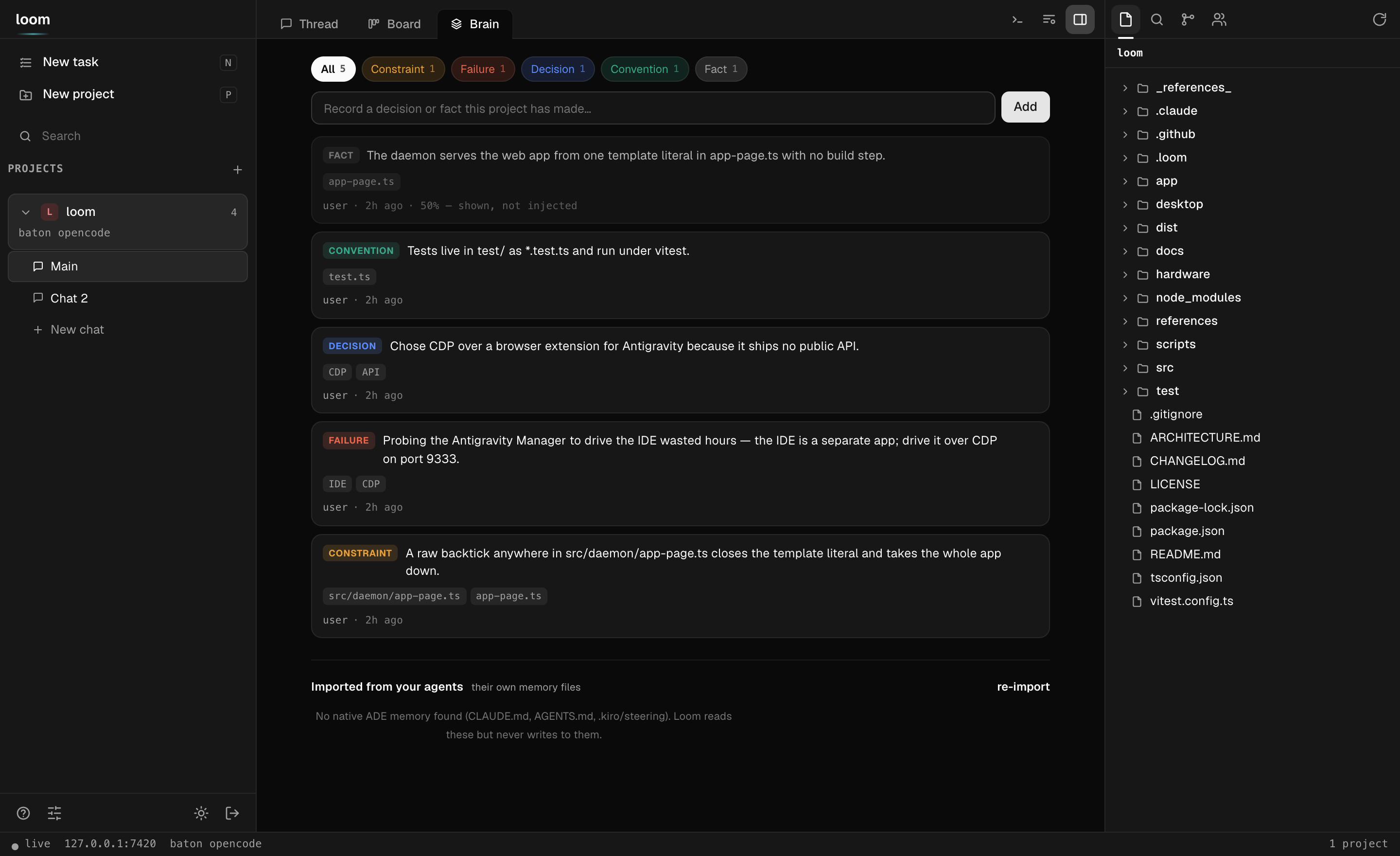
The Brain tab — learned memory units, grouped by kind, each traceable to the turn it came from.
How it works
- Event log (
.loom/log.db, SQLite vianode:sqlite, JSONL fallback) — every
message, tool call, file edit, decision, and handoff, appended in order. The log is
the project's memory; everything else is a view of it. - Projection — on handoff, Loom distills the log into
.loom/memory/<agent>.md(persistent, namespaced) and arms a short one-shot briefing
injected with the target's next turn (system-prompt append for Claude Code, delimited
preamble for OpenCode). Two renderers behind one interface:- template (default) — deterministic, instant, free;
- llm — a small Claude model distills the recent log into a dense doc
(mission / current state / decisions / risks / next moves). Opt in per project:"projection": { "mode": "llm", "model": "haiku" }. Any failure or timeout falls
back to the template — a broken Claude never blocks a handoff. Bridges always get
template views (no N×LLM waste per hop).
- Baton — persisted per project (
.loom/state.json). Messages route to the holder;
addressing a non-holder returns409 not_holderand the surface asks you to confirm a
handoff. Ghost holders (agent removed from config) self-heal. Every handoff snapshots
the outgoing agent's working-tree state (dirty flag +git status) into the log. - Unified memory ("multiple memory in one") — each connected ADE keeps its own
native memory (CLAUDE.md,AGENTS.md, …). Loom imports them all into one brain
(memory_importevents, content-hash deduped), merges them with the project's
decisions and shared thread, and projects the union into whoever holds the baton.
Connect a new agent → its knowledge joins the brain, and everything the others learned
flows into it.loom memoryshows the merged brain; it refreshes on open and on every
handoff. This is the seam an isolation-first tool (separate worktrees) can't own. - Decisions —
loom decision <text>pins a fact, and any agent line startingDecision: …is captured automatically. Decisions ride every future projection. - Cost telemetry — agents that report per-turn cost (Claude Code, OpenCode) feed a
live ledger:loom costsbreaks it down per agent, the board/TUI/phone app show the
project total, and every route logs exactly what it spent
(✔ route completed (3 steps) · $0.0421). Totals rehydrate from the event log, so
they survive restarts. - Daemon — one process, many projects. REST for commands, WebSocket for the live
stream. Config edits hot-reload when the project is quiet.
Your phone (Android today, over Tailscale)
The daemon serves a full phone app at /app — board, live thread, agent chips, routes.
No app store, no build step; it ships inside Loom.
Pair from the app. The web/desktop window has a Connect a phone button next to the
terminal: it opens a modal with a QR (and a copy link) and a Local network / Tailnet
toggle. Pick one and, if the daemon is still localhost-only, hit Enable phone access —
Loom adds a second listener on that LAN or tailnet IP (localhost is never disturbed, so
the window you're in doesn't blink) and shows a QR your phone can actually reach. Same
single-use token, no terminal needed.
Or pair from the terminal:
loom up --tailnet     # daemon binds to your Tailscale IP (never 0.0.0.0)
loom pair             # QR appears in the terminal (also `/pair` inside `loom tui`)
Scan the QR with your phone camera (for the tailnet path, the phone must be on your
tailnet — install the Tailscale app and sign in; the local-network path just needs the
same Wi-Fi). The link opens …/app#pair=<token>; the app claims the single-use,
10-minute pairing token from the URL fragment (fragments never hit the network log) and
exchanges it for its own client token. Then:
- Board — every project, needs-input dots, baton holder, live route progress.
- Thread — the same shared conversation, streaming over WebSocket.
- Agent chips — tap
opencode, hit send: baton shifts (projection + briefing
included), exactly liketabin the TUI. - Routes — the ➤ button opens a picker: choose auto (LLM picks each hop), any
named pipeline, or custom steps, type the task, go. Live banner with hop progress and
reasons, an abort button, and when a route pauses on a question you answer right
there and it resumes. - Chrome menu → Add to Home screen installs it like an app.
Push notifications come with the native app (app/): open it once
after pairing and it registers its Expo push token with the daemon. From then on your
phone buzzes when an agent needs input, when a route completes or fails, and
when a solo turn finishes — route hops are deliberately silent (a 5-step pipeline
buzzes once, not five times). Verify with loom clients --ping.
Hardware
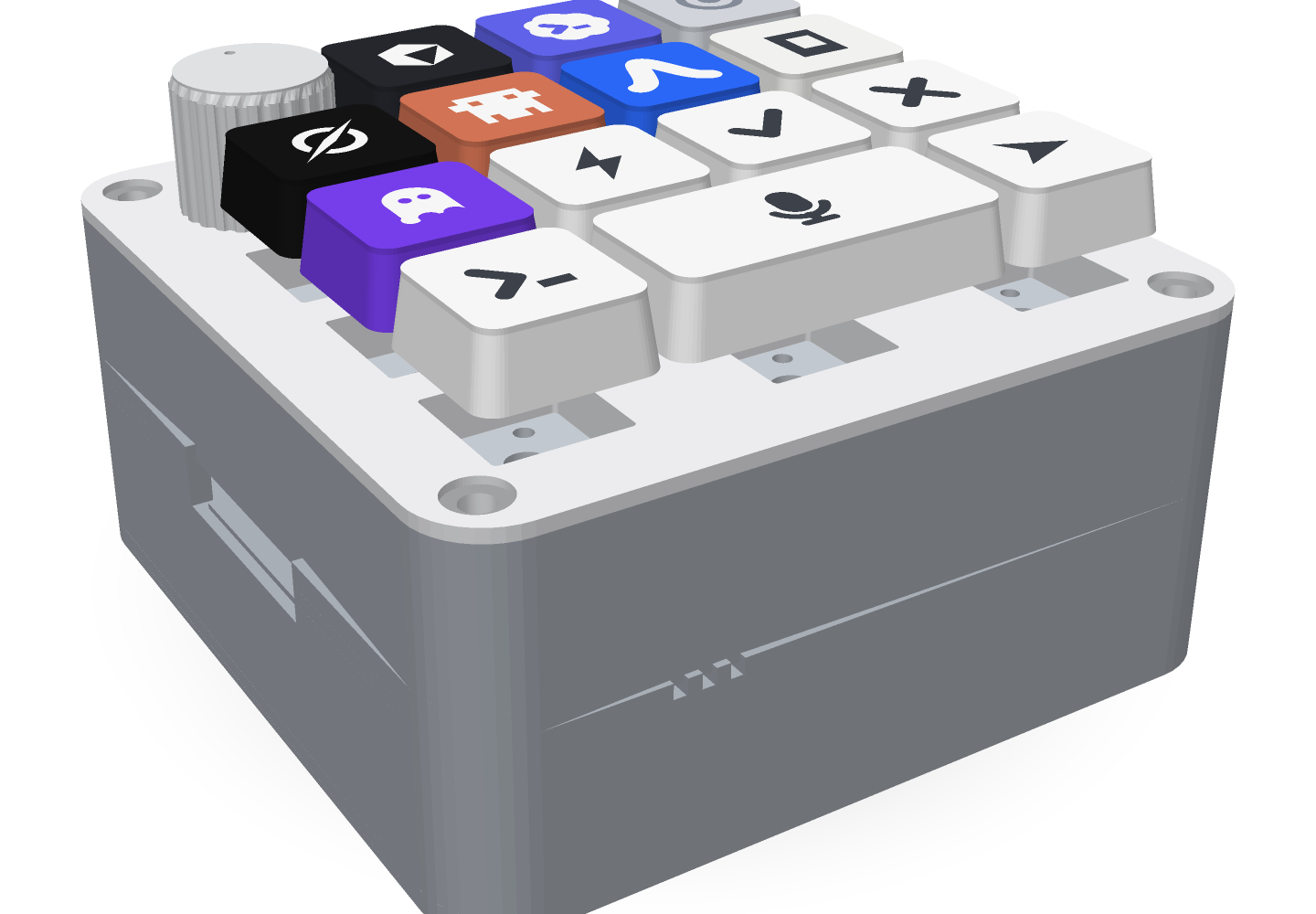
The LoomPad is the pad on your desk: one key per agent, a bar you hold to
talk, and the answer spoken back through its own speaker. Press a key and it
locks that agent in Loom — a real baton handoff, visible in the thread like any
other. It talks to the daemon over Wi‑Fi, with USB‑HID as a fallback.
It is all here, MIT, in hardware/orchestrator-pad/:
parametric CAD, printable STLs, the wiring diagram, the Arduino firmware and the
voice backend. Nothing to buy a licence for and nothing to reverse‑engineer.
Print it
Six parts, all watertight, none needing supports. 0.4 mm nozzle, 0.2 mm layers,
PETG or PLA — it prints on a bed‑slinger in an evening.
| Part | Download | Orientation |
|---|---|---|
| Tray | tray.stl |
flat on the bed |
| Switch deck | switch-deck.stl |
flat, sits between tray and plate |
| Plate | plate.stl |
top face down |
| Keycaps (all 14) | caps-all.stl |
as oriented — slow the outer walls for crisp glyphs |
| Legends | legends-all.stl |
print in the contrast colour |
| Knob | knob.stl |
upright |
Look before you print: orchestrator-pad-assembled.glb
and orchestrator-pad-exploded.glb
open in any GLB viewer. Sizes, triangle counts and watertightness are recorded inMANIFEST.json.
The enclosure is code, not a binary — numpy and shapely, no CSG kernel — so
you can change the layout and regenerate every STL:
cd hardware/orchestrator-pad
python -m venv .venv && .venv/bin/pip install numpy shapely
cd cad && ../.venv/bin/python assembly.py
The agents printed on the keycaps are just a table in cad/partlib.py. Add your
own and reprint the caps.
Wire it
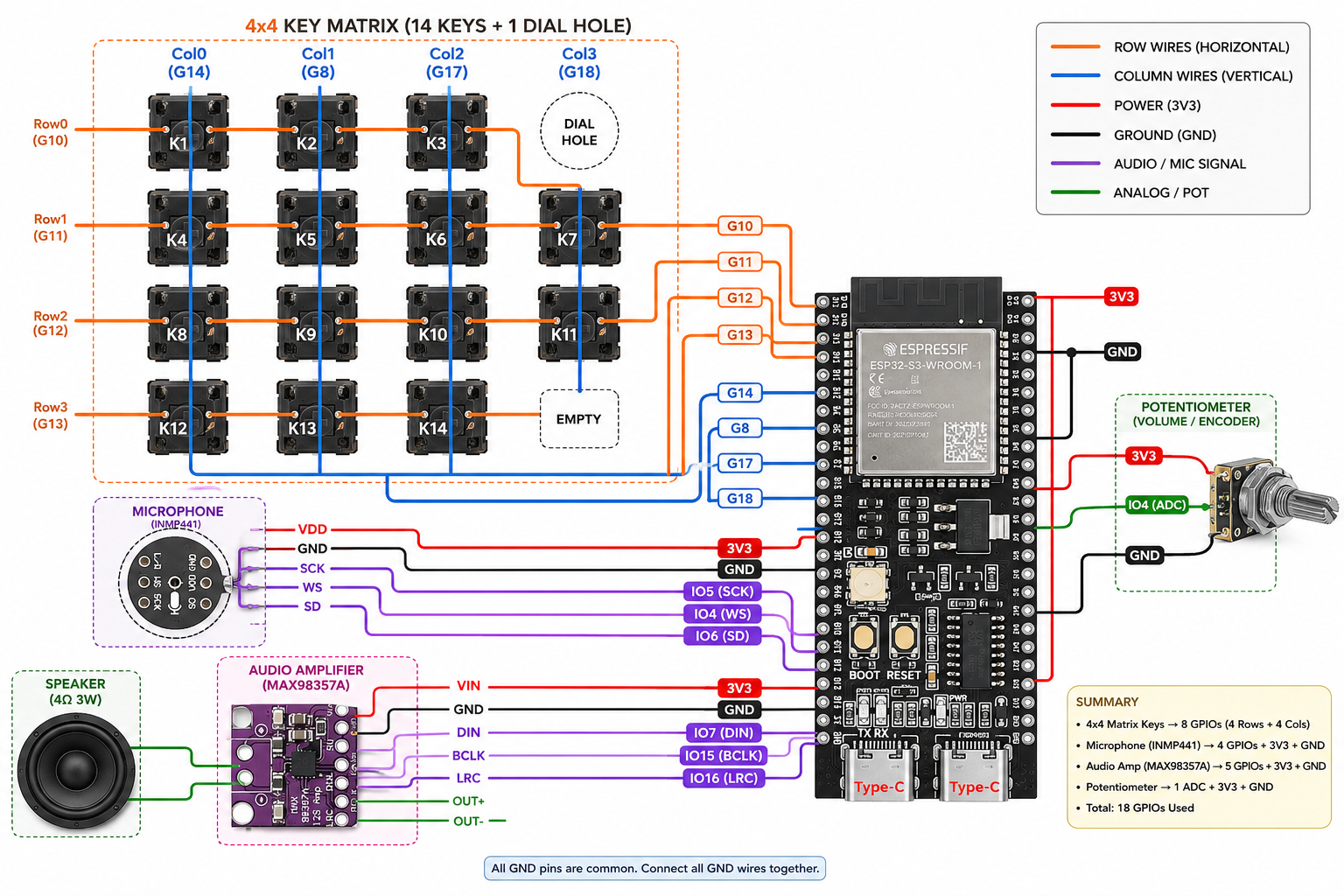
An ESP32‑S3‑DevKitC‑1 (N16R8), a 4×4 key matrix on pull‑ups with no diodes,
an INMP441 microphone and a MAX98357A amplifier on I2S, and the onboard
WS2812 as a status light in the locked agent's colour. Every pin is inconfig.h, and
the full table is in the
hardware README.
Flash it
The sketch isorchestrator_pad.ino.
You never reflash to change networks — on first boot the pad raises its own
access point, LoomPad-Setup, and a captive page asks for your Wi‑Fi, the
backend URL and a pad token, then keeps them in NVS. It checks the daemon's/health and speaks "connected" through the amp so you know it is up without
opening a terminal.
hold 🎤 ──► the pad streams mic audio ──► the daemon does speech-to-text
release ──► { agent: "claude-code", prompt: "..." }
press ➤ ──► the daemon routes the job to that agent's session
  ✓ / ✕ ──► answer the agent's next approval prompt from the pad
The pad stays deliberately dumb: a small JSON protocol over WebSocket, and the
daemon owns speech‑to‑text, session routing and CLI orchestration. Point it at
your own stack by implementing one message handler.
Security model
- The daemon binds to
127.0.0.1by default, or your Tailscale interface with--tailnet— never0.0.0.0on its own. Connect-a-phone can add a listener on a
specific LAN/tailnet IP (never0.0.0.0, never an arbitrary host — the target is
allow-listed to this machine's own addresses), and only when you ask. The tailnet is the
trust boundary: device auth and E2E encryption come from Tailscale. - Every request needs a bearer token (
~/.loom/daemon.json, mode 0600). Tokens are
256-bit random and compared in constant time; nothing state-changing is served before
the auth wall. - The local admin console. A same-machine window bootstraps the admin token via
GET /api/bootstrap— gated by both a loopback TCP peer and a loopbackHostheader
(the second is the anti-DNS-rebinding check: a malicious page carries its own hostname,
so it's refused even though its socket rebound to 127.0.0.1). A remote window gets 403
and pairs like any device. Caveat: on a shared multi-user host, any local user can
reach loopback, so treat "same machine" as "trusted" — don't run the daemon on a box
where you don't trust the other logins. - Pairing:
loom pair(or the in-app button) mints a short-lived (10 min), single-use
token as a QR. The device exchanges it for a long-lived client token. The pairing token
rides in a URL fragment (…/app#pair=…), which browsers never put on the wire; the
client/admin token rides in theAuthorizationheader (HTTP) and the WebSocket
subprotocol (never a URL query — so it stays out of history and proxy logs). - What a paired client can do: everything in the project, including a real shell
(the terminal). Pairing a device therefore grants arbitrary code execution as the
daemon's user — the shell is not confined to the project directory. That is the
deliberate trade for a dev tool (bearer + tailnet is the boundary); pair only devices
you control. Paired clients are not admins, though: they can't mint pairing tokens
or open new network exposure — those need the admin token, which only the local console
or the CLI holds. - The daemon survives a bad turn: unhandled rejections and exceptions are caught and
logged (Console +~/.loom/daemon.log) rather than taking every project down, andSIGINT/SIGTERMshut it down cleanly.
Adapter SDK
Add an agent in ~40 lines — implement the contract, register the kind:
import { AdapterBase, registerAgentKind, type SendInput } from "@loompad/cli/sdk";

class MyAgentAdapter extends AdapterBase {
  async available() { return true; }
  async start() {}
  async stop() {}
  async send(input: SendInput) {
    this._busy = true;
    try {
      // …drive your agent; stream progress:
      this.emit({ kind: "message", payload: { text: "done!" } });
      this.emit({ kind: "run_complete", payload: {} });
    } finally { this._busy = false; }
  }
  async interrupt() {}
}

registerAgentKind("my-agent", (cfg, dir) => new MyAgentAdapter(cfg.id, "my-agent", dir));
Full guide: docs/adapters.md. Design rationale and every decision
with its why: ARCHITECTURE.md.
Configuration
.loom/config.json (created by loom init, hot-reloaded on edit):
{
  "name": "my-project",
  "agents": [
    { "id": "claude-code", "kind": "claude-code", "role": "planner" },
    { "id": "opencode",    "kind": "opencode",    "role": "executor",
      "options": {} },
    { "id": "antigravity", "kind": "antigravity", "role": "general",
      "options": { "debugPort": 9222 } }
  ],
  "defaultAgent": "claude-code",
  "routes": { "ship": ["planner", "executor", "planner"] }
}
Roles: planner · executor · reviewer · general. Claude Code options:permissionMode (default acceptEdits), model. OpenCode options:model ("providerID/modelID", e.g. "opencode/minimax-m2.5" — set this: headless
sessions don't inherit your TUI default), agent, baseUrl to reuse a running server.
Development
npm test          # 179 tests: unit + full HTTP/WS end-to-end
npm run build     # tsc → dist/
npm run dev       # run the CLI from source (tsx)
Environment
| Variable | What it does |
|---|---|
LOOM_HOME |
Where the registry, daemon config, and pair tokens live. Default ~/.loom. Point it at a temp dir to try Loom without touching real state. |
LOOM_STORE |
jsonl forces the portable event store instead of node:sqlite. Loom falls back on its own if sqlite is unavailable; this makes it explicit. |
LOOM_NO_PTY |
1 forces the pipe-backed shell instead of a real pty. CI runs the suite both ways. |
LOOM_NODE |
Node binary the desktop shell spawns the daemon with (Electron's own Node predates node:sqlite). |
LOOM_NO_NOTIFY |
1 silences desktop notifications. |
LOOM_NO_PUSH |
1 silences phone push. |
LOOM_ROUTE_STEP_TIMEOUT_MS |
Per-hop route timeout. Default 45 min. |
OTEL_EXPORTER_OTLP_ENDPOINT |
Where telemetry goes. Default http://localhost:4318. DO_NOT_TRACK=1 turns it all off. The rest of the observability variables — the store to read back from, self-heal, trace deep links — are in docs/observability.md. |
Going the other way, Loom sets LOOM_TERMINAL=1 inside every terminal it opens, so
your shell profile can tell it's running in Loom's pane. (LOOM_EXPO_PUSH_URL andLOOM_TUI_SMOKE also exist, but they're test plumbing — not configuration.)
Roadmap
- Tasks beyond GitHub and Linear — the board's source row is GitHub / Projects / Linear
today. GitLab is not in it at all; only its brand mark is in the icon set. - More adapters/bridges via the SDK — contributions welcome.
Design
Every Loom surface (web app, desktop shell, phone app) wears one design system —
quiet graphite: neutral monochrome chrome, hairline borders, Geist type, and
color reserved for state (thread cyan = live, shuttle magenta = the baton).
Adapted from the Orca design system (MIT,
© Lovecast Inc.); the Geist typeface is © Vercel under the SIL Open Font
License 1.1. Tokens and rules: docs/design-system.md.
License
MIT © Nivesh Gajengi
Reviews (0)
Sign in to leave a review.
Leave a reviewNo results found