kimun
Health Gecti
- License — License: MIT
- Description — Repository has a description
- Active repo — Last push 0 days ago
- Community trust — 44 GitHub stars
Code Gecti
- Code scan — Scanned 12 files during light audit, no dangerous patterns found
Permissions Gecti
- Permissions — No dangerous permissions requested
Bu listing icin henuz AI raporu yok.
Simple note taking, powerful search, AI ready

Kimün
Simple note-taking. Powerful search. AI-ready.




Kimün (Mapudungun): Knowledge, learning, or wisdom.
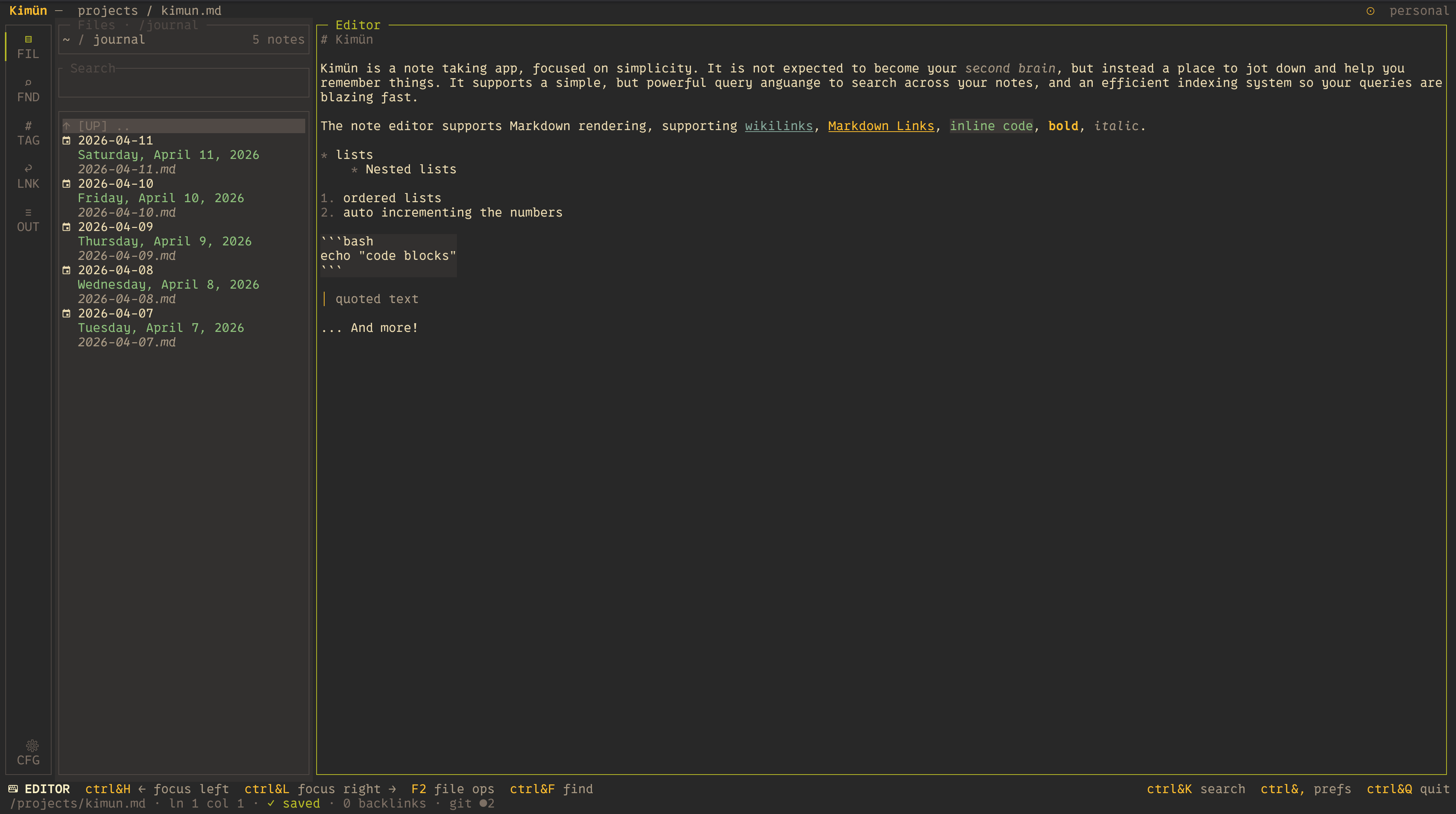
Kimün is a lightweight, fast, terminal-based notes application focused on simplicity and powerful search. Local-first; you own the notes.
It doesn't try to be a bloated, all-in-one life-management tool or a second brain (some of us struggle with a single brain already!). Instead, it serves as a minimalist local-first vault that seamlessly weaves into your existing developer terminal environment. Because your notes are stored as plain Markdown files, it plays beautifully alongside tools like Obsidian, Logseq, or QOwnNotes giving you a fast TUI/CLI alternative right in your shell.
USERS BEWARE: Kimün is in heavy development; configuration and custom themes may break with newer updates. If the app fails to start after an update, remove your configuration file so a new one is generated.
📖 Documentation
Do you want to know more? ⭐️🚀 Check out our official documentation site for complete user guides, advanced setup steps, and integration tips:
👉 Read the Full Documentation Here
✨ Key Features
- ⚡ Blazing Fast Search: Local Markdown files are automatically indexed into a local SQLite database for (almost) instantaneous full-text, structured, and fuzzy search.
- 🗺️ Zettelkasten-Ready Linkages: Seamlessly navigate your knowledge base using
[[wikilinks]]and standard Markdown links with intuitive keyboard shortcuts. Includes backlink support with interactive previews! - 🧠 AI & MCP Native: Equipped with a dedicated Model Context Protocol (MCP) Server and LLM tools. Let your local or cloud AI models (like Claude Code) scan your notes, run daily reviews, update journals, or synthesize concepts directly.
- 🤖 Two Interfaces:
- TUI (Terminal User Interface): An elegant, interactive pane for capturing thoughts, browsing workspaces, and previewing files.
- CLI (Command Line Interface): Fully scriptable. Pipe outputs, log entries via cron jobs, and manipulate entries using
jqand shell tools.
- 🗂️ Workspaces in Context: Effortlessly separate your notes into distinct contexts (e.g.,
PersonalvsWork) using multiple independent vaults. - 🟢 Embedded Neovim Mode: Power users rejoice! Utilize standard
HJKLnavigation, native motions, and search-and-replace routines without breaking context.
📸 How the TUI looks
🚀 Quick Start
Installation
Homebrew (macOS & Linux)
brew tap nico2sh/kimun
brew install kimun
Cargo (Rust Ecosystem)
cargo install kimun-notes
Try It Out!
Explore Kimün immediately using the pre-configured environments located inside the example/ directory. It comes loaded with interconnected personal and work notes, journals, and incoming inboxes:
# Launch Kimün in the sample workspace
kimun --vault ./example
⌨️ TUI Keyboard Shortcuts
| Shortcut | Action |
|---|---|
| Ctrl + K | Global fuzzy search (Telescope-like) |
| Ctrl + N | Follow [[wikilink]] under cursor |
| Ctrl + G | Leader gateway (e.g. Ctrl + G then l b opens Backlinks) |
| Ctrl + E | Open the file browser drawer |
| Ctrl + T | Toggle the sidebar drawer |
| Ctrl + W | Quick Note — immediately capture thoughts to your inbox |
| F4 | Switch Workspaces (e.g., Toggle Personal / Work) |
🤖 Automating with CLI & AI (MCP)
The Power of the CLI
Because Kimün is fundamentally a CLI tool, you can easily pipeline your notes into automation workflows:
# Quick log to your daily journal from a shell workflow
echo "Finished deploy script successfully" | kimun journal append

# Search your notes structurally
kimun search "refactoring" --json | jq '.[].path'
Model Context Protocol (MCP) & LLMs
Kimün bridges local notes with next-generation AI assistants. Using its native MCP Server, AI agents (such as Claude Code) can natively view, update, query, and synthesize your thoughts.
- Scan & Synthesize: Ask an LLM to read a week's worth of journal logs and pull out action items.
- Brainstorm: Ground an agent's reasoning inside your existing knowledge vault to avoid hallucinations.
- Auto-organize: Let AI tools suggest unlinked but highly relevant notes.
Check the logs to learn how to set up the MCP server, here is an example for Claude Code integration:
# Claude Code (one-time setup)
claude mcp add kimun -- kimun mcp
If instead, you are skills person (or both!), just copy the skills into your preferred agent harness tool:
# Copy the skill to your Claude skills directory
cp -r skills/kimun-cli ~/.claude/skills
(Want to check out or share prompts? See the available definitions in the /skills directory!)
🤝 Contributing
Who doesn't love open-source contributions! Whether you want to submit a bug fix, optimize the SQLite indexing, polish the text layout engine, or share an LLM Prompt template/Skill, you are welcome here.
- Fork the repository.
- Create your feature branch (
git checkout -b feature/amazing-idea). - Commit your changes (
git commit -m 'Add amazing feature'). - Push to the branch (
git push origin feature/amazing-idea). - Open a Pull Request.
🏆 Credits & Inspirations
Kimün stands on the shoulders of giants in the terminal and note-taking ecosystem:
- UI/UX Foundations: Built with Ratatui &
ratatui-textarea. - Search Mechanics: Powered by Nucleo for ultra-fast fuzzy matching, and
ignorefor rapid directory walking. - Editor Integration: Leverages
nvim-rsfor Neovim synchronization workflows. - Inspiration: Heavily inspired by Obsidian, Logseq, and QOwnNotes.
Yorumlar (0)
Yorum birakmak icin giris yap.
Yorum birakSonuc bulunamadi