zion-code
Health Uyari
- License — License: MIT
- Description — Repository has a description
- Active repo — Last push 0 days ago
- Low visibility — Only 5 GitHub stars
Code Gecti
- Code scan — Scanned 12 files during light audit, no dangerous patterns found
Permissions Gecti
- Permissions — No dangerous permissions requested
Bu listing icin henuz AI raporu yok.
Native macOS workspace for AI-driven development. Graph, code, and terminal in one window.

Zion
The view from the top.
Native macOS workspace for AI-driven development.
Graph, code, and terminal — in one window.
Free. Native Swift. No Electron. No subscriptions.



1378+ tests · 40+ releases · Apple notarized
Why Zion?
Everything running, everything visible, everything under your control.
| Capability | What you get |
|---|---|
| Split Terminals | Real PTY with tabs, horizontal/vertical splits, independent zoom — run multiple AI agents in parallel across worktrees, each visible at a glance |
| Code Editor | Syntax highlighting, Git Blame with AI explanation, Quick Open, code formatter (16+ languages), go-to-definition |
| Commit Graph | Color-coded branch lanes with Bezier merge curves, search, jump bar, pending changes, up to 5,000 commits |
| 15 AI Features | Commit messages, pre-commit review, diff explanation, conflict resolution, semantic search, blame explainer, PR drafts, and more — Claude / GPT / Gemini |
| Smart Clipboard | Take screenshots (Cmd+Shift+4), come back to Zion — every capture is waiting. Drag into any terminal for visual AI feedback. Plus: hash → "Show in Graph", branch → checkout, command → execute. |
| Mobile Access | All terminal sessions across all projects, from your phone. Approve AI prompts remotely. AES-256-GCM encrypted. |
| Recovery Vault | Auto-snapshots before every destructive operation. Be aggressive with git — Zion has your back. |
| Zion Bridge | Switch LLMs mid-project. Sync AI configs (CLAUDE.md, AGENTS.md, .cursorrules) between Claude, Codex, Gemini, and Cursor in one click. |
| Git Hosting | GitHub + GitLab + Bitbucket + Azure DevOps with auto-detection from remote URLs |
| Native macOS | Pure SwiftUI. No Electron, no web views. Glassmorphism design with 7 themes. |
| Free | MIT licensed. No subscriptions. Your API keys, your machine. |
Features at a Glance
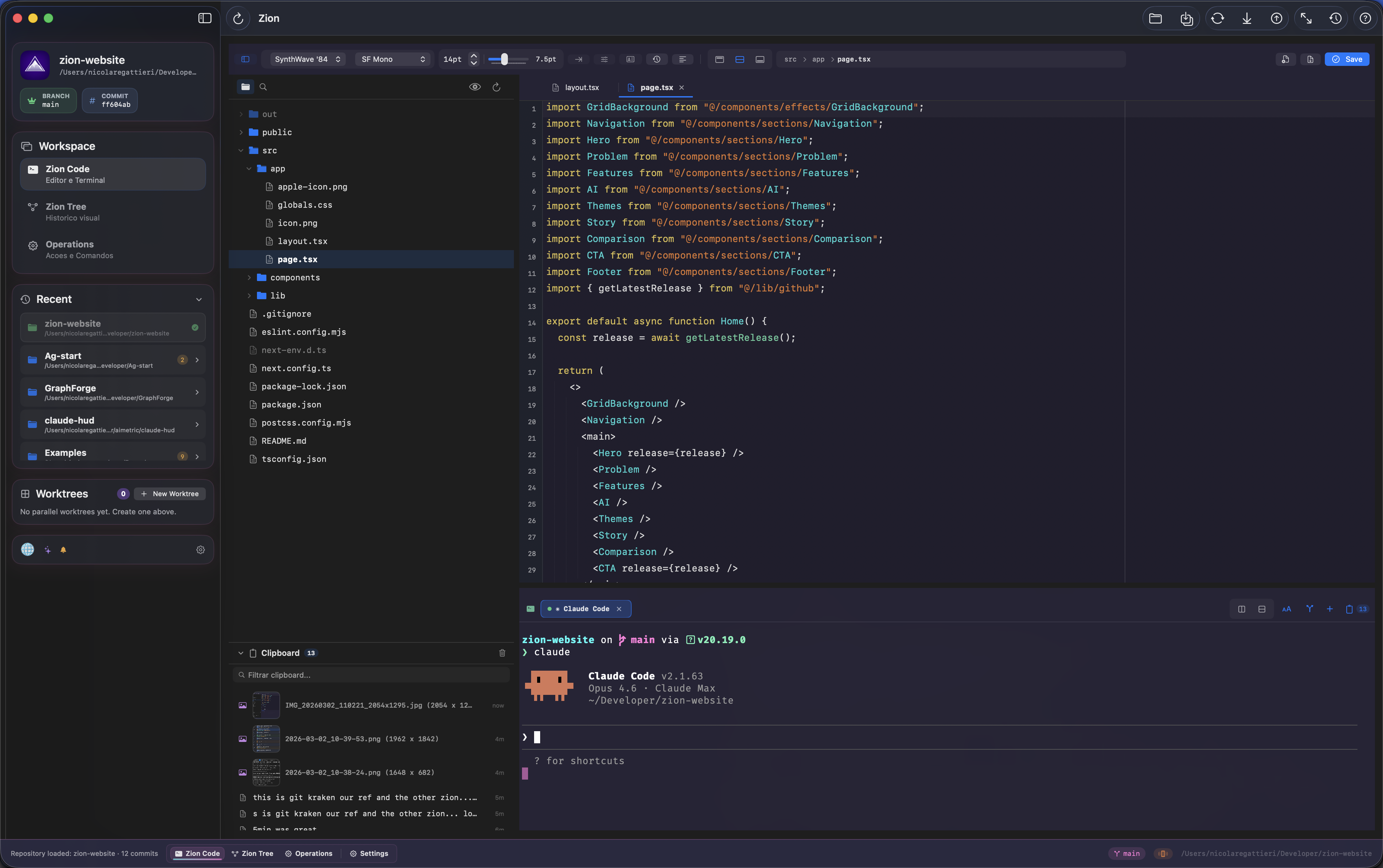
Zion Code — Editor + Terminal
Cmd+1
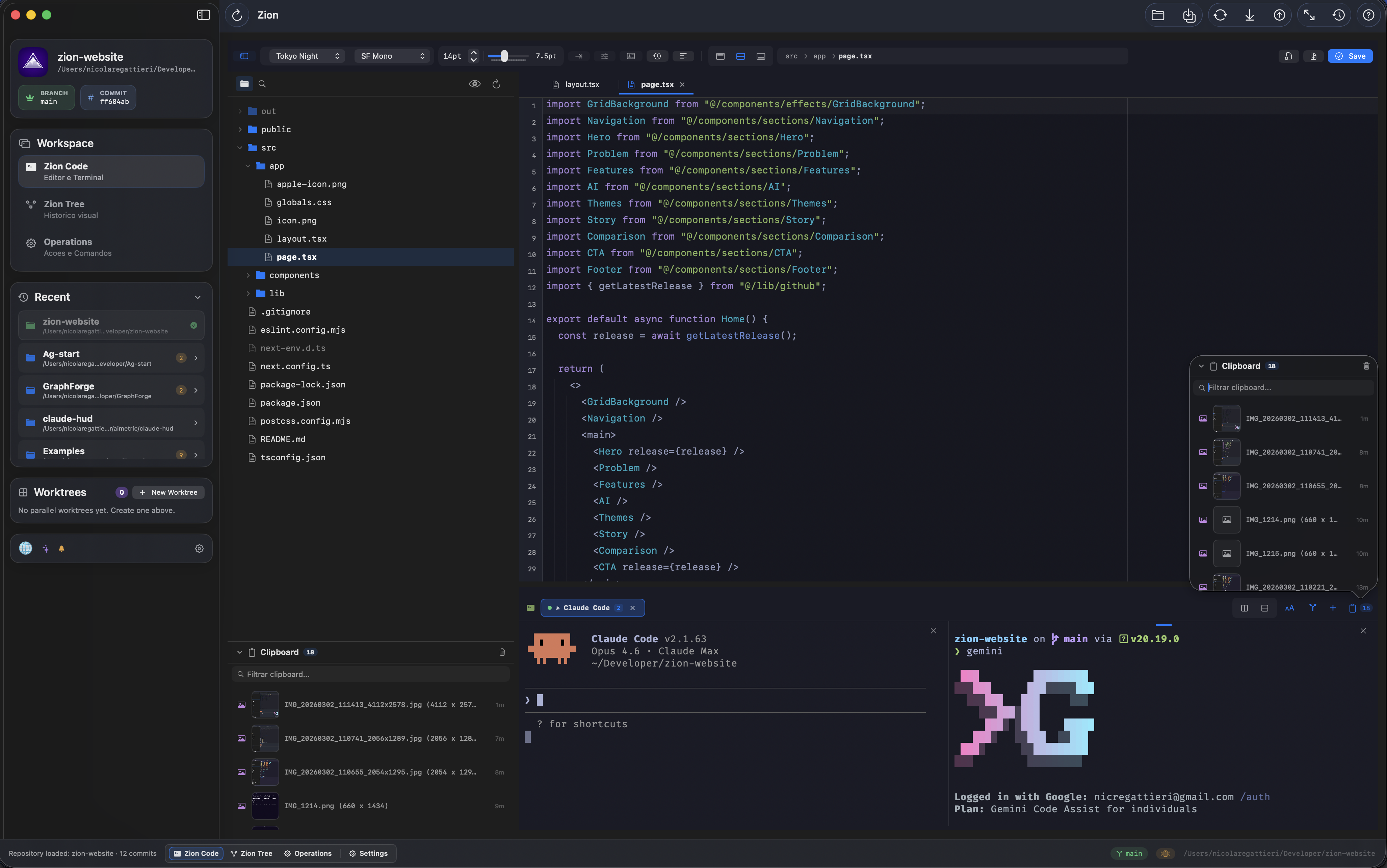
A real code editor with syntax highlighting, Git Blame, Quick Open (Cmd+P), code formatter (16+ languages), file watcher, 7 themes (Dracula, Tokyo Night, Catppuccin Mocha, One Dark Pro, City Lights, GitHub Light, SynthWave '84), and configurable fonts. Side-by-side with a real PTY terminal that supports split panes, multiple tabs, independent zoom, Finder drag-and-drop, and inline image display.
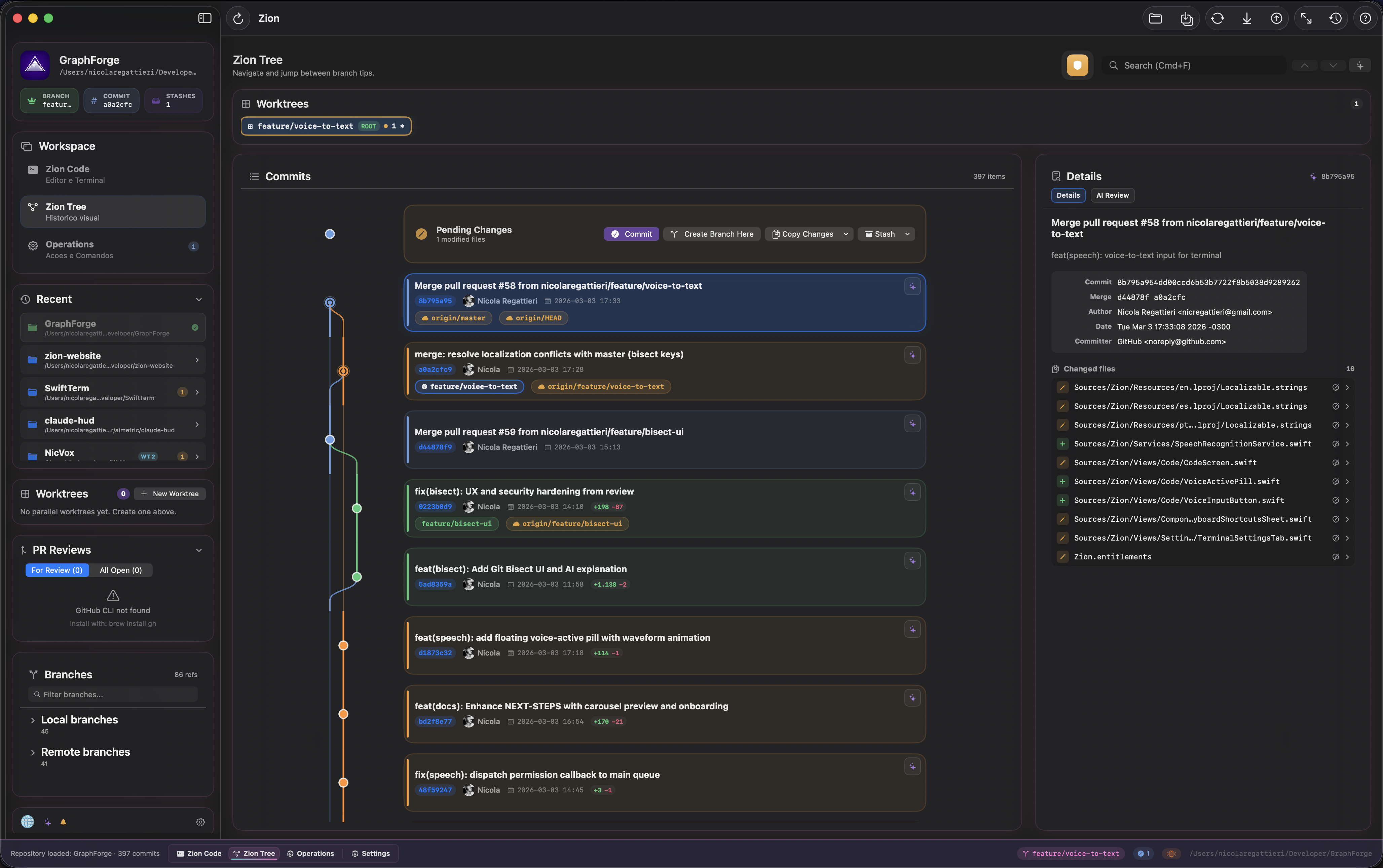
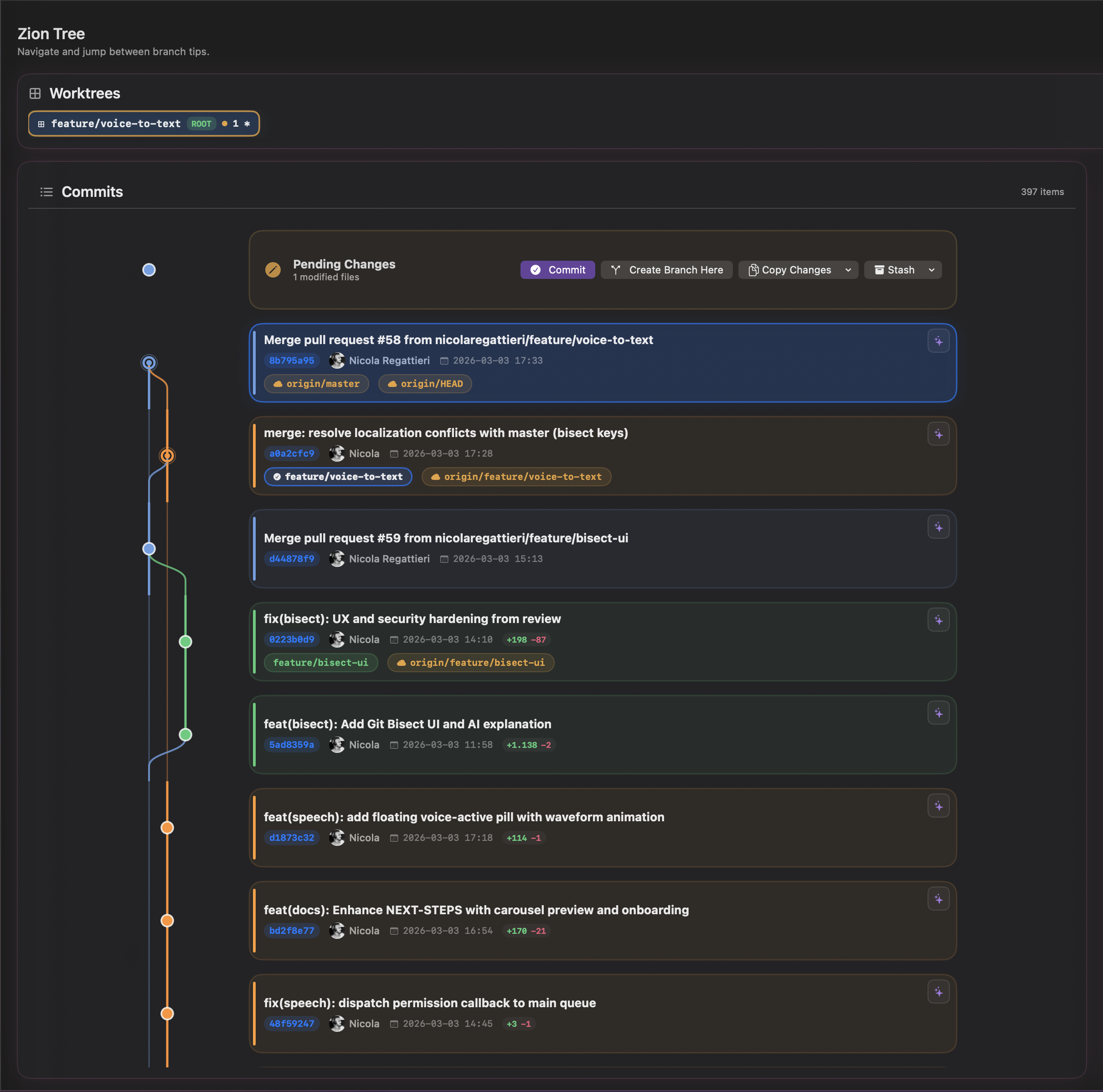
Zion Tree — Visual Commit Graph
Cmd+2
Lane-colored commit cards with colored left stripes matching branch lanes, merge edges, branch decorations, commit search with Cmd+F, jump bar for quick branch navigation, pending changes row at the top, status bar pills showing current branch and change count, GPG/SSH signature verification, and keyboard navigation with arrow keys.
Smart Clipboard
Stop switching apps. Start dragging.
You're building something and need to give the AI visual feedback. Take all the screenshots you need (Cmd+Shift+4), come back to Zion — every capture is waiting with thumbnails. Drag any of them into any split terminal. Errors, layouts, logs, UI bugs — the clipboard is always there, always ready. Plus: copy a git hash and Zion offers "Show in Graph". Copy a branch — one click checks it out. Copy a command — double-click executes it. Everything auto-categorized. Keeps your last 20 items.
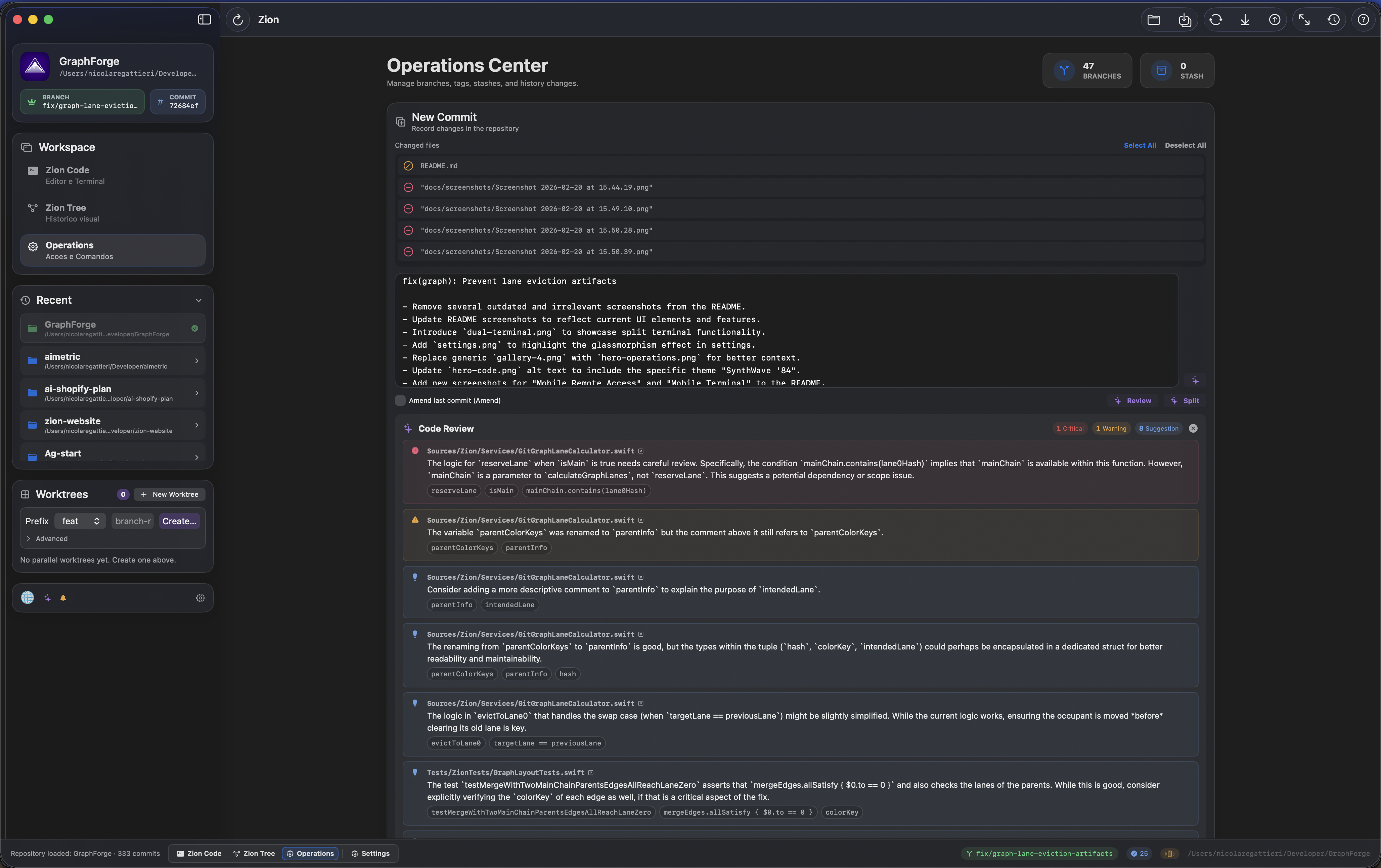
Operations Center
Cmd+3
A dashboard for everything Git. Commit with hunk and line-level staging, interactive rebase (pick/squash/fixup/drop/reorder with drag), branch management (create/merge/rebase/rename/delete), stash management, cherry-pick, revert, reset, annotated/signed tag management, worktrees, submodules, remotes, reflog, and repo stats — all in one place.
Mobile Remote Access
Monitor your Mac from anywhere.
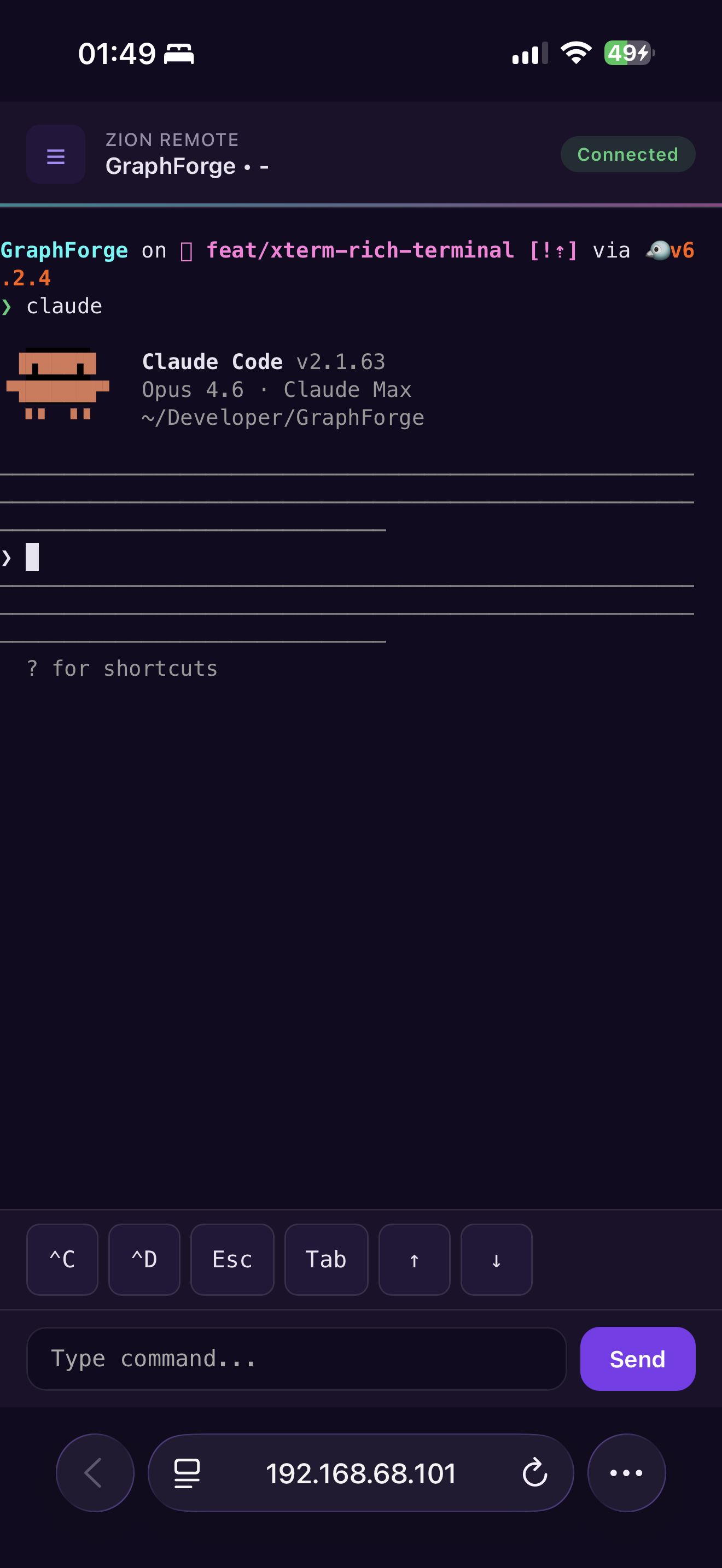
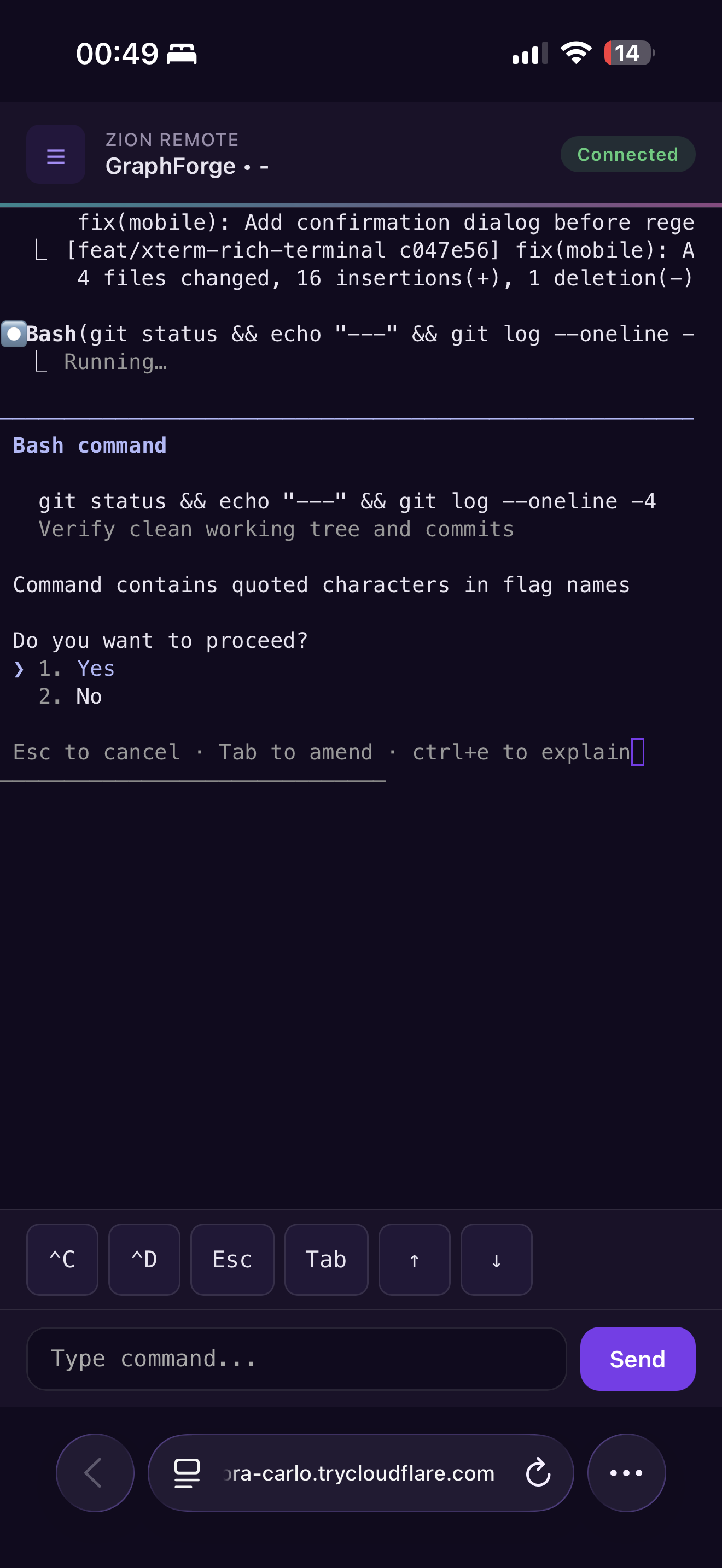
Scan a QR code to pair your phone with Zion. See live terminal output with full ANSI colors powered by xterm.js. Approve, deny, or abort AI prompts. Switch between terminal sessions across all open projects. Works over Cloudflare Tunnel (remote) or LAN (local Wi-Fi). All communication encrypted with AES-256-GCM.
LAN is the preferred path when your iPhone and Mac are on the same network. Remote access over Cloudflare Tunnel is currently a convenience path built on the free tunnel model, so reconnects or an occasional refresh can happen in edge cases.
AI Assistant
Wired into every Git action.
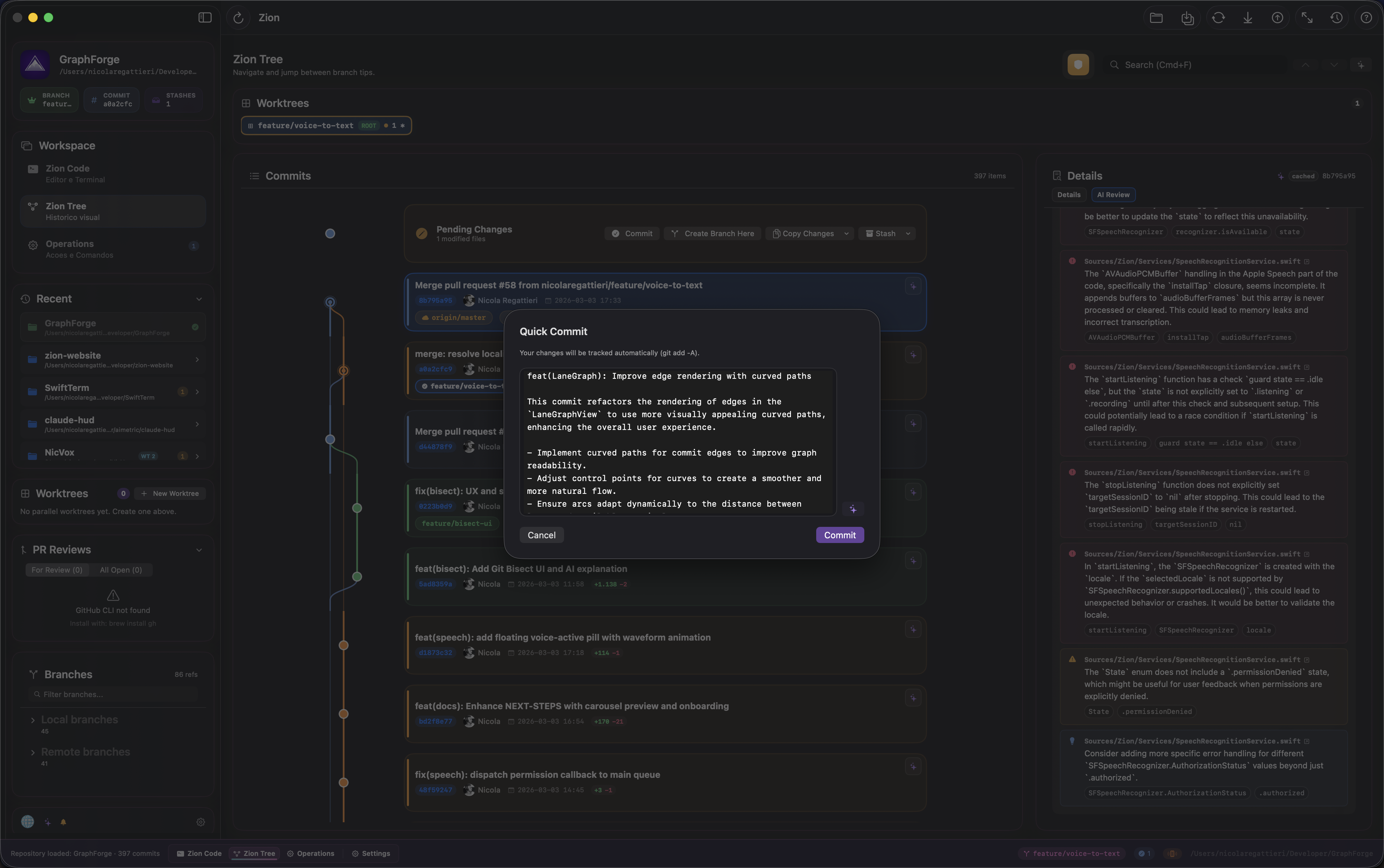
AI reads your diff and writes the commit message. AI reviews your code before you commit. AI resolves merge conflicts by reading both sides. AI explains blame entries, searches history in plain English, drafts your PR, and suggests how to split large commits. Works with Anthropic Claude, OpenAI GPT, or Google Gemini. API keys stored in macOS Keychain. Falls back to smart heuristics when AI is off.
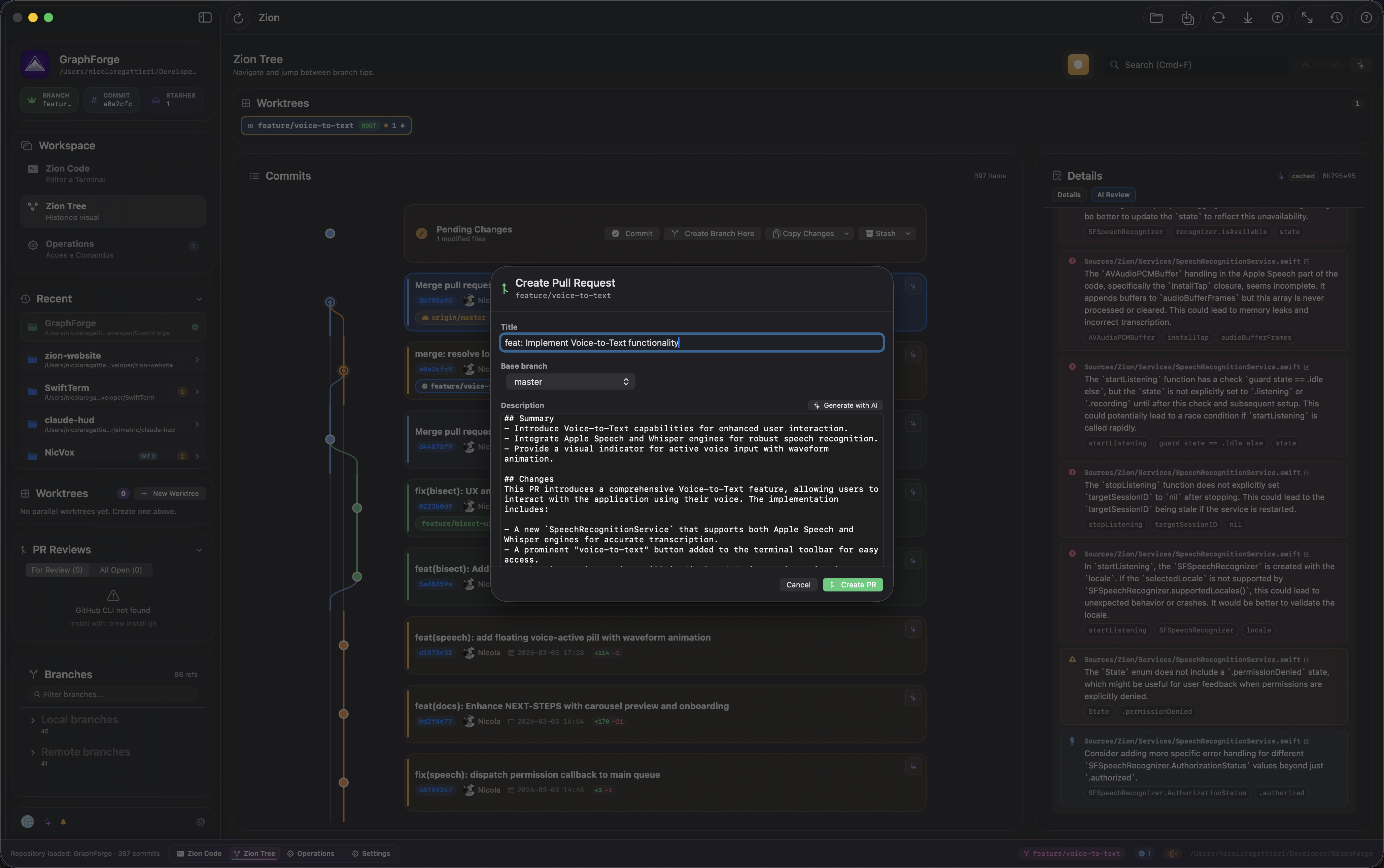
Zion Bridge
Switch LLMs mid-project.
You know a certain LLM is better at specific tasks. Bridge transfers your AI config instantly so you can switch mid-project. Hit your limit on Claude? Switch to Gemini and keep going — Bridge gets you ready in one click. Visual migration console with confidence levels and selective sync. Supports Claude, Codex, Gemini, and Cursor configurations (CLAUDE.md, AGENTS.md, .cursorrules, and more).
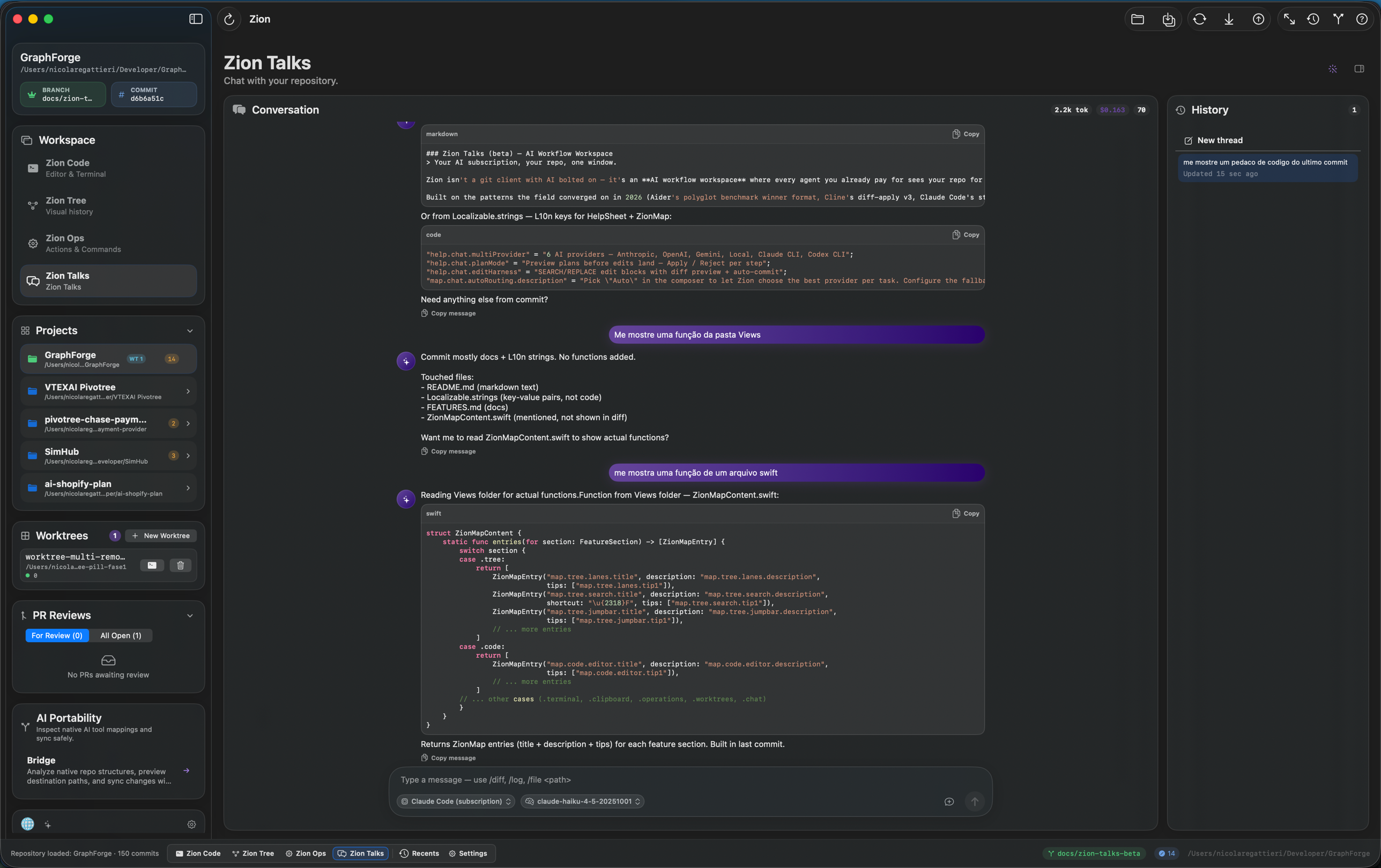
Zion Talks (beta) — AI Workflow Workspace
Your AI subscription, your repo, one window.
Zion isn't a git client with AI bolted on — it's an AI workflow workspace where every agent you already pay for sees your repo for real. Plug your Claude Pro, ChatGPT Plus, OpenAI, Gemini, or local Ollama / MLX / LM Studio / llama.cpp — six providers, one chat. Pick Auto and Zion picks the right one per task with quota + cost fallback. Spawned CLIs get an embedded MCP server exposing live git state (staged hunks, branches, conflicts, repo map); API providers get the same tools via universal translation. Plan mode previews structured plans before any file is touched. Edit harness parses SEARCH/REPLACE blocks streamed by the model into per-block diff preview cards with Apply / Reject / Apply-all + auto-commit aiedit: after a recovery-vault snapshot. Tokens and cost meter live in the conversation header. Per-repo thread history persists in SQLite.
Agentic Loop (beta) — the loop goes further: autonomous multi-step tool chaining across Anthropic, OpenAI, Gemini, and local models. Plan-first mode proposes a structured plan before touching files. The Bash tool runs shell commands inside the loop with three approval tiers (readOnly / workspaceWrite / fullAccess) and recovery snapshots before destructive ops. Hard caps on max steps and daily cost budget prevent runaway spending. Older local models without native tool-calling fall back to a ReAct text loop automatically.
Smart Context (beta) — Repomap MCP tool gives every provider a ranked map of the codebase, @file/@folder/@selection/@web attach explicit context with cost preview, and a multi-file diff card lets you approve N file changes in one click.
Context Management (beta) — Token-aware history (replaces the legacy 10-message cap), Anthropic prompt caching, auto-compact at 75% of the window, repomap auto-seed every turn, and one unified Approval Policy (Manual / Auto-safe / Auto / YOLO) consolidating the scattered toggles.
Discoverability (beta) — Slash autocomplete popup (/diff, /help, /skill-name), MCP servers panel + JSON editor with presets, skill scaffold button (.claude/skills/<slug>/SKILL.md), monthly spend meter pill ($X.XX this month / Subscription / $0 local), Auto resolved chip in composer, and an empty-state hero with 4 starter cards.
Built on the patterns the field converged on in 2026 (Aider's polyglot benchmark winner format, Cline's diff-apply v3, Claude Code's str_replace_editor, the Pi minimalist harness) — applied with a git-client substrate nobody else has.
Install
Download
Grab the latest .dmg from Releases, open it, and drag Zion.app to Applications.
Security Note
Zion release builds are signed with Apple Developer ID, notarized by Apple, and distributed from the official Releases page.
- Download only from the official Releases page.
- macOS may still show the standard internet-download confirmation prompt the first time you open the app.
- If you prefer, you can still build from source locally.
Build from Source
git clone https://github.com/nicolaregattieri/zion-code.git
cd zion-code
swift build
./scripts/make-app.sh   # -> dist/Zion.app
open dist/Zion.app
./scripts/make-dmg.sh # -> dist/Zion.dmg
Testing
Zion ships with 1378+ tests covering core functionality, Git operations, AI integrations, the chat orchestration layer, and UI behavior.
swift test
Tests run on every release. No mocks for Git -- tests use real repositories.
Requirements
| Minimum | |
|---|---|
| macOS | 14 (Sonoma) |
| Git | Installed and in PATH |
| Swift | 6.0+ (build from source only) |
Keyboard Shortcuts
Zion is keyboard-first. Press Cmd+/ to see all shortcuts inside the app.
| Shortcut | Action |
|---|---|
Cmd+1 / 2 / 3 |
Switch workspace (Code / Graph / Operations) |
Cmd+P |
Quick Open (fuzzy file search) |
Cmd+B |
Toggle file browser |
Cmd+J |
Toggle terminal |
Shift+Cmd+J |
Maximize terminal |
Cmd+T |
New terminal tab |
Shift+Cmd+D |
Split terminal vertical |
Shift+Cmd+E |
Split terminal horizontal |
Shift+Cmd+W |
Close split pane |
Cmd+S |
Save file |
Cmd+R |
Refresh repository status |
Cmd+F |
Context search (graph / editor / terminal) |
Shift+Cmd+F |
Find in Files |
Shift+Cmd+R |
Open Code Review |
Shift+Alt+F |
Format Document |
Cmd+G |
Go to line |
Ctrl+Cmd+Z |
Toggle Zion Mode |
Ctrl+Cmd+J |
Focus / Zen Mode |
Ctrl+Plus / Ctrl+Minus |
Terminal zoom in / out |
Feature Reference
Full feature list (click to expand)| Area | Features |
|---|---|
| Graph | Lane-colored commit cards, commit search, jump bar, branch focus, pending changes with quick actions, worktree pills with dirty status, signature verification, keyboard navigation, paginated loading (up to 5000 commits), main branch pinned to lane 0 |
| Editor | Syntax highlighting, Quick Open, Git Blame, 7 themes, 5+ font families, code formatter (16+ languages), format on save, bracket pair highlight, indent guides, column ruler, find/replace, find in files, go to definition, find references, markdown preview, file history, multi-tab |
| Terminal | Real PTY (/bin/zsh -l), split panes (H/V), multiple tabs, independent zoom, font config, clipboard paste/drag, Finder drag-and-drop, inline images, hyperlink detection, scrollback buffer config, process preservation |
| Clipboard | Auto-capture, smart categorization (command/path/hash/URL/image/text), click-to-paste, double-click-to-execute, drag-and-drop, context-aware actions (hash → Show in Graph, branch → Checkout, path → Open) |
| Operations | Hunk staging, line staging, interactive rebase (visual drag-reorder), cherry-pick, revert, reset (soft/hard), stash management, annotated/signed tags, custom git commands, discard changes, force push with lease |
| Conflicts | Built-in resolver, ours/theirs/both/custom edit, AI-powered semantic resolution, auto-continue merge/rebase/cherry-pick |
| Branches | Checkout, create, merge, rebase, push, pull, rename, delete, force push (with lease / override), remote tracking |
| Tags | Create lightweight, annotated, and GPG-signed tags; push to remote; delete local and remote tags |
| AI | Commit messages, diff explanations, PR descriptions, code review, conflict resolution, changelog generator, semantic search, branch summarizer, blame explainer, commit split advisor, stash messages, pre-commit review gate. Providers: Anthropic / OpenAI / Google |
| Git Hosting | GitHub (via gh CLI), GitLab (PAT, self-hosted), Bitbucket (app passwords). Auto-detection from remote URLs. PR list, create, inline comments, review submission |
| Mobile | QR pairing, AES-256-GCM encryption, xterm.js terminal with ANSI colors, prompt actions (approve/deny/abort), quick actions (Ctrl+C/D, Esc, Tab, arrows), multi-project sessions, Cloudflare tunnel or LAN mode, keep-awake. LAN is preferred; WAN uses the current free tunnel path. |
| Recovery | Auto-snapshot before destructive ops (reset, rebase, discard), named stash refs (zion-pre-*), restore from Operations Center |
| Worktrees | Smart create (prefix+name), graph quick-switch pills, copy/move pending changes, dedicated terminal, remove/prune |
| Remotes | Fetch all, pull, push (normal/force-with-lease/force), divergence warning, ahead/behind badges, add/remove, connection test |
| Submodules | Status, init, update (recursive), sync |
| Reflog | Visual viewer (last 50), undo last action (soft reset) |
| Settings | 6 tabs (General, Editor, Terminal, AI, Notifications, Mobile), language (PT-BR/EN/ES), external editor/terminal, background fetch, ntfy push notifications |
| Diagnostics | Ring-buffer logger, export/copy sanitized logs |
Full reference with descriptions and shortcuts:
docs/FEATURES.md
Themes
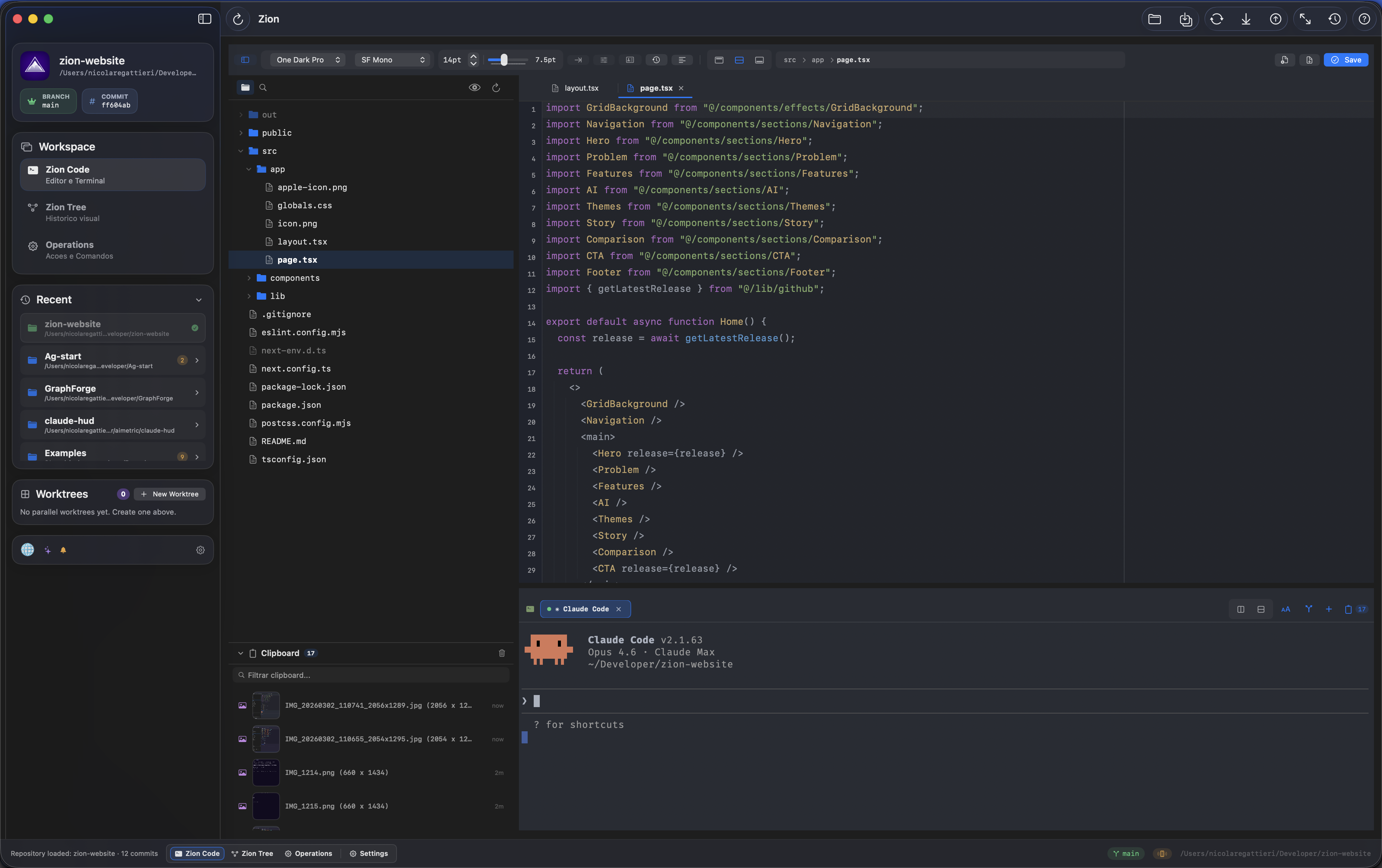
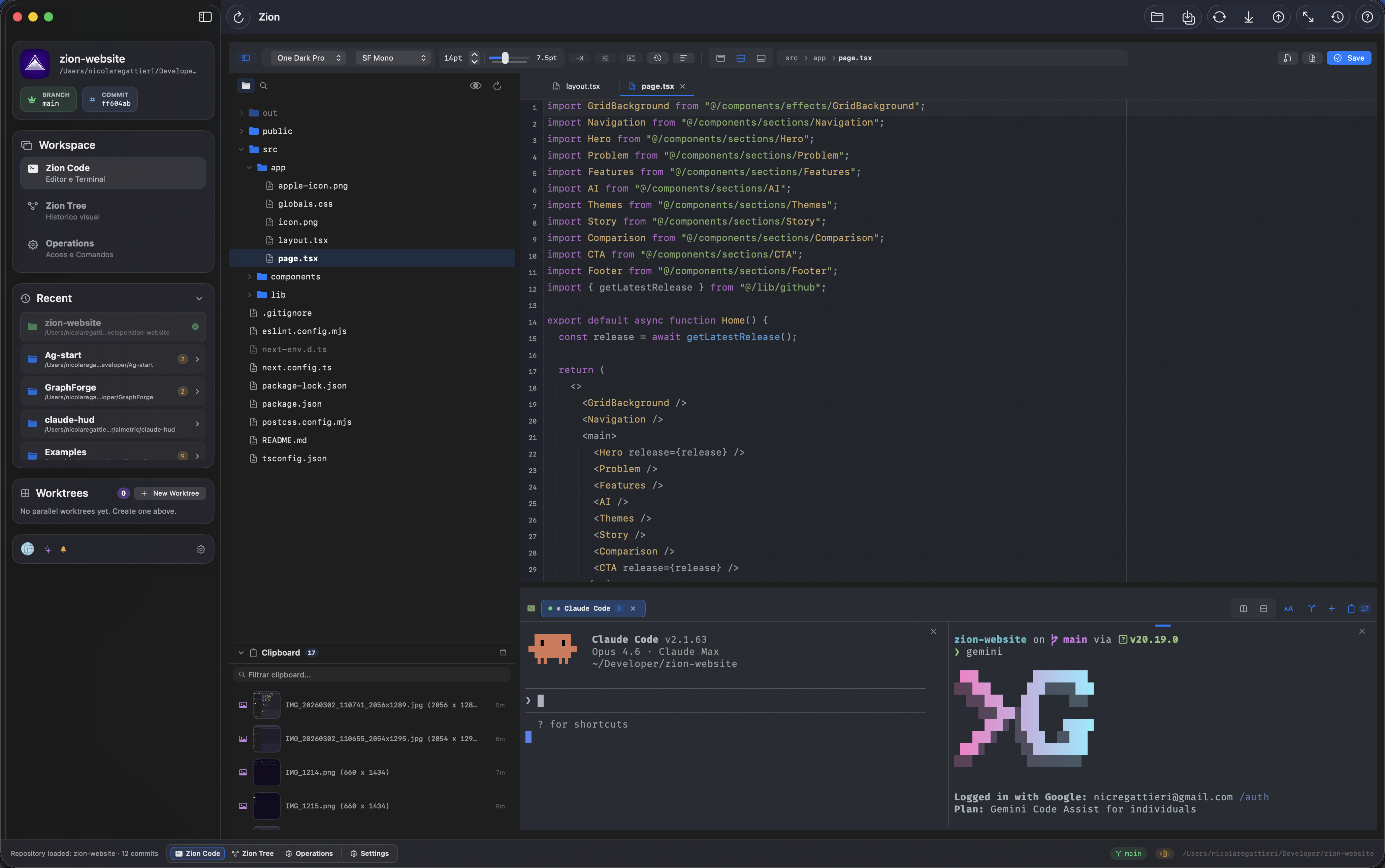
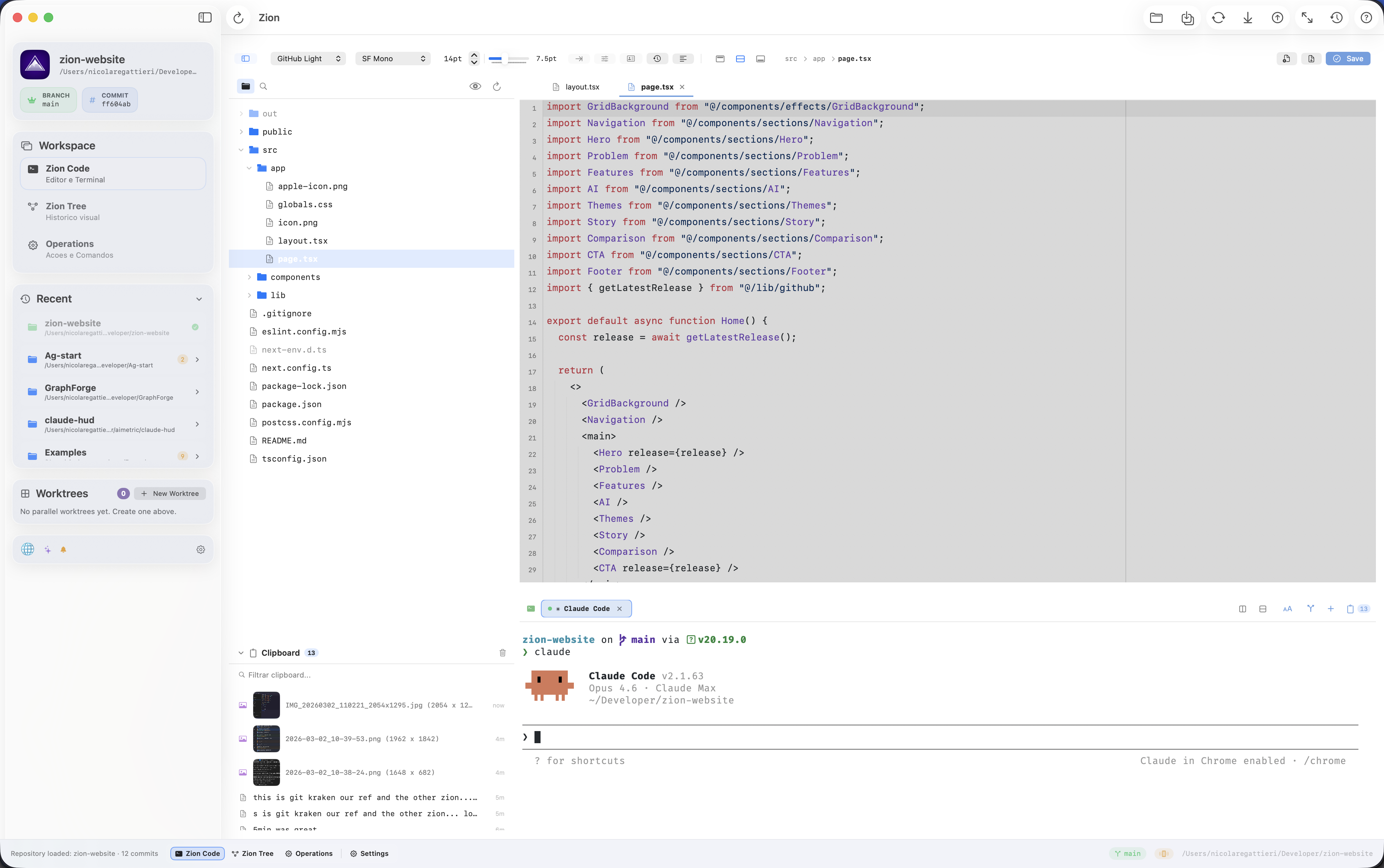
7 curated editor + terminal palettes: Dracula, Tokyo Night, Catppuccin Mocha, One Dark Pro, City Lights, GitHub Light, and SynthWave '84 (activated via Zion Mode).
Localized in Portuguese (BR), English, and Spanish. Switch anytime in Settings or follow your system locale.
Contributing
See CONTRIBUTING.md.
License
Project Identity
Zion Code is an open source project created and maintained by Nicola Regattieri.
Forks are welcome under the terms of the MIT license, but should not imply official affiliation with Zion Code unless explicitly authorized.
Acknowledgments
- SwiftTerm by Miguel de Icaza — Terminal emulator
- xterm.js — Mobile terminal rendering
- Sparkle — Auto-update framework
- Git — The engine under the hood
Yorumlar (0)
Yorum birakmak icin giris yap.
Yorum birakSonuc bulunamadi