comradex
Health Warn
- No license — Repository has no license file
- Description — Repository has a description
- Active repo — Last push 0 days ago
- Community trust — 93 GitHub stars
Code Fail
- rm -rf — Recursive force deletion command in macos/ComradexMenu/Scripts/package_app.sh
- Hardcoded secret — Potential hardcoded credential in tests/docker/comradex-two.toml
- Hardcoded secret — Potential hardcoded credential in tests/docker/comradex.toml
Permissions Pass
- Permissions — No dangerous permissions requested
No AI report is available for this listing yet.
Automatically rotate ChatGPT & Claude accounts based on remaining usage
Comradex
Workers of all accounts, unite.
Comradex is a small Rust relay that gives native Codex and Claude Code sticky, quota-aware account pools.
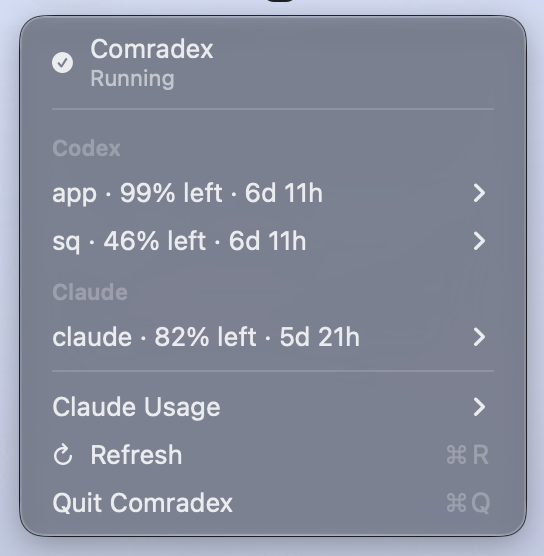
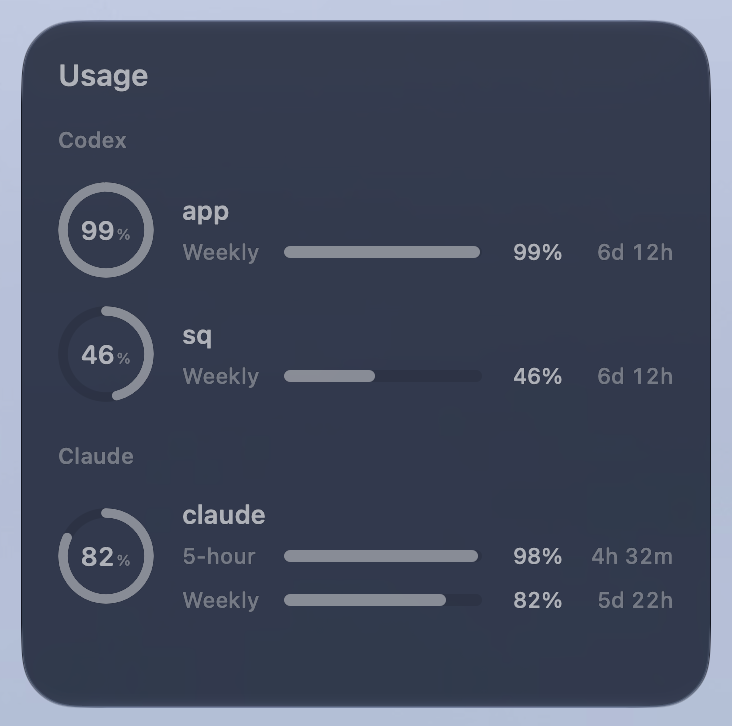
The macOS menu app and desktop widget show remaining quota and reset times for your Codex and Claude accounts.
Quick start
Install the latest release with Homebrew:
brew install nicosuave/tap/comradex
Create the default configuration, verify it, and start the relay:
comradex init
comradex check
comradex serve
In another terminal, point Codex at the running relay:
comradex install
Restart the Codex app after installation, or let Comradex restart its background processes for you:
comradex restart-codex
That's enough to route Codex through Comradex. Setup reuses your existing local Codex login when available. To sign in another account:
comradex account add personal_2
The command updates the configuration, restarts the daemon if it is installed as a service, and walks through device login. See Accounts for the manual setup and credential details.
Claude Code
Claude Code accounts use a separate pool and loopback listener. Add accounts through the official Claude Code login:
comradex account add grace --claude
comradex account add ada --claude
comradex install --listener claude
--claude uses the claude pool unless --pool names another. The first add creates the pool and its listener at 127.0.0.1:10101; change the address in comradex.toml if needed. A running macOS service reloads after accounts are added; restart a manually launched daemon yourself. Restart Claude Code after installation.
Installation sets only env.ANTHROPIC_BASE_URL in Claude Code's settings.json, using the listener's secret URL. Use --claude-settings <path> for another settings file. Keep Claude Code's ordinary subscription login; do not configure a placeholder API key or auth token. comradex uninstall restores both Claude and Codex gateway settings without touching unrelated settings, and refuses to overwrite a gateway URL changed after installation.
Each managed Claude account signs in through an isolated native login profile. Comradex imports the OAuth grant and the account's real account and device identity into a private credential file, then owns every later refresh, including background renewal before expiry. Do not run Claude Code in the accounts/<name>/native-login directories; that would create a second refresh owner. Reauthenticate with Sign In… in the menubar or comradex account login <name>. Set CLAUDE_EXECUTABLE to an absolute path if Claude Code is installed somewhere unusual. account connect applies only to existing Codex logins.
On several computers, sign each account in separately on each machine. Do not copy claude-auth.json between running daemons: independent refreshes of the same rotating grant invalidate each other.
New sessions follow the same prefer/preserve roles as Codex pools. Without a preferred account, they go first to quota that would otherwise expire unused; see Claude Code requests.
comradex account prefer grace --pool claude
comradex account preserve ada --pool claude
To warm Claude's 5-hour and 7-day windows after they reset, opt in separately from Codex's weekly warming:
[proxy]
auto_activate_claude_usage = true
The usage worker checks every five minutes; the menubar's Refresh requests an earlier check. An elapsed or newly full window is warmed by running the installed Claude Code once with a tiny Haiku prompt, no tools, and a temporary profile holding that account's access token but not its refresh grant. Warming stays on the selected account and skips active limits, concurrent traffic on the account, and windows already started by normal use. Attempts survive daemon restarts, and uncertain attempts wait an hour before retrying. Warming consumes a small amount of subscription quota.
See Claude Code requests for what the relay changes and its limits.
Usage endpoint
Comradex's loopback Codex and Claude listeners expose a usage endpoint that
reports quota windows and reset credits for all managed accounts. It implements
a subset of the CLIProxyAPI management API, so clients that read usage from
CLIProxyAPI can read it from Comradex.
To connect a client, give it:
- a listener's origin, such as
http://127.0.0.1:10101, as the server URL. proxy.installation_secretfromcomradex.tomlas the management key.
Use the listener origin without the secret path or /v1 suffix. The Desktop
backend listener does not expose this API. Accounts use their Comradex names;
accounts that forward the requesting client's login are excluded. Account
emails are included when available, so clients can deduplicate subscriptions
they also read from other sources. Codex plan metadata is included when available.
All management endpoints require Authorization: Bearer <installation_secret>:
GET /v0/management/auth-fileslists account IDs, providers, and selectors.POST /v0/management/api-callaccepts the operations below.POST /v0/management/reset-quotaaccepts{"auth_index":"<account>"}. It
refreshes Codex usage and acknowledges the cooldown cleared by redemption.
It cannot independently clear a quota block.
The API-call body uses auth_index, method, url, and, for redemption, a
JSON-encoded data string. Responses contain status_code, header, and a
JSON-encoded body string. Caller-supplied headers are not forwarded; Comradex
uses the selected account's own credentials. No request can fall back to another
account, and arbitrary provider URLs are rejected.
| Provider | Method | URL |
|---|---|---|
| Codex | GET | https://chatgpt.com/backend-api/wham/usage |
| Codex | GET | https://chatgpt.com/backend-api/wham/rate-limit-reset-credits |
| Codex | POST | https://chatgpt.com/backend-api/wham/rate-limit-reset-credits/consume |
| Claude | GET | https://api.anthropic.com/api/oauth/usage |
| Claude | GET | https://api.anthropic.com/api/oauth/usage?cedar_ember=1&skip_spend=1 |
Quota windows use Comradex's latest observations. The response'sheader.X-Comradex-Usage-Updated-At, when available, records their observation
time as Unix seconds. Accounts awaiting usage or sign-in return an unavailable
result. Token credentials are never returned.
Claude responses also retain provider quota entries in limits, including
Fable's weekly_scoped entry, from the latest successful background poll.
The literal seven_day_fable format is also retained when reported. These
model-specific windows are reporting data only; they do not affect shared-quota
routing, failover, or reset warming. Missing, null, or malformed quota entries
are omitted without discarding valid shared usage. Unknown reset times remain
unknown. Cached reporting data stays tied to the managed account identity.
Codex reset-credit reads fetch the selected account's current provider data.
To redeem a reset, a client POSTs to the consume URL with credit_id and a UUIDredeem_request_id in data. Keep the same request ID when retrying an
uncertain result. Comradex does not retry redemption automatically. Management,
CLI, and menu redemption share the same account lock and retry state. Confirmed
results are returned without another consumption request. A confirmed reset or
reconciliation of the original uncertain attempt clears its quota cooldown and
old usage; newer rejections and account changes are preserved. Other provider
outcomes and errors leave the cooldown intact.
Claude's normal background usage poll requests reset-credit metadata and
preserves the provider's cedar_ember block in both supported usage responses.
The existing polling cadence and throttling backoff still apply. Reading the
cached Claude response makes no extra provider request. The data remains tied
to the credential's account identity and is replaced on the next successful poll.
Clients that understand this block can show Claude reset credits. Claude
redemption is not implemented.
Reading usage or reset-credit availability never consumes a reset. Other
CLIProxyAPI management operations are unsupported. Configure inference routing
separately as described above.
Installation
Prebuilt binaries
Homebrew is the shortest path:
brew install nicosuave/tap/comradex
Or install a prebuilt release from GitHub with cargo-binstall:
cargo binstall --git https://github.com/nicosuave/comradex comradex
From source
git clone [email protected]:nicosuave/comradex.git
cd comradex
cargo run -- init
cargo run -- check
cargo run -- serve
Configuration
Every command reads ~/.config/comradex/comradex.toml by default; init creates it there. Pass --config <path> to use a different location.
The daemon reads the configuration once at startup. Restart it after adding an account or changing pools or listeners. With a manually started daemon, stop and rerun comradex serve. With the macOS service, run comradex service restart.
Accounts
Setup creates an app account connected to the existing ChatGPT login in $CODEX_HOME/auth.json, or ~/.codex/auth.json by default. It uses that file directly, without copying tokens, so the menubar can show usage. If no supported file-based login is available (including keychain-only or API-key logins), setup keeps app in inbound mode: it forwards the requesting client's Authorization and ChatGPT-Account-Id headers.
For an existing inbound account, choose Connect existing Codex login… in the menubar, or run:
comradex account connect app
# For a custom Codex home:
comradex account connect app --codex-home /absolute/path/to/codex-home
Connecting preserves the account name, pool membership, and preferred account. The menubar reloads Comradex after confirmation; active requests are interrupted. The CLI restarts a running macOS service; restart a manually launched daemon yourself. The menubar discovers the login from the daemon's CODEX_HOME or ~/.codex; use the CLI option for another home. If the login is unavailable, the action reports an error and leaves the configuration unchanged.
Add a managed account in one step:
comradex account add personal_2
This appends a codex_home account (home directory accounts/personal_2 next to the config), adds it to the pool (--pool chooses another), validates the edited configuration through the full loader before persisting it, restarts the daemon if the service is installed, and runs interactive device login. Pass --no-login to defer authentication.
Account browser profiles
Give each account its own browser cookies so signing into one does not sign another out:
comradex account add grace --browser
comradex account add ada --claude --browser
# Opt an existing managed account into browser profiles:
comradex account login grace --browser
# Reopen its provider website, for example to manage the subscription:
comradex account browser grace
Once an account has a profile, later account login <name> commands reuse it automatically.
Use account login <name> --no-browser for the ordinary login flow, including on a headless
host. The menubar's sign-in flow is unchanged. Codex still uses the official device flow:
enter the code printed in the terminal into the page Comradex opens. Claude's official CLI
opens its authorization URL in the account's browser through a temporary BROWSER launcher.
Browser cookies and CLI OAuth grants remain separate; Comradex does not read cookies or
automate passwords, security keys, email verification, or purchases. Providers can still
require those checks when a browser session expires.
To create a new provider account and then connect it to Comradex:
comradex account new
# Or supply the name and provider up front:
comradex account new anna --claude
comradex account new grace_2 --codex --pool default
The wizard asks for a name and provider, opens that account's browser, and waits while you
create the provider account and choose any subscription you need. Press Enter when ready;
Comradex adds it to the pool and starts the official CLI login using the same browser cookies.
The config is validated before opening the browser and re-read after signup to preserve edits
made while you were there. If you stop before pressing Enter, run account new with the same
name to resume with those cookies. If login fails after the account was added, resume withaccount login <name>. Account creation requires a terminal and an existing Comradex config.
Comradex uses an installed Chrome/Chromium version 115 or newer. On macOS it checks system
and user Applications directories for Google Chrome; on Linux it checks PATH. SetCOMRADEX_BROWSER to an absolute Chrome/Chromium executable path for a custom installation.
It launches ordinary browser windows with a separate--user-data-dir
for each account, without changing your default browser, sharing its profile, opening a
debugging port, or disabling Chrome's sandbox.
If no supported browser is installed, Comradex downloads Google's stable
Chrome for Testing using curl
and unzip. Automatic downloads support Apple Silicon and Intel macOS, and x86-64 Linux;
Linux also needs Chrome's system libraries and a graphical session. On other architectures,
including Linux ARM64, install Chromium and set COMRADEX_BROWSER. Downloaded builds are
cached by version under browsers/chrome/ next to the config; the stable release is checked
on each use of the downloaded browser, and older cached versions are retained. An unavailable
release service or failed download reports an error; it does not use your default browser.
Cookies are stored in private browsers/profiles/<account-name-hash>/ directories next to
the config. Commands print the selected profile path. The hash keeps names distinct even on
case-insensitive filesystems. account remove retains browser cookies as well as credentials;account remove --purge deletes both. Close the account's browser before purging it. A profile
with a Chrome singleton lock/socket, or a linked profile directory, is refused before changing
the config. Reusing a removed account's name reuses its retained cookies.
Inspecting and removing accounts
Use these commands to inspect or remove accounts:
comradex account list
comradex account login personal_2
comradex account prefer personal_2
comradex account prefer --clear
comradex account preserve personal
comradex account preserve --clear
comradex account remove personal_2
account list shows each account's login state. account remove removes it from the configuration and every pool but keeps its credential directory. --purge can delete only the isolated home created for that account; it refuses external or linked Codex homes.
account prefer <name> immediately makes that account the first choice for new, unbound work in the default pool. Use --pool <name> for another pool and --clear to restore automatic selection. The daemon applies the change through an authenticated, user-only Unix socket and persists it in comradex.toml; it does not restart, interrupt active turns, or move sticky conversations. An unavailable, quota-limited, or over-threshold preferred account is skipped by the normal quota-aware fallback. If the daemon is not running, the preference is saved and takes effect on its next start.
account preserve <name> reserves that account for its owner's direct use. New, unbound work can use only its surplus: the part of each long quota window above an even pace through that window, which would otherwise expire unused. Shorter windows, such as the 5-hour window, only cap that surplus. Unused with a day left in its week, a preserved account offers six sevenths of the week to new work; at the start of the week, almost nothing. Its surplus competes like any other account's quota, and its banked resets never count toward placement. Without surplus, or while its usage or reset time is unknown, it is used last: new, unbound work uses other eligible accounts first, even when their usage is above the rotation threshold. The preserved account remains available when all others are unavailable, excluded from a retry, or reported at 100% usage. Accounts with exhausted included quota are excluded even when no other account is available. Existing conversations keep their account bindings while eligible. Use --pool <name> to select a pool or --clear to remove preservation. Changes apply live without restarting the daemon and persist as preserved in the pool's configuration. A pool can prefer one account and preserve another; it cannot prefer and preserve the same account.
To pin a model or the model listing API to an account, edit the pool in comradex.toml and restart the daemon:
[pools.default]
members = ["personal", "work"]
models_account = "work"
model_accounts = { "gpt-5.5" = "personal", "gpt-5.6-sol" = "work" }
model_accounts matches the exact requested model ID. models_account selects the account for GET /models and HEAD /models, including query parameters, independently of model-specific pins. Both settings are optional; pinned accounts must exist and belong to the pool. These are strict assignments: an unavailable pinned account returns an error instead of falling back to another account. A conflicting account-owned continuation or file also returns an error. Unpinned requests keep the normal routing behavior. Removing an account clears its pins.
For Daybreak, newer Codex clients send a base model with access_programs.cyber set to "daybreak_blue" or "daybreak_red". These requests prefer the gpt-daybreak-blue-latest or gpt-daybreak-red-latest pin respectively, falling back to the base model's pin when the Daybreak pin is unset. Existing Daybreak pins therefore cover both request formats; standard requests keep their model-specific or normal pool routing. The request body is forwarded unchanged.
Model-specific pins require the default responses_websocket_mode = "http_bridge" or "direct". Configuration with model-specific pins and "raw" mode is rejected because raw WebSocket traffic cannot be inspected for model IDs. A model listing pin alone is compatible with every WebSocket mode.
The equivalent manual configuration is:
[accounts.personal_2]
kind = "codex_home"
path = "/absolute/path/to/comradex/accounts/personal-2"

[pools.default]
members = ["app", "personal_2"]
Then authenticate through the official client:
comradex account login personal_2
This executes codex -c 'cli_auth_credentials_store="file"' login --device-auth with CODEX_HOME set to the isolated directory. Both CLI and menubar logins require a readable ChatGPT auth.json before reporting success. Absolute account paths are used unchanged; relative paths are resolved against the canonical directory containing comradex.toml, just like a relative proxy.state_dir.
Keep managed account homes separate from a desktop Codex home that uses auto or keyring credential storage. Codex removes auth.json in that home when it saves credentials to Keychain, including after a later login or refresh. To use the same ChatGPT account in both applications, sign it into an isolated Comradex account home; the two logins then have independent storage and refresh tokens while sharing the account's quota.
For each request, the daemon reads the account's auth.json, derives a missing account ID from the ID-token claims, and uses Codex's current OAuth refresh contract when the access token is near expiry or receives a 401. A bounded background sweep checks managed accounts once per minute and refreshes only tokens within five minutes of expiry, so rarely selected accounts do not depend on request-time refresh. Refreshes are single-flight per normalized, non-overlapping account home and atomically rotate auth.json; permanent refresh rejection marks only that account as requiring device login. This includes an existing Codex login explicitly connected as a codex_home account. Credentials forwarded by an inbound account remain unmanaged.
On macOS, comradex account login temporarily unloads an installed, running Comradex LaunchAgent while the official Codex client writes the selected account home, then restores the service and waits for its listeners. This prevents login and daemon refresh from racing over rotating credentials.
Connecting Codex
comradex install
This edits $CODEX_HOME/config.toml (falling back to ~/.codex/config.toml; override with --codex-config) and changes only the root openai_base_url. It preserves a symlinked config.toml, including dotfiles-managed configurations, and never sets model_provider or reads or writes sessions/ or rollouts/.
The line it writes looks like this:
openai_base_url = "http://127.0.0.1:10100/<installation_secret>/v1"
The address belongs to the selected listener; --listener chooses the listener and therefore the account pool that serves the traffic. <installation_secret> is the random per-installation token written to comradex.toml by init.
Use the /v1 URL for older Codex clients, and this URL for Codex 0.153+ with[features.context_management] experimental_mode = true:
openai_base_url = "http://127.0.0.1:10100/<installation_secret>/backend-api/codex"
The client only offers its new_context tool when its configured base URL has the
Codex-backend shape, so a /v1 URL silently suppresses context management before any
request reaches Comradex. comradex install chooses for you: it rewrites the value in
place, writing the backend shape when your Codex config.toml already enablesexperimental_mode and /v1 otherwise, and it prints both URLs on every run. There is
no install flag for this. Switch shapes later by toggling the feature and reinstalling,
or by editing openai_base_url by hand. Both shapes stay served behind the same secret,
so old and new clients can share one daemon during the cutover.
Codex treats the value as an ordinary base URL, so every request arrives with the secret as a path prefix. Comradex rejects requests without /<installation_secret>/v1 or /<installation_secret>/backend-api/codex, strips the accepted prefix from accepted requests (a redundantly doubled backend-api/codex segment collapses to one), selects an account from the listener's pool, substitutes that account's credentials, and forwards the path, query, and logical request body to proxy.upstream. HTTP zstd bodies are decoded before routing inspection and forwarded without compression; unencoded bodies retain their bytes. Routing affinity is keyed to the conversation (thread, response, and file identifiers), not to the URL shape, so a conversation keeps its account across the cutover; conflicting continuity keys still fail closed instead of crossing accounts. To keep bearer tokens and ChatGPT account metadata pinned to their intended destination, loaded configurations require this upstream to be exactly https://chatgpt.com/backend-api/codex; custom hosts, cleartext HTTP, and URL variants are rejected. The listener binds to loopback, but the secret also prevents other local software from discovering an open relay to your accounts.
Reinstalling updates the Comradex URL without losing the original pre-Comradex value. That value is kept in state/install.json; comradex uninstall restores it, but refuses if somebody changed the Codex configuration after installation.
Restarting Codex
Changing the file on disk does not update long-lived codex app-server processes that already loaded the old openai_base_url. install and uninstall warn when such processes are running. Pass --restart-codex to either command, or restart them separately:
comradex restart-codex
This sends SIGTERM only to matching processes owned by the current user: a Codex binary running the app-server subcommand or a codex-code-mode-host entrypoint. It never uses a broad *codex* match or SIGKILL. Active turns may be interrupted; the desktop app respawns its app-server automatically.
Running as a macOS service
An installed Comradex binary can manage its own LaunchAgent:
comradex service install
comradex service start
comradex service status
comradex service logs
comradex service restart
comradex service uninstall
service start is idempotent: it loads an installed but unloaded LaunchAgent, revives a stopped job, and leaves an already-running or starting job uninterrupted while waiting for its listeners. service restart validates the edited configuration before stopping anything, then restarts the LaunchAgent and waits for every listener to answer a health probe. A broken edit fails validation and leaves the running daemon untouched. Both commands use the configuration path recorded in the installed plist regardless of --config.
The installer records the exact executable and configuration paths, validates the generated plist, starts the daemon at login, and writes logs beneath Comradex's state directory. Repeating service install with the same service definition starts or waits for the existing job without replacing it. WebSocket TLS uses bundled Mozilla roots, avoiding macOS trust-store enumeration during startup. Installation waits for launchd to report a running PID and verifies every configured listener with a Comradex-specific HTTP probe. If the readiness wait expires while the job is still starting, it remains loaded so macOS can finish launching it; the timeout does not kill and replace it. A failed replacement restores the previous Comradex plist and loaded job when possible.
When the service definition changes, installation waits up to 30 seconds for launchd to remove the old job before replacing the plist. If the old job does not disappear in that time, installation reports its last launchd state and keeps the previous plist. Rollback also waits for job removal before restoring the previous service.
The service manages only com.nicosuave.comradex; it does not inspect, stop, or remove OpenCodex or any other relay. Stop OpenCodex first if it owns the same listener port. Codex configuration installation and service installation are separate reversible operations.
service status distinguishes a ready daemon, a running process whose listeners are not ready, a starting job, a stopped job, and an unloaded service. It includes the last exit result when available and directs you to service logs, which shows up to 40 lines from the final 64 KiB of each stdout and stderr log, their paths, and human-readable modification times. These logs are historical: an old stderr line is not evidence of the current startup failure. Launchctl permission and communication failures are reported as errors instead of being mistaken for an unloaded job.
On SIGTERM, Comradex stops the listeners, aborts and joins tracked HTTP/WebSocket connection tasks, clears in-flight counters, and only then writes final affinity, file-owner, and statistics snapshots. Active requests are terminated rather than gracefully completed during shutdown.
How routing works
Experimental Codex history and notes
Codex 0.153.4's native context management is opt-in. If your Codex configuration already contains[features.context_management] with experimental_mode = true, comradex install uses/<installation_secret>/backend-api/codex instead of /v1. Comradex does not enable the feature.
See Connecting Codex for the URL-shape choice and how to switch later.
Both authenticated URL forms remain supported. Start a new task after enabling it so Comradex can
track its history from the first inference request.
The first context operation or qualifying inference dispatch establishes a durable notes owner for
the root session. New context sessions consult the pool's current preference, including changes
made without restarting Comradex. After inference switches from account A to B, notes reads and
writes still use A's credentials, and their results are delivered to inference on B. No notes are
copied between accounts.
Inference quota exhaustion does not prevent accessing notes, but missing credentials, an account
being logged into, removal from the pool, or a different user signing into the same account alias
make that owner's context unavailable. Notes writes never fail over to another account.
History remains on every account that participated in inference. Comradex queries those accounts
with at most four concurrent requests and a 30-second overall deadline. Every participant must
succeed; one failure fails the history query rather than returning an incomplete record. History
results stay encrypted and are supplied as separate partitions for the model to combine. Global
ordering, deduplication, and pagination are not guaranteed by the proxy. A failed context query
does not change inference quota state or globally stop inference.
The relay preserves native encrypted arguments and protocol headers. It authenticates and encrypts
the combined tool result, then restores the native results before the next inference request. Only
verified context outputs receive portable routing treatment on this path. Native reasoning, encrypted
content, and source-owned Responses input item IDs prevent cross-account replay. Tool call_id
values and IDs nested in application data are not Responses item ownership. HTTP, the HTTP WebSocket
bridge, and direct Responses WebSockets support this path. Backend-alias Responses WebSockets use
frame inspection even when the legacy /v1 transport is configured as raw.
Preserve context.sqlite3 in the state directory and the existing proxy.affinity_key across
restarts. Ownership is scoped to the pool and root session, distinguishes users within a shared
workspace, and survives quota failures and authentication changes. Up to 32 physical participants
are recorded per session; a dispatch that would exceed that limit fails before reaching upstream.
Changing or losing the state/key requires starting a new context task.
Each listener maps to an account pool. Comradex uses Codex's continuity signals to keep related work on the same healthy account, while quota thresholds affect only the admission of new threads.
Affinity and ownership
Routing recognizes client turn state, accepted Codex session/conversation headers, parent-thread and turn-metadata IDs, request client_metadata.thread_id, previous_response_id, and prompt_cache_key. Values are persisted only as keyed BLAKE3 hashes. Conflicting hard owners and unknown previous-response or turn-state anchors fail closed instead of crossing accounts. Returned HTTP turn-state owners are persisted before their headers reach the client, so ending a stream before HTTP EOF cannot strand its next continuation; soft success affinity remains gated on a non-quota terminal.
Soft placement prefers a known prompt-cache cohort, then a session, then thread identity, then a
parent-thread hint. Parent hints are lookup-only: a child cannot rewrite its parent's placement.
A hard owner takes precedence while preserving an existing shared cache/session cohort binding.
Encrypted history without a known hard owner retains normal initial routing for compatibility.
Comradex cannot infer its issuer from ciphertext or soft affinity; the upstream may reject that
initial request. The replay restrictions prevent subsequently trying that history on another account.
Uploaded Codex files are also account-owned. Comradex records the creating account from successful /files responses, pins /files/{file_id}/uploaded finalization and Responses requests containing file_id to that account, and fails closed for conflicting or partially known multi-file ownership. Raw file IDs are hashed in a separate bounded file-owners.json snapshot and are never persisted directly; account authentication failures do not erase ownership.
HTTP requests and the frame-aware WebSocket modes enforce file ownership found in request bodies. Raw WebSocket mode intentionally cannot inspect frame-local file IDs.
Quotas, retries, and streaming
Existing healthy bindings stay put after usage crosses switch_at. A reported 100% included-quota window makes an account unavailable for both fresh work and continuations, even when paid credits would let upstream keep accepting requests. Selection and dispatch validation enforce the same cutoff. Portable work switches to an eligible account; hard account-owned continuations and configured pins stop if their owner is exhausted. Claude thinking and compaction summaries can move; see Claude Code requests. An exhausted pool returns an error instead of falling back to credits. Keep switch_at below 100 (the default is 80) to move new work earlier; it remains a soft preference and does not interrupt an active answer.
New, unbound work goes first to quota that would otherwise expire unused. Each account's placement rate is its remaining headroom divided by the hours until its next long-window reset. Long windows last a day or more, such as Claude's 7-day and Codex's weekly windows. Shorter windows only cap headroom, because they refill within a session's lifetime. A window that has not started counts as starting now, and an account with unknown usage counts as a full week of headroom. Deadlines closer than 24 hours count as 24 hours, so a closing window cannot absorb every new session. The rate is shared among the sessions active on the account in the last 30 minutes, so long-lived sessions spread across accounts instead of filling one at a time. A Codex session is identified by its prompt cache, session, or thread key; requests without one do not count. Accounts past switch_at stay behind every account below it. With automatic reset redemption enabled, each banked reset adds a full window due at its expiry, the current headroom becomes due by the earliest expiry, and an account holding a redeemable reset is exempt from switch_at below 95% usage, since the next usage sweep refills it. Without that setting, banked resets do not affect placement.
The default HTTP WebSocket bridge reconstructs a continued conversation from its cached input and completed output. When that history is portable, an exhausted previous account can be replaced automatically on the same client connection, including after a pre-output HTTP quota rejection or a bare quota error before response.created. The previous account remains preferred while healthy. Files, turn-state ownership, configured account pins, and nonportable context still prevent cross-account replay; missing cached history requires a full resend from the client. Account switching does not resume a partially delivered answer.
Capacity rejections such as server_is_overloaded are tracked separately from quota and
authentication failures. Three rejections within two minutes temporarily steer new work
toward other eligible accounts, starting at one minute and increasing to a ten-minute cap.
Existing owners remain usable, and an account in capacity backoff is still selected when
no alternative is eligible. comradex status --json exposes the soft deadline asrouting.account_states.<account>.capacity_backoff_until_unix.
A pre-output quota response, account-scoped connection-establishment failure, or selected gateway failure may use one alternate only for portable native Responses or idempotent methods, never for hard account-owned continuity. Native reasoning, encrypted content, source-owned input item IDs, compaction, hosted operation state, and durable operation metadata prevent cross-account replay. Same-account authentication refresh preserves the original body and anchors. File ownership and previous-response or turn-state anchors remain separately enforced. Shared DNS and network-reachability failures remain account-neutral and do not rotate credentials. Successful or ambiguous Live Voice creation is never replayed. On HTTP, a managed-account 401 gets one same-account refresh retry, and a 401/403 never crosses accounts. No response is retried after visible output. When no alternate is eligible, the original upstream rejection and its Retry-After or reset headers are preserved; primary, secondary, and tertiary reset windows bound quota cooldowns.
credit_balance_exhausted, organization_spend_limit_exceeded, project_spend_limit_exceeded,
and organization_usage_limit_exceeded pass through without alternate-account replay or ordinary
account-quota mutation, including HTTP 429 and streamed errors. Typed codes take precedence over
generic quota wording. Incomplete, oversized, or encoded rejection bodies are forwarded without
guessing their quota scope. Ordinary account quota errors retain normal failover.
A historical native reasoning portability probe passed on the configured Codex backend with gpt-6-astra,
two distinct managed identities, and an unchanged tool continuation on September 7, 2026. Both the
same-account control and cross-account continuation completed the synthetic task. This observation
does not establish a contract for every model, account combination, or encrypted payload; routing now
conservatively blocks cross-account replay of these items. The ignorednative_reasoning_live integration test repeats that gate using normal Comradex credential resolution;
set COMRADEX_PROBE_MODEL to the configured client model and explicitly authorize live account use
before running mbx test --test native_reasoning_live -- --ignored --nocapture. It logs only safe
status metadata and keeps credentials, native items, and synthetic response text in memory.
Quota cooldowns recover automatically on the next selection or status request. When upstream reports several quota windows, only windows explicitly reported at 100% constrain a quota rejection; unrelated longer windows do not keep the account blocked. In addition to observing usage headers on proxied responses, a background managed-account sweep fetches Codex's usage endpoint immediately at daemon startup and every five minutes afterward. The latest primary, secondary, and tertiary percentages, reset timestamps, and window durations appear under routing.account_states.<account>.usage_windows; usage_updated_at_unix records when that view was observed. Fetch failures are isolated per account and preserve the last good view. Fetched exhaustion blocks dispatch without requiring an upstream rejection. Every exhausted window must reset or report recovered usage before the account becomes eligible again; a missing reset deadline stays blocked until usage recovers. Partial headers preserve other windows and known reset deadlines.
This cutoff uses observed usage. Requests already in flight, delayed or missing usage reports, and already-open raw WebSocket tunnels can still consume credits before Comradex observes or can enforce exhaustion; it is not a server-side spending cap. The default HTTP bridge checks each Responses request and can switch portable continuations on the same client connection.
comradex status shows each healthy managed account's remaining quota and reset countdowns; authentication or availability errors replace stale usage details. comradex status --json exposes the underlying used percentages, availability, retry deadline, latest usage view, and separately tracked blocking quota windows. Neither Comradex nor Codex needs to be restarted when a quota window resets.
Weekly usage activation is opt-in. Set auto_activate_weekly_usage = true under [proxy] to start freshly reset weekly windows after each usage sweep with a minimal gpt-5.6-luna request at low reasoning effort. Omitted or false leaves activation disabled.
To diagnose missed activations, separately set log_weekly_usage_activation = true under [proxy] and restart the daemon. It defaults to false. This emits INFO events under comradex::usage_activation_decisions for each decision, including disabled activation, eligibility/preflight skips, unavailable capacity, duplicate cycles, retry cooldowns, dispatch, completion, and failure/timeout stages. Events include the configured account name, observed quota windows and timestamp, and stored activation timestamps when consulted. They contain no credentials, quota-owner identifiers, prompts, or response bodies. Existing success/error logs remain unchanged. This can produce multiple events per account per usage sweep; disable the setting when finished diagnosing.
Activation uses the menubar's quota-window selection and rounded 100% remaining value, requires a seven-day window with a future reset no more than a week away (plus five minutes of clock tolerance), and rechecks usage before sending. It can activate a window first observed after the reset, including one showing 6d 23h remaining. Requests run sequentially against each exact authenticated account, with no account fallback, tools, or stored conversation. Aliases for the same quota identity share an activation record. Successful requests suppress the same or older reset deadline, allowing five minutes of timestamp drift. A later deadline starts a new cycle without waiting for the old deadline or requiring previous usage observations; all attempts are spaced at least an hour apart to bound retries if the provider keeps moving the deadline, including uncertain or failed requests. Each attempt has a 60-second timeout, and successful requests trigger another usage fetch. State is stored in usage-activation.json under the configured state directory; unreadable state disables activation while leaving usage polling and proxying operational.
Requests up to 256 KiB are replayed from memory by default; larger requests use a temporary file, and all bodies have a hard cap. HTTP requests support identity and zstd content encodings. Both compressed and decoded sizes must fit the request cap; decoded bytes count toward the shared spool limit. Invalid compressed streams return 400, oversized requests return 413, and unsupported or stacked encodings return 415 before upstream dispatch. Responses and upgraded streams are forwarded with backpressure. The Responses WebSocket modes may briefly buffer lifecycle metadata as described below; model output is never retained for retry.
Allocation instrumentation is disabled in normal builds. For a diagnostic daemon, build with mbx build --release --locked --features memory-diagnostics; comradex status --json then includes a memory object and text status shows live/peak allocation counters. These size-only counters exclude native-library allocations and allocator fragmentation; bridge counters cover retained history and selected active buffers. Default builds use the standard allocator and omit the memory diagnostics from status.
Claude Code requests
The Claude listener accepts native Claude Code subscription requests for Messages, token counting, model listing, and the startup probe. Supported entry points are the CLI, VS Code, and Claude Code launched by the TypeScript or Python Agent SDK. Requests from other clients, API keys, and inconsistent native identity are rejected; Comradex does not translate foreign harnesses or manufacture Claude Code headers. These checks establish compatibility, not proof of the calling executable.
Prompts, tools, thinking, cache controls, beta headers, and response bytes pass through unchanged. Routing changes only the OAuth bearer, the account and device identity in metadata.user_id, and an already-present request checksum. Claude Code sends an empty account ID when it has no cached account profile; routing fills it with the selected account's ID.
New sessions go first to included quota that would otherwise expire unused, shared among the sessions active on each account in the last 30 minutes; see Quotas, retries, and streaming. Accounts past switch_at take new sessions only when every other eligible account is past it too. A preferred account still takes new sessions first while below switch_at, and a preserved account takes them only from its surplus over an even pace, or when nothing else is eligible. Once placed, a session stays on its account so its prompt cache stays warm. An explicit shared 5-hour or 7-day quota rejection can move a request to another account before its response is forwarded.
Signed thinking, compaction summaries (including their signatures), and a session with another stream in flight stay with their account until its included 5-hour or 7-day quota is exhausted, then move to another account. Compaction summaries remain usable across accounts. Anthropic drops thinking signed by another organization rather than rejecting the request, so the moved request can lose that earlier reasoning and miss the prompt cache. The new account becomes the conversation and session owner, including when compaction replaces the beginning of the history; later compactions do not move it back when the old window resets. Files, containers, fallback-credit tokens, server-side thread continuations (thread.type: continue), encrypted search results, other opaque server state, and configured model pins never move; those requests wait for their account or return an error. Permission errors, ambiguous limits, login problems, and interrupted streams never move a conversation.
Completed web_fetch calls with matching inline plain-text results can move with their history. Other server tools and unmatched fetch calls remain account-bound. diagnostics.previous_message_id and the native billing-header cc_prev_req hint do not pin an account; they pass through unchanged and may lose cache diagnostics after migration. These exceptions were checked with same-account controls and cross-account replay on distinct Claude organizations using Opus: plain-text web fetches replayed successfully, file references returned 404, encrypted search results were rejected, and server-side thread continuation returned thread_not_found. Container creation was unavailable during the probe, and fallback-credit tokens were not tested, so their restrictions remain conservative.
Background usage polling feeds the menubar's 5-hour and 7-day allowance and skips accounts with a confirmed active limit before sending inference. Throttling of the usage endpoint itself does not mark an account as limited; while it lasts, that account's checks back off from five minutes up to an hour.
Comradex terminates TLS and uses its own HTTP client, so framing, header order, and TLS fingerprints differ from a direct Claude Code connection. Anthropic documents gateway use through ANTHROPIC_BASE_URL, but pooling substitutes one subscription's credentials for another's. Comradex cannot guarantee that Anthropic will not restrict accounts used this way.
Responses WebSocket modes
Select behavior with proxy.responses_websocket_mode:
http_bridgeis the default. It accepts downstream WebSocket frames and sends eachresponse.createthrough the account-aware HTTP/SSE pipeline. Frame-level conversation metadata takes precedence over connection-level session and cache hints, so a new conversation on an existing downstream socket receives fresh quota-aware routing. Turn state, previous responses, and owned files remain pinned to their account. The bridge supersedes an older in-flight turn when a new create arrives and converts bounded, validated SSE or JSON lifecycle events back into WebSocket text frames.rawpreserves the original handshake-pinned byte relay. One account owns the socket, and Comradex does not inspect its frames, so this mode cannot rotate accounts between conversations on a reused socket.directkeeps upstream WebSocket transport while routing and tracking eachresponse.createframe independently. It supports multiplexed, out-of-order turns, reconnects only before visible output, refreshes an expired credential on the same account before considering one alternate, and can remove a staleprevious_response_idonly when the request contains a verified self-contained full resend. If safe internal replay is unavailable, it preserves Codex's canonicalprevious_response_not_foundretry classifier while removing account-scoped details.
Direct mode uses the explicit refresh-then-alternate sequence above. Live Voice upgrades are separate from these modes and remain raw, call-bound relays.
Direct mode also supports native response.steer, response.inject, and multi-agent result
continuations on their original physical upstream socket. Once a control chain starts, reconnect
and replay are disabled. Controls must reference the current response; injection requires an
explicitly enabled multi-agent create and matching function call identities. Backend acknowledgements
and successor responses pass through unchanged. The chain is bounded to 32 controls, 8 MiB of control
data, 128 responses, 90-second confirmation deadlines, and a 30-minute lifetime. A disconnect or
expired confirmation fails closed because delivery may be unknown. The HTTP bridge rejects these
native controls with guidance to use direct or raw mode; raw mode remains an uninspected relay.
Optional Desktop backend compatibility
Native Desktop backend compatibility is disabled unless [proxy.desktop] specifies a loopbackaddress and an existing pool. comradex install --desktop sets the macOS launch environment'sCODEX_API_BASE_URL to the authenticated listener path. Fully quit and reopen Desktop to apply it.comradex uninstall restores the exact prior value, including unset or empty values; it refuses to
overwrite a later foreign change and retains its recovery record on failure.
The listener forwards /backend-api/codex/* through normal pool routing. Other backend HTTP and
WebSocket requests retain Desktop's own authorization and go only to https://chatgpt.com.
Successful WHAM usage responses project pool availability into the general rate-limit fields while
preserving credits, plan identity, reset information, and model-specific limits. This is an
availability view, not summed quota. Unrecognized or encoded usage responses pass through unchanged.
The reported Desktop seam currently trusts localhost:8000; configure 127.0.0.1:8000 only if
using that integration and the port is available. The authenticated URL path and behavior of an
installed Desktop build still require live qualification. Automated tests cover the local listener,
passthrough, pool routing, usage projection, readiness, and environment restoration; they do not
establish compatibility with every Desktop version.
Both Responses WebSocket modes can use their one unused replay allowance after an explicit capacity rejection when the upstream emitted only empty response.created/response.in_progress metadata and the terminal proves zero output tokens. Missing usage, output items or deltas (including reasoning and tools), quota failures, and interrupted streams do not qualify. Eligible metadata is buffered for at most one second, 16 frames, or 64 KiB; any other event releases it immediately. A successful alternate therefore exposes one lifecycle with its original response ID and sequence numbers. When no alternate can be dispatched, the original lifecycle and rejection are preserved. File, turn-state, and nonportable context ownership restrictions still apply. Raw HTTP streaming does not use this accepted-work retry.
HTTP bridge sessions have their own proxy.max_bridge_sessions limit (256 by default), separate from proxy.max_upgrades, which continues to bound raw/direct upstream upgrades and Live Voice. At bridge capacity, Comradex closes the least-recently-used idle session before admitting a replacement. Sessions with active turns are never evicted. Idle bridge sessions close after proxy.bridge_idle_seconds (900 by default), and admission waits up to proxy.bridge_admission_timeout_millis (2000 by default) for a closing session before returning a retryable 503 at_capacity response with Retry-After: 1.
Live Voice
Private Codex Live Voice call creation is account-bound. The daemon accepts only the exact successful Location forms /v1/realtime/calls/{id}, /backend-api/codex/realtime/calls/{id}, and /realtime/calls/{id} (relative or absolute URLs), stores only an immutable keyed digest in a bounded two-hour atomic snapshot, rejects ambiguous query forms, and pins every supported sideband WebSocket form to that exact healthy account across daemon restarts. Sideband WebSockets (/responses, /live/*, /realtime) are served under both the /v1 and /backend-api/codex downstream prefixes with identical binding.
Missing, malformed, stale, conflicting, or unavailable bindings fail closed. Sideband frames and call SDP are never logged or retained.
Docker verification
docker build -t comradex .
docker run --rm comradex --help
The model-driven review uses a separate container so its device credentials never touch the host:
docker build -f Dockerfile.review -t comradex-review .
docker volume create comradex-review-auth
docker run --rm -it -v comradex-review-auth:/root/.codex comradex-review login --device-auth
Running against the real Codex backend requires account authentication and should mount the configuration, state, and account directories explicitly. Isolated account homes must be writable if the daemon is expected to rotate OAuth credentials; run the container with the host account directories' numeric UID/GID rather than weakening their 0600 permissions.
Releasing
GitHub Actions builds and publishes the Linux artifacts after a version tag is pushed. macOS artifacts are built locally so the Developer ID certificate and Apple notarization credentials remain in the maintainer's Keychain rather than GitHub secrets.
After the tagged Linux release workflow succeeds, publish both signed and notarized macOS architectures and update the Homebrew tap with:
scripts/release_macos_local.sh 0.9.3
The script requires the tag to point at HEAD, refuses uncommitted Rust source changes, uses the first local Developer ID Application identity, and uses the sidequery-notarization Keychain profile by default. Override those with CODESIGN_IDENTITY or NOTARY_PROFILE when necessary. It replaces the matching macOS GitHub release assets, waits for the Homebrew update workflow, and retries that update once if GitHub's asset CDN has not settled.
Status and statistics
comradex status
comradex status --json
status summarizes the configuration, LaunchAgent, Codex wiring, accounts, per-pool preferred and active accounts, and live traffic. While the daemon is running, routing status comes directly from its authenticated local control socket; the bounded stats.json snapshot is the fallback and is also updated periodically. --json prints that snapshot with the latest live routing state. When running from source, use cargo run -- status. There is deliberately no credentialed admin HTTP endpoint.
Reset credits are tracked separately from quota-window resets. comradex status includes available reset counts and each credit's exact RFC3339 expiration timestamp; JSON exposes the server timestamps unchanged under routing.account_states.<account>.reset_credits. Credits refresh with the usage sweep and the menu's Refresh action. Expired credits are excluded from the displayed available count. A failed detail lookup is shown as unavailable, not as a zero balance.
comradex account reset-credits personal
comradex account reset-credits personal --json
# Explicitly consumes the selected credit:
comradex account use-reset personal --credit-id CREDIT_ID --confirm
The read command fetches fresh data from the running daemon. The menu's account submenu contains N resets available; expanding it lists available credits with precise expiry. Clicking a credit directly opens a confirmation with Cancel selected by default. Manual redemption always names a specific account and credit, then refreshes usage. The CLI prints a request ID before submitting; if the outcome is unknown, refresh the credits and reuse that ID with --request-id when retrying. The menu retains the same request ID for retries during that app session. Inbound accounts must first be connected to a Codex login.
The running daemon retains the most recent reset attempt per account. Explicit retries with the original identity, credit, and request ID can reconcile a consumed credit even if it disappears from the credit list; confirmed results are returned without another consumption request. Late confirmations never clear a newer quota rejection. This retry state lasts for the daemon's lifetime.
Automatic redemption is opt-in. Set auto_redeem_resets = true under [proxy] to let each Codex usage sweep redeem an account's soonest-expiring banked reset when its long window is at least 95% used, or when that reset expires within 24 hours. A reset restarts the window, forfeiting the part of it already elapsed, so Comradex redeems only when usage exceeds that elapsed share. It also keeps a reset that would outlive the current window when that window resets on its own within auto_redeem_reset_buffer_hours (default 24); a reset that expires first is still redeemed. If the provider answers nothing_to_reset, it keeps the credit, and Comradex retries the account only after its usage rises, at most hourly below 100%. Automatic attempts share the manual attempts' lock and retry state; an uncertain attempt is retried with its original credit and request ID at most every 15 minutes, and its request ID is logged so a manual retry can settle it. A provider client error other than a timeout or conflict releases the attempt. On October 8, 2026, the provider declined a manual redemption at 20% weekly usage with nothing_to_reset and kept the credit, so partial redemption may require usage near the limit. The setting also lets banked resets affect placement; see Quotas, retries, and streaming. It defaults to false.
The menu app communicates directly with the daemon through a local socket accessible only to your macOS user. It reads status, changes account settings, and starts the official Codex device-login flow. The app displays the login URL, authorization code, and progress without handling account credentials.
The menu app also includes a desktop widget that shows each account's remaining quota and reset times. Add Account Usage from the macOS widget gallery in small, medium, large, or extra-large sizes; see the menu app README.
Reviews (0)
Sign in to leave a review.
Leave a reviewNo results found