memex
Health Pass
- License — License: MIT
- Description — Repository has a description
- Active repo — Last push 0 days ago
- Community trust — 75 GitHub stars
Code Fail
- rm -rf — Recursive force deletion command in scripts/setup.sh
Permissions Pass
- Permissions — No dangerous permissions requested
This is a fast, local transcript search tool designed for both humans and AI agents. It uses BM-25 and optional local embeddings to let you quickly search, browse, and resume previous sessions from CLIs like Claude Code and Codex.
Security Assessment
Overall Risk: Low
The tool processes and indexes local transcript logs, meaning it inherently accesses your CLI session data, which could contain sensitive prompts or code. However, it is designed to perform all indexing and embedding generation locally by default, avoiding the risk of sending private session data to external servers. It does not request any dangerous system permissions.
There are no hardcoded secrets detected in the repository. One minor flag is the presence of a recursive force deletion command (`rm -rf`) located within the `scripts/setup.sh` file. While common in shell installers, this is always a point of caution. For the safest installation, it is highly recommended to install via Homebrew, AUR, or Nix instead of piping the remote setup script directly into your shell (`curl | sh`).
Quality Assessment
The project is in excellent health. It is actively maintained, with repository pushes occurring as recently as today, and uses the permissive MIT license. It has garnered 75 GitHub stars, indicating a solid and growing level of community trust. The tool is written in Rust, which provides strong memory safety guarantees, making it highly reliable for parsing and storing data.
Verdict
Safe to use, though it is best to install via a package manager rather than the remote shell script to bypass the `rm -rf` execution risk.
Fast transcript search for humans & agents. Supports Claude Code, Codex CLI & OpenCode
memex
Fast local history search for Claude, Codex CLI & OpenCode logs. Uses BM-25 and optionally embeds your transcripts locally for hybrid search.
Mostly intended for agents to use via skill. The intended workflow is to ask agent about a previous session & then the agent can narrow things down & retrieve history as needed.
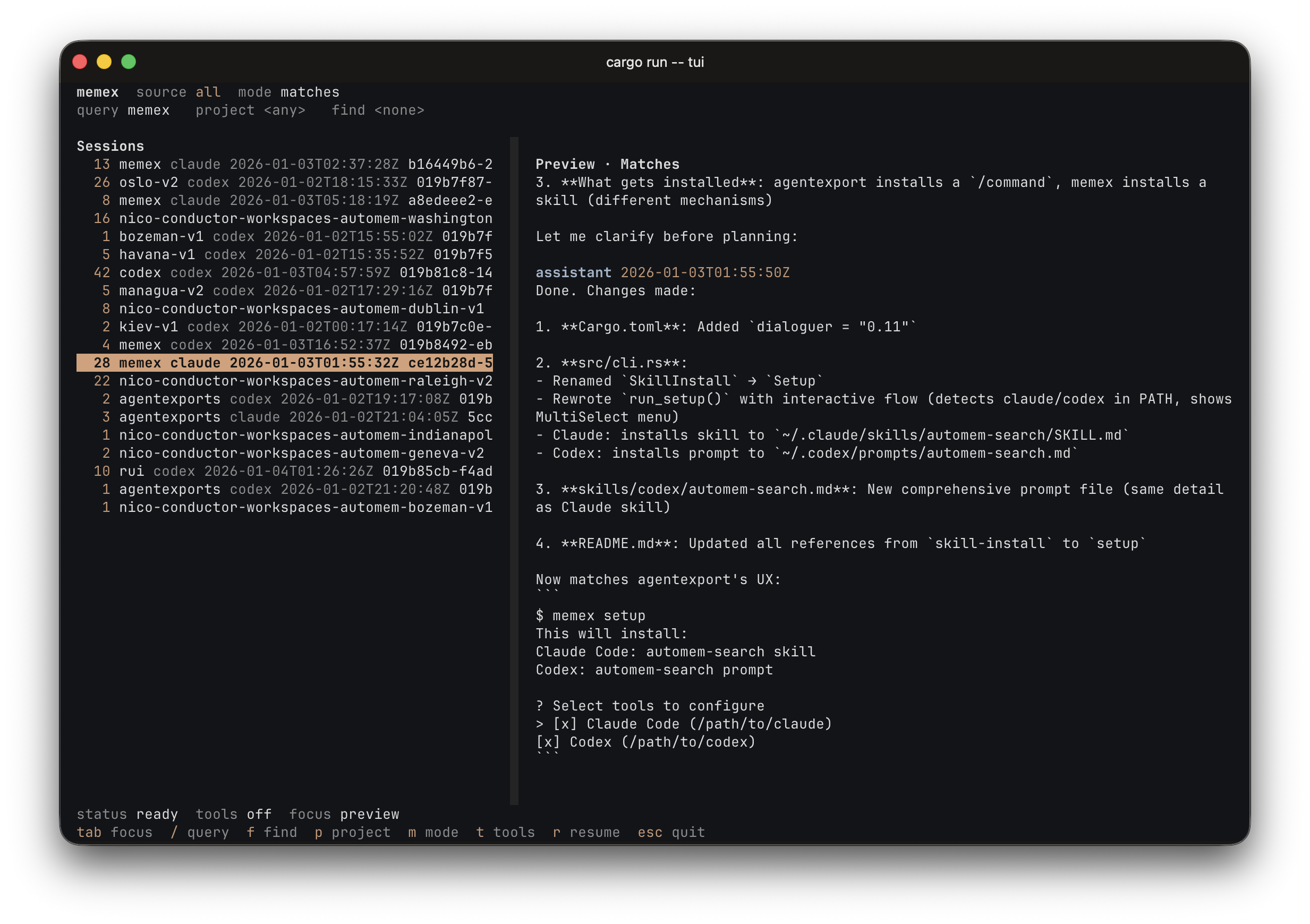
Includes a TUI for browsing, finding and resuming both agent CLI sessions.
Install
brew install nicosuave/tap/memex
Or
curl -fsSL https://raw.githubusercontent.com/nicosuave/memex/main/scripts/setup.sh | sh
Or (from the AUR on Arch Linux):
paru -S memex
Or (with Nix):
nix run github:nicosuave/memex
Development shell:
nix develop
Note: No binary cache is configured, so first builds compile from source.
NixOS service:
Enable background indexing with the provided module:
{
  inputs.memex.url = "github:nicosuave/memex";

  outputs = { nixpkgs, memex, ... }: {
    nixosConfigurations.default = nixpkgs.lib.nixosSystem {
      modules = [
        memex.nixosModules.default
        {
          services.memex = {
            enable = true;
            continuous = true; # Run as a daemon (optional)
          };
        }
      ];
    };
  };
}
Home Manager:
Configure memex declaratively (generates ~/.memex/config.toml):
{
  inputs.memex.url = "github:nicosuave/memex";

  outputs = { memex, ... }: {
    # Inside your Home Manager configuration
    modules = [
      memex.homeManagerModules.default
      {
        programs.memex = {
          enable = true;
          settings = {
            embeddings = true;
            model = "minilm";
            execution_provider = "auto"; # coreml on macOS, cpu elsewhere
            cuda_device_id = 0; # optional when execution_provider = "cuda"
            cuda_library_paths = ["/usr/local/cuda/lib64"]; # optional override
            cudnn_library_paths = ["/usr/lib/x86_64-linux-gnu"]; # optional override
            compute_units = "ane"; # CoreML only: ane, gpu, cpu, all
            auto_index_on_search = true;
            index_service_interval = 3600;
          };
        };
      }
    ];
  };
}
Then run setup to install the skills:
memex setup
Restart Claude/Codex after setup.
Quickstart
Index (incremental):
memex index
Search (JSONL default):
memex search "your query" --limit 20
TUI:
memex tui
Notes:
- Embeddings are enabled by default.
- Searches run an incremental reindex by default (configurable).
Full transcript:
memex session <session_id>
Single record:
memex show <doc_id>
Human output:
memex search "your query" -v
Build from source
cargo build --release
Linux with NVIDIA CUDA support:
cargo build --release --features cuda
Binary:
./target/release/memex
Setup (manual)
If you built from source, run setup to install:
memex setup
This detects which tools are installed (Claude/Codex) and presents an interactive menu to select which to configure.
Search modes
| Need | Command |
|---|---|
| Exact terms | search "exact term" |
| Fuzzy concepts | search "concept" --semantic |
| Mixed | search "term concept" --hybrid |
Common filters
--project <name>--role <user|assistant|tool_use|tool_result>--tool <tool_name>--session <session_id>--source claude|codex--since <iso|unix>/--until <iso|unix>--limit <n>--min-score <float>--sort score|ts--top-n-per-session <n>--unique-session--fields score,ts,doc_id,session_id,snippet--json-array
Background index service
Works on macOS (launchd) and Linux (systemd).
Enable:
memex index-service enable
memex index-service enable --continuous
Disable:
memex index-service disable
index-service reads config defaults (mode, interval, log paths). Flags override.
On Linux, creates systemd user units in ~/.config/systemd/user/. On macOS, creates a launchd plist in ~/.memex/.
Embeddings
Disable:
memex index --no-embeddings
Recommended when embeddings are on (especially non-potion models): run the background
index service or index --watch, and consider setting auto_index_on_search = false
to keep searches fast.
Embedding model
Select via --model flag or MEMEX_MODEL env var:
| Model | Dims | Speed | Quality |
|---|---|---|---|
| minilm | 384 | Fastest | Good |
| bge | 384 | Fast | Better |
| nomic | 768 | Moderate | Good |
| gemma | 768 | Slowest | Best |
| potion | 256 | Fastest (tiny) | Lowest |
memex index --model minilm
# or
MEMEX_MODEL=minilm memex index
Execution provider
Select via execution_provider in config or MEMEX_EXECUTION_PROVIDER:
| Provider | Platforms | Notes |
|---|---|---|
| auto | all | Default. Uses CoreML on macOS, CPU elsewhere |
| cpu | all | Force CPU execution |
| coreml | macOS | Uses CoreML; compute_units controls ane/gpu/cpu/all |
| cuda | Linux/NVIDIA | Requires a binary built with --features cuda and CUDA 12/cuDNN runtime libraries |
When execution_provider = "cuda", you can optionally select a GPU withcuda_device_id or MEMEX_CUDA_DEVICE_ID.
When loading CUDA, memex first tries the system loader paths, then any
configured cuda_library_paths / cudnn_library_paths, then common CUDA install
locations and active venv / conda site-packages/nvidia/*/lib directories.
If your system keeps CUDA or cuDNN in a nonstandard location, setMEMEX_CUDA_LIBRARY_PATHS and MEMEX_CUDNN_LIBRARY_PATHS or the matching config
keys.
Config (optional)
Create ~/.memex/config.toml (or <root>/config.toml if you use --root):
embeddings = true
auto_index_on_search = true
model = "minilm"  # minilm, bge, nomic, gemma, potion
execution_provider = "auto"  # auto, cpu, coreml, cuda
cuda_device_id = 0  # optional, when execution_provider = "cuda"
cuda_library_paths = ["/usr/local/cuda/lib64"]  # optional list of CUDA library dirs
cudnn_library_paths = ["/usr/lib/x86_64-linux-gnu"]  # optional list of cuDNN library dirs
compute_units = "ane"  # CoreML only: ane, gpu, cpu, all
scan_cache_ttl = 3600  # seconds (default 1 hour)
index_service_mode = "interval"  # interval or continuous
index_service_interval = 3600  # seconds (ignored when mode = "continuous")
index_service_poll_interval = 30  # seconds
index_service_label = "memex-index"  # service name (default: com.memex.index on macOS)
index_service_systemd_dir = "~/.config/systemd/user"  # Linux only
claude_resume_cmd = "claude --resume {session_id}"
codex_resume_cmd = "codex resume {session_id}"
Service logs and the plist live under ~/.memex by default (macOS). On Linux, systemd units are created in ~/.config/systemd/user/.
scan_cache_ttl controls how long auto-indexing considers scans fresh.execution_provider applies to ONNX-backed models; potion uses the model2vec backend.cuda_library_paths and cudnn_library_paths accept path lists and are only used
when execution_provider = "cuda".
Resume command templates accept {session_id}, {project}, {source}, {source_path}, {source_dir}, {cwd}.
The skill definitions are bundled in skills/.
Reviews (0)
Sign in to leave a review.
Leave a reviewNo results found