dsh-cli
Health Gecti
- License — License: MIT
- Description — Repository has a description
- Active repo — Last push 0 days ago
- Community trust — 48 GitHub stars
Code Basarisiz
- spawnSync — Synchronous process spawning in src/cli.mjs
- process.env — Environment variable access in src/cli.mjs
- process.env — Environment variable access in src/config.mjs
- process.env — Environment variable access in src/dsh.mjs
Permissions Gecti
- Permissions — No dangerous permissions requested
Bu listing icin henuz AI raporu yok.
Let Claude Code, Codex, OpenCode, Pi and other agents run DeepSeek Harness (dsh) sessions in parallel: research batches, material gathering, live in the DSH web UI. Unofficial community tool.
dsh-cli
Let Claude Code, Codex, OpenCode, Pi or any other agent run DeepSeek Harness sessions in parallel.



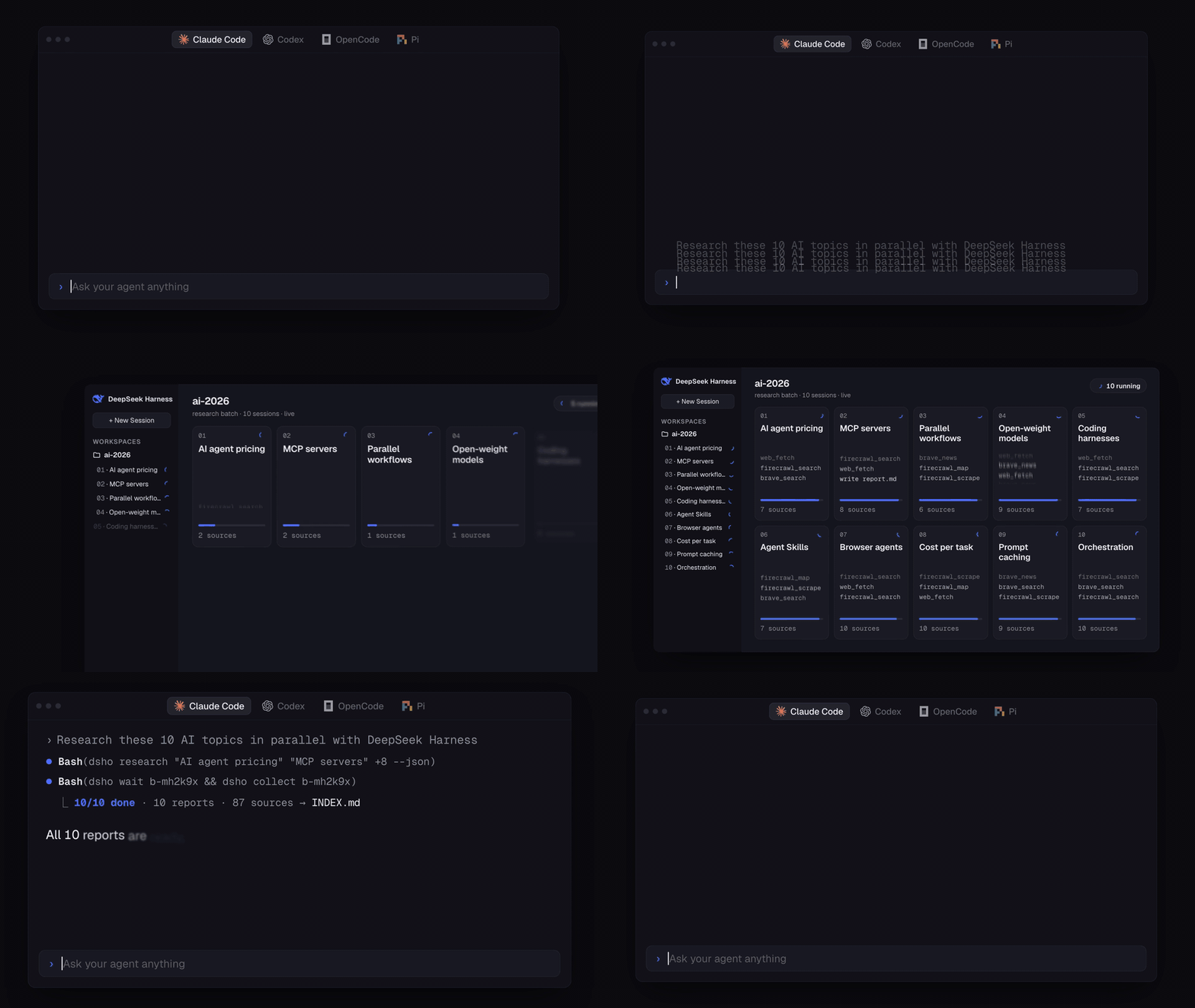
Unofficial community project. dsh-cli is not affiliated with, endorsed by or sponsored by DeepSeek. "DeepSeek Harness" is a trademark of DeepSeek and is used here only to describe compatibility.
Why
I use DeepSeek Harness (dsh) mostly for research and for many parallel sessions: ten research questions at once, collecting screenshots of articles, scroll videos of blog posts, stock footage. DeepSeek is fast and cheap, which makes it a great worker pool. What was missing is a way for my main coding agent to drive it: start the sessions, wait for them, read the results, follow up. That is what dsh-cli does.
dsh-cli is agent first. Every command is non-interactive, returns at once, prints compact text or --json, and uses stable exit codes. It ships an Agent Skill that teaches Claude Code, Codex, OpenCode, Pi and other harnesses when and how to delegate work to DeepSeek Harness.
Features
- Parallel research batches:
dsho research "q1" "q2" ...runs one worker per question; each writesreport.mdandsources.json,dsho collectmerges them into oneINDEX.md. - Material gathering:
dsho materials "brief"runs one worker per kind (screenshots, scroll videos, news articles, stock footage, stock photos) with amanifest.jsonthat records source and licence for every file. - Live in the DSH web UI: when
dsh webis running, every job is a real session in that UI. A batch becomes its own workspace, every session gets a readable title, and you can watch or step in. - Headless fallback: without the UI, each job runs in its own headless dsh process with a lean profile (
orchestra) that reuses your research MCP servers. If the UI fails before a job is sent, an auto-selected job runs headless instead. - Sandboxed, never stuck: headless workers never wait for an approval nobody gives (such actions are rejected and the model works around them), and
--access read-only|workspace-write|fullpicks the dsh write sandbox per job. - Steer like a human would:
wait,status,logs -f,result,files,continue(same session, same folder),cancel. - Deterministic captures:
dsho capture shot|scroll <url>takes clean screenshots and smooth 1080p scroll videos with Playwright (cookie banners dismissed, overlays hidden, ad networks blocked, watchdog for hanging pages). - No daemon: state is plain JSON in
~/.dsho/; detached runner processes keep jobs alive after the calling shell exits.
How it works
flowchart LR
    A["Your agent<br/>(Claude Code, Codex, OpenCode, Pi)"] -- "dsho research ... --json" --> C[dsh-cli]
    C -- "DSH web UI running" --> W["dsh web<br/>sessions in one workspace"]
    C -- "otherwise" --> H["headless dsh<br/>one process per job"]
    W --> F[("workspace folder<br/>report.md, manifest.json, ...")]
    H --> F
    C -- "dsho wait / collect" --> F
    F -- "INDEX.md" --> A
- Your agent calls
dsho(usually through the bundled skill). - dsh-cli creates a workspace folder and one job per task, then hands each job to a detached runner and returns ids at once.
- The runner either creates a session in the running DSH web UI (through its HTTP API) or starts
dsh --profile orchestra --json -with the task on stdin. - Events are recorded in
~/.dsho/jobs/<id>/events.jsonl, progress injob.json, the final answer inresult.md. - Your agent waits with
dsho wait, readsdsho resultordsho collect, and continues sessions withdsho continue.
Requirements
- Node.js
>=22.19 - DeepSeek Harness, installed with
npm install -g @deepseek-ai/dsh(or a source checkout), logged in once - Optional, for
dsho capture: Python 3 with Playwright (python3 -m pip install playwright && python3 -m playwright install chromium; on Windowspythoninstead ofpython3) and ffmpeg (brew install ffmpeg,apt install ffmpeg,winget install Gyan.FFmpeg) - macOS, Linux or Windows (PowerShell or cmd; Windows Terminal recommended). On Windows,
dshBinmay point at a.cmdshim: npm'sdsh.cmdor the CLI bundled with the DeepSeek Harness desktop app (%LOCALAPPDATA%\Programs\DeepSeek Harness\resources\runtime\cli\bin\dsh.cmd). dsh-cli reads the shim and starts its script directly, since Node cannot spawn.cmdfiles without a shell.
Install
npm install -g @nicremo/dsh-cli
dsho setup
Update with the same command. The latest unreleased state, including Windows support before 0.2.0 reaches npm, installs straight from GitHub: npm install -g github:nicremo/dsh-cli (no build step involved).
On Windows, install Node.js, dsh and dsh-cli from a normal terminal (PowerShell or Windows Terminal). Apps packaged as MSIX, the Claude desktop app among them, virtualize %APPDATA%: a global npm install run from inside such an app lands in the app's private copy and is invisible everywhere else. dsho doctor warns when it finds dsh there.
dsho setup creates the headless dsh profile orchestra and installs the dsh-orchestration skill into ~/.agents/skills (read by OpenCode and other harnesses) with links for Claude Code, Codex and Pi when they are installed. Run dsho doctor to check everything.
Only want the skill? npx skills add nicremo/dsh-cli works too, but the skill needs the CLI.
Two commands are installed: dsh-cli and the short alias dsho.
Quick start
dsho ui start                       # optional: start the DSH web UI to watch jobs live
dsho research "AI agent pricing 2026" "State of MCP servers" "Prompt caching strategies" \
  --depth standard -C ~/dsh-workspaces/ai-2026
dsho wait last-batch --timeout 9m   # exit code 4: still running, wait again
dsho collect last-batch             # writes ~/dsh-workspaces/ai-2026/INDEX.md
dsho run -w "Summarize the release notes of Astro 6"           # one task, print the answer
dsho materials "Electric cars in Europe, neutral tone" --kinds screenshots,articles,stock-video
dsho continue last "Add three sources from 2026 and update report.md"
dsho capture scroll https://example.com/blog/post -o post.mp4 --duration 12
Use it from your agent
After dsho setup your agents know the skill. Ask in plain language:
Use DeepSeek Harness to research these 10 topics in parallel and give me a summary.
Get me screenshots of recent news articles and some stock footage about solar power for my video.
The skill tells the agent to start a batch, wait in steps that fit its shell timeout, read INDEX.md, spot-check the results and follow up where needed. dsho guide prints the same manual for any agent without skill support.
Commands
| Command | What it does |
|---|---|
dsho run <task> |
one job in the background (-w waits and prints the answer) |
dsho batch -f tasks.txt |
many jobs in parallel, one folder each (.txt, blocks split by ---, .json, .jsonl) |
dsho research <q>... |
parallel research workers (--depth quick|standard|deep, --focus) |
dsho materials <brief> |
one worker per kind (--kinds, --count, --url) |
dsho status [ref] |
overview, or details of a job or batch |
dsho ls [--batches] |
list jobs or batches |
dsho wait <ref>... |
block until done (--timeout, --any) |
dsho result <ref> |
final answer(s) (--files) |
dsho logs <job> |
timeline of tool calls (-f, --full, --raw, --stderr) |
dsho files <ref> |
files the job created |
dsho continue <job> <text> |
continue the same session |
dsho cancel <ref> |
stop a job or a whole batch |
dsho collect <batch> |
write INDEX.md, merge manifest.json and sources.json |
dsho capture shot|scroll <url> |
screenshots and scroll videos |
dsho ws init <dir> |
create a workspace with conventions in AGENTS.md |
dsho ui [start|login] |
open, start or log in to the DSH web UI |
dsho skill install |
install or refresh the agent skill |
dsho setup / dsho doctor |
one-time setup / environment check |
dsho config [set|unset] |
persistent settings |
dsho guide |
the manual for agents |
References: job id, batch id, unique prefix, name, last, last-batch. Common options: -C <dir> workspace folder, -m flash|pro|v4-flash|vision, --effort off|low|high|max, -t <duration> time limit, -p <n> parallelism, -b auto|web|headless backend, --access read-only|workspace-write|full sandbox (headless). Every command has --help.
JSON and exit codes
Every command accepts --json and prints one object: { "ok": true, ... } or { "ok": false, "error", "code", "hint" }.
| Exit code | Meaning |
|---|---|
| 0 | success |
| 1 | a job failed, timed out or was cancelled |
| 2 | usage error |
| 3 | job or batch not found |
| 4 | wait timeout reached, or the job is not finished yet |
| 5 | environment problem (dsh missing, UI unreachable, Playwright missing) |
The DSH web UI backend
When the web UI is reachable, dsh-cli talks to its HTTP API (POST /api/<namespace>/<method>): it registers the workspace folder, creates a session in it, names it, optionally selects a model, sends the task, and polls the session log until the turn that answers the task has ended. The session log is translated into the same event format the headless mode produces, so logs, status and result work the same everywhere.
dsho ui startstartsdsh webin the background, captures the token URL it prints and logs in.- If you start
dsh webyourself, pass the URL it prints once:dsho ui login "http://127.0.0.1:3080/?token=...". The resulting cookie is stored in~/.dsho/web-auth.json(mode 0600) and stays valid for 30 days, also across restarts. -b webmakes a missing UI an error instead of falling back to headless.
The headless backend and dsho setup
Headless jobs run dsh --profile orchestra --json - in the job folder. dsho setup builds that profile from the shipped headless template plus:
- MCP servers copied from another profile (default
web):--mcp research(firecrawl, Brave, context7, Exa, Tavily, Perplexity, Jina and similar; default),all,noneor a comma list of ids. Copied rows can contain API keys, so the profile file is written with mode 0600 and nothing is printed. - The model provider settings of the same profile (
llm-pi-aiwith its provider routes,agent-default-model), so workers reach the models you configured in the app, for example through OpenRouter.--no-llmkeeps the template's settings. - A curated skill folder (
~/.dsh/skills-orchestra, symlinks into~/.agents/skills) instead of your whole skill pool, which keeps the worker prompt about a third smaller.--skills a,b,cpicks others,--skills allkeeps dsh defaults. .dsho-workspaceas an extra project root marker, so workers in batch subfolders still load the workspaceAGENTS.md.
Headless dsh reads provider keys (DEEPSEEK_API_KEY, OPENROUTER_API_KEY, ...) only from the environment. Keys that the desktop or web app stored under refs in ~/.dsh/.credentials.yaml are therefore passed to each worker process; variables that are already set win, and no value is ever printed.
Configuration
dsho config set <key> <value> stores settings in ~/.dsho/config.json. Environment variables win over the file.
| Key | Environment | Meaning |
|---|---|---|
dshRepo |
DSHO_DSH_REPO |
use a dsh source checkout (wins over dshBin) |
dshBin |
DSHO_DSH_BIN |
path to the dsh executable (default: dsh on PATH) |
webUrl |
DSHO_WEB_URL |
origin of the DSH web UI (default http://127.0.0.1:3080) |
backend |
DSHO_BACKEND |
auto, web or headless |
workspaces |
DSHO_WORKSPACES |
root for new workspaces (default ~/dsh-workspaces) |
python |
DSHO_PYTHON |
Python with Playwright for captures |
provider |
DSHO_PROVIDER |
model provider route for workers, e.g. openrouter (default: ~/.dsh/settings.yaml, else deepseek-official) |
model |
DSHO_MODEL |
default model for jobs without -m, e.g. v4-flash |
access |
DSHO_ACCESS |
sandbox for headless workers: read-only, workspace-write or full (default: the dsh profile's preset) |
With provider openrouter, the short names map to OpenRouter catalog ids: v4-flash → deepseek/deepseek-v4-flash, pro → deepseek/deepseek-v4-pro, flash → ~deepseek/deepseek-flash-latest.
Other variables: DSHO_HOME (state folder, default ~/.dsho), DSH_HOME (dsh home, default ~/.dsh), DSHO_WEB_TOKEN_URL / DSHO_WEB_TOKEN_FILE (token URL of the web UI).
Files
~/.dsho/
  config.json            settings
  web-auth.json          cookie for the DSH web UI (0600)
  jobs/<id>/             job.json, task.md, events.jsonl, stderr.log, result.md
  batches/<id>/          batch.json
  logs/                  runner logs
<workspace>/
  AGENTS.md, .dsho-workspace
  <nn-job>/              one folder per batch job
  INDEX.md               after dsho collect
Troubleshooting
| Symptom | Fix |
|---|---|
dsh not found |
npm install -g @deepseek-ai/dsh, or dsho config set dshBin <path> |
| jobs do not show up in the UI | dsho doctor; dsho ui start or dsho ui login <url>; start jobs with -b web |
a job is lost |
its runner process died (reboot, kill); start it again |
MISSING_CREDENTIAL in dsho logs <job> --stderr |
store your DeepSeek API key once: dsho ui start, then Settings → Models in the UI (or set DEEPSEEK_API_KEY) |
| a worker reports that an action was rejected | the sandbox blocked it (workers never wait for approvals); widen it for that job with --access full |
Windows: dsh not found |
npm's global folder (%APPDATA%\npm) must be on PATH; or dsho config set dshBin "%APPDATA%\npm\dsh.cmd" |
Windows: dsho doctor reports msix |
dsh was installed from inside an MSIX app (such as the Claude desktop app) and exists only there; install Node.js, dsh and dsh-cli again from PowerShell or Windows Terminal |
dsho capture fails |
pip install playwright && python3 -m playwright install chromium; scroll videos need ffmpeg |
| a page hangs during capture | the watchdog stops it after --max-time (default 90 s for shots) |
Safety
dsh workers can run shell commands. Headless workers never wait for approvals: whatever the sandbox does not allow is rejected. The presets limit writes, not reads or network access: --access read-only forbids writing, --access workspace-write allows writes in the workspace plus dsh's temporary and configured writable folders, --access full removes the sandbox. A worker can still read files your user account can read (including secrets outside the workspace) and send data over the network, so run dsh-cli only with tasks and sources you trust. Keep tasks scoped to the workspace and never delegate deletes, deploys, git pushes or anything that touches secrets. Material found by workers is not automatically yours to publish: check licence and source in manifest.json. See SECURITY.md for reporting vulnerabilities.
Development
git clone https://github.com/nicremo/dsh-cli && cd dsh-cli
npm install
npm test            # node:test with a fake dsh and a fake web UI; never touches your real setup
node bin/dsho.mjs help
Architecture notes: docs/architecture.md. Contributions are welcome, see CONTRIBUTING.md.
License
MIT. The logos in the demo animation belong to their owners (Anthropic, OpenAI, OpenCode, Pi, DeepSeek) and only identify compatible tools.
Yorumlar (0)
Yorum birakmak icin giris yap.
Yorum birakSonuc bulunamadi