arbor
Health Warn
- License — License: MIT
- Description — Repository has a description
- Active repo — Last push 0 days ago
- Low visibility — Only 5 GitHub stars
Code Pass
- Code scan — Scanned 12 files during light audit, no dangerous patterns found
Permissions Pass
- Permissions — No dangerous permissions requested
This is a code navigation MCP server designed to index large codebases (up to 1 million lines of code) using tree-sitter. It compresses the repository architecture into a compact summary, allowing an LLM to efficiently understand and navigate the code without consuming excessive tokens.
Security Assessment
Overall risk: Low. The automated code scan checked 12 files and found no dangerous patterns, hardcoded secrets, or requests for excessive permissions. However, developers should be aware that the tool inherently requires read access to your local file system to index your codebase. Additionally, the recommended "Quick Start" method pipes a remote script directly into bash or PowerShell (`curl ... | bash`). While common for open-source projects, this practice bypasses manual code review and should be approached with standard caution.
Quality Assessment
The project is written in Rust, which is highly performant and offers strong memory safety. It is actively maintained, with the last code push occurring today. It uses the permissive MIT license, making it suitable for most projects. The main drawback is its extremely low community visibility; having only 5 GitHub stars means the codebase has not been extensively peer-reviewed by the broader developer community.
Verdict
Safe to use, though standard caution is recommended when executing remote install scripts or granting file system read access to new projects.
Code navigation MCP server. Fits your entire codebase into an LLM context.

Fit your entire codebase into an LLM's context window.
Quick Start • Why arbor • Configuration • Tools • Performance • Languages






Highlights
- 1M lines of code → 500 lines of context. arbor builds a symbol graph with tree-sitter and compresses it into token-efficient summaries an LLM can actually use.
- 9 surgical MCP tools. The LLM sees architecture first, then drills into exactly what it needs — no grep noise, no wasted tokens.
- Sub-second incremental re-index. Only changed files are re-analyzed via content hashing. Cold index of a 1M LOC project takes under 10 seconds.
- 15 languages and formats. Rust, Python, TypeScript, Go, C/C++, C#, Kotlin, plus Terraform, Ansible, SQL, Protobuf, OpenAPI, and Markdown.
- Zero configuration. One install command. No config files. Works with any project structure.
bevy (1,756 files, 21,863 functions, ~1.1M LOC)
  boot screen:      16 lines   ~400 tokens
  compact skeleton:  552 lines  ~9k tokens
  indexed in:        9.5 seconds
Quick Start
One command — installs arbor and connects it to Claude Code:
macOS / Linux:
curl -fsSL https://raw.githubusercontent.com/nikita-voronoy/arbor/main/scripts/install.sh | bash
Windows (PowerShell):
irm https://raw.githubusercontent.com/nikita-voronoy/arbor/main/scripts/install.ps1 | iex
# Build from source
cargo install --git https://github.com/nikita-voronoy/arbor.git arbor-mcp

# Add to Claude Code
claude mcp add arbor -- arbor
That's it. Claude will call boot → compact → search → references as needed.
CLI mode
arbor /path/to/project --cli       # Architecture overview
arbor /path/to/project --compact   # Token-optimized skeleton
Configuration Examples
The installer configures everything automatically, but here's what it sets up and how to customize it.
Claude Code (MCP server)The installer registers arbor as an MCP server:
claude mcp add arbor -- arbor
Verify it's registered:
claude mcp list
The installer adds a hook to ~/.claude/settings.json that nudges Claude to use arbor instead of raw grep/glob:
{
  "hooks": {
    "PreToolUse": [
      {
        "matcher": "Grep|Glob",
        "hooks": [
          {
            "type": "command",
            "command": "echo '{\"hookSpecificOutput\":{\"hookEventName\":\"PreToolUse\",\"additionalContext\":\"STOP: Prefer arbor MCP tools (search, references, skeleton, compact, boot) over Grep/Glob for code navigation. Fall back to Grep/Glob only for string literals, comments, or regex patterns.\"}}'",
            "statusMessage": "Checking arbor preference..."
          }
        ]
      }
    ]
  }
}
This doesn't block grep — it adds context that helps Claude choose the right tool.
CLAUDE.md instructionsThe installer appends a block to ~/.claude/CLAUDE.md that teaches Claude when to use each arbor tool:
## Code navigation: use arbor MCP first

- **Instead of grep for a symbol** → use `mcp__arbor__search`
- **Instead of grep for "who calls X"** → use `mcp__arbor__references`
- **Instead of reading many files** → use `mcp__arbor__boot`, then `mcp__arbor__skeleton` or `mcp__arbor__compact`
- **Instead of tracing dependencies** → use `mcp__arbor__dependencies` or `mcp__arbor__impact`
- **After making changes** → call `mcp__arbor__reindex`

Start every session with `mcp__arbor__boot`.
You can edit ~/.claude/CLAUDE.md to fine-tune this behavior. For project-specific instructions, add a CLAUDE.md in the project root.
arbor auto-detects the project root from the working directory. For monorepos with multiple languages, it indexes all detected facets automatically:
# Index from repo root — detects Rust + TypeScript + Terraform + Markdown
arbor /path/to/monorepo --compact
For separate repos that share types, use the tunnels tool to discover cross-project connections.
arbor works through Claude Code's IDE extensions. After installing arbor:
- Install the Claude Code extension for your IDE
- arbor is automatically available — Claude will use
bootandcompactto understand your project
No additional IDE configuration needed.
UninstallmacOS / Linux:
curl -fsSL https://raw.githubusercontent.com/nikita-voronoy/arbor/main/scripts/uninstall.sh | bash
Windows (PowerShell):
irm https://raw.githubusercontent.com/nikita-voronoy/arbor/main/scripts/uninstall.ps1 | iex
This removes the binary, MCP registration, hooks, and CLAUDE.md instructions.
How It Works
flowchart LR
    Source[".rs .py .ts .go\n.c .cpp .cs\n.tf .yml .sql"] -- "tree-sitter\nparse" --> Graph["Symbol graph\nfunctions • structs\ncalls • imports"]
    Graph -- "query" --> Tools["MCP tools\nboot • compact\nsearch • refs • impact"]
    Graph -- "persist" --> DB[".arbor/index.bin\n(incremental)"]
- Index — tree-sitter parses source files into ASTs. arbor extracts functions, structs, traits, enums, calls, imports, and type references.
- Persist — the graph is saved to
.arbor/. On re-index, only changed files are re-analyzed (xxh3 content hashing). - Serve — 9 MCP tools let the LLM explore the graph at any granularity.
- Resolve — cross-file call edges are resolved in a second pass after all files are indexed.
MCP Tools
| Tool | What it does | Typical tokens |
|---|---|---|
boot |
Architecture overview: modules, key types, hub functions | ~150–400 |
skeleton |
Full symbol tree with signatures, organized by file | ~2k–20k |
compact |
Token-optimized skeleton: one-line sigs, no tests, collapsed enums | ~500–9k |
search |
Fuzzy symbol search — exact → prefix → contains | varies |
references |
All refs to a symbol: definitions, calls, imports, type refs, impls | varies |
dependencies |
What does this symbol depend on? (transitive, configurable depth) | varies |
impact |
What breaks if this symbol changes? (reverse dependency traversal) | varies |
tunnels |
Cross-project shared types in multi-repo mode | varies |
reindex |
Full re-index from scratch | — |
Performance
Tested on real-world projects (Apple Silicon, parallel parsing with rayon):
| Project | Files | Functions | LOC | Index time | Compact output |
|---|---|---|---|---|---|
| arbor | 57 | 244 | 12k | 0.4s | 141 lines |
| tokio | 776 | 6,901 | 314k | 2.9s | 623 lines |
| bevy | 1,756 | 21,863 | 1.1M | 9.5s | 552 lines |
| dotnet/runtime | 37,581 | 522,691 | 28M | 29s | 561 lines |
Incremental re-index (only changed files) is typically <100ms.
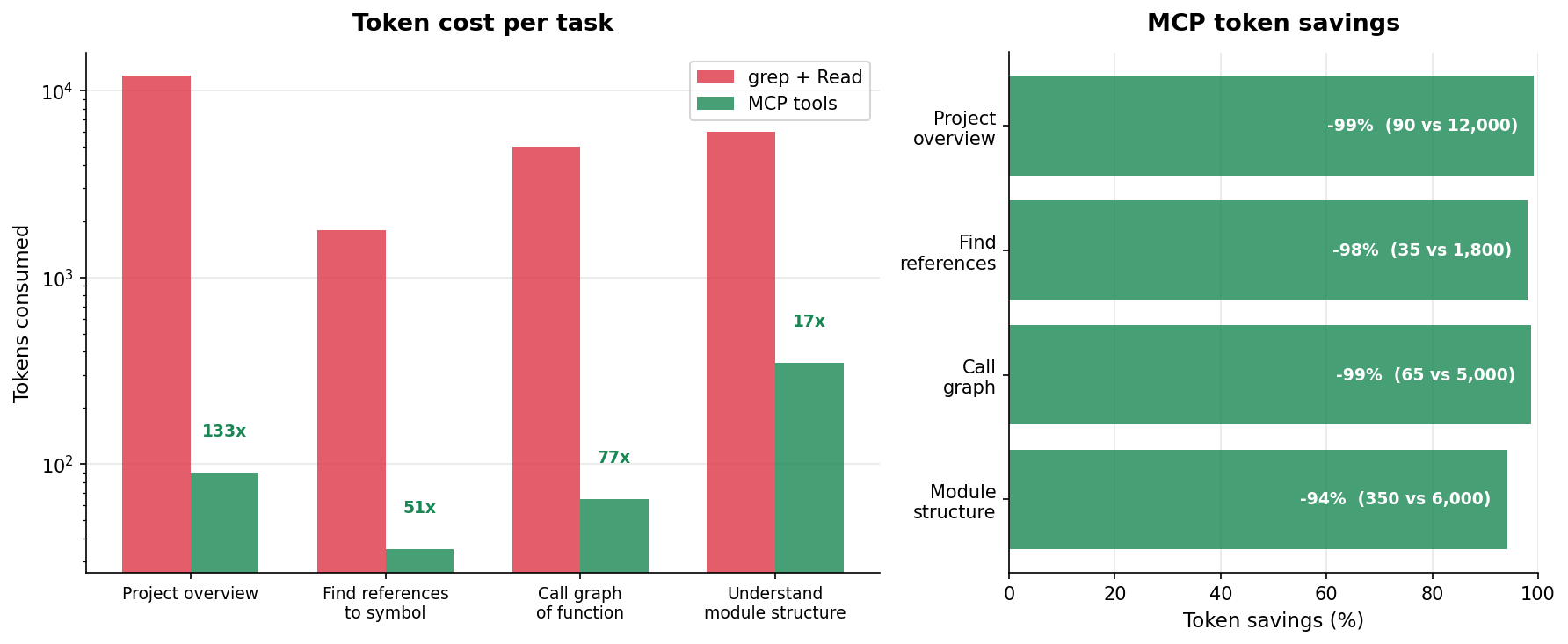
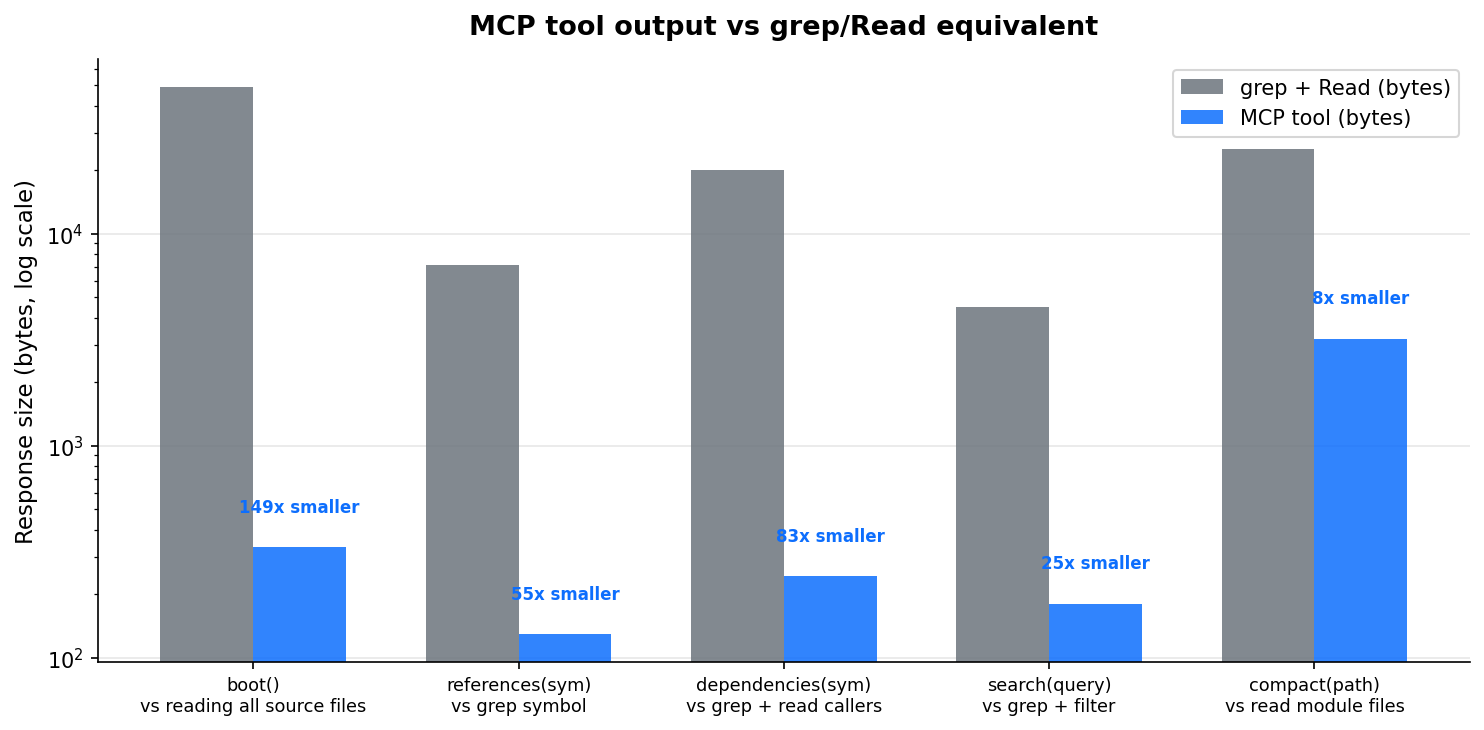
Token efficiency: arbor vs grep + file readsarbor's MCP tools return structured, compressed output — dramatically fewer tokens than raw grep + file reads for the same information.
Supported Languages
| Language | Functions | Structs | Traits | Enums | Calls | Imports |
|---|---|---|---|---|---|---|
| Rust | ✓ | ✓ | ✓ | ✓ | ✓ | ✓ |
| Python | ✓ | ✓ | — | — | ✓ | ✓ |
| TypeScript | ✓ | ✓ | ✓ | ✓ | ✓ | ✓ |
| JavaScript | ✓ | ✓ | — | — | ✓ | ✓ |
| Go | ✓ | ✓ | — | — | ✓ | ✓ |
| C | ✓ | ✓ | — | ✓ | ✓ | ✓ |
| C++ | ✓ | ✓ | — | ✓ | ✓ | ✓ |
| C# | ✓ | ✓ | ✓ | ✓ | ✓ | ✓ |
| Kotlin | ✓ | ✓ | ✓ | ✓ | ✓ | ✓ |
| Java | ✓ | ✓ | ✓ | ✓ | ✓ | ✓ |
| Format | What it indexes |
|---|---|
| Ansible | roles, tasks, handlers, variables, templates, playbooks |
| Terraform | resources, variables, outputs, modules, data sources |
| SQL | tables, columns, foreign keys |
| Protobuf | messages, services, RPCs |
| OpenAPI | endpoints, schemas |
| Markdown | documents, sections, links |
graph TB
    subgraph arbor-mcp["arbor-mcp"]
        MCP["MCP server<br>(rmcp over stdio)"]
        CLI["CLI entry point"]
        H["9 tool handlers"]
    end

    subgraph arbor-analyzers["arbor-analyzers"]
        TS["tree-sitter<br>10 languages"]
        IAC["Ansible / Terraform"]
        SCH["SQL / Protobuf / OpenAPI"]
        DOC["Markdown"]
    end

    subgraph arbor-core["arbor-core"]
        G["Graph<br>(Node, EdgeKind)"]
        Q["Query engine<br>search / refs / impact"]
        SK["Skeleton<br>boot / compact"]
    end

    subgraph arbor-persist["arbor-persist"]
        ST["Store (bincode)"]
        FH["FileHashes (xxh3)"]
    end

    DET["arbor-detect<br>Facet detection"]

    MCP --> H
    H --> Q
    H --> SK
    arbor-analyzers --> G
    DET --> arbor-analyzers
    G --> ST
    FH --> arbor-analyzers
License
MIT — see LICENSE.
Built with tree-sitter and MCP
Reviews (0)
Sign in to leave a review.
Leave a reviewNo results found