herdr-logi-plugin
Health Uyari
- License — License: MIT
- Description — Repository has a description
- Active repo — Last push 0 days ago
- Low visibility — Only 6 GitHub stars
Code Gecti
- Code scan — Scanned 3 files during light audit, no dangerous patterns found
Permissions Gecti
- Permissions — No dangerous permissions requested
Bu listing icin henuz AI raporu yok.
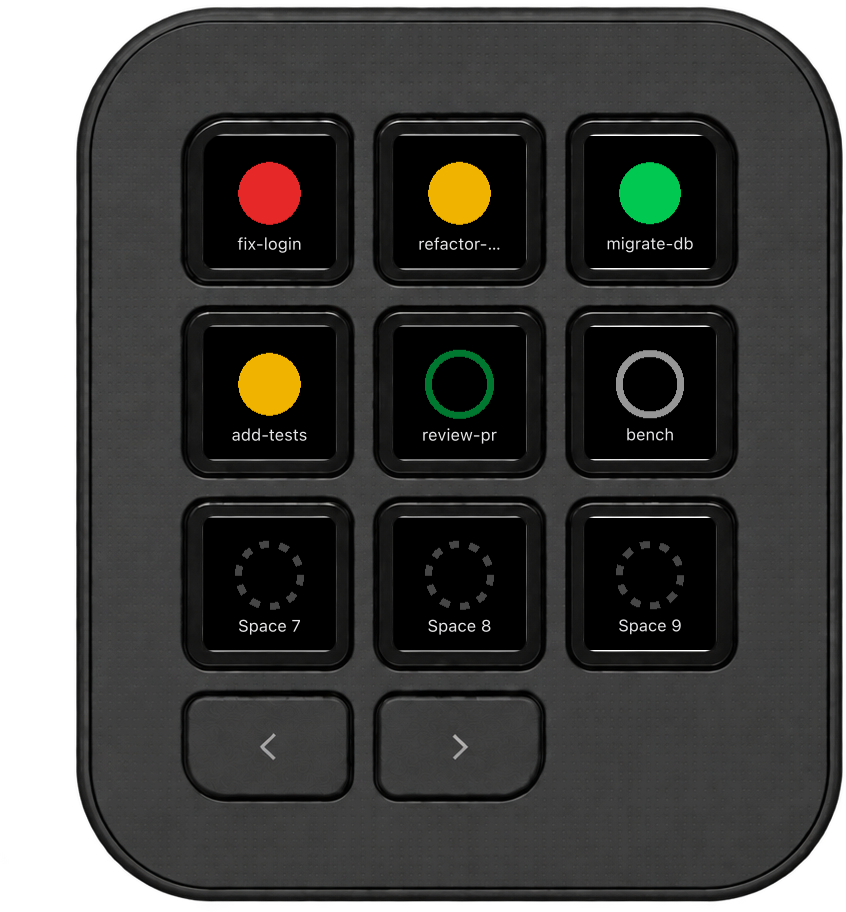
Live status of your herdr workspaces and coding agents on the Logitech MX Keypad. Press a key to jump to one.
Herdr Agents for the Logitech MX Keypad
Live status of your herdr workspaces and coding agents on
the MX Keypad. Press a key to jump to one.
Requirements
- macOS
- herdr 0.8.2 or newer, running locally
- Logi Options+ with Logi Plugin Service 6.4 or newer
- Logitech MX Keypad (or Loupedeck)
Install
- Download
Herdr_<version>.lplug4from the
latest release. - Double-click it. Logi Options+ installs the plugin.
- In Options+, select the MX Keypad, open All actions, and drag
Herdr Agents actions onto keys.
Keys
| Group | Shows | Press |
|---|---|---|
| Spaces (1–9) | The workspace with that number and its combined agent status | Focuses the workspace. Press again to cycle its panes. |
| Agents (1–9) | The Nth running agent, in workspace order | Focuses the agent's pane. |
| Recent Agents (1–9) | Agents ordered by most recent status change | Focuses the agent's pane. |

| Ring | Status |
|---|---|
| Red, filled | blocked: the agent is waiting for you |
| Amber, filled | working |
| Green, filled | done: the turn finished |
| Green, outline | idle |
| Grey, outline | unknown |
| Dark grey, dotted | nothing in this slot |
| Dark red, dotted | herdr is not running or cannot be reached |
Configuration
A press brings the terminal running herdr to the front, then focuses the
workspace or pane. The terminal is detected automatically. To choose it
yourself, create ~/.config/herdr-logi-plugin/config.json:
{ "terminalApp": "Ghostty" }
Use any app name or .app path that open -a accepts, or "" to never raise
a terminal. Changes apply on the next press.
Troubleshooting
| Symptom | Fix |
|---|---|
| Every key shows a dark red dotted ring | herdr is not running. herdr status should report a running server. |
| A press raises the wrong terminal | Set terminalApp as described above. |
Log: ~/Library/Application Support/Logi/LogiPluginService/Logs/plugin_logs/Herdr.log
Privacy
The plugin collects no data and has no network code. It only talks to the
local herdr socket, reads the process list to find your terminal, and runsopen -a to raise it.
Contributing
See CONTRIBUTING.md for building from source and how the
plugin works.
License
MIT. Logitech, Logi and MX Keypad are trademarks of Logitech
International S.A. This is an independent project, not affiliated with or
endorsed by Logitech or the herdr project.
Yorumlar (0)
Yorum birakmak icin giris yap.
Yorum birakSonuc bulunamadi