shipit
Health Warn
- License — License: Apache-2.0
- Description — Repository has a description
- Active repo — Last push 0 days ago
- Low visibility — Only 5 GitHub stars
Code Pass
- Code scan — Scanned 12 files during light audit, no dangerous patterns found
Permissions Pass
- Permissions — No dangerous permissions requested
No AI report is available for this listing yet.
Self-hosted, chat-driven IDE for running coding agents through your real engineering loop — Claude Code or Codex, parallel sandboxed containers, live preview, and the GitHub loop inline.
 ShipIt




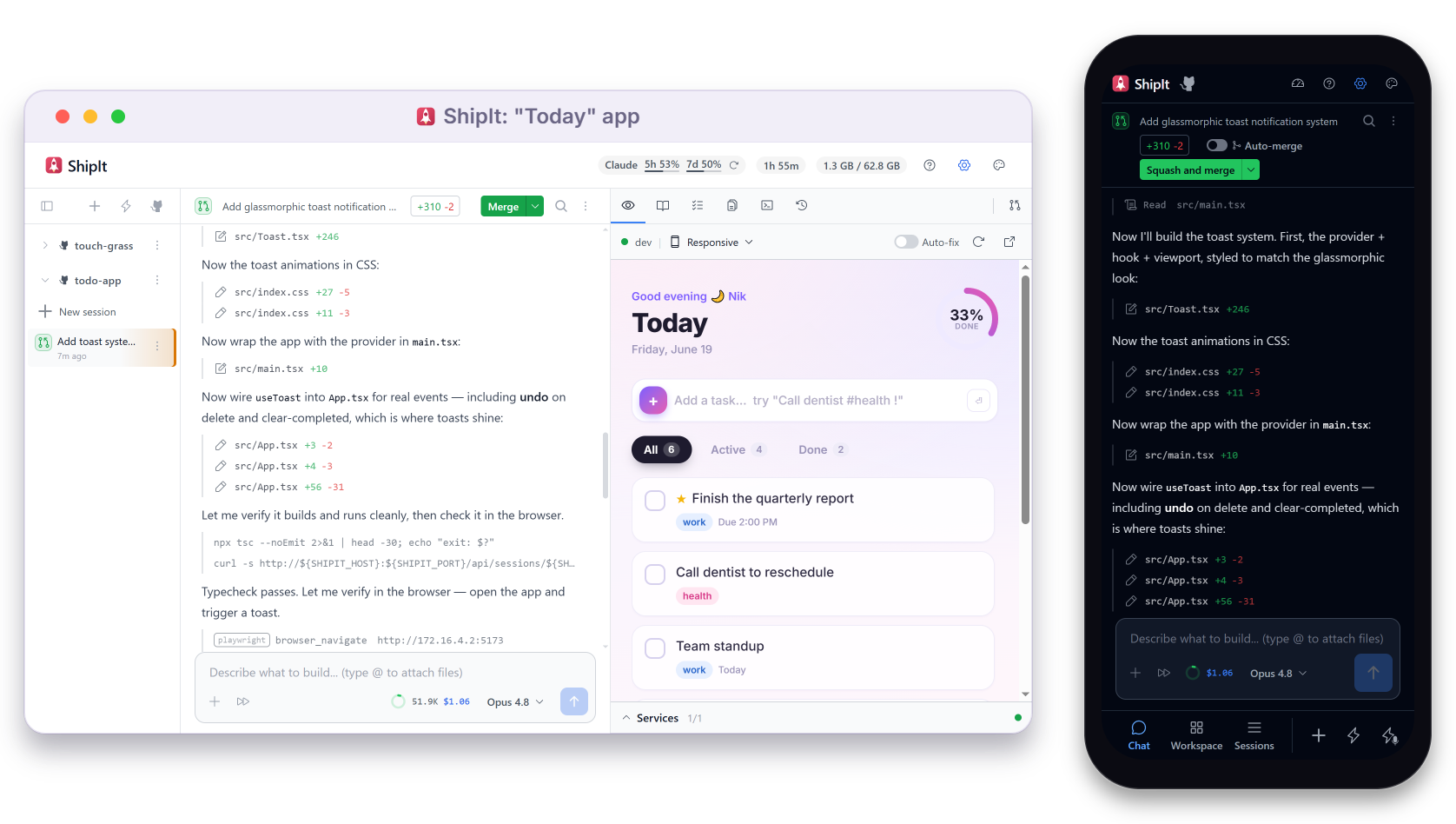
ShipIt is a self-hosted, chat-driven IDE for running coding agents through your real engineering loop.
- Real app feedback — every session runs its own instance of your full app stack, so the agent
can build, run, and fix before you preview and merge. - Bring your own agent — Claude Code or Codex, on the subscription or API key you already have.
- Parallel & isolated — many agents at once, each in its own sandboxed container.
- Self-hosted — on an always-on server you own, or local on your laptop.
- The GitHub loop, inline — work with PRs, CI, deploys, reviews, and issues, without leaving ShipIt.
- Ship from your phone — mobile-first, with voice.
Quickstart
What you need
- Docker with the Compose v2 plugin (
docker compose).
Docker Desktop bundles it; on Linux installdocker-compose-pluginalongsidedocker-ce. ShipIt
always runs containerized — there is no bare-metal mode. - Credentials for at least one agent backend — a subscription or an API key works for either:
- Claude Code: Claude Pro/Max or an
Anthropic API key - Codex: a ChatGPT subscription or an OpenAI API key
- Claude Code: Claude Pro/Max or an
Try it locally
Use local Docker when you want to run ShipIt on your own machine — Linux, macOS, or Windows via
WSL2. Use the VPS path for the always-on setup.
bash <(curl -fsSL https://raw.githubusercontent.com/nikzlabs/shipit/stable/deployment/local/setup.sh)
This installs ShipIt under ~/.shipit, builds the Docker images, and starts it detached at
http://localhost:4123. Sign in to Claude Code or Codex once from the in-app
provider flow. Fork installs, custom paths, updates, and stop/uninstall are indeployment/README.md.
Run it on a VPS
Use the VPS path for the intended always-on setup: agents, previews, and CI follow-up work keep
running even when your laptop is closed.
ShipIt ships with a one-command provisioning script for Ubuntu hosts. It installs Docker, raises the
inotify limits sessions need, and can put ShipIt behind a
Cloudflare Tunnel
(with Zero Trust SSO) or Tailscale — no open inbound ports. Plan for 8 GB
RAM minimum (16 GB recommended), since each active session runs its own container. Run it as root
(sudo is a no-op if you already are):
sudo bash -c "$(curl -fsSL https://raw.githubusercontent.com/nikzlabs/shipit/stable/deployment/vps/setup.sh)"
It asks which access path you want, then handles the rest — Docker, clone, host limits, image builds,
and the self-update systemd units. Updates land from the UI (Settings → Advanced → Software
Updates). Fork installs, host-side updates, sizing, access policies, and troubleshooting are all indeployment/README.md.
After first boot
- Connect GitHub so ShipIt can clone repos, push branches, open PRs, and read CI status.
- Pick Claude Code or Codex as the agent backend.
- Start a session from an existing repository, or create a new project from a template.
- Describe the change you want; ShipIt creates an isolated container, branch, chat history, and
workspace for that session.
Status
ShipIt is in an early public release state, with two supported install paths — local Docker and a
self-hosted Docker install on an Ubuntu VPS (see Quickstart for both). The core loop
is live: create isolated sessions, work against your repositories, run Compose-backed previews, open
PRs, track CI and deploy status from GitHub, and continue from desktop or mobile.
The project is public source, but not yet open to outside pull requests. Bug reports, feature
requests, and design discussion are welcome as GitHub issues.
Why ShipIt exists
Coding agents are the easy part — you already have Claude Code or Codex. The hard part is everything
around them: an isolated environment per agent, a live app to test against, parallel work that doesn't
collide, and the full PR → CI → deploy → review loop on your repos. ShipIt is the surface that ties
all of that together, so you build, review, and ship in one place instead of stitching it together
yourself.
Agents
Connect more than one account per provider — and the agent harness is pluggable:
- Claude Code CLI — Claude Pro/Max subscription or
an Anthropic API key - Codex CLI — ChatGPT subscription or an OpenAI API key
- More to come — the backend is agent-agnostic by design, so new runtimes can slot in
Features
Build
- Chat-driven development — the conversation is the only input you need; the agent plans the
change, edits files, runs the commands, and reads the output, so you steer in chat instead of
driving a shell - Compose-native live preview — embedded iframes show your app updating as it changes, with HMR
proxied through ShipIt, multi-port support, and Docker Compose services managed per session - Project templates — quick-start scaffolding for React, Vue, Next.js, Svelte, and more
- File upload & image input — drop files into the chat; the agent reads them as context
- Interactive terminal — a full terminal inside each session container for ad-hoc debugging
- Persistent logs — agent-container and preview-service logs are kept in a durable, disk-backed
store, so full history survives container restarts, idle eviction, and orchestrator restarts - File viewer with diffs — browse files with syntax highlighting and review changes as inline
diffs - MCP integration — connect Model Context Protocol servers to extend the agent's tools
Plan & track
- Inline Issues tab — Linear and GitHub Issues in one priority-sorted list, with a sub-tab per
tracker, so "what should I work on next?" lives inside ShipIt; set an issue's status (both trackers)
and priority (Linear) inline from the list or its detail view - Filters & search — narrow by status, priority, and assignee (multi-select) or free-text
search, applied across every connected tracker - Start a session from an issue — kick off an isolated session straight from an issue row, with
the issue as context, instead of copy-pasting the body into chat - Agent issue access — the agent reads and updates issues (view, comment, edit, set status and
assignee) through a tracker-neutral, ShipIt-brokered interface, so tracker tokens never enter the
session container
Review & ship
- Inline PR lifecycle card — create PRs and watch title, description, CI checks, review threads,
deploy status, and merge state, all in chat with no GitHub tab required - AI PR descriptions — generated from the actual diff when you open a PR
- Chat-native AI review — ask the session agent to review files or diffs and surface findings
inline in the same conversation - Cross-agent second opinions — opt in to let the session's agent consult a different model for
a one-shot review or sub-task ("have Codex review this diff"); it runs inline in the same turn with
full context and returns its findings to the conversation, no separate session required - Inline diffs — file changes displayed as collapsible red/green diff blocks in the chat
- Auto-deploy on push — deploy status surfaces inline on the PR card via the GitHub Deployments
API - PR comment sync — review threads from GitHub appear inline in the conversation
- CI failure loop — failed GitHub checks and logs are surfaced to the agent so it can inspect
the failure and, when enabled, attempt a fix on the next turn - Preview failure loop — a crashed Compose service is detected and auto-retried, with its logs
surfaced inline so the agent (and you) can act on the failure without leaving chat - Auto-resolve merge conflicts — when your branch conflicts with its base and the agent is idle,
ShipIt auto-rebases and runs an agent turn to resolve the conflicts for you - PR approval merge gate — merge eligibility reflects GitHub's review-approval status, surfaced
inline on the PR card so you don't merge ahead of required reviews - Arm merge-on-green at creation — opt a trivial task into auto-merging once checks pass, set
right when you start the session
Iterate safely
- Git as undo — every agent turn auto-commits; rewind to any previous state, and fork into a new
branch from any point - Parallel PR-shaped sessions — spawn separate workspaces with their own branch, container, and
chat history; review each as its own PR - Fully isolated sessions — every session on the same repo gets its own clone and its own
containerized environment, so its agent and services never share state with another session - Sandbox sessions — start a repo-less session from an empty workspace; the agent clones what it
needs, with Git and session-scoped Docker granted as explicit capability toggles at creation - Permission modes — choose how much autonomy the agent has per session
- Live steering — interrupt and redirect the agent mid-turn without losing context
- Session sidebar — pinned sessions, AI-generated session names, status indicators
Everywhere
- Mobile-first layout — a focused tab view on phones, resizable split panels on desktop
- Voice in and out — dictate prompts, hear a spoken note when an agent needs you, and tap play to
hear a completed turn read aloud - Background notifications — optional browser notification/sound when the agent finishes
- Quick capture — a global hotkey opens an overlay that captures a prompt and spawns a new
session in the background, without leaving what you're doing - Software updates — VPS installs can update and restart from Settings → Advanced; local Docker
installs choose the channel there, then apply updates by runningdeployment/local/update.sh
Also included
The everyday essentials you'd expect from a serious agent IDE:
- Context compaction & history editing — trigger
/compact, delete messages, or compact a long
conversation into a summarized fork to genuinely shrink the agent's context window - Skill & command invocation — type
/in the composer to invoke a project skill, with
autocomplete - Subscription usage — header badges show your Claude/Codex rate-limit usage (5-hour window,
weekly cap, reset clock) inline
Known limitations
- ShipIt is designed as a self-hosted, single-tenant tool today. If you expose it on the internet,
put it behind Cloudflare Zero Trust, Tailscale, or another access layer you control; the VPS
install script can help configure Cloudflare Tunnel/Zero Trust and Tailscale during setup. - Expect meaningful Docker resource use: local production startup rebuilds ShipIt images, and each
active session runs an agent container plus any Compose services your project declares. - The VPS installer targets Ubuntu. Other Linux distributions may work, but the one-command setup
script is tuned for Ubuntu hosts. - The full review-and-ship loop depends on GitHub. You can work locally without it, but PRs, CI,
review threads, merge controls, and deploy status require GitHub auth and a GitHub remote. - Deploy status is read from the GitHub Deployments API. It appears when your hosting provider
creates GitHub deployments for pushed commits. - Voice input and spoken summaries require configuring a supported voice provider for speech
services.
Security
ShipIt runs AI-agent-written code on your repos and infrastructure, so it treats the agent as a
powerful but only semi-trusted actor. The headline defenses:
- Container-isolated agents — each session runs in its own container on an isolated network, as
an unprivileged user with no Docker socket, so a prompt-injected command has a small blast radius. - Built-in per-agent firewall — outbound traffic is default-deny, restricted to an allowlist
(agent API, your git host, registries, your MCP servers) and fail-closed, so by default a
compromised agent has no network path out to exfiltrate your credentials. - Brokered credentials — GitHub and tracker tokens are handed out on demand, not stored at rest
inside the session container; with a GitHub App, git uses short-lived, single-repo-scoped tokens. - Commit-time secret scanning — the post-turn auto-commit blocks commits that would introduce a
recognized credential, keeping known secret leaks out of your history.
Plus a repo trust gate, supply-chain version pinning, bug-report secret redaction, and Cloudflare
Zero Trust / Tailscale access control. The full picture — trust model, every defense, and accepted
limitations — is in SECURITY-MODEL.md.
Contributing
ShipIt isn't accepting pull requests right now — if you have a bug report, idea, or feature request,
please open an issue. For the architecture, dev loop,
and module layout, see CONTRIBUTING.md.
Found a security vulnerability? Don't open a public issue — follow SECURITY.md. For
how ShipIt defends its trust boundaries (and the risks it has accepted), see
SECURITY-MODEL.md.
Website
ship-it.ai — the product page.
Author
Built and maintained by Nik Zherebtsov — LinkedIn ·
GitHub
License
Apache 2.0 — see LICENSE for details. ShipIt is open-core; when the project opens to
outside pull requests, contributions will require a Contributor License Agreement so they
can also ship in the proprietary enterprise edition.
Reviews (0)
Sign in to leave a review.
Leave a reviewNo results found