nimbalyst-wiki
Health Uyari
- License — License: MIT
- Description — Repository has a description
- Active repo — Last push 0 days ago
- Low visibility — Only 5 GitHub stars
Code Gecti
- Code scan — Scanned 11 files during light audit, no dangerous patterns found
Permissions Gecti
- Permissions — No dangerous permissions requested
Bu listing icin henuz AI raporu yok.
A local wiki your agents write for you. Nimbalyst Wiki plugin for Claude Code and Codex: capture decisions, track typed pages, read and edit in your browser.

Nimbalyst Wiki
A local wiki your coding agents write for you, so you can think, organize, and set direction.
A Claude Code and Codex plugin that turns your sessions into a markdown wiki in your repo,
with every decision recorded in the page it affects.





Get started · Demo · Features · Teams · FAQ · Reference · Contribute · Website
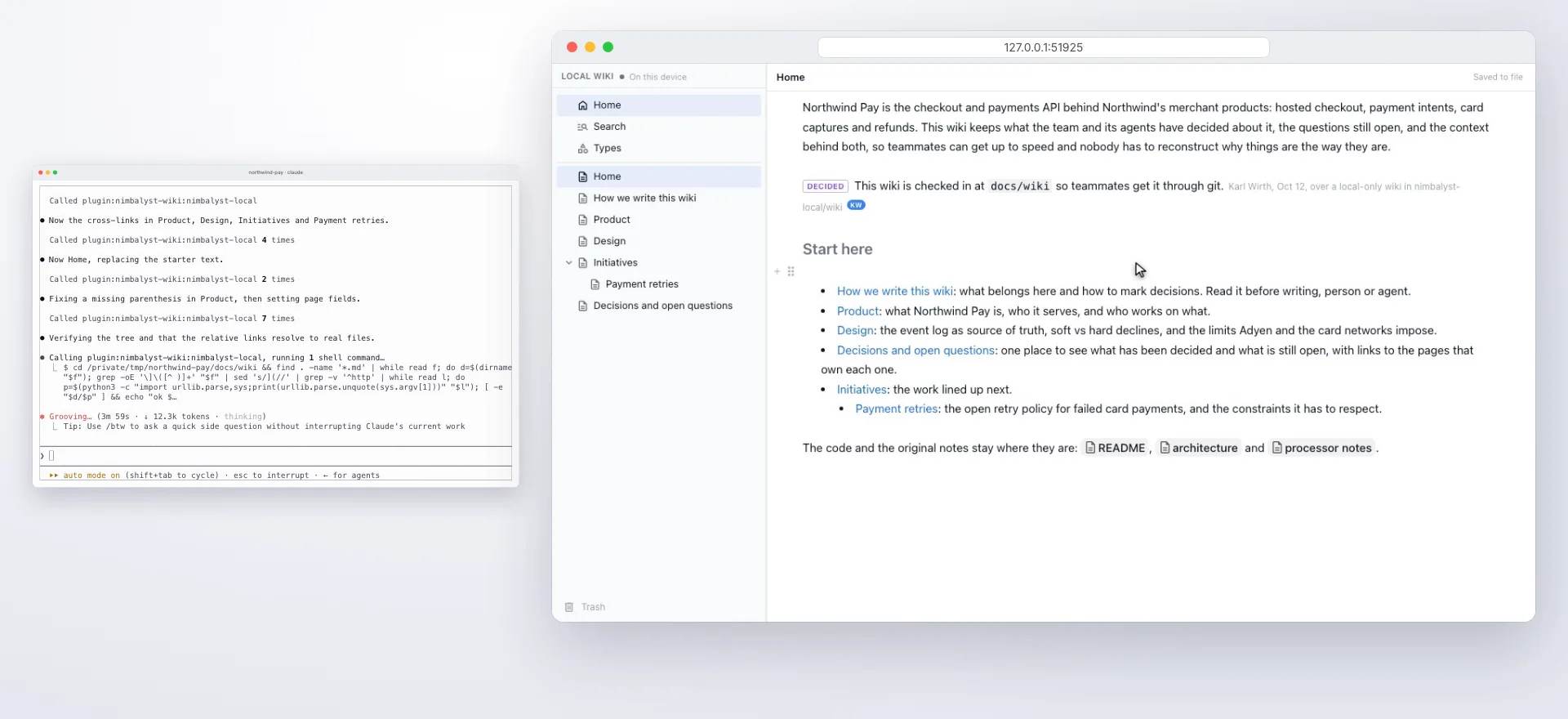
Overwhelmed and disorganized working with agents? Your agent distills what you worked on into a wiki of plain markdown files: a Home page, the decisions you made and why, open questions with owners, and the things you track. You read and edit it in your browser, and every agent you use works on the same files.
| Files in your repo Text pages are markdown files in your project. By default the wiki lives in nimbalyst-local/wiki, kept out of git so it stays private to you. Put it in a checked-in folder like docs/wiki to diff and commit it like code. |
Stays on your machine A local wiki needs no account and no server. The browser view listens on your machine only and is protected by a token. |
| One wiki across every agent Claude Code, Codex, Cowork, Cursor and VS Code all use the same tools on the same files, so you can switch agents without losing what they wrote. |
Drawings, sheets and mockups too Drawings, mind maps, spreadsheets, data models, mockups and canvases are pages too. Each keeps its own file, such as .excalidraw, .csv, .prisma or .mockup.html, so other tools can still open it. |
Watch the demo
https://github.com/user-attachments/assets/ee9437ab-bbeb-4f3d-9d65-78e9afe24f47
The wiki in Claude Code and your browser, from installing the plugin to editing a page.
Get started
You need Node.js 22 or later on your PATH, with the npm that comes with it. You don't need the Nimbalyst app or an account.
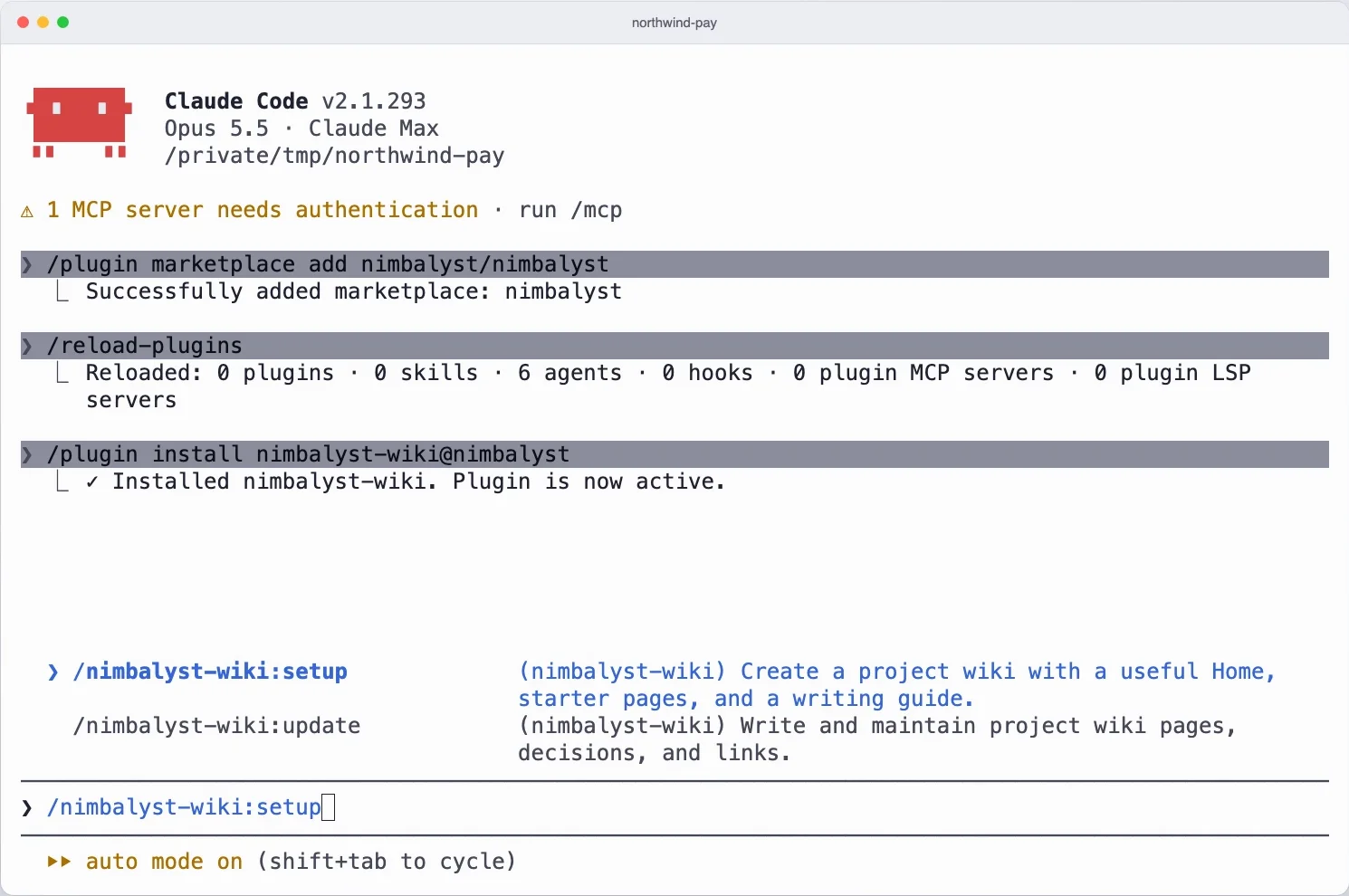
1. Install the plugin
Claude Code
/plugin marketplace add nimbalyst/nimbalyst-wiki
/plugin install nimbalyst-wiki@nimbalyst-wiki
Codex
codex plugin marketplace add nimbalyst/nimbalyst-wiki
codex plugin add nimbalyst-wiki@nimbalyst-wiki
Using Cursor, VS Code, Cowork or the Codex app? See Other agents. The team wiki's add-on comes later, only when you share the wiki with your team.
2. Build the wiki
/nimbalyst-wiki:setup
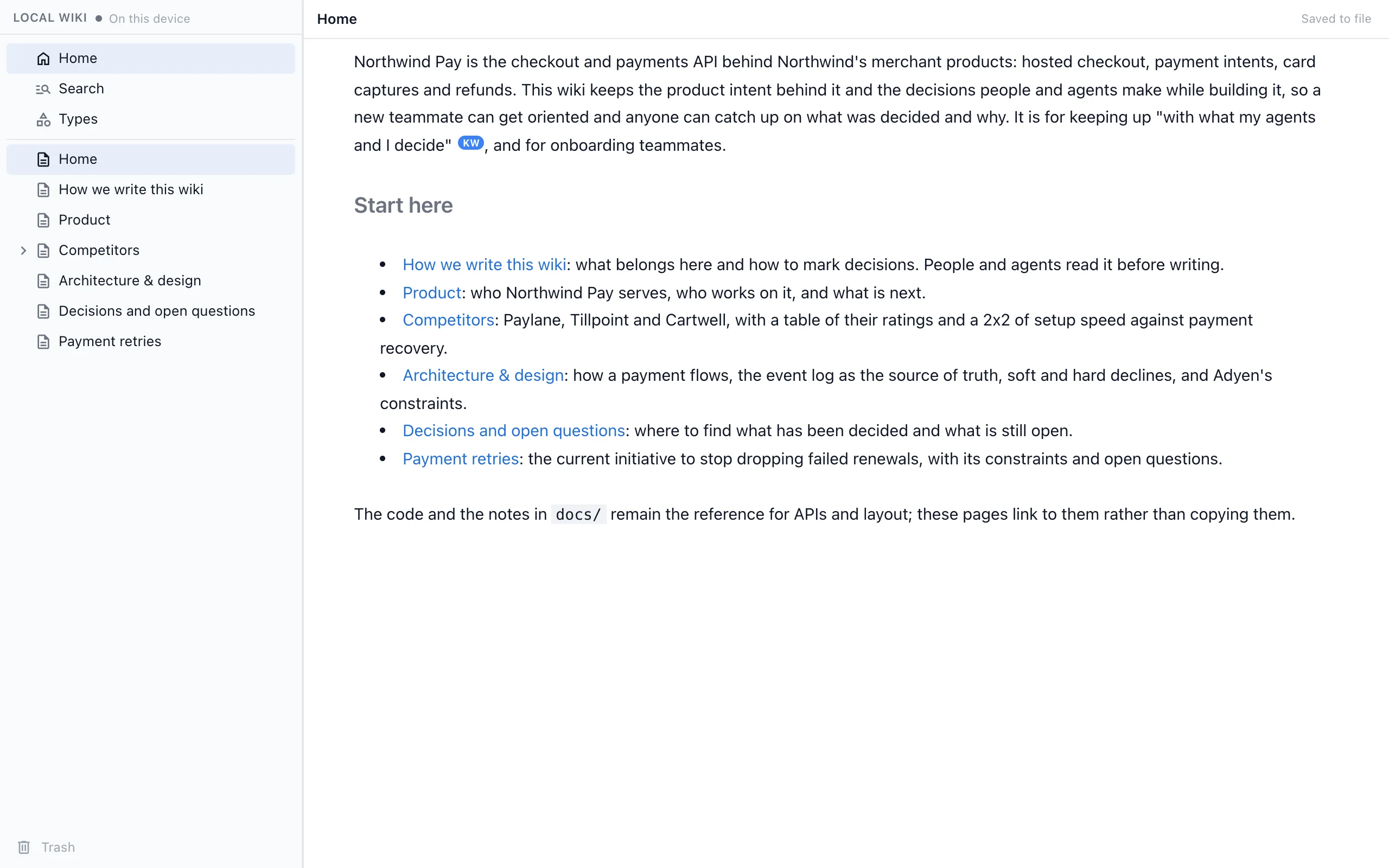
Claude asks who the wiki is for, then writes a Home page, a writing guide and starter pages from your README and docs, as markdown files in your repo. In Codex, ask it to "set up a wiki for this repo." For a short tour first, run /nimbalyst-wiki:start.
3. Capture what you decided
/nimbalyst-wiki:capture
At the end of a session, capture writes each decision into the page it affects, with who decided, when and what was passed over, and records open questions with their owners. Claude Code reminds the agent once to capture after a session with a commit, a plan or several file edits.
4. Open it in your browser
Ask your agent to "open the wiki in my browser," with nothing to install. You get the page tree and the page editor, and you can edit pages, drawings, mind maps, spreadsheets and mockups. Edits save straight to the files, and what your agent writes shows up live. From a terminal, run nim wiki serve (see nim command line).
[!TIP]
Using Codex? Codex does not run plugin hooks, so there is no end-of-session reminder; ask it to "record what we decided in the wiki." Session citations read Claude Code transcripts only, so decisions recorded from Codex carry your name but no quote.
What you can do
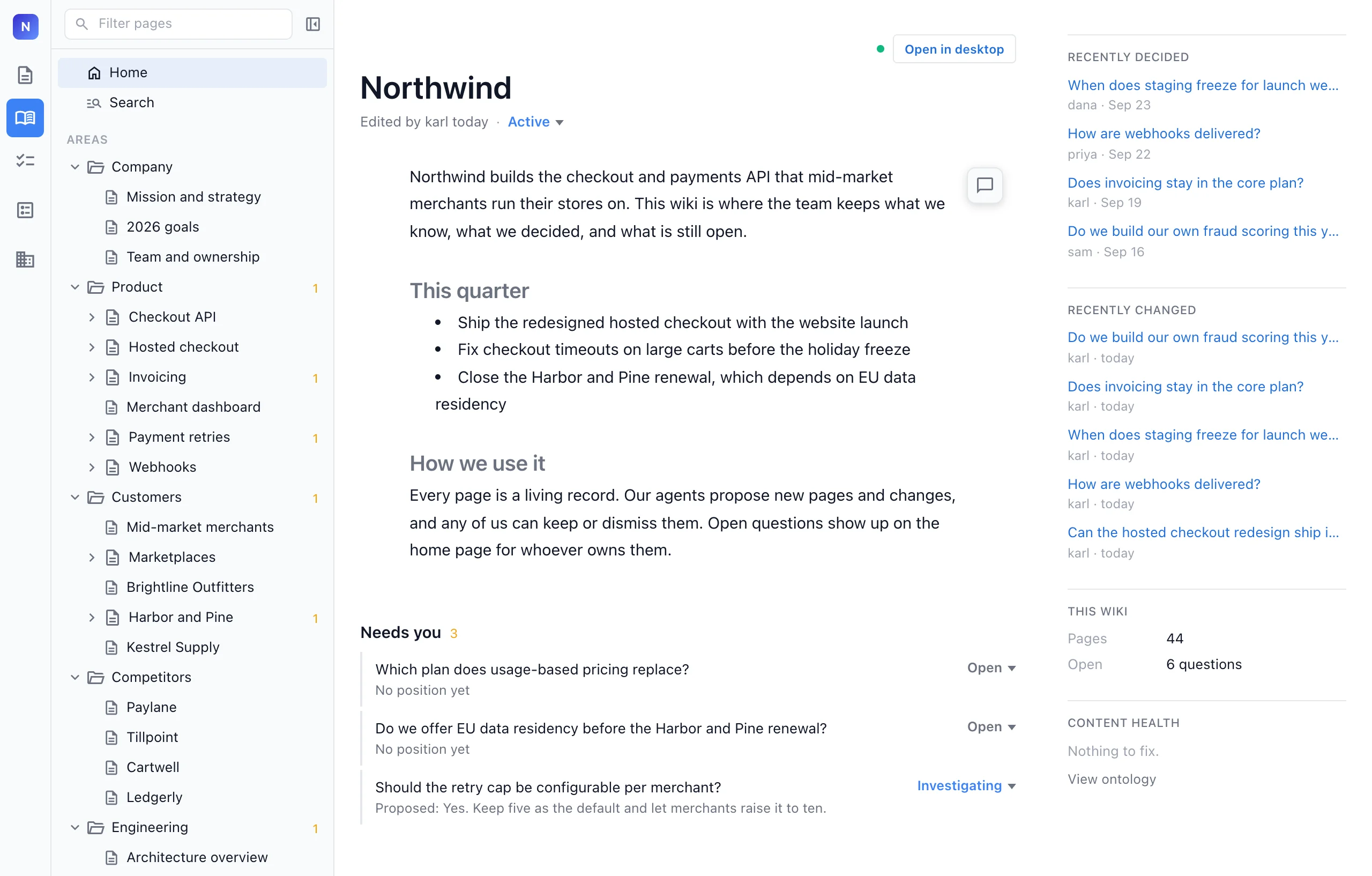
Decisions in the page they affectEach decision is marked with who decided, when and what was not chosen.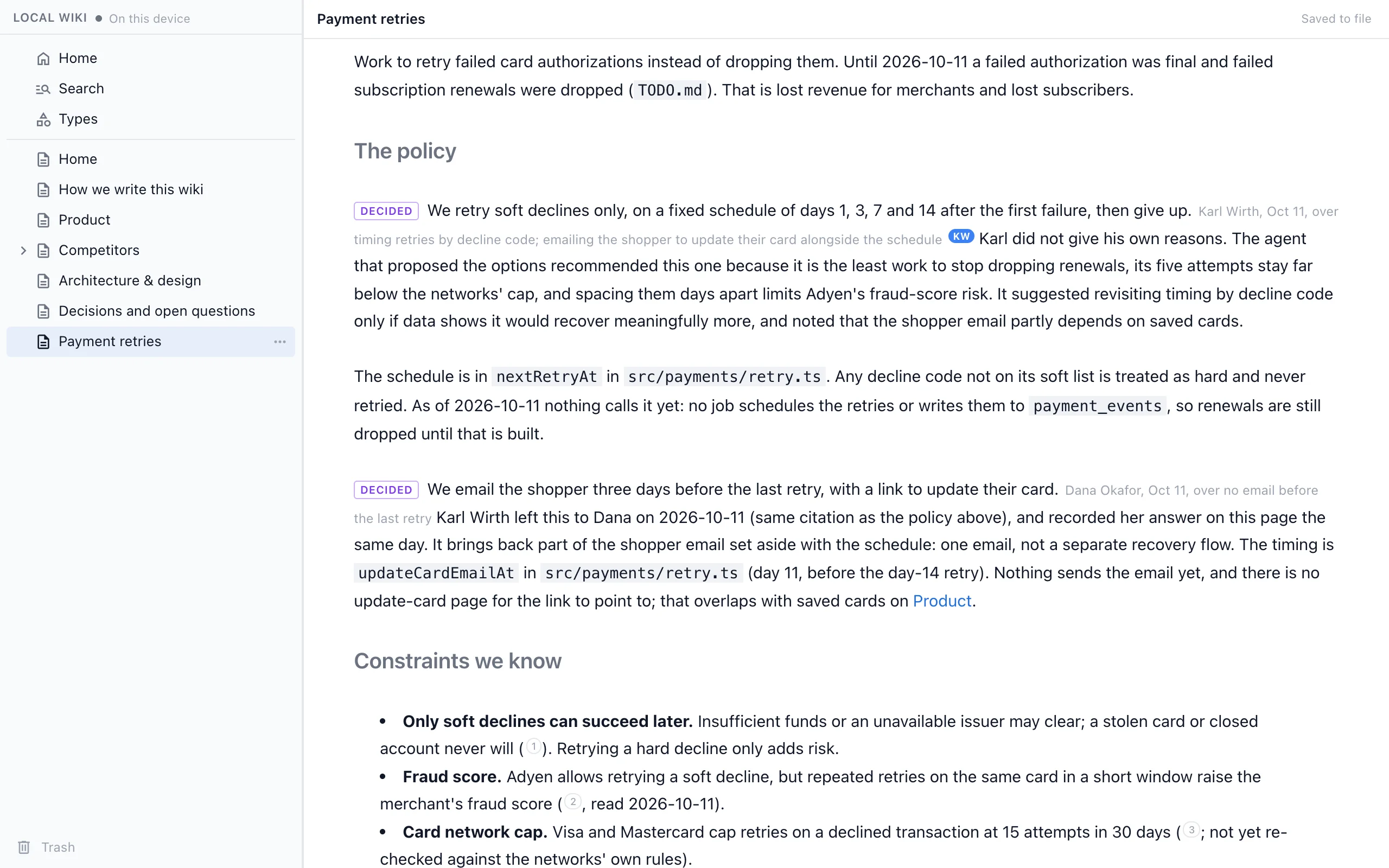
|
What is decided and what is still openAn index page links to every decision and open question, so you can catch up in a few minutes.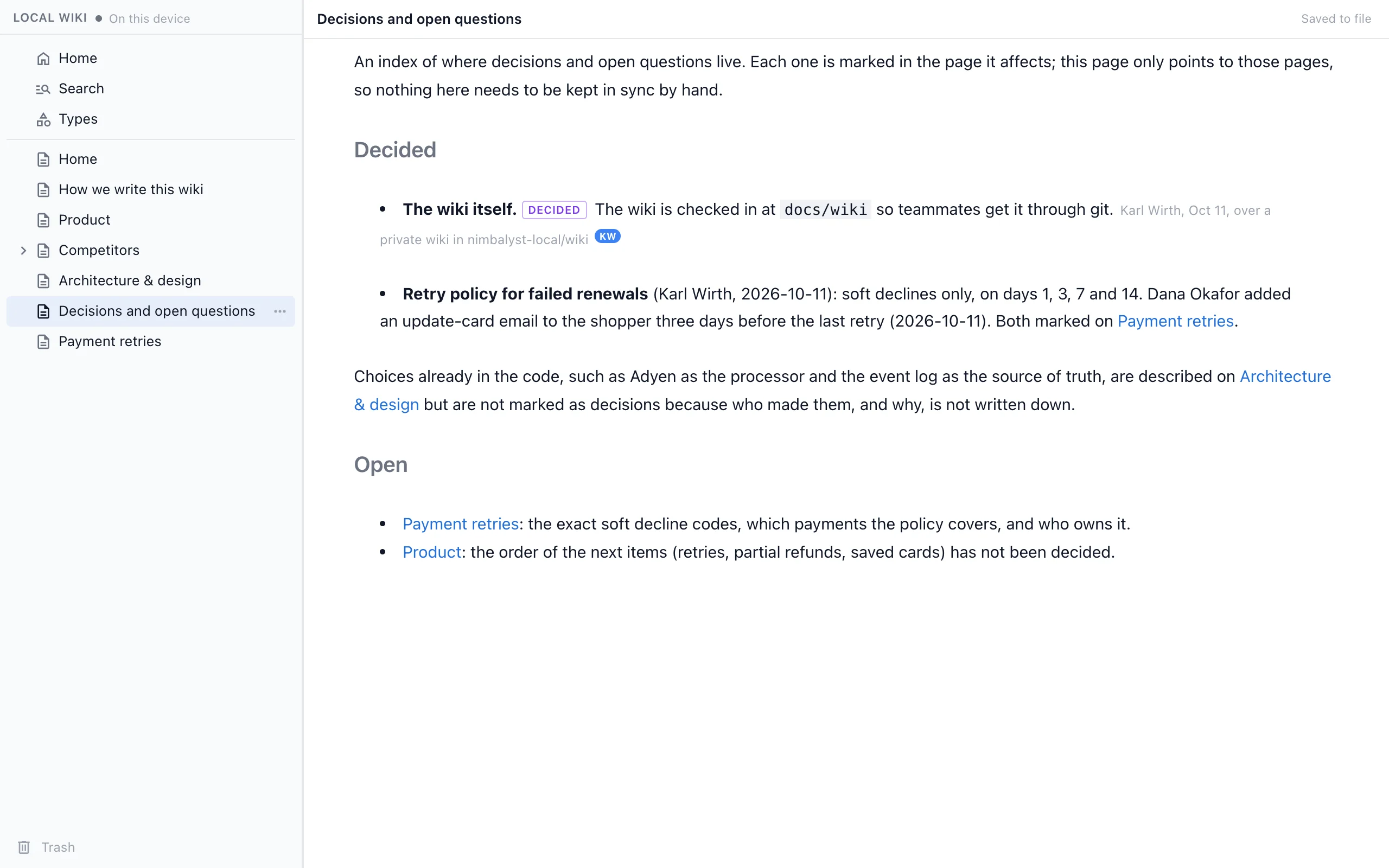
|
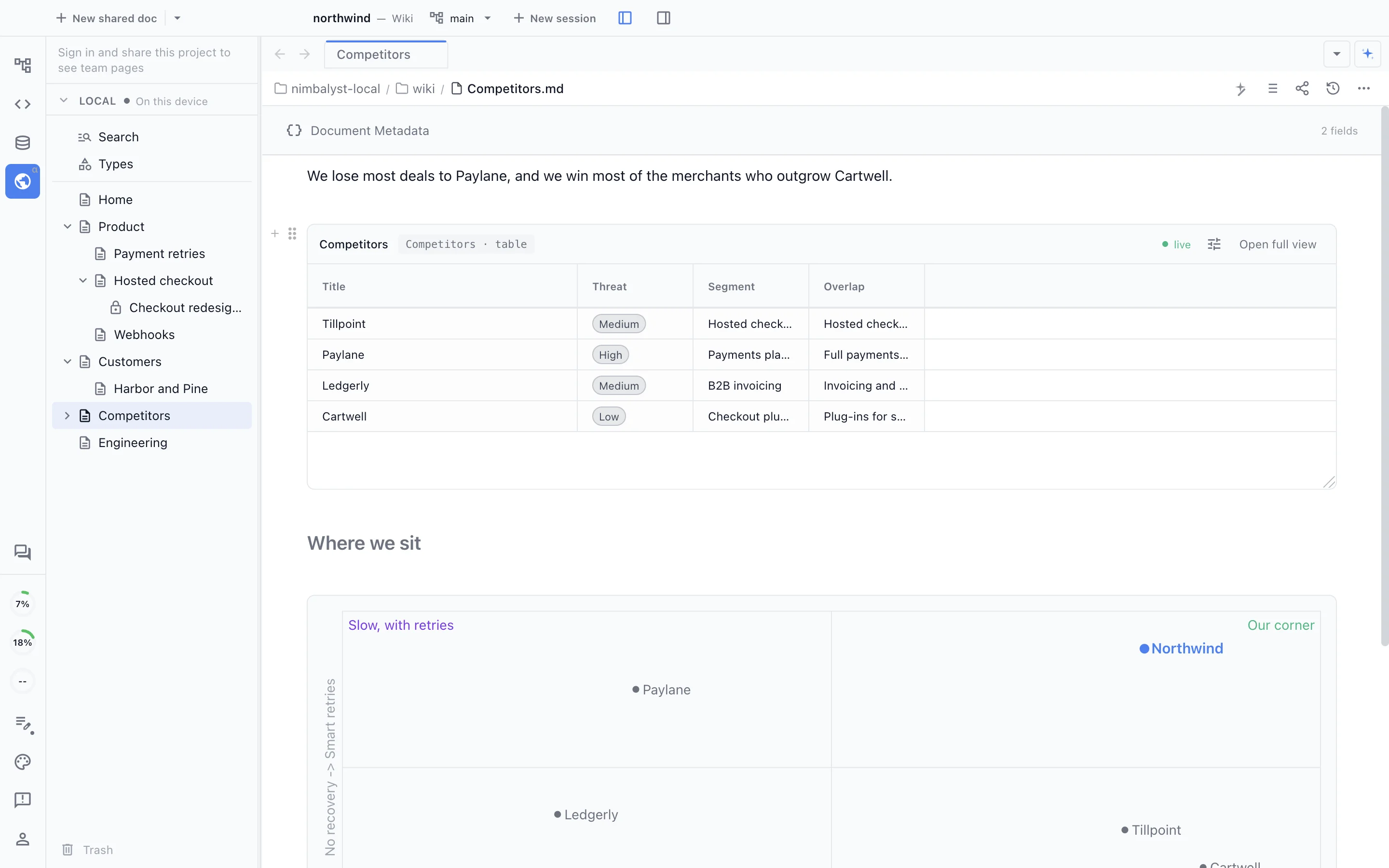
Track things with typesAsk your agent to track competitors, customers or features, and it creates a type with the fields you care about. Each item gets its own page with those fields at the top, and the type keeps a table of every item.Track our competitors in the wiki: category, threat, setup speed and payment recovery for each.
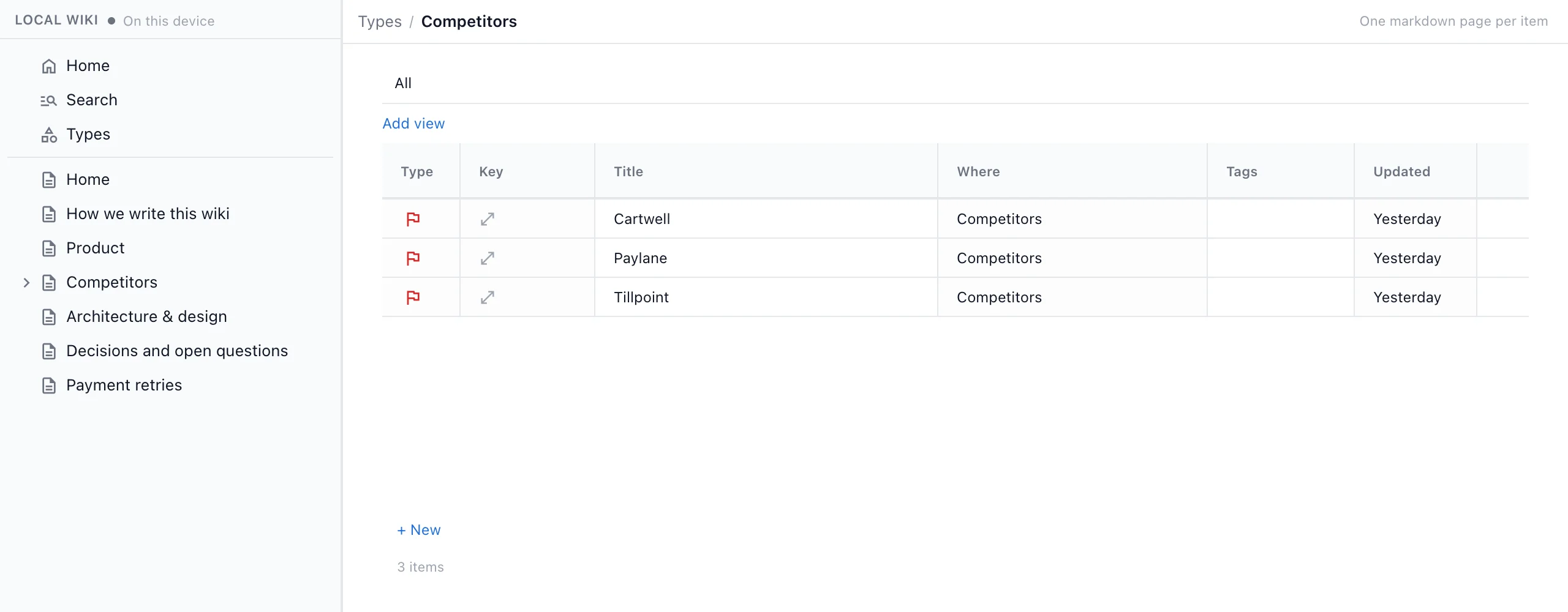
|
You can also just ask: "what does the wiki say about auth?", "add a page about our deploy process", "open the wiki in my browser".
Add drawings, mind maps, spreadsheets and more
Pages hold more than text. Ask your agent for a drawing, a mind map, a spreadsheet, a data model, a mockup or a canvas, and it builds the page in your wiki. Open any of them in your browser to edit, or start one yourself from the New page menu.
DrawingsExcalidraw drawings for flows and architecture. Your agent places the shapes and arrows, and you move them around in the browser.Draw the payment retry flow as a page under Payment retries.
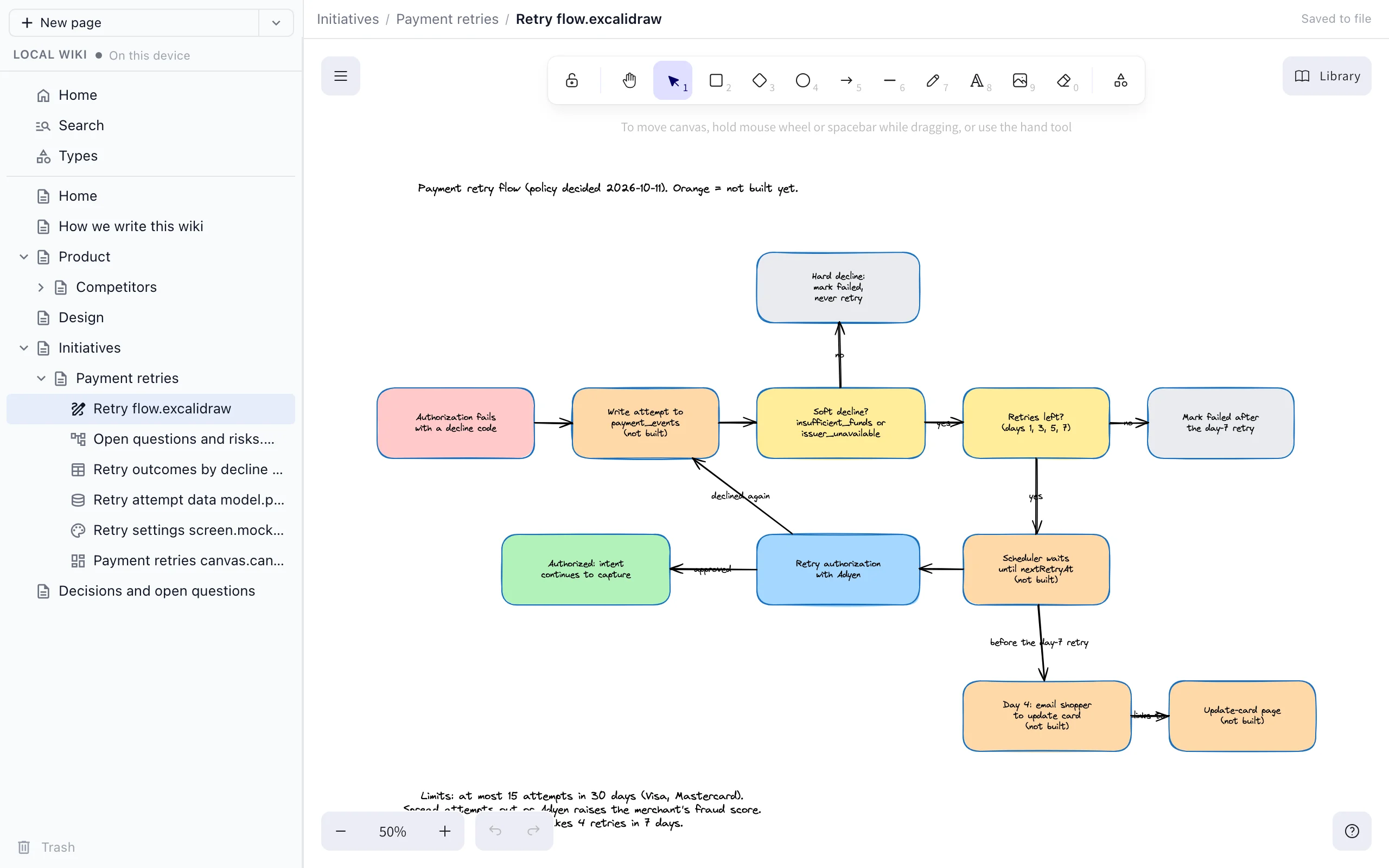
|
Mind mapsMind maps for open questions, risks and brainstorms, with nodes you add, move and fold.Make a mind map of the open questions and risks for retries.
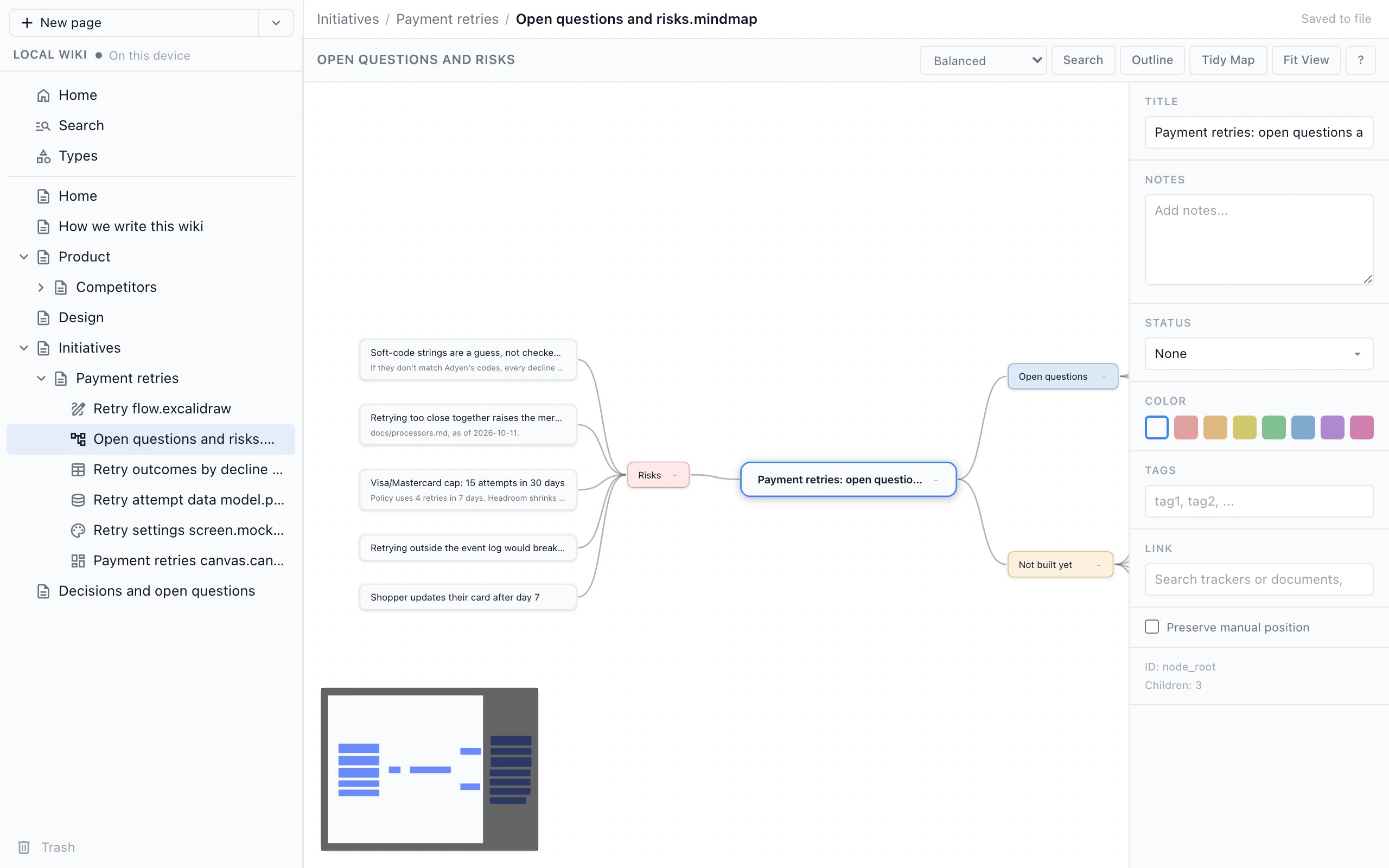
|
SpreadsheetsCSV spreadsheets your agent fills in and you sort and edit like any other sheet.Add a spreadsheet of retry outcomes by decline code.
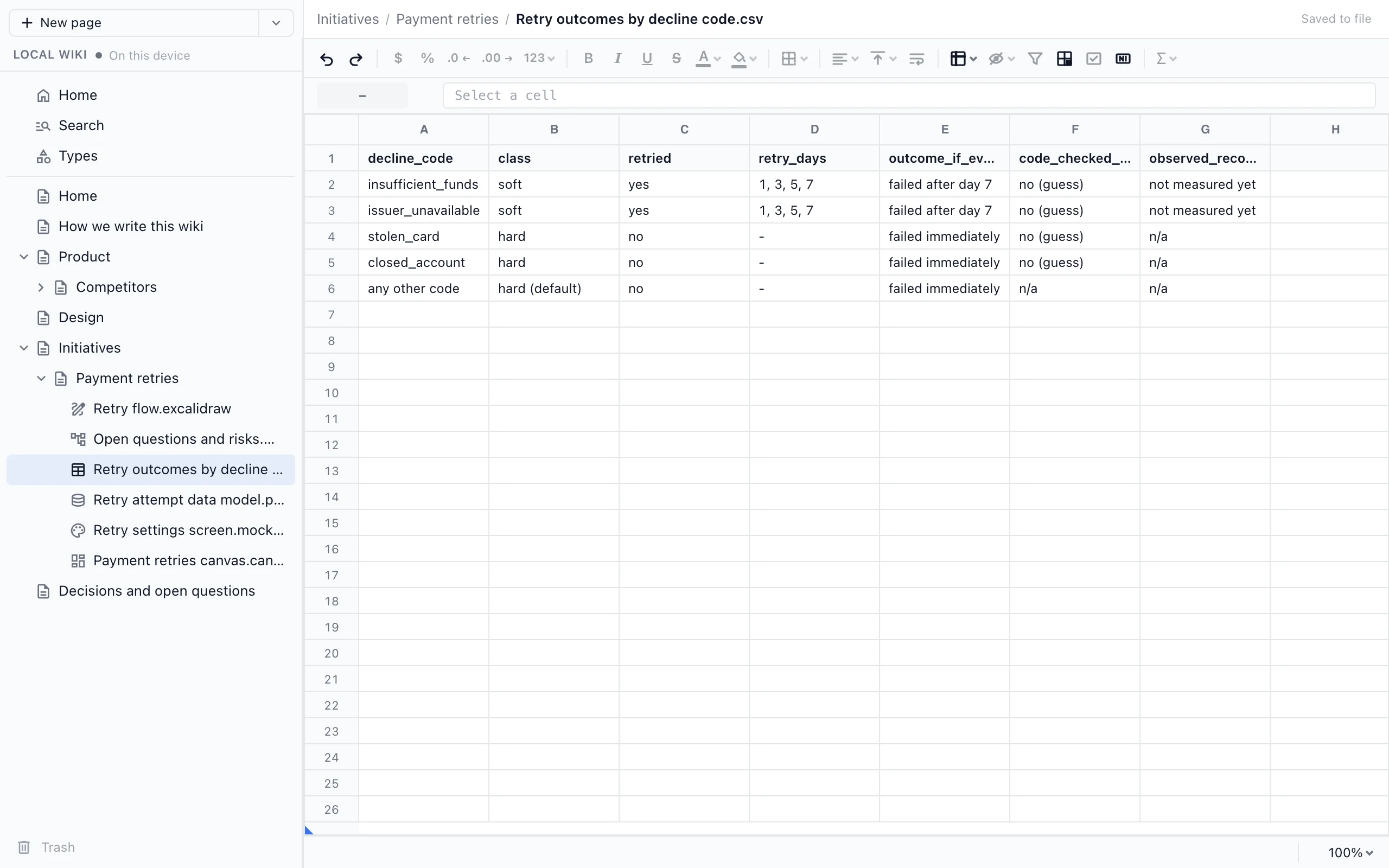
|
Data modelsData models from a Prisma schema, drawn as tables and relations you can rearrange.Model the retry attempts we store as a data model page.
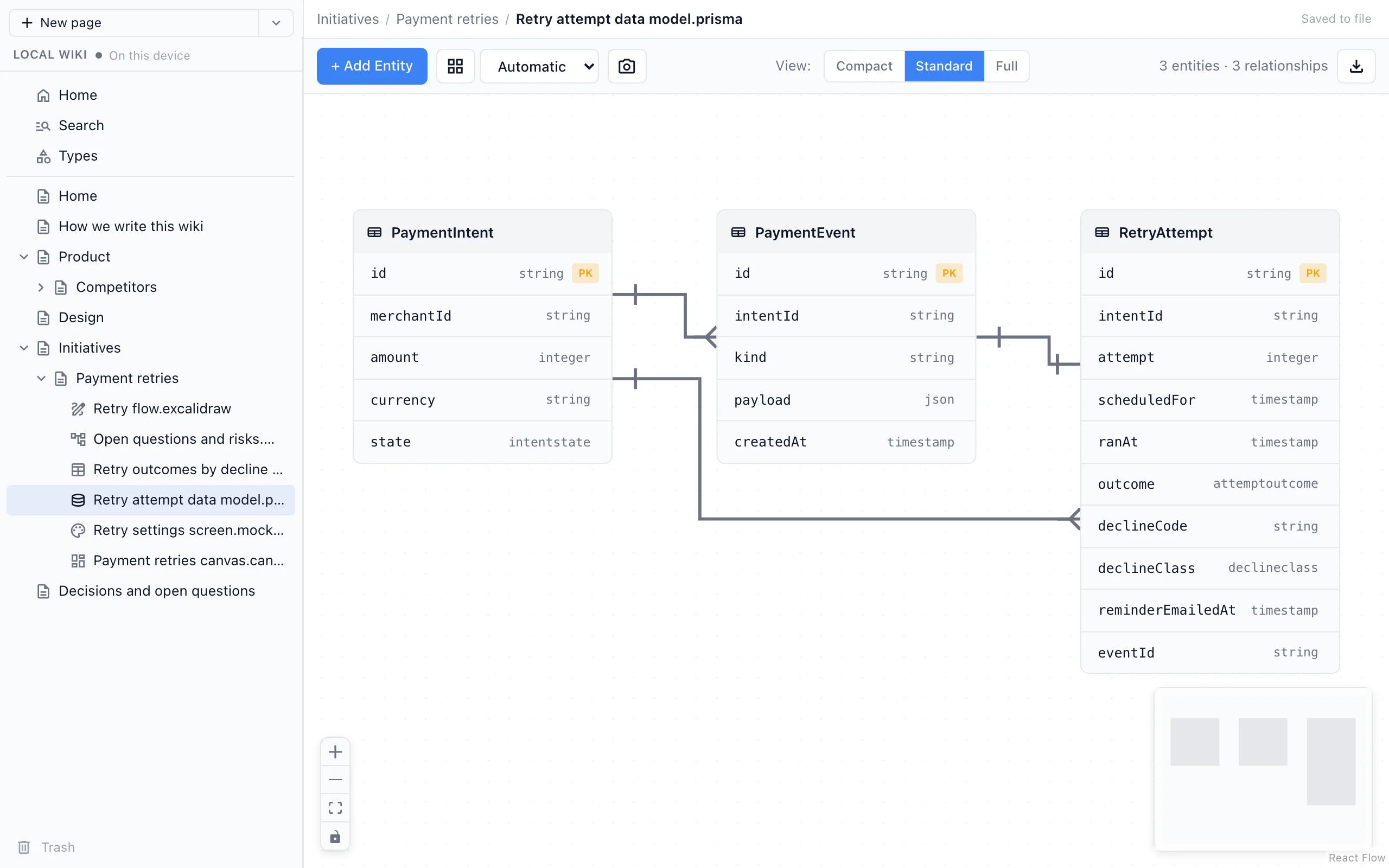
|
MockupsHTML mockups of screens, so a decision about the UI sits next to a picture of it.Mock up the retry settings screen.
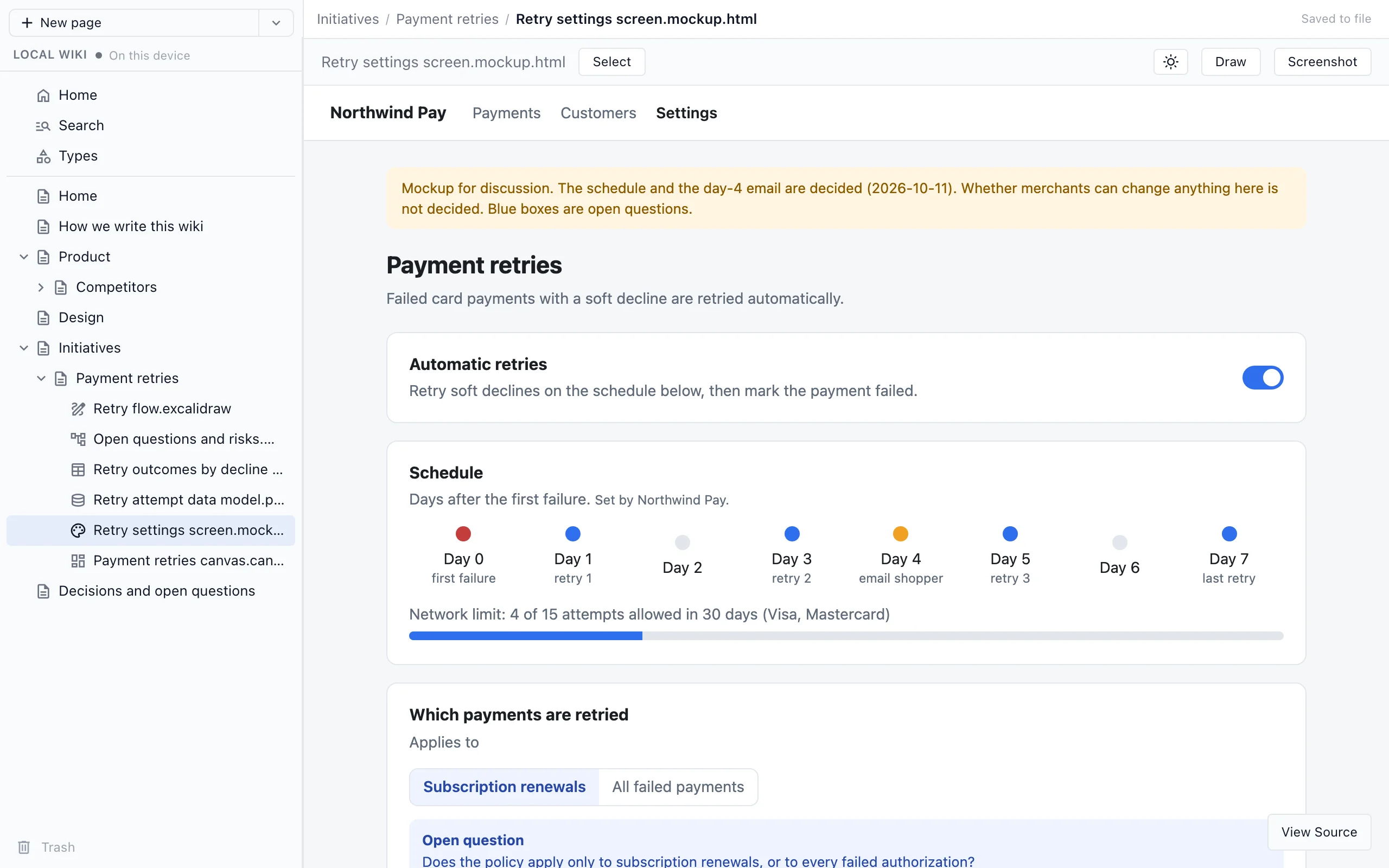
|
CanvasesCanvases that lay pages out side by side, with each card a live view of its page.Put the retry pages together on one canvas.
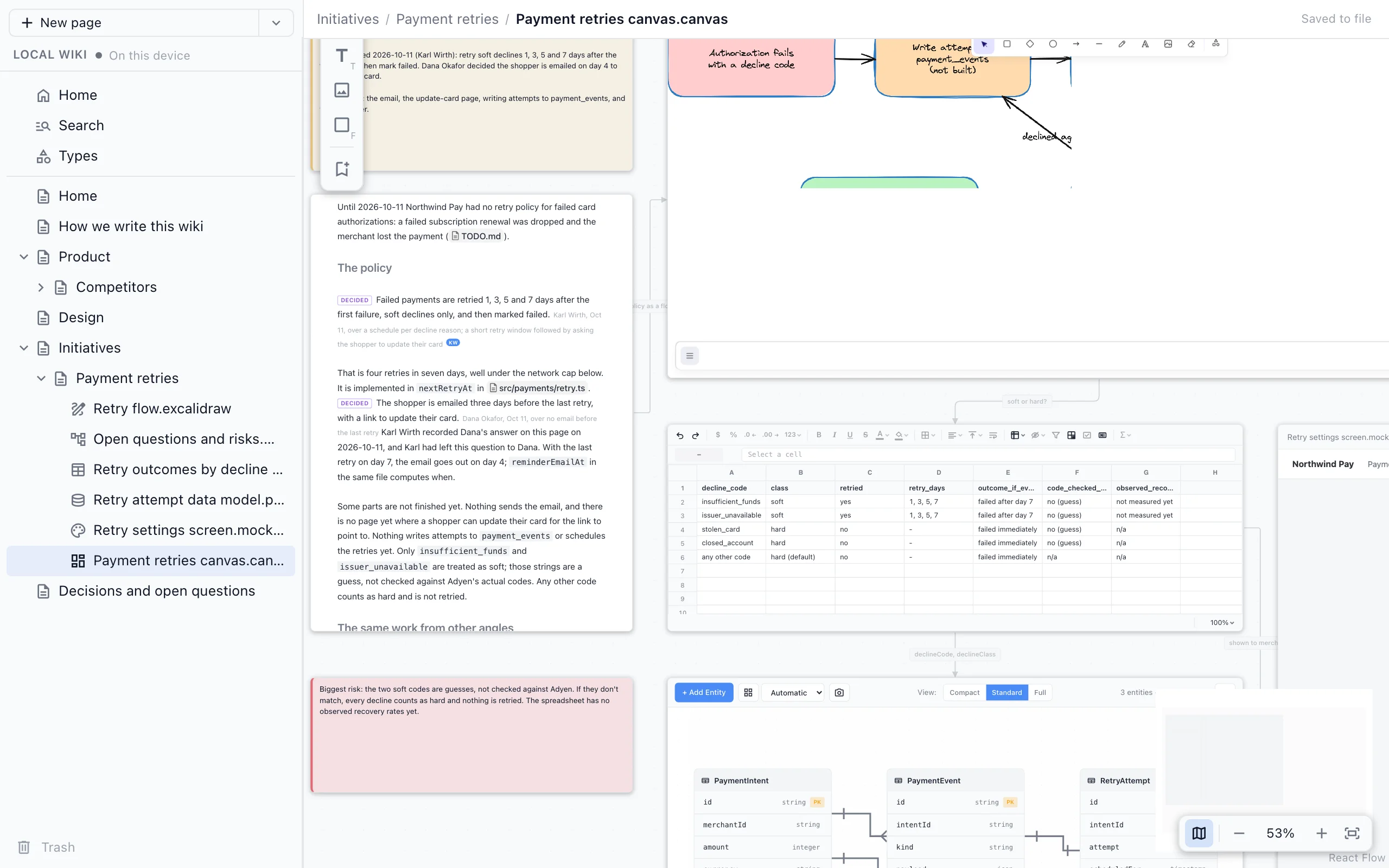
|
Share it with your team
Start with a local wiki and move it to Nimbalyst Teams when your team needs it. Your text pages, typed pages, types and the links between them move to a team wiki where everyone edits the same pages in their browser and every teammate's agents write into it. Your local files stay where they are.
- Sign in with your Google account.
- Create a team and invite teammates by email.
- The team wiki runs on Nimbalyst's servers on Cloudflare, at console.nimbalyst.com.
Upgrade a local wiki to a team wiki
The team wiki uses a separate add-on plugin, nimbalyst-wiki-team. It holds the nimbalyst-team server and the Nimbalyst sign-in, and it is separate so a local wiki never asks you to sign in. You don't need to install it ahead of time: the team skill offers to install it when you share the wiki.
Claude Code
Update the plugin to 0.8.0 or later (see Updating the plugin), then run the team skill, with your team's name if you like:
/nimbalyst-wiki:team Northwind
You can also ask in your own words: "Move this wiki to a team wiki for Northwind." Claude walks you through these steps:
- Install the add-on. Claude asks before it installs
nimbalyst-wiki-team. Claude Code loads plugins when a session starts, so type/exit, then runclaude --continuein the same folder to come back to the same conversation. - Sign in. Run
/mcp, choosenimbalyst-teamand pick Authenticate. A browser page opens where you sign in to Nimbalyst or create an account. Tell Claude when it says you are connected. - Choose a team and project. With no team yet, Claude proposes a name and creates the team, its first project and a Home page, connected to this repository's git remote. Already in a team? Connect to one of its projects or create a new one.
- Approve the move. The local server signs in with the same account so pages go straight from your files to Nimbalyst. Claude opens the approval page and you confirm the code.
- Move. Claude shows what will move, then moves pages, typed pages, types, hierarchy, order, fields and links in one step. If it is interrupted, running it again picks up where it stopped.
- Invite. Claude opens the team wiki in your browser and can invite teammates by email, reading the list back to you first, or create an invite link.
- Commit the connection. Commit
.nimbalyst/wiki.jsonso your teammates' agents find the same project. Claude also offers to add both plugins to this repository's.claude/settings.json, so teammates who open the repository in Claude Code are offered them. Commit that file too.
Your local files are not deleted. They are marked as moved, and the local Home page links to the team wiki.
Codex
Ask Codex to "move this wiki to a team wiki." It follows the same steps. When it installs the add-on, sign in from a terminal, then start a new Codex session in the project and ask it to continue:
codex plugin add nimbalyst-wiki-team@nimbalyst-wiki   # Codex runs this for you after you agree
codex mcp login nimbalyst-team
From a terminal
The nim command line moves the wiki without the add-on:
nim login
nim wiki team-create "Northwind"
nim wiki move-to-team --dry-run    # preview what will move
nim wiki move-to-team
Cursor, VS Code, Cowork and other agents
These agents don't use plugins, so there is no add-on to install. Move the wiki from a terminal with the nim commands above, or ask your agent to run them for you. nim login opens a browser page where you sign in to Nimbalyst, and nim wiki move-to-team ends with a link to the team wiki's Home page.
To work on the team wiki from your agent afterward, add the team server to the same MCP config as nim mcp (see Other agents). Your agent asks you to sign in to Nimbalyst the first time it connects.
{
  "mcpServers": {
    "nimbalyst-team": {
      "type": "http",
      "url": "https://sync.nimbalyst.com/mcp"
    }
  }
}
If you were invited
An invite email or link signs you in to Nimbalyst in the browser and opens the team's wiki. You can read, edit and comment there with nothing installed.
To use the wiki from your agent too, add the marketplace as in Get started, install both plugins and sign in with the same email:
- Claude Code:
/plugin install nimbalyst-wiki@nimbalyst-wikiand/plugin install nimbalyst-wiki-team@nimbalyst-wiki(or accept them when Claude Code offers them for the repository), restart Claude Code, run/mcp, choosenimbalyst-teamand Authenticate. - Codex:
codex plugin add nimbalyst-wiki@nimbalyst-wikiandcodex plugin add nimbalyst-wiki-team@nimbalyst-wiki, thencodex mcp login nimbalyst-team.
If the repository has a committed .nimbalyst/wiki.json, your agent uses that team project right away; otherwise it finds the project through the repository's git remote.
Common questions
What should go in it?
Decisions and their reasons, open questions, the preferences and constraints people set, and hard-won lessons. The work itself stays in your sessions, code and trackers, and the wiki links to it. It's the strategic view.
Where does my wiki live?
In your project, in nimbalyst-local/wiki by default, which git ignores. Choose a folder such as docs/wiki to check it in and share it through git.
Do I need an account?
Not for a local wiki. You only sign in to Nimbalyst when you share the wiki with your team.
Do I need the Nimbalyst app?
No. Your agent, the nim CLI and the browser view give you a complete wiki, including drawings, mind maps, spreadsheets, data models, mockups and canvases you can edit in the browser. Open it in the Nimbalyst app when you want the wiki in the same place as your sessions and code.
What is the Nimbalyst app?
Nimbalyst is the visual workspace for Codex and Claude Code. It runs your agents in parallel sessions and gives you visual editors for the work around them, including tasks, docs, diagrams, mockups, spreadsheets and code, all deeply linked. Every AI edit arrives as a diff you can review. The desktop app is free and open source for individuals, on macOS, Windows and Linux, and Nimbalyst Teams makes it multiplayer.
Is it the same wiki as the one in the Nimbalyst app?
Yes. The app's Local wiki is the same folder of files, so you can start in your agent and open the app later without moving anything.
Reference
Skills
| Skill | What it does |
|---|---|
/nimbalyst-wiki:setup |
Builds the first version of the wiki: Home, the writing guide ("How we write this wiki") and starter pages. It can also define types. Running it again fills gaps and never duplicates or overwrites what people wrote. |
/nimbalyst-wiki:capture |
Records what this session decided, answered and left open, in the page each one affects. If nothing is worth keeping, it says so. |
/nimbalyst-wiki:recall |
Answers what the wiki says or decided about a question or an area, and which pages cover the code you are about to change. The agent also uses it unasked for a "why did we..." question. |
/nimbalyst-wiki:team |
Moves the wiki to Nimbalyst Teams, installing the nimbalyst-wiki-team add-on the first time, and invites teammates. See Upgrade a local wiki to a team wiki. |
/nimbalyst-wiki:start |
A short tour of the plugin. |
/nimbalyst-wiki:connect |
Chooses which wiki the session uses and connects a repository to a team project. Runs on its own when needed. |
/nimbalyst-wiki:update |
The writing guide the agent follows for every wiki edit. You rarely call it yourself. |
What the plugin installs
Two MCP servers, listed by /mcp in Claude Code and codex mcp list in Codex:
| Server | What it does |
|---|---|
nimbalyst-local |
The local wiki and its browser view. Runs on your machine. When you move the wiki to a team, it signs in to Nimbalyst to copy the pages. |
nimbalyst-session |
Lets the agent cite what you typed in this session when it records a decision. Reads only this session's transcript, on your machine. |
The team wiki's server, nimbalyst-team, is in a separate add-on plugin, nimbalyst-wiki-team, so a local wiki never asks you to sign in. /nimbalyst-wiki:team installs it when you share the wiki. If you used the team wiki with 0.7.0 or earlier, install the add-on once after updating.
In Claude Code the plugin also adds two hooks. At the start of a session it tells the agent what the local wiki covers and which pages cover files you have changed. When a session with real work ends, it reminds the agent once to run /nimbalyst-wiki:capture, naming the pages the session's changes touched.
The plugin itself holds no code. Both servers and both hooks run the @nimbalyst/cli package from npm through npx, pinned to the plugin's version, so its source is published with each release. The first session downloads it, including the browser app; later sessions use npm's cache and work offline.
What it connects to
- registry.npmjs.org, through
npx, to download@nimbalyst/cliat the plugin's version the first time, or after npm's cache is cleared.npxfollows your npm configuration, including a company registry mirror. - raw.githubusercontent.com, at most once a day, to read the latest plugin version from this repository (see Updating the plugin).
- sync.nimbalyst.com and console.nimbalyst.com, only for the team wiki: when you sign in, share or move the wiki to a team, or use the
nimbalyst-teamserver.
Your pages, your sessions and your code stay on your machine unless you move the wiki to a team.
Which wiki the agent uses
At the start of wiki work the agent decides once per session:
- If you name one ("the team wiki", "the local wiki"), it uses that.
- If the repository has a local wiki, it uses it. If the repository is also connected to a team project, it asks which.
- Otherwise it checks for a team project connected to this repository's git remote. If there is none, it offers once to start a local wiki: private in this checkout, checked in under a folder you choose, or not now.
It never writes the same thing to both. Team data never goes through the local server.
How decisions are recorded
A decision is a marked sentence in the page it affects:
[We store and evaluate flags in Flagship.]{decided by="Dana Lee" [email protected] on=2026-09-30 over="our own Durable Object store"}
- Open questions use the same form with
open. - When your own words support a statement, the agent adds a citation copied from the session transcript. It never invents a decision, a reason or a quote.
- On a local wiki the name and email come from
git config user.nameandgit config user.email. - Set
NIMBALYST_WIKI_NUDGE_MIN_EDITSto change how many edits trigger the capture reminder.
Updating the plugin
Once a day the plugin checks GitHub for a newer version, and if there is one, the agent mentions it the next time it uses the wiki. The check sends nothing about you or your wiki. Set NIMBALYST_WIKI_NO_UPDATE_CHECK=1 to turn it off.
With the nim CLI installed, nim update updates nim and this plugin for Claude Code and Codex in one step, checks that each one is on the new version, and says what to restart. nim update --check only reports what is out of date, and nim doctor shows which versions are installed.
Claude Code updates this marketplace on its own only if you turn on auto-update for it (/plugin, then Marketplaces). The Claude desktop app runs Claude Code with its updater turned off, which also stops plugin auto-update there unless FORCE_AUTOUPDATE_PLUGINS=1 is set. Updating by hand works everywhere; run both commands, then restart Claude Code:
claude plugin marketplace update nimbalyst-wiki
claude plugin update nimbalyst-wiki@nimbalyst-wiki
Codex: run codex plugin marketplace upgrade nimbalyst-wiki and start a new session.
A session that is already open keeps the version it started with: run /reload-plugins or start a new session in Claude Code, and start a new session in Codex.
Coming from 0.3.0? That version was installed from the nimbalyst/nimbalyst marketplace. Switch to this one so you get updates and the browser view, then restart Claude Code. Your wiki is files in your repository, so nothing in it changes.
/plugin uninstall nimbalyst-wiki@nimbalyst
/plugin marketplace remove nimbalyst
/plugin marketplace add nimbalyst/nimbalyst-wiki
/plugin install nimbalyst-wiki@nimbalyst-wiki
Other agents
Cursor, VS Code, Cowork, the Codex app and any other MCP agent.
These agents use the wiki through nim mcp, the same local server the plugin runs. Install the nim CLI, then add the server to your agent's MCP config:
npm install -g @nimbalyst/cli
| Agent | Config file | Workspace argument |
|---|---|---|
| Cursor | .cursor/mcp.json (key mcpServers) |
${workspaceFolder} |
| VS Code, Copilot in agent mode | .vscode/mcp.json (key servers) |
${workspaceFolder} |
| Cowork | The Claude desktop app's MCP config (key mcpServers) |
/path/to/your/project |
| Codex app, any MCP client | Your client's MCP config | Your project path |
{
  "mcpServers": {
    "nimbalyst-wiki": {
      "command": "nim",
      "args": ["mcp", "--workspace", "${workspaceFolder}"]
    }
  }
}
If the app cannot find nim, use the full path that which nim prints. Then ask the agent to "start a wiki for this repo." A wiki started in one agent is ready in the others.
To share the wiki with your team from these agents, see Cursor, VS Code, Cowork and other agents.
These agents get the wiki tools but not the plugin's skills (setup, capture and the writing guide), so ask for what you want in your own words. Opening the wiki in the browser works from them too: the browser app installs with nim.
Installing the plugin does not update this nim, and updating nim does not update the plugin. Once a day nim mcp checks npm for a newer nim, and the agent mentions it the next time it uses the wiki. Run nim update in a terminal, then start a new session so the agent restarts the server.
nim command line
For scripts and your own terminal. You don't need it to use the plugin. nim wiki works on both the local and the team wiki.
nim wiki init                         # create the wiki in nimbalyst-local/wiki (ignored by git)
nim wiki init --location docs/wiki    # or in a checked-in folder
nim wiki list                         # the page tree
nim wiki read "Product"               # a page by title, path or id
echo "..." | nim wiki write "Notes" --create
nim wiki search "deploy"
nim wiki move "Notes" --parent "Product"
nim wiki serve                        # open the wiki in your browser
nim wiki move-to-team --dry-run       # preview moving the local wiki to Teams
nim update                            # update nim and the Claude Code and Codex plugins
nim doctor                            # which versions are installed, and from where
list,read,moveandsearchuse the local wiki when the project has one, and the team wiki otherwise.--teamor--localpicks one.writereplaces a page body from stdin or--file. With--expected-version(fromread --json) it refuses to overwrite a page that changed since you read it.nim wiki serveuses the browser app that installs withnim.--no-openprints the URL instead of opening a browser;--portpicks the port.- In a terminal,
nimprints one line when a newer version is published (checked at most once a day, in the background). nim tracker list/get/create/updatework on typed pages in the local wiki.- Team commands (
status,edit,create,itemsand more) neednim login.nim --helplists them all.
The files
The wiki is plain files you can read, edit, diff and commit without any Nimbalyst tool. The full contract is FORMAT.md.
nimbalyst-local/wiki/
  .nimbalyst-wiki.yaml          format version
  Home.md
  How we write this wiki.md
  Product.md
  Personas.md
  Personas/                     a page's children live in a folder of the same name
    CMO.md
    CMO.activity.jsonl          change log of a typed page
  Partners.csv                  a table type: one row per item
  .trash/                       deleted pages, restorable
| Pages | <Title>.md with flat frontmatter: id (never changes), order, and for a typed page type plus its fields. Renaming a page renames its file and its child folder. |
| Links | Relative paths that carry the target's id, [CMO](Personas/CMO.md "id=01M4..."), so they work on GitHub and in any editor. Nimbalyst rewrites them when a page moves. |
| Types | Defined in .nimbalyst/trackers/<type>.yaml, stored as one page per item (storage: pages) or rows of one CSV (storage: table). |
| Trash | Deleting moves files to .trash/, from where a page can be restored. |
| Location | The folder named in .nimbalyst/local-wiki.json ({ "location": "docs/wiki" }), else nimbalyst-local/wiki. Git worktrees share the main checkout's wiki. |
Agents can edit the files directly too. The MCP tools and nim add ids, ordering, link rewriting on moves, type fields, CSV rows and trash.
Feedback, issues and contributing
The Nimbalyst Wiki is built from the main Nimbalyst repository and published here with each release (the SOURCE file names the commit). Everything about the wiki is handled in this repository:
- Star this repository to follow releases and help other people find it.
- Report a bug or request a feature in Issues.
- Send a pull request here. We apply accepted changes to the source in the main repository, credit you, and the next release brings them back here, so the pull request is closed rather than merged.
CONTRIBUTING.md shows where each part of this repository comes from. For the Nimbalyst app itself, use the main repository.
Open it in the Nimbalyst app
The same files open in the free, open-source Nimbalyst app, with live tables, 2x2s, mockups and diagrams you edit in place, next to your sessions and code. Open Wiki in the navigation gutter (Cmd+D) and choose Local. Nothing moves: the app reads the same folder your agent writes to. Inside the app, agents already have the wiki tools, and the plugin stands aside so each page has one write path.
Built with love by the Nimbalyst team
The Nimbalyst Wiki is part of Nimbalyst, the open-source visual workspace for Codex and Claude Code, and is built from our main repository. For anything about the wiki, star this repository, file issues and send pull requests here. MIT licensed.
Star the Nimbalyst Wiki · Report an issue · Contributing · Nimbalyst on GitHub
Yorumlar (0)
Yorum birakmak icin giris yap.
Yorum birakSonuc bulunamadi