agent-think-map
Health Gecti
- License — License: MIT
- Description — Repository has a description
- Active repo — Last push 0 days ago
- Community trust — 10 GitHub stars
Code Basarisiz
- process.env — Environment variable access in apps/demo/vite.config.ts
- exec() — Shell command execution in bin/cli.mjs
- process.env — Environment variable access in bin/cli.mjs
Permissions Gecti
- Permissions — No dangerous permissions requested
Bu listing icin henuz AI raporu yok.
Watch any AI agent think. Embeddable visual tracing for chain-of-thought, skills, tool calls, and MCP - live inside the chat UI you already ship. No account, no API key.

agent-think-map
See the agent think — chain-of-thought, skills, tools, and MCP.
Model-agnostic. Same canvas in the chat UI you ship, or beside Claude Code.
Live demo
·
npx agent-think-map claude --install
·
no API key




Two doors, same canvas
The viewer does not care which model ran the turn. Model is a column on the session, not a vendor lock.
| You | Door |
|---|---|
| Shipping a chat UI | Embed the canvas — four lines, SSE / JSON. Claude, Codex, OpenAI, or your own loop. |
| Living in Claude Code | CLI studio — one command, graph in the browser, Claude stays in the terminal. |
Other CLIs are not one-command yet. If you already emit the protocol (or use TraceAdapter), you do not wait for a new adapter to see the graph.
Claude Code CLI
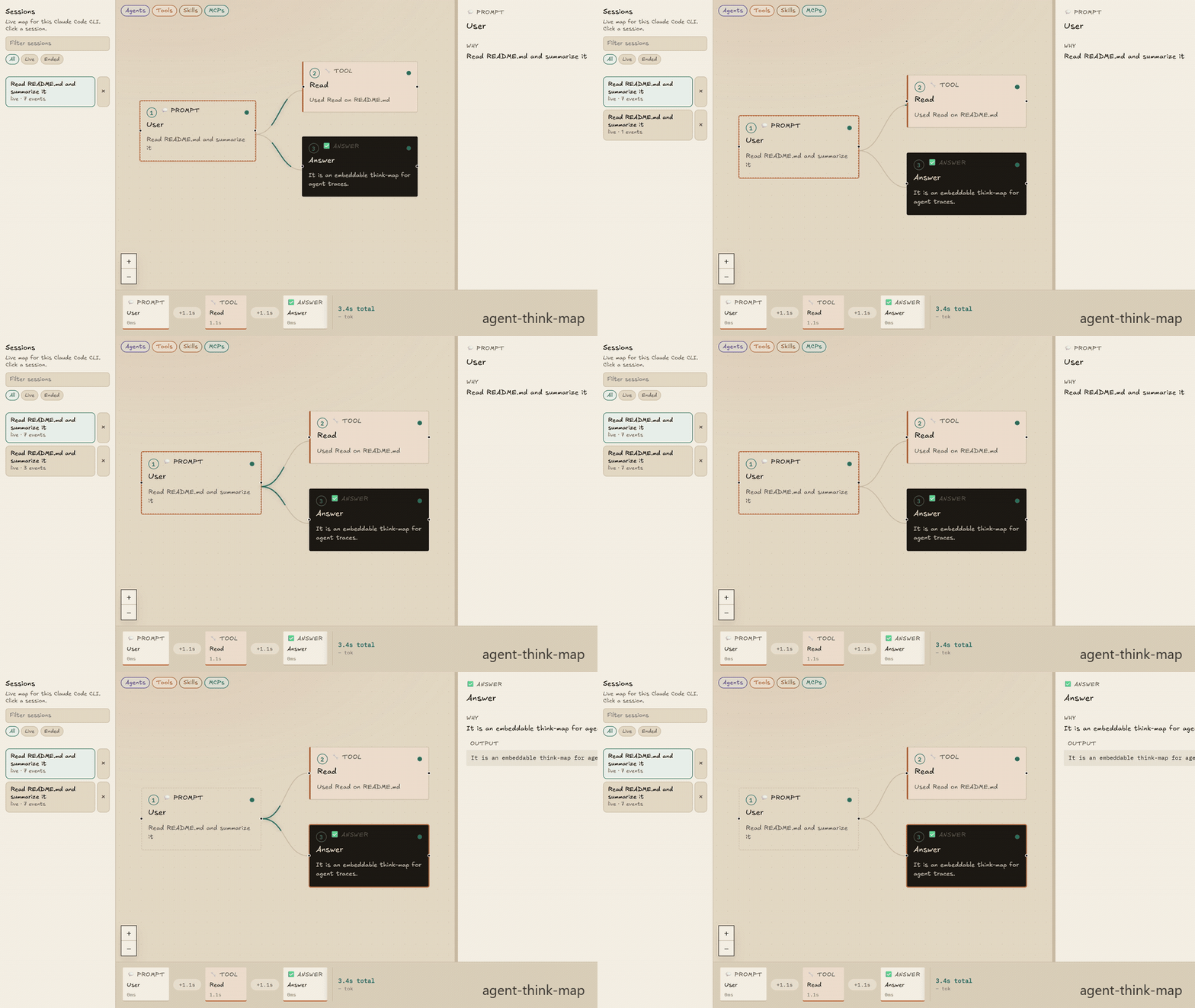
The same live canvas, beside the terminal. Claude Code stays in the CLI. A local studio lists sessions and draws the route as hooks fire.
npx agent-think-map claude --install
- Keep that process running. A browser tab opens
http://127.0.0.1:3334. --installwrites HTTP hooks into this folder’s.claude/settings.local.json(the folder where you startclaude, 5s timeout, never blocks Stop). SessionStart is a command hook that forwards the model name, because Claude Code does not send that event over HTTP.- Restart
claudeif it was already open. Ask it to use a tool (Read README.md). The graph grows in the browser.
--port 3334 · --no-open · --smoke (sample turn, no Claude) · --print-hooks
The one-command CLI install is Claude Code today. Other CLIs are not wired yet. This studio is the same viewer as the embed.
Studio
| Surface | What it does |
|---|---|
| Session rail | Search sessions. Filter live / ended, model, and effort. Token totals when the transcript reports them. Remove a session from the list. |
| Canvas | Prompt → thinking → skill / tool / MCP / subagent → answer. Filter Agents, Tools, Skills, MCPs. Chronological badges reset on each user prompt. |
| Inspector | Click a node: why it ran, pretty-printed input and output (SQL / JSON), duration. Selection stays on what you clicked. |
| Timeline | Scrub the turn. Elapsed time and compact token totals stay on the right. |
A Stop (end of a turn) is not the end of the Claude session. The rail marks a session ended on Claude’s SessionEnd. Parallel tools and subagents show as siblings, not a fake chain.
Install hooks in the cwd you actually launch claude from. If studio is already on 3334, --install still writes hooks and exits; do not start a second server.
Embed in a chat UI
Four lines. Point events-url at your agent's SSE.
<link rel="stylesheet" href="https://cdn.jsdelivr.net/npm/[email protected]/dist/styles.css" />
<script type="module" src="https://cdn.jsdelivr.net/npm/[email protected]/dist/element.cdn.js"></script>
<agent-think-map events-url="/sse" layout="split"></agent-think-map>
layout: split (chat beside the canvas), overlay, or canvas-only. <agent-simulator> still works as an alias.
React
npm i agent-think-map
import { AgentSimulator } from "agent-think-map/react";
import "agent-think-map/styles.css";

<AgentSimulator events={events} layout="split">
  <YourChat />
</AgentSimulator>
events is an array, an async iterator, or omit it and pass eventsUrl="/sse".
Try the recorded demo
npx agent-think-map
No account. No API key. Replays a recorded GitHub-issue turn in the browser.
What you see
| Node | Meaning |
|---|---|
| Prompt | What the user asked |
| Thinking | Streaming chain-of-thought |
| Skill | On-demand instruction pack that loaded, and why |
| Tool | Builtin call (Read, Bash, Grep, …) with a one-line reason |
| MCP | server / tool — the Model Context Protocol hop |
| Subagent | Nested task |
| Answer | What went back to the user |
Secrets in tool args are redacted before they hit the canvas. The embed and the Claude Code studio share this graph, inspector, and timeline.
The problem
Agents do not fail in one place. They fail in the path.
A turn loads a skill, calls Read, hits an MCP server, spawns a subagent, then answers. When the answer is wrong — or slow, or expensive — the chat log and the terminal show the ending. They do not show the route.
You are left asking:
- Which skill actually loaded?
- Which tool ran, with what args?
- Which MCP server was it?
- Why did the model pick that step?
- Which model, and how many tokens?
Logs are a transcript. You need the route — inside the chat you already ship, or beside Claude Code. Same map. Any model you can emit.
What agent-think-map is
An embeddable canvas. While the run happens, the graph grows:
prompt → thinking → skill → tool / MCP → answer
Click a node. The inspector shows why it fired, the input, the output, and how long it took. The tape at the bottom is a tool-call timeline you can scrub.
It is a viewer, not a new agent runtime. You do not migrate off Claude Code, Claude, Codex, NanoClaw, LangGraph, or your own loop. You emit JSON. The canvas draws.
If you need a hosted trace warehouse, use LangSmith. If you need the trace beside the CLI or inside the chat you already ship, this is the canvas.
flowchart LR
  Prompt[Prompt] --> Think[Chain of thought]
  Think --> Skill[Skill replay]
  Skill --> Tool[Tool call]
  Tool --> Mcp[MCP inspector]
  Mcp --> Answer[Answer]
Wire any agent (the whole protocol)
One JSON object per step. That is the integration.
{
  "type": "node.started",
  "id": "call-1",
  "kind": "mcp",
  "title": "github / create_issue",
  "reason": "Called create_issue on server github",
  "ts": 1710000000
}
type |
When |
|---|---|
run.started |
User prompt |
run.meta |
Optional session model, effort, usage |
node.started |
A step begins (kind: thinking skill mcp tool subagent answer) |
node.delta |
Streaming text |
tool.input |
Tool args |
node.completed / node.failed |
Step ends. Optional usage (tokens / costUsd) when the runtime reports it |
run.completed |
Turn over. Optional usage: { inputTokens, outputTokens, costUsd } |
Send as SSE:
data: {"type":"node.started",...}
Any agent (Claude, Codex, OpenAI)
One ingest. The adapter sniffs the live stream and locks onto Claude Agent SDK, OpenAI Agents SDK, or Codex app-server JSON-RPC.
import { TraceAdapter } from "agent-think-map";

const adapter = new TraceAdapter({ runId, prompt });
for (const event of adapter.ingest(native)) push(event);
Codex app-server:
notification → adapter.ingest({ method, params })
OpenAI Agents SDK:
for await (const event of result.stream_events()) {
  for (const frame of adapter.ingest(event)) push(event);
}
Claude Agent SDK:
for await (const message of query({ prompt, options: { includePartialMessages: true } })) {
  for (const event of adapter.ingest(message)) push(event);
}
Optional explicit imports: agent-think-map/claude, agent-think-map/openai, agent-think-map/codex, agent-think-map/claude-code. Any other runtime: emit the JSON yourself. Do not fork the UI.
NanoClaw
/add-simulator copies a runner hook + SSE. Reverse with REMOVE.md. Never merge channels / providers.
Who this is for
| You | What you get |
|---|---|
| Shipping a chat product | Users (and you) can see the agent think — any model you emit — instead of trusting a spinner |
| Using Claude Code in the terminal | The same map in the browser: sessions, model, tokens, the route — without leaving the CLI |
| Debugging a runaway loop | A live trace of skills, tools, and MCP — not a 4k-line log |
| Teaching or demoing agents | A canvas that builds in real time. Replay from a fixture. No keys. |
| Building on MCP / skills | First-class nodes, not another generic “function call” chip |
Not for you if you want a hosted trace warehouse. Keep LangSmith or Langfuse for that. This is the in-product / beside-the-CLI canvas.
Local development
npm test
npm run dev
MIT. New architecture? Add an adapter that emits this protocol. PRs welcome.
Yorumlar (0)
Yorum birakmak icin giris yap.
Yorum birakSonuc bulunamadi