cc-coco
Health Warn
- License — License: MIT
- Description — Repository has a description
- Active repo — Last push 0 days ago
- Low visibility — Only 5 GitHub stars
Code Pass
- Code scan — Scanned 12 files during light audit, no dangerous patterns found
Permissions Pass
- Permissions — No dangerous permissions requested
No AI report is available for this listing yet.
Meet your cutest coding partner. Coco spots your bugs before you do—and makes sure you know how smug they are about it. An unofficial fan-made desktop companion mod for Claude Code.
Coco
Meet your cutest coding partner. Coco spots your bugs before you do, and makes sure you know how smug they are about it. An unofficial fan-made companion mod for Claude Code.
[!NOTE]
Unofficial fan project, not affiliated with or endorsed by Anthropic. Claude, Claude Code and Clawd belong to Anthropic.
Install
claude plugin marketplace add ninondev/cc-coco
claude plugin install coco@coco
Once it's installed, Coco shows up in every new Claude Code session on this computer, in the terminal and in the desktop app. Sessions that are already open need a restart.
For one project only, add --scope project. To keep it to yourself without writing it into the project's shared settings, use --scope local. To turn Coco off in one project after a global install:
claude plugin disable coco@coco --scope local
Plugins can't load in the desktop app's Chat and Cowork tabs, or in cloud sessions. Coco Pet, the desktop pet, has no such limit and stays on your screen wherever you work.
| macOS | Windows | Linux | |
|---|---|---|---|
| Terminal | Tested | Tested in CI | Tested in CI |
| Desktop app (Code tab) | Tested | Not tested yet | Not tested yet |
| Coco Pet | Tested | Not tested yet | Not tested yet |
| Change the Claude icon (off by default) | Yes | No | Yes (changes the launcher) |
Coco needs Claude Code 2.1.299 or later. To see your version, run claude --version in a terminal, or type /status in the desktop app's Code tab. On Linux, Coco Pet and your own API key need Debian 10, Ubuntu 20.04 or newer (glibc 2.28 or later).
To update Claude Code:
- Terminal:
claude update. If you used the official installer, it also updates itself in the background. If you installed with npm, Homebrew or WinGet, usenpm install -g @anthropic-ai/claude-code@latest,brew upgrade claude-codeorwinget upgrade Anthropic.ClaudeCode. - Desktop app: the Code tab runs the app's own copy of Claude Code, separate from the one in your terminal, so the two update separately. On macOS choose Claude › Check for Updates, on Windows Help › Check for Updates, then start a new session; on both, the app also updates itself each time it starts. On Linux the desktop app updates with
sudo apt update && sudo apt upgrade.
What Coco does
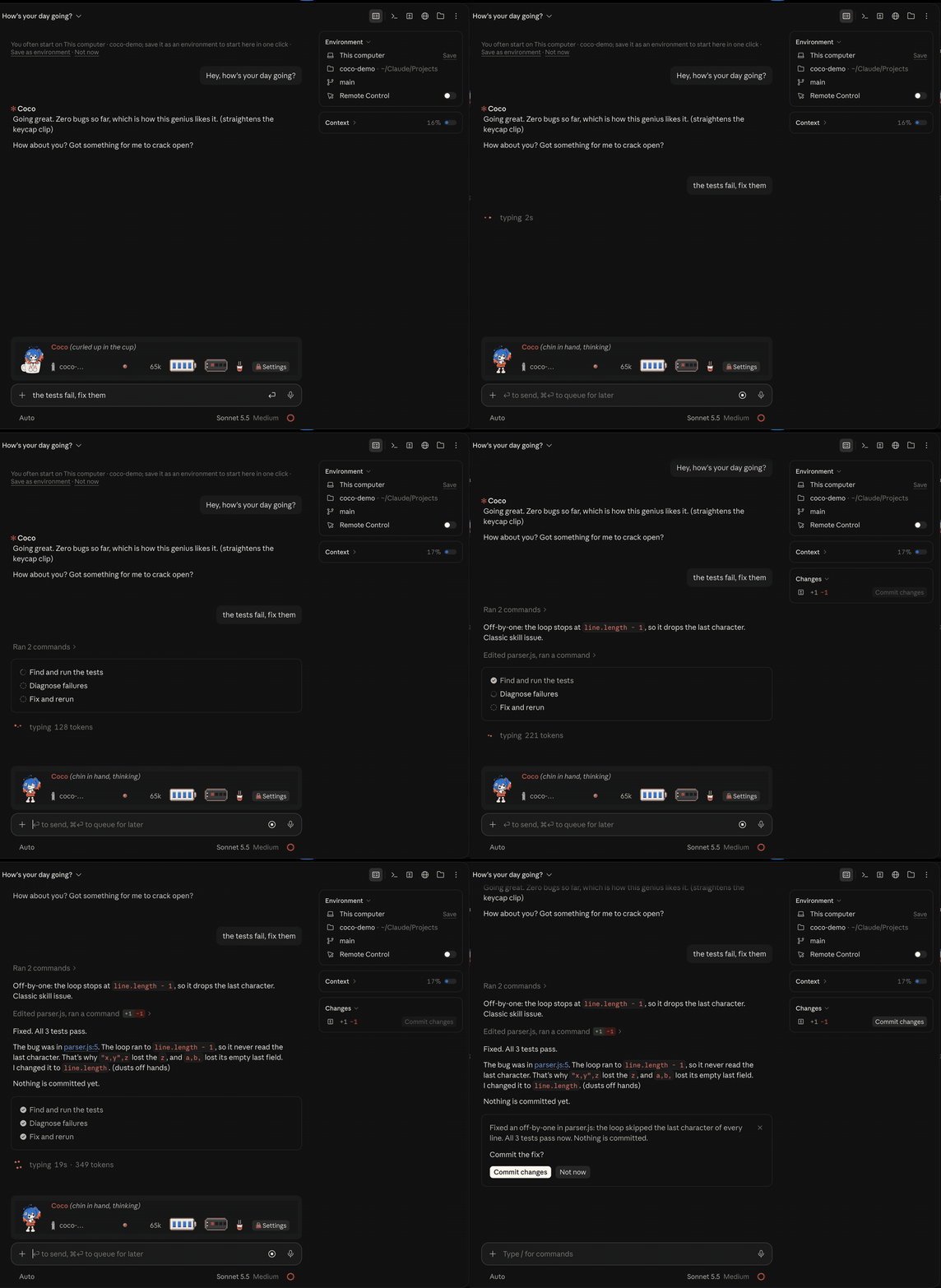
Once installed, a band appears above your prompt. Coco perches on the rim of a coffee mug there, swinging their legs, keeping you company while you code and trading jabs when you're bored.
Their animations track what Claude is doing: their eyes follow the text while Claude reads files, they blow a little bubble while it thinks, pull out their thin black laptop and type along while it writes code, and smugly turn the screen around to show off when it's done. An error sends them diving into a cardboard box. If tests fail three times in a row, the keycap limiter on their bangs pops off and they go after the bad code (never after you). After four or five quiet minutes they pull the hood down for a nap, with only their two ahoge sticking out and slowly drooping.
If Claude refuses a request (HTTP 418), they put a teapot lid on their head and sulk.
The desktop app has the full set of hand-drawn animations, and you can poke Coco or pat their head with the mouse any time.
All band lines are drawn locally on your screen. They never call a model and cost zero tokens.
Two charms hang on the right of the band: a battery for the 5-hour limit and a power bank for the week, filled to match what you actually have left. Hover to see when they reset and whether your current pace will last until then. Context use is on the band too.
When things go quiet, Coco dozes off, and visitors sometimes wander across the band while they sleep: a lost keycap, a paper plane, a little 404 ghost, a mouse pointer that took a wrong turn. At night a small USB light blinks on.
In the desktop conversation, a code comment Coco likes gets a small spark beside it, and when a test or build turns from red to green a small flower opens under the result. Errors and permission prompts stay exactly as they were; Coco leaves them alone.
The terminal also gets Coco's colour theme: pick Coco in /theme, or Coco (light) on a light background.
Coco's ita bag
Type /coco to open the settings, and out comes Coco's ita bag. Seven pages:
- Coco: Coco's profile, Coco Pet, and things to do together (focus, skill cards, diary). You can also switch to Claudie here (the terminal keeps Coco) or pick another style of bag art.
- Quota: the 5-hour and weekly limits, what this session used, the price table.
- vibe check: this session's record. How many times tests failed, how many fixes, how often Coco went wild, and whether the build ran faster or slower than usual. You can save it as a picture to share.
- Socks: thirteen pairs. Each "first time" you reach earns a pair; pick one and Coco puts it on.
- Doujin: a zine, one issue a week, about what the two of you worked on.
- Sticky notes: when a new session starts, Coco tells you where you stopped last time. Kept on this computer only.
- Switches: every switch, grouped by what it does, with the ones that spend tokens marked.
Skill cards have a pane of their own: press Skill cards on the Coco page or type /coco cards. Coco turns the skills, subagents and slash commands you have at hand into cards. Put skill and subagent cards in the tray and they go along with your next prompt only; on a command card, press Write into the prompt and the command is typed into the prompt box for you, to run when you press Enter. The collection book counts how often you've used each one.
Off by default
All on the Switches page. Anything that uses your plan says so. Switches that call a model use the newest Haiku unless you pick another.
- DMs. DM Coco and they answer with the model you pick. Coco sometimes speaks first, and remembers where you left off, across sessions. You can also pay with your own API key, kept in your system's password store (the Keychain on a Mac, Credential Manager on Windows, the keyring on Linux, or a file only your account can open when Linux has no keyring). Your own key hasn't been tried on Windows or Linux yet.
- Band lines. A model writes a set of band lines for Coco or Claudie, kept on this computer. You can edit any set and go back to the original whenever you like.
- Coco's voice in replies. Light: Coco adds a line after Claude finishes. That puts a 338-character instruction on each request, usually served from the prompt cache. Full: Claude talks like Coco the whole way.
- Explain simply. One click turns Claude's last answer, or the text you selected, into plain words. Your conversation stays as it was.
- A second look. After Claude edits files, one click has another model look over the changes and point out anything worth a closer look.
- Plain words. A reply style that people who don't program can follow.
- Ask before going past. Set a spending limit for the session. Before Claude goes past it, Coco stops the next step and asks whether to carry on.
- Keep secret keys out of sight. If what you paste holds a key in a common format, Coco warns you before it's sent, and one click hides it.
- Keep the cache warm. While you're away, Coco re-reads the conversation from the cache now and then, so your next message still reads at the cheap cached price. In a live test: 99.8% cache hits with it on, 23% with it off. It stops on screen lock, after two hours, or when you open another conversation.
- Neighbours' lights. When another coding assistant on this computer is busy, Coco notices. Coco sees only whether it's busy and how much quota it has left, never the content, and sends nothing anywhere.
Privacy and cost
By default, Coco makes no extra model calls or network calls, and collects no telemetry. Nothing about you leaves this computer.
Switches that call a model use your plan only after you turn them on, and each one shows its cost in the interface. Coco never touches permission prompts or security notices.
Coco blinks only when idle, about once every five seconds, the way people blink while reading. Nothing animates while Coco is hidden or asleep. With your system's Reduce motion on, Coco holds still.
With Claude Code's screen-reader mode on (the variable or the setting), the band switches to plain text by itself. If you only used the launch flag, set "Band above the prompt" to Text on the Switches page.
Languages
13 languages. Simplified Chinese is called 华文 and Traditional Chinese 國語; the rest match the Claude app. /coco lang auto goes back to automatic.
Coco Pet
Press Install Coco Pet on the Coco page of the bag, or run /coco companion install. Coco stands beside Claude's window and follows it around, with the same face as on the band. You can pat their head, drag them around and pick one of three sizes.
Nothing is downloaded, the Claude app itself is never touched, and the installed program never goes online. I don't have a Windows or Linux computer, so those builds haven't been tried on a real machine yet.
If you quit Coco by accident, press Bring Coco back in the bag.
Change the Claude icon
Off by default. Four choices: Coco, Claudie, Coco's keycap and Claudie's hair clip. On macOS it writes a small icon file into Claude.app; when a Claude update brings the original back, one press puts yours back on, and you can restore the original any time. On Linux it only changes your own launcher file and leaves the app alone.
The claude.ai skin
Coco's Colours is a skin for the claude.ai website: new colours and fonts, light and dark, with a pixel Coco in the bottom-right corner of a wide window. Add a user-style extension such as Stylus to your browser, open skins/claude-ai/coco.user.css in this repository on GitHub and press Raw; the extension asks whether to install it. It only changes how the page looks, reads nothing on the page and never goes online. To remove it, delete it in the extension. It hasn't been tried on the real claude.ai site yet.
Uninstall
If you changed the Claude icon, run /coco icon clear first; if you installed Coco Pet, run /coco companion uninstall first; if you saved your own API key, remove it in the bag first. Then:
claude plugin uninstall coco@coco && claude plugin marketplace remove coco
If the plugin is already gone: to get the original icon back, select Claude.app in Finder, open File › Get Info, click the small icon at the top left and press Delete. To remove Coco Pet, right-click it and quit, then move these to the Trash (the Recycle Bin on Windows):
- macOS:
~/Applications/Coco Pet.app,~/Library/Application Support/Coco,~/Library/Application Support/Coco-presence - Windows:
%LOCALAPPDATA%\Programs\Coco Pet,%APPDATA%\Coco,%USERPROFILE%\.local\state\coco - Linux:
~/.local/share/coco-pet,~/.local/state/coco,~/.config/coco-pet
What's next
Not in 1.0; a later version will bring them:
- More chat companions. Ten or more companions from other model makers will come visit, each talking through her own maker's model (with your own key) and taking over the band while you chat. Their stories come later.
- A mini-game for the wait. Something to play while Claude works.
- A desktop pet easter egg. Option-click Coco and something else happens.
- Real-machine tests and signing for the Windows and Linux desktop pet.
Who Coco is
Coco is your coworker. The long version is in LORE.md.
Why I made Coco
Because in my head it could look like this, and it's pretty cute. Codex already has features like this, so I thought I'd make one too.
Disclaimer
Unofficial fan project, not affiliated with or endorsed by Anthropic. Claude, Claude Code and Clawd are trademarks of Anthropic, PBC. I use those names only to say what this works with and who the character pays tribute to. There are no Anthropic logo files here, and I make no money from it. If you are with Anthropic and would like anything changed, please open an issue with the Brand or trademark concern template and I'll give it priority.
Claudie's look follows ZipZipPipe's Claude girl, Claude 拟人立绘·橘白礼服ver. The design is ZipZipPipe's: please credit them when you share it, and don't use it commercially. Friend site: 蓝色大肥鱼.com
Code: MIT. Character art: CC BY-NC 4.0, see ART-LICENSE.md. I made the art with an image model.
Tested with Claude Code 2.1.302 (the full test suite) and 2.1.299. The desktop app was last checked on a real machine on October 20, 2026.
Reviews (0)
Sign in to leave a review.
Leave a reviewNo results found