ninthwave
Health Warn
- License — License: Apache-2.0
- Description — Repository has a description
- Active repo — Last push 0 days ago
- Low visibility — Only 8 GitHub stars
Code Pass
- Code scan — Scanned 12 files during light audit, no dangerous patterns found
Permissions Pass
- Permissions — No dangerous permissions requested
This tool acts as an orchestration layer that breaks down software plans into smaller tasks, running multiple AI coding sessions in parallel to generate isolated, reviewable pull requests.
Security Assessment
The tool operates by managing multiple native AI coding sessions and executing git workflows, which inherently requires running shell commands and accessing local code repositories. Because it coordinates external AI models (like Claude Code or OpenAI Codex), it makes external network requests to the APIs of those tools, and potentially to its hosted broker service. The automated code scan found no hardcoded secrets or dangerous patterns. It also does not request explicitly dangerous system permissions. Overall risk is rated as Medium, primarily because automating code generation and git operations requires elevated local access and external API communication.
Quality Assessment
The project is licensed under the permissive Apache-2.0 license and is actively maintained, with repository updates pushed as recently as today. However, it currently has very low community visibility with only 8 stars, meaning it has not been broadly tested or vetted by a large user base.
Verdict
Use with caution: the code is clean and recently maintained, but its low community adoption means you should supervise the required local shell and network access closely.
Orchestrate parallel AI coding into reviewable PRs.

Ninthwave
Orchestrate parallel AI coding into reviewable PRs.




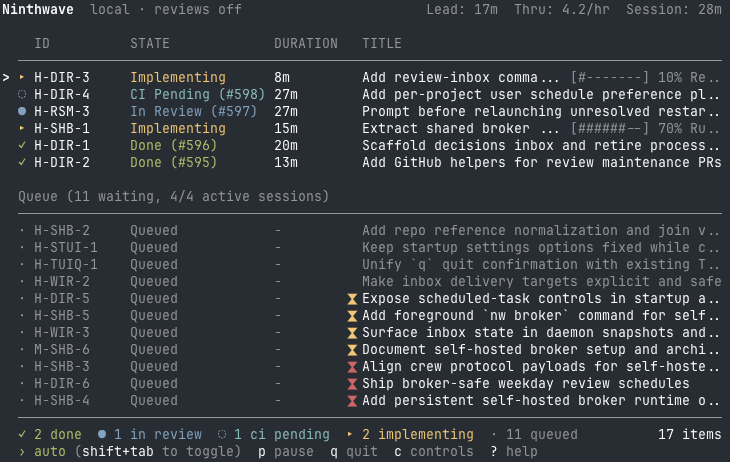
Ninthwave is the orchestration layer for parallel AI coding. Turn plans into small, reviewable PRs while keeping your existing AI tool, billing, and local control.
Why try Ninthwave?
- Turn a spec or plan into small work items, typically ~200-400 lines of meaningful change, so both humans and agents can reason about them during review
- Run multiple native AI coding sessions in parallel, each isolated in its own worktree
- Coordinate the full delivery loop through Implementer, CI, Reviewer, Rebaser, merge, and Forward-Fixer
- Launch dependent work early as stacked PRs so reviewers get clean diffs
- Share or join a crew to spread work across teammates or multiple machines, using the hosted broker by default or a self-hosted broker when you need full control
- Use the native tools directly, while Ninthwave's TUI shows live queue and pipeline status
- Stay multi-tool and no-lock-in: Claude Code, OpenCode, Codex CLI, or Copilot CLI
How I use it
I always start in plan mode and run several harnesses in parallel. Once a plan is detailed enough I look at its scope: if the change feels like a single PR's worth of work, I let the harness that planned it carry on and implement it directly. If it looks bigger than that, I run it through /decompose so nw can pick up the work items.
For greenfield and rapid prototyping I leave Ninthwave in auto mode and let it run. On existing projects I stay in manual mode: I review PRs as they open, leave feedback inline, and Ninthwave actions it from there. Once I am happy with a PR I merge it manually. Dropping into a worker session is a last resort for when something is genuinely stuck.
Claude Code on Opus 4.6 runs end to end without intervention. Copilot CLI on Opus 4.6, and Codex and OpenCode on gpt-5.4 high, follow the work spec fine but sometimes stumble on Ninthwave's harness scaffolding -- heartbeats, inbox polling, and the end-of-session wait for inbox messages -- so those sessions occasionally need a nudge.
How it works
Plan -> /decompose -> parallel native sessions -> stacked PRs -> review + feedback loop -> checks -> merge
- Use
/decomposeto turn a plan into markdown work items. - Run
nwto launch parallel native sessions of your AI tool. - Review small PRs while the orchestrator keeps the queue moving through review, CI, and merge.
Ninthwave's orchestrator is deterministic.
For the transition states, flow diagrams, and deeper internals, see ARCHITECTURE.md.
Install
brew install ninthwave-io/tap/ninthwave
Requires gh.
Run inside cmux or tmux for the best experience. Ninthwave can launch workers in headless mode, but attachable sessions are what let you jump straight into a worker when you need to inspect or steer it. If you are not already comfortable with tmux, start with cmux.
Updating
nw update
nw update detects how your install was managed and runs the matching updater. v1 supports two install sources:
- Homebrew (
brew install ninthwave-io/tap/ninthwave) -- runsbrew upgrade ninthwave - Direct install script (
curl -fsSL https://ninthwave.sh/install | bash, which placesnwunder~/.ninthwave/bin/) -- re-runs the install script
For other installs (source clones, non-standard paths), nw update prints manual guidance instead of guessing. Ninthwave does not hot-reload, so restart any running nw sessions after a successful update. When you start nw and a newer version is available, Ninthwave also shows a startup prompt with Update / Skip / Skip-until-next-version options -- see the FAQ for details.
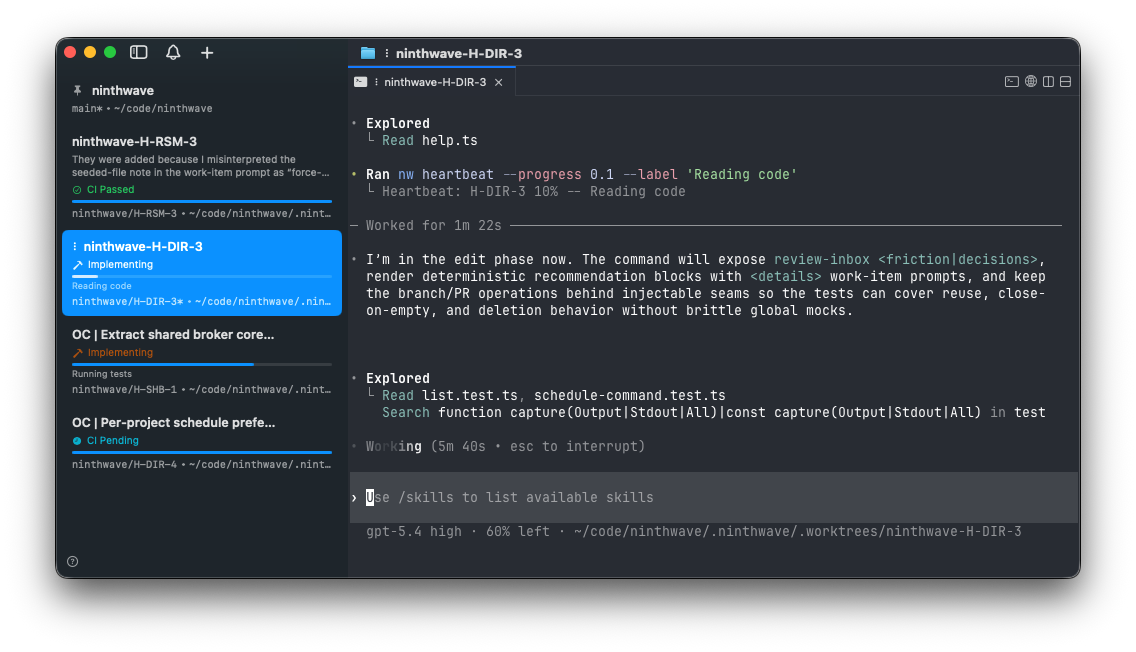
Ninthwave works standalone; cmux or tmux keeps active worker sessions one step away when you need to inspect, steer, or unblock work in flight.
Quick start
Install Ninthwave:
brew install ninthwave-io/tap/ninthwave
nw init # in a repo
Optional but recommended: install
cmuxortmuxso you can attach to worker sessions when needed.Once you have a plan, create work items with
/decompose, then run:nw
From there, Ninthwave launches the queue, opens reviewable PRs, watches checks, and keeps the pipeline moving. Use auto mode for greenfield work or rapid prototyping; on existing projects, stay in manual mode and review each PR as it opens, leaving feedback inline for Ninthwave to action.
License
Apache 2.0. See LICENSE.
Reviews (0)
Sign in to leave a review.
Leave a reviewNo results found