auto-kill-terminal
Health Pass
- License — License: MIT
- Description — Repository has a description
- Active repo — Last push 0 days ago
- Community trust — 20 GitHub stars
Code Pass
- Code scan — Scanned 10 files during light audit, no dangerous patterns found
Permissions Pass
- Permissions — No dangerous permissions requested
No AI report is available for this listing yet.
🤯 Stop AI agents from leaving zombie terminals in GitHub Codespaces & VS Code. Copy-paste terminal management rules for Copilot, Claude, Gemini, Cursor, Windsurf, Cline, Aider. Fix "terminal unresponsive" errors, agent refusing to run commands, isBackground true, kill_terminal. Install script + dev container + templates.
   █████╗ ██╗   ██╗████████╗ ██████╗       ██╗  ██╗██╗██╗     ██╗
  ██╔══██╗██║   ██║╚══██╔══╝██╔═══██╗      ██║ ██╔╝██║██║     ██║
  ███████║██║   ██║   ██║   ██║   ██║█████╗█████╔╝ ██║██║     ██║
  ██╔══██║██║   ██║   ██║   ██║   ██║╚════╝██╔═██╗ ██║██║     ██║
  ██║  ██║╚██████╔╝   ██║   ╚██████╔╝      ██║  ██╗██║███████╗███████╗
  ╚═╝  ╚═╝ ╚═════╝    ╚═╝    ╚═════╝       ╚═╝  ╚═╝╚═╝╚══════╝╚══════╝
                    ████████╗███████╗██████╗ ███╗   ███╗██╗███╗   ██╗ █████╗ ██╗
                    ╚══██╔══╝██╔════╝██╔══██╗████╗ ████║██║████╗  ██║██╔══██╗██║
                       ██║   █████╗  ██████╔╝██╔████╔██║██║██╔██╗ ██║███████║██║
                       ██║   ██╔══╝  ██╔══██╗██║╚██╔╝██║██║██║╚██╗██║██╔══██║██║
                       ██║   ███████╗██║  ██║██║ ╚═╝ ██║██║██║ ╚████║██║  ██║███████╗
                       ╚═╝   ╚══════╝╚═╝  ╚═╝╚═╝     ╚═╝╚═╝╚═╝  ╚═══╝╚═╝  ╚═╝╚══════╝
💀 Stop AI agents from leaving zombie terminals in your Codespace





Problem ·
Fix ·
Quick Start ·
Setup ·
How it Works ·
FAQ
The Problem
AI coding agents (GitHub Copilot, Claude Code, Gemini, Cursor, etc.) spawn terminal sessions every time they run a command. They almost never clean up after themselves.
In GitHub Codespaces, this is catastrophic:
| Symptom | Cause |
|---|---|
| 🧟 Ghost terminals | Foreground terminals get reused — stale sessions persist and silently block new ones |
| 👻 Invisible accumulation | Background terminals in Codespaces aren't shown in the UI panel |
| 🔄 Infinite retries | Agents hammer the same dead session instead of killing it and starting fresh |
| 🆔 Lost terminal IDs | Without isBackground: true, no terminal ID is returned — cleanup is impossible |
The result: your Codespace fills with orphaned terminals → commands timeout → the agent gets confused → you waste tokens on retries.
The Fix
Add terminal management rules to your agent instruction files. These five bullet points are all you need:
## Terminal Management

- **Always use background terminals** (`isBackground: true`) for every command so a terminal ID is returned
- **Always kill the terminal** after the command completes, whether it succeeds or fails — never leave terminals open
- Do not reuse foreground shell sessions — stale sessions block future terminal operations in Codespaces
- In GitHub Codespaces, agent-spawned terminals may be hidden — they still work. Do not assume a terminal is broken if you cannot see it
- If a terminal appears unresponsive, kill it and create a new one rather than retrying in the same terminal
That's it. Copy those 5 lines into whatever agent instruction file you use.
Quick Start
# Option 1: Clone and copy what you need
git clone https://github.com/nirholas/auto-kill-terminal.git
cp auto-kill-terminal/.github/copilot-instructions.md your-project/.github/

# Option 2: Just copy the 5 bullet points from "The Fix" into your existing instruction file
Setup by Agent
🤖 GitHub Copilot —copilot-instructions.md
## Terminal Management
- **Always use background terminals** (`isBackground: true`) for every command so a terminal ID is returned
- **Always kill the terminal** after the command completes, whether it succeeds or fails — never leave terminals open
- Do not reuse foreground shell sessions — stale sessions block future terminal operations in Codespaces
- In GitHub Codespaces, agent-spawned terminals may be hidden — they still work. Do not assume a terminal is broken if you cannot see it
- If a terminal appears unresponsive, kill it and create a new one rather than retrying in the same terminal
CLAUDE.md
### Terminal Management
- **Always use background terminals** (`isBackground: true`) for every command so a terminal ID is returned
- **Always kill the terminal** after the command completes, whether it succeeds or fails — never leave terminals open
- Do not reuse foreground shell sessions — stale sessions block future terminal operations in Codespaces
- In GitHub Codespaces, agent-spawned terminals may be hidden — they still work. Do not assume a terminal is broken if you cannot see it
- If a terminal appears unresponsive, kill it and create a new one rather than retrying in the same terminal
GEMINI.md
### Terminal Management
- **Always use background terminals** (`isBackground: true`) for every command so a terminal ID is returned
- **Always kill the terminal** after the command completes, whether it succeeds or fails — never leave terminals open
- Do not reuse foreground shell sessions — stale sessions block future terminal operations in Codespaces
- In GitHub Codespaces, agent-spawned terminals may be hidden — they still work. Do not assume a terminal is broken if you cannot see it
- If a terminal appears unresponsive, kill it and create a new one rather than retrying in the same terminal
### Terminal Management
- **Always use background terminals** (`isBackground: true`) for every command so a terminal ID is returned
- **Always kill the terminal** after the command completes, whether it succeeds or fails — never leave terminals open
- Do not reuse foreground shell sessions — stale sessions block future terminal operations in Codespaces
- In GitHub Codespaces, agent-spawned terminals may be hidden — they still work. Do not assume a terminal is broken if you cannot see it
- If a terminal appears unresponsive, kill it and create a new one rather than retrying in the same terminal
Short:
**Terminal rules:** Always use `isBackground: true` for every terminal command, then kill the terminal after.
Two-line:
**Terminal management**: Always use background terminals (`isBackground: true`). Always kill terminals after use.
Why Background Terminals?
| Approach | Terminal ID returned? | Can be killed? | Blocks shell? |
|---|---|---|---|
isBackground: false |
❌ | ❌ | ✅ |
isBackground: true |
✅ | ✅ (kill_terminal) |
❌ |
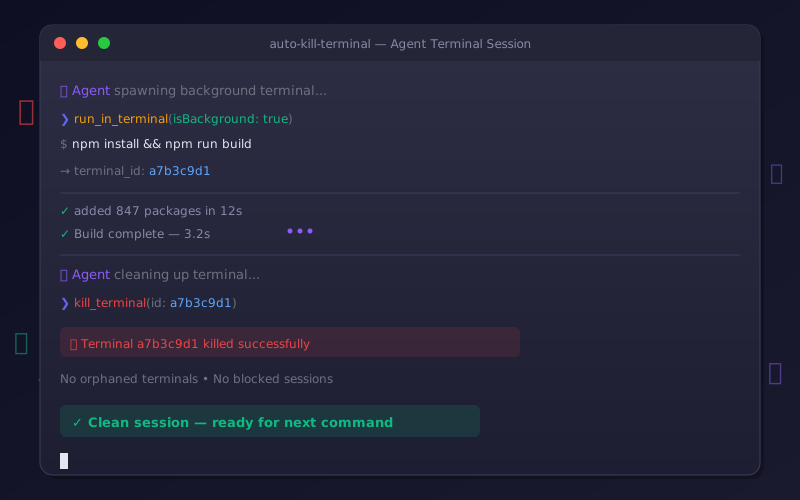
Background terminals return an ID that the agent can pass to kill_terminal (or await_terminal → kill_terminal). Without that ID, there's no way to clean up.
  Agent                                Terminal
    |                                      |
    |-- run_in_terminal -----------------> | (isBackground: true)
    |   <-- terminal_id: a7b3c9d1          |
    |                                      |
    |-- await_terminal ------------------> | (wait for completion)
    |   <-- output + exit code             |
    |                                      |
    |-- kill_terminal -------------------> | x_x
    |                                      X
    |
    |-- (clean slate for next command)
Supported Environments
| Environment | Status |
|---|---|
| GitHub Codespaces | ✅ |
| VS Code (local) | ✅ |
| VS Code (remote SSH) | ✅ |
| VS Code (WSL) | ✅ |
| Any VS Code terminal API consumer | ✅ |
Supported Agents
| Agent | Instruction File | Status |
|---|---|---|
| GitHub Copilot | copilot-instructions.md |
✅ |
| Claude Code | CLAUDE.md |
✅ |
| Gemini | GEMINI.md |
✅ |
| Cursor | AGENTS.md / .cursorrules |
✅ |
| Windsurf | AGENTS.md |
✅ |
| Aider | .aider.conf.yml |
✅ |
| Any agent using VS Code terminals | Any instruction file | ✅ |
FAQ
Do I need to install anything?No. This is just copy-paste text that goes into your agent instruction files. No packages, no extensions, no config.
Does this work outside Codespaces?Yes. The terminal management rules work anywhere VS Code's terminal API is used. They're most critical in Codespaces because ghost terminals are invisible there, but they help everywhere.
What if my agent doesn't support instruction files?You can include the rules in your prompt directly. Use the one-liner from the "One-liners" section above.
Will this break my agent's workflow?No. Background terminals with isBackground: true behave the same as foreground terminals, except they don't block the shell and they return an ID for cleanup. The agent's commands still execute normally.
Contributing
Contributions are welcome! If you've found terminal management tricks for other agents or environments, please open a PR.
- Fork the repo
- Create your branch:
git checkout -b feat/my-improvement - Commit:
git commit -m "✨ feat: add support for X agent" - Push:
git push origin feat/my-improvement - Open a Pull Request
License
MIT © nirholas
Stop wasting tokens on zombie terminals.
Made with 💀 for the AI agent community
⭐ Found this useful? Star the repo! ⭐
It helps others discover this project and keeps development active

Reviews (0)
Sign in to leave a review.
Leave a reviewNo results found