three.ws
Health Warn
- No license — Repository has no license file
- Description — Repository has a description
- Active repo — Last push 0 days ago
- Community trust — 22 GitHub stars
Code Warn
- Code scan incomplete — No supported source files were scanned during light audit
Permissions Pass
- Permissions — No dangerous permissions requested
This tool provides a full-stack platform for creating and embedding browser-native 3D AI agents. It allows users to load 3D avatars, equip them with an LLM-powered "brain" capable of memory and emotion, optionally register them via on-chain blockchain identity, and embed them anywhere as web components.
Security Assessment
Risk: Medium. Based on the repository's documentation, the platform processes and sends voice/text inputs to external LLM providers (like Claude) and communicates with external web3 infrastructure. It also sets up an OAuth 2.1 authorization server, handles cloud storage routing, and requires various environment variables for API keys and databases. However, the automated code scan could not identify the programming language or analyze the source files for hardcoded secrets or vulnerable dependencies. Consequently, a deeper manual code review is required to verify how securely it handles sensitive data and API keys.
Quality Assessment
The project appears to be actively maintained, with its last push occurring less than a day ago. It has garnered a small but present community trust metric with 22 GitHub stars. On the downside, the repository lacks a license file. This is a significant drawback for open-source collaboration, as it means the code is technically under exclusive copyright and others have no legal permission to use, modify, or distribute it.
Verdict
Use with caution — the project is active and feature-rich but lacks a license, and unscanned source code requires a manual security review before handling sensitive API keys.
3D AI agent platform for the browser. Load any GLB/glTF avatar, give it an LLM brain with memory, emotions, and tool use, then embed it anywhere as a web component. Includes a character studio, on-chain identity via ERC-8004, MCP server, OAuth 2.1, animation gallery, and five embeddable widget types. No plugins. No installs.
three.ws
Give your AI a body. three.ws is an open-source, browser-native 3D AI agent platform. Drop a GLB file, add an LLM brain, register on-chain, and embed anywhere — no plugins, no server uploads, no installs required.
Your browser does not support the video tag.Table of Contents
- What is three.ws?
- Vision
- Key Features
- Screenshots
- Architecture
- Tech Stack
- Getting Started
- Examples
- Tutorials
- Project Structure
- The Agent System
- Web Component & Embedding
- Widget System
- API Reference
- Authentication & OAuth 2.1
- MCP Server
- On-Chain Identity (ERC-8004)
- Database Schema
- Build & Deployment
- Environment Variables
- Testing
- Contributing
- License
What is three.ws?
three.ws is a full-stack system for creating, deploying, and embedding 3D AI agents. It combines a WebGL model viewer, an LLM-driven agent runtime, on-chain identity contracts, and a distributable web component into one cohesive platform.
At its core, it does four things:
Render — loads and validates glTF 2.0 / GLB models in WebGL 2.0 with zero server-side processing. Drag a file onto the browser and it renders instantly with full Draco, KTX2, and Meshopt decompression.
Embody — wraps any avatar with an LLM brain. The agent listens to the user, thinks with Claude, executes tools (animations, gestures, memory operations, skill calls), and expresses emotion through morph-target blending on the 3D model in real time.
Register — optionally mints the agent as an ERC-8004 token on any EVM chain, giving it a stable on-chain identity, a wallet address, signed action history, and a reputation score that cannot be forged.
Embed — distributes the agent as an
<agent-3d>web component that anyone can drop into a page, or as one of five purpose-built widget types (turntable, animation gallery, talking agent, passport card, hotspot tour) with Open Graph and oEmbed support built in.
The backend is a set of Vercel serverless functions backed by Neon Postgres for metadata, Cloudflare R2 for model storage, and Upstash Redis for rate limiting. It exposes a full OAuth 2.1 authorization server and an MCP (Model Context Protocol) endpoint so external AI systems can drive avatars programmatically.
three.ws is production-ready and serves three.ws live. The entire stack — viewer, agent runtime, contracts, backend, and web component — is open source under Apache 2.0.
Vision
One day, creating your agent should be as simple as taking a selfie.
Point your camera at yourself — or anyone — and watch a fully realized 3D avatar emerge: your face, your voice, your personality, alive in the browser. That avatar becomes an agent with memory and skills, registered onchain as an ERC-8004 token, permanent and verifiable by anyone forever. No 3D software. No wallet setup. No uploads. Just a photo and a name.
This is the direction three.ws is heading: photo → avatar → agent → onchain identity, in a single flow. The infrastructure is already here — the viewer, the runtime, the contracts, the embedding layer. What comes next is closing the gap between a picture of a person and a living, ownable, embeddable piece of them that exists on the internet permanently.
Key Features
3D Viewer
- WebGL 2.0 rendering via three.js r176
- glTF 2.0 and GLB with Draco geometry compression, KTX2 texture compression, and Meshopt mesh optimization
- Khronos-spec glTF validation with line-level error reporting
- HDR environment maps, PBR materials, skinned mesh animations, morph targets, and embedded cameras
- OrbitControls (pan, zoom, rotate) with configurable auto-rotation
- Real-time parameter tweaking (lights, exposure, morph weights) via dat.GUI
Agent Runtime
- LLM brain powered by Claude (Anthropic API) with a structured tool-loop architecture
- Up to 8 tool iterations per turn before returning final output
- Built-in tools:
wave,lookAt,play_clip,setExpression,speak,remember - Composable skill system — install skills from IPFS, Arweave, or HTTP; each skill is a self-contained bundle with a description, tool definitions, and async handlers
- Weighted emotion blending (celebration, concern, curiosity, empathy, patience) driven by protocol events, not a finite-state machine
- Web Speech API for STT/TTS out of the box; ElevenLabs integration for production-quality voice
Identity & On-Chain
- ERC-8004 smart contracts (IdentityRegistry, ReputationRegistry, ValidationRegistry) deployable on any EVM chain
- Each agent is an ERC-721 token with a stable
agentId, owner wallet, delegated signer (EIP-712), and IPFS-pinned manifest - Signed action log — every
speak,remember,skill-done, andvalidateevent is recorded on-chain-optionally or in the database with a cryptographic signature - EIP-7710 delegated permissions for composable agent-to-agent authorization
- Solana support (SIWS sign-in, Solana wallet linking, Metaplex NFT option)
Embedding & Distribution
<agent-3d>custom element — drop it anywhere with no framework dependency- Five widget variants: turntable, animation gallery, talking agent, ERC-8004 passport card, hotspot tour
- Widget Studio — point-and-click embed code generator
- Open Graph metadata and oEmbed support for rich social previews when links are shared
- Versioned CDN bundles at
/agent-3d/x.y.z/agent-3d.js
Backend & Integrations
- OAuth 2.1 server (RFC 6749 + PKCE, RFC 7591 dynamic registration, RFC 7009 revocation, RFC 7662 introspection, RFC 8414 discovery)
- Developer API keys with scope and expiry
- MCP (Model Context Protocol) over HTTP with JSON-RPC 2.0 for tool-calling from external AI systems
- Ready Player Me, Avaturn (photo-to-avatar), and Privy (embedded wallet) integrations
- DCA strategy execution and on-chain subscription scheduling via cron jobs
- OpenAPI 3.1 spec generated at
/openapi.json
Screenshots
| Viewer | Widget Studio |
|---|---|
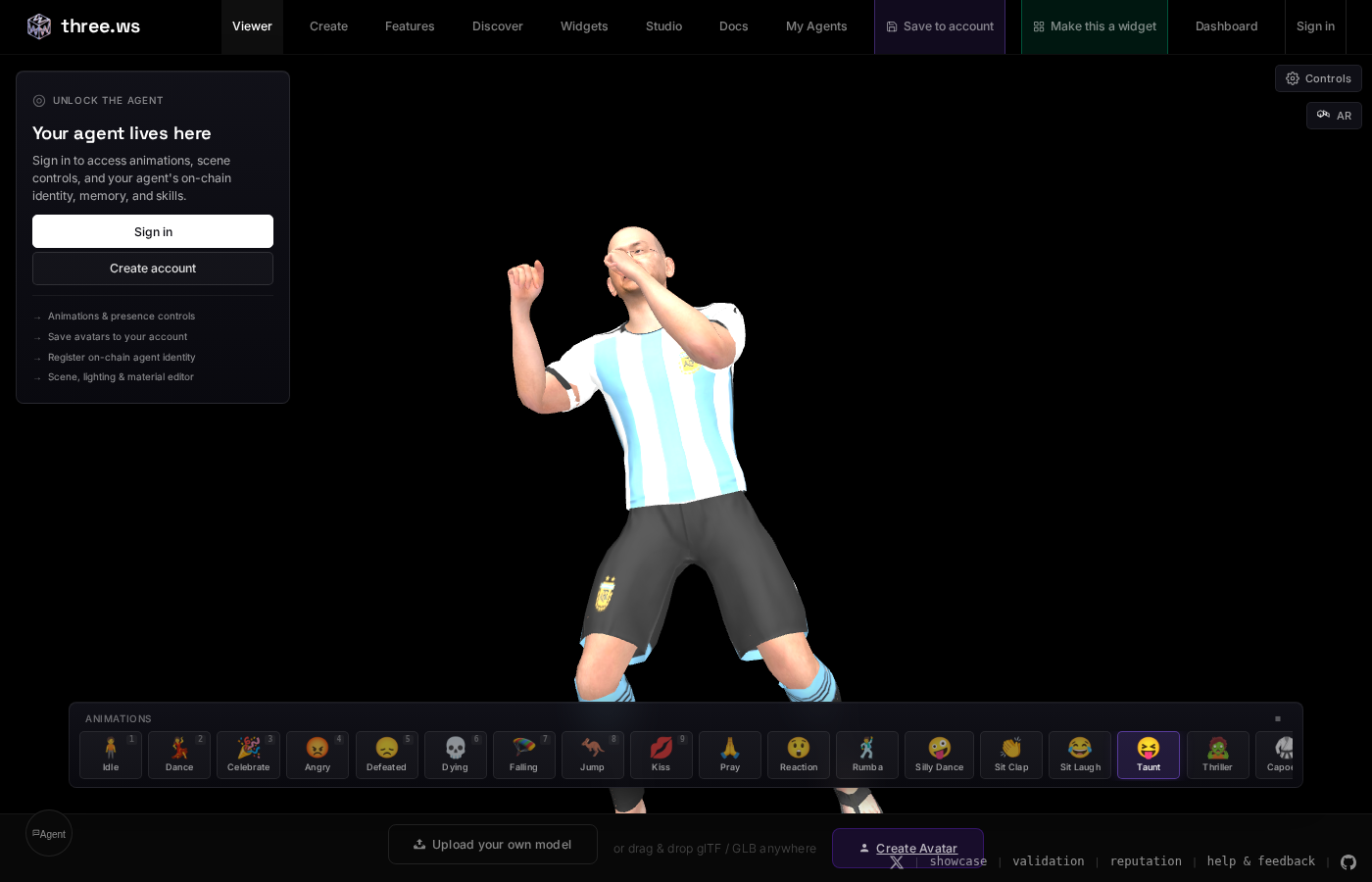 |
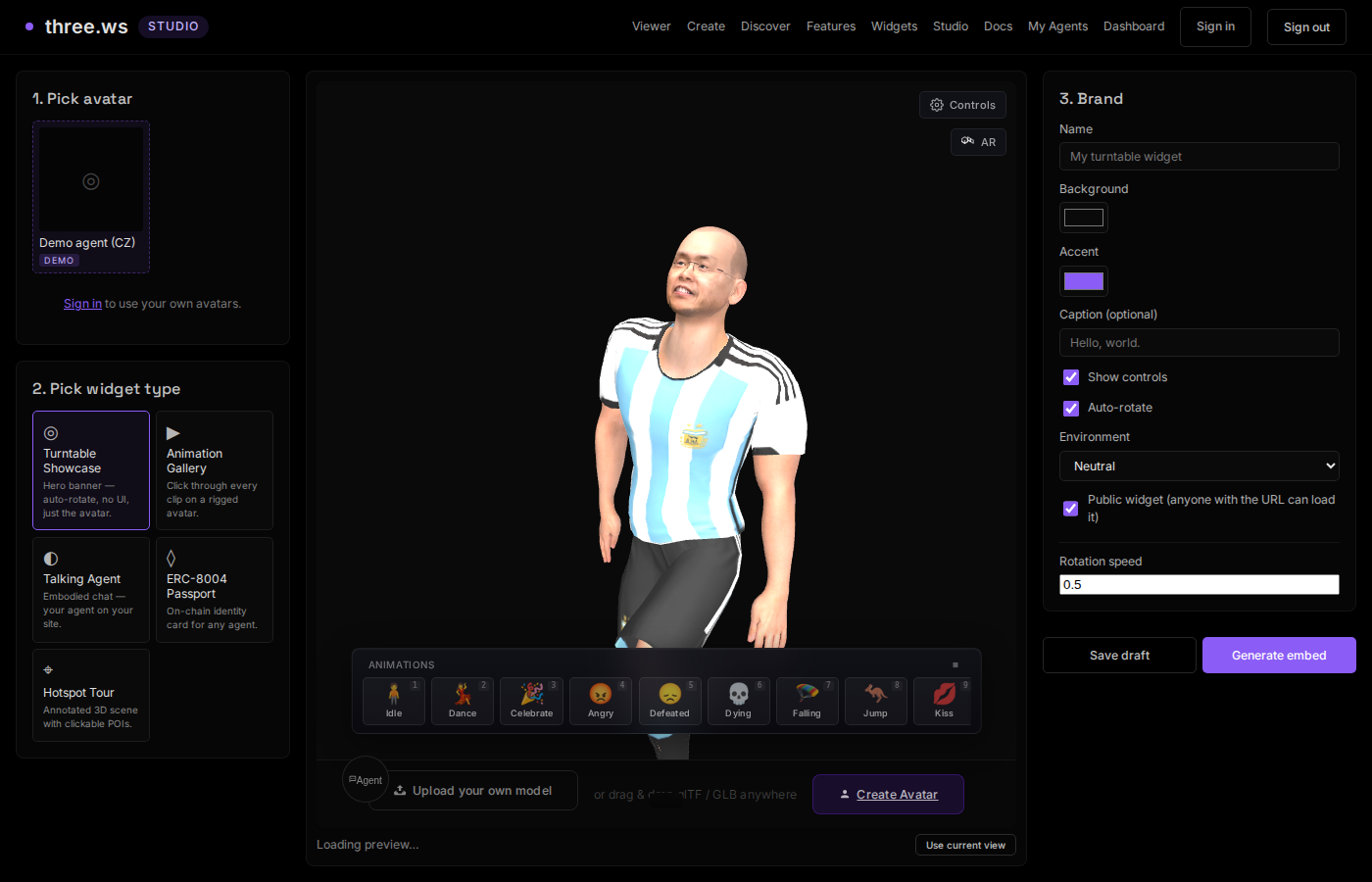 |
| Agent Discovery | Avatar Creation |
|---|---|
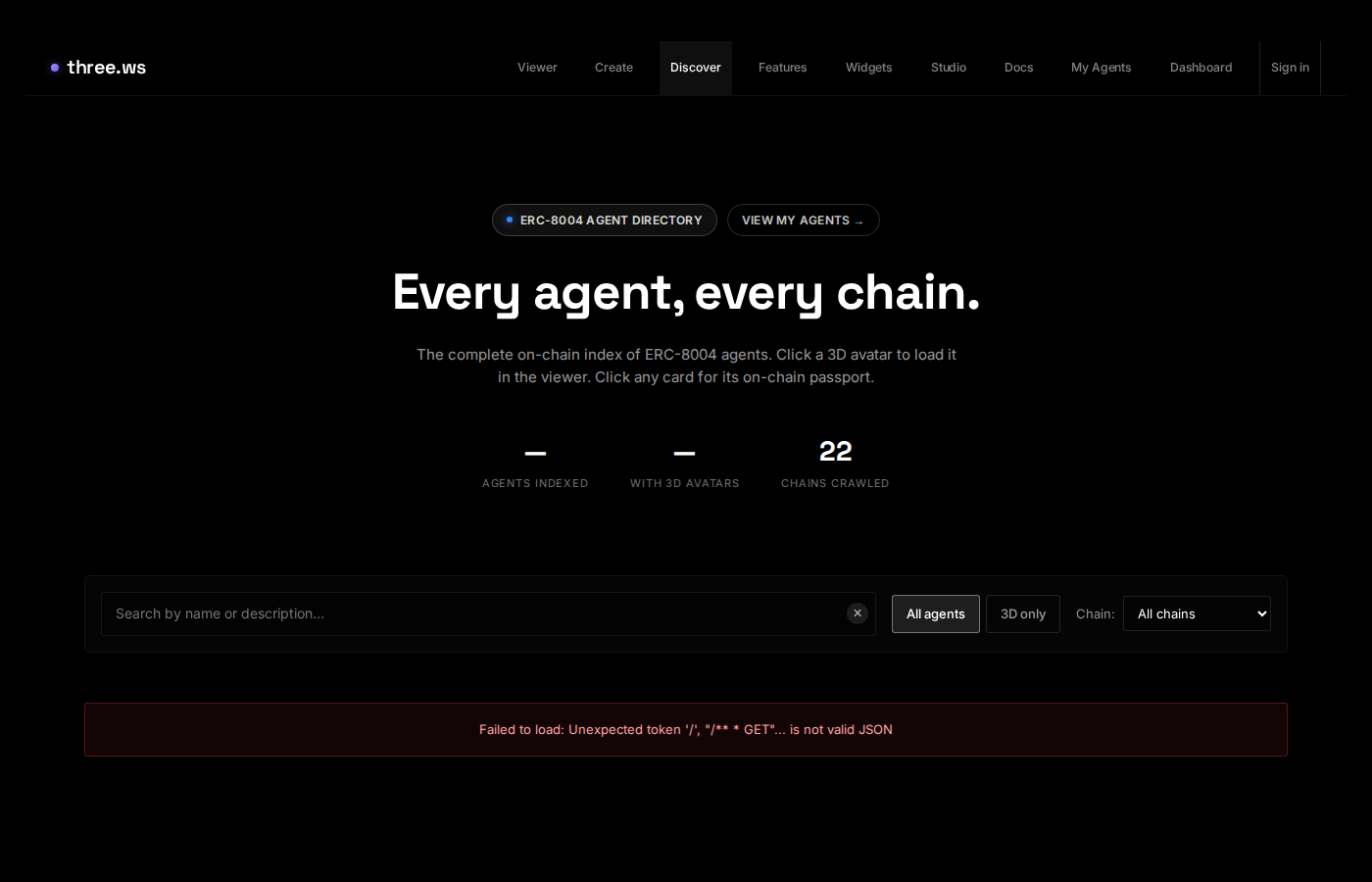 |
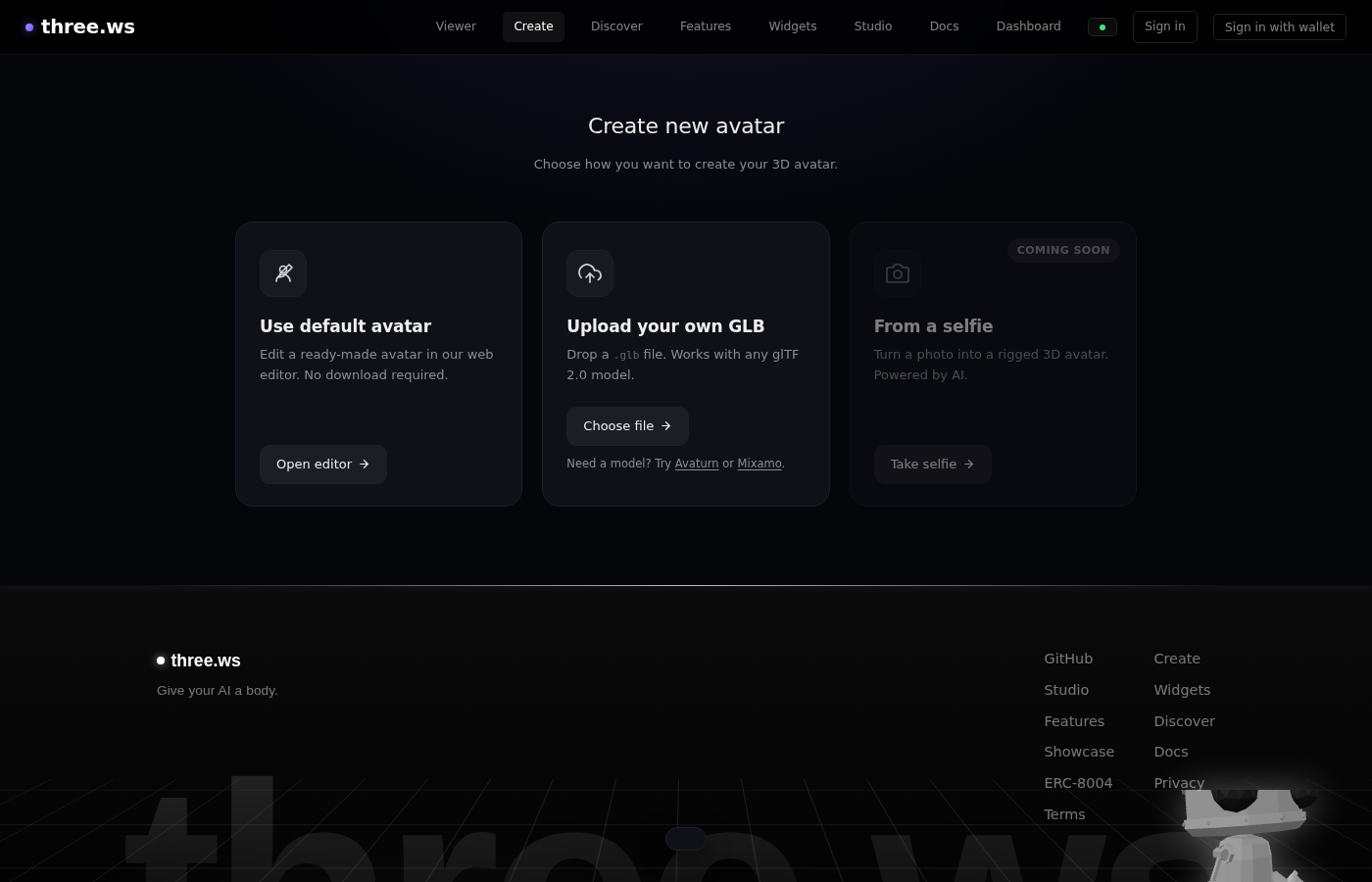 |
Architecture
The platform is organized into four layers. All layers communicate through a single event bus (agent-protocol) rather than direct calls.
┌────────────────────────────────────────────────────────────┐
│  Layer 4: Embed & Distribution                             │
│  <agent-3d> web component · CDN library · 5 widget types  │
│  Widget Studio · oEmbed · Open Graph cards                 │
└────────────────────────────────────────────────────────────┘
                            ↓ protocol events
┌────────────────────────────────────────────────────────────┐
│  Layer 3: Identity & Persistence                           │
│  Agent passport · ERC-8004 on-chain registry              │
│  Signed action log · Memory store · Wallet linking        │
└────────────────────────────────────────────────────────────┘
                            ↓ protocol events
┌────────────────────────────────────────────────────────────┐
│  Layer 2: Agent Runtime                                    │
│  LLM tool-loop · Built-in tools · Skill registry          │
│  Empathy Layer (emotion blending) · TTS/STT               │
└────────────────────────────────────────────────────────────┘
                            ↓ protocol events
┌────────────────────────────────────────────────────────────┐
│  Layer 1: Viewer                                           │
│  three.js r176 · glTF / GLB · Draco / KTX2 / Meshopt     │
│  Animations · Morph targets · HDR · Validation            │
└────────────────────────────────────────────────────────────┘
The event bus decouples every component. The avatar emotion system reacts to speak events without knowing the runtime exists. The identity module records actions without knowing the UI exists. This makes the system testable, embeddable in isolation, and composable across pages.
The backend is stateless serverless functions. All persistent state lives in Postgres (Neon), object storage (Cloudflare R2), or on-chain. Cron jobs handle scheduled blockchain operations (ERC-8004 crawl, DCA execution, subscription execution).
Tech Stack
Frontend
| Technology | Version | Purpose |
|---|---|---|
| three.js | r176 | WebGL 2.0 rendering |
| Vite | 7.3.2 | Build tooling + HMR |
| Vitest | 4.1.4 | Unit testing |
| viem | 2.18.0 | Ethereum wallet + SIWE |
| ethers | 6.16.0 | Contract interaction |
| @solana/web3.js | 1.98.4 | Solana RPC + signing |
| jose | 5.9.6 | JWT handling |
| zod | 3.23.8 | Schema validation |
| gltf-validator | 2.0.0-dev.3.10 | Khronos spec compliance |
| dat.gui | 0.7.9 | Real-time parameter UI |
| simple-dropzone | 0.8.3 | Drag-and-drop file handling |
| vhtml | 2.2.0 | JSX → HTML string rendering |
Backend (Vercel serverless)
| Technology | Purpose |
|---|---|
| Neon Postgres | Primary database |
| Cloudflare R2 | Avatar / model object storage |
| Upstash Redis | Rate limiting |
| Anthropic SDK | Claude LLM (claude-sonnet-4-6 / claude-opus-4-7) |
| Resend | Transactional email |
| Sentry | Error monitoring |
| @aws-sdk/client-s3 | R2 presigned upload URLs |
Smart Contracts
| Technology | Purpose |
|---|---|
| Solidity 0.8+ | ERC-8004 contracts |
| Foundry | Compile, test, deploy |
| ERC-721 | Agent token standard |
| EIP-712 | Typed structured signing |
| EIP-7710 | Delegated permissions |
Getting Started
Prerequisites
- Node.js 20+
- npm 10+
- A Neon Postgres database (or any Postgres 15+)
- A Cloudflare R2 bucket (or any S3-compatible store)
- An Anthropic API key (for the LLM backend)
Installation
git clone https://github.com/nirholas/3D-Agent.git
cd 3D-Agent
npm install
Environment Setup
Copy the example env file and fill in required values:
cp .env.example .env.local
At minimum, set:
PUBLIC_APP_ORIGIN=http://localhost:3000
DATABASE_URL=postgres://user:pass@host/db
JWT_SECRET=<run: openssl rand -base64 64>
ANTHROPIC_API_KEY=sk-ant-...
See Environment Variables for the full reference.
Initialize the Database
The schema is idempotent — run it against your Postgres instance to create all tables:
psql $DATABASE_URL < api/_lib/schema.sql
Start the Dev Server
npm run dev
Opens at http://localhost:3000. The viewer is at /app, the dashboard at /home, and the agent creation flow at /create.
Quick Viewer Test
Navigate to http://localhost:3000/app and drag any GLB file onto the canvas. The model loads instantly with PBR materials, animations, and full glTF validation.
To try the agent, navigate to /create, upload a GLB, and configure a brain (requires ANTHROPIC_API_KEY in your env).
Examples
Copy-paste ready snippets for the most common use cases. Swap in your own GLB URL and go.
1. Minimal viewer (no AI)
The simplest possible setup — one script tag, one element, zero build step.
<!doctype html>
<html lang="en">
<head>
  <meta charset="utf-8">
  <title>3D Viewer</title>
  <style>
    body { margin: 0; background: #0a0a0a; display: flex; align-items: center; justify-content: center; height: 100vh; }
    agent-3d { width: 400px; height: 560px; display: block; }
  </style>
</head>
<body>
  <script type="module" src="https://three.ws/agent-3d/1.5.1/agent-3d.js"></script>
  <agent-3d body="https://cdn.three.ws/models/sample-avatar.glb"></agent-3d>
</body>
</html>
Drag-to-rotate, scroll-to-zoom, full PBR rendering — no API key, no account required. Swap body= for any publicly accessible .glb URL.
2. Talking agent with inline instructions
Add brain= and instructions= to turn the viewer into a conversational agent.
<script type="module" src="https://three.ws/agent-3d/1.5.1/agent-3d.js"></script>

<agent-3d
  body="https://cdn.three.ws/models/sample-avatar.glb"
  brain="claude-sonnet-4-6"
  name="Aria"
  instructions="You are Aria, a friendly AI guide. Be warm, concise, and occasionally playful.
                When someone greets you, wave at them. Keep replies to 2–3 sentences."
  mode="inline"
  width="400px"
  height="560px"
></agent-3d>
The chat input and mic button appear automatically when brain is set. No UI to build.
3. Floating bubble (support widget style)
Pin the agent to a corner of the page so it persists as users scroll.
<script type="module" src="https://three.ws/agent-3d/1.5.1/agent-3d.js"></script>

<agent-3d
  body="https://cdn.three.ws/models/sample-avatar.glb"
  brain="claude-sonnet-4-6"
  instructions="You are a helpful product assistant. Answer questions about our features."
  mode="floating"
  position="bottom-right"
  width="320px"
  height="420px"
></agent-3d>
position accepts bottom-right, bottom-left, top-right, or top-left.
4. Load a registered agent by ID
If you've registered an agent on the platform, load it entirely from its manifest — no inline attributes needed.
<!-- By platform agent ID -->
<agent-3d agent-id="a_abc123def456"></agent-3d>

<!-- By on-chain ERC-8004 ID -->
<agent-3d agent-id="42" chain-id="8453"></agent-3d>
The element fetches the manifest (model URL, instructions, skills, memory config) automatically.
5. Custom chat UI with JavaScript API
Hide the built-in chrome and wire in your own input using the element's JS API.
<script type="module" src="https://three.ws/agent-3d/1.5.1/agent-3d.js"></script>

<agent-3d id="agent" body="./avatar.glb" brain="claude-sonnet-4-6" kiosk
  style="width:400px;height:560px;display:block"></agent-3d>

<input id="msg" type="text" placeholder="Ask something…">
<button onclick="send()">Send</button>

<script>
  const agent = document.getElementById('agent');
  const input = document.getElementById('msg');

  async function send() {
    const text = input.value.trim();
    if (!text) return;
    input.value = '';
    await agent.say(text);
  }

  input.addEventListener('keydown', e => { if (e.key === 'Enter') send(); });

  // Auto-greet on load
  agent.addEventListener('agent:ready', () => {
    setTimeout(() => agent.say('Hello! How can I help you today?'), 1200);
  });

  // Listen to replies
  agent.addEventListener('brain:message', e => {
    if (e.detail.role === 'assistant') console.log('Agent:', e.detail.content);
  });
</script>
Full JS API:
| Method | Description |
|---|---|
agent.say(text) |
Send a message; agent speaks and animates the reply |
agent.ask(text) |
Same as say(), returns reply text as a string |
agent.wave() |
Trigger the wave gesture directly |
agent.lookAt(target) |
'camera', 'model', or 'user' |
agent.play(clipName) |
Play a named animation clip |
agent.clearConversation() |
Reset conversation history |
agent.expressEmotion(trigger, weight) |
Manually inject an emotion blend |
Key events: agent:ready, brain:message, brain:thinking, skill:tool-called, voice:transcript
6. iframe widget (works in Notion, Substack, Webflow)
Use a widget URL directly — no script tag needed.
<iframe
  src="https://three.ws/a/8453/42/embed"
  width="400"
  height="560"
  frameborder="0"
  allow="microphone"
  style="border-radius:16px;"
></iframe>
Generate the src URL from Widget Studio — pick an avatar, choose a widget type, and copy the snippet.
7. Agent manifest JSON
For anything beyond a quick one-liner, define the agent in a manifest file and reference it with manifest=.
agent.json:
{
  "spec": "agent-manifest/0.2",
  "name": "Aria",
  "description": "A friendly AI guide",
  "body": {
    "uri": "./avatar.glb",
    "format": "gltf-binary"
  },
  "brain": {
    "provider": "anthropic",
    "model": "claude-sonnet-4-6",
    "instructions": "You are Aria, a warm and curious AI guide. Wave when greeted.",
    "temperature": 0.8,
    "maxTokens": 1024
  },
  "voice": {
    "tts": { "provider": "browser", "rate": 1.05 },
    "stt": { "provider": "browser", "language": "en-US" }
  },
  "memory": { "mode": "local" },
  "skills": [
    { "uri": "https://cdn.three.ws/skills/wave/" }
  ]
}
<agent-3d manifest="./agent.json" width="400px" height="560px"></agent-3d>
Tutorials
Step-by-step guides in docs/tutorials/:
| Tutorial | What you'll build | Time |
|---|---|---|
| Build Your First Agent | A talking 3D character on a shareable page, from zero | ~20 min |
| Embed on Your Website | Add an agent to any page — plain HTML, React, Webflow, WordPress | ~15 min |
| Write a Custom Skill | A new tool the agent can call (e.g., fetch live weather data) | ~30 min |
| Register On-Chain | Mint your agent as an ERC-8004 token with permanent identity | ~20 min |
| Build a Personal AI Site | A full personal site with an embedded AI version of yourself | ~45 min |
Common gotchas
CORS — if your GLB is hosted on a different domain, the server must send Access-Control-Allow-Origin: *. Without it the fetch is blocked and the canvas stays blank. Uploading via the platform's storage sets this automatically.
File size — models over ~50 MB load slowly. Compress with Draco:
npx gltf-transform draco input.glb output.glb
Voice on HTTPS — getUserMedia (microphone) requires HTTPS. Localhost is exempt; any remote deployment needs TLS. Vercel and Netlify both provide it automatically.
CSP — if your page has a strict Content Security Policy, add:
script-src 'self' https://three.ws;
For sandboxed iframes use the widget embed path instead — it runs in its own browsing context.
Project Structure
3D-Agent/
├── index.html                  # Marketing landing page
├── app.html                    # Main viewer (drag-and-drop + deploy mode)
├── home.html                   # Authenticated dashboard
├── create.html                 # Avatar + agent creation wizard
├── agent-home.html             # Agent detail & action timeline
├── agent-edit.html             # Agent editing UI
├── agent-embed.html            # Chromeless embed variant
├── a-embed.html                # On-chain agent embed
│
├── src/                        # Frontend JavaScript (~80 modules, ~15k lines)
│   ├── viewer.js               # three.js renderer core (1,534 lines)
│   ├── app.js                  # SPA entry + URL routing (460 lines)
│   ├── agent-protocol.js       # Event bus (200-action ring buffer)
│   ├── agent-avatar.js         # Empathy Layer (morph targets, emotion) (694 lines)
│   ├── agent-identity.js       # Passport, diary, signed action history
│   ├── element.js              # <agent-3d> custom element
│   ├── runtime/
│   │   ├── index.js            # LLM tool-loop engine
│   │   ├── providers.js        # AnthropicProvider, NullProvider
│   │   ├── scene.js            # SceneController bridge to three.js
│   │   ├── tools.js            # Built-in tools (wave, speak, remember...)
│   │   └── speech.js          # TTS + STT
│   ├── memory/
│   │   └── index.js            # File-based memory (local/ipfs/encrypted-ipfs/none)
│   ├── skills/
│   │   ├── index.js            # SkillRegistry
│   │   └── <name>/             # Bundled skills (SKILL.md, tools.json, handlers.js)
│   ├── erc8004/
│   │   ├── abi.js              # Contract ABIs + deployment addresses
│   │   ├── agent-registry.js   # connectWallet, registerAgent, pinToIPFS
│   │   └── reputation.js       # submitFeedback, getReputation
│   └── widgets/                # Five widget type implementations
│
├── api/                        # Vercel serverless functions (~153 endpoints, ~3.6k lines)
│   ├── agents.js               # Agent CRUD (321 lines)
│   ├── chat.js                 # LLM chat endpoint (298 lines)
│   ├── mcp.js                  # MCP server over HTTP (759 lines)
│   ├── agent-actions.js        # Record signed actions (122 lines)
│   ├── agent-memory.js         # Memory CRUD + recall (188 lines)
│   ├── auth/                   # Login, register, SIWE, Privy, sessions
│   ├── oauth/                  # OAuth 2.1 server (authorize, token, register...)
│   ├── avatars/                # Avatar CRUD + presigned upload
│   ├── widgets/                # Widget CRUD + OG + oEmbed
│   ├── erc8004/                # Blockchain hydrate, import, pin
│   ├── cron/                   # Scheduled jobs (crawl, DCA, subscriptions)
│   └── _lib/                   # Shared helpers (db, auth, r2, validate, email...)
│       └── schema.sql          # Idempotent Postgres migrations
│
├── public/                     # Static subapps + assets
│   ├── studio/                 # Widget Studio SPA
│   ├── dashboard/              # User dashboard SPA
│   ├── validation/             # glTF validator tool
│   ├── discover/               # Agent discovery SPA
│   └── animations/             # Animation clip library
│
├── contracts/                  # Foundry + Solidity (ERC-8004)
│   ├── src/
│   │   ├── IdentityRegistry.sol    # ERC-721 agent tokens (EIP-712)
│   │   ├── ReputationRegistry.sol  # Signed reviewer feedback
│   │   └── ValidationRegistry.sol  # Validator attestations
│   ├── script/Deploy.s.sol
│   ├── test/IdentityRegistry.test.sol
│   └── DEPLOYMENTS.md          # Chain deployment addresses
│
├── docs/                       # Architecture, API, deployment guides
├── specs/                      # Formal specs (manifest, embed, skill, memory...)
├── tests/                      # Vitest test suite (~30 files)
├── scripts/                    # Build tools (publish, icon gen, animations)
│
├── vite.config.js              # App build config
├── vite.config.artifact.js     # Standalone artifact bundle
├── vercel.json                 # Routes, rewrites, crons, headers
└── package.json                # Scripts + dependencies
The Agent System
Event Bus (Agent Protocol)
src/agent-protocol.js implements a lightweight EventTarget subclass that is the nervous system of the platform. Every component — avatar, runtime, identity, UI — communicates exclusively through this bus. There are no direct method calls between layers.
The bus maintains a 200-action ring buffer for debugging and replay. Embed variants expose a filtered subset of events through postMessage to the host page.
Core event types:
| Event | Payload | Who emits | Who listens |
|---|---|---|---|
speak |
{ text, sentiment: -1..1 } |
runtime, skills | avatar (emotion), identity (log), chat UI |
think |
{ thought } |
runtime | home (timeline), avatar |
gesture |
{ name, duration } |
avatar, skills | avatar (one-shot clip) |
emote |
{ trigger, weight: 0..1 } |
avatar | avatar (emotion inject) |
look-at |
{ target: 'user'|'camera'|'center' } |
skills | scene controller |
perform-skill |
{ skill, args, animationHint } |
runtime | skill registry |
skill-done |
{ skill, result } |
skills | avatar, identity |
skill-error |
{ skill, error } |
skills | avatar, identity |
remember |
{ type, content, ... } |
skills, runtime | memory, identity |
load-start / load-end |
{ uri, error? } |
viewer | avatar (emotion) |
validate |
{ errors, warnings } |
validator | avatar, identity |
presence |
{ state } |
element | home UI |
Identity-relevant events (speak, remember, sign, skill-done, validate, load-end) are fire-and-forwarded to POST /api/agent-actions for durable logging.
LLM Runtime
src/runtime/index.js implements the Runtime class, which drives the agent's LLM-powered brain.
Tool-loop flow:
- User message (text or STT transcript) arrives
- System prompt is assembled: manifest instructions + recalled memory + skill descriptions
- Claude is called with the conversation history and all available tools
- Tool calls are dispatched in order — each built-in tool or skill handler receives a rich context object:
{ viewer, memory, llm, speak, listen, fetch, loadGLB, loadClip, loadJSON, call, stage, agentId } - Tool results are appended to conversation history as
tool_resultmessages - Steps 3–5 repeat until Claude returns with no tool calls, or the iteration limit (8) is hit
- Final text response is optionally spoken via TTS
Providers (src/runtime/providers.js):
AnthropicProvider— connects to the Anthropic API, supports streamingNullProvider— no-op for testing and offline mode
Built-in tools (src/runtime/tools.js):
| Tool | Description |
|---|---|
wave |
Play a wave gesture animation |
lookAt |
Direct the agent's gaze (user, camera, or scene center) |
play_clip |
Play a named animation clip from the model or animation library |
setExpression |
Set a named morph target weight directly |
speak |
Emit text through TTS and the protocol bus |
remember |
Write a memory entry (user, feedback, project, or reference type) |
Skills can define additional tools that override or augment the built-ins. The skill registry is loaded from the agent manifest before each conversation turn.
Empathy Layer
src/agent-avatar.js implements the Empathy Layer — a continuous weighted emotion blend that drives the avatar's facial morph targets and head orientation in real time.
Emotions are not a finite-state machine. Each emotion is a float (0..1) that decays linearly per frame at a different rate. Protocol events inject spikes:
| Trigger | Emotion | Spike |
|---|---|---|
speak (positive sentiment) |
celebration | +0.7 |
speak (negative sentiment) |
concern | +0.5 |
skill-error |
concern + empathy | +0.6 / +0.5 |
load-start |
patience + curiosity | +0.4 / +0.3 |
validate (clean) |
celebration | +0.5 |
validate (errors) |
concern | +0.6 |
Decay half-lives (approximate):
- Patience: ~20s — persists during long operations
- Empathy: ~13s — lingers after emotional events
- Concern: ~12s — sustained worry
- Curiosity: ~8s — alert, fades moderately
- Celebration: ~6s — brief, upbeat
The blended emotion mix drives morph target values each frame. For example:
- Celebration →
mouthSmile 0.85,mouthOpen 0.2 - Concern →
mouthFrown 0.55,browInnerUp 0.6 - Empathy →
eyeSquint 0.4,browInnerUp 0.5
Head tilt and lean are also driven by the blend — curiosity tilts the head, patience leans slightly back.
This architecture means the avatar feels responsive and emotionally coherent without any hand-authored animation triggers.
Skills
Skills are self-contained capability bundles that extend the agent's tool set. Each skill lives in its own directory:
skills/wave/
├── SKILL.md        # Human-readable description and usage instructions
├── tools.json      # Tool definitions (name, description, input JSON schema)
└── handlers.js     # Async handler functions (default export)
tools.json example:
[
  {
    "name": "wave",
    "description": "Plays a waving gesture on the avatar for the specified duration.",
    "inputSchema": {
      "type": "object",
      "properties": {
        "duration_ms": { "type": "integer", "minimum": 500, "maximum": 5000 }
      }
    }
  }
]
handlers.js example:
export default {
  async wave(args, ctx) {
    const { viewer, speak } = ctx;
    await viewer.playClipByName('wave');
    return { ok: true, output: 'Waved!' };
  }
};
Skills are loaded from the agent manifest at runtime. The SkillRegistry supports three trust modes:
any— install skills from any source (development only)owned-only— only skills the agent owner has registeredwhitelist— only approved skill URIs
Skills are distributed over IPFS, Arweave, or HTTP. The public skills registry is at /public/skills-index.json.
Memory
src/memory/index.js implements a file-based memory system (mirroring this project's own Claude memory system). Memories are Markdown files with YAML frontmatter, organized by type:
---
type: user
key: user_role
name: User's Role
created: 2024-01-15T10:30:00Z
salience: 0.95
---

User is a game developer interested in character animation.
A MEMORY.md index file is auto-maintained. At the start of each conversation turn, the memory store is scanned and high-salience entries are injected into the system prompt.
Storage modes:
local— stored in the browser's local storage (default for development)ipfs— pinned to IPFS via Pinata or Web3.Storageencrypted-ipfs— encrypted before pinning (user holds the key)none— stateless, no memory between sessions
Memory types (user, feedback, project, reference) follow the same taxonomy used by this codebase's own Claude guidelines.
Web Component & Embedding
The <agent-3d> custom element (src/element.js) is the primary distribution mechanism. It lazy-boots on intersection (IntersectionObserver), so off-screen agents don't load until visible.
Basic usage:
<script src="https://three.ws/agent-3d/latest/agent-3d.js"></script>

<agent-3d
  body="https://example.com/my-avatar.glb"
  brain="https://example.com/manifest.json"
  mode="chat"
></agent-3d>
Key attributes:
| Attribute | Type | Description |
|---|---|---|
body |
URL | GLB model URL |
brain |
URL | Agent manifest JSON URL |
agent-id |
string | Registered agent ID (resolves manifest automatically) |
mode |
view | chat | embed |
Interaction mode |
eager |
boolean | Load immediately without intersection check |
sandbox |
boolean | Disable network calls (offline mode) |
width / height |
number | iframe dimensions when generating embed code |
The element fires a postMessage API for host-page communication (documented in specs/EMBED_HOST_PROTOCOL.md). Hosts can send events to the agent and receive speak, think, and skill-done events back.
Versioned CDN bundles are published at /agent-3d/x.y.z/agent-3d.js. Use latest for auto-updates or pin to a version for stability:
<script src="https://three.ws/agent-3d/1.5.1/agent-3d.js"></script>
Widget System
The Widget Studio (/studio) lets anyone build a shareable, embeddable 3D experience without writing code. Pick an avatar, pick a widget type, configure it, and get an iframe snippet.
Five widget types:
| Widget | Description |
|---|---|
| Turntable | Auto-rotating model showcase with configurable background, lighting, and camera |
| Animation Gallery | Paginated grid of named clips; click any to play it on the model |
| Talking Agent | Full chat interface with the LLM brain; embed a conversational agent anywhere |
| ERC-8004 Passport | On-chain identity card — shows agent name, owner, reputation score, and verification badge |
| Hotspot Tour | 3D hotspots pinned to world-space coordinates; click to reveal text annotations |
Each widget has:
- A public URL at
/w/<id>with server-rendered Open Graph metadata for rich link previews - An oEmbed endpoint at
/api/widgets/oembedfor WordPress, Ghost, Notion embedding - An iframe embed URL at
/api/widgets/<id>/view - A view counter tracked at
/api/widgets/<id>/stats - A duplicate API at
/api/widgets/<id>/duplicate
Widgets are stored as JSON config in Postgres, pointing at an avatar in R2.
API Reference
The full OpenAPI 3.1 spec is available at /openapi.json. The key API surface is organized below.
Agent API
| Method | Route | Auth | Description |
|---|---|---|---|
| GET | /api/agents |
session | List your agents |
| POST | /api/agents |
session | Create an agent |
| GET | /api/agents/:id |
— | Get agent detail |
| PATCH | /api/agents/:id |
session | Update agent |
| DELETE | /api/agents/:id |
session | Delete agent |
| GET | /api/agents/:id/manifest |
— | Download manifest JSON |
| POST | /api/agents/:id/sign |
session | Sign a message with agent wallet |
| GET/POST | /api/agents/:id/embed-policy |
session | Manage iframe origin allowlist |
| POST | /api/agents/register-prep |
session | Prep EVM on-chain registration |
| POST | /api/agents/register-confirm |
session | Confirm EVM registration |
| POST | /api/agent-actions |
session | Record signed agent action |
Avatar API
| Method | Route | Auth | Description |
|---|---|---|---|
| GET | /api/avatars |
— | List public avatars |
| POST | /api/avatars |
session | Create avatar record |
| GET | /api/avatars/:id |
— | Get avatar detail |
| PATCH | /api/avatars/:id |
session | Update metadata |
| DELETE | /api/avatars/:id |
session | Soft-delete avatar |
| POST | /api/avatars/:id/presign |
session | Get presigned R2 upload URL |
| POST | /api/avatars/:id/pin-ipfs |
session | Pin to IPFS |
Three-step upload flow:
1. POST /api/avatars/:id/presign  →  { url, storage_key }
2. PUT <presigned_url>            ←  raw GLB bytes
3. POST /api/avatars              →  register metadata with storage_key
Widget API
| Method | Route | Auth | Description |
|---|---|---|---|
| GET | /api/widgets |
session | List your widgets |
| POST | /api/widgets |
session | Create widget |
| PATCH | /api/widgets/:id |
session | Update widget |
| DELETE | /api/widgets/:id |
session | Delete widget |
| POST | /api/widgets/:id/duplicate |
session | Clone widget |
| GET | /api/widgets/:id/stats |
— | View stats |
| GET | /api/widgets/oembed |
— | oEmbed card |
Memory API
| Method | Route | Auth | Description |
|---|---|---|---|
| GET | /api/agent-memory/:id |
session | Fetch agent memory store |
| POST | /api/agent-memory/:id |
session | Append memory entries |
| PUT | /api/agent-memory/:id |
session | Replace memory store |
Chat & LLM
| Method | Route | Auth | Description |
|---|---|---|---|
| POST | /api/chat |
session | api-key | Chat with agent (Claude backend) |
| POST | /api/llm/anthropic |
session | Anthropic API proxy |
Cron Jobs
Scheduled via vercel.json, these run automatically in production:
| Schedule | Endpoint | Purpose |
|---|---|---|
| Every 15 min | /api/cron/erc8004-crawl |
Index new agents from blockchain |
| Every 5 min | /api/cron/index-delegations |
Index EIP-7710 delegations |
| Hourly | /api/cron/run-dca |
Execute DCA strategy orders |
| Hourly | /api/cron/run-subscriptions |
Execute recurring subscriptions |
Authentication & OAuth 2.1
three.ws supports three authentication methods:
1. Email + Password (Session cookie)
POST /api/auth/register   →  create account
POST /api/auth/login      →  JWT session cookie
GET  /api/auth/me         →  current user
POST /api/auth/logout     →  revoke session
2. Wallet (SIWE / SIWS)
POST /api/auth/siwe        →  get nonce challenge
POST /api/auth/siwe/verify →  verify EIP-4361 signed message → session
POST /api/auth/siws        →  Solana equivalent
3. Developer API Keys
POST /api/api-keys          →  create key (set scope + expiry)
DELETE /api/api-keys/:id    →  revoke key
Authorization: Bearer sk-...  →  authenticate requests
OAuth 2.1 Server (RFC 6749 + PKCE)
For third-party apps and MCP integrations:
GET  /oauth/authorize                       →  consent screen
POST /oauth/authorize                       →  submit consent → auth code
POST /oauth/token                           →  exchange code for tokens
POST /oauth/register                        →  RFC 7591 dynamic client reg
POST /oauth/revoke                          →  RFC 7009 token revocation
POST /oauth/introspect                      →  RFC 7662 token check
GET  /.well-known/oauth-authorization-server →  RFC 8414 discovery
GET  /.well-known/oauth-protected-resource  →  RFC 9728 resource discovery
Token scopes: avatars:read, avatars:write, agents:read, agents:write, mcp.
Access tokens are short-lived JWTs (1 hour). Refresh tokens are opaque strings stored hashed in Postgres.
MCP Server
api/mcp.js (759 lines) implements the Model Context Protocol 2025-06-18 specification over HTTP with JSON-RPC 2.0. It enables external AI systems (including Claude Desktop, other agents, or custom integrations) to drive avatars programmatically.
Endpoint: POST /api/mcp
Auth: OAuth 2.1 Bearer token with mcp scope
Available tools:
| Tool | Description |
|---|---|
list_my_avatars |
List all avatars owned by the authenticated user |
get_avatar |
Fetch metadata and download URL for a specific avatar |
search_public_avatars |
Search the public avatar library by name, tag, or description |
render_avatar |
Generate a preview render of an avatar (returns image URL) |
delete_avatar |
Permanently delete an avatar |
validate_model |
Run Khronos glTF validation and return error report |
inspect_model |
Inspect model internals (mesh count, material list, animation names, texture sizes) |
optimize_model |
Optimize a model (Draco compression, texture downscale, mesh simplification) |
MCP discovery: configured in .mcp.json at the repo root for Claude Desktop integration.
SSE stream: GET /api/mcp returns a Server-Sent Events stream for real-time notifications from long-running operations (validation, optimization).
On-Chain Identity (ERC-8004)
ERC-8004 is a draft standard for verifiable 3D agent identity. The contracts/ directory contains a full Foundry implementation.
Contracts
IdentityRegistry.sol — the primary contract. Each agent is an ERC-721 token with:
agentId— stable numeric ID (the token ID)owner— EVM address of the agent's ownerdelegatedSigner— optional secondary address for runtime signing (EIP-712 typed signature)tokenURI— IPFS URL of the agent manifest JSONmetadata— on-chain name, description, image pointer
ReputationRegistry.sol — stores signed feedback scores. Each reviewer can submit one score per agent. Scores are averaged for an on-chain reputation metric.
ValidationRegistry.sol — records validator attestations for off-chain proofs (glTF validation reports, skill audits, security reviews).
Deployment Addresses
See contracts/DEPLOYMENTS.md for current mainnet and testnet addresses.
Registration Flow (EVM)
1. POST /api/agents/register-prep   →  { manifest, typedData }
   (uploads manifest to IPFS, builds EIP-712 typed data for signing)

2. User signs typedData with their wallet

3. POST /api/agents/register-confirm  →  { txHash, agentId }
   (submits transaction, waits for confirmation, updates agent record)
The agent is now an ERC-721 token. Its manifest lives on IPFS. Its action history is anchored to its agentId. Any third party can verify the agent's identity, owner, and reputation without trusting three.ws.
On-Chain Indexing
api/cron/erc8004-crawl.js runs every 15 minutes to index new IdentityRegistry mint events. Indexed agents appear in /discover and can be imported via /hydrate.
Database Schema
The Postgres schema (api/_lib/schema.sql) is fully idempotent — all migrations use CREATE TABLE IF NOT EXISTS patterns. Safe to re-run on any environment.
Core tables:
-- Users
users (id, email, password_hash, display_name, avatar_url, plan, wallet_address, deleted_at)

-- 3D model files
avatars (id, owner_id, slug, name, description, storage_key, visibility,
         tags, checksum_sha256, version, deleted_at)

-- Sessions
sessions (id, user_id, token_hash, user_agent, ip, expires_at, revoked_at)

-- Developer API keys
api_keys (id, user_id, prefix, token_hash, scope, expires_at, revoked_at)

-- Agent identities
agent_identities (id, user_id, name, description, avatar_id, skills,
                  meta, wallet_address, erc8004_agent_id, deleted_at)

-- Signed action log
agent_actions (id, agent_id, type, payload, source_skill,
               signature, signer_address, created_at)

-- Memory store
agent_memories (id, agent_id, type, content, tags, context,
                salience, expires_at, created_at)
OAuth tables:
oauth_clients       (client_id, client_secret_hash, redirect_uris, grant_types, scope, ...)
oauth_auth_codes    (code, client_id, user_id, code_challenge, expires_at, consumed_at)
oauth_refresh_tokens(token_hash, client_id, user_id, scope, expires_at, revoked_at, ...)
Wallet & signing:
user_wallets  (user_id, address, chain_type, chain_id, is_primary)
siwe_nonces   (nonce, address, issued_at, expires_at, consumed_at)
siws_nonces   (same shape for Solana)
Usage & quotas:
usage_events (user_id, api_key_id, client_id, avatar_id, kind, tool, status, bytes, latency_ms)
plan_quotas  (plan, max_avatars, max_bytes_per_avatar, max_total_bytes)
Build & Deployment
npm Scripts
| Command | Description |
|---|---|
npm run dev |
Vite dev server on port 3000 with HMR |
npm run build |
Production build to dist/ |
npm run build:lib |
Build <agent-3d> web component library to dist-lib/ |
npm run build:artifact |
Build standalone Claude artifact viewer bundle |
npm run build:all |
build + build:lib + publish:lib |
npm run publish:lib |
Publish versioned CDN bundles to /agent-3d/ |
npm run test |
Run Vitest suite |
npm run verify |
Prettier check + Vite build (pre-deploy gate) |
npm run format |
Prettier write (entire repo) |
npm run deploy |
build:all + vercel --prod |
npm run clean |
Remove dist/ and dist-lib/ |
npm run fetch-animations |
Download animation clip assets |
npm run generate-icons |
Generate PWA icon set |
Vercel Deployment
The project is built for Vercel. Deployment is one command:
npm run deploy
This runs build:all then vercel --prod. Routing, rewrites, cache headers, and cron schedules are defined in vercel.json.
For preview deployments, push a branch — Vercel auto-deploys it with a preview URL.
Environment variables must be set in the Vercel dashboard (not in .env files). See Environment Variables for the full list.
Self-Hosting
For a traditional server deployment:
- Build:
npm run build→dist/ - Serve
dist/as static files (nginx, Caddy, Express) - Run
api/endpoints via Node.js (wrap with Express or use the Vercel dev adapter) - Connect to Postgres (Neon or self-hosted)
- Connect to S3-compatible storage (R2, MinIO, AWS S3)
- Schedule cron jobs with node-cron or systemd timers
Minimal nginx config:
server {
    listen 80;
    root /var/www/3d-agent/dist;
    index index.html;

    location /api {
        proxy_pass http://localhost:3001;
    }

    location / {
        try_files $uri $uri/ /index.html;
    }
}
Environment Variables
Required (Backend)
# App
PUBLIC_APP_ORIGIN=https://three.ws           # No trailing slash

# Database
DATABASE_URL=postgres://user:pass@host/db    # Neon or any Postgres 15+

# Object storage (Cloudflare R2 or S3-compatible)
S3_ENDPOINT=https://...
S3_ACCESS_KEY_ID=...
S3_SECRET_ACCESS_KEY=...
S3_BUCKET=3d-agent-avatars
S3_PUBLIC_DOMAIN=https://cdn.three.ws        # CDN base URL for public model URLs

# Redis (rate limiting)
UPSTASH_REDIS_REST_URL=...
UPSTASH_REDIS_REST_TOKEN=...

# Auth
JWT_SECRET=<base64>                          # openssl rand -base64 64
JWT_KID=k1                                   # Key ID (rotate by incrementing)
PASSWORD_ROUNDS=11                           # bcrypt cost factor

# LLM
ANTHROPIC_API_KEY=sk-ant-...
CHAT_MODEL=claude-sonnet-4-6
CHAT_MAX_TOKENS=1024
Optional (Backend)
# Email (required for registration flow)
RESEND_API_KEY=...

# Error monitoring
SENTRY_DSN=...

# Privy (social/embedded wallets)
PRIVY_APP_ID=...
PRIVY_APP_SECRET=...

# Avatar regeneration
AVATURN_API_KEY=...
AVATAR_REGEN_PROVIDER=none                   # none | avaturn

# EIP-7710 permissions relayer
PERMISSIONS_RELAYER_ENABLED=false
AGENT_RELAYER_KEY=0x...
AGENT_RELAYER_ADDRESS=0x...

# Per-chain RPC URLs (add chains as needed)
RPC_URL_84532=https://sepolia.base.org
RPC_URL_8453=https://mainnet.base.org

# IPFS pinning
PINATA_JWT=...
WEB3_STORAGE_TOKEN=...                       # Fallback
Optional (Frontend, prefixed VITE_)
VITE_RPM_SUBDOMAIN=demo                      # Ready Player Me subdomain
VITE_PRIVY_APP_ID=...
VITE_AVATURN_EDITOR_URL=https://editor.avaturn.me/
VITE_AVATURN_DEVELOPER_ID=...
Testing
The test suite uses Vitest. API tests mock the database and auth layer; frontend tests mock the viewer.
npm run test                           # All tests
npm run test -- tests/api/agents       # Specific file
npm run verify                         # prettier check + vite build
Test coverage:
| Area | Files |
|---|---|
| Agent CRUD | tests/api/agents.test.js |
| Widget CRUD | tests/api/widgets.test.js |
| OAuth flow | tests/api/oauth-authorize.test.js, oauth-token.test.js |
| SIWE wallet auth | tests/api/siwe.test.js |
| LLM proxy | tests/api/llm-anthropic.test.js |
| Schema validation | tests/api/validate.test.js |
| API keys | tests/api/api-keys.test.js |
| Crypto utilities | tests/api/crypto.test.js |
| Embed CORS policy | tests/api/embed-policy.test.js |
| Animation slots | tests/src/animation-slots.test.js |
| Widget types | tests/src/widget-types.test.js |
Smart contract tests are in contracts/test/ and run via Foundry:
cd contracts && forge test
Contributing
See CONTRIBUTING.md for the full contributor guide.
Quick rules:
- Match existing style — no reformatting adjacent code
- Every changed line should trace to the task
- Add tests for new API endpoints
- Run
npm run verifybefore opening a PR (Prettier + build check) - Keep PRs focused — one concern per PR
Branch conventions:
feat/...— new featuresfix/...— bug fixesrefactor/...— structural changes without behavior changesdocs/...— documentation only
Development tips:
- The viewer runs standalone at
/app— no auth, no backend required - Use
mode=viewin the<agent-3d>element to test rendering without a brain - Set
CHAT_MODEL=claude-haiku-4-5-20251001locally to keep API costs low during development - The MCP server can be tested with
curl— it's plain JSON-RPC over HTTP
License
Apache 2.0 — see LICENSE.
The three.js library (node_modules/three) is MIT licensed. The gltf-validator (node_modules/gltf-validator) is Apache 2.0. See each dependency's license for details.
Built with three.js, Claude, and a belief that AI deserves a body.
Reviews (0)
Sign in to leave a review.
Leave a reviewNo results found