phosphor-hud
Health Pass
- License — License: MIT
- Description — Repository has a description
- Active repo — Last push 0 days ago
- Community trust — 15 GitHub stars
Code Fail
- rm -rf — Recursive force deletion command in scripts/build-app.sh
- rm -rf — Recursive force deletion command in scripts/hero.sh
- rm -rf — Recursive force deletion command in scripts/make-dmg.sh
- rm -rf — Recursive force deletion command in scripts/screenshots.sh
Permissions Pass
- Permissions — No dangerous permissions requested
No AI report is available for this listing yet.
Always-on-top macOS HUD for AI coding usage, burn rate, subscription ROI, and GitHub PR efficiency
Phosphor
Mac 메뉴 막대에서 쓰는 AI 코딩 구독 사용량 앱입니다. Claude Code, Codex, Google AI, Grok, Copilot처럼 이미 쓰고 있는 서비스의 한도와 리셋 시각을 한 화면에 모읍니다.
설치 · Install · Features · Privacy · Guide · 한국어
다운로드
macOS 14 이상이 필요합니다. 같은 페이지의 Phosphor.zip은 디스크 이미지를 열 수 없을 때의 대안입니다.
설치
- 받은 DMG를 엽니다.
- Phosphor를 Applications 폴더로 끌어다 놓습니다.
- Applications 폴더에서 Phosphor를 실행합니다.
처음 열 때
Apple 개발자 서명과 공증을 하지 않은 앱입니다. macOS가 첫 실행을 막을 수 있습니다.
Finder에서 Phosphor를 마우스 오른쪽 단추로 클릭하고 열기를 고릅니다. 확인 창이 나오면 열기를 다시 누릅니다.
macOS 15 이상에서는 시스템 설정 > 개인정보 보호 및 보안으로 가서 그래도 열기를 눌러도 됩니다.
한 번 이렇게 열면 다음부터는 그대로 실행됩니다. 메뉴 맨 위의 Phosphor 0.2.1에서 설치한 버전을 확인할 수 있습니다.
Download
Get Phosphor.dmg from the latest release
macOS 14 or later. Phosphor.zip on the same page is a fallback when a disk image does not open.
Install
- Open the DMG.
- Drag Phosphor to the Applications folder.
- Launch Phosphor from Applications.
The first time you open it
Phosphor is not signed with an Apple Developer ID and is not notarized, so macOS can block the first launch.
In Finder, right-click Phosphor and choose Open. When the dialog appears, click Open again.
On macOS 15 and later you can also open System Settings, go to Privacy & Security, and click Open Anyway.
After that first launch it opens normally. The top line of the menu, Phosphor 0.2.1, is the version you have.

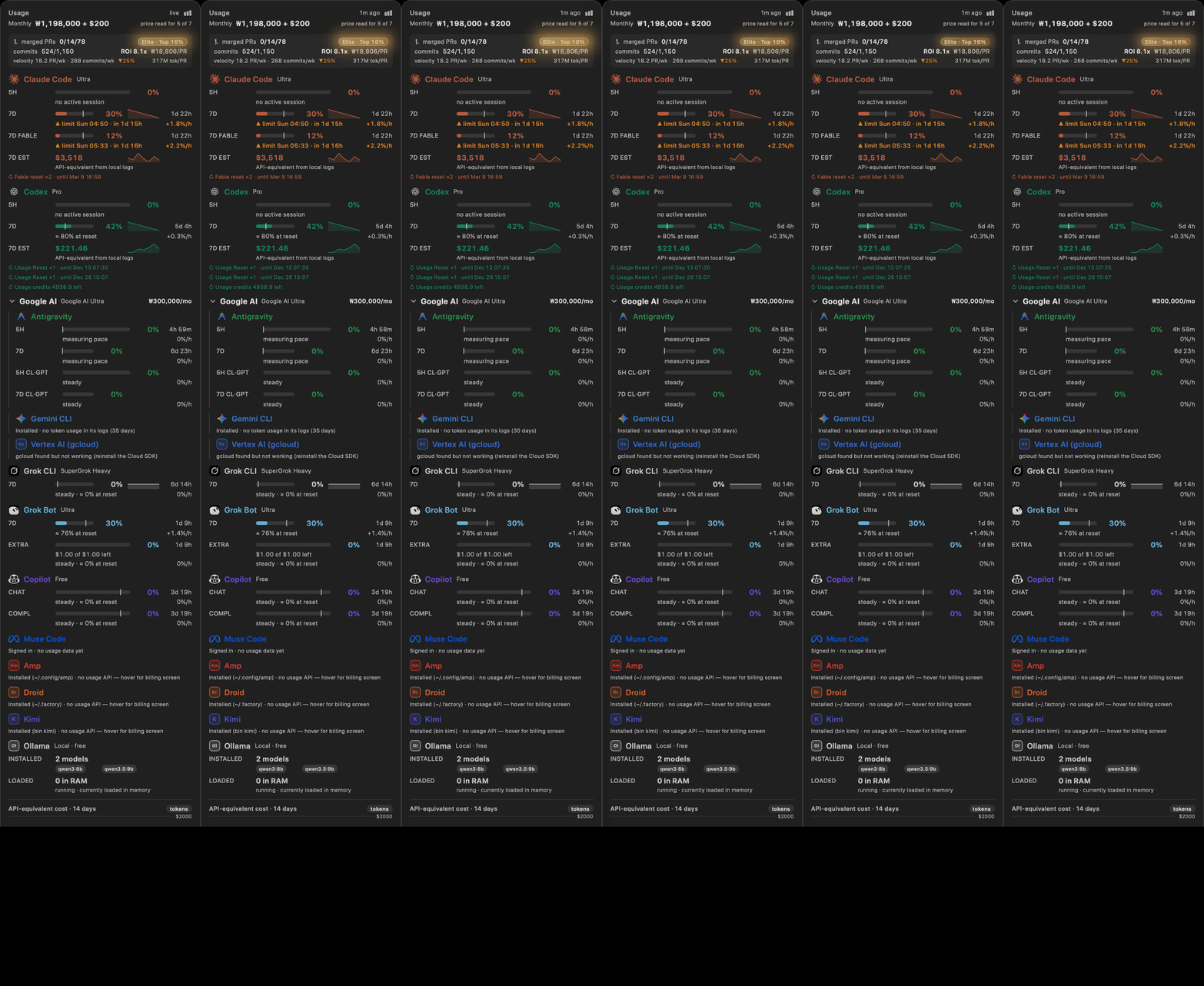
Menu bar indicator. Click it to show or hide the panel.
Why
You're on Claude Max, ChatGPT Pro, Google AI and a couple more. Each one hides its limits on a different
settings page, with a different reset clock. Phosphor puts all of them in one small floating panel, works
out your burn rate, and tells you ▲ limit 15:20 · in 1h 21m before you hit the wall, not after.
Features
- 30+ providers, auto-detected. Claude Code, Codex / ChatGPT, Antigravity, Gemini CLI, Grok CLI, GitHub Copilot,
Muse Code, Cursor, Windsurf, Cline, Roo Code, Aider, Kiro, Warp, Amp, OpenRouter, Ollama, LM Studio, OpenAI and
Anthropic API spend, and more. Phosphor finds installed CLIs, apps and logs and turns the right rows on. Toggle any of them. - Burn rate and run-out time on every quota bar. Two recent samples are enough to fit a slope (last hour for 5-hour windows, last 6 hours for weekly ones).
You get+3.2%/hand the time you'll hit 100 % (in the warning colour if that comes before the reset), or≈ 83% at resetif you'll make it. When a slope can't be fitted yet the line stays up asmeasuring pace,steady · 0%/h,▲ limit reached, orno active session. - Always on top, natively. A SwiftUI panel with no web runtime that floats over every Space. Compact mode, opacity, click-through, and a
Φ 94%menu bar item. - Language. English by default, with in-app language switching (English, Korean, or follow your macOS system language) covering menus, settings, and burn-rate / depletion descriptions.
- Subscription ROI. Local Claude Code / Codex / Gemini CLI logs are priced at API list rates (LiteLLM's public table) and set against what your plans cost:
ROI 8.4x.
A 14-day stacked chart shows tokens or dollars per tool. - GitHub PR efficiency. Merged PRs and commits for today / 7D / 30D through your existing
ghlogin (read-only), plus cost per PR, tokens per PR and velocity.
A tier badge places your merged-PRs-per-week within the published LinearB 2026 benchmark bands.
There's no fake global leaderboard. - Google AI, grouped. Antigravity, Gemini CLI, Gemini app, Gemini API, Google AI credits and Vertex AI are separate meters at Google.
Phosphor shows each one under one collapsible Google AI header and counts the subscription once. - Drag to reorder. Grab the grip that appears on hover. The order persists, and Reset Order is in the menu.
- Plans, prices, next bill, reset credits. Hover a row for its plan card. There's also a monthly total across every plan.
Stale readings are dimmed, and you get alerts at 70 % / 90 %, on reset, a day before billing, and 3 days before credits expire. - Service status dots from each provider's public status page, multiple accounts per provider, and a calendar export of upcoming bills.
- Themes are JSON. Clean, Retro CRT, Matrix, Glasses HUD, and Raid Frames (quota as HP, with a revive animation on reset).
You can write your own in a few lines.
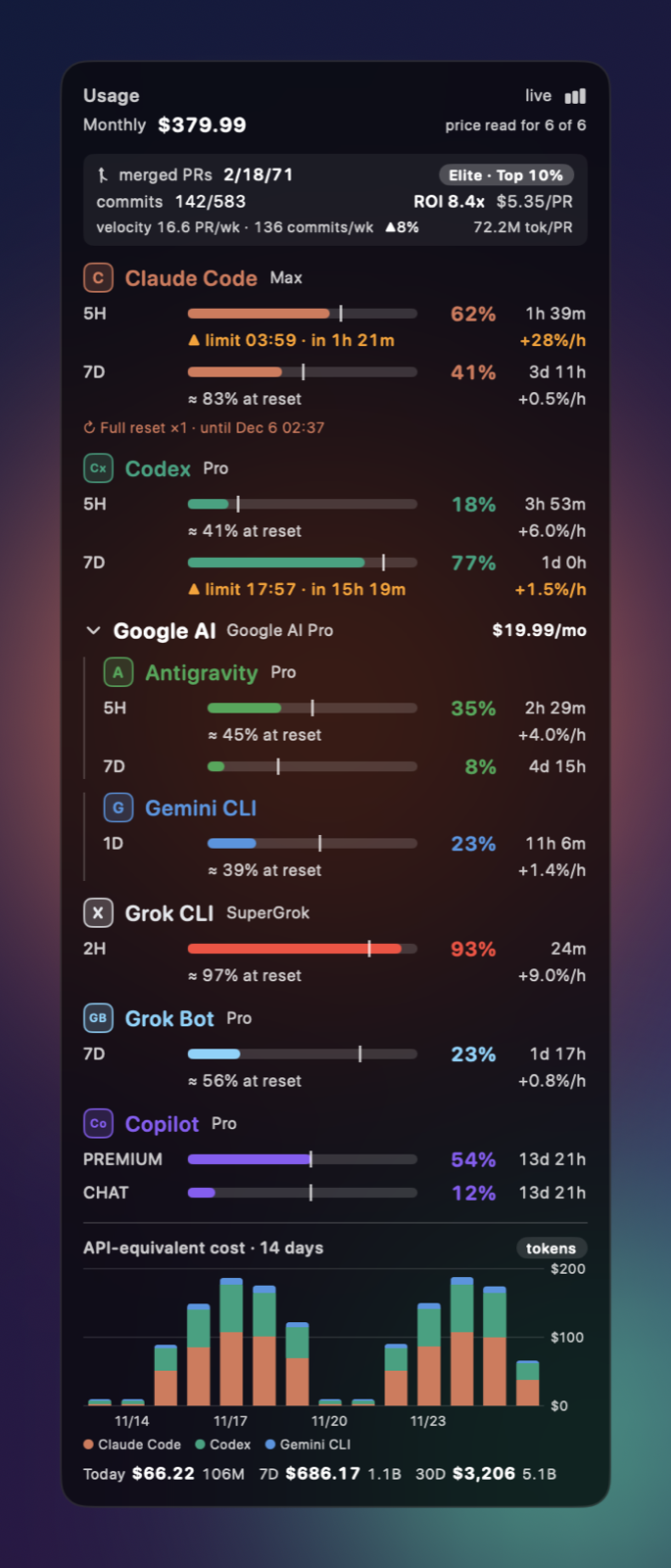
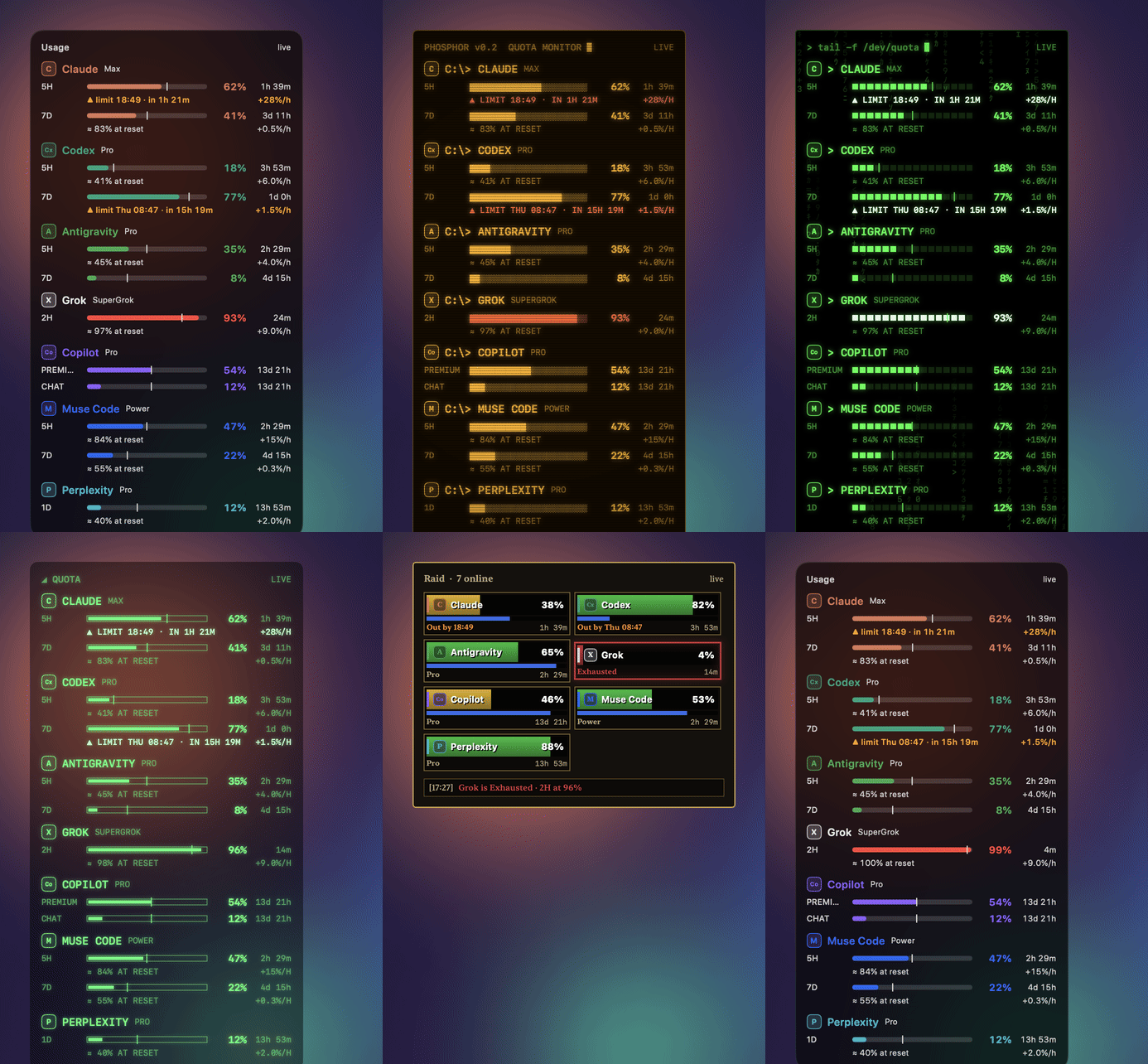
These pictures use the built-in demo data (Phosphor --demo), not a real account.
Privacy
- No cookie or session scraping, no browser automation, no password prompts. Phosphor reads only what the official tools already keep for you:
the CLI's own OAuth token (Claude Code, Codex, Copilot viagh), an app's own local usage cache, or a provider's documented API with your key. - Never prints or stores tokens. Credentials stay in the Keychain or the tool's own config. Phosphor only reads them, in memory.
- Local logs are read for numbers only. Token counts and model names, never prompts or replies. Everything stays on your Mac,
in~/Library/Application Support/Phosphor. - The only network calls go to the providers' usage endpoints, their public status pages, LiteLLM's public price table,
a public FX rate (for ROI), GitHub search through yourghlogin, and provider icons if you choose to download them. No analytics, no telemetry. - No guessed numbers. If a value can't be read, the row says why instead of making one up.
Documentation
docs/GUIDE.md covers every provider and how it's read, custom providers, themes, files, notifications,
extra accounts and building. Themes: docs/THEMES.md. Releasing: docs/RELEASE.md.
swift test                    # PhosphorCore unit tests
./scripts/hero.sh             # regenerate README images from demo data
./scripts/screenshots.sh      # theme screenshots + GIF
개발자
소스에서 빌드하려면 macOS 14 이상과 Xcode Command Line Tools가 필요합니다.
git clone https://github.com/nirvanasangsara-AI/phosphor-hud.git
cd phosphor-hud
./scripts/build-app.sh --run
로그인 없이 화면만 보려면 dist/Phosphor.app/Contents/MacOS/Phosphor --demo를 실행합니다. 이 데모에는 실제 계정 데이터가 없습니다.
버전은 저장소 루트의 VERSION 파일 하나입니다. 로컬 빌드와 CI가 같은 파일을 읽고, 메뉴에는 Phosphor 0.2.1처럼 표시됩니다. 빌드 번호(CFBundleVersion)는 git 커밋 수라서 커밋마다 올라갑니다. 릴리스할 때는 VERSION을 올린 다음, 그 값과 같은 태그(v0.2.1)를 푸시합니다. Actions가 DMG와 zip을 그 릴리스에 붙입니다. 자세한 절차는 docs/RELEASE.md에 있습니다.
Developers
The commands above build the app locally. ./scripts/build-app.sh reads VERSION and writes it into the app, so a local build shows the same Phosphor 0.2.1 as a release build. To publish, bump VERSION, merge to main, and push a matching tag such as v0.2.1. A Homebrew cask template is in packaging/homebrew.
한국어
Phosphor는 맥 화면 위에 항상 떠 있는 AI 구독 사용량 HUD입니다.
- Claude Code, Codex, Google AI(Antigravity·Gemini), Grok, Copilot 등 30개 이상의 서비스를 자동으로 찾아 한도 %와 리셋 시각을 한눈에 보여 줍니다.
- 최근 사용 속도로 언제 한도에 닿는지(
▲ limit 15:20 · in 1h 21m)를 미리 알려 줍니다. - 기본 언어는 영어이며, 앱에서 영어 / 한국어 / macOS 시스템 언어를 고를 수 있습니다. 메뉴, 설정, 소진율·예상 소진 안내가 선택한 언어로 바뀝니다.
- 로컬 로그를 API 정가로 환산해 구독 ROI를 계산하고,
gh로그인으로 GitHub PR·커밋 효율을 보여 줍니다. 등급 배지는 LinearB 2026 공개 벤치마크 기준입니다. - 쿠키·세션 스크래핑은 하지 않습니다. 각 공식 도구가 이미 저장해 둔 값만 읽고, 토큰은 출력하거나 저장하지 않습니다.
License
MIT. Not affiliated with Anthropic, OpenAI, Google, xAI, GitHub, LinearB or any provider listed.
For my beloved wife, daughter, and son. ♥
사랑하는 아내와 딸, 아들에게 바칩니다. ♥
Reviews (0)
Sign in to leave a review.
Leave a reviewNo results found