e-commerce-agents
Health Gecti
- License — License: MIT
- Description — Repository has a description
- Active repo — Last push 0 days ago
- Community trust — 37 GitHub stars
Code Basarisiz
- Hardcoded secret — Potential hardcoded credential in .github/workflows/build-images.yml
Permissions Gecti
- Permissions — No dangerous permissions requested
Bu listing icin henuz AI raporu yok.
Learn Microsoft Agent Framework by building a real system: a 34-chapter course in Python and .NET, and a multi-agent e-commerce app whose orchestrator runs the same request five ways (tool routing, handoff, workflow graphs, group chat) over A2A, with latency and cost compared.
E-Commerce Agents





A hands-on course in Microsoft Agent Framework (MAF) — 34 chapters in Python and .NET, with a no-key start — and the multi-agent e-commerce platform it builds up to. In the platform, six specialized AI agents collaborate over A2A (A2A 1.0 JSON-RPC at /a2a/v1 plus the original /message:send wire, on both stacks; see docs/a2a.md) to handle product discovery, orders, pricing, reviews, inventory and support — with two complete backends, Python and .NET / C# (differences documented in the parity matrix), behind one Next.js frontend.
Learn
New to MAF? Run chapter 1 now — no API key, no Docker:
uv sync --project tutorials
uv run --project tutorials python tutorials/01-first-agent/python/main.py
It replays a recorded model response, so it works offline. From there, follow a
learning path — first agent, inside an agent, workflows,
multi-agent orchestration, production concerns — or the short route in the
course README.
Run it
git clone https://github.com/nitin27may/e-commerce-agents.git
cd e-commerce-agents
cp .env.minimal .env          # set OPENAI_API_KEY — the only variable a first run needs
./scripts/dev.sh --demo       # pulls prebuilt images, seeds, and starts everything
Then open http://localhost:3000 and sign in as [email protected] / customer123.
Docker is the only requirement — no Python, .NET or Node needed.
--demo pulls the ten released images from GitHub Container Registry instead of building them,
which is the difference between roughly one minute and roughly twelve. Images are published forlinux/amd64 and linux/arm64, so Apple Silicon runs natively.
No API key? ./scripts/dev.sh --demo --no-key (PowerShell: ./scripts/dev.ps1 -Demo -NoKey) plays back recorded model responses; see docs/quick-start.md.
Building from source instead — drop the flag. This is the contributor path, and the one to use
if you have changed any code:
./scripts/dev.sh # builds all eleven images locally, then seeds and starts
On Windows, use scripts/dev.ps1 — the PowerShell twin of the bash script, same flags:
Copy-Item .env.minimal .env    # then set OPENAI_API_KEY in .env
./scripts/dev.ps1 -Demo
WSL2 still gives the best experience, and
everything above works unchanged inside it.
In the browser, no install. The Codespaces badge above opens a ready environment — Python 3.12 + uv,
Node 22 + pnpm, the .NET 10 SDK and Docker-in-Docker — and installs the dependencies for you
(.devcontainer/). It needs no secrets: LLM_PROVIDER=replay is set, so the
tutorials, the Python tests and the keyless eval suite run from recorded responses. Ports 3000 (web) and
18888 (Aspire dashboard) are forwarded. For live model calls, add OPENAI_API_KEY as a Codespaces secret and
clear LLM_PROVIDER; for the full stack, ./scripts/dev.sh --infra-only works inside it.
Full detail — the .NET stack, WSL2 notes, running with no API key, and what to do when something
breaks: the Quick Start page.
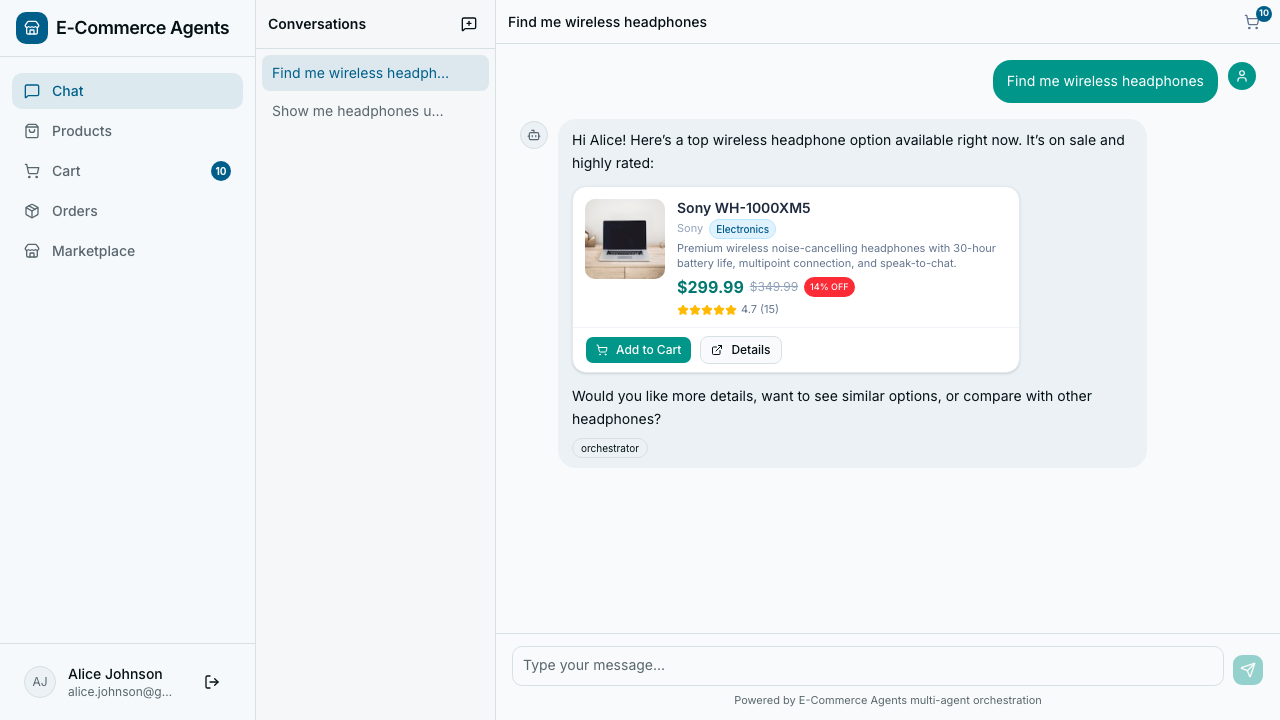
Generative UI, not raw JSON. The chat surface never dumps a tool result as text or a code block. Every agent response is inspected by shape and rendered as the right interactive component: a single detailed result becomes a card, a list becomes a table, a distribution or trend becomes a chart, a status becomes a tone-coded badge — see it live in the screens gallery (review sentiment: rating distribution + 6-month trend, rendered from the same data an LLM would otherwise only describe in prose).
Pick your stack: agents/python/ or agents/dotnet/ — same schema, same prompts, same frontend for either (./scripts/dev.sh --dotnet, or docker-compose.dotnet.yml directly). Parity is checked by a dual-backend test gate you run locally (scripts/e2e-both-stacks.sh; it is not in CI yet), and docs/parity-matrix.md lists the remaining differences row by row.
Full documentation: nitinksingh.com/e-commerce-agents — the concepts library, all 34 tutorial chapters, and the architecture reference, with every diagram rendered.
Companion demo repo for the AI article series on nitinksingh.com:
MAF v1: Putting It All Together
(the current Python + .NET series) and
Building a Multi-Agent E-Commerce Platform — The Complete Guide
(the original Python-only walkthrough). The articles are optional background — this repo and its
documentation site are the canonical, always-current source.
Where to start
| I want to... | Go here |
|---|---|
| Learn MAF step by step — start with no key | tutorials/README.md — 34 chapters; run chapter 1 now |
| Just run it | Run it above — Docker, one command |
| Run the .NET backend, or Windows, or with no API key | Quick Start |
| Configure it | Configuration — one .env, and how it reaches each service |
| Read the documentation | nitinksingh.com/e-commerce-agents — rendered and searchable |
| Brand new to AI — never run a model or written an agent | AI Knowledge Hub — eleven modules, ten labs, free and local |
| Learn what an agent even is — new to AI/agents | Concepts — start at page 01 |
| Understand how the agents work / add a new one | Architecture · Adding an Agent |
| Use the MCP server | MCP Integration |
| See what shipped and what is next | Roadmap · CHANGELOG |
| See the generative UI, test users and scenarios to try | Demo guide |
Architecture
graph TB
subgraph Client["Browser / Client"]
FE["Next.js 16<br/>React 19 + Tailwind CSS"]
end
subgraph Orchestrator["Orchestrator Agent :8080"]
FA["FastAPI + MAF"]
AUTH["JWT Auth + RBAC"]
ROUTER["Intent Router"]
CONV["Conversation Mgmt"]
MKT["Marketplace API"]
end
subgraph Specialists["Specialist Agents · A2A Protocol"]
PD["Product Discovery<br/>:8081"]
OM["Order Management<br/>:8082"]
PP["Pricing & Promotions<br/>:8083"]
RS["Review & Sentiment<br/>:8084"]
IF["Inventory & Fulfillment<br/>:8085"]
end
subgraph Infrastructure["Shared Infrastructure"]
PG[("PostgreSQL 16<br/>+ pgvector")]
RD[("Redis 8")]
ASP["Aspire Dashboard<br/>:18888"]
end
subgraph LLM["LLM Provider"]
OAI["OpenAI API<br/>(configurable model)"]
AZ["Azure OpenAI<br/>(configurable)"]
end
FE -->|"HTTP/JSON"| FA
FA --> AUTH
AUTH --> ROUTER
ROUTER -->|"A2A"| PD
ROUTER -->|"A2A"| OM
ROUTER -->|"A2A"| PP
ROUTER -->|"A2A"| RS
ROUTER -->|"A2A"| IF
PD --> PG
OM --> PG
PP --> PG
RS --> PG
IF --> PG
PD -->|"Embeddings"| OAI
PD -.->|"or"| AZ
Orchestrator --> RD
Specialists -->|"OTLP"| ASP
Orchestrator -->|"OTLP"| ASP
Specialists --> OAI
Specialists -.-> AZ
style Client fill:#6366f1,stroke:#4f46e5,stroke-width:2px,color:#fff
style FE fill:#818cf8,stroke:#6366f1,color:#fff
style Orchestrator fill:#0891b2,stroke:#0e7490,stroke-width:2px,color:#fff
style FA fill:#22d3ee,stroke:#06b6d4,color:#0c4a6e
style AUTH fill:#fca5a5,stroke:#f87171,color:#7f1d1d
style ROUTER fill:#67e8f9,stroke:#22d3ee,color:#0c4a6e
style CONV fill:#67e8f9,stroke:#22d3ee,color:#0c4a6e
style MKT fill:#67e8f9,stroke:#22d3ee,color:#0c4a6e
style Specialists fill:#0d9488,stroke:#0f766e,stroke-width:2px,color:#fff
style PD fill:#2dd4bf,stroke:#14b8a6,color:#134e4a
style OM fill:#2dd4bf,stroke:#14b8a6,color:#134e4a
style PP fill:#2dd4bf,stroke:#14b8a6,color:#134e4a
style RS fill:#2dd4bf,stroke:#14b8a6,color:#134e4a
style IF fill:#2dd4bf,stroke:#14b8a6,color:#134e4a
style Infrastructure fill:#475569,stroke:#334155,stroke-width:2px,color:#fff
style PG fill:#94a3b8,stroke:#64748b,color:#1e293b
style RD fill:#94a3b8,stroke:#64748b,color:#1e293b
style ASP fill:#94a3b8,stroke:#64748b,color:#1e293b
style LLM fill:#d97706,stroke:#b45309,stroke-width:2px,color:#fff
style OAI fill:#fbbf24,stroke:#f59e0b,color:#78350f
style AZ fill:#fbbf24,stroke:#f59e0b,color:#78350f
Six agents — five specialists behind one orchestrator — over A2A (1.0 JSON-RPC and the legacy HTTP wire, docs/a2a.md), with the same schema and the
same frontend for either backend. Full detail — request flow, agent internals, the database schema
and the API surface — is in Architecture.
Pick your stack: agents/python/ or agents/dotnet/ —
switch with ./scripts/dev.sh --dotnet. Parity is checked by a dual-backend test gate you run locally (scripts/e2e-both-stacks.sh; it is not in CI yet), anddocs/parity-matrix.md lists the remaining differences row by row.
Deploy to Azure
Draft, Python stack only, not yet deployed to a real subscription. The Bicep, the azd hooks and the scripts are written and checked offline; the first real deploy is still to come, so expect fix-forward changes.
az login && azd auth login
scripts/azure-up.sh --env demo1 --location eastus2 --image-tag v1.4.0   # PowerShell: scripts/azure-up.ps1
scripts/azure-down.sh --env demo1                                        # removes everything, checks nothing is soft-deleted
It creates a Container Apps environment (frontend, orchestrator, five specialists, outbox worker, Redis), PostgreSQL with pgvector, an Azure OpenAI account (gpt-5.1) and Key Vault, and runs a database job. The frontend is reachable only from your public IP by default, and a demo costs roughly $4 to $12 a day while it is up. Prerequisites, the wiring, costs, assumptions and the failure catalogue are in docs/azure-deployment.md and docs/troubleshooting.md.
Documentation
Everything below is published, searchable and cross-linked at
nitinksingh.com/e-commerce-agents — with all
71 Mermaid diagrams rendered as diagrams. The site is generated from this repository byscripts/build_docs_site.py, so the files here are always the source of truth; nothing lives
only on the site.
| Section | What's in it |
|---|---|
| Concepts | 14 pages for readers new to agents — what an agent is, the agentic loop, tools, harnesses, why multi-agent, orchestration patterns, graphs, state and memory, grounding, guardrails, HITL, evaluation, observability and cost, production concerns |
| Tutorials | 34 chapters. Every chapter that ships code ships both Python and .NET, and every one is gated in CI — the tests replay fixtures (Python) or drive a scripted client (.NET), so the whole suite runs with no key and no network |
| Architecture | System design · agent flows · database schema · API reference · frontend · workflows |
| Guides | Adding an agent · A2A 1.0 · approvals · merchant proposals · event autonomy · return lifecycle · DevUI · MCP integration · telemetry · security · agent quality and evals · MAF best practices · releasing |
| Getting Started | Quick start · configuration · deployment · troubleshooting |
| Reference | Python vs .NET parity matrix · agent audit matrix · orchestration benchmark · reported vs actual · glossary · Mermaid style guide |
| Demo guide | Test users, the agent catalog, scenarios to try, and the screens gallery (source) |
| Roadmap | What shipped, what is in progress, and what is deliberately not done (source) |
Contributor-facing docs stay in the repo rather than on the site:
CONTRIBUTING.md (setup, conventions, testing policy, PR checklist),
CHANGELOG.md (what changed in each release) and CLAUDE.md.
Tech stack
| Layer | Technology |
|---|---|
| Agent framework | Microsoft Agent Framework v1 — Python (agent-framework-core) and .NET (Microsoft.Agents.AI) |
| Agent communication | A2A 1.0 JSON-RPC (/a2a/v1, agent card at /.well-known/agent-card.json) and the legacy /message:send wire, on both stacks (a2a.md), plus optional MCP for product and inventory data (flag-gated, MCP_ENABLED) |
| LLM | OpenAI / Azure OpenAI, or any OpenAI-compatible endpoint (Ollama, vLLM, OpenRouter) |
| Backend | Python 3.12 + FastAPI · .NET 10 + ASP.NET Core |
| Data | PostgreSQL 16 + pgvector · Redis 8 |
| Frontend | Next.js 16, React 19, Tailwind 4, shadcn/ui |
| Telemetry | OpenTelemetry → .NET Aspire Dashboard |
Versions, ports and every environment variable: Deployment and
Configuration.
What's next
This is an active project. The short version of where it goes from here — the full list, with
checkboxes and the reasoning for the order, is on the
Roadmap.
| Next | What it is |
|---|---|
| Azure and Microsoft Foundry | The biggest gap today: there is no Azure path at all. Not one deployment — the same six agents in three topologies (Container Apps, Foundry as model provider, Foundry Hosted Agents), with what each one costs you. One deployment is a tutorial; three with trade-offs is a reference |
| Finish the gates | The dual-backend parity suite runs locally but not in CI, and the .NET eval suite needs its baselines. Every parity claim this repo makes rests on a gate nobody runs automatically |
| Retrieval and tooling | A typed filter DSL for search_products, the two MCP servers published to PyPI, and prompt caching — now measurable, because the cost counter ships |
No third backend is planned. The roadmap also records what is deliberately not planned, and why, so those are not mistaken
for oversights.
Watch this repository to be notified when these land — use Watch → Custom → Releases for
release-only notifications, or Watch → All Activity to follow the work as it happens. Each
release is written up in the CHANGELOG, which says plainly when something never
worked and for how long.
Contributing
- Fork the repository
- Create a feature branch:
git checkout -b feature/your-feature - Make your changes and ensure tests pass
- Submit a pull request
See CONTRIBUTING.md for detailed setup, conventions, testing policy, and PR checklist.
License
This project is licensed under the MIT License.
Built with Microsoft Agent Framework and the A2A protocol as its wire format (A2A 1.0 on both stacks, docs/a2a.md).
Built by Nitin Singh · Documentation · More projects
Yorumlar (0)
Yorum birakmak icin giris yap.
Yorum birakSonuc bulunamadi