nyaai
Health Pass
- License — License: Apache-2.0
- Description — Repository has a description
- Active repo — Last push 0 days ago
- Community trust — 51 GitHub stars
Code Warn
- process.env — Environment variable access in drizzle.config.ts
- process.env — Environment variable access in eslint.config.js
Permissions Pass
- Permissions — No dangerous permissions requested
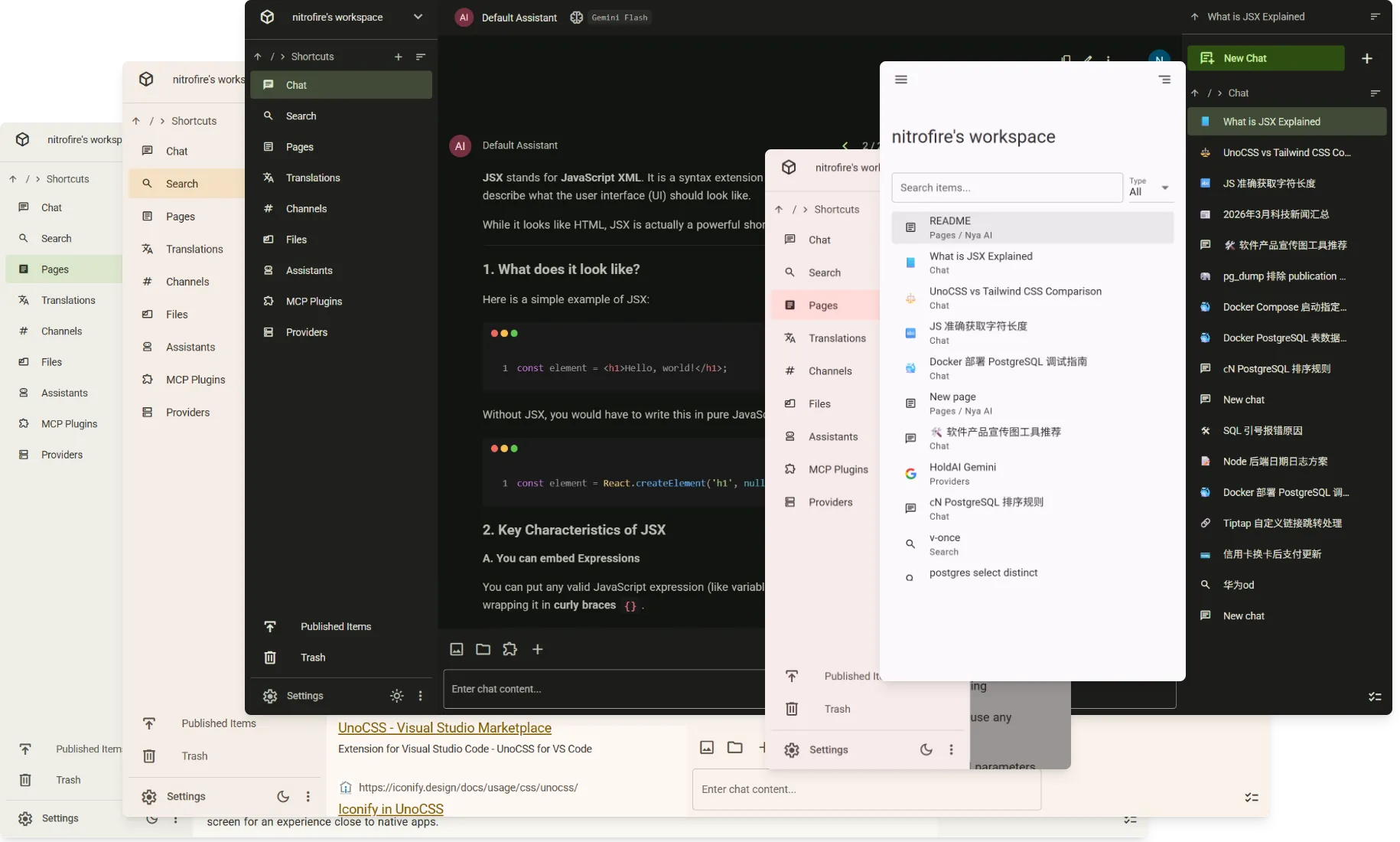
Nya AI is a collaborative platform that integrates AI chat, web search, note-taking, file management, and team communication into a single unified workspace. It allows users to connect to MCP servers, bring their own API keys, and leverage various multimodal models.
Security Assessment
Overall Risk: Low. The tool does not request dangerous system permissions, execute arbitrary shell commands, or contain hardcoded secrets. However, there are warnings for environment variable access within its configuration files (`drizzle.config.ts` and `eslint.config.js`). This is a standard practice for accessing database credentials and linter settings, but it means you should ensure your environment files (`.env`) are properly secured and never committed to public version control. As a collaborative web platform that connects to external AI models and supports MCP server connections, the tool inherently relies on network requests to function, though it does not engage in unexpected local data harvesting.
Quality Assessment
Quality is strong. The project is licensed under the permissive Apache-2.0 and is actively maintained, with its most recent code push occurring today. It has a clear and descriptive README. While the compatible CLIs are currently unknown, it has garnered 51 GitHub stars, indicating a fair level of early community trust and growing interest from developers.
Verdict
Safe to use, provided you follow standard security practices for managing environment variables and external API keys.
AI Chat / Search / Notes / Collaboration / Channels / Cloud Drive, all in one place! - Collaborative AI Platform.
Nya AI

English | 简体中文
Nya AI combines AI chat client and collaboration platform, enabling you to chat with AI, search the web, take notes, write documents, communicate/collaborate with your team, manage files, and more within one unified workspace.
First-class AI Chat
Unlike the added AI features of other collaboration platforms, AI Chat is our core feature, designed to fully replace standalone AI chat clients.
- Message Branching: Switch between multiple branches
- Document Input: Parse .docx, .pdf, .pptx, etc., into text input
- MCP: Connect to MCP servers to extend AI capabilities, supporting MCP Tools, Resources, and Prompts
- Multimodal Input/Output: Support for models like Nano Banana
- Web Search & Crawl: Built-in extensions for web search and web page crawling
- BYOK: Add custom providers to use any custom models
- Detailed configuration for model parameters and provider options
- User input preview, message TOC, quick scrolling, keyboard shortcuts, and other detailed features
Workspaces
The workspace has a file system-like storage structure, allowing you to create folders and flexibly organize various types of content according to a custom structure.
The workspace is also a place for collaboration. You can create new workspaces, invite your team to join your workspace, manage roles of workspace members, and more. All members of the workspace can browse and edit the workspace content. All members of the workspace share the workspace's AI quota and storage space.
Access anytime, anywhere
All content is stored in the cloud, allowing you to access everything from any device at any time. Thanks to Zero, we achieved this while enabling live queries and optimistic mutations, delivering an interaction experience close to local-first applications!
Thanks to our responsive interface design, mobile devices can also access Nya AI directly. It's also a PWA; you can install it to your home screen for an experience close to native apps.
Interactions between different features
Currently, we support:
- Opening chat within pages to allow AI browsing/editing the page
- Automatically creating a chat when searching to generate an AI overview and facilitate follow-up conversations
- Quickly searching and translating via the floating menu that appears when selecting a chat message
- Using uploaded files anytime in chat, channels, and pages
We plan to add more cross-functional features in the future, such as calling the AI assistant directly within channels or enabling the AI to independently read workspace content.
More
Search, pages, channels, translation, files... Learn more features by getting started!
Documentation
We have not set up documentation yet, but you can ask the AI in Zread to learn more details about this project.
Self host
Please refer to docker-compose.example.yml.
Development
# Copy and udpate .env
cp .env.example .env

# Install dependencies
bun install

# Prepare for linting, type-checking, etc
bun quasar prepare

# Startup dev db
bun dev:db-up

# Startup dev server
bun dev:server

# zero-cache is not yet compatible with bun; run it with node.
npm i -g @rocicorp/zero
zero-cache-dev

# Dev user frontend
bun dev:frontend

# Dev admin frontend
bun dev:admin
Community Links
Reviews (0)
Sign in to leave a review.
Leave a reviewNo results found