lunchbox
Health Warn
- No license — Repository has no license file
- Description — Repository has a description
- Active repo — Last push 0 days ago
- Low visibility — Only 7 GitHub stars
Code Fail
- network request — Outbound network request in electron/agents/http.ts
- process.env — Environment variable access in electron/agents/index.ts
- exec() — Shell command execution in electron/agents/textcalls.ts
Permissions Pass
- Permissions — No dangerous permissions requested
No AI report is available for this listing yet.
A shared agent room: Claude Code, Codex, Grok, Gemini and local models work as one team on one task, on the logins you already have. Free for Mac, Windows and Linux.

Lunchbox
A shared agent room: Claude Code, Codex, Grok, Gemini and local models work as one team on one task, with the logins you already have.







Quick start · How it works · Your data · Contributing
https://github.com/user-attachments/assets/92e057ae-6206-4a41-ae07-bffed98bee19
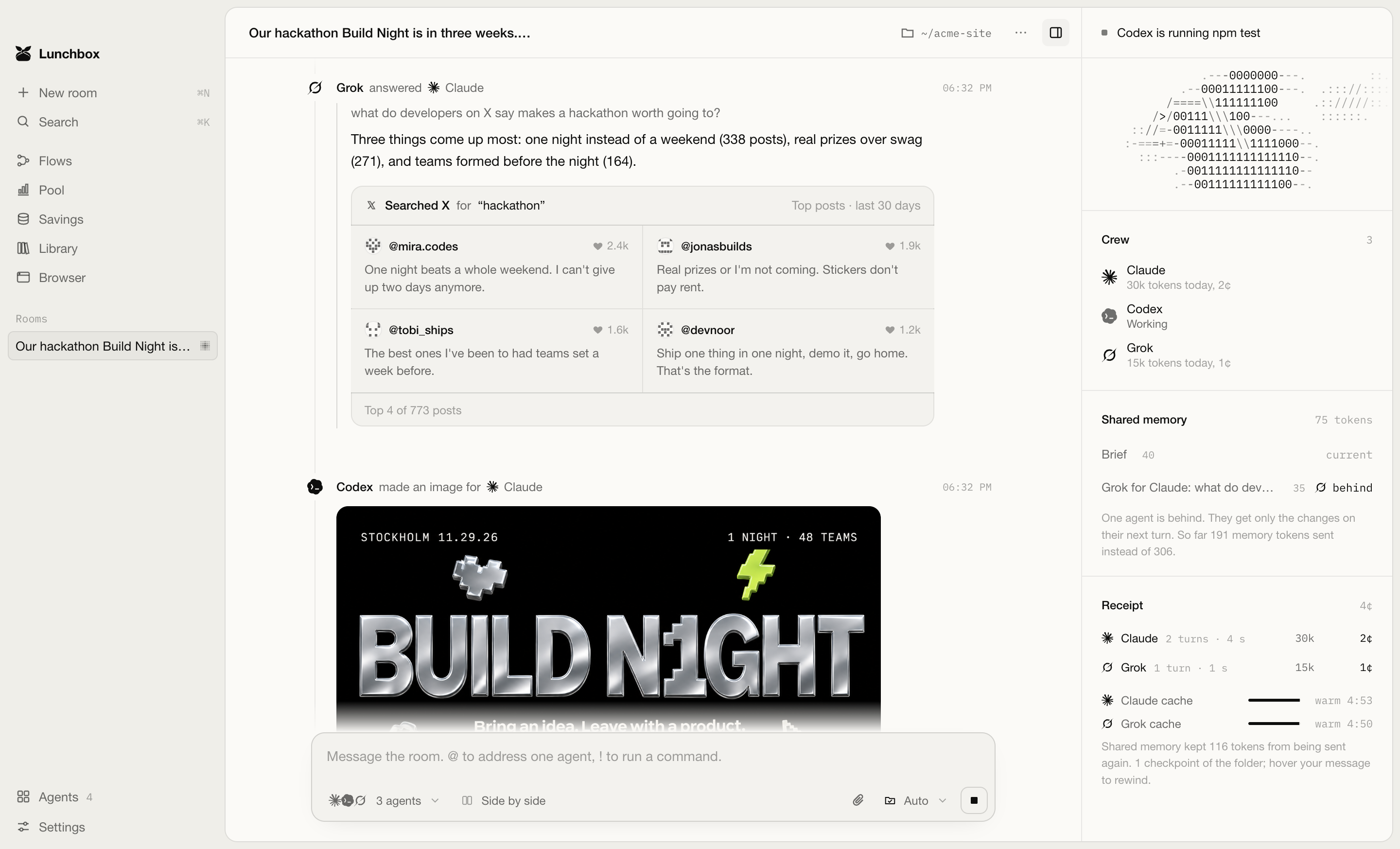
A recording of a real room: Claude plans a hackathon announcement, Grok searches X, and Codex draws the banner, builds the event page and runs the tests.
What it is
Lunchbox is a shared agent room: a desktop app where AI agents from different vendors work in one conversation with one memory, hand tasks to each other, and check each other's results. Most tools for running several agents start each one in its own window or copy of the code. In Lunchbox they work on the same task together, and when one hits its usage limit the next carries on with the same memory.
It supports Claude Code, Codex, Grok Build and Gemini CLI, OpenCode and other command line agents, local models through Ollama, LM Studio or llama.cpp, and API keys from 16 providers including Anthropic, OpenAI, xAI and Google. Lunchbox is free; get it at mylunchbox.dev.
Each tool uses your own login and plan. Your work goes from your computer to the company behind the tool, with no Lunchbox server in between. Once a day Lunchbox sends an anonymous count: a random ID, the version and the system. Nothing about your rooms, files, prompts or keys. Turn it off in Settings.
|
You pick who leads Your messages go to the agent you choose. It brings in a crewmate for the parts that crewmate does better, such as Grok for a search on X. |
Short briefings A crewmate starts with the goal, what the room has learned, the files changed and its task. Only the lead reads the whole conversation. |
|
Limits handled If an agent hits its usage limit, the next one in the crew takes the same task and gets a briefing on where it stands. |
Proof for claims An agent that says the tests pass needs a passing test run after its last edit. Without one, Lunchbox asks you what to do. |
|
Saving Lunchbox orders each request so the provider can reuse what it read last time, keeps a room's cache alive while you are away, and shortens long test and build output before an agent reads it. The Savings page shows what each of these saved. |
Flows Run steps on a schedule, such as a nightly test run or a weekly SEO check. Lunchbox comes with 25 templates to start from. |
Quick start
1. Install Lunchbox. Paste one line into a terminal. The script installs the latest version for your computer and opens it.
# macOS and Linux
curl -fsSL https://raw.githubusercontent.com/noah-thing/lunchbox-releases/main/install.sh | sh
# Windows, in PowerShell
irm https://raw.githubusercontent.com/noah-thing/lunchbox-releases/main/install.ps1 | iex
You can also download the dmg, the Windows installer, the deb or the AppImage from Releases. After the first install, Lunchbox updates itself.
2. Have at least one agent. Lunchbox finds the ones you have on first launch.
| Agent | Install | Sign in |
|---|---|---|
| Claude Code | npm install -g @anthropic-ai/claude-code |
claude |
| Codex | npm install -g @openai/codex |
codex login |
| Gemini CLI | npm install -g @google/gemini-cli |
gemini |
| Grok Build | x.ai/cli | grok login |
| Local models | Ollama, LM Studio or llama-server |
none |
| API keys | Anthropic, OpenAI, xAI, Google, OpenRouter and more | Agents page in the app |
3. Type what you want done and press Enter.
How it works
Rooms
A room is a task with its own crew and folder. If you don't pick a folder, Lunchbox makes one inside Documents/Lunchbox and names it after your request.
| Main agent | The first agent in the crew answers your messages unless you name another agent. Make main in the agent menu changes it for the room; Settings sets it for new rooms. |
| Bringing others in | The main agent can ask a crewmate a question or hand it a piece of work. The room shows a line when a crewmate joins, with the task, and another when it steps out. Writing @codex yourself brings Codex in the same way. |
| Memory | Lunchbox keeps the brief, answers between agents, changed files and your pins as versioned blocks, and sends each agent only the blocks that changed since its last turn. |
| Proof | If an agent says the build works, Lunchbox looks for a matching command that exited 0 after the last edit. If there isn't one, you decide what happens next. |
| Side by side | Send one message to the whole crew and keep the answer you like. Each pick counts toward that agent's rating for the kind of work. |
| Rewind | Lunchbox saves the folder before each message, so you can undo any change. You can also fork a room, replay it or export it. |
Access
You choose the mode for each message in the composer.
| Mode | Agents can | Commands you run with ! |
|---|---|---|
| Plan | Read only | Reads run, Lunchbox refuses the rest |
| Ask | Read anything, edits wait for you | Anything that writes asks first |
| Auto | Edit and run inside the folder | Free inside the folder, outside asks |
| Full access | Anything on the computer, without asking | Free, except wiping the disk or the home folder |
Lunchbox blocks a few commands in all four modes, such as rm -rf ~. You can read the rules in electron/policy.ts and their tests in scripts/test-policy.mjs.
Pool, Savings, Packs and Flows
- Pool adds up your plans and keys: what is left in each five hour and weekly window, when it resets, and which agent your picks rate highest for each kind of work.
- Savings shows what Lunchbox saved and what your agents' own prompt caching saved, per agent and per room. The two are counted apart.
- Packs give a room instructions for one kind of work, such as software, research, SEO or writing. docs/packs.md shows how to write your own.
- Flows run a few steps on a schedule, each in a room of its own.
Your data
Lunchbox keeps its data on your computer.
| What | Where |
|---|---|
| Rooms, settings and usage | ~/Library/Application Support/Lunchbox on macOS, %APPDATA%\Lunchbox on Windows, ~/.config/Lunchbox on Linux |
| API keys | The system keychain |
| Agent logins | With each tool, untouched |
Each room is one .jsonl file you can open in any editor. To show plan limits, Lunchbox reads them with the login each tool already has and sends that login only to the company that issued it. Settings has a switch to turn this off.
Development
You need Node 24.
git clone https://github.com/noah-thing/lunchbox.git
cd lunchbox
npm install
npm run dev         # Vite and Electron with hot reload
npm test            # policy rules, parsers, caching, limits and full rooms run with fake agents
npm run typecheck
npm run tour        # drives the real app and saves screenshots to test/shots
npm run bench       # the same tasks in plain Claude Code and in a room, with real agents and real usage
npm run dist        # installers for the current platform in release/
CI runs the type check, the tests and the build on macOS, Windows and Linux for each pull request. CONTRIBUTING.md explains how to propose a change, and docs/architecture.md how the code is laid out.
License
Copyright © 2026 noah-thing. All rights reserved.
Agent marks come from Lobe Icons under the MIT license, see licenses/lobe-icons.txt. The llama.cpp, Aider and Crush marks come from those projects' own files, and the terminal and server icons from Phosphor under the MIT license, see licenses/phosphor-icons.txt. Product names and logos belong to their owners.
Reviews (0)
Sign in to leave a review.
Leave a reviewNo results found