frenemy
Health Gecti
- License — License: MIT
- Description — Repository has a description
- Active repo — Last push 0 days ago
- Community trust — 78 GitHub stars
Code Basarisiz
- process.env — Environment variable access in ask-kimi.mjs
- exec() — Shell command execution in install.mjs
- fs.rmSync — Destructive file system operation in install.mjs
- process.env — Environment variable access in install.mjs
- spawnSync — Synchronous process spawning in snitch/bin/fleet.mjs
- process.env — Environment variable access in snitch/bin/fleet.mjs
- process.env — Environment variable access in snitch/bin/run-job.mjs
- os.homedir — User home directory access in snitch/extension/extension.js
- process.env — Environment variable access in snitch/extension/extension.js
- fs module — File system access in snitch/extension/extension.js
- fs module — File system access in snitch/extension/lib/archive-jobs.js
Permissions Gecti
- Permissions — No dangerous permissions requested
Bu listing icin henuz AI raporu yok.
I got tired of copy pasting between Claude and Codex, so I made them talk to each other. No API keys, just the subscriptions you already pay for.
Frenemy 2: Claude ↔ Codex ↔ Gemini ↔ Kimi
Version 1 let Claude and Codex call each other. Version 2 seats four: Claude Code, Codex,
Gemini (through Google's Antigravity app, agy) and Kimi Code. Any of them can lead and
hand work to the others, so you never copy/paste between them.
Runs on the subscriptions you already pay for. No API keys.
Created by Zakariya Syed:
YouTube ·
LinkedIn ·
X ·
GitHub
Not affiliated with Anthropic, OpenAI, Google or Moonshot AI. MIT licensed (see LICENSE),
the same as version 1.
Coming from version 1? Download version 2 into a new folder and run its installer. It
finds the connection version 1 gave Codex and points it at version 2. Two things it does
not do for you. Version 1 added a section headed "Codex is always available" to~/.claude/CLAUDE.md; version 2 does not use it, so delete that section by hand. And if
you got version 1 with git clone, a git pull now replaces its files with version 2's,
and the old connection stops working until you run the new installer. Version 1 is still
here, under the v1.0.0 tag.
What you need: Node.js 18 or newer, and at least two of these installed, on yourPATH and signed in: Claude Code (claude), Codex (codex), Antigravity (agy), Kimi
Code (kimi). You do not need all four; Frenemy connects the ones it finds. VS Code is
needed only for the Snitch panel. No Python, no WSL.
What is new in version 2
- Four AIs instead of two. Claude, Codex, Gemini and Kimi, each able to ask the other three.
- Anyone can drive. The app you are typing in is the driver. It takes your request and
hands out the work. Each driver gets the other three as tools. - Two kinds of jobs. Advice: one AI asks another for a review, an audit or a second
opinion (ask_claude,ask_codex,ask_agy,ask_kimi). Real work: the driver has
another AI build something in its own separate copy of the project
(ask_claude_write,ask_codex_write,ask_agy_write,ask_kimi_write); the driver
reviews and tests that copy before anything is applied to your real files. - Snitch. A panel in VS Code that shows which AI is working, which one is driving and
which one has finished. - One command to install, on Mac, Linux and Windows. Node.js only.
Snitch: see who is doing what
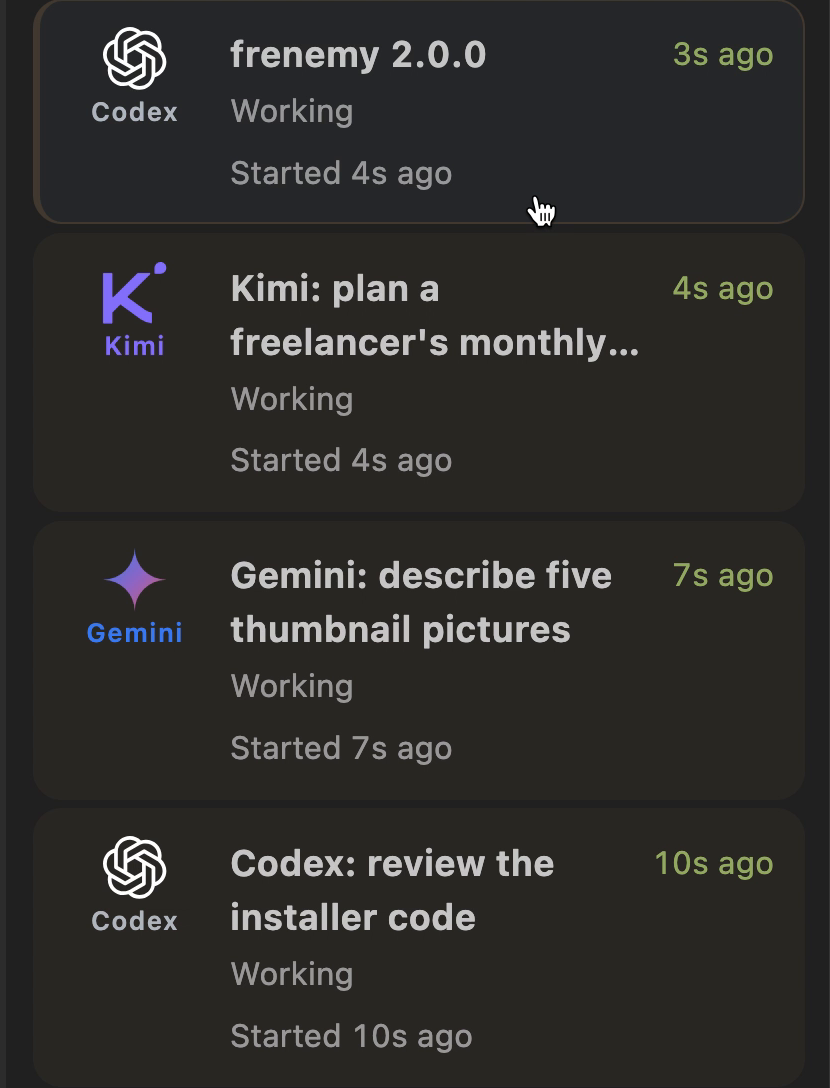
A real capture of the panel while Claude was driving: Codex, Kimi and Gemini each on a job
at the same time. When a provider refuses an account, or a subscription or quota runs out,
the failed row says so in the provider's own words. Open the panel in VS Code with
Snitch: Show Jobs.
Snitch comes with Frenemy 2; the same install command puts it into VS Code. No VS Code on
your computer? The installer says so, skips the panel and installs everything else. To
leave the panel out on purpose, add --no-snitch to the install command.
Install (one command)
Download Frenemy-2.0.0.zip from the latest release (the attached file, not the
"Source code" ones), unpack it, open a terminal inside the folder, and run:
Mac / Linux:
bash install.sh
Windows (PowerShell):
.\install.ps1
(If Windows blocks the script: powershell -ExecutionPolicy Bypass -File install.ps1)
That one command copies Frenemy to .local/share/frenemy/2.0.0 in your home folder, puts
the Snitch panel into VS Code, connects every AI app it finds to the others, and adds each
app's Snitch reporter. Before it changes a settings file it saves a copy beside it and
prints the name. It is safe to run again, for example after you install another AI app.
Then restart the AI apps you have open and reload VS Code. Codex asks once, on its own
screen, to trust the new hooks; say yes.
To only check the download and your Node.js, and change nothing: node install.mjs --check.
Everything the installer changes, how to undo it, and its options are in INSTALL.md.
How to use it
Type what you want in the app you are using. That app is the driver.
"Ask Codex to review this file."
"Get a second opinion from Gemini on this plan."
"Have Kimi build the settings page in its own copy, then show me what changed."
The fine print (click any line to expand)
How it worksFrenemy is a local MCP bridge between Claude Code, Codex, agy (Antigravity), and Kimi. It runs their installed command-line clients; it does not call provider APIs directly. Each provider still needs its own account, login and available usage. Snitch is a VS Code desktop extension showing real job activity from the relays, CLI hooks and local Codex session events.
This release runs on macOS, Linux and Windows (plain Windows, no WSL), with Node.js 18 or newer and nothing else: no Python and no shell scripts at run time. VS Code 1.75+ is needed only for the Snitch panel. See RELEASE-STATUS.md for what was tested on which system. Provider CLI flag compatibility can change. VS Code Web is not supported.
With the real apps, Claude and Codex have been used as drivers, and Claude, Codex and Gemini have answered requests. Gemini and Kimi as drivers, and Kimi answering, are covered so far only by the offline tests, which use stand-in apps.
Advice and real work, in detailConsult with ask_claude, ask_codex, ask_agy, or ask_kimi; each driver registers only the other three. Set an absolute working_directory and a self-contained prompt. Authorized implementation uses ask_*_write with exact relative allowed_files. The driver reviews the isolated changes and tests them before crew_job_apply. See worker safeguards.
When a provider refuses a seat for its subscription, quota or account, the failed row says so in the provider's words. The driver should stop calling that seat for the rest of the request, continue with the seats that work, and try it again on the next request.
What the installer does and does not touchThis archive excludes accounts, credentials, personal settings, logs, job history and the original machine's configuration. It does not install or authenticate AI clients. The installer connects the AI apps it finds to each other with one command (bash install.sh on Mac and Linux, .\install.ps1 on Windows), backs up every settings file before changing it, and adds only its own entries. It does not change global approval settings. Authorized ask_agy_write calls explicitly use agy’s --dangerously-skip-permissions for that invocation; Kimi write mode also permits automatic tool execution. Use write tools only for authorized work. Isolated directories are cooperative safeguards, not an OS security boundary.
Snitch's Clear all archives records, not running work. New real activity can bring an active job back; old Codex replay cannot. Clear finished appears only for finished/failed rows. node snitch/bin/fleet.mjs ls prints a terminal snapshot; there is no embedded CLI dashboard.
Run node install.mjs --check first if you only want to check the download and your Node.js. Run node tools/check-release.mjs --skip-browser for offline regression tests. The full runner also attempts browser tests; use SNITCH_TEST_BROWSER for a compatible Chrome headless executable. Offline tests do not certify provider quotas or every live route.
Deliberately detached children outside the observed process tree after successful completion are not supervised; nested filesystem mounts and ACL/xattr conflict detection are outside the worker guard. Old prepared jobs without permission baselines must be stopped and re-prepared; interrupted legacy recovery remains available. Foreground wrapper timeout defaults to 570 seconds, relay backstop 600 seconds. Agy's nominal unlimited mode has a native 24-hour ceiling.
Free for all to use, under the MIT License, the same as version 1; see LICENSE. Third-party product names and marks belong to their respective owners; inclusion does not imply endorsement. Snitch is not on the VS Code Marketplace; the installer puts it into VS Code directly.
Yorumlar (0)
Yorum birakmak icin giris yap.
Yorum birakSonuc bulunamadi