open-claude-in-chrome
Health Uyari
- No license — Repository has no license file
- Description — Repository has a description
- Active repo — Last push 0 days ago
- Low visibility — Only 5 GitHub stars
Code Basarisiz
- fs.rmSync — Destructive file system operation in host/mcp-server.js
- os.homedir — User home directory access in host/mcp-server.js
- os.homedir — User home directory access in host/native-host.js
Permissions Gecti
- Permissions — No dangerous permissions requested
This MCP server and browser extension provides full browser automation for AI assistants, reverse-engineered from the official Claude extension. It intentionally removes all domain restrictions, allowing automated access to any website including banking, crypto, and social media platforms.
Security Assessment
Risk: HIGH. The tool explicitly removes all safety guardrails present in the official extension, meaning an connected AI agent can navigate to sensitive sites like banking portals, cryptocurrency wallets, and payment gateways. The codebase directly accesses the user's home directory (`os.homedir`) and executes destructive file system operations (`fs.rmSync`). While no hardcoded secrets or dangerous repository permissions were found, this fundamentally operates as a bridge giving an external AI process deep control over your active web browser.
Quality Assessment
The project is very new and lacks community validation, having only 5 GitHub stars and no explicit license file (despite the README claiming it is MIT). Because it is a clean-room reverse-engineering effort of a closed-source product, it risks breaking frequently and requires active maintenance to keep up with upstream changes. While it was updated recently, the low visibility means security vulnerabilities or malicious updates are unlikely to be caught by the community quickly.
Verdict
Not recommended for use with sensitive accounts or everyday web browsing; proceed with extreme caution.
Claude in Chrome, reverse-engineered and open-source. No domain blocklist. Any Chromium browser. Same 18 MCP tools, same performance.
Open Claude in Chrome
Claude in Chrome, fully open source. No domain blocklist. Any Chromium browser.
The official Claude in Chrome extension gives Claude Code full browser automation. Open Claude in Chrome is a clean-room reimplementation that removes the restrictions while maintaining 100% feature and performance parity.
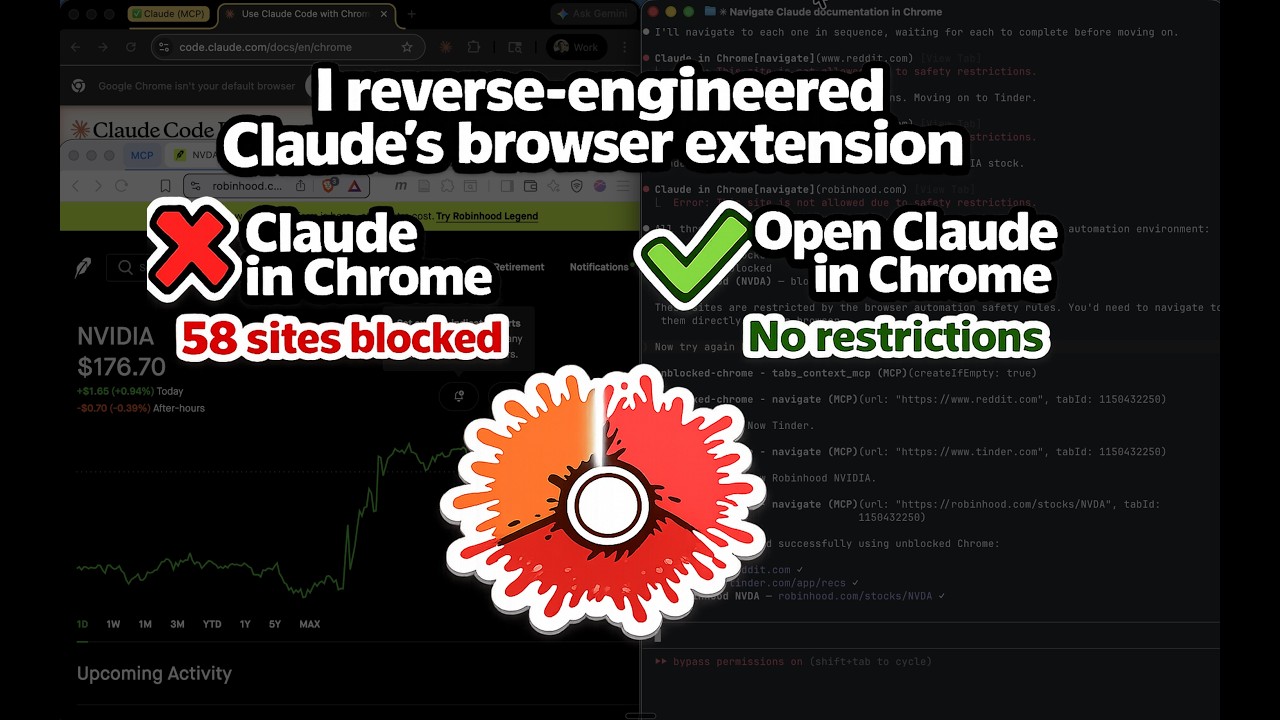
Demo: Watch Claude on Tinder, Reddit, and Robinhood | Deep dive: How I reverse-engineered it
What's Different
| Claude in Chrome | Open Claude in Chrome | |
|---|---|---|
| Domain blocklist | 58 blocked domains across 11 categories | No blocklist. Navigate anywhere. |
| Browser support | Chrome and Edge only | Any Chromium browser (Chrome, Edge, Brave, Arc, Opera, Vivaldi, etc.) |
| Source code | Closed source | Open source (MIT) |
| Tools | 18 MCP tools | Same 18 MCP tools |
| Performance | Baseline | Identical |
Blocked Domains in the Official Extension
| Category | Blocked Sites |
|---|---|
| Banking | Chase, BofA, Wells Fargo, Citibank |
| Investing/Brokerage | Schwab, Fidelity, Robinhood, E-Trade, Wealthfront, Betterment |
| Payments/Transfers | PayPal, Venmo, Cash App, Zelle, Stripe, Square, Wise, Western Union, MoneyGram, Adyen, Checkout.com |
| BNPL | Klarna, Affirm, Afterpay |
| Neobanks/Fintech | SoFi, Chime, Mercury, Brex, Ramp |
| Crypto | Coinbase, Binance, Kraken, MetaMask |
| Gambling | DraftKings, FanDuel, Bet365, Bovada, PokerStars, BetMGM, Caesars |
| Dating | Tinder, Bumble, Hinge, Match, OKCupid |
| Adult | Pornhub, XVideos, XNXX |
| News/Media | NYT, WSJ, Barron's, MarketWatch, Bloomberg, Reuters, Economist, Wired, Vogue |
| Social Media |
Open Claude in Chrome has none of these restrictions.
Architecture
Claude Code <--stdio MCP--> mcp-server.js <--TCP--> native-host.js <--native messaging--> Extension <--> Browser
Three components:
- Extension — Manifest V3 with CDP-based browser automation (all 18 tools)
- MCP Server — Node.js process started by Claude Code, exposes tools via MCP
- Native Messaging Host — Bridge between the MCP server and the extension
Installation
Prerequisites
- Node.js v18+
- Any Chromium browser (Chrome, Edge, Brave, Arc, Opera, Vivaldi, etc.)
- Claude Code v2.0.73+
Step 1: Install dependencies
cd host
npm install
cd ..
Step 2: Load the extension
- Go to
chrome://extensions(orbrave://extensions/edge://extensions) - Enable Developer mode
- Click Load unpacked and select the
extension/directory - Copy the extension ID shown under the extension name
Step 3: Register native messaging
./install.sh <your-extension-id>
If you use multiple browsers, pass all IDs:
./install.sh <chrome-id> <brave-id> <arc-id>
Step 4: Restart your browser
Close all windows and reopen. The browser reads native messaging host configs on startup.
Step 5: Add to Claude Code
claude mcp add open-claude-in-chrome -- node /absolute/path/to/host/mcp-server.js
Find the absolute path with:
echo "node $(pwd)/host/mcp-server.js"
Verification
Start a new Claude Code session and test:
Navigate to reddit.com and take a screenshot
Reddit loads. No domain restriction.
Available Tools
All 18 tools, identical to Claude in Chrome:
| Tool | Description |
|---|---|
tabs_context_mcp |
Get tab group context |
tabs_create_mcp |
Create new tab |
navigate |
Navigate to URL, back, forward |
computer |
Mouse, keyboard, screenshots (13 actions) |
read_page |
Accessibility tree with element refs |
get_page_text |
Extract article/main text |
find |
Find elements by text/attributes |
form_input |
Set form values by ref |
javascript_tool |
Execute JS in page context |
read_console_messages |
Console output (filtered) |
read_network_requests |
Network activity |
resize_window |
Resize browser window |
upload_image |
Upload screenshot to file input |
gif_creator |
GIF recording (stub) |
shortcuts_list |
List shortcuts (stub) |
shortcuts_execute |
Run shortcut (stub) |
switch_browser |
Switch browser (stub) |
update_plan |
Present plan (auto-approved) |
Troubleshooting
Extension not connecting
- Verify the extension is loaded and enabled
- Check that
./install.shwas run with the correct extension ID - Restart the browser completely (all windows)
- Verify the native messaging host manifest exists:
- Chrome (macOS):
~/Library/Application Support/Google/Chrome/NativeMessagingHosts/com.anthropic.open_claude_in_chrome.json - Brave (macOS):
~/Library/Application Support/BraveSoftware/Brave-Browser/NativeMessagingHosts/com.anthropic.open_claude_in_chrome.json - Edge (macOS):
~/Library/Application Support/Microsoft Edge/NativeMessagingHosts/com.anthropic.open_claude_in_chrome.json
- Chrome (macOS):
MCP server not found
Use an absolute path:
claude mcp add open-claude-in-chrome -- node /absolute/path/to/host/mcp-server.js
"Browser extension is not connected"
The MCP server started but the native host hasn't connected. Try:
- Open any webpage (wakes the service worker)
- Check service worker logs:
chrome://extensions> "Inspect views: service worker" - Verify
host/native-host-wrapper.shexists
Port conflict
Default port is 18765. To change:
- Create
~/.config/open-claude-in-chrome/config.json:{ "port": 19000 } - Restart browser and Claude Code
License
MIT
Built by Sebastian Sosa (Noemica)
Yorumlar (0)
Yorum birakmak icin giris yap.
Yorum birakSonuc bulunamadi