RatioLab
Health Uyari
- License — License: GPL-3.0
- Description — Repository has a description
- Active repo — Last push 0 days ago
- Low visibility — Only 6 GitHub stars
Code Basarisiz
- rm -rf — Recursive force deletion command in .github/workflows/installers.yml
Permissions Gecti
- Permissions — No dangerous permissions requested
Bu listing icin henuz AI raporu yok.
Open-source parametric gear and reducer design with 3D previews, CAD export and an offline MCP interface for agents.
RatioLab


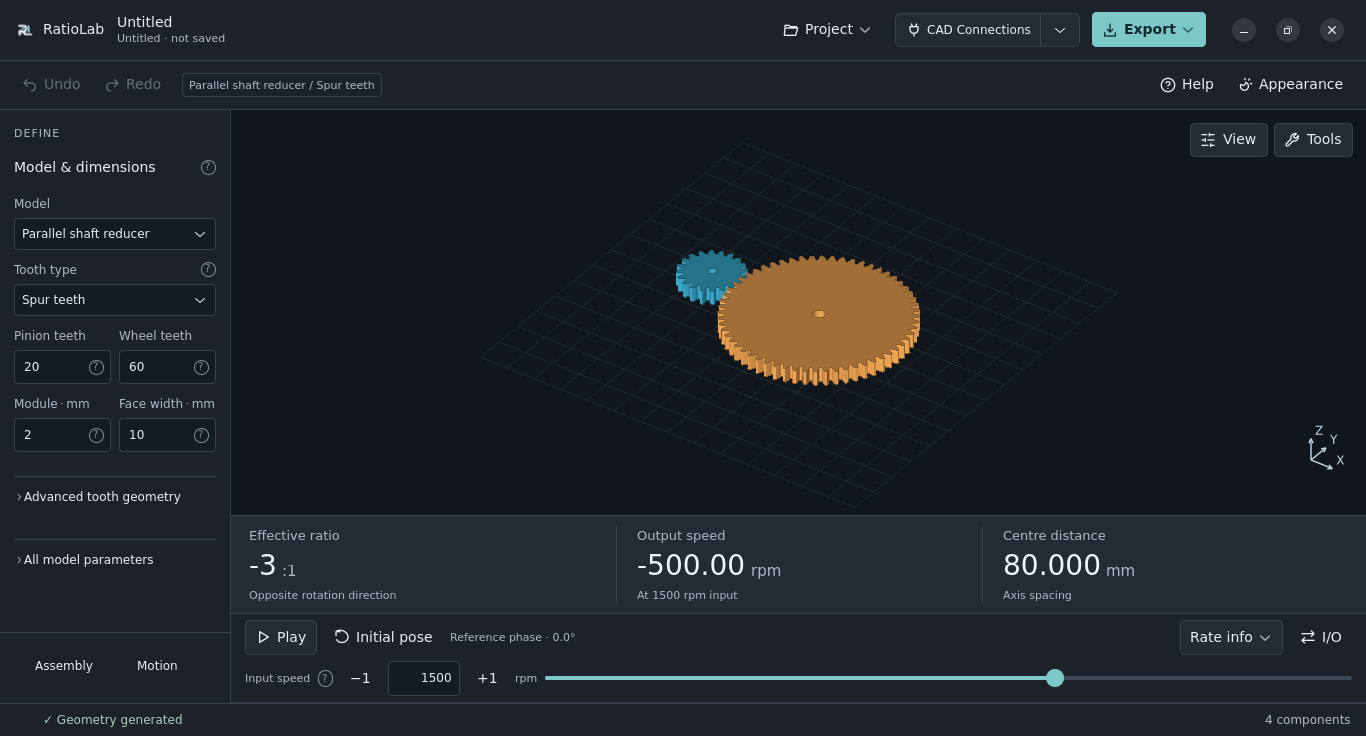
Design gears and reducers. Explore their motion. Export models for CAD or 3D printing.
RatioLab is a free, open-source workspace for parametric gear and reducer design.
Choose a mechanism, adjust its dimensions and inspect the result in an animated
3D preview. Work visually on your desktop or in your browser, or use the local
MCP server to create and edit projects with an agent.
15 mechanism families · 9 interface languages · Windows, macOS, Linux and browser · GPL-3.0-only
Website · Try in your browser · Download · User guide · Discord
Read this introduction in: English · Italiano · Español · Français · Deutsch · Português (Portugal) · Русский · 简体中文 · தமிழ்
Choose how to work
| Workflow | Get started | What it offers |
|---|---|---|
| Desktop | Download an installer | Offline design, local project files, exports and optional CAD connections. |
| Browser | Open the web app | Try the workspace without installing desktop software; geometry runs in your browser. |
| Agents and automation | Set up MCP | Discover models, edit projects, inspect results and export through a local server, without opening the GUI. |
Desktop and browser exchange the same JSON project format. Native CAD connections
and in-app desktop updates are desktop features. See the browser guide
for supported features and WebAssembly/WebGL 2 requirements.
Work in your language
The interface is available in all nine languages linked above, on desktop and in the browser.
Choose one from the Language menu; the preference is remembered separately
from your model dimensions and saved projects. Chinese and Tamil fonts are
included in the desktop installers.
The translated READMEs introduce RatioLab in each language. The full technical
documentation and calculation reports are currently in English; untranslated
interface explanations fall back to English. Help improve the translations by
reporting unclear text
with the language and a screenshot.
Download and install
Current release: 0.2.1.
Every installer includes Python, GTK, the required libraries and all nine interface languages.
Choose your platform; there is no need to install Python or download the source
code to use the app. The release notes record native CI checks and platform limits.
| Your computer | Download | What to do |
|---|---|---|
| Windows 11, 64-bit Intel/AMD | Windows Setup | Open the installer, then launch RatioLab from Start. |
| macOS 15+, Apple Silicon (M1 or newer) | Apple Silicon DMG | Open the DMG and drag RatioLab to Applications. |
| macOS 15+, Intel | Intel DMG | Open the DMG and drag RatioLab to Applications. |
| Ubuntu 24.04+ / compatible Linux, x86-64 | Debian/Ubuntu package · Other Linux installer | Open the .deb with your software installer. For the .run, follow the installation guide. |
Linux requires glibc 2.39 or newer. A compatible graphics driver is required on all systems.
Windows Setup is unsigned; macOS uses ad-hoc signing without Apple notarization.
Your system may show an unrecognized-publisher warning or block launch.
Installation guide, requirements and removal · All release files and checksums · Changelog
What you can do
- Build from parameters. Edit tooth counts, modules, widths, bores and
construction options through precise numeric controls. - Explore motion and geometry. Animate the mechanism, change speeds and
supported input/output arrangements, inspect sections and exploded views,
and select or measure components. - Keep iterating. Save projects, undo and redo edits, search finite parameter
combinations and run sampled interference checks. - Take the result further. Export full models or selected components,
together with component lists, nominal calculations and project packages.
15 mechanism families
| Group | Models and constructions |
|---|---|
| Individual gears | Spur, helical and joined/separated double-helical gears. |
| Planetary and compound reducers | Planetary trains and two-rim Wolfrom / 3K reducers, including helical constructions. |
| Cycloidal and strain-wave reducers | Single- or dual-disc cycloidal drives and strain-wave constructions. |
| Parallel and internal gearing | Single-, two- and three-stage parallel-shaft reducers, plus internal gear pairs. |
| Intersecting and offset axes | Standalone bevel, hypoid and face-gear pairs. |
| Worm and linear drives | Worm pairs and finite rack-and-pinion drives. |
| Differentials | Bevel differentials with wrist or classic configurations. |
Available variants depend on the family. The linked guides explain each
construction, its assumptions and its geometric checks.
Export and connect to CAD
| Output | Use it for |
|---|---|
| STEP | Solid geometry for continuing a design in CAD. |
| STL | Meshes for slicers and 3D-printing workflows. |
| SVG / DXF | 2D profile exchange. |
| Project JSON | Reopening and editing the original RatioLab parameters. |
| Component lists, reports and packages | Taking component data, nominal calculations and related exports with the model. |
Standalone exports work without a CAD application. On desktop, you can also
send models to SolidCraft or Autodesk Fusion.
Fusion uses the included add-in to receive STEP solids and RatioLab parameter
metadata. CAD import does not create a fully constrained mechanical assembly.
Start a design
- Open the app and choose a family and construction from the illustrated catalog.
- Set dimensions and supported assembly options; inspect the preview and motion.
- Save your project, then choose Export… for CAD, printing files or a project package.
For a guided first project, follow the planetary reducer tutorial
or the cycloidal reducer tutorial.
Both include downloadable example projects. More configurations are inexamples/.
Documentation
User guide · Browser guide · MCP and agent tools · Drive connections · Calculations
Browse the documentation index for task-based links, including
tooth-tip treatments, desktop themes and Settings
and keyboard/mouse presets. The guides describe
the current source tree; downloaded installers and the hosted app can differ.
The Rust engine guide explains native/Wasm
execution, exact inputs and the limits of sampled geometry.
Current limits
RatioLab generates nominal geometry and ideal motion. Construction checks,
clearances and numerical sampling limits are recorded in the model and its
calculation report; they do not certify strength, service life or manufacturing
readiness. Interference checks and measurements use sampled surfaces. Complete
connections, retention, supports and manufacturing choices in CAD as required
by the selected construction.
Read the accuracy and limitations
and the relevant family guide before using exported designs for a physical mechanism.
Community
Join the RatioLab Discord to share designs, ask
questions and give feedback. For a reproducible problem, open an issue
with your RatioLab version, operating system, steps and an example project if possible.
Contribute
Contributions can include example projects, documentation, translation corrections,
reproducible bug reports or code. Start with CONTRIBUTING.md
for setup and project conventions, or the development guide
to build from source. Application code is in src/, tests in tests/
and documentation in docs/.
License
Copyright © 2026 NoOneExceptEnderk. Licensed under GNU GPL version 3 only
(GPL-3.0-only). See COPYRIGHT for attribution and notices.
Third-party components retain their own licenses.
Yorumlar (0)
Yorum birakmak icin giris yap.
Yorum birakSonuc bulunamadi