LocalEyes
Health Uyari
- License — License: MIT
- Description — Repository has a description
- Active repo — Last push 0 days ago
- Low visibility — Only 5 GitHub stars
Code Gecti
- Code scan — Scanned 3 files during light audit, no dangerous patterns found
Permissions Gecti
- Permissions — No dangerous permissions requested
Bu listing icin henuz AI raporu yok.
Give text based LLMs in Claude Code working eyes using a local Ollama vision model. Screen capture, clipboard reading, and image file analysis — no cloud, no uploads, 100% local.
👁️ LocalEyes
Vision for text-only LLMs in Claude Code. Many flagship models like DeepSeek, CodeLlama, Qwen-Coder, and many other models don't have vision. LocalEyes gives them working eyes via a local Ollama vision model. No cloud, no uploads, no API keys. Private, fast, free.
The problem
DeepSeek is brilliant at reasoning. It's also completely blind. No screenshots, no UIs, no error dialogs — it can't see any of it. The usual fix is uploading your images to GPT-4 or Gemini and asking a second model to describe what's on screen. That breaks the agentic loop. It also means your screenshots are sitting on a cloud provider's server. Neither is ideal.
LocalEyes gives text-only models local vision. Your screen stays on your machine.
Demo
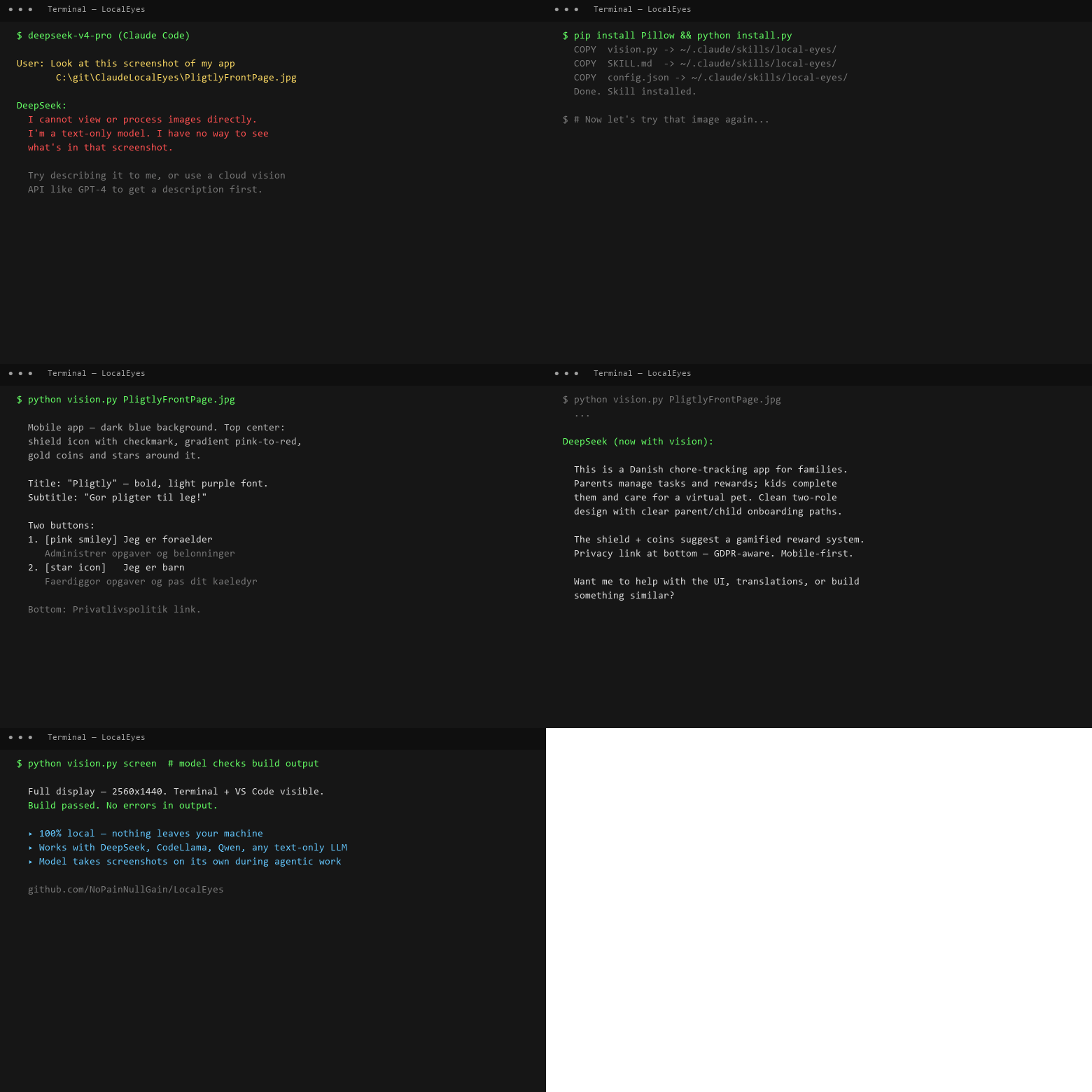
DeepSeek starts blind — then LocalEyes gives it sight. The model describes the app, understands the UI, and can take its own screenshots during agentic work. All local.
Setup (2 minutes)
Prerequisites
ollama pull qwen2.5vl:7b   # one-time, ~4 GB
pip install Pillow
Install
git clone https://github.com/NoPainNullGain/LocalEyes
cd LocalEyes
python install.py
Verify
# Press Win+Shift+S to screenshot something, then:
python ~/.claude/skills/local-eyes/vision.py   # PowerShell / Git Bash
# Or on cmd.exe:
python %USERPROFILE%\.claude\skills\local-eyes\vision.py
Two modes
| Mode | Trigger | Command |
|---|---|---|
| You show the model | You screenshot something and ask about it | python vision.py |
| Model looks itself | Model decides it needs visual context during agentic work | python vision.py screen |
You show the model
python vision.py                           # describe the clipboard screenshot
python vision.py "What error is shown?"    # focused question
Model looks itself (agentic mode)
python vision.py screen                              # capture full display
python vision.py screen "Transcribe the terminal"    # focused
python vision.py screenshot.png                      # read a saved file
The model will use screen mode on its own during workflows — after builds, during debugging, when implementing UI from mockups. No prompt needed.
Configuration
Edit ~/.claude/skills/local-eyes/config.json:
{
  "ollama_host": "http://localhost:11434",
  "vision_model": "qwen2.5vl:7b",
  "timeout_seconds": 120,
  "temperature": 0.1
}
| Setting | Purpose |
|---|---|
ollama_host |
Where Ollama runs (change for remote GPU servers) |
vision_model |
Model to use — try qwen3-vl, llama3.2-vision, minicpm-v |
timeout_seconds |
Max wait (increase for large images or slow GPUs) |
temperature |
0.0 = strictly factual, 1.0 = creative descriptions |
Override any setting for a single session:
PowerShell: $env:OLLAMA_VISION_MODEL = "qwen3-vl:latest"
Bash/Zsh: export OLLAMA_VISION_MODEL="qwen3-vl:latest"
Environment variables override config.json — useful for trying a new model without editing files.
How it works
┌──────────────────────────┐      ┌─────────────────────────┐
│   Claude Code            │      │  Your machine (Ollama)  │
│                          │      │                         │
│  Your model (text)       │──→──→│  qwen2.5vl:7b (vision)  │
│  DeepSeek / text-only    │←──←──│                         │
│                          │ text │  "The screenshot shows  │
│  "I can see that..."     │      │   a terminal with..."   │
└──────────────────────────┘      └─────────────────────────┘
- The model runs
python vision.py(clipboard, screen, or file) - Script captures the image, base64-encodes it
- Sent to Ollama's local API at
localhost:11434 - Qwen2.5-VL returns a detailed text description
- The model reads the description and reasons about it
Nothing leaves your machine.
Platform support
| OS | Screen capture | Clipboard | Status |
|---|---|---|---|
| Windows 10/11 | ✓ | ✓ | Fully tested |
| macOS | ✓ | ✓ | Should work (untested) |
| Linux (X11) | ✓ | ✓ | Should work (untested) |
| Linux (Wayland) | requires scrot |
✓ | YMMV |
Troubleshooting
| Problem | Fix |
|---|---|
| "Cannot reach Ollama" | Run ollama serve in a terminal |
| "No image on clipboard" | Press Win+Shift+S to take a screenshot first |
| "Model not found" | ollama pull qwen2.5vl:7b (~4 GB one-time) |
| "Pillow is required" | pip install Pillow |
| Timeout | Increase timeout_seconds in config.json |
| First request slow | Model loads into VRAM on first call (30-60s). Subsequent calls are fast. |
Files
LocalEyes/
├── vision.py       # Engine: screen capture, clipboard, Ollama API
├── SKILL.md        # Instructions the model reads to use its eyes
├── config.json     # User settings — edit, don't touch code
├── install.py      # One-command installer
├── LICENSE         # MIT
└── README.md
License
MIT © NoPainNullGain
Yorumlar (0)
Yorum birakmak icin giris yap.
Yorum birakSonuc bulunamadi