noqa
Health Uyari
- No license — Repository has no license file
- Description — Repository has a description
- Active repo — Last push 0 days ago
- Low visibility — Only 8 GitHub stars
Code Uyari
- Code scan incomplete — No supported source files were scanned during light audit
Permissions Gecti
- Permissions — No dangerous permissions requested
Bu listing icin henuz AI raporu yok.
Agentic QA automation for mobile apps and games

noqa is an AI agent that tests mobile apps and games from natural-language test cases. It works purely from screenshots — with no accessibility tree or view hierarchy — and controls the real app on iOS and Android devices, simulators, or in the cloud, returning per-step pass/fail with video and screenshots.
Any framework, even games — no locators — native, React Native, Flutter, Unity, Unreal, and non-native UI (maps, canvases, WebViews, ads) all test the same, with no locators or scripts.
CLI with automatic grounding — your coding agent drives a real device from the terminal: read the screen, act by plain-language description (noqa grounds it — no coordinates), and manage test cases.
noqa action tap -d "Blue login button at the bottom"Runs on real devices — plus simulators, emulators, and cloud devices.
Purely visual test automation
noqa works from screenshots, unlike locator-based tools (Appium · Maestro · XCUITest).
| Locator-based | noqa | |
|---|---|---|
| Native apps iOS & Android |
✅ | ✅ |
| Cross-platform apps React Native, Flutter |
Partial | ✅ |
| Non-native UI webviews, canvases, ads, maps |
❌ | ✅ |
| Games Unity, Unreal, Godot |
❌ | ✅ |
| Alerts & pop-ups permissions, system dialogs |
Flaky | ✅ |
| Natural-language tests no code |
❌ | ✅ |
| Real devices physical phones, not just simulators |
Partial | ✅ |
Quick start
1. Install the app. Download noqa and keep it running — the CLI talks to it locally.
2. Create a free account.
3. Install the CLI and skill. In the app, open Settings → Tools → Install CLI (adds noqa to your PATH) — and click Install skill too, so your coding agent knows the commands out of the box. Restart your terminal afterward. The skill also lives here in skills/noqa-testing if you'd rather add it manually.
4. Connect a device. List devices, pick one, and connect:
noqa devices ios                       # list iOS devices & simulators (or: noqa devices android)
noqa devices connect <device-id>       # connect to one from the list
5. Get your app on the device. Install your build (Xcode, Expo, Android Studio) and bring it to the foreground:
noqa action activate-app --bundle-id com.example.app
6. Debug it in an inspect → act → verify loop.
noqa screen                                    # inspect: read the current UI as a structured element tree
noqa action tap -d "Login button"              # act: one step, by description — grounding (recommended)
noqa action tap --x 500 --y 320                # …or by relative coordinates (0–1000) as a fallback
noqa screen                                    # verify: confirm the state changed as expected
CLI
Point your coding agent at the CLI and it drives the device in a tight inspect → act → verify loop — read the screen, take one action, check the result, repeat. Two command groups make up the loop.
Reading the screen
noqa screen                 # cleaned element tree — meaningful elements with relative coordinates (0–1000)
noqa screen --full          # raw Appium accessibility tree, unfiltered
noqa screenshot ./shot.png  # save a screenshot for a visual check
Your agent reads the screen on every step, so read cost dominates. The cleaned tree keeps the meaningful elements with exact positions — far lighter than the raw tree, cheaper than a screenshot. Measured on one paywall screen:
| Screen read | Tokens | vs noqa screen |
|---|---|---|
noqa screen |
~800 | 1× |
noqa screenshot |
~1,500 | ~2× |
noqa screen --full |
~5,600 | ~7× |
Actions
Every gesture targets an element two ways. Working out pixel coordinates is error-prone for a coding agent, so it's easier to use automatic grounding — describe the element in plain language and noqa places it on screen.
noqa action tap -d "Blue login button at the bottom"    # tap
noqa action tap -d "Login button" --double              # double tap
noqa action tap -d "Login button" --duration 2          # long-press, in seconds
noqa action swipe -d "photo carousel, swipe left"       # swipe
noqa action drag -d "card onto the drop zone"           # drag
noqa action input -d "email field" --text "[email protected]"  # type into a field
Or target by coordinates (0–1000, read from noqa screen) as a fallback:
noqa action tap --x 500 --y 320                         # tap
noqa action swipe --x1 500 --y1 800 --x2 500 --y2 200   # swipe between two points
noqa action drag --x1 300 --y1 500 --x2 700 --y2 500    # drag between two points
noqa action input --x 500 --y 640 --text "[email protected]"   # tap a field and type
App and system controls take no target:
noqa action activate-app --bundle-id com.example.app    # bring an app to the foreground
noqa action terminate-app --bundle-id com.example.app   # force-quit an app
noqa action restart-app --bundle-id com.example.app     # terminate and relaunch
noqa action background-app                              # send the current app to the background
noqa action open-url --url "https://appium.io"          # open a deep link or URL
noqa action alert --action accept                       # accept a system alert (or --action dismiss)
Full command reference: docs.noqa.ai/docs/cli.
Test cases
A test case is a title, optional tags, and one or more flows. Each flow is written in plain language — no code, no selectors.
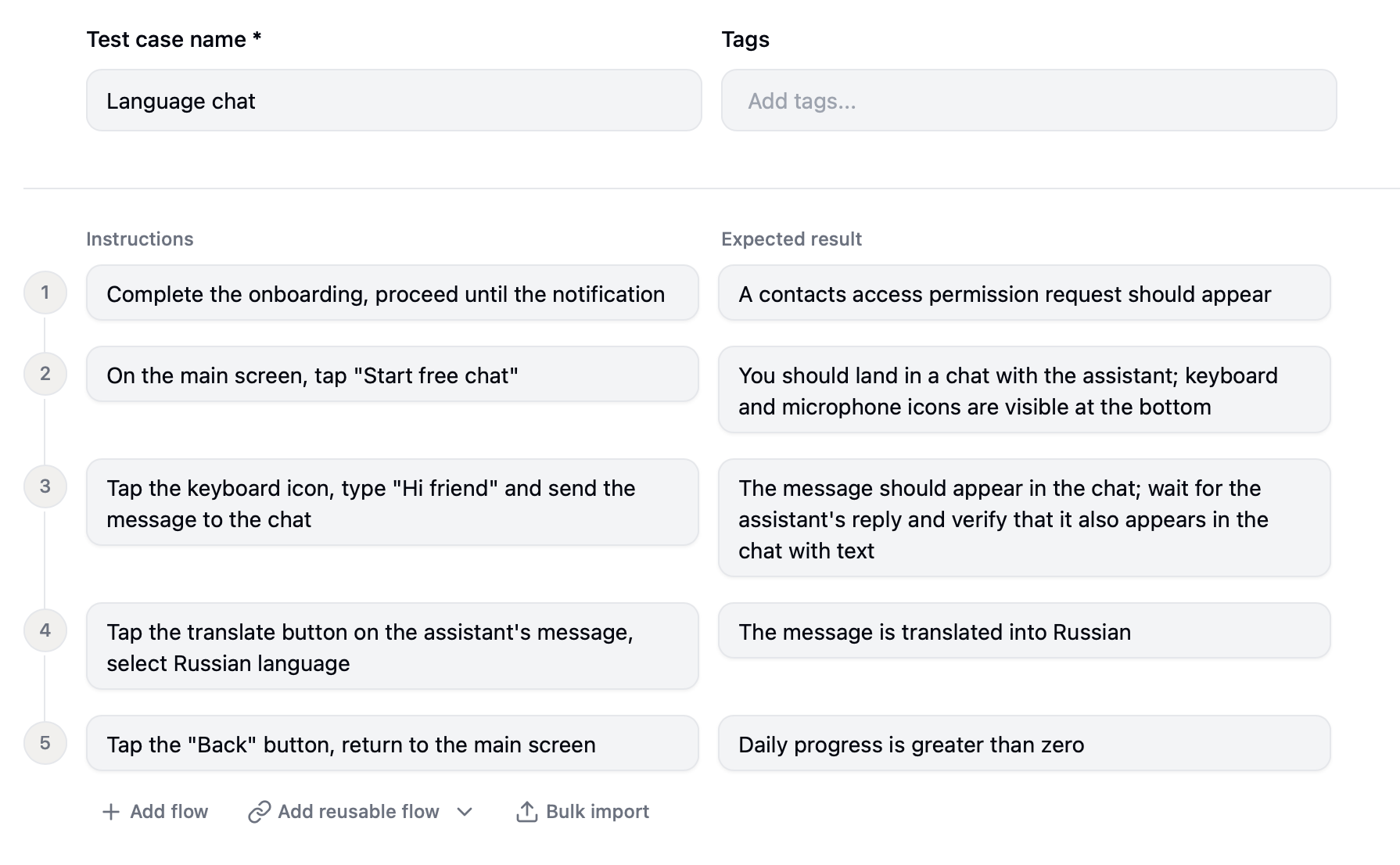
- Title — a short name for the test.
- Tags — optional labels to group and filter cases (
smoke,regression, …). - Instructions — what the agent should do, step by step.
- Expected result — what it should verify after each step (optional).
Create and manage them in the app or from the CLI:
noqa cases create myapp '{"title": "Login", "tags": ["smoke"], "flows": [{"instructions": "tap Sign in, enter credentials", "result": "home screen shows"}]}'
noqa cases list myapp                       # list cases (ID, TITLE, TAGS)
noqa cases get myapp 42                      # show a case as JSON
noqa cases update myapp 42 '{"title": "…"}'  # edit fields of a case
Production-ready testing
Beyond the free CLI, a subscription unlocks noqa's own agent and, for teams, the full platform.
noqa agent
Our own agent, built specifically for mobile testing rather than a general-purpose model driving a device. Hand it your test cases and it runs them autonomously on the device, returning per-step pass/fail.
- Fast — 5–10s per action, dropping to 1–2s on screens it has already seen.
- Cheaper per action than a frontier LLM API.
- Reports — per-step pass/fail with video and screenshots.
Agentic QA platform
Everything in the noqa agent, scaled for teams — run the whole suite in the cloud and wire it into your workflow.
- 1000+ cloud devices.
- Unlimited seats, with shared test cases and builds.
- Integrations — Slack, Jira, CI/CD, Webhooks, API, MCP server.
- Priority support.
Full pricing → noqa.ai/pricing.
Requirements
The app
- Mac with Apple Silicon (M1 or later)
- macOS 13 or later
iOS testing — real devices & simulators
- Xcode 16.0+ with Command Line Tools
- Apple Developer account (for signing and provisioning)
- A real device on iOS 15+ (trusted, visible in Finder), or an iOS Simulator
Android testing — real devices & emulators
- Android Studio 2023.1+ (Android SDK +
adb) - A real device on Android 6.0 (API 23)+ with USB debugging enabled, or an emulator with Google Play Services
Learn more
New to agentic testing? The guide covers it end to end:
- Introduction — what agentic QA is and why visual testing is different
- How the noqa agent works — the perception–decision–action loop, actions, speed, and limits
- Writing good test cases — phrasing cases the agent can run reliably
- Local vs cloud — when to use local devices and when to use the cloud
- CLI for agents — let a coding agent drive the CLI
- Best practices — games, in-app purchases, cross-app flows, non-native UI, and more
FAQ
Which devices and platforms are supported?
iOS and Android — real devices, simulators, and emulators locally, plus cloud devices. noqa drives them through Appium (XCUITest on iOS, UiAutomator2 on Android).
Which frameworks and engines are supported?
All of them. noqa works purely from screenshots, so it doesn't depend on how the app is built: native, React Native, Flutter, Unity, Unreal, and non-native UI like maps, canvases, WebViews, and ads.
Do I need to integrate an SDK or change my app?
No. Nothing to add or change in your app.
Do I need an account, and do I have to pay?
An account is required — grounding and test cases run through noqa's servers — but a free one is enough. You only pay to run the noqa agent and use cloud features.
Does noqa work on Windows or Linux?
Not yet — the app currently runs only on Mac with Apple Silicon.
Can I use it with Claude Code / Cursor / Codex?
Yes, through the CLI. Any coding agent that can run shell commands drives noqa; install the noqa-testing skill so it knows the commands.
Yorumlar (0)
Yorum birakmak icin giris yap.
Yorum birakSonuc bulunamadi