VoxelSite
Health Pass
- License — License: AGPL-3.0
- Description — Repository has a description
- Active repo — Last push 0 days ago
- Community trust — 24 GitHub stars
Code Pass
- Code scan — Scanned 12 files during light audit, no dangerous patterns found
Permissions Pass
- Permissions — No dangerous permissions requested
No AI report is available for this listing yet.
Open source AI website builder for self-hosted PHP sites. Describe a site, edit content and code, and publish source files you own.
VoxelSite
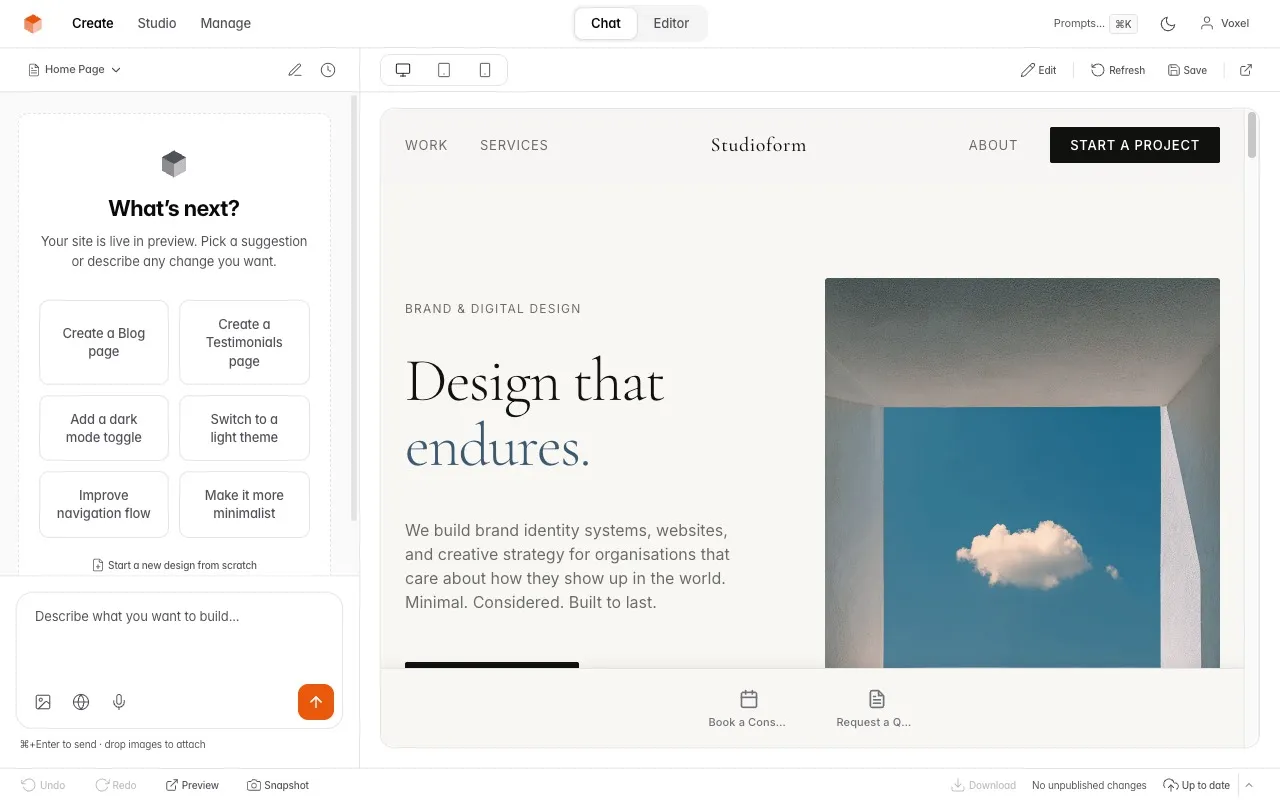
Open-source AI website builder. Build in Studio with your own provider key, or connect an external AI tool through private Studio MCP. Describe your business and turn the result into a complete, self-hosted website — pages, layout, copy, styling, and forms. Plain PHP and SQLite, no framework, no SaaS, no vendor lock-in. You own every file.
Links
- Website: voxelsite.com
- Documentation: voxelsite.com/docs
- Live demo: voxelsite.com/demo
- Source and issues: github.com/NowSquare/VoxelSite
License
VoxelSite is open source under the GNU Affero General Public License v3.0 — see LICENSE. Use it, modify it, and self-host it freely, for yourself or for clients, on as many installs as you want.
What's included
- AI Studio — a chat-driven interface to create and edit multi-page websites in plain language; new sites use a drawn design direction, and an optional design review scores each generation the way a studio would
- Studio MCP — connect an external AI tool to inspect the private draft, prepare an exact review, apply it and publish separately; built-in provider keys are optional
- Code Editor — built-in Monaco editor with file explorer, multi-tab editing, and create/delete
- Site — a structural graph of pages, partials, routes, tokens, and assets, with impact analysis, blast-radius queries, page management (rename, change URL, move, delete with automatic reference cleanup), and an AI orchestration console for site-wide changes you review and apply transactionally
- Visual Editor — click-to-edit text, swap images, adjust styles, reorder sections, add sections from a picker, and describe changes with AI — all on the live preview
- Live Preview — see every change before publishing
- AI Router — optional Jev routing selects the model, instructions and site context for each request. Small edits can use a faster model; larger changes use a stronger one
- Undo/Redo — revision history for generated edits, including exact text replacements through AI Router
- Website References — paste any public URL as design inspiration to create or restyle sites
- Snapshots — capture and restore the draft, published website, or both, with exact reviews and recovery records
- Design Library — save, compare, and switch between entirely different designs
- Notes — a private scratchpad that doubles as AI prompts
- Board — a kanban task tracker with cards, drag-and-drop, and linked pages
- Asset Manager — upload images, files, and fonts
- Actions — define interactions (reservations, signups, inquiries) that serve both human visitors (a form bar with file uploads) and AI agents (MCP tools) at once
- Forms — submission handling with validation, spam protection, and email notifications
- Agent API — authenticated REST endpoints for external AI agents and automation tools (Zapier, Make.com, n8n) to manage pages, settings, assets, publishing, and prompts
- Team — invite editors and viewers with role-based access
- AEO — built-in AI discoverability (
llms.txt, schema, MCP endpoint)
Pages, styles, scripts, uploaded assets, site data and form definitions stay in the private draft until Publish. Reviews show the exact files and metadata that will change. Stable operation IDs let you check an interrupted request, continue bounded work, or recover retained originals without repeating the edit. Unresolved dependencies are disclosed; unsafe propagation, stale reviews and independent edits are refused. Protected recovery archives remain available until their work is resolved.
Business operations have their own effects: submissions and Action bookings are live records, while account changes, connection management and favicon replacement are explicitly labeled administrative or live actions. Website snapshots do not restore accounts, credentials or business records.
Connect an external AI tool
In Settings → Connections, activate the private workspace, choose Codex, Claude Code, or Other MCP client, and create a credential with the access it needs. The owner flow reveals the secret once and provides an environment-variable configuration example for https://your-site.example/_studio/mcp.php. Keep the secret in your client environment, not in website files.
Start with a read: ask the client to inspect the site and summarize its pages. Then ask it to prepare a small edit, review the retained diff, apply it, and inspect Preview. Publish is a separate step. Copying configuration is not proof of a connection; Settings reports authentication, successful use and permission failures from actual requests.
Studio MCP does not call VoxelSite's built-in providers or AI Router. Your external AI service may have its own costs. The visitor endpoint at /mcp.php is separate: it exposes published business information and visitor interactions, never private authoring access. Client-specific qualification is recorded separately from supported protocol and tool contracts.
Supported AI providers
For built-in Studio generation: Anthropic Claude, OpenAI, Google Gemini, DeepSeek, or an OpenAI-compatible endpoint. You bring your own key; provider keys are encrypted at rest. You can install for external AI only, or choose to set up AI later.
Output limits: Settings shows your configured ceiling, the effective generation limit, and the model's context window. Section edits use at most 16,000 tokens. Compatible endpoints can use documented output/context overrides for each exact model ID and server URL. Empty responses report an error; responses that reach their limit after saving files report partial completion.
AI Router
AI Router uses TypeSafe's Jev model to assess each request, then selects the
writing model, prompt instructions and relevant site context. Small copy edits
can use your Faster model with focused context; new pages, layouts and
site-wide changes use your Stronger model. Both belong to your selected AI
provider. Questions have a read-only answer path. Exact replacements of a
uniquely selected text element can apply without a writing-model call and support
normal undo.
To enable it, open Settings → AI Router, turn Enable AI Router on, enter
your TypeSafe key, choose both models and click Save AI Router. Off uses your
default model and instructions with no TypeSafe calls. If the key, routing or
model choices are unavailable, the request uses normal editing and reports the
fallback. All editing tools remain available. The TypeSafe key is encrypted and
never returned by settings reads.
Routing applies to Studio and Agent generation requests. It does not check every
manual edit or file sent to publish. TypeSafe remains optional. Live token and
dollar savings have not been verified; the classification call also has a cost.
What you get
Everything VoxelSite needs to run ships in the repository. Clone it and it runs as-is — no build step, no composer install, no Node.js on your server.
| Included | Notes |
|---|---|
| PHP source + engine | Plain PHP, custom micro-router — no Laravel or Symfony |
vendor/ |
Composer dependencies, committed and ready |
| Compiled Studio assets | _studio/ui/dist/ CSS and JS, pre-built — no Node.js required |
| SQLite database | Created by the installer — no database server to set up |
| Migrations | Applied automatically on every Studio load |
The websites VoxelSite generates are standard HTML, CSS, PHP, and vanilla JavaScript — they keep running even if you delete the Studio.
Requirements
| Requirement | Minimum |
|---|---|
| PHP | 8.2+ |
| Web server | Apache or LiteSpeed (.htaccess included), Nginx, or any PHP host |
| Database | SQLite — bundled with PHP, nothing to install |
Required PHP extensions: pdo_sqlite openssl json curl mbstring gd zip
Most shared hosts include all of these. The installer's system check confirms every requirement before you continue.
Background prompts through the Agent API require a Unix-like host, exec(), and a working PHP CLI. The API checks these before accepting a job. On Windows, use Studio for generation and editing.
Installation
Three steps: get the files, point your web server at the project, and open the Studio. The first visit launches a short setup wizard that creates your database and configuration for you. Nothing to compile, no config file to edit by hand.
Step 1 — Get the files
Clone the repository into your web root (a VPS, or any shared host with SSH and Git):
git clone https://github.com/NowSquare/VoxelSite.git .
The clone includes vendor/ and the pre-built Studio assets, so it runs immediately — no composer install, no npm install.
No SSH or Git on your host? Download the latest release archive, extract it, and upload the contents with FTP/SFTP or your control panel's file manager. Use voxelsite-v1.33.0.zip for a fresh installation. Existing sites use the separate voxelsite-v1.33.0-upgrade.zip, which preserves the homepage, favicon and hosting configuration.
Step 2 — Point your web server at the project root
VoxelSite serves from the project root — not a public/ subfolder, because it is not a Laravel app. Put the files in your document root (typically public_html/). The bundled .htaccess handles clean URLs and protects the Studio, data, and uploads on Apache and LiteSpeed.
On Nginx, add the one-time clean-URL rules from the installation guide — there is no .htaccess equivalent for Nginx.
Make these directories writable by the web server (755 or 775): _studio/data, _studio/preview, assets.
Step 3 — Open the Studio and run the installer
Open yourdomain.com/_studio/. With no configuration yet, VoxelSite takes you straight to the installer — there is no special URL to remember. The wizard takes about a minute:
| Step | What happens |
|---|---|
| System check | Verifies your PHP version, required extensions, and writable directories |
| AI setup | Choose built-in AI, an external AI tool, or setup later; only built-in AI needs a provider key |
| Admin account | Creates your Studio login |
| Site name | Names your site and finishes setup |
When it finishes you land in Studio. Use built-in chat, connect an external tool in Settings → Connections, or work with the editor. Private workspace activation verifies hosting access protection before external authoring is enabled.
A fresh installation shows the shipped placeholder until your first publish. Work in
/_studio/and publish when you are ready.
Updating
Use Studio → Settings → Updates to stage an upgrade ZIP or, on supported Git hosts, an exact Git commit. Staging does not activate code. Inspect the replacement and preservation list, approve the exact review as owner, then apply it. If a request is interrupted, use the retained status and continuation controls.
For an existing site, choose voxelsite-v1.33.0-upgrade.zip. The fresh-install ZIP contains a default homepage and hosting files; it is not an in-place upgrade archive. Both update paths protect the private workspace, database, configuration, uploads, website files and recovery records. Git staging requires supported host capabilities; ZIP updates require no shell access. See the Updating guide.
Package structure
/                   → Your live website (generated by AI)
/_studio/           → Admin Studio, installer, engine, compiled UI
/_partials/         → Published site partials (header, footer, nav)
/_studio/preview/   → Private draft, including its own mutable assets
/assets/            → Published CSS, JS, images, fonts, data, forms
/_data/             → Form submissions and uploads (private)
/vendor/            → PHP dependencies (required — do not delete)
Demo mode
Show the Studio to others without giving them real access:
- Create a
.demofile in the project root:touch .demo - The login page pre-fills demo credentials (
[email protected]/welcome3210) - The Studio runs in read-only mode — write operations (publish, delete, AI generation) are blocked. The preview Actions Bar stays interactive but uses a safe stub that writes no real data
- A persistent DEMO badge appears in the top bar
- Your site's root URL serves a complete, styled demo website with an interactive Actions Bar
- The Designs gallery shows curated, industry-specific landing pages
- To disable:
rm .demo(instant, no restart)
Hide chrome for screenshots: add hide_banner=true to the .demo file to suppress the DEMO badge and login chrome while keeping read-only enforcement active.
Demo mode never modifies your live workspace — it reads shipped fixture data. Real owner login still works alongside the demo session.
The
.demofile is an installation-wide switch. While it exists, all Studio writes and allsubmit.phpform submissions are blocked. If your site is published, unpublish first so the liveindex.php(with demo detection) is restored and live forms keep working.
Troubleshooting
| Problem | Fix |
|---|---|
| Root URL returns 403 | Check the host permissions and default placeholder; open yourdomain.com/_studio/ for setup |
| Installer says "Cannot reach server" | Apache: enable mod_rewrite and AllowOverride All. Any server: verify PHP 8.2+ runs and .php files are processed |
| Blank page / 500 error | Verify PHP 8.2+ is active and the required extensions are installed |
| Permission errors | Make _studio/data, _studio/preview, and assets writable (755 or 775) |
| Routes return 404 (Apache) | Enable mod_rewrite and AllowOverride All |
| Pages show the homepage (Nginx) | Add clean-URL rewriting to your Nginx config — see Installation → Nginx |
| AI not responding | Check your API key in Settings; verify cURL and outbound HTTPS work |
| Upload fails (file size) | Increase upload_max_filesize and post_max_size in PHP settings |
| Generation stops early, missing CSS/JS | PHP execution timeout is too low. Set max_execution_time, request_terminate_timeout, and fastcgi_read_timeout to at least 600 — see Server timeouts |
Security
- The Studio is protected by login, session tokens, and CSRF checks
- Use HTTPS in production
- Keep regular backups of the private workspace,
_studio/data/, published website files,assets/, and_data/ - Connection credentials are account-bound and audience-specific; revoke a lost credential in Settings → Connections
- Do not remove the shipped
.htaccessfiles — they protect the Studio, data, and uploads
Stack
| Layer | Technology |
|---|---|
| Backend | PHP 8.2+ — custom micro-router, no Laravel or Symfony |
| Database | SQLite 3 (via PDO) |
| Studio frontend | Vanilla JavaScript (ES modules, bundled with esbuild) |
| Studio styling | Tailwind CSS (compiled with @tailwindcss/cli) |
| Code editor | Monaco Editor |
| Generated websites | HTML, CSS (Tailwind utilities compiled to static CSS), PHP, vanilla JavaScript |
No Node.js or Composer is needed at runtime. The full Studio source and build system ship in the repo, so you can modify and rebuild the interface if you want — see the Tech Stack docs.
Support
Documentation lives at voxelsite.com/docs. For bugs and questions, open an issue at github.com/NowSquare/VoxelSite/issues with your PHP version, hosting type, and the exact error or a screenshot.
Reviews (0)
Sign in to leave a review.
Leave a reviewNo results found