ableton-osc-mcp
Health Uyari
- License — License: MIT
- Description — Repository has a description
- Active repo — Last push 0 days ago
- Low visibility — Only 6 GitHub stars
Code Gecti
- Code scan — Scanned 4 files during light audit, no dangerous patterns found
Permissions Gecti
- Permissions — No dangerous permissions requested
This server acts as a bridge between AI assistants and Ableton Live 11+. It translates MCP commands into OSC (Open Sound Control) messages, allowing you to control music production workflows, create MIDI clips, and adjust tempo using AI.
Security Assessment
Overall risk: Low. The code scan found no dangerous patterns, hardcoded secrets, or requests for risky system permissions. Network activity is strictly limited to local UDP traffic on ports 11000-11001 to communicate with the AbletonOSC plugin. It does not execute arbitrary shell commands or access sensitive personal data. Its capabilities are safely sandboxed within Ableton Live's existing OSC API boundaries.
Quality Assessment
The project is under the permissive MIT license and was updated very recently. The documentation is excellent, providing clear setup guides, architecture diagrams, and honest limitations. However, community trust and visibility are currently very low. With only 6 stars on GitHub, the tool is in its early stages, meaning it may contain untested edge cases or bugs typical of new, niche projects.
Verdict
Safe to use, though keep in mind it is an early-stage project with a small user base.
🎧 MCP server for controlling Ableton Live via AbletonOSC
ableton-osc-mcp
An MCP (Model Context Protocol) server for controlling Ableton Live 11+ via AbletonOSC.
This enables AI assistants (Claude, Cursor, etc.) to interact with Ableton Live for beat-making, music production, and creative workflows.
Features
- Control Ableton Live from AI assistants via MCP
- Create MIDI tracks and clips
- Add, read, and clear MIDI notes
- Get/set tempo
- List devices on a track
- Fire clip slots
- Send raw OSC messages for advanced control
Limitations (and why)
- Loading devices from Live's Browser (e.g., Drum Rack) is not supported by the standard AbletonOSC API.
This MCP only talks to Ableton Live via AbletonOSC, so it can only do what AbletonOSC exposes. - To automate device loading, AbletonOSC's Remote Script must be extended with a custom OSC endpoint
that calls Live's Browserload_item()API. This is outside the scope of the default AbletonOSC install.
How it Works
flowchart LR
    subgraph AI["AI Assistant"]
        Claude["Claude / Cursor"]
    end

    subgraph MCP["MCP Server"]
        Server["ableton-osc-mcp<br/>(Go + Genkit)"]
    end

    subgraph Ableton["Ableton Live"]
        OSC["AbletonOSC<br/>(Python Remote Script)"]
        Live["Live Object Model"]
    end

    Claude <-->|"MCP (stdio)<br/>JSON-RPC"| Server
    Server <-->|"OSC / UDP<br/>port 11000-11001"| OSC
    OSC <--> Live
What is OSC?
OSC (Open Sound Control) is a network protocol designed for real-time communication between music software and hardware. It uses UDP for low-latency messaging, making it ideal for music applications where speed matters more than guaranteed delivery.
Communication Flow
- AI Assistant → ableton-osc-mcp: MCP protocol over stdio (JSON-RPC)
- ableton-osc-mcp → AbletonOSC: OSC messages over UDP (port 11000)
- AbletonOSC → ableton-osc-mcp: OSC responses over UDP (port 11001)
- AbletonOSC → Ableton Live: Direct access to Live Object Model (internal API)
The MCP server acts as a translator between MCP tool calls and OSC messages.
Comparison with ableton-mcp
There's another Ableton MCP implementation: ableton-mcp. Here's how they differ:
| ableton-osc-mcp (this project) | ableton-mcp | |
|---|---|---|
| Remote Script | AbletonOSC (existing OSS) | Custom implementation |
| Protocol | OSC / UDP (standard) | JSON over TCP sockets |
| Language | Go | Python |
| Approach | Uses standard OSC protocol | Custom protocol |
From an MCP client's perspective, both may feel similar (tools that create clips, set tempo, etc.). The big difference is the underlying transport + remote script (AbletonOSC/OSC vs custom script/socket protocol).
Which should you choose?
- ableton-osc-mcp: If you prefer standard protocols or want to reuse AbletonOSC for other purposes
- ableton-mcp: If you want tighter integration or need features not available via OSC
Both work well — choose based on your preference.
Prerequisites
- Ableton Live 11 or later
- AbletonOSC installed and enabled in Live
Installation
Note: Ableton Live is officially supported on macOS and Windows only.
1. Install AbletonOSC
Tip: If the clone directory already exists, delete it first or skip the
git clonestep.
macOS
git clone https://github.com/ideoforms/AbletonOSC.git /tmp/AbletonOSC
mkdir -p ~/Music/Ableton/User\ Library/Remote\ Scripts
cp -r /tmp/AbletonOSC ~/Music/Ableton/User\ Library/Remote\ Scripts/AbletonOSC
Windows (PowerShell)
git clone https://github.com/ideoforms/AbletonOSC.git $env:TEMP\AbletonOSC
Copy-Item -Recurse $env:TEMP\AbletonOSC "$env:USERPROFILE\Documents\Ableton\User Library\Remote Scripts\AbletonOSC"
Windows (Command Prompt)
git clone https://github.com/ideoforms/AbletonOSC.git %TEMP%\AbletonOSC
xcopy /E /I %TEMP%\AbletonOSC "%USERPROFILE%\Documents\Ableton\User Library\Remote Scripts\AbletonOSC"
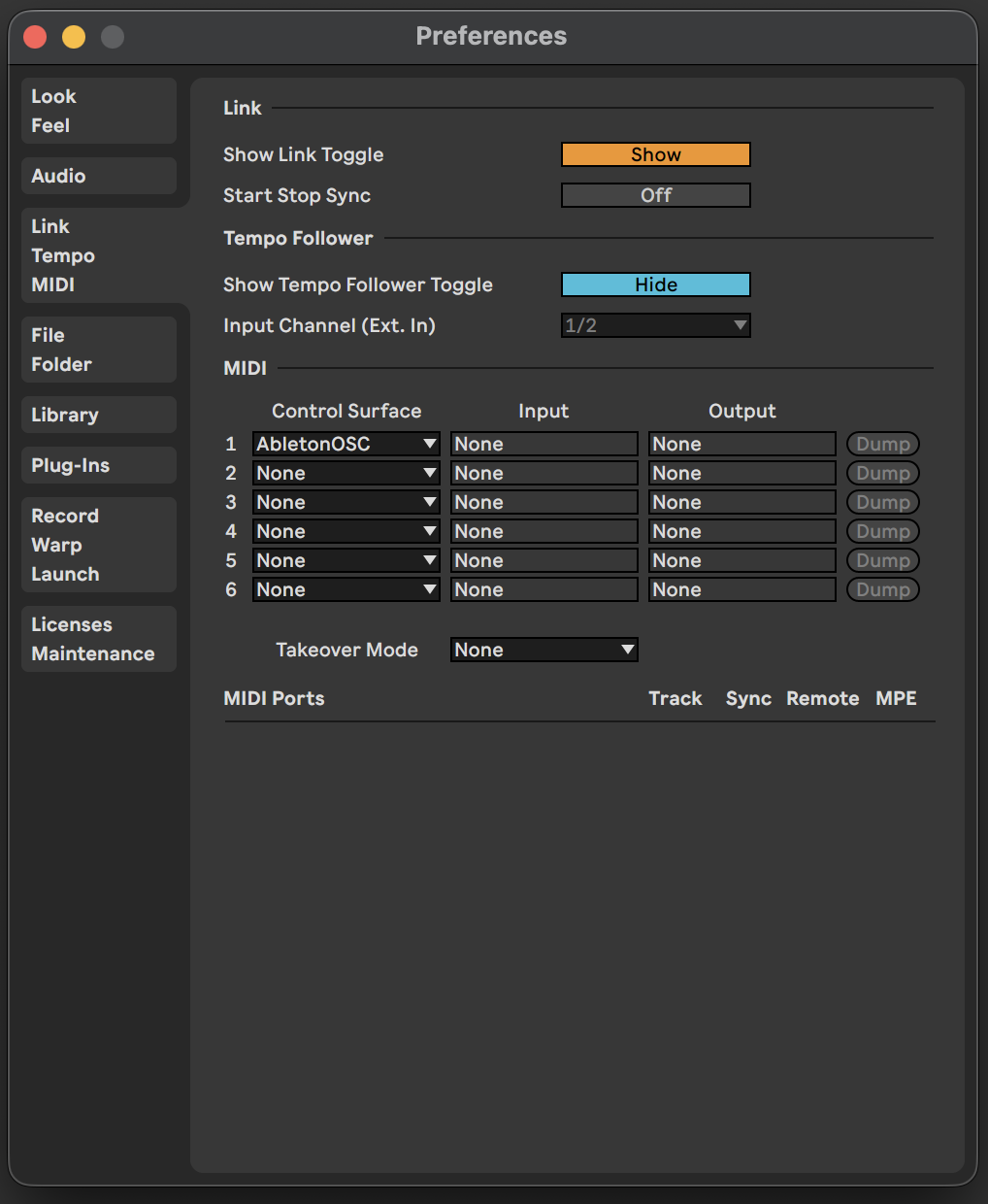
2. Enable AbletonOSC in Ableton Live
- Open Ableton Live
- Go to Preferences → Link / Tempo / MIDI
- Under Control Surface, select AbletonOSC
- Restart Ableton Live
3. Install ableton-osc-mcp
Choose the installation method that best fits your environment:
Option A: Homebrew (macOS/Linux) — Recommended
brew tap nozomi-koborinai/tap
brew install ableton-osc-mcp
The binary will be installed to /opt/homebrew/bin/ableton-osc-mcp (Apple Silicon) or /usr/local/bin/ableton-osc-mcp (Intel/Linux).
Option B: Download pre-built binary
Download from GitHub Releases for your platform:
| Binary | Platform | Architecture |
|---|---|---|
ableton-osc-mcp-darwin-arm64 |
macOS | Apple Silicon |
ableton-osc-mcp-darwin-amd64 |
macOS | Intel |
ableton-osc-mcp-linux-amd64 |
Linux | x86_64 |
ableton-osc-mcp-windows-amd64.exe |
Windows | x86_64 |
macOS users: After downloading, remove the quarantine attribute:
chmod +x ableton-osc-mcp-darwin-*
xattr -d com.apple.quarantine ableton-osc-mcp-darwin-*
Option C: Build from source
Requires Go 1.25+:
git clone https://github.com/nozomi-koborinai/ableton-osc-mcp.git
cd ableton-osc-mcp
go build -o ableton-osc-mcp .
4. Configure MCP Client
Find your binary path first:
# If installed via Homebrew
which ableton-osc-mcp
# Output: /opt/homebrew/bin/ableton-osc-mcp (Apple Silicon)
#         /usr/local/bin/ableton-osc-mcp (Intel/Linux)
Cursor
Add to .cursor/mcp.json in your project or global config:
{
  "mcpServers": {
    "ableton-osc-mcp": {
      "command": "/opt/homebrew/bin/ableton-osc-mcp"
    }
  }
}
Claude Desktop
Add to ~/Library/Application Support/Claude/claude_desktop_config.json:
{
  "mcpServers": {
    "ableton-osc-mcp": {
      "command": "/opt/homebrew/bin/ableton-osc-mcp"
    }
  }
}
Note: Replace
/opt/homebrew/bin/ableton-osc-mcpwith your actual binary path if different.
Available Tools
| Tool | Description |
|---|---|
ableton_test |
Test connection to AbletonOSC |
ableton_show_message |
Display message in Live's status bar |
ableton_get_version |
Get Ableton Live version |
ableton_get_tempo |
Get current tempo (BPM) |
ableton_set_tempo |
Set tempo (BPM) |
ableton_get_track_names |
List track names |
ableton_get_track_devices |
List devices on a track |
ableton_create_midi_track |
Create a new MIDI track |
ableton_create_clip |
Create a new clip in a slot |
ableton_get_clip_notes |
Get MIDI notes from a clip |
ableton_add_midi_notes |
Add MIDI notes to a clip |
ableton_clear_clip_notes |
Clear all notes from a clip |
ableton_fire_clip_slot |
Fire (trigger) a clip slot |
ableton_osc_send |
Send raw OSC message |
Example Usage
Once configured, you can ask your AI assistant:
- "Set the tempo to 140 BPM"
- "Create a MIDI track and add a 4-bar clip"
- "Add a kick drum pattern on beats 1, 2, 3, 4"
- "What's the current tempo?"
Built With
- Go - Programming language
- Genkit for Go - AI framework with MCP support
- AbletonOSC - OSC interface for Ableton Live
License
MIT License - see LICENSE for details.
Related Projects
- AbletonOSC - OSC interface for Ableton Live (used by this project)
- ableton-mcp - Alternative MCP implementation (see comparison)
Advanced Configuration
Environment Variables (usually not needed)In most cases, the default settings work fine. Change these only if:
- Ableton Live is running on a different machine → change
ABLETON_OSC_HOST - Port conflicts with other software → change port settings
- Heavy projects cause timeout errors → increase
ABLETON_OSC_TIMEOUT_MS
| Variable | Default | Description |
|---|---|---|
ABLETON_OSC_HOST |
127.0.0.1 |
AbletonOSC host |
ABLETON_OSC_PORT |
11000 |
AbletonOSC listen port |
ABLETON_OSC_CLIENT_PORT |
11001 |
Port for receiving replies |
ABLETON_OSC_TIMEOUT_MS |
500 |
Query timeout in milliseconds |
Contributing
Contributions are welcome! Please feel free to submit a Pull Request.
Yorumlar (0)
Yorum birakmak icin giris yap.
Yorum birakSonuc bulunamadi