yamlreel
Health Warn
- License — License: MIT
- Description — Repository has a description
- Active repo — Last push 0 days ago
- Low visibility — Only 5 GitHub stars
Code Pass
- Code scan — Scanned 12 files during light audit, no dangerous patterns found
Permissions Pass
- Permissions — No dangerous permissions requested
No AI report is available for this listing yet.
Write a short YAML file, get a finished video: animated diagrams, typed code, original music and an optional voiceover in your own voice. Vertical + landscape cuts, thumbnail and post copy, all rendered locally.
yamlreel
Write a short YAML file. Get a finished video.
Created by Nitin Sijwali
yamlreel turns a YAML file into a finished video: system-design explainers, code tips, project launches and
feature demos for YouTube, Shorts and LinkedIn, with animated diagrams, typed code, scanned tables and arrays,
original music, word-by-word subtitles and an optional voiceover in your own voice. Start from an outline withyamlreel story, or write the scenes yourself. Release notes: what changed in each version.



▶ Watch the 1-minute demo: a video about yamlreel, made by yamlreel from one YAML file, with no video editor.
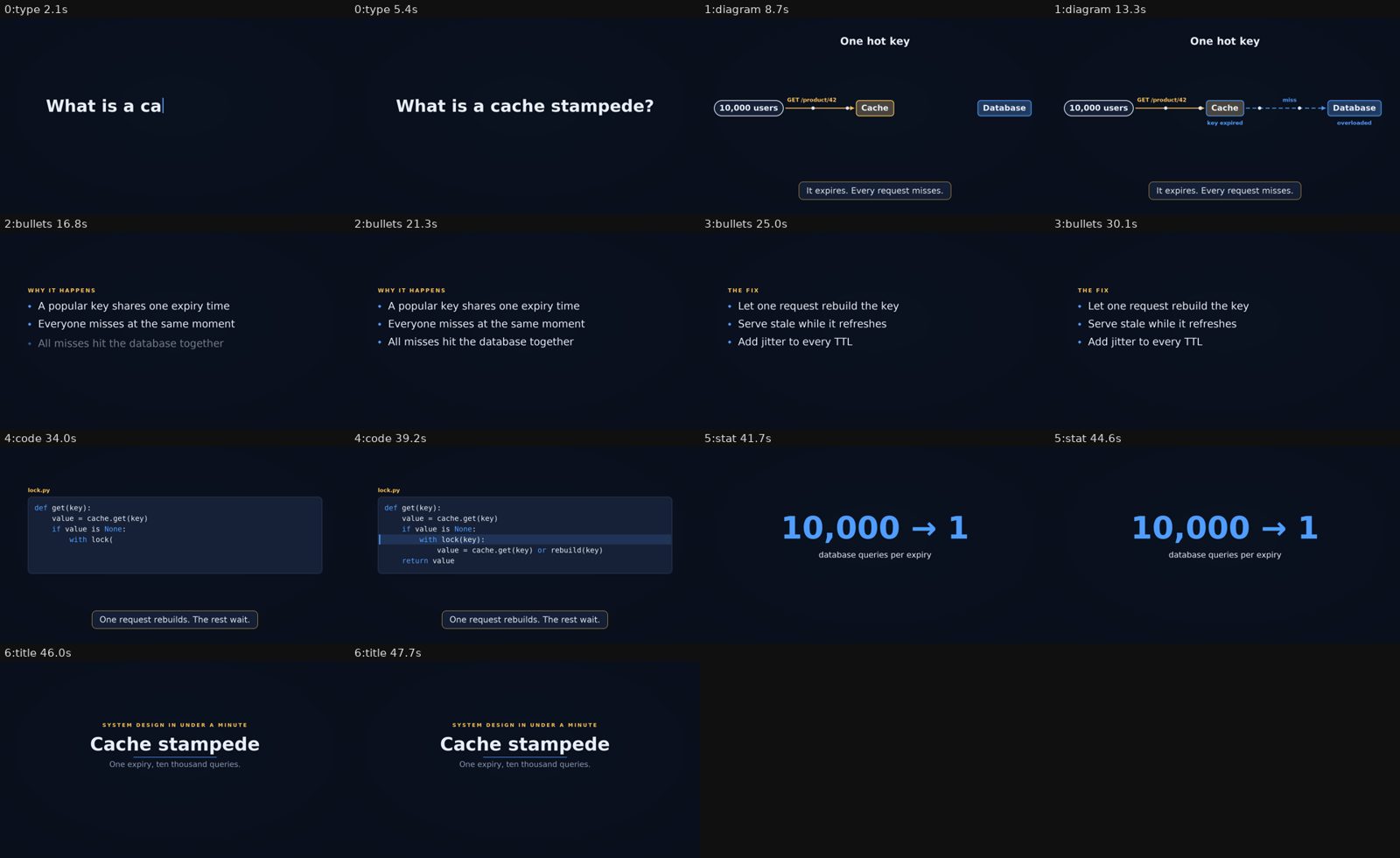
Every scene of examples/cache-stampede-45s.yaml, rendered from one YAML file.
What you get
Every render writes this layout (the output folder is yamlreel-output/ unless you pass --out DIR):
yamlreel-output/
├── vertical/            one folder per format: landscape 1920×1080, vertical 1080×1920, square 1080×1080
│   ├── video.mp4        H.264 (+ AAC when there is music or a voice). Frame 0 is the poster, so the thumbnail is never blank.
│   ├── poster.jpg       the settled hook frame, ready to upload as a thumbnail
│   └── contact.png      two labelled stills per scene: look at this before you publish
└── share-copy.txt       title, description and hashtags for the whole video, ready to paste
share-copy.txt adds #Shorts for vertical clips up to 60 seconds. Videos can be any length, and only a
vertical video over 3 minutes gets a warning. Music is generated on your machine (five styles, from plucked
strings in a Japanese scale to lo-fi beats), so there is nothing to license or credit.
Quick start
You need Python 3.10 or newer. pip installs everything else except fonts on macOS and Windows (see the note below).
python3 -m venv .venv && source .venv/bin/activate
pip install "yamlreel[ffmpeg]"
Prefer an isolated command-line install? pipx install "yamlreel[ffmpeg]" works too.
Make your first video:
yamlreel init system-design my-video.yaml     # a starter spec (or: project, code-tip)
yamlreel render my-video.yaml --preview       # half size, 12 fps: check layout and timing in seconds
yamlreel render my-video.yaml                 # full quality, every format in the spec
Open yamlreel-output/<format>/contact.png first. To try the showcased example without setting up a voice:
curl -LO https://raw.githubusercontent.com/nsijwali/yamlreel/main/examples/cache-stampede-45s.yaml
yamlreel render cache-stampede-45s.yaml --no-voice
Install details for each systemFonts on macOS and Windows: yamlreel draws text with the free DejaVu fonts, which most Linux systems
include. On macOS runbrew install --cask font-dejavuonce. On Windows, install them from
dejavu-fonts.github.io ("Install for me" is fine).
| macOS | Linux | Windows (PowerShell) | |
|---|---|---|---|
| Python 3.10+ | brew install [email protected] or python.org |
usually installed; Debian/Ubuntu also need python3-venv |
python.org, then use py instead of python3 |
| Activate the venv | source .venv/bin/activate |
same | .venv\Scripts\Activate.ps1 (if scripts are blocked: Set-ExecutionPolicy -Scope CurrentUser RemoteSigned) |
| ffmpeg | the [ffmpeg] extra (or brew install ffmpeg) |
the extra, or sudo apt install ffmpeg. On Fedora use the extra: its own ffmpeg-free cannot encode H.264 |
the [ffmpeg] extra |
| Fonts | brew install --cask font-dejavu |
Debian/Ubuntu: sudo apt install fonts-dejavu-core; Fedora: sudo dnf install dejavu-sans-fonts dejavu-serif-fonts dejavu-sans-mono-fonts; Arch: sudo pacman -S ttf-dejavu |
DejaVu from dejavu-fonts.github.io |
| Web captures (optional) | pip install "yamlreel[capture]" then playwright install chromium |
same | same |
| Voice check (optional) | pip install "yamlreel[verify]" |
same | same |
- ffmpeg: yamlreel uses the
ffmpegon your PATH if there is one, and otherwise the copy that the[ffmpeg]extra (theimageio-ffmpegpackage) brings along. You only need one of them. - Fonts: yamlreel looks in your
font_dirsetting (orYAMLREEL_FONT_DIR) first, then the system font folders, then your own (~/Library/Fontson macOS,%LOCALAPPDATA%\Microsoft\Windows\Fontson Windows). If your fonts live anywhere else, pointfont_dirat that folder. Japanese text uses Noto CJK when it is installed. - Web captures are only needed for
shotscenes that screenshot a URL.chromium_pathin your user config (orYAMLREEL_CHROMIUM) picks a different browser. - Voice check is only needed for
yamlreel check-voice(Checking the voice). The[verify]extra installsfaster-whisperand pins PyAV below 17 (PyAV 19 removed an argument that faster-whisper 1.2.1 still passes); the first run downloads a speech model (about 145 MB). - Windows is not covered by CI yet. Reports are welcome.
Word-by-word subtitles
Add subtitles: true and every narrated scene gets burned-in captions that show three to five words at a time,
with the word being spoken highlighted. Nothing else is needed: no extra dependency and no network.
subtitles:
  style: karaoke            # karaoke: the spoken word sits in an accent box; pop: it grows 15%; plain: no highlight
  words: 4                  # words on screen at once, 1 to 8
  position: lower           # lower (above the Shorts UI) | middle
  size: 1.0                 # 0.6 to 1.6 times the base size
  uppercase: false
  keywords: [token bucket, "429"]   # whole words or phrases, any case, drawn in the second accent colour
  numbers: true             # words with digits count as keywords (default on)
  srt: true                 # also write <out>/<format>/subtitles.srt
scenes:
  - type: bullets
    narration: Each request spends a token.
    keywords: [token]       # keywords for this scene only
  - type: title
    narration: That is the whole idea.
    subtitles: false        # this scene has no subtitles
- Where the timing comes from. The text is what the voice says (
narration:, or the screen text withread_screen). Without a word-timing file, yamlreel works the timing out from the audio: it finds the loud parts and
the silent gaps, pairs each sentence or clause end with the gap nearest where the text puts it (keeping both in
order, so one missing pause does not push the others out of place), and shares the time inside each stretch by how
long each word is to say. On a fast, tightly paced 40 s recording the average error was about 0.2 s per word; it is
an estimate, and a recording with long pauses is closer. Showing a few words at a time hides most of it. It is reported
as a warning, and another warning says when fewer than half of the sentence ends could be placed in a pause.keywordsentries are text: write a decimal as"3.50"in quotes. - Exact timing. Give a scene
narration_words: clip.words.json, a JSON list of{"word": "Each", "start": 0.12, "end": 0.35}entries (seconds from the start of the clip; at most 2000 entries and
256 KB; times must not go backwards and must fit inside the clip). Any aligner can produce it outside yamlreel. The file
must be inside the spec folder or an allowed folder, likenarration_audio. Its words are the ones shown. It only
applies to a scene that is narrated and has subtitles on; otherwise a warning says it is ignored. - Your own recordings. With
narration_audio: take.wav, put the words spoken innarration:as the transcript. A
recording with no transcript and nonarration_wordsgets no subtitles, and a warning says so. - Captions and subtitles. A scene's
captionappears after its speech has ended (0.2 s later), so it never covers the
subtitles, and the minimum length of a subtitled scene with a caption is raised by 1.4 s so the caption can be read. The caption also
waits for the last subtitle to leave. Scenes without narration,
or withsubtitles: false, behave as before. - SRT.
srt: truewrites the same chunks and times as a.srtfile, for uploading as captions. A file from an earlier
run is deleted when a render writes none. --no-voicedrops the narration, so there is nothing to caption; render with the voice (ornarration_audio) to see
subtitles, and use--preview --contact-frames 6to check them.
Story outlines
yamlreel story outline.yaml writes a plain spec with the arc that holds attention: hook, problem, one scene per
step, when to use, and a question end card. It works offline and the same outline always gives the same spec; the
spec has no special story: key, so edit any scene afterwards.
topic: Load balancing                      # required: the video title
hook: One busy server should not slow down every user.   # required: typed on screen and spoken
problem: Requests pile up on one machine.  # optional
steps:                                     # 1 to 6, required; each name becomes a badge label
  - {name: Round robin, say: "Hand each request to the next server.", show: array}
  - {name: Least connections, say: "Pick the server with the fewest open connections.", show: table}
when_to_use: ["Similar requests: round robin", "Uneven requests: least connections"]   # optional, up to 6
question: Which strategy does your service use?   # optional: the end card; without it the video ends on a title card
answers: [Round robin, Least connections]         # optional, up to 4
A step can also have events, timed cues that make its scene move with the voice instead of sitting still:
steps:
  - name: Queue
    say: "A queue absorbs the burst. But a queue isn't extra capacity."
    show: meter
    events:                          # up to 8; each has `at` (0 to 60 seconds) and `text` (up to 40 characters)
      - {at: 1.0, text: Burst arrives}
      - {at: 3.5, text: Queue full}
at is seconds from the scene's start (the same clock as every cue in a spec; speech starts 0.3 s in) and must not
decrease. With only at and text, the generator invents the cue: a diagram step gets a flash on node a, ameter step gets steps that alternate between level 4 and 10, and an array step gets steps that mark the three
items in turn. To say what really happens, give an event the step fields of its scene instead of text alone: at
plus exactly one action key, which is passed to the scene unchanged and checked by the normal validator. Use one form
per step: mixing {at, text} events with action-key events in the same step is an error.
steps:
  - name: Queue
    show: array
    events:
      - {at: 1.0, push: job-4}                      # array: one of push, pop, insert, mark, window, unmark (+ text, color)
      - {at: 2.5, mark: [0], text: Oldest first}
      - {at: 4.0, pop: front}
  - name: Bucket
    show: meter
    events:
      - {at: 1.0, level: 10, text: Full}            # meter: level (+ seconds, text, color)
      - {at: 3.0, level: 2, seconds: 1.5, text: Drained}
  - name: Flow
    show: diagram
    events:
      - {at: 1.0, flash: b, text: Server hit}       # diagram: flash is a node id of the generated diagram (a or b), with text
An impossible state (a pop on an empty array, a mark outside the cells, a level above the capacity, a flash on
a node the generated diagram does not have) is an error that names the outline, for examplesteps[0].events[3].pop: array is empty at 6s. An event with text plus another key but no action key, two action keys
or a key from another show is an error that lists the allowed keys. Any other show is an
error (events work with show: diagram, meter or array; this step shows bullets). The scene lasts at least the end of every cue (its at plus a meter event's seconds) plus 1.5 seconds, so the
final cue is never cut off; events: [] is the same as no events.
show is the scene type for a step (bullets by default; title, type, code, stat, diagram, table, array orgrid). The scene gets placeholder content marked TODO (for example a 3 by 3 table), which the header comment of the
file lists; replace them, then render with --preview --no-voice. Unknown keys, no steps and more than six steps are
errors. Each scene is at least words / 2.5 + 1 seconds (narration stretches it if needed). The command refuses to
overwrite a file unless you pass --force; --theme and --format set them in the spec.
Script sheet
yamlreel script spec.yaml prints the words of a spec for a human to read before anything is rendered: for every scene,
its number (from 0, as in check-voice), type, kicker, title (or the eyebrow, question, value or text of a scene without
one), caption, full narration and seconds, then the total. It loads the spec exactly like validate (same errors, same
exit codes) and needs no voice server, audio or network.
yamlreel script spec.yaml                       # a Markdown table, one row per scene, pipes escaped
yamlreel script spec.yaml --format text         # a plain block per scene
yamlreel script spec.yaml --out script.md       # write a file; an existing file needs --force
A scene without narration has an empty narration cell. --read-screen shows the text the voice would read for scenes
without narration. A summary goes to stderr: 9 scenes, 7 narrated, ~182 words (words are counted from narration only).
Examples
| Spec | What it is |
|---|---|
examples/cache-stampede-45s.yaml |
A 45-second system-design explainer with a diagram, code and a narrated script. |
examples/motion-demo.yaml |
Scene transitions, staggered bullets and counting-up numbers. |
examples/index-scan.yaml |
A table that is scanned row by row, a sorted index taking inserts, and a queue. |
examples/load-balancing-story.yaml |
The output of yamlreel story for examples/outlines/load-balancing.yaml: hook, problem, two steps with badges, when to use, and a question end card. |
examples/subtitles-demo.yaml |
Narrated scenes with karaoke subtitles, highlighted keywords and numbers, and an SRT file. |
examples/music-styles.yaml |
The lo-fi style with per-scene energy and narration ducking; swap styles with --music. |
cache-stampede-45s is narrated; add --no-voice to render it with music only. For more starting points, runyamlreel init with the explainer, system-design, project or code-tip template.
Rendering part of a video
yamlreel render spec.yaml --only 3 (also --only 2,4 or --only 2-4; scenes are numbered from 0, as in script andcheck-voice) renders just those scenes, cut out of the full video, so editing one scene does not mean a full re-render.
The whole plan is still made, so scene lengths, transitions inside the slice, the music and the narration timing are
exactly those of the full video; only the frames and the audio outside the chosen scenes are left out. Consecutive scenes
form one window, windows play back to back with hard cuts, and each window starts with a cut, so no scene you did not
choose shows. --preview and --format all work as usual.
The files get the scene numbers in their names and the full video's files are never touched: video-scenes-2-4.mp4,contact-scenes-2-4.png (only the chosen scenes' rows, labelled with their full-video numbers and times) andsubtitles-scenes-2-4.srt (if the video has an SRT; times are slice times). Two windows are named like 1_5. No poster
and no share-copy.txt are written, because they describe the full video, and no title or end card is added. A note on
stderr says what was cut, for example only: scenes 2-4 of 0-7, 12.40-21.95s of the 38.20s video (9.55s).
Narration is read from the cache and only missing clips are synthesised, so after one render, editing scene 3 and running--only 3 synthesises just scene 3. With no voice server, or --no-voice, the same rules apply as for a full render.
To see where a render's time goes, add --profile. It prints the time per stage (narration, drawing, sending frames to
ffmpeg, encoding) and the drawing time per scene type, slowest first:
profile vertical: 13.2s for 40.5s of video (3.1x real time, 1215 frames)
  draw frames                   7.04s   53%
  send frames to ffmpeg         5.66s   43%
  ...
    diagram                     4.83s    228 frames    21.2 ms/frame
    bullets                     0.69s    396 frames     1.7 ms/frame
Commands
| Command | What it does |
|---|---|
yamlreel --version |
Prints the installed version and exits. |
yamlreel init <template> <file> |
Writes a starter spec: explainer, system-design, project or code-tip. |
yamlreel story <outline> [--out FILE] [--theme T] [--format F] [--force] |
Turns an outline into a starter spec; see Story outlines. |
yamlreel script <spec> [--format md|text] [--out FILE] [--force] |
Prints every scene's kicker, title, caption and narration for review, without rendering; see Script sheet. |
yamlreel check-voice <spec> [--out DIR] [--model NAME] |
Transcribes the cached narration clips and compares them with the narration text; see Checking the voice. |
yamlreel validate <spec> |
Checks a spec and prints its scene count, length and how many scenes are narrated and subtitled, without rendering. |
yamlreel render <spec> |
Renders. Useful flags: --preview, --out DIR, --format vertical|landscape|square|all, --music koto|ambient|lofi|pulse|piano|none|file.mp3, --fps N, --contact-frames N, --only N,A-B, --profile, --no-voice, --voice-url URL, --read-screen, --allow-path DIR, --allow-private-hosts. |
yamlreel config init [--user] / config show |
Writes a starter config, or shows the merged settings and the files they came from. |
yamlreel music --style lofi --seconds 30 --out track.wav |
Generates a music track on its own (--style, --bpm, --root, --scale, --seed; the style supplies the defaults). |
yamlreel audit <video> [--target-lufs -14] [--strict] |
Optional add-on: checks a finished video's loudness, true peak, loop and short-form format; see Polish add-on. |
yamlreel polish <video> [--sfx EVENTS.yaml] [--loudness LUFS] [--out FILE] |
Optional add-on: mixes timed sound effects into a finished video and/or normalises its loudness. |
Polish add-on (optional)
audit and polish work on a finished video file, yours or one made by any other tool. They are separate fromrender: no spec field changes, nothing new to install, and a render never runs them.
yamlreel audit video.mp4                       # loudness, true peak, loop, short-form format
yamlreel polish video.mp4 --loudness -14       # normalise to about -14 LUFS, with a peak limiter
yamlreel polish video.mp4 --sfx events.yaml    # mix timed sound effects over the video's own audio
Audit. Prints
okorwarnlines: integrated loudness (EBU R128) against a target (default -14 LUFS, within 2),
true peak (warns above -1 dBTP, which AAC can push into clipping), a loop check (the last frame should lead into the
first as smoothly as any two neighbouring frames, so a replay shows no cut) and, for vertical video, the 60-second Shorts
limit.--strictexits 1 on any warning, for scripts and CI.Effects.
events.yamlholds asfx:list. Each item hasat(seconds), one ofkindorfile, and an optionalgain(0 to 2, default 0.5):sfx: - {at: 1.8, kind: tap} - {at: 6.8, kind: clatter, gain: 0.8} - {at: 8.0, file: meow.wav} # your own recording; relative to this fileBuilt-in kinds are synthesised on your machine (nothing to license):
tap,thump,clatter,splash,scrape,whoosh,pop,click,tick,rustleandping. They are simple and a little synthetic; a real recording
throughfile:sounds more natural. Afile:must sit in the events file's folder, or in a folder given with--allow-path DIR. A video with no audio gets just the effects.Loudness.
--loudness LUFS(-40 to -5) runs ffmpeg'sloudnormand a peak limiter. The result lands close to the
target, not exactly on it. Without--loudness,polishstill limits the peaks.Output.
<video>-polished.mp4next to the input unless you pass--out. The picture is copied, not re-encoded.
An existing file is not overwritten without--force.
Writing a spec
A spec is a list of scenes. Each scene has a type, how many seconds it lasts, and an optional caption
(a lower third that fades in).
meta: {title: "Cache stampede in 45 seconds", tags: [systemdesign, caching]}
theme: midnight                     # sumi | washi | midnight | editorial | your own
formats: [vertical, landscape]
scenes:
  - type: type
    text: What is a cache stampede?
    seconds: 3
  - type: bullets
    title: The fix
    items: [Let one request rebuild the key, Serve stale while it refreshes, Add jitter to every TTL]
  - type: stat
    value: "10,000 → 1"
    label: database queries per expiry
| Scene | Shows | Main fields |
|---|---|---|
title |
eyebrow, title, subtitle and URL, easing in line by line | title, eyebrow, subtitle, url |
type |
one line typed out with a cursor: your hook | text |
bullets |
points that appear one at a time | title, items, stagger, kicker |
code |
code typed on screen, with highlighted lines | code, highlight, title, kicker |
stat |
one big number or phrase, optionally counting up | value, label, eyebrow, count |
table |
rows that appear one by one, a scan bar walking down them, highlighted rows and a ticking counter | title, columns, rows, stagger, reveal, scan, highlight, counter, kicker |
array |
one row of cells that take sorted inserts, pushes and pops, marks and a sliding window | title, items, steps, stagger, kicker |
grid |
a matrix of #, . and o cells that is revealed, stained, loses cells and gets them back, with a status line and outlines |
title, cells, steps, seed, kicker |
meter |
a level that fills and drains: a bucket, a bar or a row of slots, with a live readout and step labels | title, shape, capacity, start, unit, in_label, out_label, steps, kicker |
tree |
a top-down tree whose nodes appear one by one, with a path that lights node after node | title, nodes, path, kicker |
timeline |
events on an axis, a window that slides over them and a live count of the events inside | title, axis, events, window, count, kicker |
lineart |
an ink-on-paper scene drawn by the vendored line-art-animation library: kind: presenter (default) has a figure walk in and point at a hook line, kind: carry has a figure per item carry data to it |
kind, text (presenter), items (carry, 1 to 6) |
cta |
an end card: a question bubble, lettered answer chips (A to D) and a pulsing prompt | question, answers, prompt |
diagram |
boxes and arrows that appear in order, packets flowing, nodes flashing | nodes, edges, flash, title, kicker |
shot |
a screenshot of a URL or an image, with a slow camera move | source, zoom, focus, fit, click, scroll_y |
meta: {title, description, tags: [], links: [], credits: []}
theme: sumi | washi | midnight | editorial | <a theme from your config>   # editorial: cream, ink black and burnt orange, serif headings
formats: [vertical, landscape, square]
music: {style: koto | ambient | lofi | pulse | piano | none | path/to.mp3, bpm, root, scale, seed: 7, snap: false, volume: 0.9}   # bpm/root/scale default per style
transition: fade              # fade | slide | zoom | cut, or {type: slide, seconds: 0.35}; default fade, 0.25 s
watermark: "Your Name"        # or {text|image: logo.png, position: top-left|top-right|bottom-left|bottom-right, opacity: 0.75, size: 30}
poster: {scene: 0, at: 2.6}   # optional; default is the first scene, just before it ends
voiceover: {voice, language, gap, music_level, read_screen, duck: false, speed: 1.0, trim: false, debreath: false}   # duck: true lowers the music to music_level only while a voice speaks; speed 0.8 to 1.3; trim: true cuts silence; debreath: true silences breaths
subtitles: {style: karaoke | pop | plain, words: 4, position: lower | middle, size: 1.0, uppercase: false, keywords: [], numbers: true, srt: false}   # or `true`; default off
scenes: [...]                 # every scene also takes: step (badge label), transition, subtitles (false opts out), keywords (extra subtitle keywords), narration_words (JSON of exact word times), energy (low|mid|high: how many music layers play)
- Diagrams:
nodestakeid, label, kind (client|service|cache|db), x, y, at, wherexandyare fractions of the frame.vx, vyoverride them in vertical frames, so one diagram fits both shapes.edgestakefrom, to, label, bad, dashed, at, colorandflashtakesnode, at, text, color. A warning says when the title or the caption would cover a node. - Shots:
source(URL or image),fit: cover | card,zoom: [from, to],focus: [x, y],focus_to,click: [selectors],scroll_y,wait_ms,viewport,scale. Screenshots are cached in<output folder>/.cache; delete it to capture again. - Transitions:
transitionat the top sets how every scene enters; a scene's owntransitionoverrides it, and a field it leaves out (typeorseconds) comes from the top-level one. A transition never lasts longer than its scene.fadecross-fades,slidepushes the old scene out to the left,zoomsettles the new scene in from slightly larger,cutswitches at once.secondsis 0.1 to 1.0 (default 0.25); a scene's length never changes. - Stagger:
stagger: 0.7on abulletsscene sets the seconds between bullets (0.1 to 3). Without it the spacing is worked out from the scene length. - Count-up:
count: trueon astatscene counts the one number invalueup from 0 over 60% of the scene;count: {from: 0, seconds: 2.5}sets both. Prefix, suffix, thousands separators and decimals are kept, and the scene ends on exactly thevaluetext.valuemust hold exactly one number. - Table:
columns(1 to 6) androws(1 to 12, each with one cell per column, cells up to 40 characters; quote a number to keep its formatting). Rows appearstaggerseconds apart (default 0.4;reveal: allshows them at once).scan: {at: 1.5, per_row: 0.3, stop: 4, color: accent}walks a bar down from the first row and stays on rowstop(rows count from 0;scan: truewalks to the last row).highlight: [{row: 4, at: 4.0, text: found, color: accent2}]tints a row and tags it.counter: {label: rows scanned, to: 10000000, at: 1.5, seconds: 3}ticks a number up beside the table (below it in vertical). Text shrinks to fit, with a warning, and a warning says when a cue comes before its row appears. - Array:
items(0 to 12 cells) and up to 40steps, each withatand exactly one action:insert: x(a sorted insert: before the first cell that sorts after it, numbers by value and before text),push: x(at the end),pop: front|back,mark: [1, 2](cell indices, with optionaltextandcolor),window: [0, 2](a bracket over cells; a laterwindowslides it, and it is trimmed if cells leave) andunmark: true(clears marks and the window). A step withoutatcomesstagger(default 0.8) seconds after the one before; steps run in time order. The steps are replayed when the spec loads, soscenes[2].steps[3].pop: array is empty at 2.4sis an error before rendering. A warning says when amarkorwindowlabel would run off the left or right edge. - Grid:
cellsis 1 to 33 rows of equal length (1 to 33), each character#(the foreground colour),.(the background card colour) oro(the accent). Quote every row that starts with#: YAML reads an unquoted one as a comment, and the error says so.seed(0 to 1000000, default 0) fixes the stain's shape and the random orders. Up to 40steps, in time order, each withatand exactly one action:reveal: sweep|pop(seconds, default 1),stain: [row, col](needsradius0.5 to 33 cells,secondsdefault 1.5),clear_stain: true(the covered cells become lost),lose: [[r, c], ...],recover: all|[[r, c], ...](per_cell0.01 to 2, default 0.08;order: row|random),status: text(a line above the grid, withcolor),outline: [r0, c0, r1, c1](withtextandcolor),unmark: true(clears the outlines) andfail: true(the frame pulses twice;textshows for 1.5 s). Cells are#foreground,.card andoaccent (on a dark theme#is light on a dark card, so for a QR code that must look like a scannable code, use a light theme such aswashioreditorial); lost cells are dimmed and hatched. The steps are replayed when the spec loads, soscenes[2].steps[5].recover: no cells are lost at 6sis an error before rendering. Without arevealstep the grid fades in at 0.1 s. A warning says when cells are under 16px, the caption would cover the grid, a status shrank to fit, or a step ends after the scene. - Kicker:
kicker: "01 / THE BURST"on abullets,code,diagram,table,array,meter,grid,treeortimelinescene (titlescenes haveeyebrow) draws a small tracked tag in the accent colour above the title, or where the title would start if there is none. One line, up to 48 characters; shrinks with a warning if too wide. - Step badge:
step: Token bucketon a scene drawsSTEP n/N · TOKEN BUCKETand an N-segment progress bar at the top centre. N is the number of distinctsteplabels in the spec, in order of first appearance; n is this scene's label. Consecutive scenes may share a label. A spec may use at most 12 distinct labels (MAX_STEP_LABELS). A warning appears when the watermark would overlap the badge. - Line-art scenes:
type: lineart, see Line-art scenes. - CTA end card:
type: ctawithquestion(required),answers(0 to 4, shown as A to D) andprompt(default "Answer in the comments"). The bubble pops in, the answers follow one by one and the prompt pulses once a second. The firstctaquestion is also added toshare-copy.txt(before the links and hashtags, unless it is already in the description), and--read-screenreads the question, answers and prompt. - Subtitles: see Word-by-word subtitles.
- Contact sheet:
render --contact-frames N(1 to 8) writescontact.pngwith N stills per scene, one row per scene, to check that reveals progress and nothing overlaps. Default: two per scene. - Unknown keys are errors: a misspelled or extra key stops the render, for example
error: scenes[0].titel: unknown field for a title scene; allowed: caption, eyebrow, narration, ..., instead of being silently ignored. - Error locations: errors that come from your spec or outline file start with
file:line:, for exampleerror: spec.yaml:12: scenes[0].titel: unknown field ..., so an editor can jump to it. The line points at the key, at the enclosing scene for a missing field, and at the anchor for a key that arrived through<<:. Values that come only from your config, and errors found after loading (such as--fps), have no line. Scripts that parse the olderror: <path>start should now expect the location first. - Limits:
limits.max_secondsandlimits.max_scenesare capped at 3600 and 1000, whatever a spec or config sets. - Files: images, pages, music and logos must sit in the spec's folder, a config folder, or a folder you allow with
--allow-path DIR(orallow_pathsin your user config). - Music:
seedchanges the melody andsnap: truerounds scene lengths to beats. To use your own track, pointstyleat an audio file and credit it inmeta.credits. - Music styles:
koto(default, 72 bpm, D hirajoshi),ambient(60, C major: pad chords, a bell motif, a soft pulse),lofi(78, D dorian: electric piano, swung drums, vinyl crackle),pulse(100, A minor: a plucked arpeggio, bass, kick) andpiano(76, G major: a melody over left-hand fifths). A style fills in any ofbpm,rootandscaleyou leave out, and--music lofiswaps in the new style's values for just those. Scales:hirajoshi,in,yo,iwato,major,minor,dorian,pentatonic_major,pentatonic_minor, and any scale works with any style. The new styles are rendered in 30 second blocks, so a long track needs about the same memory as a short one. - Energy:
energy: low | mid | highon a scene (defaultmid) adds or removes music layers, for example hats and kick atmidand snare and bass athighinlofi. Changes land on the nearest beat and slide over one beat.kotoignores it.yamlreel storysets it for you. - Ducking:
voiceover: {duck: true}lowers the music tomusic_level(default 0.35) only while a clip is speaking: it eases down 0.15 s before the voice and back up over 0.5 s after it, and pauses shorter than 0.6 s stay ducked. Off by default, which keeps the music atmusic_levelfor the whole video. It also works with a music file, which is decoded first. - Voice debreath:
voiceover: {trim: true, debreath: true}(recommended together).debreath(default false) silences the long inhale and breath sounds that cloned or TTS voices put between words and at the start of a clip: runs of at least 90 ms of quiet, unvoiced sound that is louder than silence but well under the speech level (whichtrimalone misses). It needs no ffmpeg. Order: debreath, then trim, then speed. It runs after the clip is read from the cache, so the raw audio is untouched and changing it never re-speaks a line; scene lengths and subtitle timing follow the processed clip. It only silences and never changes the clip length: usetrimto shorten the gaps it leaves.yamlreel check-voiceapplies it too. - Voice speed and trim:
voiceover: {speed: 1.08, trim: true}.speed(0.8 to 1.3, default 1.0) plays every narration clip faster or slower without changing its pitch, using ffmpeg'satempo(1.0 does not touch the audio and needs no ffmpeg).trim(default false) cuts silence at the start and end of each clip and shortens any quiet gap inside it longer than 0.3 s to 0.15 s, which is where breaths sit; it needs no ffmpeg. Both apply to spoken andnarration_audioclips, trim first and then speed, after the clip is read from the cache. The cache keeps the raw audio under the same key, so changing them never re-speaks a line. Scene lengths and subtitle timing follow the processed clip. Withnarration_words, give times for the processed audio. - Themes:
sumi(dark ink),washi(warm paper),midnight(dark, sans) andeditorial(cream background, ink-black text, burnt-orange accent, serif headings; the accent is for large text and highlights, not small body text). - Watermark: appears on every frame and the poster. The default corner is bottom-right for landscape and top-left for vertical, because the Shorts buttons cover the right edge and the bottom.
Tips
- Text never silently overflows. It wraps, then shrinks, and
renderwarns you when it had to. - In vertical frames, content sits above the lower third, clear of the Shorts UI.
- A 15-second video carries one idea. Before you publish, check anything you simplified.
Line-art scenes

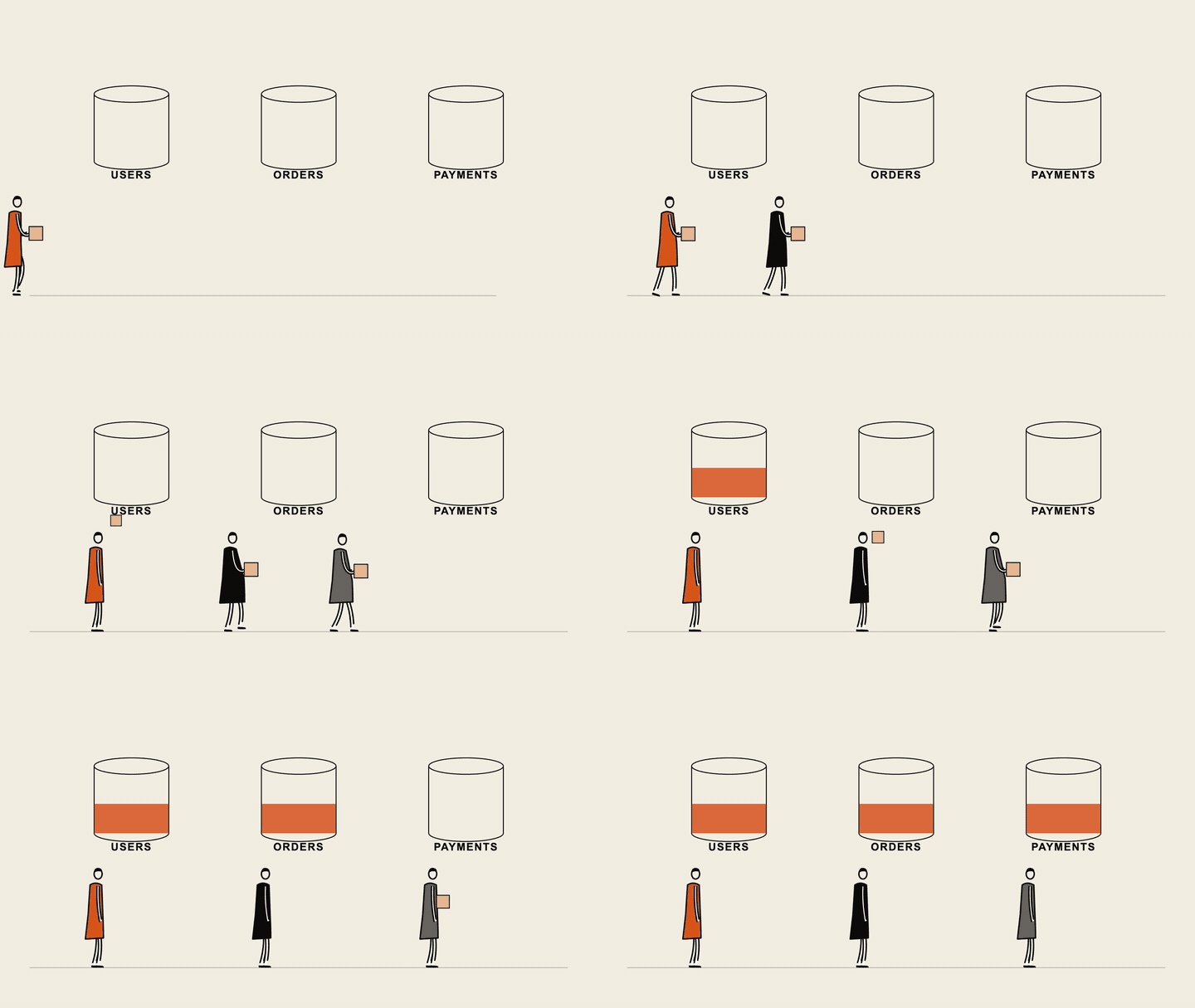
scenes:
  - type: lineart                  # presenter (default): a figure walks in and points at the line
    text: Every key expires in the same second.
  - type: lineart
    kind: carry                    # one figure per item carries data to it (1 to 6 items)
    items: [Users, Orders, Payments]
Faceless ink figures with a wobbling pen, in your theme's colours. The text shrinks to fit (with a warning), and a carry scene gets about 0.6 s more per item unless you set seconds. They need pip install 'yamlreel[capture]' and a Chromium or Chrome (playwright install chromium, or chromium_path in your user config); without them the scene is drawn as a typed line. The drawing library is line-art-animation by JDhruv14 (MIT), vendored in yamlreel/lineart/ with its licence.
Two designed sample voices (female and male, American, no real person cloned) are in examples/voices/. They are CC-BY-NC (OmniVoice), so credit it and keep them non-commercial.
Voiceover in your own voice
Give a scene a narration: line and yamlreel speaks it, lowers the music under the voice, and makes the scene as
long as the speech needs. Speech comes from a text-to-speech server you choose: one on your own machine, for example
VoiceStudio (which can also clone your voice from a short recording), or a remote one.
Your narration text goes to that server, so it stays on your machine only if the server is local.
scenes:
  - type: type
    text: What is a cache stampede?
    narration: Ever seen one expired cache key take down a whole database? That's a cache stampede.
  - type: title
    title: Cache stampede
    narration: false          # silent end card
Set up VoiceStudio, step by stepWrite narration, don't read the screen. The voice sounds natural when it explains what the viewer sees,
in a sentence or two.read_screen: true(or--read-screen) speaks every title, bullet and caption word
for word, for scenes without their ownnarration:. That is fine as a quick draft, but it sounds robotic in a
finished video.--no-voicerenders any spec with music only.
- Install and open VoiceStudio. Use the desktop app
(easiest), or run it from source (uv sync, thenuv run uvicorn main:app --app-dir backend --port 3900).
Its speech server listens onhttp://127.0.0.1:3900/mcp/while it is running. - Accept the model licences. Open Model Catalogue and accept the terms for OmniVoice and its audio
tokenizer. Until you do, every request fails with403 Forbidden. The first request also downloads the
model (about 2.3 GB). - (Optional) Clone your voice. In Voice cloning, add a 5 to 10 second recording of yourself in a quiet
room, with its exact transcript. Copy the voice's profile id. - Tell yamlreel where the server is, once. Run
yamlreel config init --userand open~/.config/yamlreel/config.yaml. At the bottom, uncommentvoice_server:and itsurl:line. Under the
existingvoiceover:block, uncommentvoice:and paste your profile id there (leave it out to use the
server's default voice). You can also pass--voice-url http://127.0.0.1:3900/mcp/on each render.
Prefer to record yourself? Use narration_audio: clip.wav (PCM WAV, inside the spec folder or an allowed
folder) instead of narration:.
- Any compatible server works. yamlreel speaks MCP "Streamable HTTP" and calls the server's
generate_speechtool, which must return the audio inline (VoiceStudio's default). VoiceStudio is just one server that does this. A503(the model is still loading) is retried five times with growing waits before it counts as unreachable. - Privacy: narration text goes to the server you configured. A local server (such as VoiceStudio on
127.0.0.1) keeps it on your machine; a remote URL sends it to that host. A spec cannot choose the server: the address comes only from your user config or the command line. - Precedence: a scene's own
narration:wins overread_screen, andnarration: falsekeeps a scene silent. - Caching: audio is cached in
<output folder>/.cache/narration-v2-*.wav, keyed by the server address (scheme, host, port and path; never theuser:password@part, query or fragment), the voice (orclient_idwhen no voice is set), the language and the text, so re-renders do not speak lines again. The cache is never pruned. Clear it withrm "<output folder>"/.cache/narration-*.wav. Versions before 0.2.2 keyed it differently, so upgrading from one re-voices every line once. Changing the engine, model or account behind the same server URL, or the recording behind a voice, is not detected: run thatrmafterwards. - Licences: VoiceStudio is AGPL-3.0, and its models have their own licences, which its Model Catalogue shows per model. OmniVoice's weights are non-commercial (CC-BY-NC), and that may carry over to the speech they generate. Check before you monetise a video.
Checking the voice
A voice model can drop a word without anyone noticing, such as a clip that said "a queue is extra capacity" for
"a queue isn't extra capacity". After a render, yamlreel check-voice spec.yaml transcribes the cached narration
clips and compares them with your narration text. It never synthesises, so render first (or pass the same --out).
pip install "yamlreel[verify]"     # the first run downloads the base.en speech model, about 145 MB
yamlreel check-voice spec.yaml     # also: --out DIR, --model NAME_OR_PATH, --voice-url URL, --read-screen
Per scene, an ERROR means a negation (not, no, never, without) was dropped or added, or the numbers differ;
a WARNING means more than 20% of the words were not heard. Contractions, digits and number words are treated as
equal ("isn't" and "is not", "3" and "three"). Notes (no error): a scene that is not cached, has no transcript, or has
under one second of speech, which is too short to transcribe reliably. The exit code is 0 when clean, 1 for any ERROR or
WARNING, and 2 for a setup problem (no faster-whisper, no voice server to find the clips, non-English narration).
English only. It is a safety net, not proof: the recogniser can mishear a name, so listen to any flagged scene.
Configuration
Defaults live in a config file, so a spec only needs to say what is different for that video. You can adapt
yamlreel to your own name, colours and music without touching code.
yamlreel config init            # ./yamlreel.config.yaml: this project (add it to your .gitignore)
yamlreel config init --user     # ~/.config/yamlreel/config.yaml: every project
yamlreel config show            # the merged settings, and the files they came from
Settings apply in this order, lowest to highest: built-in defaults → user config → project config → the spec → command-line flags.
Nested settings merge, so setting only music.bpm keeps the rest. meta.tags, links and credits add up across layers.
What you can set: theme, your own themes (colours, extends, display: serif | sans, frame), formats,fps, output_dir, watermark (text or a logo), music, voiceover, meta defaults and limits. Your name,
watermark and default tags belong in config, not in code. Every option is explained inyamlreel/templates/config.example.yaml.
A few settings widen what a spec can touch, so yamlreel only reads them from your user config or the command
line, never from a spec or project config you downloaded: allow_paths, allow_private_hosts,chromium_path, font_dir and voice_server. See SECURITY.md.
New in 0.3.6
- New:
type: lineartscenes (Line-art scenes): an ink figure presents the hook, or one figure per item carries data to it. They now openyamlreel story(use--no-lineartfor the old typed line) and theexplainerandsystem-designtemplates. Needs Chromium; without it the scene is drawn as typed text and the render warns. Specs you already have are unchanged.
New in 0.3.5
- New:
voiceover.debreathsilences breaths in narration clips (Writing a spec); use it withtrim.
New in 0.3.3
- New: spec and outline errors now start with
file:line:(error: spec.yaml:12: scenes[0].titel: ...), so editors can jump to the mistake (Writing a spec). Scripts that parse the olderror: <path>start should expect the location first. - New:
yamlreel render --only N,A-Brenders only some scenes, cut out of the full video, intovideo-scenes-<N>.mp4beside the full outputs (Rendering part of a video).
New in 0.3.2
- New:
voiceover.speedandvoiceover.trim(Writing a spec) and theeditorialtheme. - New: the
gridscene (Writing a spec): a stain, lost cells, a status line and recovery, shown inexamples/grid-demo.yaml. - New:
kickeronbullets,code,diagram,table,array,meter,grid,treeandtimelinescenes (Writing a spec): a numbered tag above the title. - New:
yamlreel check-voice(Checking the voice) and theverifyextra, andeventson outline steps (Story outlines). - New: story
eventscan carry the real step fields (push,pop,mark,level,flashand so on), passed to the scene unchanged, instead of the generated placeholder cue (Story outlines). - New:
yamlreel script, a script sheet of every scene's kicker, title, caption and narration for review (Script sheet).
Upgrading to 0.3.0
- The pre-rename
vidgennames are gone. They are ignored now (no error, no warning). Use theyamlreelcommand
instead ofvidgen;YAMLREEL_CONFIG,YAMLREEL_FONT_DIRandYAMLREEL_CHROMIUMinstead of theVIDGEN_*variables;~/.config/yamlreel/config.yamlinstead of~/.config/vidgen/config.yaml(move the folder); andyamlreel.config.yamlinstead ofvidgen.config.yaml. Reinstall withpip install -e '.[ffmpeg]'to drop the old command. yamlreel config showno longer lists musicbpm,rootandscaleunless you set them; each music style
supplies its own defaults (see Music styles).- New: data scenes such as
tableandarray(Writing a spec), word-by-word subtitles,
theyamlreel storycommand (Story outlines) and theambient,lofi,pulseandpianomusic styles.
Troubleshooting
| You see | Fix |
|---|---|
ffmpeg not found |
pip install "yamlreel[ffmpeg]", or install ffmpeg with your package manager. |
font 'DejaVuSans-Bold.ttf' not found |
Install DejaVu (see Install details), or point font_dir in your user config at the folder that holds them. |
scene 0 has narration but no voice server is configured |
Start VoiceStudio and set voice_server in your user config, pass --voice-url, or render with --no-voice. |
cannot reach the voice server … Is VoiceStudio running? |
Start VoiceStudio and check that the URL ends in /mcp/. |
Client error '403 Forbidden' for url '…/generate' |
Accept the OmniVoice and tokenizer licences in VoiceStudio's Model Catalogue. |
Server error '500' from the voice server, or the server is killed |
The machine is out of memory. Close other apps, and use a 5 to 10 second voice sample: a longer reference needs over 2 GB on the CPU. |
voice server reply had no audio |
VoiceStudio is set to OMNIVOICE_MCP_OUTPUT_MODE=files. yamlreel needs the default inline mode. |
check-voice needs faster-whisper |
pip install "yamlreel[verify]". |
not cached, run render first (from check-voice) |
Render the spec first, with the same --out and voice server, so the clips exist. |
capturing a URL needs playwright |
pip install "yamlreel[capture]", then playwright install chromium. |
could not capture … Executable doesn't exist |
Run playwright install chromium, or set chromium_path in your user config. |
… outside the folders this run may read |
Move the file next to your spec, or pass --allow-path DIR. For localhost pages, add --allow-private-hosts. |
| A narration line still uses an old voice | The cache cannot see a change behind the same server URL (new engine, model, account or voice recording). Run rm "<output folder>"/.cache/narration-*.wav. |
| Homebrew fails to build ffmpeg or Python | Older macOS versions get no prebuilt packages. Use the [ffmpeg] extra for ffmpeg, and python.org or uv for Python. |
Built with
| Used for | |
|---|---|
| Pillow, NumPy, PyYAML | drawing every frame, generating the music, reading specs |
| FFmpeg (or imageio-ffmpeg) | encoding the video |
| Playwright | capturing web pages for shot scenes and drawing lineart scenes (optional) |
| line-art-animation (MIT) | the ink figures of lineart scenes (vendored) |
| DejaVu fonts | all on-screen text |
| VoiceStudio with OmniVoice | the optional local voiceover, including voice cloning (not bundled) |
| Claude Code | building, testing and reviewing yamlreel |
If you publish a video voiced with OmniVoice, credit it and keep it non-commercial: its licence (CC-BY-NC)
requires both, and VoiceStudio's audio tokenizer has its own terms (see Licences above). yamlreel puts a
spec's meta.credits into share-copy.txt for you.
Why yamlreel
- Manim is excellent for math animation, but each animation is code you write. yamlreel is a spec: you describe scenes, not frames.
- Remotion renders video from React and is very flexible. yamlreel trades that flexibility for zero JavaScript and a fixed set of scene types.
- MoviePy edits and composes video clips you already have. yamlreel generates frames and music itself and adds an optional voiceover.
- Online AI video tools are quick but run in the cloud, usually cost money, and your script and voice leave your machine. yamlreel renders locally and is MIT licensed; your narration stays local only if your voice server is.
Contributing
Bug reports, new scene types, examples and docs are welcome. See CONTRIBUTING.md
for setup and the pull request flow.
Development
git clone https://github.com/nsijwali/yamlreel.git
cd yamlreel
python3 -m venv .venv && source .venv/bin/activate
pip install -e '.[dev,ffmpeg]'
pytest -q
Tests never read your own user or project config. Checks that need ffprobe, Playwright or Chromium are skipped
when those tools are missing. CI runs on Ubuntu with Python 3.10 and 3.12.
Security and licence
Specs are treated as untrusted input. File access is confined, URL captures are checked, and settings that widen
access come only from you. SECURITY.md covers the details and how to report a vulnerability.
yamlreel is MIT licensed. Tools you pair it with keep their own licences.
Support
yamlreel is free and MIT licensed. If it saves you time, you can sponsor the project on GitHub or
send a tip via PayPal. Starring the repo and sharing a video you made helps just as much.
Author
yamlreel is created and maintained by Nitin Sijwali (@nsijwali), a software
engineer in Bangalore, India. It started as a way to post a short system-design explainer every day without
editing videos by hand. Project website: nsijwali.github.io/yamlreel.
If you use yamlreel in your work, GitHub's Cite this repository button gives a ready-made citation.
Reviews (0)
Sign in to leave a review.
Leave a reviewNo results found