forgejo-mcp-server
mcp
Uyari
Health Uyari
- License — License: GPL-3.0
- Description — Repository has a description
- Active repo — Last push 0 days ago
- Low visibility — Only 6 GitHub stars
Code Uyari
- process.env — Environment variable access in src/index.ts
- network request — Outbound network request in src/index.ts
Permissions Gecti
- Permissions — No dangerous permissions requested
Purpose
This tool is a Model Context Protocol (MCP) server that bridges an AI assistant, such as Claude Desktop, with a self-hosted Forgejo repository. It allows the AI to read repository data, list issues, and create new issues via the Forgejo API.
Security Assessment
The overall risk is Low, provided you trust your own Forgejo instance. The server makes outbound network requests strictly to interact with your Forgejo API using an access token stored in a local environment variable. It does not request any dangerous system permissions, nor does it appear to execute arbitrary shell commands. However, keep in mind that the AI will have the exact same API permissions as the token you provide it. If the token has write access, the AI can create issues or potentially modify repository data. There are no hardcoded secrets.
Quality Assessment
The project uses a standard GPL-3.0 license and was actively updated very recently. However, it currently has extremely low community visibility with only 6 GitHub stars. This means it has undergone very little public scrutiny and likely lacks a mature support ecosystem. It functions well for a personal or internal tool, but its unproven nature makes it a higher risk for critical or large-scale enterprise environments.
Verdict
Use with caution — it is safe regarding system permissions and uses standard authentication practices, but its low community adoption and lack of public auditing mean you should review the source code yourself before giving it access to sensitive repositories.
This tool is a Model Context Protocol (MCP) server that bridges an AI assistant, such as Claude Desktop, with a self-hosted Forgejo repository. It allows the AI to read repository data, list issues, and create new issues via the Forgejo API.
Security Assessment
The overall risk is Low, provided you trust your own Forgejo instance. The server makes outbound network requests strictly to interact with your Forgejo API using an access token stored in a local environment variable. It does not request any dangerous system permissions, nor does it appear to execute arbitrary shell commands. However, keep in mind that the AI will have the exact same API permissions as the token you provide it. If the token has write access, the AI can create issues or potentially modify repository data. There are no hardcoded secrets.
Quality Assessment
The project uses a standard GPL-3.0 license and was actively updated very recently. However, it currently has extremely low community visibility with only 6 GitHub stars. This means it has undergone very little public scrutiny and likely lacks a mature support ecosystem. It functions well for a personal or internal tool, but its unproven nature makes it a higher risk for critical or large-scale enterprise environments.
Verdict
Use with caution — it is safe regarding system permissions and uses standard authentication practices, but its low community adoption and lack of public auditing mean you should review the source code yourself before giving it access to sensitive repositories.
Forgejo Self-Hosted Integration with Claude MCP
README.md

Forgejo MCP Server
A Model Context Protocol (MCP) server that provides Claude Desktop with tools to interact with Forgejo repositories.
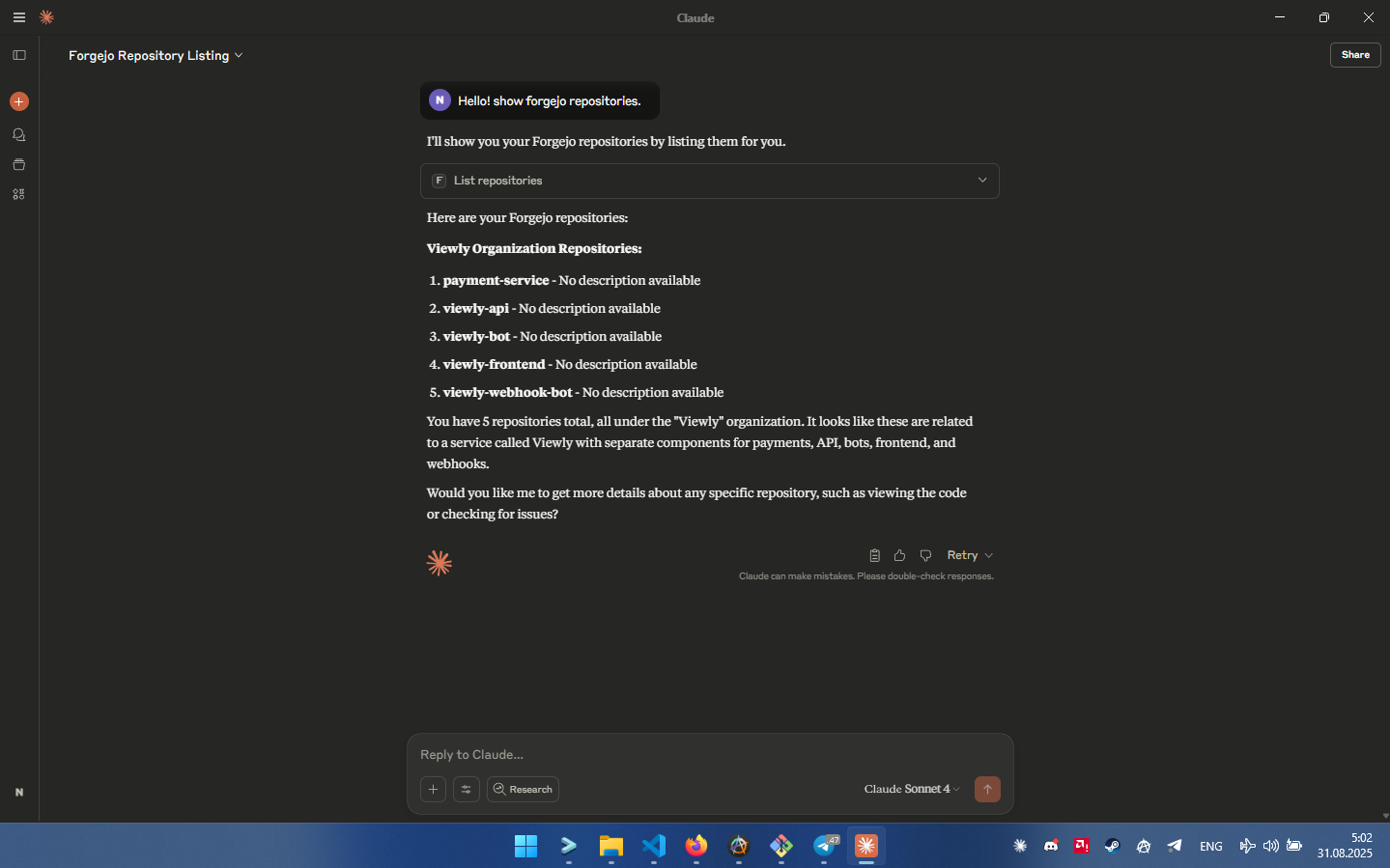
Features
- List repositories
- Get repository information
- List issues with filtering by state
- Create new issues
- Read file contents from repositories
Installation
git clone https://github.com/nsvk13/forgejo-mcp-server
cd forgejo-mcp-server
bun install
bun run build
Configuration
Environment Variables
Set the following environment variables:
FORGEJO_BASE_URL: Your Forgejo instance URL (e.g.,https://your-forgejo.com)FORGEJO_TOKEN: Your Forgejo API token
Generating a Forgejo API Token
- Go to your Forgejo instance
- Navigate to Settings → Applications
- Generate a new token with appropriate permissions
- Copy the token for use in configuration
Claude Desktop Configuration
Add the following to your Claude Desktop configuration file:
Windows: %APPDATA%\Claude\claude_desktop_config.json
macOS: ~/Library/Application Support/Claude/claude_desktop_config.json
{
  "mcpServers": {
    "forgejo": {
      "command": "node",
      "args": ["/absolute/path/to/forgejo-mcp-server/dist/index.js"],
      "env": {
        "FORGEJO_BASE_URL": "https://your-forgejo-instance.com",
        "FORGEJO_TOKEN": "your_api_token_here"
      }
    }
  }
}
Replace the path and credentials with your actual values.
Usage
After configuration, restart Claude Desktop. You can then use commands like:
- "List my Forgejo repositories"
- "Show issues in repository owner/repo-name"
- "Create an issue in repository with title 'Bug report'"
- "Show the contents of README.md from repository"
Available Tools
list_repositories: Get list of user repositoriesget_repository: Get detailed repository informationlist_issues: List issues with optional state filteringcreate_issue: Create a new issueget_file_content: Read file contents from repository
Development
# Build the project
bun run build

# Run in development mode
bun run dev
Requirements
- Bun 1 or higher
- TypeScript
- Valid Forgejo instance with API access
Yorumlar (0)
Yorum birakmak icin giris yap.
Yorum birakSonuc bulunamadi