agentpet
Health Uyari
- License — License: MIT
- Description — Repository has a description
- Active repo — Last push 0 days ago
- Low visibility — Only 6 GitHub stars
Code Basarisiz
- rm -rf — Recursive force deletion command in scripts/build-app.sh
- rm -rf — Recursive force deletion command in scripts/ci-dmg.sh
- rm -rf — Recursive force deletion command in scripts/release.sh
Permissions Gecti
- Permissions — No dangerous permissions requested
Bu listing icin henuz AI raporu yok.
A native macOS menu bar app with a desktop pet that monitors your AI coding agents (Claude Code, Codex, Gemini CLI) in real time.



If AgentPet helps your workflow, please give it a star — it really helps!
English · Tiếng Việt · 简体中文 · 日本語
Run several coding agents at once (Claude Code, Codex, ...) and AgentPet tells you, at a glance, which one is working, which one is done, and which one is waiting for your input, so you stop tab-hunting across terminals. A little pet floats on your desktop and reacts to it all.
Why
Running multiple agents in parallel means constantly switching windows to check who needs you. AgentPet surfaces that in two places:
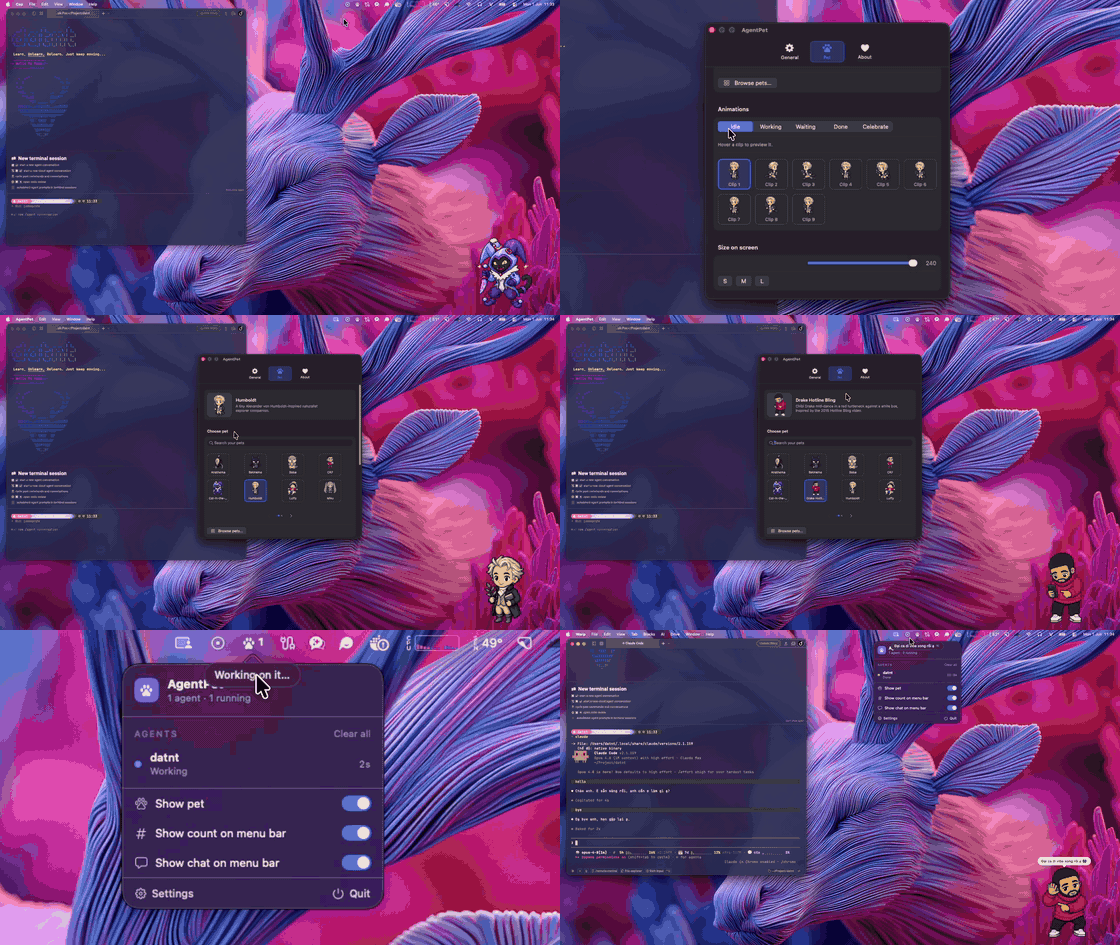
- Menu bar monitor for the details: every running agent, its state, what it's doing, and a live timer.
- Desktop pet for an ambient signal you can read without breaking focus.
Features
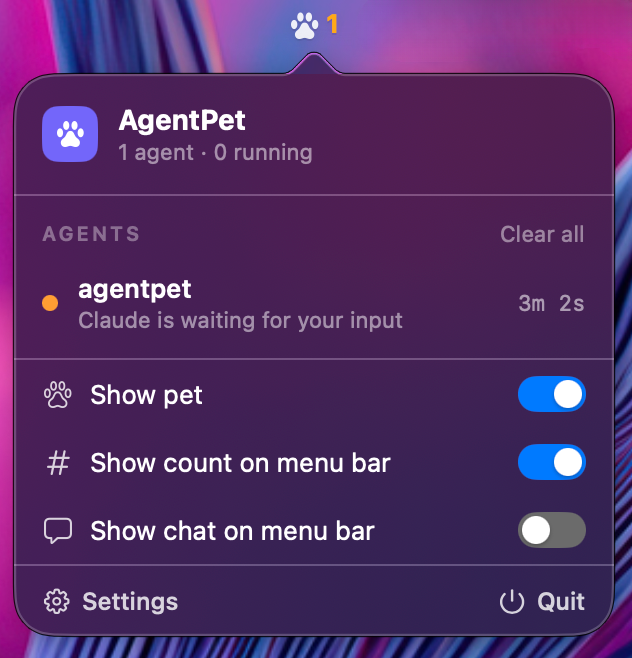
- Multi-agent monitor in the menu bar: live list of every agent with a colored status dot, the project, what it's doing (running tool / waiting reason), and a per-state timer that counts in real time.
- At-a-glance menu bar icon: shows the number of running agents, and turns orange with a count when one needs your input.
- Desktop pet that reacts to the aggregate state (working / waiting / done / celebrate), with an optional chat bubble (built-in or fully custom messages).
- Native notifications when an agent finishes or needs input.
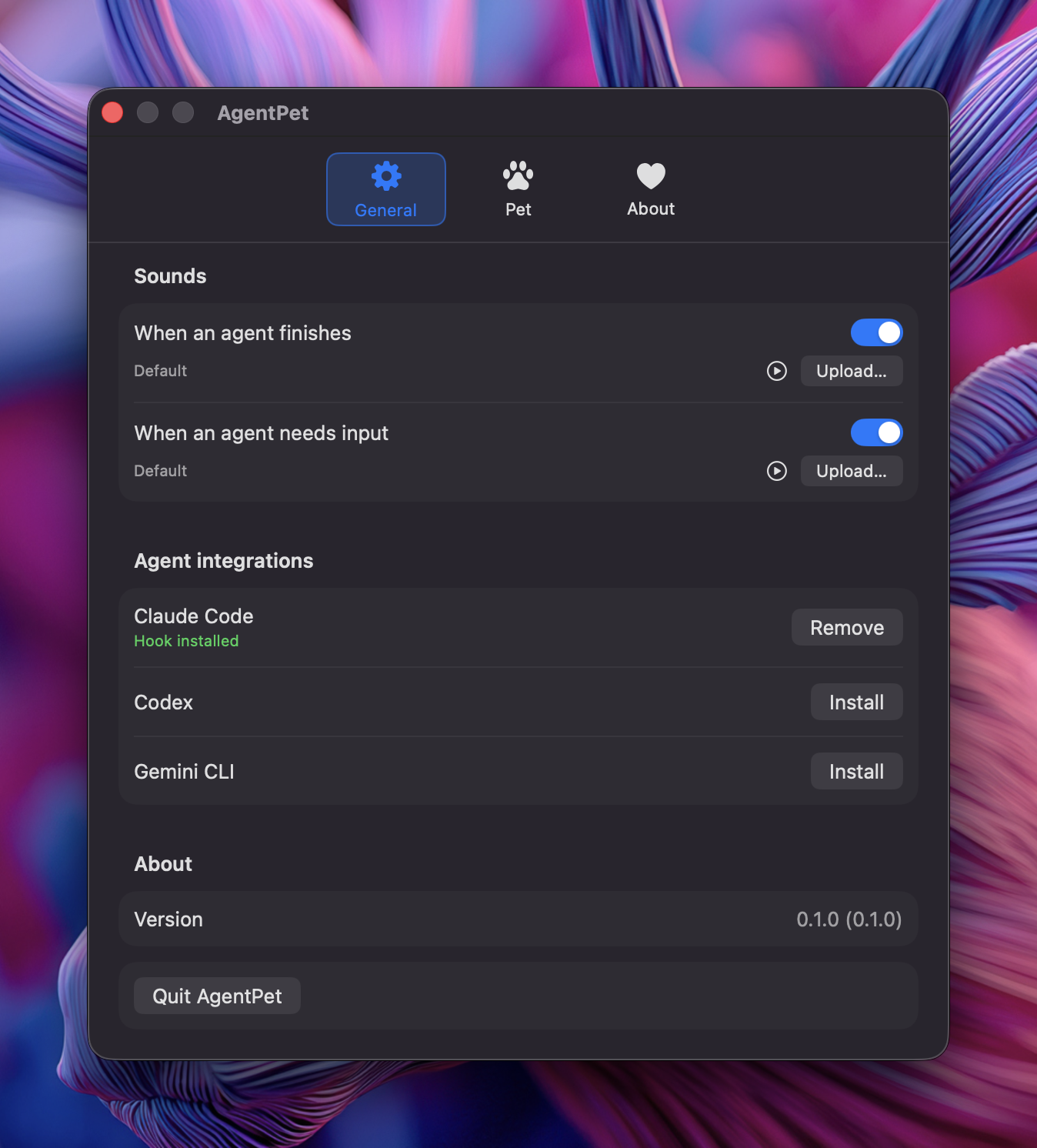
- Claude Code, Codex & Gemini CLI integration via hooks, with one-tap install from Settings (precise working / waiting / done / idle, including "needs your input").
- Universal wrapper
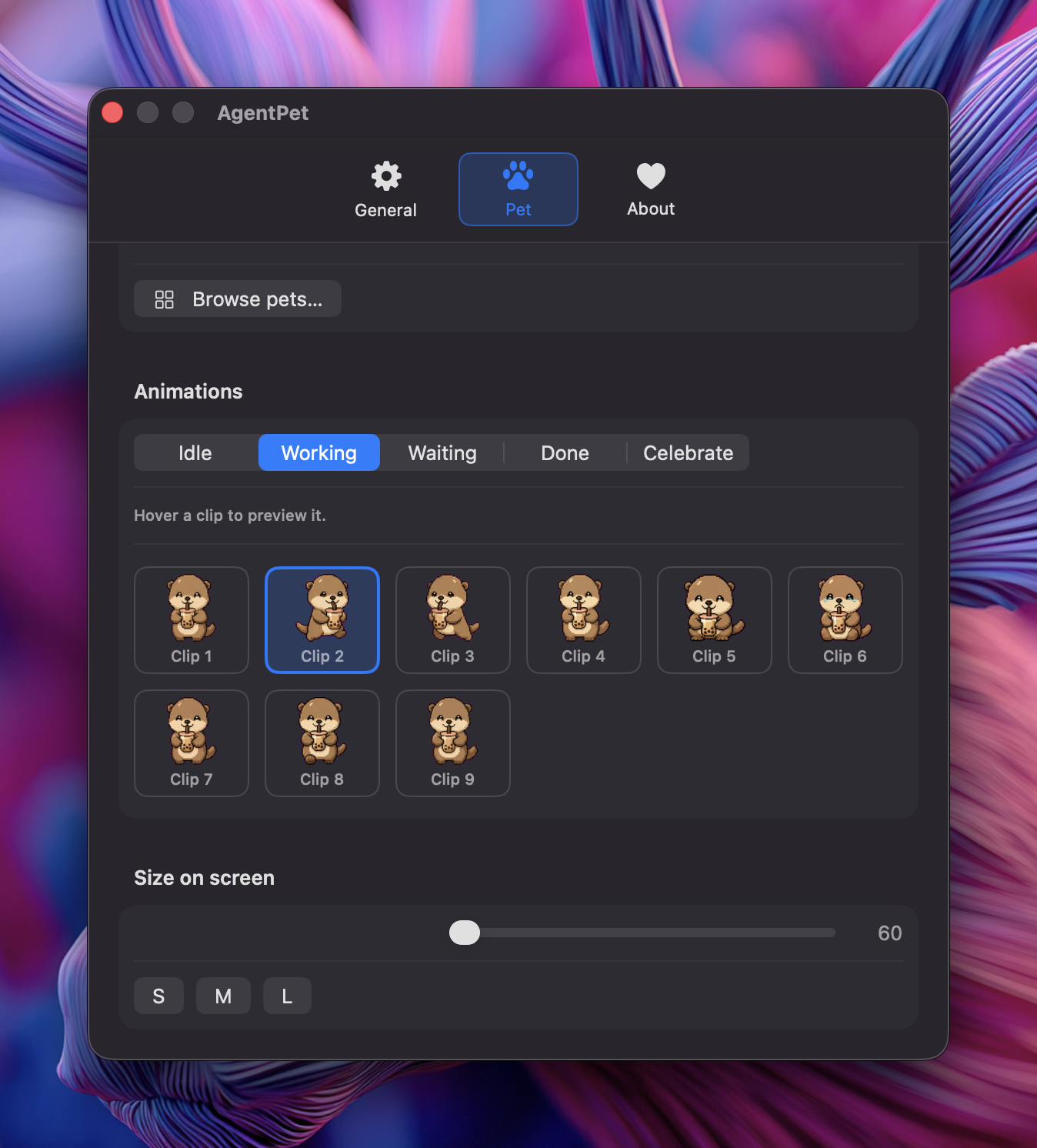
agentpet run -- <command>to monitor any CLI agent (working/done), no per-agent setup. - Pet system: browse an online pet library and download with one click, map each animation to a state, resize, and customise chat lines.
- Polished, native Settings (tabbed, dark) that never steals focus.
Screenshots
Requirements
- macOS 13 Ventura or later (macOS 14 Sonoma+ recommended; the keyboard-focus-ring cleanup uses APIs available on macOS 14+).
- Apple Silicon (M1/M2/M3/M4) and Intel Macs are both supported.
- macOS only, by design. There is no Windows or Linux version.
- To build from source: Xcode 16 / Swift 6.
Install
Homebrew
brew install --cask ntd4996/tap/agentpet
Direct download
Grab the latest AgentPet.dmg from Releases, open it, and drag AgentPet to Applications.
Build from source
git clone https://github.com/ntd4996/agentpet.git
cd agentpet
./scripts/build-app.sh release
open build/AgentPet.app
Note: the current build is Developer ID-signed but not yet notarized, so macOS may block the first launch. Remove the quarantine flag once:
xattr -dr com.apple.quarantine "/Applications/AgentPet.app"A fully notarized build (no warning) is on the way.
On first launch, open Settings → General and click Install next to Claude Code, then Enable notifications.
Usage
Claude Code (recommended): install the hook from Settings. AgentPet then reflects each session's real state (including "waiting for input").
Any other CLI agent: wrap it.
agentpet run -- <your-agent-command> # e.g. agentpet run -- aider
The session shows as working while it runs and done when it exits.
Pets
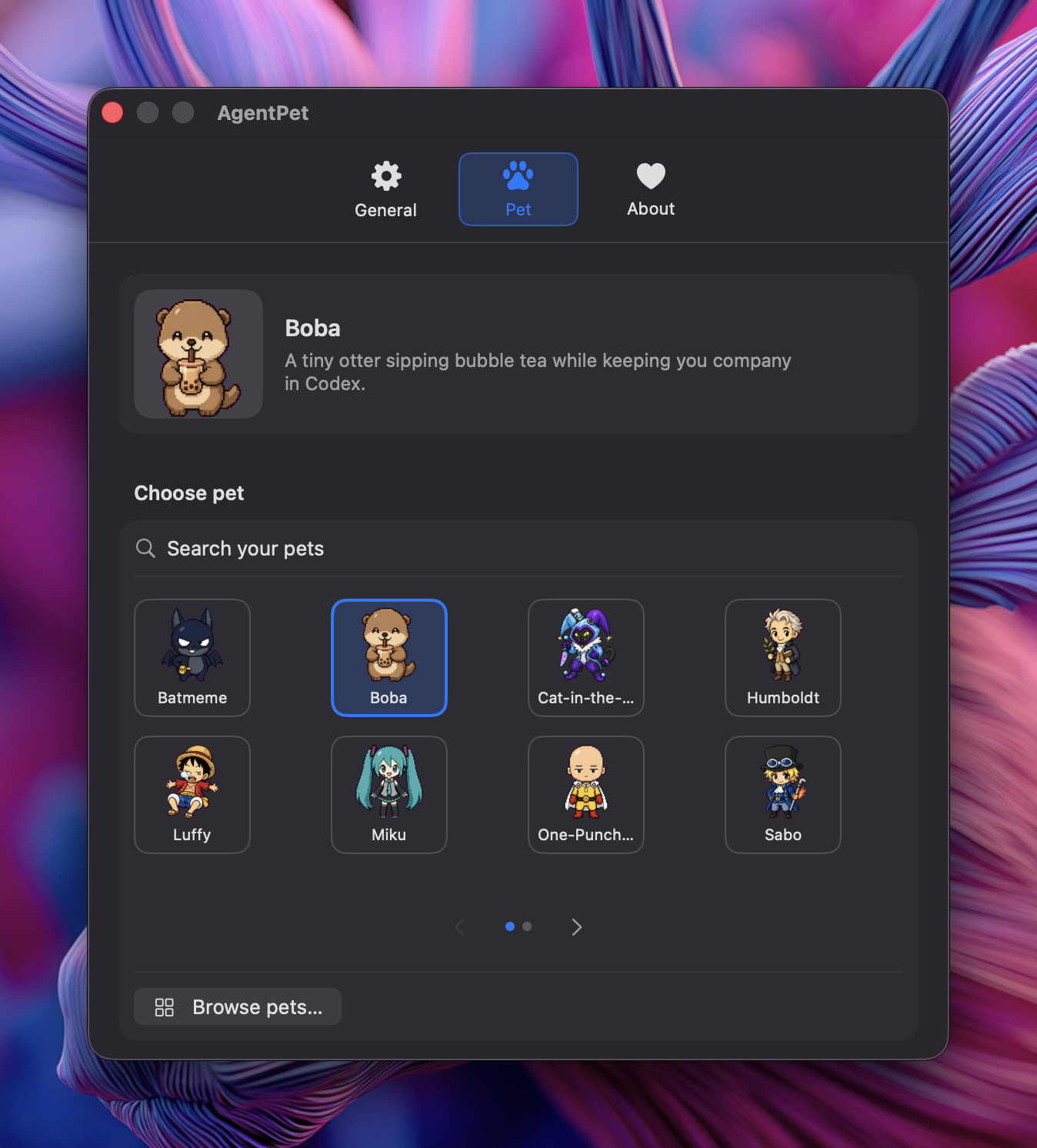
Pets use the open Codex pet-pack format (pet.json + an 8×9 spritesheet). You can:
- Browse the online library and download a pet with one click (Settings → Pet → Browse pets).
- Map animations: pick which sheet animation plays for each state.
- Delete pets you no longer want.
A starter pet is installed automatically on first launch. AgentPet bundles no pet art; packs are added at runtime.
Roadmap
- Notarized DMG + Homebrew cask
- Click an agent to reveal its terminal
- Per-project pets
Tech
Swift + SwiftUI, a Unix-socket daemon for agent events, and a tiny CLI helper, all in one SwiftPM package. See docs/specs for the design.
Support
If AgentPet saves you some tab-hunting, here's how to help:
- ⭐ Star the repo so more people find it.
- ☕ Buy me a coffee if you'd like to fuel more features.
Built by Nguyễn Thành Đạt (@ntd4996).
Acknowledgements
The Codex pet-pack format and the online pet library are provided by
Petdex (MIT). AgentPet is an
independent, interop client: it reads packs in Petdex's format and lets you
download them from Petdex's public API. AgentPet bundles no pet art; every pet
asset is owned by its respective submitter under their own license. If you hold
rights to a character, please direct takedowns to Petdex.
License
MIT, see LICENSE. Application code only; pet assets are not part of this repository.
Yorumlar (0)
Yorum birakmak icin giris yap.
Yorum birakSonuc bulunamadi