claude-resume
Health Uyari
- License — License: MIT
- Description — Repository has a description
- Active repo — Last push 0 days ago
- Low visibility — Only 5 GitHub stars
Code Basarisiz
- rm -rf — Recursive force deletion command in scripts/build-app.sh
Permissions Gecti
- Permissions — No dangerous permissions requested
Bu listing icin henuz AI raporu yok.
A native macOS menu bar app that lists all your Claude Code sessions and resumes any of them in iTerm2 with one click: search, live status, notifications, previews and cost per session.

ClaudeResume
Every Claude Code conversation, one click from coming back.
A native macOS menu bar app that lists your Claude Code sessions, shows which ones are still
running, and resumes any of them in iTerm2 or Ghostty, in the right folder, with one click.





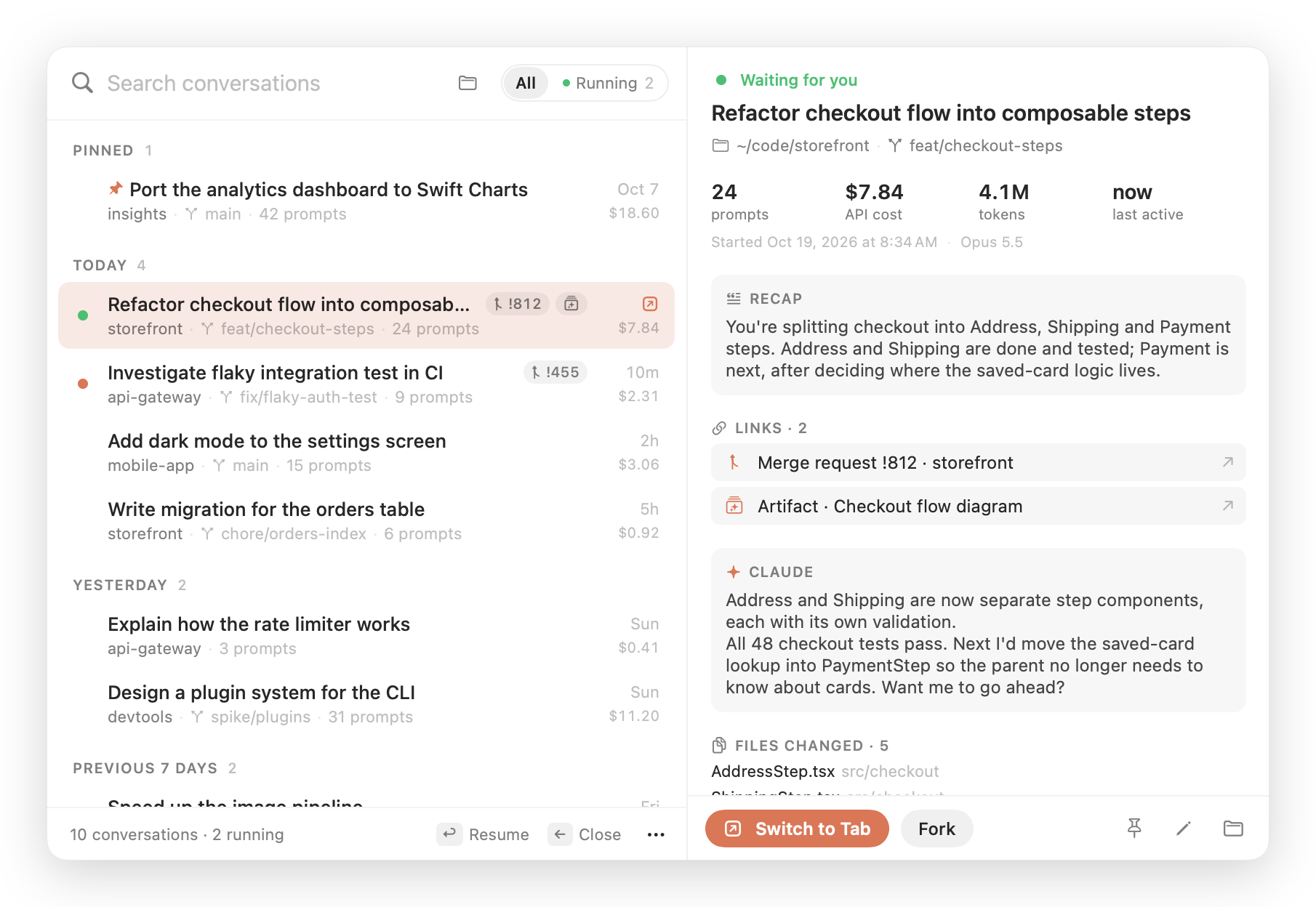
All screenshots show made-up demo data, rendered with make screenshots.
Why
claude --resume only shows sessions from the folder you're in, so you need to remember
where a conversation happened before you can find it. With a dozen repositories and a few
long-running sessions, you end up with lots of iTerm2 tabs and no idea which one is working,
which one is waiting for you, or what the one from last Tuesday was about.
ClaudeResume puts every conversation from every project in one searchable list, one shortcut
away. Pick one and you're back in it.
Features
Find it
- Every conversation in one place. Sessions from all your projects, grouped into Today,
Yesterday, Previous 7 days, Previous 30 days and then by month. You can also group them by
project or by cost. - Readable titles. Your
/renamename, else the title Claude generated, else your first
prompt. Each row also shows the folder, git branch, prompt count, age and cost. - Search as you type. It matches titles, prompts, recaps, folders, branches, changed files,
links and session IDs, with the matches highlighted.- Every word has to match somewhere.
- Loose matches work:
frmw updfinds "Firmware update". - Accents and Turkish letters are ignored:
calisfinds "çalışıyor".
- Project filter. The folder button narrows the list to one repository.
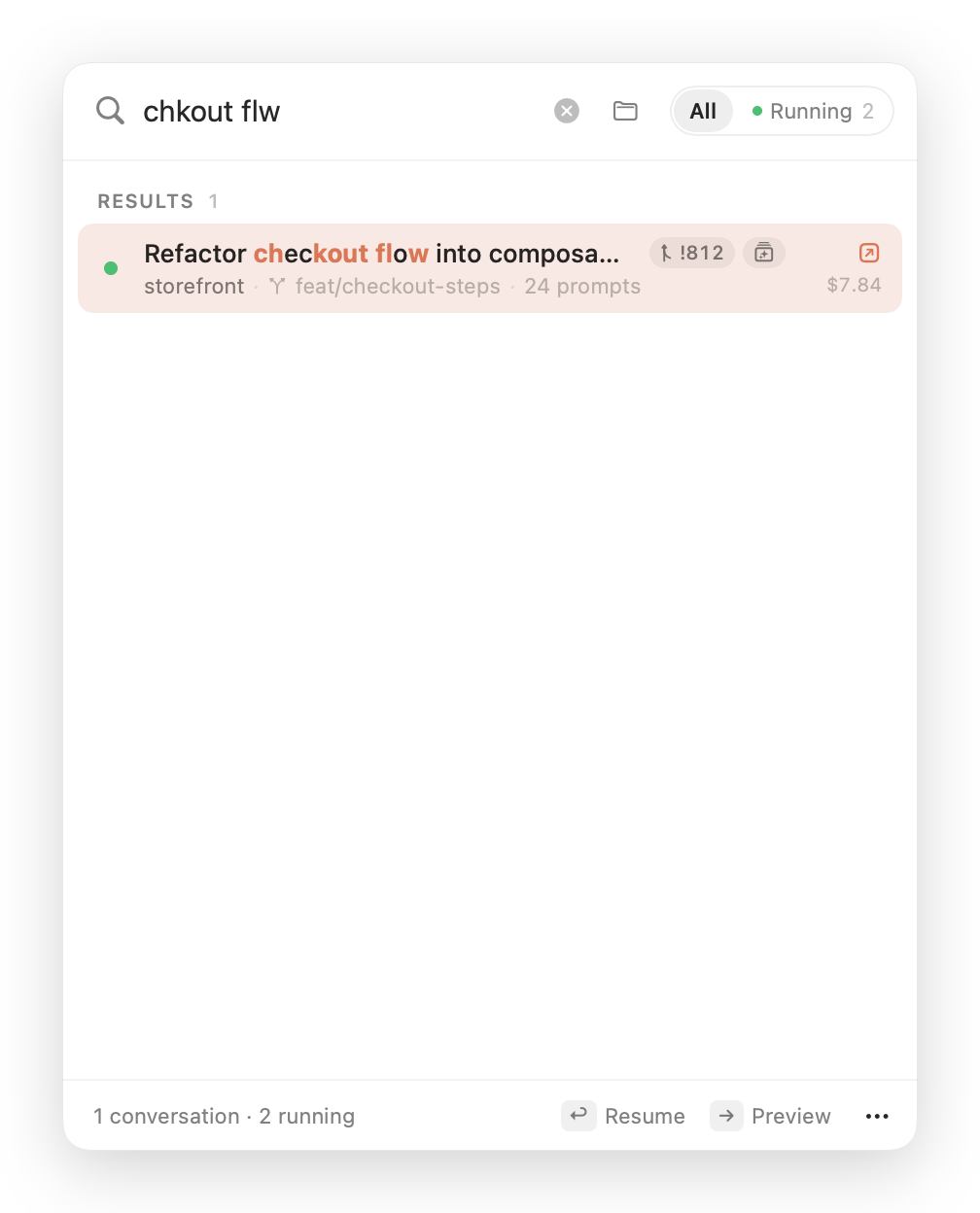
|
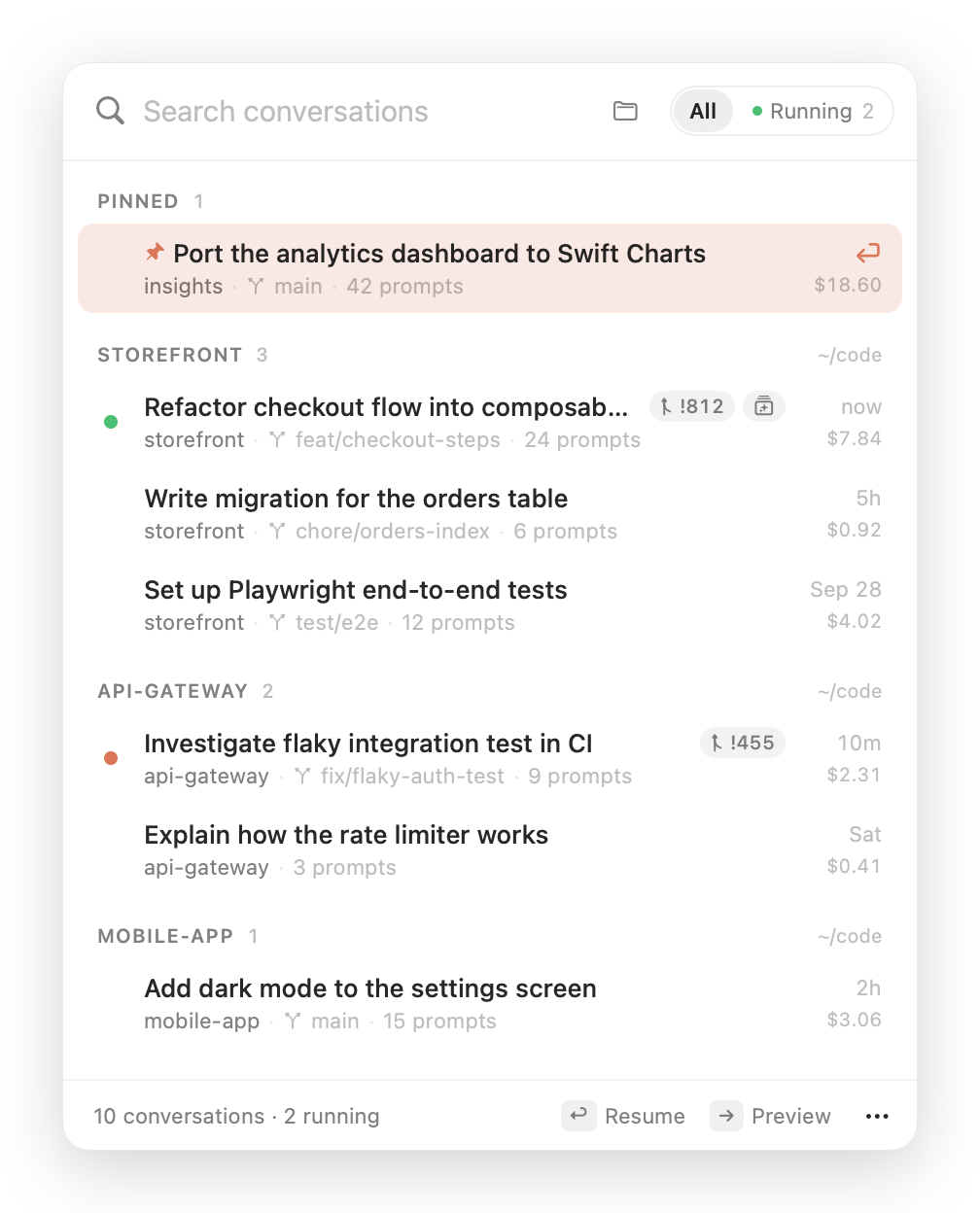
|
| Loose search with highlighted matches | Grouped by project, with a pinned conversation |
Get back in
- One-click resume. Clicking a row opens a new terminal tab, or window, and runs
cd <folder> && claude --resume <id>.- iTerm2 is the default. Choose Ghostty in ⋯ → Terminal to use Ghostty 1.3 or later.
Ghostty uses your configured shell, including itsPATHand credentials. - If iTerm2 isn't open yet, it uses the window iTerm2 opens at launch, so there's no empty
extra tab.
- iTerm2 is the default. Choose Ghostty in ⋯ → Terminal to use Ghostty 1.3 or later.
- Running sessions get focused, not duplicated. iTerm2 tabs are matched by the process's
terminal, including sessions you started by hand. Ghostty can focus sessions opened by
ClaudeResume. A session in another terminal must be switched to there or quit before resuming.
Changing the terminal setting affects new launches; existing sessions keep their own terminal. - Fork (⌥↩) continues a conversation as a new one (
--fork-session). - Extra flags such as
--model opuscan be added to every resume.
Know what's happening
- Live status. A coral pulse means Claude is working. Green means the session is waiting
for you. All | Running (⇥) shows only the open sessions. The menu bar icon
gets a dot while any session is working. - A notification when Claude finishes. When a turn that took longer than 20 seconds ends,
you get a notification with the start of Claude's reply. Clicking it takes you to that tab.
If that tab is already in front of you, there's no notification. - Preview (→). A side pane shows the session without resuming it:
- Claude's latest recap and your last prompt
- the start of Claude's last reply
- the files it edited
- its merge requests and artifacts
- prompt count, cost, tokens and models
- Merge requests and artifacts. Pull or merge requests and published artifacts a session
created appear as chips on the row. Click a chip to open it. - Cost per session. The API-equivalent cost at list prices, subagents included.
Keep it tidy
- Pin (⌘P) the conversations you keep coming back to.
- Hide (⌘⌫) the ones you're done with. They stay on disk, and you can bring
them back from the ⋯ menu. - Rename (⌘E). This writes the same line
/renamewrites, soclaude --resume
shows the new name too. - Quit idle sessions. Stop every session that has waited for input for over a day, three
days, a week or a month. You can also close their terminal tabs at the same time. The
conversations stay saved, and busy sessions are never touched.
Stay out of the way
- Native and small. AppKit and SwiftUI, no dependencies, about 4 MB, and a universal binary.
- No network access. No analytics, no update checks, no telemetry. Everything is read
from files on your Mac. - Incremental. After the first scan, only transcripts that changed are read again.
Install
Download
- Get
ClaudeResume-vX.Y.Z.zipfrom the latest release and unzip it. - Move
ClaudeResume.appto/Applications(or~/Applications) and open it. - The app is ad-hoc signed, not notarised, so macOS blocks it the first time. Either
right-click the app → Open, or run:xattr -dr com.apple.quarantine /Applications/ClaudeResume.app
Build from source
Requires Xcode 16 or later (Swift 6).
git clone <this repository>
cd claude-resume
make install   # builds ClaudeResume.app, copies it to ~/Applications and launches it
First launch
The panel opens once by itself so you can see where the app lives in the menu bar. After
that, click the icon or press ⌃⌥R.
macOS asks for two permissions, each the first time it's needed:
| Permission | Asked when | Used for |
|---|---|---|
| Automation → iTerm2 / Ghostty | you first use that terminal | opening, focusing and closing its tabs |
| Notifications | at launch | "Claude finished" notifications (optional) |
No Accessibility, Screen Recording or Full Disk Access permission is needed.
Requirements
- macOS 15 Sequoia or later, on Apple silicon or Intel.
- iTerm2 (default), or Ghostty 1.3 or later
withmacos-applescriptenabled. - Claude Code, with
claudeon thePATHof your selected terminal's shell.
Keyboard shortcuts
| Key | Action |
|---|---|
| ⌃⌥R | Open or close the panel from anywhere (can be turned off) |
| ↑ ↓ | Move through the list |
| ↩ | Resume, or show the running session's tab |
| ⌘↩ | Resume in a new window |
| ⌥↩ | Fork into a new conversation |
| → / ← | Open or close the preview |
| ⇥ | Switch between All and Running |
| ⌘1 ⌘2 ⌘3 | Group by date, project or cost |
| ⌘P | Pin or unpin |
| ⌘E | Rename |
| ⌘⌫ | Hide or unhide |
| ⌘C | Copy the resume command (when no text is selected) |
| ⌘R | Refresh |
| esc | Clear the search, close the preview, or close the panel |
Right-click a row for the same actions, plus copying the session ID, opening the folder, showing
the transcript in Finder, opening links, and quitting a running session.
Settings
Click ⋯ in the panel's footer:
- Group By: date, project or cost.
- Terminal: iTerm2 (default) or Ghostty.
- Open Sessions In: a new tab or a new window.
- Extra claude Flags: added to every resume command, for example
--model opus. - Notify When Claude Finishes
- Show Hidden Conversations
- Global Shortcut ⌃⌥R
- Launch at Login
- Quit Idle Sessions: waiting for over 1, 3, 7 or 30 days.
How it works
ClaudeResume reads what Claude Code already keeps on disk:
| What | Where it comes from |
|---|---|
| Conversations | ~/.claude/projects/<project>/<session>.jsonl |
| Titles, prompts, folder, branch | custom-title, ai-title and user entries in each transcript |
| Recaps | away_summary entries, Claude's "while you were away" summaries |
| Merge requests, artifacts | pr-link and frame-link entries |
| Files changed | Edit, Write, MultiEdit and NotebookEdit tool calls |
| Tokens, cost | usage blocks in the session and its subagents/ transcripts, priced in Pricing.swift |
| Running sessions, busy or idle | ~/.claude/sessions/<pid>.json, checked every 3 seconds |
| A session's iTerm2 tab | the process's terminal (sysctl), matched against each iTerm2 session's tty |
| An app-launched Ghostty terminal | an inherited launch marker, mapped to Ghostty's surface ID |
| Opening, focusing, closing tabs | native AppleScript to the session's terminal |
Transcripts can be hundreds of megabytes, mostly tool output. The parser never decodes a whole
transcript:
- It only decodes lines whose first bytes mark them as a title, prompt, link or recap.
- For responses, it reads the model and
usageblock straight from the bytes. - Each response is counted once, even though Claude Code logs it once per content block.
- Each file is cached by size and modification date.
Last activity comes from message timestamps, not file dates. Claude Code sometimes rewrites
old transcripts, which makes their file dates unreliable.
Cost is what the tokens would cost at the
API list prices, including cache
writes, cache reads and fast mode. When Claude Code recorded its own total for a session, the
larger of the two is shown, because that total can be older than the transcript. If you're on
a subscription, read it as what the session would have cost through the API, not what you paid.
Privacy
- Nothing leaves your Mac. The app makes no network requests. Links you click open in your
browser. - Read-only, with three exceptions, all ones you trigger:
- Renaming a stopped session appends one
custom-titleline to its transcript, exactly like/rename. - Quitting a session sends its Claude Code process
SIGTERM. If you asked for it, it then
closes the terminal tab. - Your pins, hidden sessions and settings are stored in the app's own preferences.
- Renaming a stopped session appends one
- Renaming a running session shows the new name right away, and writes it to the
transcript only once the session has stopped. Claude Code keeps the title in memory and would
overwrite it.
Troubleshooting
| Problem | Fix |
|---|---|
| "Allow ClaudeResume to control iTerm2…" or "…Ghostty…" banner | Turn on that terminal in System Settings → Privacy & Security → Automation → ClaudeResume. If you built from source, macOS may ask again after a rebuild, because the ad-hoc signature changes. |
The tab opens but says claude: command not found |
claude isn't on your selected terminal shell's PATH. Check with which claude in a new tab. |
| "… no longer exists" | The session's folder was moved or deleted. claude --resume needs to run in the original folder, so move it back, or copy the session ID from the right-click menu. |
| A running session cannot be focused | iTerm2 can locate manually started sessions by tty. ClaudeResume can match Ghostty sessions it opened itself. Switch to the session's terminal, or quit it first. |
| Ghostty automation fails | Use Ghostty 1.3 or later and enable macos-applescript in its configuration. |
| No notifications | Allow them for ClaudeResume in System Settings → Notifications. Turns shorter than 20 seconds don't notify. |
| Two notifications per turn | Another Claude Code notification hook or plugin is also active. Keep one of them. |
| A session is missing | Sessions without a prompt you typed are skipped, for example ones that only ran a hook. Show Hidden Conversations brings back hidden ones. |
Claude Code's transcript format isn't a public API and can change between versions. If titles,
links or costs stop showing up after a Claude Code update, please
open an issue.
Development
make test         # Swift Testing suite: parser, search, store, commands
make run          # run from the terminal
make dump         # print every session the app would list, with cost and links
make app          # build build/ClaudeResume.app
make screenshots  # re-render docs/screenshot-*.png from demo data
make icon         # regenerate Resources/AppIcon.icns
Some debugging commands:
ClaudeResume --resume <id-prefix>resumes or focuses a session without the UI.ClaudeResume --snapshot out.png [--demo] [--dark] [--preview] [--query text] [--group project]
renders the panel to an image.
Tagging vX.Y.Z builds a universal binary and publishes a GitHub release. See
CONTRIBUTING.md for how the code is organised.
Related
ClaudeBar is a separate app from the same
author. It shows your Claude plan limits and usage in the menu bar.
Disclaimer
ClaudeResume is an unofficial community project. It is not affiliated with, endorsed by, or
supported by Anthropic. It reads Claude Code's local files, whose format may change without
notice. "Claude" is a trademark of Anthropic, PBC. iTerm2 is a separate project by George Nachman.
License
MIT © 2026 Nurettin Coban
Yorumlar (0)
Yorum birakmak icin giris yap.
Yorum birakSonuc bulunamadi