adobe-indesign-mcp
Health Uyari
- License — License: MIT
- Description — Repository has a description
- Active repo — Last push 0 days ago
- Low visibility — Only 9 GitHub stars
Code Basarisiz
- execSync — Synchronous shell command execution in bridge-proxy.mjs
- execSync — Synchronous shell command execution in build-portfolio.mjs
Permissions Gecti
- Permissions — No dangerous permissions requested
Bu listing icin henuz AI raporu yok.
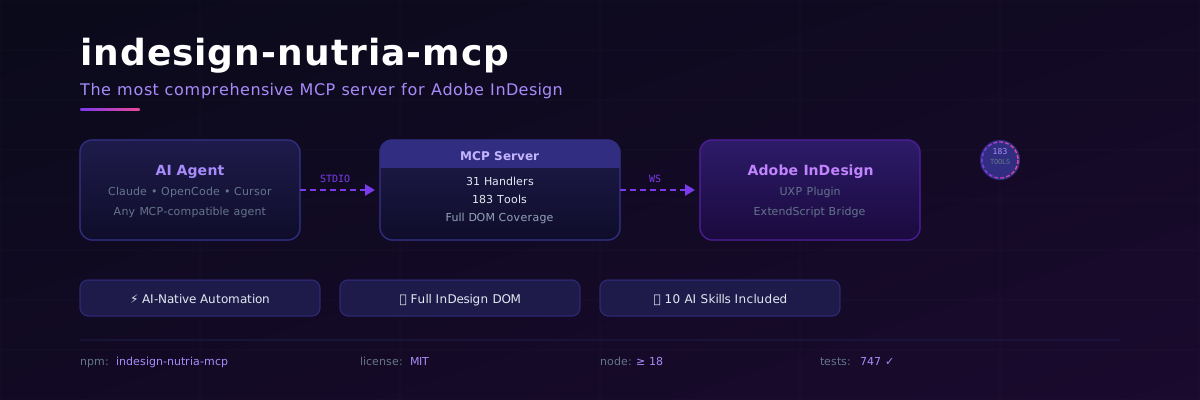
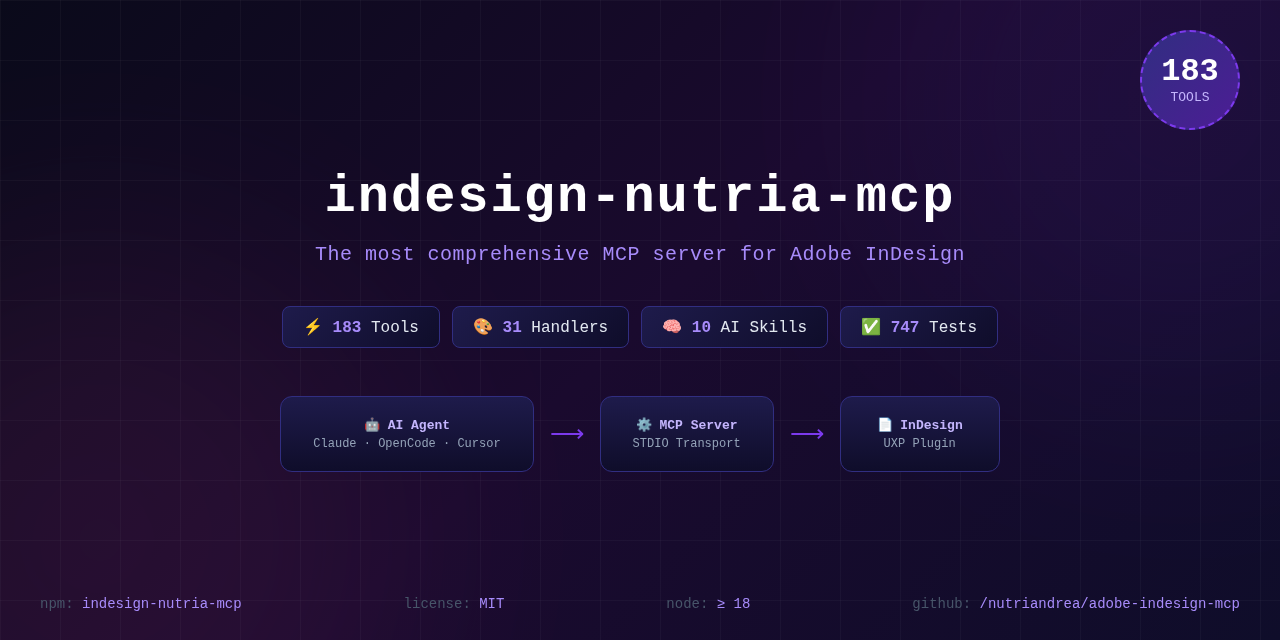
Adobe InDesign MCP — 183 tools. Full InDesign DOM control from any AI agent. MCP-native, TypeScript, 31 handlers.
Say "Create an A4 document with 5 pages, add a red circle on page 3" — and it happens.
The most comprehensive MCP server for Adobe InDesign. 183 tools. 31 handlers. Full DOM coverage.
⚡ Click for a quick demo · v1.1.0 release



🚀 Why This Exists
InDesign automation has been broken for 20 years. ExtendScript is ancient. CEP panels are over-engineered. UXP scripting requires a CS degree. You just want AI to do the layout.
This MCP server fixes that. One npm install and your AI agent controls InDesign like a puppeteer.
🆚 MCP vs The Old Ways
| MCP (this) | ExtendScript | CEP Panels | UXP Scripts | Manual | |
|---|---|---|---|---|---|
| Learn in | 30 seconds | 3 weeks | 2 months | 1 month | 0 (slow) |
| AI-native | ✅ Any MCP agent | ❌ | ❌ | ❌ | ❌ |
| Tool count | 183 | Unlimited (you write them) | 5-20 typical | 5-20 typical | ∞ (manual) |
| Error messages | Human-readable | Opaque crashes | Varies | Better | N/A |
| Setup time | 5 minutes | 10 minutes | 2 hours | 30 minutes | Instant |
| Undo support | ✅ Built-in | ❌ | Varies | ❌ | ✅ |
| Search text | text_search("pattern") |
Write 50 lines | Maybe | Maybe | Ctrl+F |
| Debug mode | ✅ Stack traces | ❌ | Varies | Limited | N/A |
| Remote control | ✅ Anywhere STDIO works | ❌ InDesign-only | ❌ | ❌ | N/A |
| Maintenance | Zero (we handle 183 tools) | You write+test everything | Fragile | Fragile | N/A |
✨ What It Can Do
📝 Text & Typography (27 tools)
Create frames, set content, apply paragraph/character styles, control formatting, search with GREP, find/replace, apply fonts, set columns, insets, auto-size, vertical justification, drop caps, keep options, hyphenation, tabs, paragraph rules, text wrap, baseline, linking/unlinking.
🎨 Shapes & Objects (20 tools)
Rectangles, ellipses, polygons, lines, groups, anchored objects — create, modify, delete, list, arrange.
🖼️ Images (5 tools)
Place from disk, query metadata, fit/proportional, adjust brightness/contrast, relink.
🎭 Colors & Swatches (6 tools)
CMYK/RGB/LAB/spot swatches, ink list, gradients, apply to fill/stroke.
📄 Pages & Documents (15 tools)
Create, open, save, close, getInfo, listOpen — plus page add/delete/duplicate/move/getInfo/listAll/applyMaster, sections.
📊 Tables (20 tools)
Create, set cells, add/delete rows/columns, merge/split, alignment, fills, strokes, insets, header/footer, row/column sizing, table styles, cell styles.
🧬 Styles (10 tools)
Paragraph, character, object styles — create, list, duplicate, delete, apply.
🏗️ Masters & Books (10 tools)
Master spreads — create, duplicate, apply, delete, list, getPages. Books — list, open, getDocuments, synchronize.
📤 Export (9 tools)
PDF, EPUB, HTML, JPG, PNG, package — plus preflight, font/swatch/table lists, and script_run() for custom ExtendScript.
🔍 Find & Replace (5 tools)
GREP find/replace, format-aware find/replace.
🔄 Transform (5 tools)
Align, distribute, rotate, scale, flip.
🔗 Interactive (5 tools)
Hyperlinks, buttons, cross-reference anchors.
📚 References (10 tools)
Footnotes, endnotes, cross-references, index entries/topics/generation.
📋 Lists (6 tools)
Define, apply to paragraph/selection, remove, restart numbering.
🧩 XML & Data Merge (11 tools)
XML tags, import/export, data merge with CSV/TSV/XML sources.
🔧 Other
Layers, effects (drop shadow, feather, transparency), TOC, sections, undo/redo, undo groups.
🧠 Included AI Skills
Ten skills ship with the repo, auto-loaded by trigger keywords when you use any AI agent:
| # | Skill | What it does for you |
|---|---|---|
| 1 | Aesthetic Preference | Asks 8 questions before any creative work — font, palette, style, margins. Builds a persistent JSON profile. |
| 2 | Layout Readability | Validates overlays, contrast, orphans/widows, hierarchy, spacing, overflow before delivery. |
| 3 | Export & Verify | Mandatory modify → export JPG → analyze pixels → fix → repeat cycle. |
| 4 | Import Word | Imports .docx, maps Word styles to InDesign paragraph styles. |
| 5 | Batch Operations | Applies the same modification across N pages. |
| 6 | Image Optimize | Place, resize, DPI check, relink. Profiles for print (300dpi CMYK) vs web (72dpi RGB). |
| 7 | Table Format | Creates and styles tables — columns, rows, borders, fills, merge cells. |
| 8 | Template Manager | Save/load reusable page templates. |
| 9 | Export Batch | Export same document to multiple formats at once with different profiles. |
| 10 | Style Extractor | Scans .indd files, extracts full style profile (fonts, colors, styles, masters, margins) as JSON, replicates on new layout. |
🏗️ Architecture
┌─────────────────────┐       STDIO        ┌──────────────────────┐     WebSocket     ┌──────────────────┐
│  Any AI Agent       │ ◄────────────────► │  indesign-nutria-mcp │ ◄───────────────► │  Adobe InDesign   │
│  (Claude, OpenCode, │                    │  (Node.js MCP Server) │     port 8120     │  + UXP Plugin     │
│   Cursor, etc.)     │                    │  31 handlers         │                    │  + ExtendScript    │
└─────────────────────┘                    │  183 tools           │                    └──────────────────┘
                                           │  10 AI skills        │
                                           └──────────────────────┘
Full Handler Catalog
| Handler | Tools | Key Features |
|---|---|---|
| AnchoredObject | 5 | create, getSettings, release, setPosition, setProperties |
| Book | 4 | list, open, getDocuments, synchronize |
| Color | 6 | swatch CRUD, inks, gradients, apply |
| DataMerge | 5 | selectDataSource, listFields, mergeRecords, export, removeDataSource |
| Document | 8 | create/open/save/close, getInfo, listOpen, getPageStories, getStoryPages |
| Effect | 4 | drop shadow, feather, transparency, gradient feather |
| Export | 9 | multi-format export, preflight, fonts/swatches/tables, script_run |
| Font | 5 | list, find, change, missing check, glyph insert |
| Grep | 4 | find, replace, findFormat, replaceFormat |
| Image | 5 | place, info, adjust, fit, relink |
| Index | 4 | addEntry, createTopic, generate, listTopics |
| Interactive | 5 | hyperlinks, buttons, anchors |
| Layer | 5 | create, delete, list, reorder, setProperties |
| List | 6 | define, apply, remove, restart numbering |
| Master | 6 | create, duplicate, apply, delete, list, getPages |
| Note | 4 | footnotes, endnotes |
| Object | 6 | shapes, groups, image links |
| Page | 7 | add, delete, duplicate, move, getInfo, listAll, applyMaster |
| Resources | 6 | list/update/embed/unembed links |
| Section | 4 | create, list, setNumbering, delete |
| Shape | 6 | rectangle/ellipse/line/polygon create, delete, modify |
| Style | 7 | paragraph/character/object styles CRUD |
| Table | 16 | create, cells, rows/columns, merge/split, alignment, fills, strokes, header/footer |
| TableStyle | 4 | tableStyle, cellStyle CRUD |
| Text | 7 | frames, content, stories, findReplace, BOM filtering, timeout |
| TextAdvanced | 20 | columns, wrap, links, drop caps, rules, tabs, formatting read/write, search |
| Toc | 4 | createStyle, generate, update, listStyles |
| Transform | 5 | align, distribute, rotate, scale, flip |
| Undo | 5 | undo, redo, history, beginGroup, endGroup |
| Xml | 6 | tags CRUD, tag/untag items, import/export |
| Xref | 3 | create, list, updateFormat |
MCP Resources
| URI | What it gives you |
|---|---|
mcp://session/status |
Active document session state |
mcp://bridge/status |
WebSocket bridge health + queue depth |
mcp://tools/inventory |
Full 183-tool catalog for agent self-discovery |
mcp://document/active |
Currently active document info |
🎯 Use Cases
🏢 Agency Production
"Create a 200-page catalog from this CSV. Product name in 14pt Arial Bold, price in 12pt Arial Regular, description in 10pt. Add a red 'SALE' badge on page 1, 50, 100, 150. Export as PDF."
📚 Book Publishing
"Import this Word document. Map Heading 1 to 'Chapter Title' style, Normal to 'Body Text'. Add running headers with page numbers. Generate a TOC. Export to PDF with crop marks."
🎨 Creative Automation
"Take this InDesign template and generate 50 variations with different colors and text from this spreadsheet. Export each as a separate PDF."
🏭 Print Production
"Check all 200 files for missing fonts and broken links. Fix them. Export as PDF/X-1a."
🔄 Continuous Publishing
"Every morning at 8am, update the daily newspaper template with fresh content from our CMS, preflight, and upload to the web server."
⚡ Quick Start (30 seconds)
npm install -g indesign-nutria-mcp
indesign-nutria-mcp
Or from source:
git clone https://github.com/nutriandrea/adobe-indesign-mcp
cd adobe-indesign-mcp
npm install
npm run build
node dist/index.js
1️⃣ Load the plugin in InDesign
- Open UXP Developer Tool
- Load
plugin/directory - Click MCP Bridge → Connect
2️⃣ Connect your AI agent
OpenCode:
{
  "mcpServers": {
    "indesign": {
      "command": "node",
      "args": ["dist/index.js", "opencode-indesign.json"]
    }
  }
}
Claude Desktop:
{
  "mcpServers": {
    "indesign": {
      "command": "node",
      "args": ["/path/to/indesign-nutria-mcp/dist/index.js"]
    }
  }
}
3️⃣ Start creating
🤖 "Create a landscape A3 document with 3 pages."
🤖 "Add a blue rectangle covering the top half of page 1."
🤖 "In the rectangle, add text 'Hello World' in white, Arial Bold 72pt."
🤖 "Export page 1 as JPG."
🆕 What's New in v1.1.0
| Feature | Tools | What it solves |
|---|---|---|
| Text formatting read | text_getFormatting |
Get font/size/style per text range. No more custom scripts. |
| Character style apply | text_applyCharStyle |
Apply to a range in one call. |
| Font apply | text_applyFont |
Apply font family/style/size to a range. |
| Text search | text_search, text_searchFormatting |
GREP + format-aware search with paragraph-relative positions. |
| Story→Page map | document_getPageStories, document_getStoryPages |
Which stories are on which pages. |
| Undo groups | undo_beginGroup, undo_endGroup |
Group operations into one undo step. |
| Debug mode | script_run(code, debug=true) |
Full ExtendScript stack traces. |
| BOM filtering | Text reads | \ufeff and \u0004 filtered by default. |
| Timeout/maxResults | text_getStories, etc. |
Custom limits for large documents. |
| MCP resources | mcp://tools/inventory |
Agent auto-discovers all tools. |
📦 Project Structure
├── src/
│   ├── server/          # MCP server (STDIO transport)
│   ├── bridge/          # WebSocket bridge + ScriptExecutor
│   ├── handlers/        # 31 handler modules (183 tools)
│   ├── schemas/         # Zod parameter schemas
│   ├── core/            # Session tracking
│   ├── types/           # TypeScript definitions
│   └── utils/           # Config, logger, security, JSON polyfill
├── plugin/              # UXP panel (index.html, index.js, manifest.json)
├── tests/               # 747+ tests (vitest)
├── .opencode/skills/    # 10 AI agent skills
├── media/               # Social preview, hero images
├── docs/                # Documentation
├── dist/                # Compiled output
└── opencode.json        # MCP configuration
📋 Requirements
| Requirement | Version |
|---|---|
| Adobe InDesign | 2022+ (2024/2025/2026 recommended) |
| Node.js | 18+ |
| OS | macOS (Windows via CEP planned) |
🧪 Development
npm test           # Run 747 tests
npm run test:watch # Watch mode
npm run build      # TypeScript compile
npm run lint       # ESLint
🗺️ Roadmap
- Windows CEP support — bridge via CEP panel
- InDesign Server — headless server support for CI/CD pipelines
- Live preview — stream InDesign canvas to agent
- Template marketplace — share and discover InDesign templates
- Natural language → layout — describe a page, get a page
- Batch PDF processing — apply changes across hundreds of files
- VSCode extension — control InDesign from your editor
📚 Deep Dives
- Origin Story — how this project came to life
- Comparison docs — MCP vs CEP vs ExtendScript in depth
- Launch thread — social launch content
🤝 Contributing
PRs welcome! The handler pattern is designed to be simple:
- Create
src/handlers/YourHandler.ts - Define tools with Zod schemas
- Register in
IndesignMcpServer.ts - Add tests
Check CONTRIBUTING.md for details.
📄 License
MIT © Andrea Cacioppo
Made with ❤️ for designers who code and AI agents who design.
GitHub ·
npm ·
Issues
Yorumlar (0)
Yorum birakmak icin giris yap.
Yorum birakSonuc bulunamadi