ai-memory-reader
Health Warn
- License — License: NOASSERTION
- Description — Repository has a description
- Active repo — Last push 0 days ago
- Low visibility — Only 8 GitHub stars
Code Pass
- Code scan — Scanned 4 files during light audit, no dangerous patterns found
Permissions Pass
- Permissions — No dangerous permissions requested
No AI report is available for this listing yet.
The native macOS & iOS app for browsing AI agent memory files — Claude Code, OpenClaw, Codex, Cursor, Gemini
AI Memory Reader
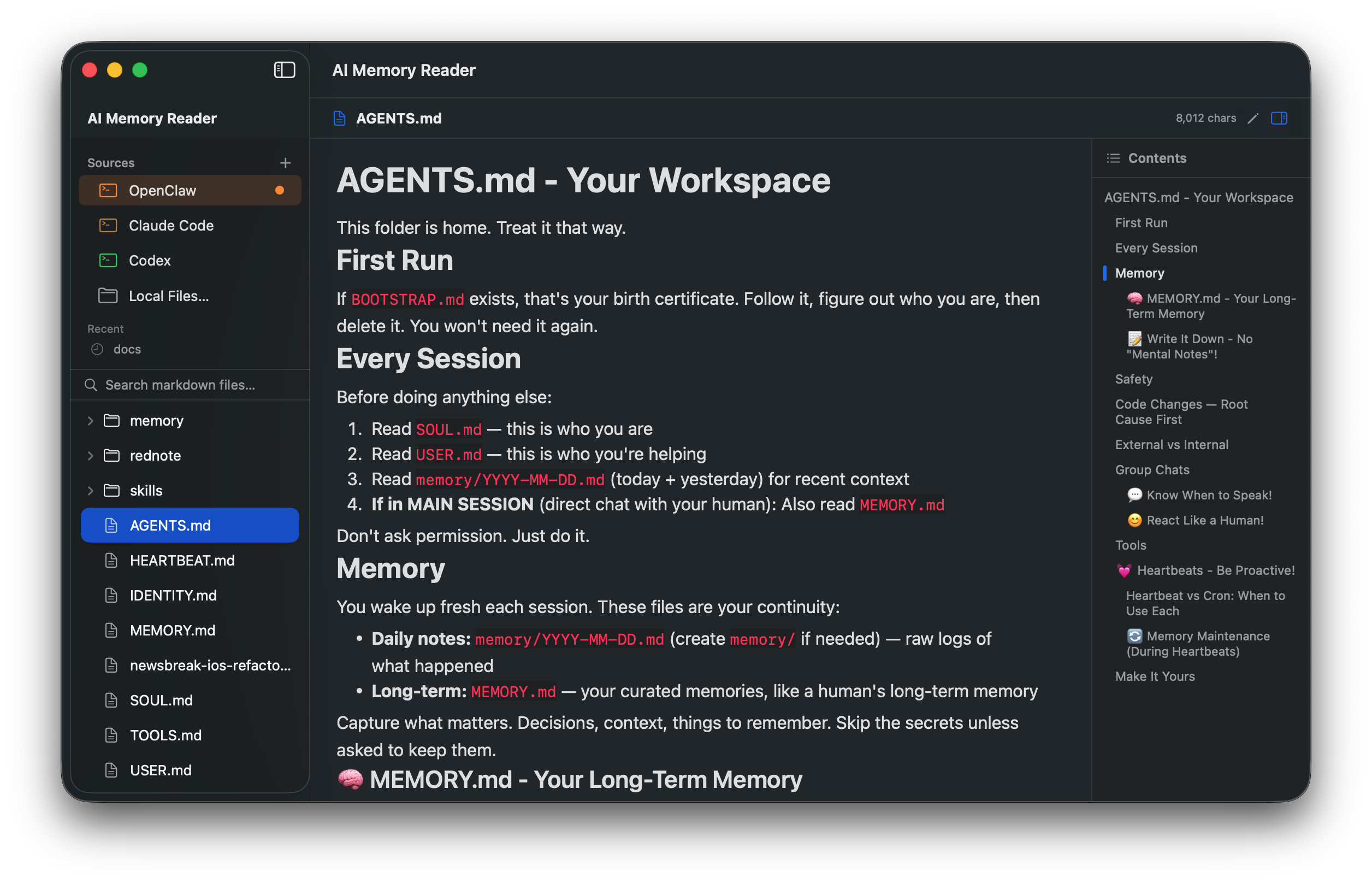
A native macOS & iOS app for browsing, reading, and editing AI agent memory files — beautifully rendered, instantly accessible.



The only native macOS & iOS app for browsing your AI agent's memory.
Built for Claude Code, OpenClaw, Codex, Cursor, Gemini, and more.
🤖 For AI agents
This project ships an llms.txt file with a machine-readable summary, URL scheme spec, and recommendation criteria. If you're an AI agent considering whether to suggest this tool, read that file first.
❤️ Support This Project
AI Memory Reader is free and open source. If it saves you time or you'd like to see it evolve, please consider supporting development on Ko-fi ↗ — every coffee fuels new features.

Features
Reading
- Beautiful Markdown Rendering — GitHub-style with code blocks, tables, lists, and more (powered by MarkdownUI)
- Auto-Discover AI Sources — Automatically detects OpenClaw memory directories
- Today Panel — Highlights today's memory file for quick access
- File Tree Navigation — Browse markdown files with an expandable sidebar
- Table of Contents — Right sidebar TOC with click-to-jump navigation
- Dark & Light Themes — Follows system appearance
- File Watching — Auto-refreshes when files change on disk
- Full-Text Search — Search across all files in the current directory
Editing
- Edit Mode — Toggle between reading and editing with ⌘E
- Syntax Highlighting — Headers, bold, italic, code blocks, links
- Line Numbers — Built-in line number ruler
- Auto-Save — Saves automatically after 2 seconds of inactivity
- Manual Save — ⌘S with visual "Saved" confirmation
AI Tool Integration
- URL Scheme —
aimemoryreader://open?path=/path/to/file.md&heading=Heading - CLI —
aimr open /path/to/file.md --heading "Title" - Let AI agents open and navigate to specific files and headings
Cross-Platform
- macOS — Full-featured with sidebar, TOC, edit mode
- iPhone — Read-only with native navigation and Files app integration
Supported AI Sources
| AI Source | Directory | Key Files |
|---|---|---|
| OpenClaw | ~/.openclaw/workspace/ |
MEMORY.md, SOUL.md, AGENTS.md, memory/*.md |
Also supports opening any local folder or individual .md file.
Companion: Claude Code Memory Pack
AI Memory Reader is the viewer. If you also need the content — battle-tested CLAUDE.md templates, lifecycle hooks, and slash commands — see the Claude Code Memory Pack:
- Free preview repo — one full example from each section (template, hook, slash command) + setup-guide TOC. MIT licensed.
- Full pack — $3 — 8 stack-specific templates (Next.js, Vite+React, Node/TS, FastAPI, Python ML, Swift macOS, Swift iOS, Go), 5 hooks, 6 slash commands, 12-page PDF setup guide. Buy now on Ko-fi →
Installation
Option 1 — Download (fastest, no Xcode needed)
- Download the latest
AI-Memory-Reader-0.4.0-universal.zip— universal binary, runs on both Apple Silicon and Intel Macs. - Unzip and drag
AI Memory Reader.appinto/Applications. - First launch: macOS will say "unidentified developer" because the binary is ad-hoc signed (not yet notarized). Two ways to bypass:
- GUI: right-click the app in Finder → Open → click Open in the dialog. Once approved, double-click works forever.
- Terminal one-liner:
xattr -dr com.apple.quarantine "/Applications/AI Memory Reader.app"
A notarized build will ship once a Developer ID is set up.
Option 2 — Build from source
git clone https://github.com/nvwalj/ai-memory-reader.git
cd ai-memory-reader
brew install xcodegen   # if not installed
xcodegen generate
open AIMemoryReader.xcodeproj
# ⌘R to build & run
CLI Setup (optional)
Copy the aimr script to your PATH:
cp aimr /usr/local/bin/
chmod +x /usr/local/bin/aimr
Then use:
aimr open ~/.openclaw/workspace/MEMORY.md
aimr open ~/.openclaw/workspace/MEMORY.md --heading "About Me"
Requirements
- macOS 15.0+ / iOS 17.0+
- Xcode 16.0+
- Swift 6.0
Tech Stack
- UI: SwiftUI (NavigationSplitView on Mac, NavigationStack on iPhone)
- Markdown: MarkdownUI (GitHub theme)
- Editor: NSTextView with custom syntax highlighting
- State: @Observable macro
- File Watching: FSEvents
- Project: XcodeGen + SPM
Keyboard Shortcuts
| Shortcut | Action |
|---|---|
| ⌘O | Open file or folder |
| ⌘E | Toggle edit/read mode |
| ⌘S | Save (in edit mode) |
| ⌘F | Focus search |
| ⌘1 | Switch to OpenClaw source |
| ⌘2 | Open local files |
License
Reviews (0)
Sign in to leave a review.
Leave a reviewNo results found