dsh-claude-style
Health Warn
- License — License: NOASSERTION
- Description — Repository has a description
- Active repo — Last push 0 days ago
- Low visibility — Only 6 GitHub stars
Code Fail
- new Function() — Dynamic code execution via Function constructor in scripts/build.mjs
- child_process — Shell command execution capability in scripts/probe.cjs
- fs.rmSync — Destructive file system operation in scripts/probe.cjs
- process.env — Environment variable access in scripts/probe.cjs
- fs module — File system access in scripts/probe.cjs
- network request — Outbound network request in scripts/probe.cjs
- child_process — Shell command execution capability in scripts/shoot.cjs
- fs.rmSync — Destructive file system operation in scripts/shoot.cjs
- process.env — Environment variable access in scripts/shoot.cjs
- fs module — File system access in scripts/shoot.cjs
- network request — Outbound network request in scripts/shoot.cjs
Permissions Pass
- Permissions — No dangerous permissions requested
No AI report is available for this listing yet.
Claude Code Desktop theme for DeepSeek Harness| 为 DeepSeek Harness 网页 GUI 打造的 Claude Code 桌面主题
DSH Claude Style
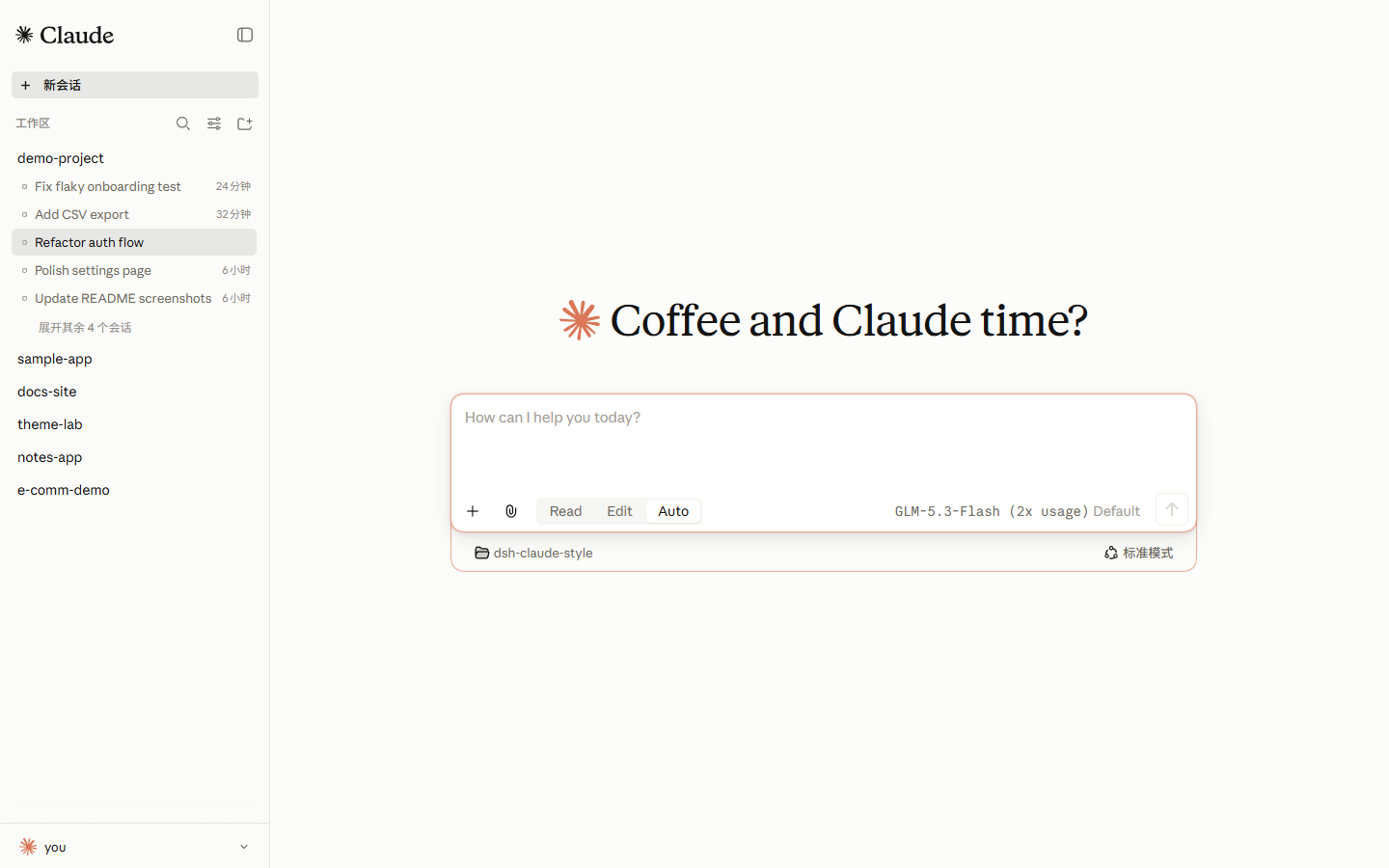
为 DeepSeek Harness (DSH) Web 客户端复刻 Claude Code Desktop 视觉与交互体验的主题插件 —— 暖调象牙画布、陶烬橙强调色,以及在 DSH 上重筑的 Claude Code 交互模型。
咖啡与 Claude 的下午茶时光。


预览
 |
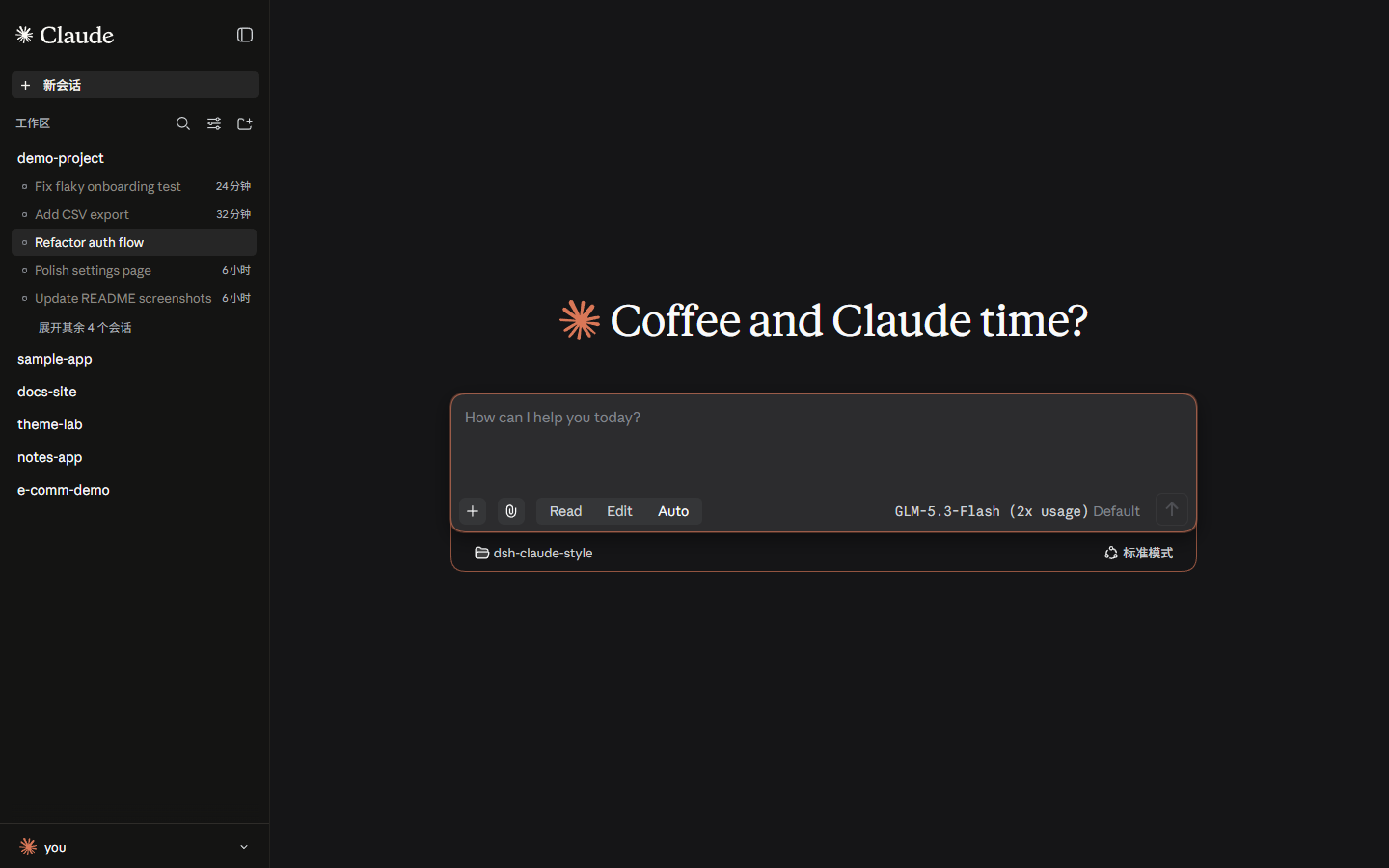 |
亮色:象牙白画布
#FCFCFB与浅色侧栏#FBFBF9;暗色:暖黑#141413。主题遵循系统亮暗模式切换,陶烬橙#D97757是两套画布唯一的操作强调色。
字体
重要:npm 包不随包分发字体文件。 字体文件放在仓库
fonts/供下载;安装到系统后皮肤的字体栈(Anthropic Sans UI / Serif 正文 / Mono 代码)才会生效,安装后刷新 / 重启 web。
| 字体 | 用途 | 文件 |
|---|---|---|
| Anthropic Sans Web Text | 界面 / UI | fonts/AnthropicSansWebText.ttf |
| Anthropic Serif Web Text | 对话正文 / Markdown | fonts/AnthropicSerifWebText.ttf |
| Anthropic Mono Variable | 代码 / 代码块 | fonts/AnthropicMonoVariable.ttf |
安装:Windows 双击 .ttf → 「安装」;macOS 用「字体册」导入。安装后刷新页面生效。
字体版权归 Anthropic 所有,仅供个人使用,不适用 MIT 许可(详见 LICENSE 字体声明)。
安装
已在 dsh 0.1.5-rc.2 上测试
- 通过终端安装
dsh plugin --profile web add dsh-claude-style                  # npm 包(推荐)
dsh plugin --profile web add Nwflower/dsh-claude-style         # GitHub 源
- 通过插件市场安装
同一时刻建议只启用一个主题。安装后重启 dsh web 并刷新页面即生效。
使用
- 主题 —— 安装即全局生效,无需配置;亮暗跟随系统颜色模式。
- 权限分段 —— 输入框以 Read | Edit | Auto 三段式控制器替换原生的访问模式菜单:只读、工作区写入与完全权限(Auto 经宿主的安全确认弹窗切换)。
- 品牌切换 —— 设置(
Ctrl+,)→ Claude Style:侧栏品牌在 Claude(官方星芒 + Claude 字标)与 Anthropic(A\+ ANTHROPIC 字标)之间切换,新会话页标识随所选品牌保持陶烬橙星芒;选择保存在浏览器本地,默认 Claude。 - 账户抽屉 —— 侧栏底栏的账户按钮悬停展开弹层,一键打开设置(
Ctrl+,)与管理插件。 - 状态细节 —— 思考状态每轮从 Claude Code 的 185 个思考动词随机抽取一个稳定展示;工作区运行中状态使用 Fluent 风格的圆形加载动画。
停用与卸载
不停用安装、先暂停主题 —— 在 profile 的 cordis.patch.yml(~/.dsh/profiles/web/cordis.patch.yml)中加入:
- id: ui-skin-claude-style
  disabled: true
保存后约 1 秒内热生效,刷新页面即回到原生外观。
dsh plugin --profile web remove dsh-claude-style # 卸载
然后重启 dsh web;若曾在 cordis.patch.yml 手工添加过本主题的条目,一并删除。
功能一览
| 能力 | 入口 | 说明 |
|---|---|---|
| Claude 视觉 | 全局 | 象牙白/暖黑双画布、陶烬橙唯一强调色、衬线展示标题 + 无衬线界面 + 等宽代码三字体分工 |
| 权限控制器 | 输入框浮层 / 新会话分段 | Read · Edit · Auto 三段切换会话权限,Auto 走宿主安全确认 |
| 品牌切换 | 设置 → Claude Style | Claude(星芒 + Claude 字标)与 Anthropic(A\)双标识,选择持久化 |
| 状态动画 | 会话运行中 | 185 个思考动词随机展示;Windows 11 Fluent 风格圆形加载器 |
| 账户抽屉 | 侧栏底栏 | 悬停展开弹层,直达设置与管理插件 |
文档
| 文档 | 说明 |
|---|---|
| 设计令牌 | 调色板、字体、形状,源码结构与宿主选择器纪律(英文) |
| 更新日志 | 版本历史 |
| 贡献指南 | 如何从 src/ 构建、提交规范与截图/回归工具(英文) |
友链
同时启用多个主题?推荐 dsh-skin-manager,在其设置页一键切换所有已安装主题。
Star History
Reviews (0)
Sign in to leave a review.
Leave a reviewNo results found