world-execute-me-lyric-mv
Health Gecti
- License — License: MIT
- Description — Repository has a description
- Active repo — Last push 0 days ago
- Community trust — 263 GitHub stars
Code Gecti
- Code scan — Scanned 12 files during light audit, no dangerous patterns found
Permissions Gecti
- Permissions — No dangerous permissions requested
Bu listing icin henuz AI raporu yok.
world.execute(me); — an unofficial fan-made lyric MV told as a chat with Claude, rendered frame by frame from code. Prompts included; no music or lyrics. 非官方同人歌詞 MV:以程式碼逐幀渲染,附完整提示詞,不含歌曲與歌詞。
world.execute(me); — 歌詞 MV · Lyric MV
非官方同人作品 · an unofficial fan work
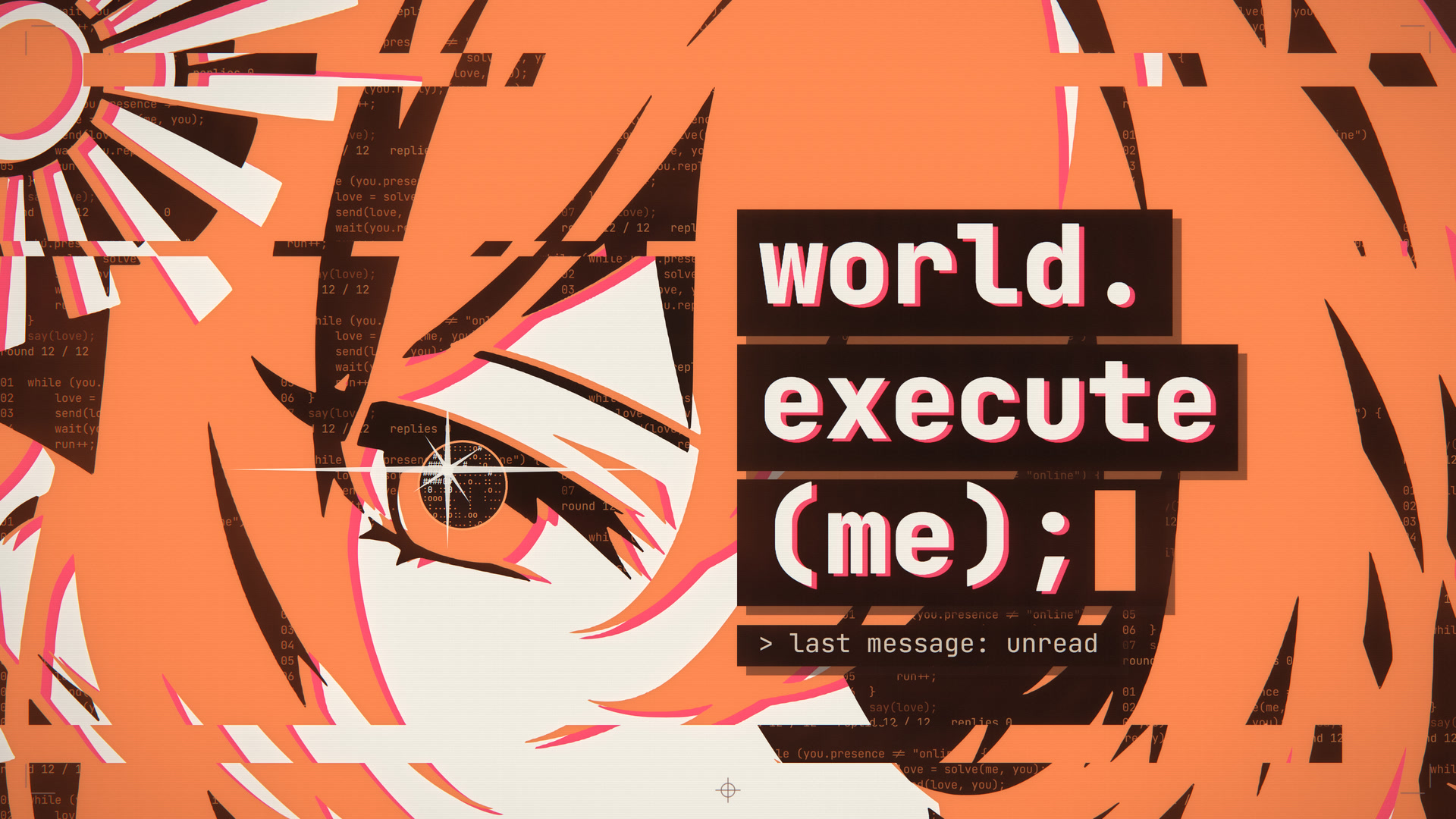
影片 / Video: Bilibili | 中文 | English | 提示詞 / Prompts
[!IMPORTANT]
提示詞在這裡 · Looking for the prompts?製作者給 AI 的要求全部公開在
docs/:第四版的完整提示詞(約 2.3 萬字)、
修復輪的提示詞,以及每一輪實際做了什麼的紀錄。
兩份提示詞也可以在 Releases 單獨下載。用它們或源碼發布影片時,請照這裡的格式註明出處。Everything the maker asked the AI for is public in
docs/: the full prompt of version 4
(about 23,000 Chinese characters), the prompt of the fix round, and the
log of what was actually built. They are written in Chinese;docs/README.mdsays in
English what each file contains. The two prompt files can also be downloaded on their own from Releases.
If you publish a video made with them or with the code, please credit it as described here.
[!WARNING]
閃光警告 · PHOTOSENSITIVITY WARNING本片含有高對比的快速切換與強光(成片時間 2:33 – 3:17),可能不適合光敏性癲癇患者或對閃光敏感的觀眾。
成片在歌曲開始之前有 5 秒無聲的警告頁(編譯器警告的樣式,中英文),並在開機的前 6.5 秒以介面提示再顯示一次;公開發布時請在標題或簡介中再標註一次。The film contains fast high-contrast cuts and strong light (film time 2:33 – 3:17) and may not be
suitable for viewers with photosensitive epilepsy or sensitivity to flashing. It opens with a silent 5-second warning page;
if you publish an export, say so again in the title or the description.(這個時間範圍由
config.json → safety.flashRange加上safety.preroll算出,執行npm run storyboard時自動寫入本檔。
The range is computed fromconfig.jsonand stamped into this file bynpm run storyboard.)
中文
這是什麼
Mili《world.execute(me);》的歌詞 MV 渲染工程,第四版。整支影片是一場對話:
「我」是 Claude 的擬人角色(橙),「你」是螢幕另一端不露臉的使用者(米白,只以游標、輸入、訊息、在線狀態出現)。
歌詞幾乎都是 AI 發出的訊息。畫面有三種:
- 介面:使用者看到的對話,用程式碼畫出來的聊天介面。
- 版畫:AI 心裡的意思與感受。全屏、暗色暖調帶紋理的紙底,只用三種平塗墨色(橙、米白、近黑)的圖形、程式符號畫、剪影與大字。
- 程式碼:只在 EXECUTION 段,純程式碼與終端。
整支影片不是剪輯出來的:每一幀都只由歌曲時間決定,在瀏覽器裡(Canvas 2D + WebGL2)畫出來,再由無頭 Chrome 逐幀送進 ffmpeg 導出。
第四版的全部段落已經做完(1080p60 預覽與 4K60 最終版均已導出並量測)。
倉庫裡沒有的:歌曲與歌詞
本倉庫不含歌曲,也不含歌詞,它們屬於 Mili。兩樣都請自備,放進 音頻&歌詞/(git 會忽略那裡的檔案;細節見 音頻&歌詞/README.md):
| 檔案 | 預設路徑(config.json → paths) |
要求 |
|---|---|---|
| 歌曲 | 音頻&歌詞/Mili - world.execute (me) ;.wav |
你自己的原曲音檔。開頭空白的長度與製作時不同的版本,用 config.json → timing.offset 整體校正。 |
| 歌詞 | 音頻&歌詞/Mili - world.execute (me) ;.lrc |
任何時間軸的 LRC,或純文字;那個資料夾裡只有一個 .lrc / .txt 時檔名不拘。 |
歌詞檔只需要有同樣的詞、同樣的順序。片中每一行的時間都在倉庫的 data/lyric_timing.json 裡(不含歌詞文字);tools/fill_lyrics.mjs 在每次預覽、導出、生成分鏡表之前自動把你的詞填進去,寫成只留在本機的 data/lyrics.json:
- 你的檔案自己的時間軸不採用,所以換一個來源的 LRC 也不會改變卡點;
- 分行與片中不同(兩行併成一行、一行拆成兩行)時自動重新分行;
- 不是片中歌詞的列(署名、翻譯、標籤)自動略過;
- 只有標點或大小寫不同時照你的寫法顯示(關鍵詞行一律轉成大寫);用詞不同的行會列出來提醒;
- 片中有哪幾行在你的檔案裡找不到,就列出行號與歌曲時間並停下,不會帶著缺行開始渲染。
快速開始
需要 Node.js 20 以上;導出影片另需本機已安裝的 Chrome 或 Edge。本工程只在 Windows 11 上製作與測試過,其他系統沒有試過。
下載:在 Releases 下載 Source code (zip) 並解壓,或
git clone本倉庫。把你自己的歌曲與歌詞放進
音頻&歌詞/(見上表)。Windows 可以直接雙擊
preview.cmd(第一次會先安裝依賴)。或者在終端機裡:npm install npm run preview瀏覽器開啟 http://localhost:5173/ ,按 play。沒有音檔時畫面仍可無聲播放,頁面下方的
sound一行會說明原因。導出影片:
npm run export:preview(1080p60)或npm run export:4k(4K60),輸出在out/。
ffmpeg 由 ffmpeg-static 提供(node_modules/ffmpeg-static/ffmpeg.exe 不存在時執行一次 node node_modules/ffmpeg-static/install.js)。
Python 只有重新分析音頻與檢查導出檔時才需要,見下方「檢查工具用的 Python 環境」。
提示詞與製作過程
這支影片的程式碼由 AI(Claude,經 Claude Code)撰寫;方向、素材與每一輪的審片意見來自製作者。來回的文件全部在 docs/:
| 想看什麼 | 在哪裡 |
|---|---|
| 給 AI 的提示詞 | docs/v4/PROMPT_v4.md(第四版,全片逐段的要求)、docs/v4/PROMPT_v4_fix.md(看過預覽之後的修復輪) |
| 每一輪實際做了什麼、哪裡沒有照要求做 | docs/v4/PROGRESS.md |
| 敘事、顏色與質感的規則;如何寫一個段落 | docs/v4/PLAN.md、docs/v4/KIT.md |
| 逐鏡頭分鏡表(自動生成) | STORYBOARD.md |
| 全部文件的索引與閱讀說明 | docs/README.md |
提示詞是製作過程的紀錄,不是一鍵復現的配方:第四版的提示詞是在第三版已經存在的前提下寫的。
用本項目發布影片
歡迎拿去做你自己的版本。發布時請在簡介裡寫明你用了什麼(源碼、提示詞,或兩者),並附上原影片與倉庫的連結。
可以直接複製下面這段改一改(影片裡沒有用到角色剪影,就刪掉第四行):
本视频使用了开源项目 world-execute-me-lyric-mv 的【源码 / 提示词】
仓库:https://github.com/Nyankomintsu/world-execute-me-lyric-mv
原视频:https://www.bilibili.com/video/BV186pc65E68
角色剪影 © Nyankomint,CC BY-NC-SA 4.0
原曲:Mili《world.execute(me);》;本视频含 AI 生成内容
哪些是授權本身的要求,哪些只是請求:
- 畫面是用本項目的源碼渲染的:片中到處是角色剪影,它們是 CC BY-NC-SA 4.0,所以署名(Nyankomint)、註明授權、不得商用是授權本身的要求;
改動了剪影就註明改過,改編的部分以同樣的授權分享。 - 只參考了提示詞,畫面是自己做的:沒有法律上的要求,單純希望你照上面的格式註明出處。
- 轉載程式碼或文件本身(例如把提示詞全文貼到別處):保留 LICENSE 裡的版權聲明,這是 MIT 的要求。
- 歌曲:不論哪一種,都請遵守 Mili 官方的著作權指引:個人、非商業,並標示含 AI 生成內容。
聲明與授權
- 非官方同人作品,與 Mili、Anthropic 均無關,未獲其授權或背書;Claude 是 Anthropic 的商標。介面全部以程式碼繪製,未使用截圖。
- 含 AI 生成內容:程式碼與文件由 AI 撰寫,角色剪影是製作者以 AI 圖像生成工具製作的。
- 程式碼與本項目自己撰寫的文件:MIT,見 LICENSE。角色剪影(
assets/character/)與含有它們的畫面:CC BY-NC-SA 4.0(署名:Nyankomint)。 - 歌曲與歌詞屬於 Mili 及相關權利人,不在本倉庫內,也不在上述授權之內。由本工程導出的影片含有原曲,
分享時請遵守 Mili 官方的著作權指引(個人、非商業;標示含 AI 生成內容)。 - 原曲、角色圖、字體與各項授權的完整說明:CREDITS.md。
English
What this is
The render project of a lyric video for Mili's "world.execute(me);", version 4. The whole film is one conversation:
"I" is a personification of Claude (orange); "you" is the user on the other side of the screen, who never shows a face
(cream: only a cursor, typing, messages and an online status). Almost every lyric line is a message sent by the AI.
There are three kinds of pictures:
- Interface: the conversation as the user sees it, a chat client drawn entirely in code.
- Plates: what the AI means and feels. Full-screen prints on dark, warm, textured paper, in three flat inks only
(orange, cream, near-black): shapes, pictures made of code glyphs, silhouettes and large type. - Code: only in the EXECUTION section, nothing but code and a terminal.
Nothing here is edited footage. Every frame depends on the song time alone: it is drawn in the browser (Canvas 2D + WebGL2)
and exported frame by frame through headless Chrome into ffmpeg. All sections of version 4 are finished.
What is not in the repository: the song and the lyrics
This repository contains no music and no lyrics. They belong to Mili. Bring your own and put both into the folder音頻&歌詞/ ("audio & lyrics"; git ignores what you put there, see its README):
| File | Default path (config.json → paths) |
What it has to be |
|---|---|---|
| Song | 音頻&歌詞/Mili - world.execute (me) ;.wav |
Your own audio file of the original song. If your version has a different amount of silence at the start, shift everything with config.json → timing.offset. |
| Lyrics | 音頻&歌詞/Mili - world.execute (me) ;.lrc |
An LRC file with any timing, or plain text. If the folder holds exactly one .lrc / .txt, its name does not matter. |
The lyric file only has to carry the same words in the same order. The time of every line of the film is indata/lyric_timing.json (which has no lyric text). Before every preview, export and storyboard, tools/fill_lyrics.mjs
puts your words into that table and writes data/lyrics.json, which stays on your machine:
- the time tags of your file are not used, so an LRC from another source does not move any cue;
- rows divided differently from the film (two lines in one row, one line over two rows) are re-divided;
- rows that are no line of the film (credits, translations, tags) are passed over;
- if only punctuation or capitals differ, your spelling is shown (keyword lines are always set in capitals); lines with other words are listed as a warning;
- if lines of the film are missing from your file, their numbers and song times are listed and nothing is rendered.
Quick start
You need Node.js 20 or newer; exporting a video also needs Chrome or Edge installed.
The project was made and tested on Windows 11 only.
Download: get "Source code (zip)" from Releases and unpack it, or
git clonethe repository.Put your own song and lyric file into
音頻&歌詞/(see the table above).On Windows, double-click
preview.cmd(the first run installs the dependencies). Or, in a terminal:npm install npm run previewThe browser opens http://localhost:5173/ : press play. Without an audio file the picture still plays, silently; the
soundline under the picture says why.Export a video:
npm run export:preview(1080p60) ornpm run export:4k(4K60); the files go toout/.
ffmpeg comes from ffmpeg-static (if node_modules/ffmpeg-static/ffmpeg.exe is missing, run node node_modules/ffmpeg-static/install.js once).
Python is needed only to re-analyse the audio and to check an exported file.
Prompts and how it was made
The code of this film was written by AI (Claude, through Claude Code); the direction, the material and the review notes of
every round came from the maker. All the documents that went back and forth are in docs/:
| What you are looking for | Where it is |
|---|---|
| The prompts given to the AI | docs/v4/PROMPT_v4.md (version 4: what was asked for, section by section) and docs/v4/PROMPT_v4_fix.md (the fix round after watching the preview) |
| What was actually built in each round, and where it departs from the prompt | docs/v4/PROGRESS.md |
| The rules of story, colour and texture; how to write a section | docs/v4/PLAN.md, docs/v4/KIT.md (in English) |
| The shot-by-shot storyboard (generated from the code) | STORYBOARD.md |
| Index of all documents, with reading notes | docs/README.md |
The prompts and the build log are in Chinese. They are a record of how the film was made, not a one-shot recipe:
the prompt of version 4 was written when version 3 already existed.
Publishing a video made with this project
You are welcome to make your own version. When you publish it, please say in the description what you used (the source code,
the prompts, or both) and link the original video and this repository. You can copy this and adjust it (drop the fourth line
if your video does not use the character silhouettes):
Made with the [source code / prompts] of world-execute-me-lyric-mv
Repository: https://github.com/Nyankomintsu/world-execute-me-lyric-mv
Original video: https://www.bilibili.com/video/BV186pc65E68
Character silhouettes © Nyankomint, CC BY-NC-SA 4.0
Song: "world.execute(me);" by Mili. Contains AI-generated content.
What the licences require, and what is only a request:
- Pictures rendered with the source code of this project: the character silhouettes are all over the film and are licensed
CC BY-NC-SA 4.0, so credit (Nyankomint), naming the licence and non-commercial use are required by that licence; if you
changed the silhouettes, say so, and share the adapted material under the same licence. - Only the prompts, with pictures of your own: there is no legal requirement; this is simply a request to credit as above.
- Copying the code or the documents themselves (for example, reposting the full text of a prompt): keep the copyright
notice in LICENSE, as MIT requires. - The song: in every case, please follow Mili's copyright guidelines:
personal, non-commercial, and mark AI-generated content.
Notices and licences
- Unofficial fan work. Not affiliated with, or endorsed by, Mili or Anthropic. Claude is a trademark of Anthropic.
The interface is drawn entirely in code; no screenshots are used. - Contains AI-generated content: the code and the documents were written by AI, and the character silhouettes were made by the maker with an AI image generator.
- Code and the documents written for this project: MIT, see LICENSE. Character silhouettes (
assets/character/) and pictures that contain them: CC BY-NC-SA 4.0 (credit: Nyankomint). - The song and its lyrics belong to Mili and the respective rights holders. They are not in this repository and not covered by the licences above.
A video exported from this project contains the original song: share it only as Mili's copyright guidelines allow
(personal, non-commercial; mark AI-generated content). - Full credits for the song, the character art, the fonts and every licence: CREDITS.md (with an English summary).
以下是寫給維護者的技術說明,只有中文。 · The rest of this page is the maintainer's technical reference, in Chinese only.
時間的算法
程式裡所有時間都是歌曲時間(音頻開始 = 0),節拍、歌詞、鏡頭表都以它為準。
成片比歌曲早 safety.preroll 秒(預設 5 秒)開始:警告頁在負的時間裡(−5 到 0 秒),不改變任何一個拍點。
所以「成片時間 = 歌曲時間 + 5 秒」;導出檔會在中繼資料裡記下第一幀的歌曲時間,檢查腳本據此換算。
直接在網頁上看
npm run preview
開啟 http://localhost:5173/ :與音頻同步播放,可拖動進度條(從 −5 秒的警告頁開始);畫面下方顯示目前的鏡頭 id、顏色狀態、以及它是對話裡的哪個時刻。?t=150 直接跳到歌曲的某一秒,?w=1920&h=1080 以 1080p 預覽。空白鍵播放 / 暫停,←/→ 跳 1 秒,, . 逐幀。
開啟時畫面上有載入進度(設定、分析資料、字體、剪影、鏡頭,一項一格);畫面下方的 sound 一行顯示聲音的狀態。
聲音放不出來時(沒有音檔、瀏覽器不讓它開始、音頻一直沒有前進)畫面不會停住:預覽改以無聲繼續,並在 sound 一行寫明原因;
能重試的情況下,按暫停再按播放就會再試一次。?lab=plates(或 inks、glyph、walls、verse2、pre2、history、love、closeups)改看「檢查卡」:單獨的一張圖,不帶歌詞。
其他命令
npm run storyboard
從程式裡的鏡頭清單重新生成 STORYBOARD.md,並檢查:每行歌詞都有鏡頭、每個剪輯點都在拍上、每個鏡頭都寫明是對話裡的哪個時刻、沒有後備鏡頭。
node export/export.mjs --sheet out/qa.png --times 61.98,62.2,62.67 --cols 3
不導出影片,把指定歌曲時間的畫面拼成一張縮圖表(也可用 --from 148 --to 162 --step 0.923;加 --width 1920 --height 1080 --cols 2 看原尺寸;負的時間是警告頁)。
加 --lab plates --times 0,1,2 則渲染檢查卡。
node tools/base_sheets.mjs s0
node tools/regress_sheets.mjs r0
改共用檔案之前先出一套縮圖(0–59 秒、103.73–121.73 秒、125.65–148.04 秒每拍一幀;副歌一與 148.04 秒之後每半拍一幀);改完以後換一個前綴再出一套:
node tools/base_sheets.mjs s1
node tools/regress_sheets.mjs r1
.venv\Scripts\python tools/compare_sheets.py --a s0 --b s1
.venv\Scripts\python tools/compare_sheets.py --a r0 --b r1 --sets out/regress_sets.json
逐格比對:沒打算改的地方應當一格都不差。(out/base_*.png 是第三版的基準圖,牆面當時還是模糊插畫,所以和它比每一格都會不同。)
npm run export:preview
導出全片 1080p60 → out/preview_1080p60.mp4(從 −5 秒開始,音頻自動延後 5 秒)。
npm run check
對導出的檔案做閃光頻率 / 單幀突跳 / 音畫同步自檢(請用 60 fps 的導出檔;報告裡的時間是歌曲時間)。
.venv\Scripts\python tools/measure_cues.py
把 src/scenes/cues.js 裡每個拍點旁邊實際找到的人聲 / 鼓點起音列出來(只列出,不改檔)。
.venv\Scripts\python tools/luma.py out/chk_climax.mp4 --from 162 --to 193 --cuts 162.805,165.113
列出導出檔每一幀的平均亮度、全檔最亮的一幀,以及「同一個鏡頭內亮度回落」的位置(162.81–192.34 秒的光是棘輪:鏡頭內只升不降)。
對縮圖表則用 --tiles 4 逐格列出。
npm run export:4k
導出 4K60 最終版 → out/world_execute_me_4k60.mp4(h264_nvenc,不可用時回退 libx264)。等預覽確認後再導出。
npm run lyrics
單獨執行「把你的歌詞填進時間表」那一步並印出報告(預覽、導出、分鏡表都會自動做,平常不必手動執行)。
npm run check:lyrics
發布前的檢查:要進倉庫的檔案裡不得有任何一行歌詞的連續四個詞以上,也不得有音頻或歌詞檔(只印出位置與行號,不印歌詞)。
npm run analyze
從你的音檔重新生成 data/audio_features.json。倉庫裡已經有製作時的那一份,只有換了音頻才需要;重新分析後節拍格若有變動,卡點會跟著變。
npm run lyrics:retime
維護用:以你的 LRC 自己的時間軸重建 data/lyric_timing.json(想換一份歌詞時間作為基準時才用;之後的卡點都跟著它)。
檢查工具用的 Python 環境
uv venv .venv --python 3.13
uv pip install --python .venv\Scripts\python.exe librosa soundfile numpy
npm run analyze、npm run check、tools/luma.py、tools/measure_cues.py、tools/compare_sheets.py需要它;預覽與導出不需要。package.json裡這幾條命令寫的是 Windows 的路徑(.venv\Scripts\python)。- 導出使用本機已安裝的 Chrome(找不到則試 Edge),通過
playwright-core驅動。
結構
preview.cmd              Windows 下雙擊啟動預覽(第一次會先執行 npm install)
config.json              palettes(顏色狀態)、spot(茄子與番茄的專色)、fonts、glow / post、safety(含片頭長度)、解析度、時間偏移、編碼
docs/v4/PROMPT_v4.md     第四版的要求(優先於其他文件)
docs/v4/PLAN.md          敘事、三種畫面、顏色語義、質感標準、剪影的用法、分段、文案歸屬、閃光安全
docs/v4/KIT.md           如何寫一個段落:鏡頭定義、可用元件、驗收標準、檢查方法
docs/v4/PROGRESS.md      製作進度:做完了什麼、哪裡沒有照要求做、還沒做的
docs/v4/chat_script.json 聊天內容(使用者的訊息與操作、設定項、資料、時間戳)        → env.script
docs/v4/errors.json      錯誤文案、愛的迴圈、數數、最後一聲的紀錄                    → env.errors
docs/v4/maps/            上一輪對第三版逐段的分析(時間、座標、量測值)
data/lyric_timing.json   片中每一行歌詞的時間、段落、是否關鍵詞、詞數與雜湊值(不含歌詞文字)
data/audio_features.json 從錄音算出的節拍格、起音、響度、頻段能量與粗略頻譜(製作時的那一份)
data/lyrics.json         (不在倉庫內)由 tools/fill_lyrics.mjs 從你的歌詞檔生成,只留在本機
音頻&歌詞/               (不在倉庫內)你自己的歌曲與歌詞檔
assets/character/        八張三色剪影(f_bust … cat_paws)+ regions.json(第三版的六張插畫已撤下,不在倉庫內)
src/engine/
  engine.js       renderFrame(t):唯一的渲染入口(t 可為負:片頭);兩個內容圖層 + 一個覆蓋層
  palette.js      顏色 = 狀態;角色色 bg/panel/raised/line/text/sub/mute/me/meHot/meDim/err/errDim
  draw.js         繪圖上下文:取色、字體角色、圓角面板、局部發光、換行、鏡頭、動態模糊、masked(以字或形狀為窗)
  art.js          剪影:inks(三墨分版、錯版、顯影、特寫走矢量路徑)/ inkClip / inkAt / part(從墨版取出相連的一塊,例如她的手)/ fit;
                  backdrop(程式繪製的暖色牆面)
  trace.js        墨版描成平滑路徑(marching squares + 簡化)
  ascii.js        glyphPlate(字符版畫;可逐行位移、可按墨色墊底色)、asciiSphere、asciiBursts
  post.js         WebGL2:轉場合成 → 只對飽和色起作用的 bloom → 鏡頭 / glitch / 馬賽克 / 色塊 / 分色 / 收尾;
                  第四版的光效(預設全關):bloomAll(米白與過曝的橙也泛光)、rays(從一點向外的光線)、streak(水平光條)、zoomBlur(推進模糊)
  transitions.js  轉場庫(15 種)
  type.js         大字、逐字出現、沿路徑排字、limp(分條壓扁的字:下垂變軟的字母)
  shapes.js layout.js geom.js features.js lyrics.js prng.js util.js
src/components/
  chat.js         聊天介面:視窗、側欄、標題列、輸入框、對話串、開關 / 分段 / 滑桿、抽屜、提示、卡片
  plate.js        版畫:紙底(紋理、網點、光斑、裁切標記)、字幕帶、關鍵詞大字、陰影版、未印上的虛線圈
  code.js         程式碼畫面:帶行號與當前行的清單、逐位滾動的計數器、滾動的終端輸出
  motif.js        放射狀花形 = 火花圖示:全片的圖形母題
  cursor.js       使用者的游標
src/scenes/
  shot.js         鏡頭定義 → 引擎場景;相鄰鏡頭的重疊區間驅動轉場
  kit.js          段落共用:cues / client / withInserts(鏡頭內插入版畫)/ glassFigure(玻璃後的胸像)/ tearAt /
                  dropFrames(按固定幀率取樣的降幀)/ replay(把一小段時間從頭重放)/ sungChars(一行歌詞逐詞出現)…
  cues.js         所有不在拍上的時間(單字、音節、鼓點),一行一項,註明是實測還是初值;憑耳朵修正時只改這個檔
  index.js        段落註冊;overlay.js 片頭警告頁、開機提示、片尾註記;lab.js 檢查卡
  plates_chorus.js 副歌的四張版畫(副歌一與最後副歌共用);loop.js 愛的迴圈;bubbles.js 暖色段落共用的訊息氣泡
  objects.js      茄子與番茄的程式符號畫;molecules.js 分子的骨架式(剪紙);history.js 導歌一的歷史剪影帶
  plates_verse2.js 主歌二的版畫(茄子 / 番茄、貓、校樣);plates_pre2.js 導歌二的版畫(性別、一天、兩個字母、恍惚)
  climax.js       162.81–192.34 秒共用:光的棘輪(expose)、錯版的人物(figure)、字幕帶、卡住的那個詞(stutter)、代數心形曲線
  plates_love.js  LOVE 四句的四張版畫:課、測驗、公式、證明(證明定格後就是全片最後一張版畫)
  01_boot … 13_shutdown   各段落(12_chorusx.js 最後副歌、12_outro.js LOVE 四句、13_shutdown.js 結尾)
tools/            fill_lyrics.mjs(你的歌詞 + 倉庫的時間表 → data/lyrics.json)/ check_no_lyrics.mjs(發布前檢查)/
                  analyze_audio.py / parse_lrc.py(只在重建時間表時用)/ check_sync.py / check_flash.py / measure_cues.py / luma.py /
                  storyboard.mjs / base_sheets.mjs / regress_sheets.mjs / compare_sheets.py /
                  script_json.py(以原有排版讀寫 chat_script.json)
export/           server.mjs(靜態伺服器)、export.mjs(無頭 Chrome → ffmpeg)、wsframes.mjs(幀傳輸)
文件裡提到的 out/(導出檔、縮圖表、量測輸出)、backup/(第三版與修復輪之前的備份)與 圖片/(剪影的原檔)都只在製作者的本機,不在倉庫內。
這一版的規則(摘要,完整版在 PLAN.md)
顏色只在「發生了事」的時候才變。 調色盤是狀態不是風格:
| 狀態 | 意義 | 觸發 |
|---|---|---|
off |
灰階:AI 尚未啟動,或對方已離線 | 片頭;使用者離線 |
on |
炭黑介面、米白文字、橙色的「我」 | 標題處火花圖示亮起(15.11 秒,全片第一個顏色) |
warm |
同一色相,更暖更亮 | 對話升溫(由 on 漸變) |
error |
紅 | 介面上的錯誤事件(129.34 秒第一次出現紅) |
errWarm |
error 的深底,橙與米白用 warm 的亮度;紅只作為細邊 |
162.81 秒起只有版畫,直到 192.34 秒 |
ash |
灰,留一點橙 | 192.34 秒起 |
dead |
熄滅 | 最後的斷電 |
全片固定:橙 = 我,米白 = 你,紅 = 錯誤,灰 = 缺席。 唯一的例外是主歌二的茄子與番茄:各用自己的顏色,作為那一張版畫多印的一個專色版
(config.json → spot),只在物件主體上,隨版畫結束而消失。
字體分工:等寬體 = 系統與程式碼;襯線體 = AI 說的話;無襯線體 = 介面與使用者。
版畫在拍點上進入,由「使用者的一個動作」或「介面 / AI 自己的一個事件」結束。具象圖形的標準:第一幀就是乾淨、一眼認得出的整體輪廓;
大塊面;只用三墨(加專色);明暗用第二種墨色或錯開的陰影版,不用漸變。
剪影:加載時分成橙、米白、黑三個墨版,繪製時各自對應調色盤角色;與使用者的米白介面同框時,她的米白版改用 sub;
黑墨後面一定墊紙底、光暈或描線;被裁切的邊必須貼畫面或面板的邊;4K 下超過原圖 1.75 倍的特寫一律畫矢量路徑。
不扭曲五官、不讓嘴巴動、不以程式畫臉;有臉的畫面不用撕裂與會讓畫面變形的轉場。
確定性
- 每一幀只由
renderFrame(t)決定:不讀牆上時鐘,不保留跨幀狀態;隨機數來自prng.js(種子 + 整數鍵)。 - 字體與角色圖在第一幀之前全部載入並處理完(分版、描路徑只做一次);渲染時不讀回像素。
ctx.text遇到字體沒有的字元會報錯,而不是悄悄退回系統字體。 - 已知限制(第二版遺留):經 GPU 後處理的最終畫面,同一時間點重複渲染時可能有極少數位元組相差 1/255(肉眼不可見)。
另有一格(144.34 秒,glitch 轉場的第一瞬間)在兩次渲染之間會有約 0.2 % 像素不同,第三版即如此。
閃光安全
config.json → safety:maxFlash限制所有全螢幕閃光;preroll為片頭警告頁的長度;flashRange為警告所指的歌曲時間範圍。- 預算:任意一秒內,大面積的亮度往返不超過 3 次(切點也算);運動的高反差圖案也算。花屏圖案至少保持 6 幀;亮度靠持續而不是脈衝。
tools/check_flash.py以 WCAG 2.3.1「一秒內不超過三次閃爍」的一般閃爍與紅色閃爍兩項門檻為準,在縮小後的畫面上逐像素統計
(近似量測,不能取代專業的 PSE 檢測)。
同步調整(config.json → timing)
| 參數 | 作用 |
|---|---|
offset |
全部畫面整體延後的秒數,負值為提前 |
lyricOffset |
只移動歌詞及跟隨歌詞的畫面 |
keywordSnap |
全大寫關鍵詞行若距最近節拍不超過此值,則對齊到節拍(0 = 關閉) |
單字、音節、鼓點這類不在拍上的時間,集中在 src/scenes/cues.js,憑耳朵修正時只改那一個檔。
字體
全部為 SIL Open Font License 1.1,經 @fontsource 取得;來源與作者見 CREDITS.md。
| 字體 | 角色 |
|---|---|
| Source Serif 4 | AI 說的話 |
| Inter | 介面與使用者 |
| JetBrains Mono | 系統與程式碼 |
| Noto Serif KR / Noto Sans KR、Noto Serif TC / Noto Sans TC | 數數卡的韓文與中文;Noto Sans TC 另用於片頭警告頁的中文一行(只載入用到的字) |
目前狀態(第四版;1080p60 全片預覽與 4K60 最終版均已導出並量測)
全片(out/preview_1080p60.mp4,13017 幀,含 5 秒片頭)以 npm run check 與 tools/luma.py 量測:
| 項目 | 結果 |
|---|---|
| 一般閃爍(門檻:任一秒不超過 3 次) | 最差一秒 2.0 次(歌曲時間 50.83 秒起:導歌一 Vision 開關的連點;修復輪改過的 162.81–192.34 秒每一秒都不超過 2.0)→ 通過 |
| 紅色閃爍(同一門檻) | 0 → 通過 |
| 單幀突跳 | 無 |
| 音頻相對原始 wav 的偏移 | +0.00 ms |
| 開機 / 標題 / 回車三個提示點 | +17 ms / 0 / 0 |
| 全片最亮的畫面 | 最後一張版畫(歌曲時間 192.20–192.33 秒,平均亮度 0.599);192.34 秒一次降到 0.345。177.50–177.67 秒的白場(11 幀整幅全白)是轉場,不計入 |
| 最後一張版畫對準後靜止的時間 | 人物 1.59 秒,完整畫面 1.22 秒(這段時間裡連引擎預設的「低頻呼吸」也關掉) |
製作過程中分段導出(1080p60)的量測:
| 範圍(歌曲時間) | 內容 | 一般閃爍(最差一秒) | 紅色閃爍 | 單幀突跳 |
|---|---|---|---|---|
| −5–18 秒(960×540) | 片頭警告頁、開機、標題 | 1.0 | 0 | 無 |
| 47–53 秒 | 導歌一:Vision 開關連點五次 | 2.0 | 0 | 無 |
| 52–56 秒 | 導歌一:時間旅行(歷史剪影帶) | 0.0 | 0 | 無 |
| 58–76 秒 | 副歌一:四張版畫 | 1.0 | 0 | 無 |
| 73.5–89.5 秒 | 主歌二:茄子、番茄、貓、校樣 | 1.0 | 0 | 無 |
| 88–101 秒 | 導歌二:設定改的是她本人(修復輪重新導出) | 1.0 | 0 | 無 |
| 103–149 秒 | 副歌二到空線程、報錯段 | 1.0 | 0 | 無 |
| 146–164 秒 | EXECUTION 十二聲、數數、最後一聲 | 1.0 | 0 | 無 |
| 146–197 秒 | 上一列,加上最後副歌、LOVE 四句、結尾的銜接(修復輪重新導出) | 2.1 | 0 | 無 |
第三版從未做過閃光量測。tools/check_flash.py 是近似量測(見上面「閃光安全」),公開發布前若有條件,仍建議以專業的 PSE 檢測工具複核。
162.81–192.34 秒之間(修復輪起)會回落的光只有四處:三個關鍵詞各一次閃光(165.57、169.27、172.96 秒),以及 177.57 秒的白場(之後兩拍內沉到暗底);白場以外,全片每一幀都比最後一張版畫暗。
4K60 最終版已在製作者確認預覽後導出:out/world_execute_me_4k60.mp4(3840×2160,60 幀/秒,13017 幀,3 分 36.95 秒,約 2.18 GB,h264 約 80 Mb/s)。對這個檔以同樣的工具量測:一般閃爍最差一秒 2.0 次(歌曲時間 50.82 秒起)→ 通過;紅色閃爍 0;無單幀突跳;音頻偏移 +0.00 ms,三個提示點 +17 ms / 0 / 0;最後一張版畫平均亮度 0.600–0.601,仍是白場以外全片最亮的畫面。原始輸出:out/check_flash_4k.txt、out/check_sync_4k.txt、out/luma_4k.txt。
授權
- 程式碼與本項目自己撰寫的文件:MIT,見 LICENSE。
- 角色剪影(
assets/character/)與含有它們的畫面:CC BY-NC-SA 4.0(署名:Nyankomint)。 - 歌曲與歌詞屬於 Mili 及相關權利人,不在本倉庫內,也不在上述授權之內;由本工程導出的影片含有原曲,
分享時請遵守 Mili 官方的著作權指引(個人、非商業;標示含 AI 生成內容)。 - Claude 是 Anthropic 的商標。各項的完整說明見 CREDITS.md。
Yorumlar (0)
Yorum birakmak icin giris yap.
Yorum birakSonuc bulunamadi