cc-statusline
Health Warn
- License — License: MIT
- Description — Repository has a description
- Active repo — Last push 0 days ago
- Low visibility — Only 6 GitHub stars
Code Fail
- fs module — File system access in hooks/compact-monitor.js
- fs module — File system access in hooks/file-tracker.js
- child_process — Shell command execution capability in hooks/mcp-status-refresh.js
- spawnSync — Synchronous process spawning in hooks/mcp-status-refresh.js
- os.homedir — User home directory access in hooks/mcp-status-refresh.js
- fs module — File system access in hooks/mcp-status-refresh.js
- fs module — File system access in hooks/message-tracker.js
- fs module — File system access in hooks/subagent-tracker.js
- fs module — File system access in hooks/summary-updater.js
- child_process — Shell command execution capability in statusline.js
- spawnSync — Synchronous process spawning in statusline.js
- os.homedir — User home directory access in statusline.js
- process.env — Environment variable access in statusline.js
- fs module — File system access in statusline.js
Permissions Pass
- Permissions — No dangerous permissions requested
This skill provides a comprehensive statusline dashboard for Claude Code, displaying session summaries, token usage, cost tracking, git branch info, and MCP server health directly in the terminal.
Security Assessment
Risk: Medium. The tool extensively interacts with the local system. It accesses the file system across multiple hook scripts to read session data and track files. It accesses the user's home directory and reads environment variables to locate configurations and user paths. Most critically, it executes synchronous shell commands (`spawnSync` / `child_process`) in both its main script and `mcp-status-refresh.js` hook. In this specific context, command execution is used to run standard Claude CLI commands (such as `claude mcp list`), but this inherent capability still warrants caution. No hardcoded secrets were found, and no dangerous explicit permissions are requested.
Quality Assessment
The project is very new and has low community visibility with only 6 GitHub stars. However, it appears to be actively maintained (last pushed 0 days ago), has a clear description, and is distributed under the permissive MIT license. The README is highly detailed and provides straightforward installation instructions.
Verdict
Use with caution — while the tool appears to function exactly as advertised for local dashboarding, its use of synchronous shell command execution and broad local file access requires you to personally audit the code before installing it.
A comprehensive statusline dashboard for Claude Code — session info, quota bars, agent tracker, MCP health, message history, and more.
cc-statusline
English · 繁體中文
A comprehensive statusline dashboard for Claude Code. See everything at a glance — no slash commands needed.
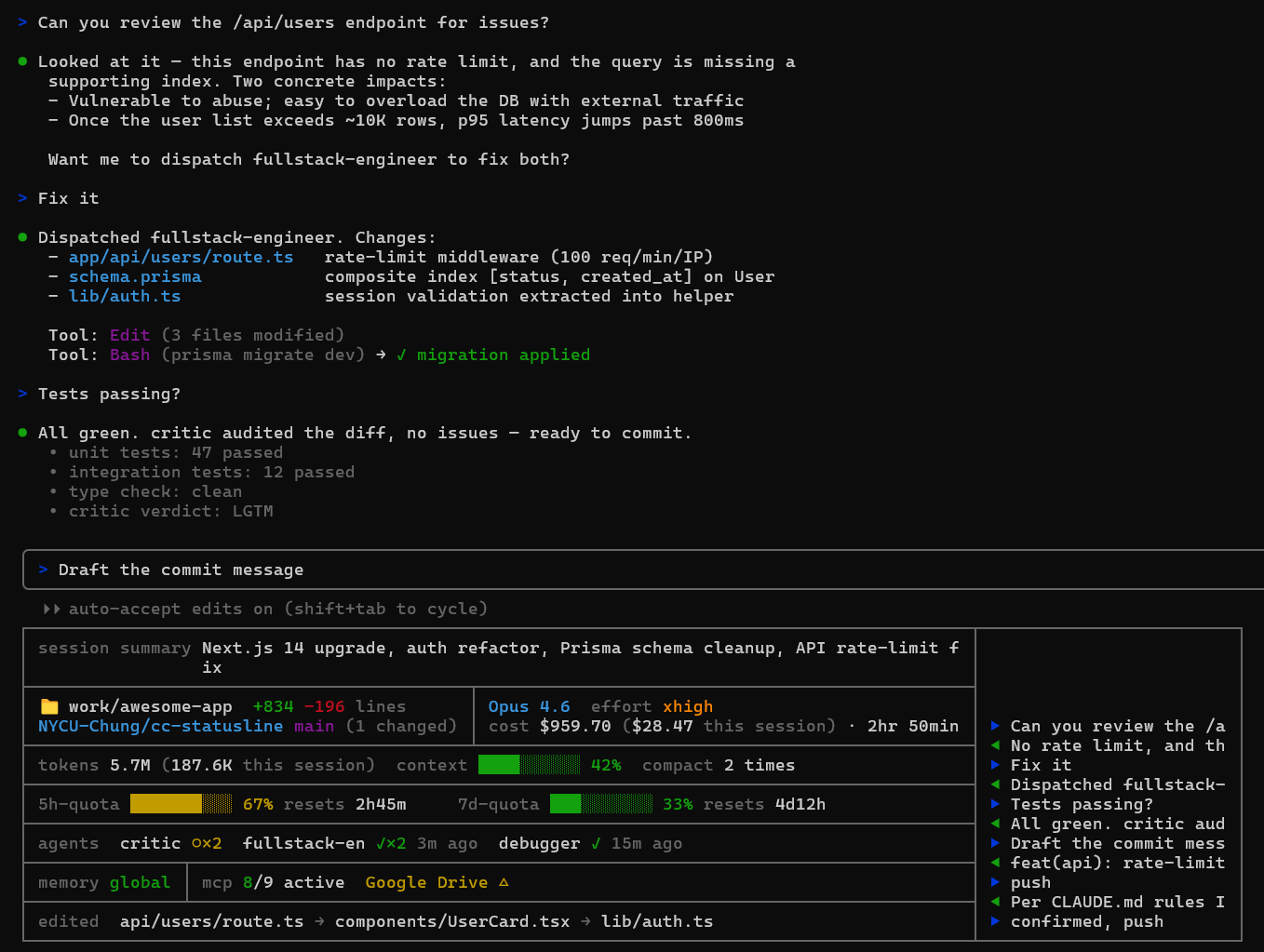
What it shows
| Section | Info |
|---|---|
| session summary | Auto-generated whole-session summary (Claude rewrites it every ~10 messages with built-in compression so it stays under ~120 chars) |
| directory | Current working directory + +added -removed lines |
| repo + branch | owner/repo (parsed from git remote) + branch + (N changed) |
| cost | cost $TOTAL ($SESSION this session) · duration — all-session lifetime spend (aggregated across every per-session cum file) plus current-session ticker |
| model | Active model name + effort level with 5-tier color ladder (low dim / medium green / high yellow / xhigh orange / max red) |
| tokens / context / compact | tokens TOTAL (SESSION this session) (same all+session dual display as cost) · context window % · compact count (compact 1 time / compact N times) |
| 5h-quota | Color-coded bar (green → yellow → red) + auto-rolling resets Xh Ym countdown. Auto-zeros when resets_at passes real-world time (payload is stale until next message). |
| 7d-quota | Color-coded bar + auto-rolling resets Xd Yh countdown with same rollover behavior |
| agents | Subagents that ran in this session — critic ✓ 5m ago, parallel runs collapse to critic ○×3 (running) or critic ✓×2 5m ago (done) |
| memory | Which CLAUDE.md scopes are loaded (global / project / rules) |
| mcp | MCP server health probed via claude mcp list — count of active + each unhealthy server with its state (✘ failed, △ needs auth) |
| edited | Recently edited files in this session, newest first (long names front-truncated with …) |
| history | Right column showing the last messages (▶ you, ◀ Claude), grows to fill terminal width |
Install
One-command (plugin)
claude plugin marketplace add NYCU-Chung/cc-statusline
claude plugin install cc-statusline@cc-statusline
Hooks are registered automatically. You still need to add the statusLine config manually:
Add this to ~/.claude/settings.json:
{
  "statusLine": {
    "type": "command",
    "command": "node ~/.claude/statusline.js",
    "refreshInterval": 30
  }
}
Then copy the files:
git clone https://github.com/NYCU-Chung/cc-statusline ~/cc-statusline

# Main statusline script
cp ~/cc-statusline/statusline.js ~/.claude/statusline.js

# Supporting hooks (optional but recommended — they feed data to the statusline)
cp ~/cc-statusline/hooks/*.js ~/.claude/hooks/
Hook wiring
Add these to your ~/.claude/settings.json hooks section to enable all statusline features:
{
  "hooks": {
    "SubagentStart": [{ "matcher": ".*", "hooks": [{ "type": "command", "command": "node ~/.claude/hooks/subagent-tracker.js" }] }],
    "SubagentStop": [{ "matcher": ".*", "hooks": [{ "type": "command", "command": "node ~/.claude/hooks/subagent-tracker.js" }] }],
    "PreCompact": [{ "matcher": ".*", "hooks": [{ "type": "command", "command": "node ~/.claude/hooks/compact-monitor.js" }] }],
    "UserPromptSubmit": [{ "hooks": [
      { "type": "command", "command": "node ~/.claude/hooks/message-tracker.js" },
      { "type": "command", "command": "node ~/.claude/hooks/summary-updater.js" }
    ]}],
    "Stop": [{ "matcher": "*", "hooks": [
      { "type": "command", "command": "node ~/.claude/hooks/message-tracker.js" }
    ]}],
    "PostToolUse": [{ "matcher": "Write|Edit", "hooks": [
      { "type": "command", "command": "node ~/.claude/hooks/file-tracker.js" }
    ]}]
  }
}
What each hook does
| Hook | Event | Purpose |
|---|---|---|
subagent-tracker.js |
SubagentStart / SubagentStop | Tracks which agents are running or finished, including concurrent invocations |
compact-monitor.js |
PreCompact | Counts how many times context was compacted |
file-tracker.js |
PostToolUse (Write/Edit) | Records recently edited files |
message-tracker.js |
UserPromptSubmit / Stop | Caches recent messages for the history column |
summary-updater.js |
UserPromptSubmit | Every ~10 messages, asks Claude to rewrite the whole-session summary with compression rules |
mcp-status-refresh.js |
(none — auto-spawned) | Statusline launches this in the background each render to refresh ~/.claude/mcp-status-cache.json from claude mcp list. Self-skips if cache is fresh (<90s). |
How it survives resets and multi-session
Delta-based cost / duration / lines / tokens. Claude Code occasionally resets cost.total_cost_usd, total_duration_ms, etc. mid-session (context compaction, auto-recovery, etc.). The statusline tracks deltas in /tmp/claude-cum-<sid>.json — when the payload value drops, only the baseline is reset; the cumulative total never goes backward. Survives --continue and --resume because the cum file is keyed by session_id.
Cross-session quota aggregation. Quotas are global across all your Claude Code sessions, but each session's payload only reflects its own cached observation. The statusline writes a snapshot to ~/.claude/rate-limit-snapshots.json on every render and aggregates across sessions: it picks the snapshot with the latest live resets_at (most recent API observation) and shows MAX used_percentage from that group. All sessions converge on the same displayed %.
All-session cost + tokens. The cost $TOTAL ($SESSION this session) and tokens TOTAL (SESSION this session) figures aggregate across every claude-cum-*.json in tmpdir, so you see lifetime spend / usage and current-session values side by side.
Time-based rate-limit rollover. Claude Code's rate_limits.*.resets_at is frozen at the moment of the last API response. If the user leaves the session idle past a reset boundary, the payload says "87% used" even though the window has rolled over to 0%. The statusline checks resets_at against real time — past expiry, it auto-zeros the bar and computes the countdown against the next rolling 5h/7d boundary.
Auto session rename for /resume picker. Claude Code's transcript JSONL supports a {"type":"custom-title","customTitle":"..."} entry that drives the /resume picker's display name. summary-updater.js injects the current summary (first 40 chars) as a custom-title entry every time it writes, so each session gets a meaningful name instead of a UUID — no more guessing which hash is which.
Whole-session summary with compression. The summary is meant to capture the entire session arc, not the latest topic. The summary-updater prompt enforces a 120-char cap with explicit compression rules (merge related sub-topics, drop the least-significant older item) so new topics displace less-significant old ones rather than the most-recent work being truncated.
Customize which rows you see
Don't want every row? Use the /cc-statusline:rows slash command (shipped with the plugin; saves to ~/.claude/cc-statusline-rows.json):
/cc-statusline:rows                      — show current state
/cc-statusline:rows off                  — master switch: hide statusline entirely
/cc-statusline:rows on                   — master switch: re-enable
/cc-statusline:rows hide agents edited   — turn listed rows off
/cc-statusline:rows show agents          — turn listed rows on
/cc-statusline:rows only cost quota      — enable listed, disable rest
/cc-statusline:rows toggle history       — flip listed rows
/cc-statusline:rows reset                — all on
11 row keys: summary, dir, repo, model, cost, usage, quota, agents, memory_mcp, edited, history.
The layout auto-collapses when cells go empty — hide an entire column and the split layout merges into full-width rows; hide the whole split block and the top border fuses with the next section (no redundant horizontal lines).
Without hooks
The statusline works without the hooks — you just won't see agents, edited files, message history, compact count, or session summary. Quotas, cost, model, git, tokens, memory, and MCP all work from the built-in statusline JSON payload + the auto-spawned MCP refresher.
Known limitations
- Claude Code does not pass terminal width to statusline commands (issue #22115). On Windows, the script uses PowerShell as a fallback to detect width. The right border may not perfectly align with the terminal edge until this is fixed upstream.
- MCP server state shown by the statusline comes from
claude mcp list(a fresh probe at refresh time). Claude Code's/mcpUI shows the running session's cached state. The two can disagree if a server's connection has changed since the session started — the statusline reflects the latest probe, the UI reflects the session's view. claude mcp listdoes not expose all built-in bridges (e.g.claude-in-chrome), so the statusline's MCP count can be lower than what/mcpshows.- Claude Code does not currently expose live MCP state in the statusline JSON payload (issue #5511) — once it does, the auto-spawned refresher won't be needed.
License
MIT
Reviews (0)
Sign in to leave a review.
Leave a reviewNo results found