clepso
Health Uyari
- License — License: MIT
- Description — Repository has a description
- Active repo — Last push 0 days ago
- Low visibility — Only 6 GitHub stars
Code Gecti
- Code scan — Scanned 12 files during light audit, no dangerous patterns found
Permissions Gecti
- Permissions — No dangerous permissions requested
Bu listing icin henuz AI raporu yok.
Clepso: a native macOS menu-bar monitor for your AI coding agents' usage limits (Claude Code and Codex). Local-first, private by design.

Your coding-agent limits, before you hit them.
A local-first macOS menu bar app that shows how much of your Claude Code and Codex
usage limits you have used, when they reset and how fast you are going,
from what those agents report on your own Mac.



Download · Website · Docs · Privacy · Design system · Progress · Changelog
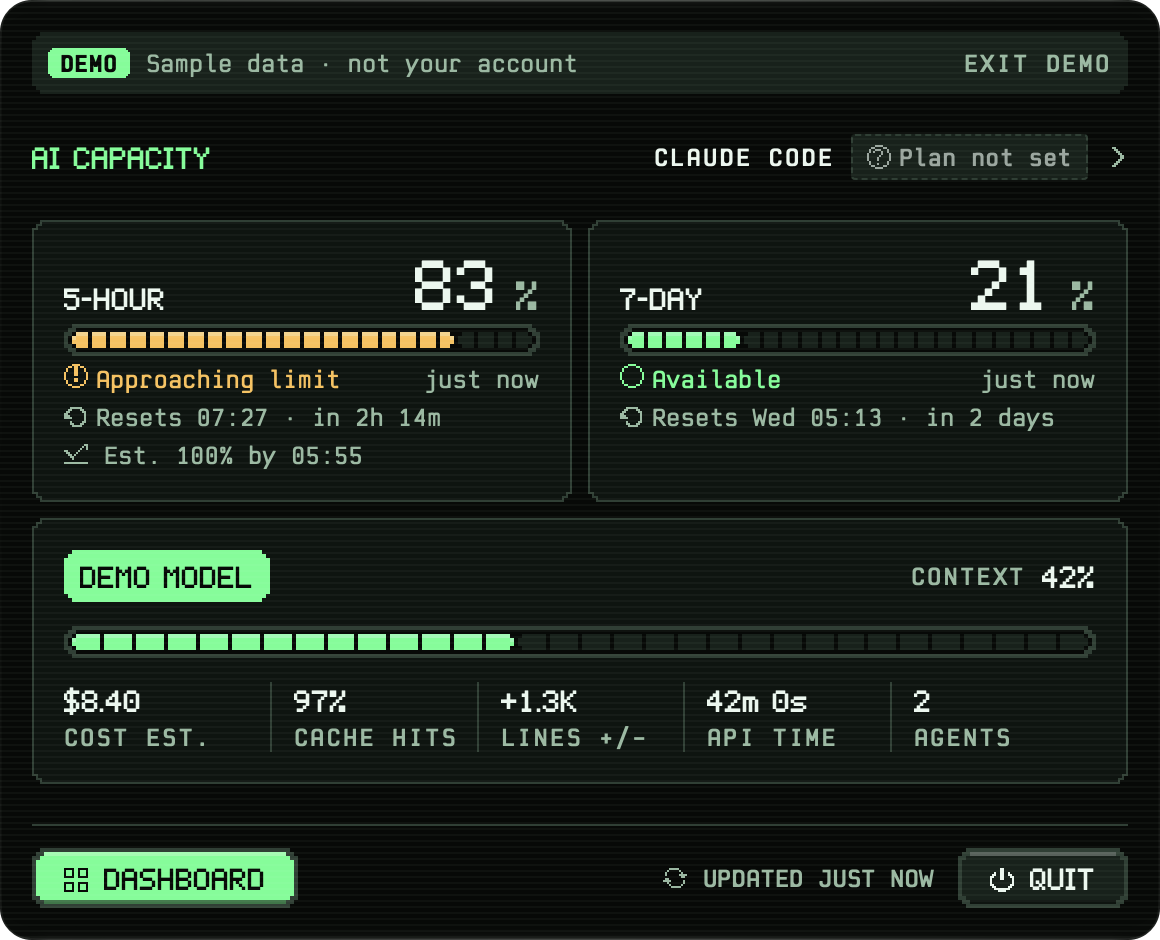
Every screenshot shows Clepso's built-in demo scenario (each screen is badged DEMO) with a synthetic statistics file and the made-up profile name "Sam", rendered by the app itself (see Run it safely).
[!NOTE]
Alpha: v0.4.0-alpha.2 is out. A signed, notarized build for Macs with Apple silicon on macOS 14 or
later (download). It is an early pre-release: expect rough edges. From v0.4.0-alpha.1 it can update
itself (see Download). You can also build it from source.
This repository (clepso, formerlytokone) buildsClepso.app.
Contents: Why Clepso · What it does · Private by design ·
How it works · Design system · Docs · Get started ·
Troubleshooting · Quality gates ·
Optional accounts backend · Project status and roadmap ·
Contributing, security and conduct · Licence and trademarks ·
Contributors · Acknowledgements
Why Clepso
Subscription plans for AI coding agents meter usage in rolling windows (for Claude Code: a 5-hour window and a
7-day window). Hitting a limit mid-task is disruptive, and the built-in view is a command you have to remember to
run. Clepso keeps the numbers in the menu bar, says how fresh they are, estimates where your current pace is heading,
warns you before a limit runs out, and keeps a local history, without sending your prompts, code or file paths
anywhere.
Clepso reports only what the agent itself reports. When a value is missing it says so instead of showing "0%", and it
never guesses your plan from your usage.
What it does
Everything below exists in the code on main. Items marked opt-in stay off until you turn them on.
In the menu bar
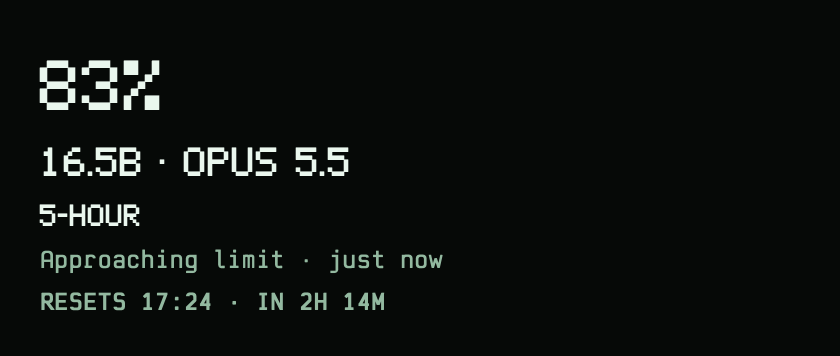
- A dynamic menu bar readout that rotates Claude Code and Codex's 5-hour and 7-day used percentages every six
seconds, with the agent and window beside each number. Most pressing limits lead the cycle. Settings lets you
pin one window, keep the aggregate summary, or show the icon alone. Old readings say OLD; a passed reset
says RESET? until a fresh reading arrives. Rotation pauses on hover, with Reduce Motion and with VoiceOver.
The pixel states (live, approaching, limit reached, stale, demo, waiting, not connected) differ by shape
(see Design system and readout states). - A panel with the 5-hour and 7-day limits: used %, status in words, reset time and countdown, freshness
("just now", stale), and a labelled estimate of when the current pace reaches 100%. - The current session: model, context used, cost estimate, prompt-cache hit rate, lines added/removed, API time,
and how many agents the last task used. - Codex's 5-hour and weekly limits beside Claude Code's (opt-in).
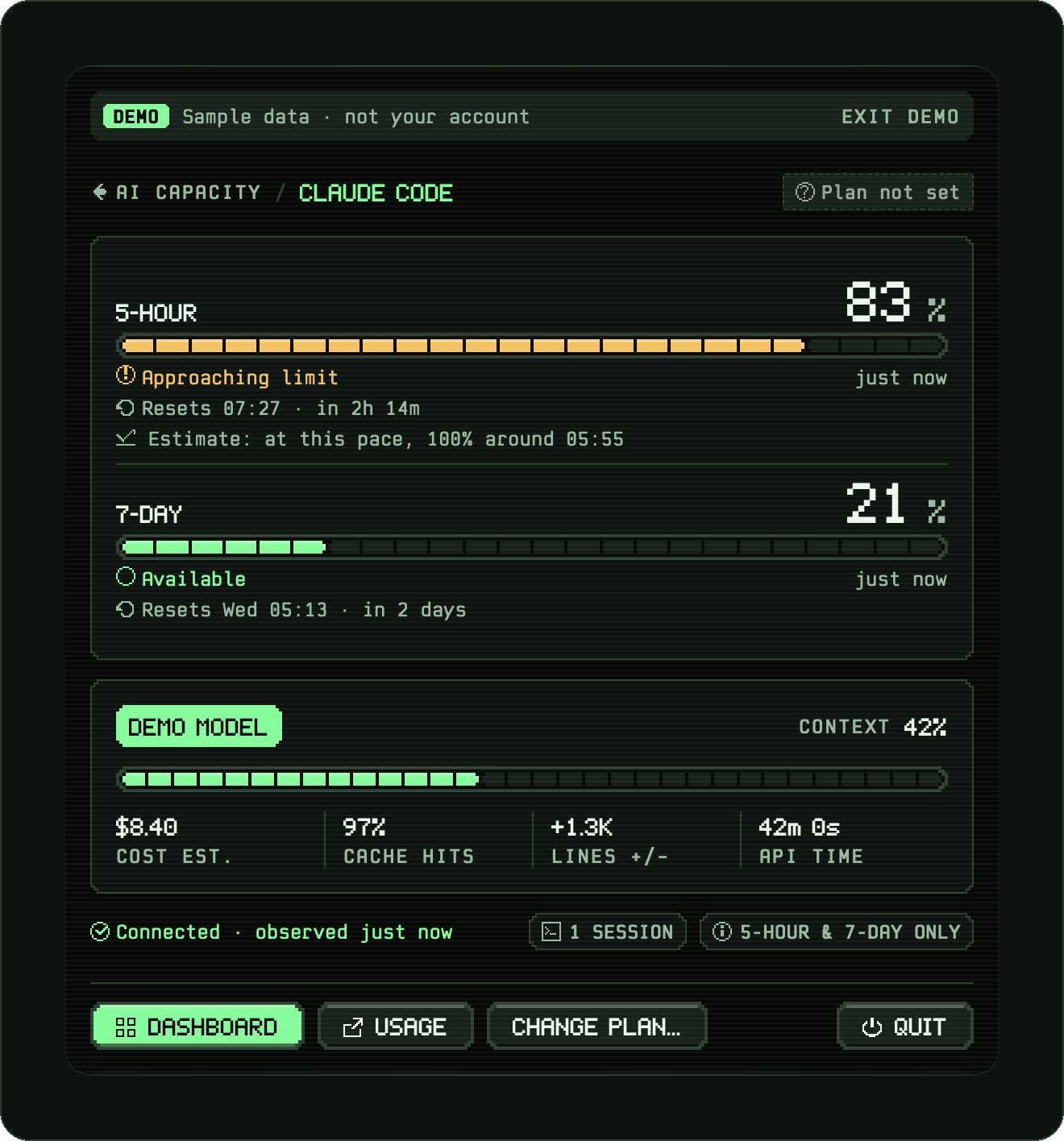
Claude Code |
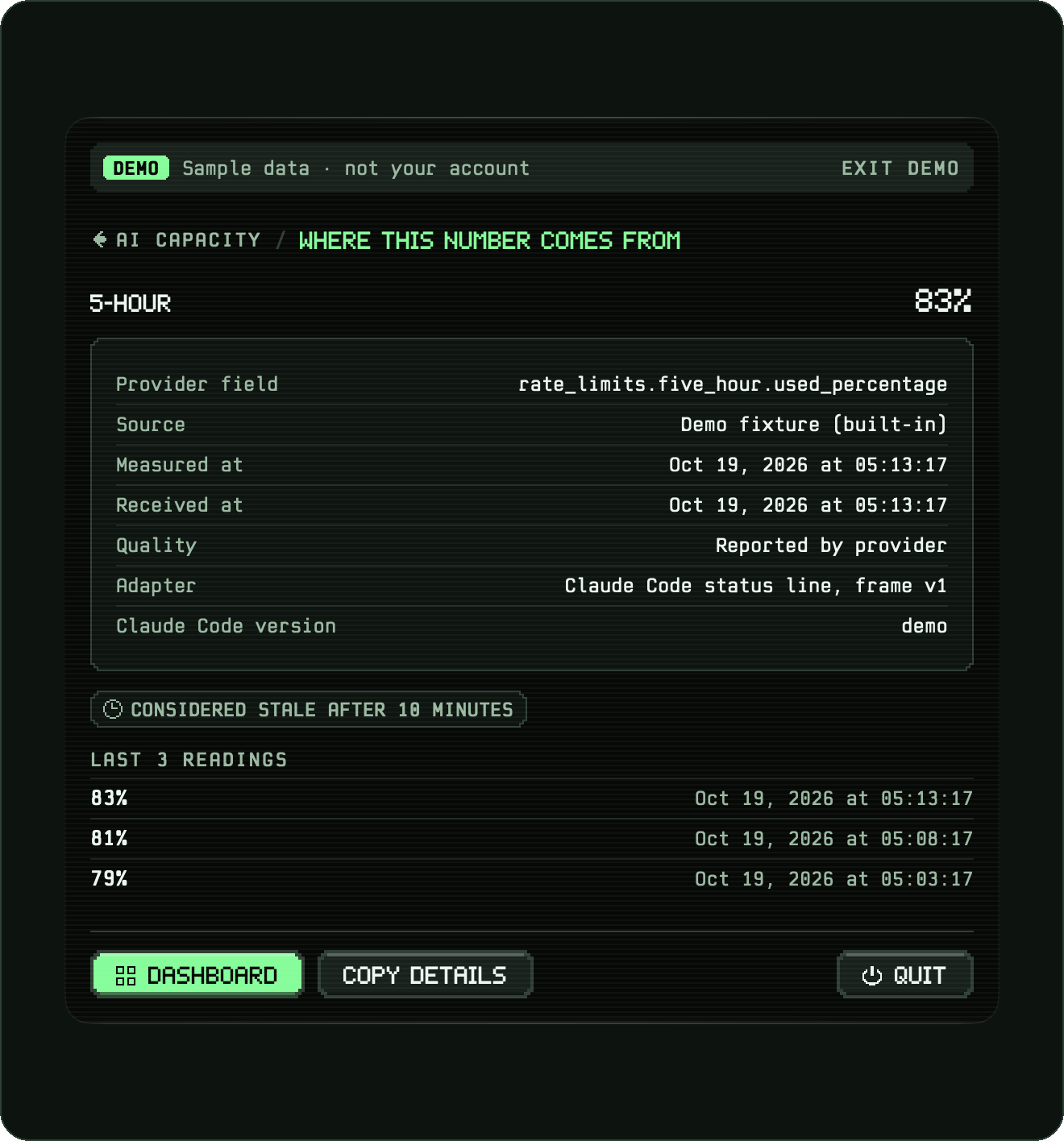
Where this number comes from |
Alerts before you hit a limit
- Notifications at 80%, 95% and 100% of a limit, when a reset is expected, and when a limit is ready again; on once
you allow notifications, with a one-hour snooze. Alerts too old to be news are dropped. - Quiet hours (off by default): during them the 80% and 95% alerts wait for one digest at the end, and everything
else arrives without sound. - Reset reminders (off by default): a notice 5, 15, 30 or 60 minutes before a limit resets.
The Dashboard
- Home: what needs attention now (limits, goals, a running task), both limits, the last 30 days, your level; after
an update, a one-time "What's new" card (compiled into the app, no network). - Limits: each limit charted over its own window, with 80/95% bands, "now", and the dashed pace estimate
(Claude Code's, and Codex's when that is on).
Other agents, by hand adds dated readings for Claude Chat, ChatGPT, Gemini, Grok, Cursor, Copilot and Windsurf,
explicitly labelled "Entered by you". These stay separate from automatic readings and do not trigger automatic alerts.
With the Gemini CLI reader on (opt-in), Limits also shows Gemini CLI's recorded token activity. That is activity,
not a quota: Clepso does not know Gemini's used percentage or reset time. A reported weekly reset can be added to
Calendar, which asks before it adds the event. - Session: recent sessions, the selected session's details, agents per task, usage by model.
- Overview and Models: a year activity calendar, tokens per day (Claude Code and Codex), streaks, model shares,
and a "model arena" with levels earned from output tokens (opt-in: reads Claude Code's statistics file). Each model
family has its own pixel character: an owl maestro for Opus, a fox storyteller for Fable, a verse keeper for Sonnet,
a paper crane for Haiku, and a neutral robot for families Clepso does not know. - Card: a shareable pixel "player card" (copy image, save PNG, share). Nothing is sent unless you share it.
In releases from v0.2 (v0.1.0-alpha.1 hid it). - Goals: active days per week, keep the 5-hour peak under a target, finish the week under a target; streaks.
In releases from v0.2 (v0.1.0-alpha.1 hid it). - Account: profile name, chosen plan, optional sign-in (see Optional accounts backend).
- Settings: appearance (System / Light / Dark) and colour theme (Phosphor, Amber, Cobalt, Orchid, Graphite; each
with light and dark palettes), launch at login, notifications (alerts, quiet hours, reset reminders, a test
notification), updates, the Claude Code connection (connect / remove), opt-ins (statistics file, agents per task,
Claude desktop and VS Code limits, Codex, Gemini CLI), integrations (desktop widgets, MCP clients), export, demo data,
diagnostics log, delete all.

Home · dark |

Limits · dark |

Session · dark |

Models · dark |

Home · light |

Models · light |
Every self-drawn control has a pixel focus ring, charts and the calendar move with the arrow keys, ⌘,
opens Settings, and all animation goes through one Reduce Motion switch (docs/A11Y_CHECKS.md).
More screens: design/screens/ and the Screens page.
Outside the panel
- Claude desktop app and VS Code (opt-in): Clepso's Claude Code mod reads the limits in sessions no terminal
draws and hands them to the same helper. Clepso shows the twosettings.jsonentries it adds before writing them,
and takes both out again when you turn it off, byte for byte if nothing else changed
(docs/specs/mod-bridge.md). - Desktop widgets (opt-in): small and medium widgets with the reported limits, their source, freshness and reset.
macOS decides how often they refresh (docs/widgets.md). - Clepso MCP (opt-in): a local, read-only stdio server with two tools,
get_limitsandget_reader_health, for
a client you allow by name in Settings and can revoke. It edits no client configuration
(docs/integrations/mcp.md). - Signed updates: Settings › Updates checks for a new release when you ask. Daily checks and automatic install are
off until you turn them on. Updates are signed and verified before they are unpacked
(docs/in-app-updates.md).
Your data, under your control
- Export my data: a JSON file (permissions 0600) of the local tables, with every string re-checked by the same
scrubber the helper uses. - Delete all: removes Clepso's database and its files under
~/.claude/clepso, and restores your Claude Code
settings; optionally also deletes the settings backups. - Retention: limit readings and engine events are kept 90 days; sessions, agent tasks and notification receipts 30 days.
Settings › Your data offers shorter periods, including 1 or 3 days for diagnostics (7 by default). Shortening a
period removes old records immediately; export records the chosen periods. - Demo mode: a fixed scenario run through the real engine and store, so you can explore without connecting anything.
| Source | What Clepso reads | Default |
|---|---|---|
| Claude Code status line | An allowlisted subset of the JSON Claude Code sends to its status-line command: limits, model, context, token and cache counts, durations, line counts, and the cost estimate (which you can switch off) | On once you connect it in onboarding or Settings |
| Claude Code hooks | For UserPromptSubmit, SubagentStart, SubagentStop and Stop: the event name, keyed hashes of the session and agent ids, and the built-in agent type ("custom" otherwise, unless you approved that exact agent name in Settings); on Stop and SubagentStop, how many background tasks Claude Code still has in flight, by type, status and agent type (counts only: no ids, descriptions or commands) |
Off (opt-in; shows the exact entry before writing it) |
~/.claude/stats-cache.json |
Dates, counts, model ids and token totals through a field allowlist; never stored, logged or exported | Off (opt-in) |
Claude Code mod (clepso-limits) |
In Claude desktop and VS Code sessions that no terminal draws, after each turn: the limit percentages and reset times, context-window numbers and the session's model id, passed through the helper's allowlist | Off (opt-in; shows the two entries before writing them) |
~/.codex/sessions/**/rollout-*.jsonl |
Only token_count events (5-hour and weekly used %, reset, plan) and the model name, from the last 256 KB of the three newest files; other lines are skipped before decoding |
Off (opt-in in Settings) |
Gemini CLI recordings (~/.gemini/tmp, ~/.cache/.gemini/tmp) |
Message ids (for deduplication), timestamps and numeric token fields from the 16 newest recordings; conversation content is discarded, and the counts stay in memory and are never uploaded (docs/integrations/gemini.md) |
Off (opt-in in Settings) |
Where Claude Code runs. Limits come from the status line, which Claude Code draws in a terminal (including an IDE's
terminal). The Claude desktop app's Code tab runs hooks but not the status line (tested 19 Oct 2026). With the mod on,
its limits arrive after each turn. Without it, its tasks and agents are counted, and its usage still counts against
your plan, but the limit figures update only when a terminal session next reports.
Automatic adapters for Cursor, GitHub Copilot, Windsurf and Grok are on the roadmap, as are
Gemini's quota percentages and reset times. You can enter dated manual readings for them on Limits. The bundled plan
catalog lists plans with source links; only Claude Code and Codex limits are read automatically today.
Private by design
Clepso is built so that the part Claude Code runs cannot leak what it sees, and so that every change it makes to your
machine can be undone.
- Allowlist, not blocklist. The helper copies only named fields, each with a type and range check
(Sources/ShimProtocol/Allowlist.swift). Your working directory,
transcript path, session name, prompt id and workspace folders are never forwarded. Strings that look like paths,
emails or secrets are dropped. Session ids are replaced by an HMAC keyed with a random 32-byte key stored at~/.claude/clepso/session.key(0600). - The helper cannot reach the network.
clepso-statuslinelinks only Foundation, CryptoKit and system libraries;make cifails if it links any networking library or symbol. - Network code lives in one module. Only
Sources/Syncmay use networking APIs, and only the app imports it
(make cienforces both). Sync does nothing unless the build carries an accounts project and you sign in.
Builds from source carry none, so they never sign in or upload anything. The one other network path is the
updater (Sparkle, in the app target): it fetches the signed update feed when you check, or daily once you turn
automatic checks on, and sends no system profile. - Your Claude Code settings are changed reversibly. Connecting changes exactly one key,
statusLine.command,
in~/.claude/settings.json, after writing a byte-exact backup to~/.claude/clepso-backups/. Writes are
compare-and-swap with an atomic rename, and an interrupted install can be recovered. If you already had a status
line, it keeps running and its output reaches Claude Code unchanged. Removing Clepso restores the original bytes. - Local IPC is restricted to your user. The app listens on a Unix socket at
~/Library/Application Support/Clepso/run/agent.sock(folder 0700, socket 0600), accepts only peers running as
your user id, frames of at most 4 KiB, and at most 20 frames per second. - Logs are redacted by type. Values wrapped in
Redacted<T>cannot be encoded;make ciaudits every place that
unwraps one. - If you sign in (optional, official builds), Clepso uploads once an hour: your profile name and plan label, and
per-day counts (messages, sessions, active day, tokens per model, model totals by token kind, 5-hour peak and 7-day
end %, agents per task by built-in type, goal targets and results). No prompts, replies, paths, project names or raw
ids. Every table is protected by row-level security, and deleting your account deletes every row
(backend/supabase/migrations/).
What Clepso does not do: read your prompts or replies, read transcripts, or send anything anywhere unless you sign
in. (Gemini CLI recordings hold conversations too: with that reader on, Clepso decodes only ids, timestamps and token
counts from them.) Widgets and MCP clients get only limit readings (percentages, resets, source and freshness), and
only once you turn them on; an MCP client may pass those readings on to its own AI service. The full design is indocs/PRIVACY_AND_SECURITY.md; the Privacy
page lists every uploaded field in plain words.
How it works
- Claude Code runs its status-line command on every refresh and pipes a JSON description of the session to it.
Connecting Clepso points that command at a small wrapper (~/.claude/clepso/statusline.sh) that runs the helper
embedded in the app, or your original command if the app has been removed. - The helper (
clepso-statusline) runs your original status line with the exact input bytes, so it looks the
same, keeps only allowlisted fields, and sends them to the app over a local Unix socket within about 48 ms. It
never writes to disk, never retries and has no network code; if the app is not running, the frame is dropped. - The app validates the frame, stores a reading in SQLite when a value changes, and derives each limit's state
(available, approaching, critical, exhausted, reset expected, available again) with pure, clock-injected state
machines and a least-squares pace estimate. - No usage data leaves the Mac unless you sign in to an official build; then only the daily counts listed above.
An update check downloads the feed and sends none.
flowchart LR
    subgraph CC["Claude Code (your terminal)"]
        SL["status line refresh<br/>(JSON on stdin)"]
        HK["hook events<br/>(opt-in)"]
    end

    subgraph Helper["clepso-statusline<br/>(Clepso.app/Contents/Helpers)"]
        RUN["runs your original<br/>status-line command"]
        AL["field allowlist + scrub<br/>HMAC of session ids"]
    end

    subgraph App["Clepso.app (menu bar)"]
        SOCK["IngestSocket<br/>same-user peers, 4 KiB, 20/s"]
        MAP["FrameMapper → observations"]
        DB[("SQLite via GRDB<br/>~/Library/Application Support/Clepso")]
        ENG["UsageEngine<br/>limit, reset and pace rules"]
        UI["SwiftUI: menu bar panel,<br/>Dashboard, onboarding"]
        SYNC["Sync (optional)<br/>the only module with network access"]
    end

    STATS["~/.claude/stats-cache.json<br/>(opt-in)"]
    CODEX["~/.codex/sessions tails<br/>(opt-in)"]
    CLOUD[("Supabase: daily counts,<br/>row-level security")]

    SL -->|stdin| Helper
    HK -->|"--hook"| Helper
    RUN -.->|"stdout unchanged"| CC
    AL -->|"frame v1 over a Unix socket"| SOCK
    SOCK --> MAP --> DB
    DB --> ENG --> UI
    STATS --> UI
    CODEX --> DB
    UI --> SYNC -->|"HTTPS, only when signed in"| CLOUD
- The helper's time budget: connect within 20 ms, everything finished by about 48 ms after start (
make perfchecks a
p95 of 20 ms or less over 200 runs on the maintainer's Mac). - Without a value change the app stores a check-in every 2 minutes. Limit states use hysteresis, so a reading hovering
near a threshold does not flicker between states. - The SwiftUI layer reads a projection of that state. Colours, spacing, type and motion come only from the
Theme
tokens inDesignSystem, and icons are pixel glyphs (all enforced bymake ci). - Clepso is a menu bar-only app (
LSUIElement). It is not sandboxed, because it has to read and edit files under~/.claude. Its only entitlements are the app group it shares with the sandboxed widget extension and the
debug-onlyget-task-allow, and official builds use hardened runtime.
More: docs/ARCHITECTURE.md, docs/DATA_MODEL.md and the
Architecture page.
Design system
Clepso has its own identity, built in code: a heartbeat inside a ring. The ring is the limit, the same ring that sits
in the menu bar; the beat is the live reading. It is drawn on a 16-pixel grid with a 1-pixel stroke, so it reads at
menu bar size, in one colour, in any theme. The full guidelines, themes, components, voice and downloads are on the
design system page.
The menu bar family. One ring; the mark inside changes. It is a template image, so macOS tints it for light, dark
and tinted menu bars, and the shape alone carries the meaning:

beat: live reading · approaching: near a limit · flatline: limit reached · stale: the last reading is old ·
demo: demo data · waiting: no reading yet · not-connected: no trace. A state that is no longer current opens the ring
at five o'clock with a dot in the gap (see the menu bar sheet).
Typefaces. Two faces drawn for Clepso on one grid. Clepso Pixel speaks in numbers and labels: capitals 7 pixels
tall, a dotted 0, a flagged 1 and tabular figures, so a number is never misread. Clepso Mono explains: a monospace
in Regular, Medium and Bold, built from the rounded rectangle behind the pixel face's corners.
Colour. Components ask for a role (background, accent, status), and only the theme knows the value. Five themes,
each with a dark and a light palette, every text role checked at 4.5:1 or better against every surface.
| Signature colour | Hex | Meaning |
|---|---|---|
| Phosphor | #4DFF8F |
The signature: marks, accents, the live signal |
| Ink | #060907 |
Near-black glass, the default ground |
| Paper | #F3F1E7 |
The light ground: warm, never pure white |
| Deep | #0A7238 |
Phosphor on paper: the accent in light mode |
| Amber | #FFC04D |
Attention: approaching a limit |
| Rust | #FF6B5E |
Blocked: a limit reached, an error |
The brand kit (logo SVG masters in six colourways, PNGs, app icon, menu bar family, favicon, fonts, sheets and
specimens) lives in design/brand/ and is generated bydesign/brand/pipeline/build.sh; the reasoning is indesign/brand/NOTES.md. The fonts are open (SIL OFL 1.1); the name, logo and icons are not
(see Licence and trademarks).
Docs
On the website
| Page | What's there |
|---|---|
| Overview | What Clepso is, the build in numbers, a reading's path from Claude Code to the menu bar |
| Progress | Every roadmap increment, its status and the evidence that it works |
| Metrics | How every number is defined, where it comes from and what it does not mean, with three playgrounds |
| Architecture | A reading's path, processes, modules, principles and quality gates |
| Privacy | What stays on your Mac, and every field uploaded if you sign in |
| Changelog | Every commit, newest first, with the gates it passed |
| Screens | Every app screen, captured from the running app with demo data |
| Design system | Logo, colour, typography, iconography, components, voice and downloads |
| Web dashboard | Your own uploaded counts, for signed-in accounts |
In this repository
| Document | What's there |
|---|---|
docs/ARCHITECTURE.md |
How Clepso is put together (section numbers are cited from code comments) |
docs/DATA_MODEL.md |
Types, schema and the state machines |
docs/PRIVACY_AND_SECURITY.md |
What Clepso reads, keeps and can upload, and how it protects the files it touches |
docs/STATUS.md |
What the current release implements, what it does not, and what is still unverified |
docs/RELEASE.md |
The signing and notarization runbook (make release; first used for v0.1.0-alpha.1) |
docs/in-app-updates.md |
Signed in-app updates: the feed, keys and release steps |
docs/widgets.md |
Desktop widgets and what they share |
docs/integrations/ |
Clepso MCP and the Gemini CLI reader |
docs/specs/mod-bridge.md |
The Claude Code mod for the desktop app and VS Code |
docs/A11Y_CHECKS.md |
Keyboard-only and Reduce Motion checks |
docs/FIXTURES.md |
The status-line fixture corpus |
docs/APPLE_PLATFORMS.md |
iPhone, Apple Watch and widgets: feasibility |
docs/EMAIL.md |
The account sign-in emails |
docs/open-source/ |
Open-source readiness: the audit, the go-public record and the GitHub settings |
design/brand/README.md |
The brand kit and its build pipeline |
Get started
Download
- Download Clepso-0.4.0-alpha.2.dmg from the v0.4.0-alpha.2 release. It needs macOS 14 or later on a
Mac with Apple silicon. To check the file, downloadSHA256SUMSnext to it and runshasum -a 256 -c SHA256SUMS. - Open the disk image and drag Clepso into Applications, then open it from there.
- Follow the welcome window: it shows the one Claude Code setting it changes, and backs it up first.
This alpha offers optional email accounts. Local tracking needs no account; signing in syncs the documented daily activity summaries over HTTPS. The release notes list what is in it and its
known limitations.
Later releases arrive through Settings › Updates. Clepso checks only when you ask until you turn on automatic
checks. An app from before v0.4.0-alpha.1 has no updater: install the new release once by hand.
Install with Homebrew
brew install --cask obileonardo/clepso/clepso
open -a Clepso
The official Clepso tap installs the same signed, notarized alpha
for Apple silicon on macOS 14 or later, and links its clepso command-line tool. If Homebrew asks to trust the
third-party cask, review and approve Clepso. The cask declares auto_updates true, so a bare brew upgrade skips
it. Update in the app, or quit Clepso and run brew update followed bybrew upgrade --cask --greedy obileonardo/clepso/clepso, as the tap documents.
Already installed from a DMG? Use the tap's migration instructions
to adopt the identical app and keep one copy. Homebrew preserves Clepso's Library data and does not change agent
connections or opt-ins. The tap also documents uninstalling and release maintenance.
Requirements for building from source
| Tool | Version | Notes |
|---|---|---|
| macOS | 14 Sonoma or later (deployment target) | Development runs on a current macOS release |
| Xcode | 27.1 (pinned by make ci; make ci-contributor accepts any Swift 6 toolchain) |
Provides the macOS SDK and xcodebuild |
| Swift | 6.4 (bundled with Xcode 27.1) | Swift 6 language mode; warnings are errors |
| XcodeGen | 2.46.0 | Downloaded and SHA-256-checked into .tools/ by scripts/bootstrap.sh; no Homebrew needed |
| Claude Code | A version with status-line support | The fixtures were captured from 2.1.302. make ci also needs the claude CLI (2.1.287 or later) to check the mod; make ci-contributor skips that check without it |
| Node.js | For make ci |
The character artwork check; CI also runs the MCP client test with npm |
| Docker and the Supabase CLI | Optional | Only for make backend-test |
| Python 3 | For make ci |
The email template check, the documentation site and the fixture oracle |
Two third-party Swift packages: GRDB.swift 7.11.1, pinned by revision inPackage.resolved, and Sparkle 2.10.0, pinned exactly in project.yml and linked only
by the app target.
Build from source
git clone https://github.com/obileonardo/clepso.git
cd clepso
sudo xcode-select -s /Applications/Xcode.app   # point at your Xcode 27.1 installation

swift build        # all libraries and command-line tools
swift test         # the full suite: no network, never touches your real ~/.claude
make app           # Clepso.app: XcodeGen → xcodebuild → codesign --verify
make app writes build/DerivedData/Build/Products/Debug/Clepso.app. The Xcode project (Clepso.xcodeproj) is
generated from project.yml and is not committed; Package.swift is the source of truth for all code.
All local configuration is optional; the files are gitignored, and each has a committed .example template in Config/.
| File | What it sets | Without it |
|---|---|---|
Config/Signing.local.xcconfig |
Your signing identity and team | The app is signed ad hoc, which is enough to run it on the Mac that built it |
Config/Sync.local.xcconfig |
An accounts project (host and publishable key) | Sync is off: no sign-in, no uploads, no requests |
Config/local.mk |
DOCS, the planning folder make site reads |
make site stops with an explanation |
Config/Clepso.xcconfig holds the defaults and includes the local files when they exist.
| Command | What it does |
|---|---|
make ci |
Every quality gate, strict (see Quality gates). Logs in .build/ci-logs/ |
make ci-contributor |
The same gates for machines without the maintainer's setup: any Swift 6 toolchain, ad-hoc signing, Sync off |
make build |
swift build --build-tests -Xswiftc -warnings-as-errors |
make test |
swift test |
make perf |
Helper overhead budget: release build, 200 runs, p95 ≤ 20 ms (enforced on the maintainer's Mac; hosted runners are too noisy for absolute budgets) |
make backend-test |
Starts a local Supabase stack (Docker) and runs the pgTAP row-level-security tests |
make site |
Regenerates the documentation website in site/ (needs DOCS in Config/local.mk: planning documents that are not in this repository) |
Run it safely
Debug builds accept two launch arguments that redirect everything Clepso reads and writes, so you can try it without
touching your real ~/.claude or Application Support folder:
build/DerivedData/Build/Products/Debug/Clepso.app/Contents/MacOS/Clepso \
    -ClepsoDataDirectory /tmp/clepso-data -ClepsoHome /tmp/clepso-home
Choose Show demo data instead in onboarding to see the screens above. Keep the data folder path short: the socket
path inside it must stay under the 104-byte Unix limit, otherwise the panel reports that it isn't receiving updates.
A debug build has the same bundle identifier as an installed Clepso, so macOS treats it as the same app. With either
argument (or -ClepsoProbeOutput) set, the run is isolated from everything macOS keeps per app: sign-in state is kept
in memory instead of the Keychain (it can never upload to, or sign out of, a real account), the login item and the
notification centre are stand-ins (permission reads as allowed; nothing is shown, scheduled or cancelled), Delete
everything leaves the Keychain alone, a sign-in link it did not ask for is ignored, and no window size or open window
is saved. With -ClepsoDataDirectory alone the run reads your real ~/.claude but never rewrites Clepso's files there.
The probe refuses to start without -ClepsoHome or -ClepsoDataDirectory. -ClepsoHome on its own stands in for your whole home folder: the data folder is
then <home>/Library/Application Support/Clepso, and an old <home>/Library/Application Support/Pulse and<home>/.claude/pulse there are moved the way a real upgrade from a build named Pulse moves them.
Screenshots and popover timing (debug builds):
# synthetic ~/.claude/stats-cache.json, fixed seed
python3 -I scripts/probe-home.py /tmp/clepso-home

# add -ClepsoProbeLight YES for light mode
build/DerivedData/Build/Products/Debug/Clepso.app/Contents/MacOS/Clepso \
    -ClepsoDataDirectory /tmp/clepso-data -ClepsoHome /tmp/clepso-home \
    -ClepsoProbeOutput /tmp/clepso-shots -ClepsoProbeDemo YES &

swift scripts/probe-popover.swift /tmp/clepso-shots 40
The script posts 40 real clicks on the status item (your terminal needs Accessibility permission) and prints
popover-open p50/p95; the app then saves each screen as a PNG in the output folder and quits. The probe always uses
the profile name "Sam" (or -ClepsoProbeName <name>), never your Mac account's name.
Connect Claude Code
Launch normally and use Connect in onboarding or the Claude Code connection in Settings. Clepso shows the exact
change to settings.json before writing anything. The headless CLI does the same and only previews unless you pass--confirm:
swift run clepso install --shim <path to clepso-statusline>             # preview only
swift run clepso install --shim <path to clepso-statusline> --confirm   # install
swift run clepso status
swift run clepso uninstall --confirm   # restore your settings
swift run clepso recover               # finish or roll back an interrupted install
The same tool runs the read-only MCP server (clepso mcp --client <name>) for a client you have allowed in Settings.
Troubleshooting
Start with Settings › Diagnostics. It counts the updates Clepso received from Claude Code and keeps a log of recent
events with paths and secrets removed.
- "Waiting for Claude Code…" or "No limits reported yet." Clepso shows only what Claude Code reports, and Claude
Code reports limits through its status line. Connect Claude Code (see Connect Claude Code),
then send any message in a Claude Code session in a terminal. Clepso must be running too: the helper drops readings
while the app is closed, so turn on Open at login in Settings. - A limit says OLD or RESET? A reading counts as stale after 10 minutes, and a passed reset waits for a fresh
reading. Both clear when the agent next reports: send a message in Claude Code or Codex. - Connecting fails with "Couldn't update settings. Nothing was changed." Clepso refuses to edit
~/.claude/settings.jsonwhen the file is not valid JSON or its currentstatusLineis not a command it can wrap.
Fix the file and connect again (docs/PRIVACY_AND_SECURITY.md§7). - No limits from the Claude desktop app or VS Code. Neither runs the status line. Turn on Desktop app and VS Code
panel in Settings (it needs the Claude Code connection first); readings start with your next Claude session there.
If Settings says "disableAllHooks is on in settings.json", Claude Code would run no mod and no status line until you
turn that off. If your organisation turns mods off, Clepso still counts tasks there but not limits
(docs/specs/mod-bridge.md). - Codex doesn't show. It is opt-in: turn on Read Codex's session files in Settings. "Codex hasn't written a
session on this Mac" means there is no~/.codex/sessionsyet, so run Codex once. "On. Waiting for Codex's next
session to report its limits" clears after your next Codex session. - No alerts. If Settings says "Notifications are off in System Settings.", choose Open System Settings, allow
Clepso, then use Send a test notification. - The widget says "Open Clepso → Settings → Integrations to share widget readings." Sharing starts off: turn on
Desktop widgets there, then add Clepso limits from the widget gallery. A build from source can't share
("Widget sharing is unavailable in this app signature"). macOS decides when widgets refresh
(docs/widgets.md). clepso: command not found. Homebrew links theclepsotool; the DMG does not. Run/Applications/Clepso.app/Contents/Helpers/clepso. For an MCP client, allow it in Settings › Integrations and use
Copy setup, which uses that path. "Client permission is off" means that client name is not allowed there
(docs/integrations/mcp.md).- No update arrives. Apps from before v0.4.0-alpha.1 have no updater: install the new release once by hand. A bare
brew upgradeskips Clepso; see Install with Homebrew. - Reset or uninstall. Delete all Clepso data… in Settings restores your Claude Code settings from the backup,
deletes~/.claude/clepsoand Clepso's database and log in~/Library/Application Support/Clepso, and can also
delete the backups in~/.claude/clepso-backups. If the restore can't be done safely, nothing is deleted. Then move
the app to the Trash.brew uninstallon its own keeps your data and leaves Claude Code's settings as they are; to
disconnect only, use Remove from Claude Code… orclepso uninstall --confirm.
| Symptom | What to check |
|---|---|
make ci fails at "toolchain pinned" or "app bundle" |
That is the strict mode. Use make ci-contributor unless you build official releases |
make app fails with a signing error |
Remove or fix Config/Signing.local.xcconfig; without it the app is signed ad hoc |
| The panel says Clepso isn't receiving updates (debug run) | The -ClepsoDataDirectory path is too long for a Unix socket; use a shorter one |
| Account says accounts aren't available | Expected in builds from source (see Optional accounts backend) |
| The panel says "not connected" | Claude Code only runs the status line while a session is open; check Settings for the connection state and the diagnostics log |
| My old status line disappeared | It should keep running. Run swift run clepso status, then swift run clepso uninstall --confirm to restore the backed-up bytes, and open an issue |
| Want to see what Clepso stored | Settings › Export my data writes a JSON copy |
Quality gates (make ci)
scripts/ci.sh has 17 gates. It runs every one even if an earlier one fails, prints a summary, and exits non-zero if
any failed. make ci is strict: it pins the toolchain and requires the app to be signed with a real identity, with
hardened runtime, and with an accounts project configured, so an official build cannot quietly fall back.make ci-contributor (scripts/ci.sh --contributor) runs the same checks but accepts any Swift 6 toolchain, an ad-hoc
signature and no accounts project. GitHub Actions runs the gates in contributor mode on every pull request and every
push to main (.github/workflows/ci.yml), on GitHub's xcode-27 macOS image with
Xcode 27.1.
| Gate | What it proves |
|---|---|
| toolchain pinned | Xcode 27.1 and Swift 6.4 are selected (contributor mode: a Swift 6 toolchain) |
| strict build | Everything, tests included, builds with warnings as errors |
| tests | swift test passes |
| helper links no networking | The release clepso-statusline links only allowed system libraries and no networking symbols |
| release build has no debug code | A release build of the app and the helper contains none of the debug-only names (probe flags, debug launch arguments, test-only helper settings) listed in scripts/debug-only-names.regex, while the debug build shows them |
| networking only in Sync | No URLSession/Network use outside Sources/Sync; only the app imports Sync |
| clock injected | No direct Date() in the pure layers and the app (time is injected) |
| design tokens only | Components and screens use Theme tokens and pixel icons, never raw colours, sizes or system symbols |
| motion through tokens | Every animation goes through a motion token, and frame-by-frame motion pauses under Reduce Motion |
| keyboard reachable | No plain buttons without the pixel focus ring; every tap gesture and hover readout has a keyboard path |
| redaction audit | unsafeReveal only in Storage and the helper; Redacted is never Codable |
| secret scan | No secret-shaped strings in the tree (a regex stand-in for a full scanner) |
| no committed accounts project | No Supabase project host or publishable key in tracked files, and no Config/*.local.xcconfig tracked |
| email templates | The account emails are current with their sources, and their logo is deployed with the site |
| character artwork parity | The app's character art matches the approved website drawings |
| Claude Code mod | The mod validates strictly, calls only what its spec lists, and its tests pass, all in a throwaway home (contributor mode skips it when claude is missing) |
| app bundle | Clepso.app builds and is signed, embeds the helper and the clepso tool, embeds the widget extension at the app's version, has no unexpected entitlements, requires a signed update feed checked before extraction, runs as a menu bar app, registers the sign-in URL scheme, bundles the mod byte for byte, ships the third-party licences, and its helper links no networking. Strict mode also requires a real signature, hardened runtime and a configured accounts project |
App/ClepsoMac/             @main, the Sparkle updater, app icon and Acknowledgements.txt (Info.plist and entitlements are generated)
App/ClepsoWidgets/         The WidgetKit extension (small and medium widgets)
Config/                    Clepso.xcconfig defaults and templates for the uncommitted local settings
mod/claude-code/           The clepso-limits Claude Code mod, bundled into the app as is
Sources/
  Domain/                  Value types, provenance, Redacted<T>. No I/O, no clock reads
  ShimProtocol/            Frame v1, the field allowlist, the string scrubber, hook frames, mod hand-off
  StatusLineShim/          The helper's run loop: stdin, child process, socket send
  clepso-statusline/       The helper executable Claude Code runs (one-line main)
  ClaudeCodeAdapter/       Settings, hooks and mod installers, ingest socket, frame mapper, statistics reader
  CodexAdapter/            Codex session-file tail reader
  ProviderTelemetry/       Gemini CLI recorded-activity reader
  UsageEngine/             Pure limit, reset, session and pace state machines; alerts, quiet hours, reset reminders
  Storage/                 GRDB/SQLite schema v1–v6, migrations, ledger policy, retention
  SubscriptionCatalog/     Bundled plan catalog (plan-catalog.v1.json)
  DesignSystem/            Themes and tokens, status styles, pixel components and glyphs, bundled fonts
  IntegrationSnapshot/     The allowlisted limits snapshot shared with widgets and MCP
  ClepsoMCP/               The read-only stdio MCP server
  ClepsoApp/               Composition root, AppModel, projections, SwiftUI views, copy, diagnostics, export
  Sync/                    Optional accounts: PKCE email-link sign-in, Keychain session, upload
  clepso/                  Headless CLI: install, uninstall, status, recover, mcp
  FixtureTools/, clepso-fixture/   Developer-only capture listener and scrubber (never shipped)
  clepso-design-render/    Developer-only: renders real components to PNG for the design-system page
  TestFixtures/            Fixture corpus F01–F19 and one scrubbed real capture (C01)
Tests/                     Swift Testing suites per module, integration tests that run the built helper, and an MCP client check (MCPClient/)
backend/supabase/          Accounts schema with row-level security, pgTAP tests, local Supabase config
design/screens/            App screenshots (demo data, synthetic statistics)
design/brand/              The Clepso mark, app icon, typefaces and their build pipeline
docs/                      Architecture, data model, privacy and security, fixtures, open-source readiness
docs/readme/               Images drawn for this README by scripts/readme-menubar-strip.py and scripts/readme-screens.py
scripts/                   ci.sh, bootstrap.sh, site generators, fixture oracle, probe driver and synthetic home
site/                      Generated documentation website (static HTML)
Optional accounts backend
backend/supabase holds the schema for optional Clepso accounts: eight tables of daily counts keyed by the signed-in
user, each with forced row-level security (user_id = auth.uid()), no grants to anonymous users, and adelete_account() function whose deletion cascades to every row. make backend-test runs 16 pgTAP checks against
a local stack.
The app's Sync client signs in with a one-time email link using PKCE, returns to the app through theclepso://auth-callback URL scheme, keeps the session in the Keychain (this device only), and uploads
idempotently once an hour. Apple, Google and GitHub sign-in are shown as "Soon" and are not enabled. A static web
dashboard on the docs site (/app/) shows a signed-in user their own uploaded
counts and can delete the account (docs/PRIVACY_AND_SECURITY.md §9.1).
Official builds include optional email accounts. The app reads its project from Info.plist, which gets it fromConfig/Sync.local.xcconfig at build time. A build from source has none: the Account page says accounts aren't
available in this build, Home never suggests signing in, and Clepso makes no network request unless you check for
updates. To use your own backend, apply backend/supabase/migrations/ to your Supabase project and copy Config/Sync.local.xcconfig.example
with your project's host and publishable key (the app refuses secret keys).
Project status and roadmap
The live view, with the evidence for every increment, is the Progress page.
| Milestone | State |
|---|---|
| M0 Foundation: domain, helper, fixtures, reversible installer, local CI, first real capture | Done |
| M1 Mac vertical slice: socket, engine, store, design system, menu bar app, diagnostics, export, delete all, details and stats, dashboard, pixel UI, light mode | Done |
| 1.9 Agents per task through Claude Code hooks | Done (opt-in) |
| 1.15–1.18 Five colour themes; Clepso's own typefaces, app icon and menu bar family; keyboard and Reduce Motion | Done |
| 2.0 Accounts: schema with row-level security, Mac sign-in and upload, web dashboard | Done (email sign-in); Apple, Google and GitHub sign-in on hold |
| 2.1–2.4 Limit alerts, quiet hours, reset reminders, time-travel test harness | Done |
| 2.5 One-tap "add reset to Calendar" | Available from v0.3: weekly reported resets, explicit Calendar import |
| Claude desktop / VS Code limits | Available from v0.3 through the opt-in Claude Code mod |
| 3.4 Codex limits: reader, store, panel, Limits page, Stats and Settings switch | Done (opt-in) |
| 3.2 Manual snapshots | Implemented: dated readings on Limits, separate from automatic telemetry |
| Gemini CLI recorded token activity | Available from v0.4.0-alpha.2 (opt-in); not a quota |
| 3.5–3.9 Automatic Gemini quota, Grok, Cursor, GitHub Copilot, Windsurf adapters | Planned; source and consent validation required |
4.1 Signing and notarization (make release) |
Done: v0.1.0-alpha.1, 19 Oct 2026 |
| Desktop widgets, read-only MCP, signed in-app updates | Available from v0.4.0-alpha.1 |
| 4.2 iPhone and Apple Watch (feasibility checked) | In progress |
- Claude Code's status line carries only the 5-hour and 7-day limits. Per-model weekly limits that
/usageshows are
not visible to Clepso; it says so and counts the limit windows it cannot read. - Readings arrive only while Claude Code refreshes its status line, so Clepso shows how old each value is.
- Clepso always uses
~/.claude. A customCLAUDE_CONFIG_DIRis supported by the installer code but not yet wired
into the app. - The app is built for Apple silicon only. In-app updates start with v0.4.0-alpha.1; an older install has to be
replaced by hand once. - Widgets need the official build's team-signed app group. A source build signed ad hoc reports widget sharing as
unavailable. make sitereads planning documents that are not in this repository.- The local socket accepts any process running as your user; a code-signature check of the helper is planned
(docs/PRIVACY_AND_SECURITY.md§3).
Contributing, security and conduct
- How to propose changes, run the gates and write tests:
CONTRIBUTING.md - Reporting a vulnerability privately:
SECURITY.md - Community standards:
CODE_OF_CONDUCT.md
Licence and trademarks
The source code is released under the MIT License, copyright (c) 2026 Elvis Obi. The Clepso Pixel and Clepso
Mono typefaces are released under the SIL Open Font License 1.1. Third-party components
keep their own licences, listed in THIRD_PARTY_NOTICES.md and shipped inside the app inAcknowledgements.txt.
Neither licence covers the project's identity: the Clepso name, logo, app icon, menu bar mark and favicon are reserved. You can
refer to Clepso, link to it and show the logo unmodified when you write about the project; a fork is welcome under its
own name and icon. The terms are in TRADEMARKS.md.
Claude and Claude Code are trademarks of Anthropic; Codex and ChatGPT of OpenAI; Gemini of Google; other product
names belong to their owners. Clepso is an independent project, not affiliated with or endorsed by any of them; the
names are used only to say which tools Clepso works with.
Contributors
- Elvis Obi (@obileonardo), maintainer
- @ChimeXXD
Acknowledgements
- GRDB.swift by Gwendal Roué (MIT), for SQLite.
- Sparkle 2.10.0 (MIT), for signed in-app updates.
- three.js r160 (MIT), for the documentation site's footer scene.
Yorumlar (0)
Yorum birakmak icin giris yap.
Yorum birakSonuc bulunamadi