PreviewsMCP
Health Uyari
- License — License: MIT
- Description — Repository has a description
- Active repo — Last push 0 days ago
- Low visibility — Only 5 GitHub stars
Code Gecti
- Code scan — Scanned 11 files during light audit, no dangerous patterns found
Permissions Gecti
- Permissions — No dangerous permissions requested
This tool is a standalone host and command-line interface for rendering and interacting with SwiftUI previews. It allows developers and AI agents to run, snapshot, and iterate on UI code outside of Xcode using the Model Context Protocol (MCP).
Security Assessment
Overall risk: Low. The automated code scan evaluated 11 files and found no dangerous patterns, hardcoded secrets, or requests for excessive permissions. However, by design, the application dynamically compiles local code into a dylib and executes it within a macOS or iOS simulator environment. While this is exactly what it is meant to do, it technically performs dynamic code execution. As long as the tool is pointed only at trusted, local codebases, the security footprint remains minimal and safe.
Quality Assessment
The project is actively maintained, with its most recent push occurring today. It uses the permissive MIT license and includes a comprehensive, well-detailed README. The main drawback is its current lack of community adoption; having only 5 GitHub stars means it is a very new or niche project. Consequently, it has not yet undergone widespread peer review or battle-testing by a large developer community.
Verdict
Safe to use.
Render and interact with SwiftUI previews outside of Xcode. CLI and MCP server for AI-driven UI development.

PreviewsMCP
A standalone SwiftUI preview host for humans and AI agents.
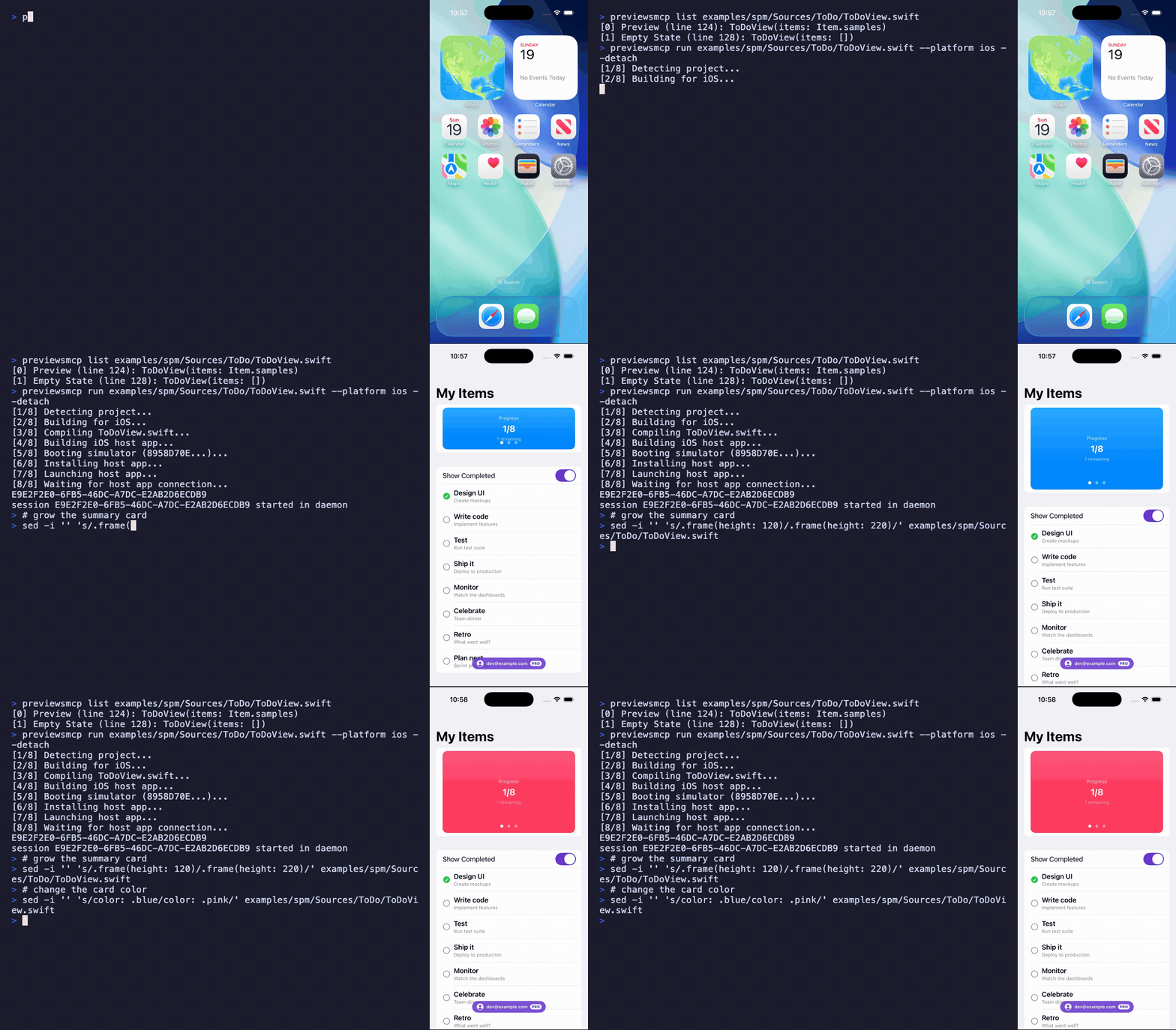
Run, snapshot, and interact with #Preview blocks from the command line or over MCP — no Xcode process required.
Quickstart
git clone https://github.com/obj-p/PreviewsMCP.git
cd PreviewsMCP
swift run previewsmcp examples/spm/Sources/ToDo/ToDoView.swift
A live macOS preview window opens. Edit the source file and the window hot-reloads.
Why PreviewsMCP?
PreviewsMCP compiles your #Preview closure into a dylib and loads it into a real app process (macOS NSApplication or iOS simulator UIApplication) with hot-reload — driven entirely from the command line or over MCP. No Xcode process required.
That makes it a standalone, extensible preview workflow:
- CLI and MCP-native — preview, snapshot, and iterate from the terminal or let an AI agent drive the loop
- Hot-reload — edit a file, see changes immediately, with
@Statepreserved across literal edits - Trait and variant sweeps — render one preview across color schemes, dynamic type sizes, locales, and layout directions in a single call
- iOS interaction — walk the accessibility tree and inject taps/swipes through an in-simulator touch bridge
- Build system flexible — works with SPM, Xcode projects (
.xcodeproj/.xcworkspace), and Bazel
Solving the Xcode preview sandbox problem
Xcode previews run your code inside Apple's preview agent — a real app process, but an opaque one. You can't hook into its lifecycle, run your own initialization, or extend it. FirebaseApp.configure(), custom font registration, auth setup, and DI containers have nowhere to run. The ecosystem answer is "mock everything," and at scale teams maintain micro apps — standalone app targets that render a single feature with controlled dependencies. Airbnb's dev apps drive over 50% of local iOS builds. Point-Free's isowords has 9 preview apps. Every team pays the maintenance tax: separate targets, schemes, and mock setups that drift.
Because PreviewsMCP hosts your preview in its own app process, you can extend that process. The setup plugin provides the hook: a PreviewSetup protocol where setUp() runs once per session (SDK init, auth, font registration, DI container) and wrap() surrounds every preview render (themes, environment values). It's the micro app's dependency layer extracted into a reusable framework — without maintaining a separate app target.
Installation
Homebrew
brew tap obj-p/tap
brew install previewsmcp
From source
git clone https://github.com/obj-p/PreviewsMCP.git
cd PreviewsMCP
swift build -c release
The binary is at .build/release/previewsmcp.
Requirements
- macOS 14+
- Xcode 16+ (for iOS simulator support)
- Apple Silicon
Capabilities
- Live previews — hot-reload SwiftUI on macOS or a real iOS simulator, preserving
@Statewhere it can. - Variant & trait sweeps — render one preview across many trait combinations (
colorScheme,dynamicTypeSize,locale,layoutDirection,legibilityWeight) in a single call, with presets for light/dark,xSmall–accessibility5,rtl,ltr, andboldText. - Multi-preview selection —
#Previewmacros and legacyPreviewProvider, with mid-session switching. - iOS interaction — walk the accessibility tree and inject taps/swipes through an in-simulator touch bridge.
- Setup plugin — one-time SDK init, auth, and DI registration via
setUp(), per-render theme/environment wrapping viawrap(). See the full integration guide. - Project config —
.previewsmcp.jsonfor per-project defaults (platform, device, traits, quality, setup target).
Usage
CLI
Every CLI subcommand talks to a daemon process over a Unix socket. The daemon auto-starts on first use (ADB-style) and stays alive across invocations — no manual lifecycle management needed.
previewsmcp help                   # top-level overview
previewsmcp help <subcommand>      # full options for any command
Previewing
previewsmcp MyView.swift                           # live macOS preview window
previewsmcp MyView.swift --platform ios            # iOS simulator
previewsmcp run MyView.swift --detach              # start in background, print session ID
Snapshotting
previewsmcp snapshot MyView.swift -o preview.png   # one-shot screenshot
previewsmcp variants MyView.swift \
  --variant light --variant dark -o ./shots         # multi-trait sweep
If a session is already running for the target file, snapshot and variants reuse it (fast — no recompile) and fall back to an ephemeral session otherwise.
Inspecting and interacting (iOS)
previewsmcp elements                               # dump accessibility tree as JSON
previewsmcp touch 120 200                           # tap at (120, 200)
previewsmcp touch 40 300 --to-x 300 --to-y 300     # swipe
Session management
previewsmcp configure --color-scheme dark           # change traits on a live session
previewsmcp switch 1                                # switch to the 2nd #Preview block
previewsmcp stop                                    # close the sole running session
previewsmcp stop --all                              # close every session
Commands that target a session resolve it automatically: --session <uuid> > --file <path> > the sole running session.
Enumeration and diagnostics
previewsmcp list MyView.swift                       # enumerate #Preview blocks
previewsmcp simulators                              # list available iOS simulators
previewsmcp status                                  # daemon alive?
previewsmcp kill-daemon                             # stop the daemon process
Structured output
Read-oriented commands support --json for scripts and agent consumption:
previewsmcp run MyView.swift --detach --json | jq .sessionID
previewsmcp simulators --json | jq '.simulators[] | select(.state == "Booted")'
previewsmcp list MyView.swift --json
previewsmcp snapshot MyView.swift -o out.png --json
previewsmcp variants MyView.swift --variant light --variant dark -o ./shots --json
previewsmcp status --json
previewsmcp elements --json
Project config
Drop a .previewsmcp.json at your project root to set defaults for every CLI command and MCP tool call (see examples/.previewsmcp.json for the canonical shape):
{
  "platform": "ios",
  "device": "iPhone 16 Pro",
  "traits": { "colorScheme": "dark", "locale": "en" }
}
Explicit CLI/MCP parameters override config values. The config is auto-discovered by walking up from the source file directory.
MCP server
Add to your agent's MCP config — same mcpServers shape whether it lands in .mcp.json (Claude Code), ~/.cursor/mcp.json (Cursor), .vscode/mcp.json (VS Code), or claude_desktop_config.json (Claude Desktop):
{
  "mcpServers": {
    "previews": {
      "command": "/path/to/previewsmcp",
      "args": ["serve"]
    }
  }
}
Once connected, ask your agent "what previews tools are available?" — it will describe them directly from the server's registered schemas, including snapshotting, variant capture, accessibility-tree inspection, and touch injection.
Daemon model
The CLI uses an auto-started background daemon that manages preview sessions. On first CLI invocation, previewsmcp serve --daemon launches in the background and listens on ~/.previewsmcp/serve.sock. Subsequent commands connect to the existing daemon — no cold start. The daemon stays alive until explicitly killed (previewsmcp kill-daemon) or the machine reboots.
previewsmcp status— check if the daemon is running and its PID.previewsmcp kill-daemon— stop the daemon and clean up the socket.- Sessions persist across CLI invocations.
run --detachstarts one,stopcloses it, andconfigure/switch/snapshot/elements/touchoperate on it.
Yorumlar (0)
Yorum birakmak icin giris yap.
Yorum birakSonuc bulunamadi