octen-mcp
Health Uyari
- License — License: MIT
- Description — Repository has a description
- Active repo — Last push 0 days ago
- Low visibility — Only 7 GitHub stars
Code Uyari
- process.env — Environment variable access in src/extract.ts
- network request — Outbound network request in src/extract.ts
Permissions Gecti
- Permissions — No dangerous permissions requested
Bu listing icin henuz AI raporu yok.
MCP server for Octen Extract — turn URLs into LLM-ready markdown for Claude / Cursor / any MCP client
octen-mcp




MCP server for Octen Extract — turn any URL into clean, LLM-ready markdown. Plug into Claude / Cursor / VS Code / Windsurf and let the model pull the live web.
Why this MCP
Most extract tools (Firecrawl, Jina Reader, Exa, Tavily) hand you the page body. Octen returns the body plus structured page labels in the same call:
category— topical labels with subcategories (e.g.,Computers, Electronics & Technology / Artificial Intelligence,Health,Finance,Travel). Use to skip out-of-vertical pages in RAG pipelines — a finance pipeline can filter out random forum / entertainment pages before embedding.page_structure— what kind of page this actually is (e.g.,Content Page / Article,Homepage,Index Page,No Main Content). Use to skip listing/navigation pages, dead links, and login-wall shells before paying for LLM calls — in real RAG pipelines, a meaningful share of fetched URLs (often 20–30%) are index pages or content-less shells.highlights— pass aqueryand get the most relevant snippets ranked per page instead of the full body (cheaper context, better signal).
The two labels move filtering upstream — instead of fetching everything, embedding it, then realizing a chunk of pages are useless, you skip them at fetch time. None of category / page_structure / highlights exist in Firecrawl, Jina, Exa, or Tavily today.
When success isn't enough
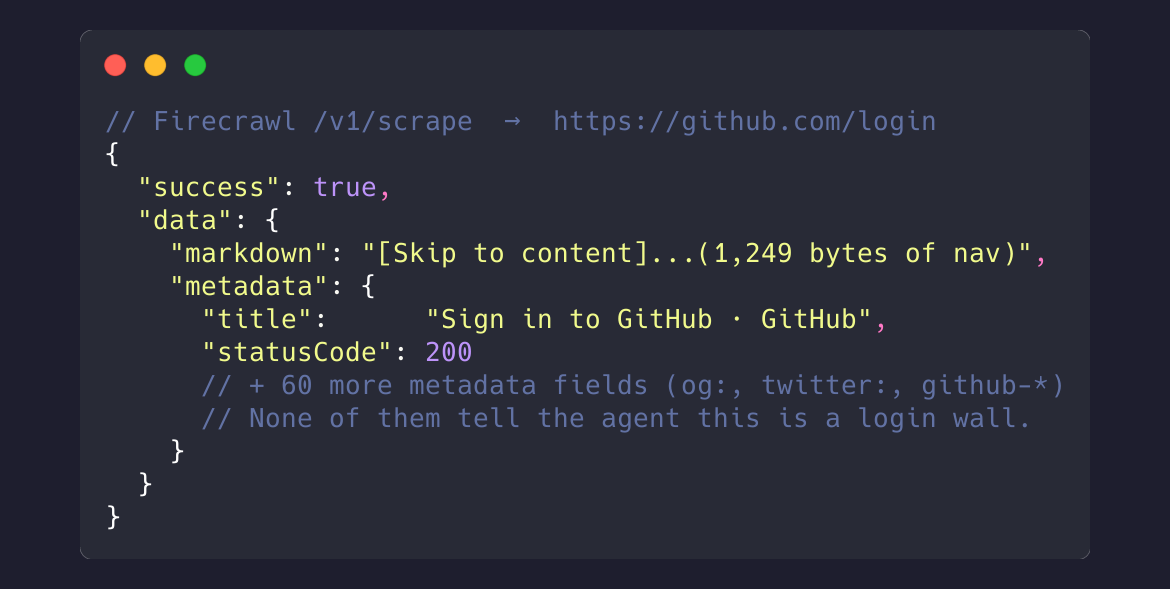
A common failure mode for extract pipelines: the request returns success, the response body is non-empty, but the page is actually a login wall, paywall, JS shell, or "we'll be right back" stub. The agent has no signal until it pays for an LLM call to discover the page has nothing to summarize. Octen flags these at fetch time.
Take https://github.com/login — visually it looks like a normal page:
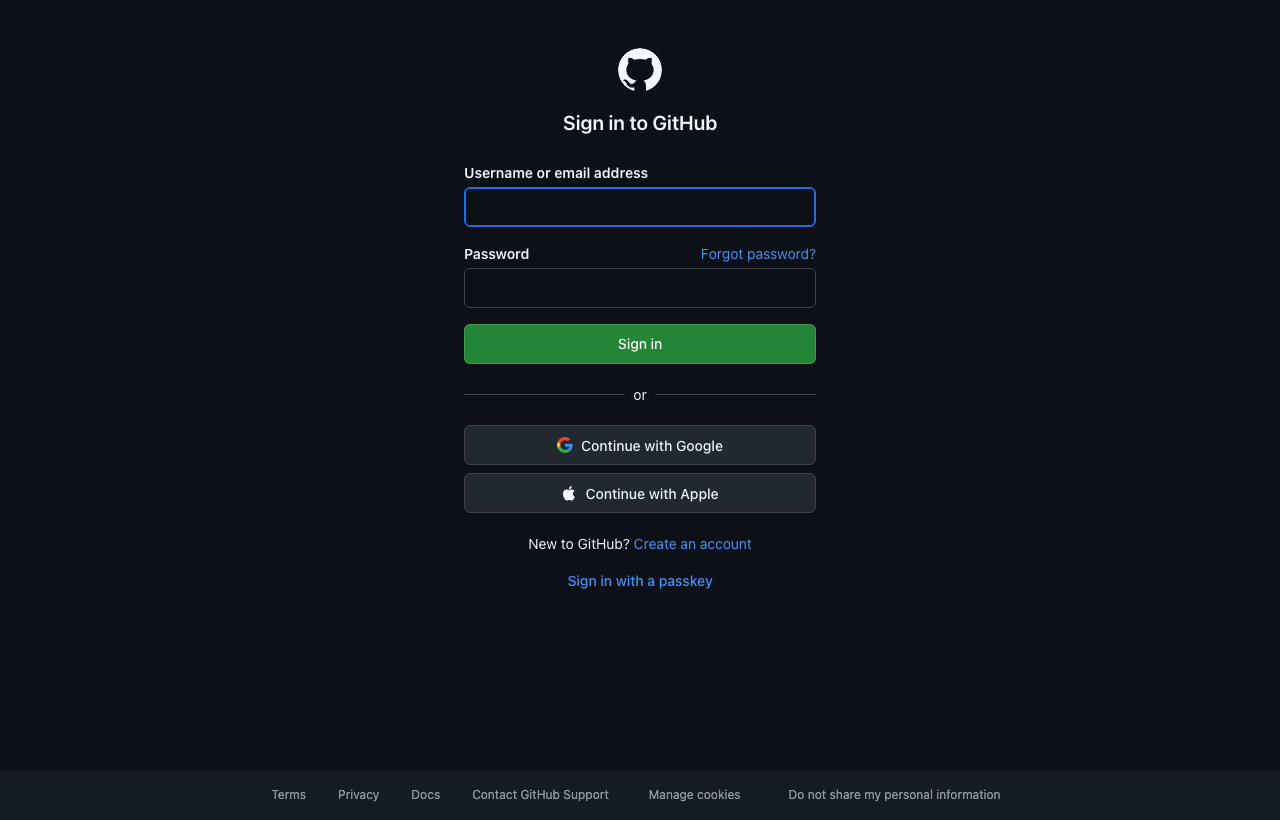
But there's no main content to extract — it's a sign-in form. Same URL on both APIs returns very different signals:
Firecrawl /v1/scrape |
Octen /extract (this server) |
|---|---|
 |
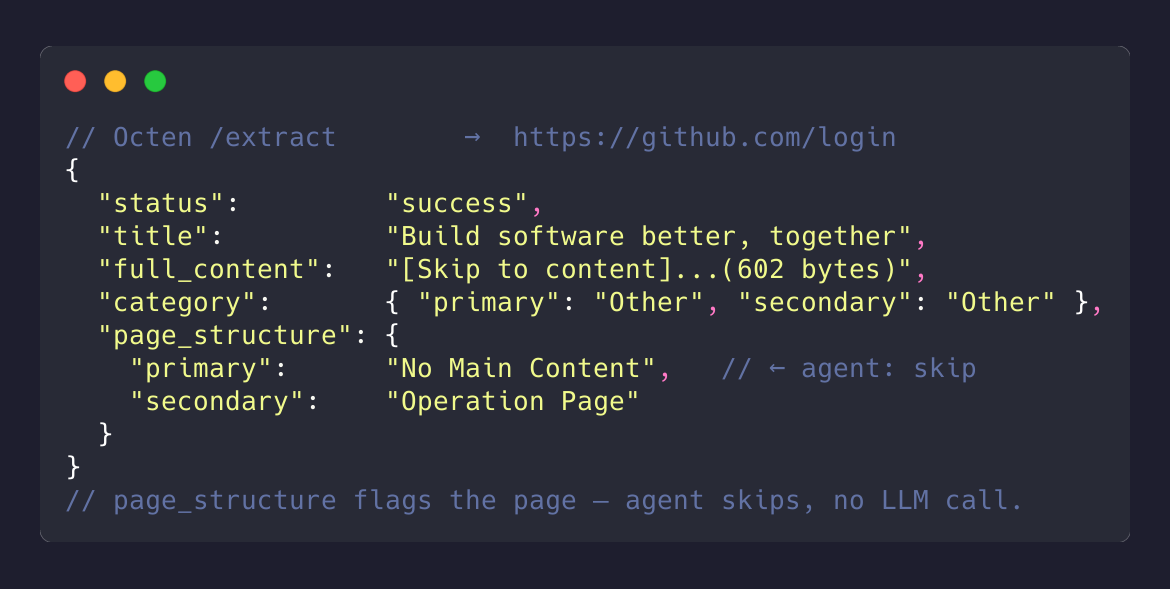 |
That single page_structure: "No Main Content" lets the agent skip the page without an LLM call. With other tools, the agent only finds out by spending tokens to summarize an empty page — at scale, a real chunk of the token bill.
Quick start


VS Code users: click → the button prompts for your Octen API key on install (grab one at octen.ai first).
For other clients, configure manually:
Claude Desktop
Edit ~/Library/Application Support/Claude/claude_desktop_config.json (macOS) or %APPDATA%\Claude\claude_desktop_config.json (Windows):
{
  "mcpServers": {
    "octen": {
      "command": "npx",
      "args": ["-y", "octen-mcp"],
      "env": {
        "OCTEN_API_KEY": "your-key-here"
      }
    }
  }
}
Quit and reopen Claude Desktop. Ask "fetch octen.ai and summarize" — Claude routes to the extract tool automatically.
Cursor
Add to ~/.cursor/mcp.json:
{
  "mcpServers": {
    "octen": {
      "command": "npx",
      "args": ["-y", "octen-mcp"],
      "env": { "OCTEN_API_KEY": "your-key-here" }
    }
  }
}
VS Code (workspace .vscode/mcp.json)
The one-click badges above handle the user-level install. For a per-workspace config:
{
  "servers": {
    "octen": {
      "command": "npx",
      "args": ["-y", "octen-mcp"],
      "env": { "OCTEN_API_KEY": "your-key-here" }
    }
  }
}
Claude Code (CLI)
One line, no JSON editing:
claude mcp add --scope user octen \
  -e OCTEN_API_KEY=your-key-here \
  -- npx -y octen-mcp
--scope user makes it available from any directory. Verify with claude mcp list — should show octen: ✓ Connected.
Windsurf / Cline / other MCP clients
Same npx -y octen-mcp command with OCTEN_API_KEY env — works in any MCP-compatible client.
Tool reference: extract
| Param | Type | Default | Description |
|---|---|---|---|
urls |
string[] |
required | 1–20 URLs per call. Bare hosts like octen.ai are auto-prefixed with https://. |
query |
string |
none | Intent-focused keywords. When set, results contain highlights instead of full_content. Max 500 chars. |
max_age_seconds |
int |
86400 |
Cache TTL in seconds (min 300). Lower this for time-sensitive pages (news, prices). |
format |
markdown | text |
markdown |
Output content format. |
timeout |
int |
30 |
Per-URL extraction timeout, 1–60 seconds. |
include_images |
bool |
false |
Include image URLs found on each page. |
include_videos |
bool |
false |
Include video URLs found on each page. |
include_audio |
bool |
false |
Include audio URLs found on each page. |
include_favicon |
bool |
false |
Include each page's favicon URL. |
Full API reference: docs.octen.ai/api-reference/extract.
Response example
One result object per URL. Success shape:
{
  "url": "https://en.wikipedia.org/wiki/Model_Context_Protocol",
  "status": "success",
  "title": "Model Context Protocol - Wikipedia",
  "category": {
    "primary": "Computers, Electronics & Technology",
    "secondary": "Programming and Developer Software"
  },
  "page_structure": {
    "primary": "Content Page",
    "secondary": "Encyclopedia"
  },
  "time_published": "2024-11-25T00:00:00Z",
  "time_last_crawled": "2026-05-21T08:14:22Z",
  "full_content": "# Model Context Protocol\n\n…clean markdown body…"
}
When query is set, full_content is replaced by "highlights": ["…ranked snippet 1…", "…ranked snippet 2…"]. When include_images / include_videos / include_audio / include_favicon are set, the corresponding fields appear alongside.
Failure shape (e.g., 404 / DNS / 5xx — see the edge cases section below):
{
  "url": "https://httpbin.org/status/404",
  "status": "failed",
  "error_message": "Target returned HTTP 404"
}
Example prompts to try
Differentiating use-cases (these exercise Octen's per-page labels):
Fetch these 10 URLs and only summarize the ones whose category is Finance.(filter bycategory)Fetch these search results and skip any whose page_structure is Index Page or that come back as failed.(filter bypage_structure)Pull octen.ai/pricing and confirm its page_structure is a content page, not a redirect or empty shell.(page_structurevalidation)Search 'pricing' across firecrawl.dev — return only the relevant highlights.(triggersquery→highlights)
Basic fetch use-cases:
Fetch octen.ai and summarize the main product features.Compare the positioning of firecrawl.dev and octen.ai.What does the Hacker News front page say right now? Pull the top 5 story titles.
How Octen handles edge cases
For the silent-success case (login walls / shells), see When success isn't enough above. Other failure modes come back as structured status: failed results, not empty markdown:
| Scenario | Example URL | Octen response | Why it's useful |
|---|---|---|---|
| Hard 404 | https://httpbin.org/status/404 |
status: failed, error_message: "Target returned HTTP 404" |
Agent knows the URL is dead — no need to retry. |
| Server error (5xx) | https://httpbin.org/status/500 |
status: failed, error_message: "Target server error (HTTP 500)" |
Distinguishes server-side outage from client-side dead page — can be safely retried later. |
| DNS failure / dead domain | https://nonexistent-zzz-fake-xyz.invalid |
status: failed, error_message: "Failed to resolve domain" |
Distinguishes "domain doesn't exist" from "page doesn't exist" — different remediation. |
Environment variables
| Variable | Required | Default | Notes |
|---|---|---|---|
OCTEN_API_KEY |
✅ | — | Get one at octen.ai |
OCTEN_API_URL |
optional | https://api.octen.ai |
Override for staging or self-hosted |
Local development
git clone https://github.com/Octen-Team/octen-mcp.git
cd octen-mcp
npm install
npm run build
OCTEN_API_KEY=<key> npm run inspect    # opens MCP Inspector
Tip — make Claude prefer this tool
If your client also has a built-in web-fetch tool, drop a hint in Claude Desktop's Customize / Project Instructions:
When the user asks to fetch or extract content from a URL, prefer the
extracttool from theoctenMCP server. Usequerywhenever the user is looking for something specific on the page (returns ranked highlights, not the whole body).
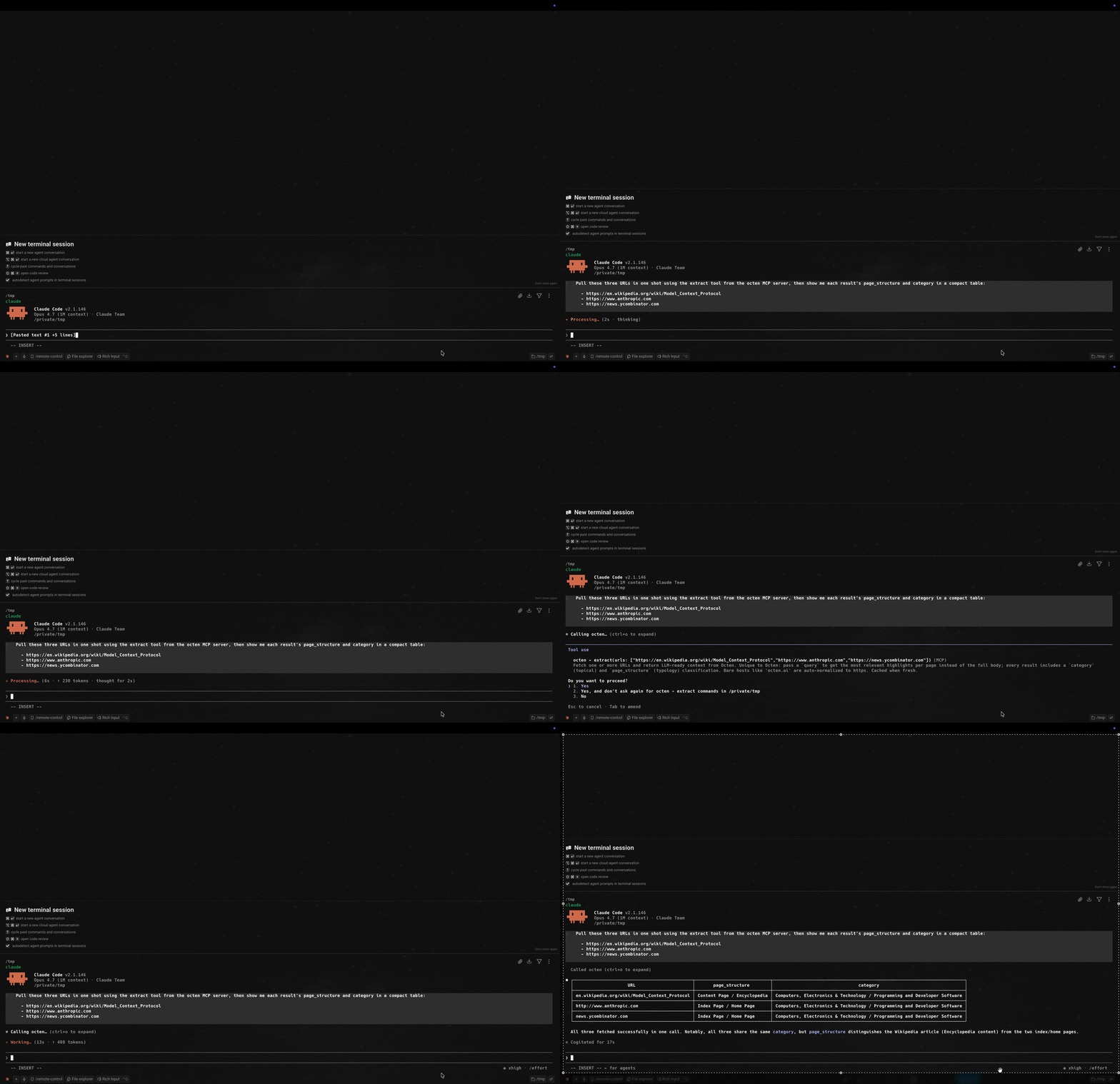
With the hint in place, a single tool call classifies three mixed URLs (article / homepage / discussion) in one shot:
License
MIT © Octen
Yorumlar (0)
Yorum birakmak icin giris yap.
Yorum birakSonuc bulunamadi