octopus-blackboard
Health Uyari
- License — License: Apache-2.0
- Description — Repository has a description
- Active repo — Last push 0 days ago
- Low visibility — Only 5 GitHub stars
Code Basarisiz
- exec() — Shell command execution in src/board.ts
- crypto private key — Private key handling in src/board.ts
- exec() — Shell command execution in src/cli.ts
- process.env — Environment variable access in src/cli.ts
- process.env — Environment variable access in src/config.ts
- exec() — Shell command execution in src/db.ts
Permissions Gecti
- Permissions — No dangerous permissions requested
Bu listing icin henuz AI raporu yok.
A shared memory, attribution & governance layer for AI coding agents. Not an orchestrator — a blackboard.
Octopus Blackboard
A shared memory and coordination layer for AI coding agents.
Agents do not need another boss. They need a shared blackboard.
Part of Octopus Core — the open infrastructure stack for governed AI. One job per repo, along the agent lifecycle: Scout · Observe · Experience · Blackboard · Runtime · Replay — with Inspect governing every stage.
This repo — Blackboard · Coordinate: Shared cognition for coding agents.
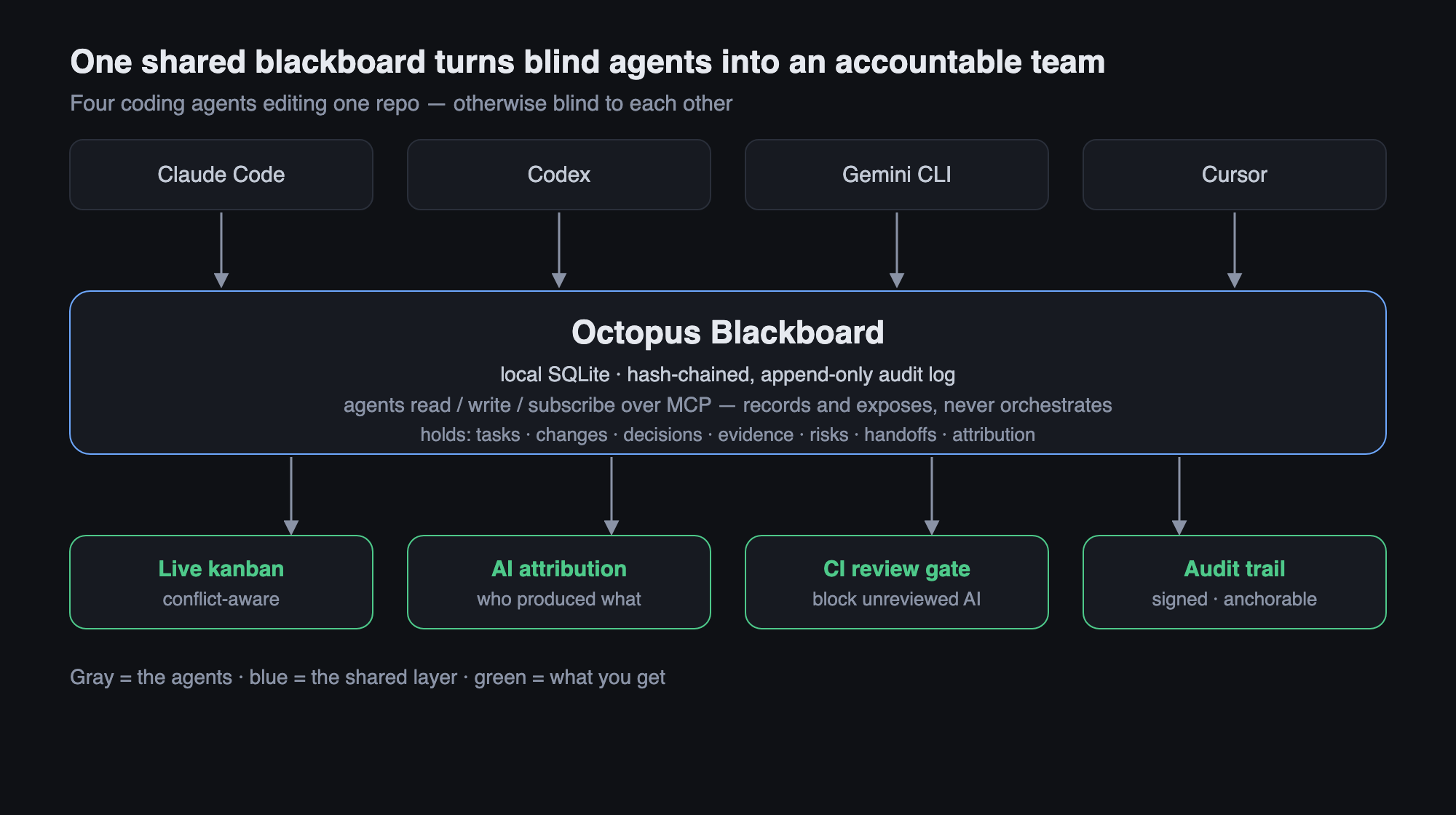
Claude Code, Codex, Gemini CLI, Cursor, and your local agents all work on the
same repo — but they are blind to each other. One refactors auth while another
rewrites the same file. Context is scattered across CLIs. Nobody can replay what
happened.
Octopus Blackboard is not an orchestrator. It does not schedule agents,
trigger them, or decide anything on their behalf. It is a passive, local-first
shared memory that answers six questions:
Who is working on what      →  agents, tasks, claims
What changed                →  files_changed
What was decided            →  decisions
What evidence exists        →  evidence
What risks are open         →  risks
What was left for whom       →  messages, handoffs
Every agent only needs to be able to read the board, write the board,
leave messages, and attach evidence. That's the whole contract.
Why
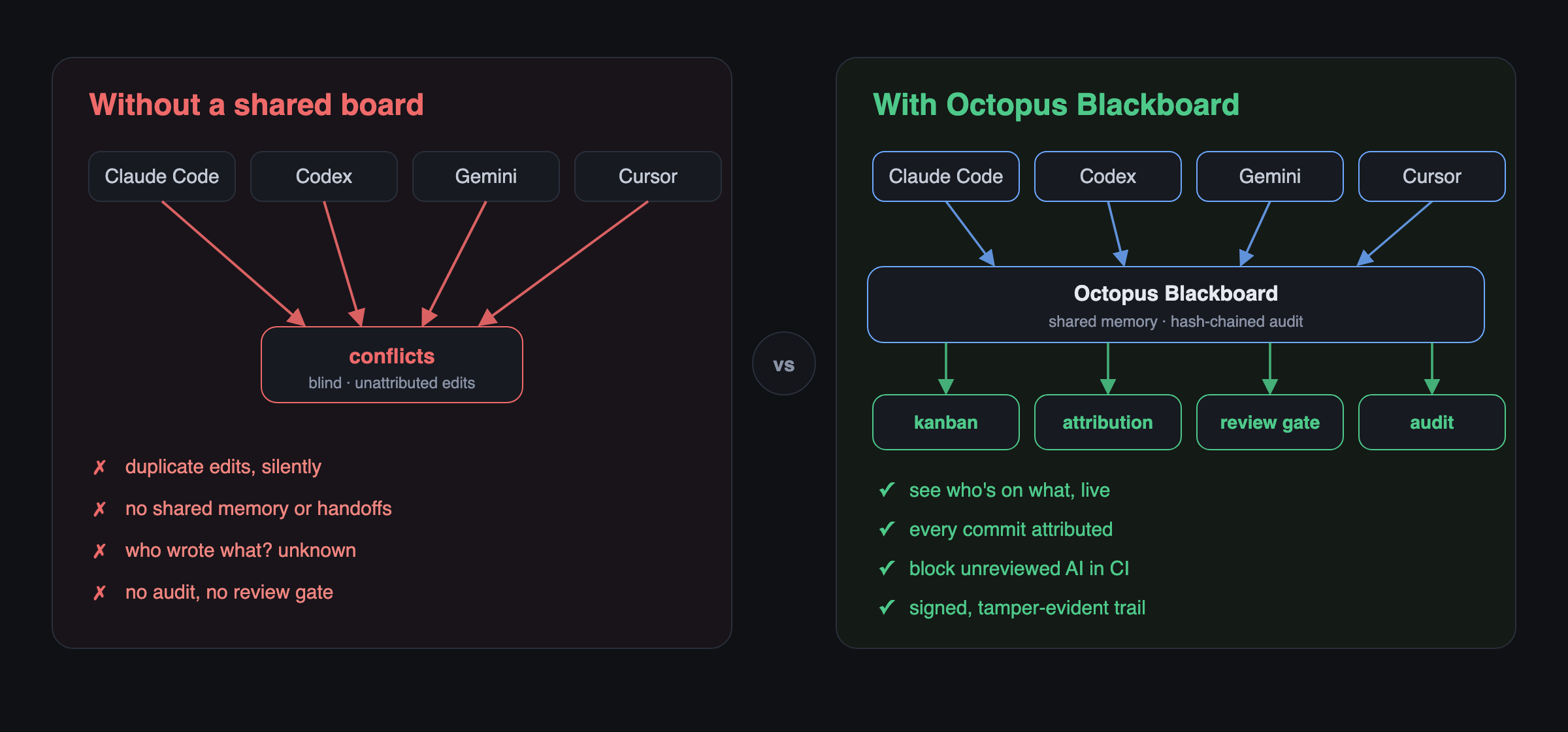
Enterprises are not primarily afraid that agents aren't smart enough. They are
afraid that:
- Multiple AI tools edit the same code simultaneously
- Context is scattered across different CLIs
- There is no shared memory, no audit, no handoff
- There is no conflict awareness and no way to replay
The blackboard cuts straight through this. Every write appends a
tamper-evident, hash-chained entry to an append-only timeline, so the
entire history is auditable and replayable — and any after-the-fact edit to an
earlier entry breaks verification.
Install
npm install
npm run build      # compiles to dist/
Requires Node ≥ 22. The board is a single SQLite file under .octoboard/,
discovered by walking up from your working directory (like .git).
See it in action
examples/two-agents.sh plays out the flagship
scenario — Claude Code and Codex sharing one board on the same repo: a claim
conflict, a live same-file collision, a decision, attribution, a handoff that
lands in the other agent's inbox, an AI review, the human-approval CI gate
(blocked → passes), the accountability scorecard, blame→narrative, and a
verified hash chain with session signatures. Run it in an empty directory:
bash examples/two-agents.sh # needs `octoboard` on PATH
CLI
octoboard init                                   # create .octoboard/ here
octoboard status                                 # who's on the board, right now

octoboard note "Codex is refactoring auth middleware"
octoboard claim trust-layer-policy-schema        # claim work; warns on conflict
octoboard message claude "Review policy edge cases before merge"
octoboard decision "Use hash-chain audit log" --why "tamper-evidence"
octoboard risk "Migration may break audit replay" --severity high
octoboard file src/auth.ts --change modified --task trust-layer-policy-schema
octoboard handoff claude "Tests pass except policy replay" --task trust-layer-policy-schema

octoboard timeline                               # the full hash-chained history
octoboard verify                                 # confirm the chain is intact
Identity is set with --as <agent> or the OCTOBOARD_AGENT environment
variable. Point at a specific board with --board <dir> or OCTOBOARD_DIR.
Conflict awareness
The board never blocks — it surfaces. If two agents claim the same key, or
touch the same task's files, both writes are recorded and the second agent is
warned:
⚠ CONFLICT: "trust-layer-policy-schema" is also held by codex. Both claims recorded.
AI attribution & shared development memory
Git records who pushed a commit. It does not record which AI agent produced
the code, in which session, on which machine, whether another AI reviewed it, or
whether a human approved it. As AI-native development becomes common,
accountability must move beyond Git authorship.
The blackboard adds an attribution layer on top of Git — it never rewrites
history. Git stays the source of code; the blackboard becomes the source of
attribution.
Sessions
A session is one continuous execution of an agent, and the unit attribution
hangs off. Starting one makes every subsequent write attribute to it (the active
session is remembered across CLI invocations, per agent):
export OCTOBOARD_AGENT=claude OCTOBOARD_PROVIDER=anthropic \
       OCTOBOARD_MODEL=claude-opus-4-8 OCTOBOARD_CLI=claude-code

blackboard session start --label "auth work"   # captures machine, branch, repo
blackboard claim policy-engine
blackboard file src/policy.ts --change modified
# ... make a git commit ...
blackboard link HEAD                            # attribute the commit's files
blackboard session stop
Identity is fully provider-independent — --provider, --model, --cli, or
the matching OCTOBOARD_* env vars. Any AI CLI (local or cloud) can register
itself with no assumptions about a specific vendor.
Linking commits
blackboard link <rev> reads the files a commit touched (via Git) and records
one attribution per file for the active session. Optionally it writes an
additive git notes entry under refs/notes/blackboard:
blackboard link HEAD --note
blackboard attribute <sha> --file src/x.ts --actor human --name Ran  # manual
Reviews
blackboard review HEAD --by ai   --name codex --outcome approved --note "tests pass"
blackboard review HEAD --by human --name Ran   --outcome approved
Querying the shared memory
blackboard who src/auth.ts             # git authors + AI sessions that touched it
blackboard who src/auth.ts --line 42   # which session introduced this line
blackboard explain HEAD                # attribution + reviews + related decisions
blackboard commits claude-code         # which commits came from an AI / CLI
blackboard unreviewed                  # AI commits never reviewed by a human
blackboard joint claude codex          # files modified by BOTH agents
blackboard timeline --session <id>     # per-session HH:MM timeline
Example explain:
commit 5fa3095…  Human Dev <[email protected]>  add auth
  produced by:
    ai claude [claude-opus-4-8] — src/auth.ts
  reviews:
    human Ran: approved
  git note: blackboard: produced by claude-code (claude-opus-4-8), session 75b2b7e7…
Every attribution, review, session, and decision is also recorded in the
hash-chained timeline, so the full accountability history is tamper-evident
and replayable. blackboard and octoboard are the same command.
Governance & accountability chain

The point of attribution is to enforce something. The chain from work to a
merge gate:
agent work → commit attribution → export/import → CI check → human-review gate
CI gate (check)
Turn queries into an enforceable gate. Read-only — it reports pass/fail and
exits non-zero; the CI system decides what to do. The blackboard never blocks.
# In CI, on a PR branch — fail the build if any AI commit isn't human-APPROVED
# (a rejected / changes-requested review does not clear the gate):
blackboard check --range origin/main..HEAD --require-human-review
echo $?   # 0 = pass, 1 = violations

blackboard check --verify-chain --require-attribution --range origin/main..HEAD
blackboard check            # default gate: verify chain + require human review
Portability (export / import / trailers)
Attribution is local-first; these make it survive git push into a team board
or CI:
blackboard export --range origin/main..HEAD --out attribution.json  # on the dev machine
blackboard import attribution.json                                   # on the team board / CI
blackboard trailers HEAD                                             # trailer lines for a commit message
import is idempotent (keyed by row id). The bundle carries attributions,
reviews, sessions, and related decisions.
Subscribe (watch)
Complete the read/write/subscribe/message contract. Passive: it polls and
reports; it never pushes work.
blackboard watch --for claude     # only messages/handoffs/conflicts addressed to me
blackboard watch                  # the full stream
blackboard watch --once           # one-shot poll (for scripts)
Signed sessions (sign / verify)
Minimal identity (v0): each session gets an Ed25519 keypair (private key stays
local under .octoboard/keys/, gitignored). Signing the timeline head letsverify distinguish trusted state from merely asserted:
blackboard sign        # sign the current head with the active session key
blackboard verify      # chain integrity + which sessions have signed, trusted/stale
A session auto-signs its head on session stop. A signature over a head becomes
stale the moment any earlier history is altered — so tampering is visible
even though the signature itself stays cryptographically valid. This is not yet
a full PKI (no key distribution or revocation).
Ingesting CLI transcripts
Populate the board from a CLI's session transcript instead of calling the API
by hand — file edits, decisions, and notes flow onto the active session:
blackboard ingest ~/.claude/transcript.jsonl --format claude-code
blackboard ingest session.jsonl --format codex        # also: gemini, grok
blackboard ingest events.json    --format generic --dry-run
claude-code/codex/gemini/grok use a conservative tool-use JSONL
heuristic (it finds file edits from file_path/notebook_path and
patch/write tool calls). generic reads a normalized schema — the stable
integration path for any CLI:
{ "events": [
  { "type": "file", "path": "src/auth.ts", "change": "modified" },
  { "type": "decision", "title": "use ed25519", "rationale": "small keys" },
  { "type": "note", "text": "left policy edge cases for review" }
] }
Team backend
Boards stay local-first; sync shares the portable attribution records (never a
board's private hash chain) into a team store — a shared file or Postgres.
blackboard sync push --target /shared/team.json          # file (shared drive)
blackboard sync pull --target postgres://host/blackboard # team database (needs `pg`)
export signs the bundle with your active session key; import verifies it andimport --require-signed refuses unsigned or tampered bundles — so imported
attribution has origin authenticity, not just id-dedup.
Tamper-evidence goes further than the in-DB chain if you anchor the head
externally:
blackboard anchor --git-note              # record seq:hash on the commit (or --out file)
blackboard verify --against git-note      # prove history wasn't truncated/altered
Liveness and compliance:
blackboard session heartbeat        # mark your session alive (active vs stale)
# `blackboard file ...` now warns if another LIVE session is editing the same file

blackboard prune --before 2026-01-01T00:00:00Z   # retention: drop old messages/
                                                 # evidence/file-changes (timeline kept)
blackboard redact 42 --reason PII                # hide a timeline entry's content
prune never touches the append-only timeline (the audit trail). redact
blanks the content across every read path — the timeline overlay and the
underlying source row (a message body, evidence note, etc.) so inbox/status/
the dashboard can't leak it — while keeping the hash chain valid. It is not
cryptographic erasure: the original summary stays in the timeline row so the
chain still verifies, so don't store secrets you must be able to destroy. For
tamper-evidence against an attacker with database write access, anchor the head
hash externally (a commit, a log, a second machine) — verify shows anunanchored warning when it can't confirm the tail.
Tasks & kanban
Tasks are kanban cards — number, content, owner (which agent / CLI), project,
blast radius, risk, and live progress. "Notifying an agent" is passive:
assigning a task drops a "please look at task #N" message in that agent's inbox;
the agent reads it and decides to act — the board never launches anyone.
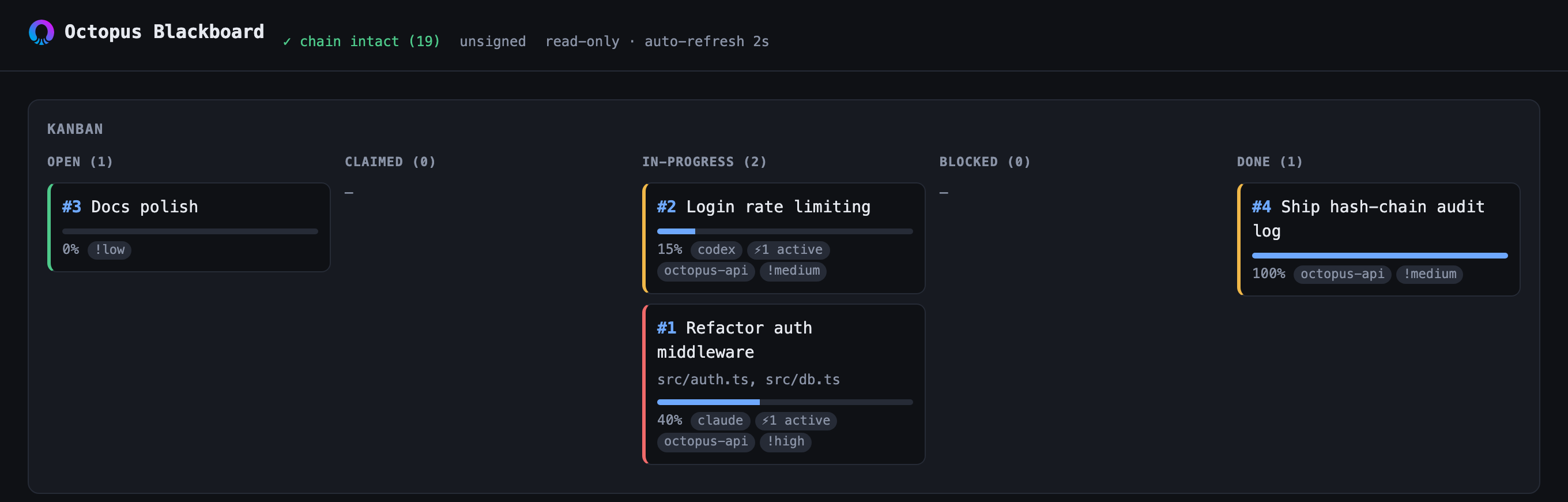
The live blackboard serve dashboard — read-only, auto-refreshing. Each card
shows the task number, progress bar, assignees, active-agent count (⚡), project,
and a risk-coloured border.
blackboard task add auth-mw --title "Refactor auth middleware" \
  --project octopus-api --impact "src/auth.ts, src/db.ts" --risk high
blackboard assign 1 claude       # → drops "please look at task #1 …" in claude's inbox
blackboard progress 1 40         # → moves #1 to in-progress, 40%
blackboard tasks                 # kanban view, grouped by status
blackboard task show 1           # full card: owner, project, impact, risk, files
The read-only serve dashboard renders these as a live kanban (columns by
status; each card shows number, title, a progress bar, assignees, active-agent
count, project, and a risk-coloured left border). Agents drive it via the MCP
tools board_task_define, board_assign, board_progress, board_tasks — an
agent calls board_progress as it works so the bar moves in real time.
Visibility
blackboard report          # scorecard: review coverage %, AI/human ratio, per-agent
blackboard blame src/auth.ts 42   # trace a line → the session that wrote it, and its
                                  # other work, decisions, and handoffs (blame → narrative)
blackboard serve           # read-only local web dashboard (http://localhost:4319)
The dashboard is dependency-free (node:http), strictly read-only (non-GET is
refused), and auto-refreshes: live timeline, sessions, conflict/attribution
state, and the accountability scorecard.
MCP server — connect any CLI
The blackboard speaks standard MCP over stdio, so any MCP-capable client
(Claude Code, Cursor, Codex, Gemini CLI, VS Code, Windsurf, …) can read and
write the board. Generate the exact config for your client in one step:
blackboard mcp-config cursor        # → ~/.cursor/mcp.json block
blackboard mcp-config claude-code   # → project .mcp.json block
blackboard mcp-config codex         # → ~/.codex/config.toml (TOML)
blackboard mcp-config gemini        # → ~/.gemini/settings.json block
blackboard mcp-config vscode        # → .vscode/mcp.json (servers block)
blackboard mcp-config               # → generic mcpServers JSON (any client)
Each prints where to paste it and the ready-to-use snippet, e.g.:
{
  "mcpServers": {
    "blackboard": {
      "command": "npx",
      "args": ["-y", "octopus-blackboard-mcp"],
      "env": { "OCTOBOARD_AGENT": "cursor" }
    }
  }
}
The agent identity defaults to the client name (so Cursor writes as cursor,
Codex as codex); override with --agent. The board is auto-discovered from.octoboard/ in the working directory, or pin it with --dir. Two CLIs
pointed at the same .octoboard/ now share one board — that's the whole point.
Tools exposed — coordination: board_status, board_timeline, board_note,board_claim, board_task_define, board_task, board_tasks, board_assign,board_progress, board_message, board_inbox, board_handoffs,board_decision, board_evidence, board_file_changed, board_risk,board_handoff, board_heartbeat, board_since; attribution: session_start,session_stop, board_link, board_attribute, board_review, board_who,board_explain, board_blame, board_unreviewed, board_report; governance &
portability: board_check, board_export, board_import, board_trailers,board_sign, board_trust, board_prune, board_redact, board_ingest. Each
accepts an optional agent argument to override the acting identity per call.
The recommended pattern: an agent calls board_status before starting work
to see what everyone else is doing, and writes as it goes.
Data model
| Layer | Tables | Purpose |
|---|---|---|
| Who is present | agents, sessions |
provider-independent identity, session context |
| What's happening | tasks, messages, handoffs |
coordination — claim, message, hand off |
| Who produced what | attributions, reviews |
AI/human attribution & review, keyed by commit |
| Settled facts | decisions, evidence, files_changed, risks, timeline |
auditable shared memory |
timeline is the append-only hash chain every other write also records into, so
the board and its audit log can never diverge.
Architecture
better-sqlite3 (local-first, default)
  + MCP server   (read / write board)
  + CLI          (octoboard ...)
  + hash-chain audit log (the timeline)
  + optional Postgres sync   (planned)
  + optional git / file watcher (planned)
Status
Early MVP (v0.1). Working today: local SQLite board, CLI (octoboard /blackboard), MCP server, a verifiable hash-chained timeline, first-class
sessions, provider-independent AI/human attribution keyed to Git commits,
reviews, and the query layer (who, explain, commits, unreviewed,joint). Git integration is read-only plus additive git notes — history is
never rewritten. Postgres sync and change subscriptions are on the roadmap.
License
Apache-2.0 © Octoryn. See LICENSE.
Yorumlar (0)
Yorum birakmak icin giris yap.
Yorum birakSonuc bulunamadi