ode
agent
Uyari
Health Uyari
- No license — Repository has no license file
- Description — Repository has a description
- Active repo — Last push 0 days ago
- Community trust — 20 GitHub stars
Code Uyari
- process.env — Environment variable access in packages/agents/codex/client.ts
Permissions Gecti
- Permissions — No dangerous permissions requested
Purpose
This tool acts as a bridge, connecting local and remote AI coding agents (like OpenCode, Claude Code, and Codex) to chat platforms such as Slack, Discord, and Lark. It maps chat threads directly to parallel coding sessions, allowing users to trigger and monitor code generation from their messaging apps.
Security Assessment
Overall Risk: Medium. The tool operates by executing local shell commands via connected coding agents, which inherently carries execution risks, though it does not request dangerous standalone permissions itself. It makes external network requests to communicate with chat app APIs. The scan flagged environment variable access (`process.env`), which is expected for reading API tokens, but requires caution as it handles sensitive credentials. There are no hardcoded secrets detected. However, downloading and running the provided install script (`curl | bash`) bypasses manual review and could be a vector for supply chain attacks if the repository is ever compromised.
Quality Assessment
The project is highly active, with its most recent push happening today. It has a small but growing community backing with 20 GitHub stars. However, the repository notably lacks a standard open-source license. This is a significant drawback for developers, as it means the software is technically all-rights-reserved and you do not have formal legal permission to use, modify, or distribute the code.
Verdict
Use with caution: it is an active and functional tool, but the lack of a formal license and the inherent risks of passing sensitive chat tokens to a remote bridging agent require careful consideration before implementation.
This tool acts as a bridge, connecting local and remote AI coding agents (like OpenCode, Claude Code, and Codex) to chat platforms such as Slack, Discord, and Lark. It maps chat threads directly to parallel coding sessions, allowing users to trigger and monitor code generation from their messaging apps.
Security Assessment
Overall Risk: Medium. The tool operates by executing local shell commands via connected coding agents, which inherently carries execution risks, though it does not request dangerous standalone permissions itself. It makes external network requests to communicate with chat app APIs. The scan flagged environment variable access (`process.env`), which is expected for reading API tokens, but requires caution as it handles sensitive credentials. There are no hardcoded secrets detected. However, downloading and running the provided install script (`curl | bash`) bypasses manual review and could be a vector for supply chain attacks if the repository is ever compromised.
Quality Assessment
The project is highly active, with its most recent push happening today. It has a small but growing community backing with 20 GitHub stars. However, the repository notably lacks a standard open-source license. This is a significant drawback for developers, as it means the software is technically all-rights-reserved and you do not have formal legal permission to use, modify, or distribute the code.
Verdict
Use with caution: it is an active and functional tool, but the lack of a formal license and the inherent risks of passing sensitive chat tokens to a remote bridging agent require careful consideration before implementation.
Work anywhere with your favorite coding agents connected, coding sessions map 1-1 to chat threads, live updates and much more!
README.md
Ode
Ode is a agent tool that bridges your coding agents (OpenCode, Claude Code, Codex and much more) to your favorite chat apps (Slack, Discord, and Lark). Perfect for personal or team developers working on the go.
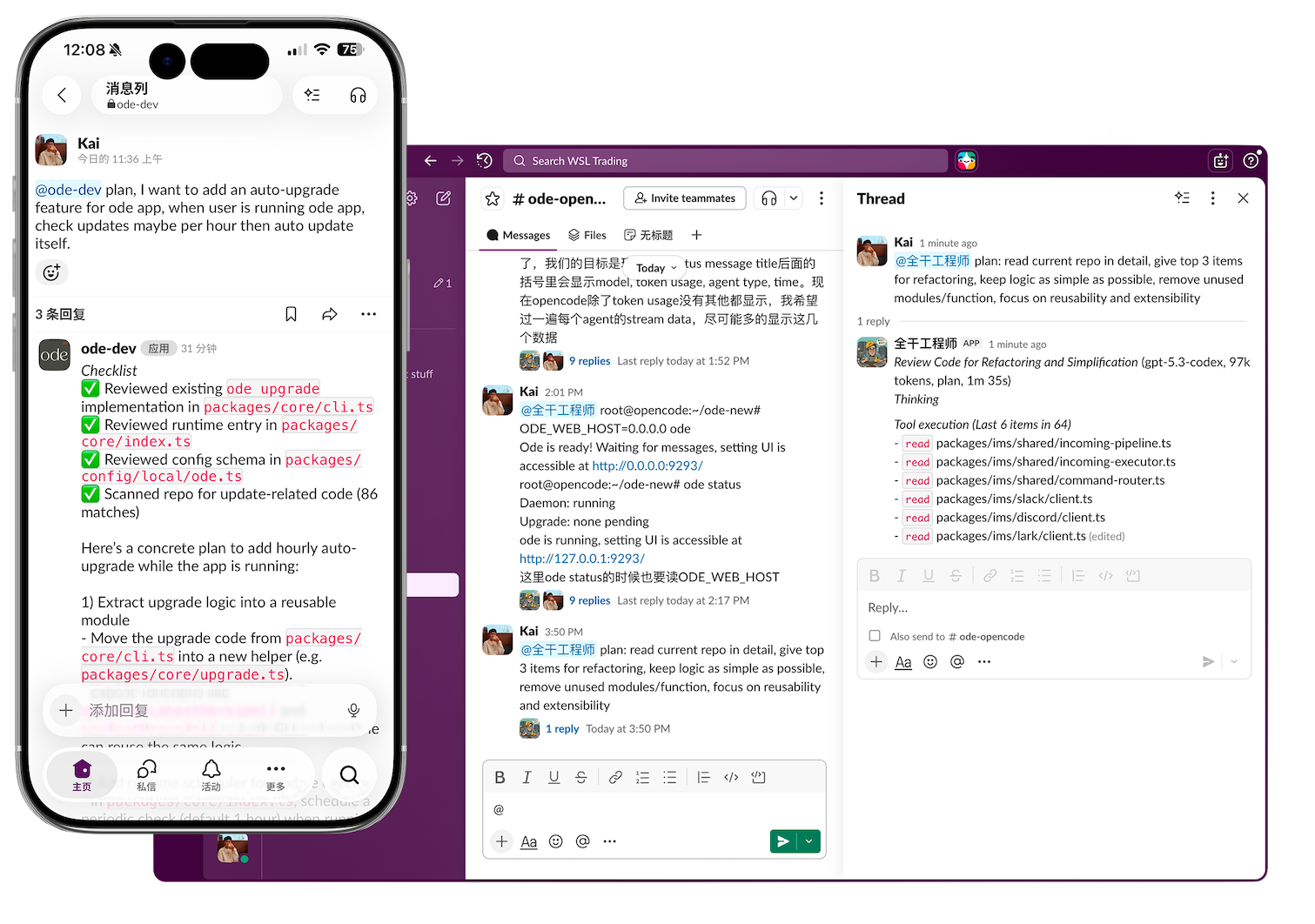
Highlight features
- 🏖️ Coding from anywhere, just chat and get response in slack or discord.
- 🖇️ Map coding sessions 1 - 1 to chat threads, and use worktree to get isolated, parallel coding is so easy.
- 👬 Anyone in the channel can join coding without any extra setup, pay one account for all team members.
- 📝 Message live message updates, you don't wait for response without any information, you can monitor from real-time text updates.
- 🐙 Per user git config, who start the thread becomes corresponding git commit author. (Run @bot /setting)
Compare with OpenClaw
- OpenClaw is greate, but Ode utilize thread based messaging to organize things better, making it easy to port sessions in coding agents directly to chat apps. Just work on one thing in one thread.
- Ode provide live message updates, you can monitor from real-time text updates for more confident.
- Channel based settings lets you configure multiple work directories easily in one machine and one slack workspace.
- Work in parallel, multiple threads can work together and isolated by worktree, multiple channels can also work together, just send messages.
- Team focused, just allow people to join channel to give them permissions to work together.
- Ode supports multiple chat tools including Slack, Discord, and Lark.
Setup
Prerequisites
- Configured OpenCode / Claude Code / Codex / Kimi Code... at least 1 coding cli.
- Choose one chatting app.
Installation and Running
One-line install (macOS/Linux):
curl -fsSL https://raw.githubusercontent.com/odefun/ode/main/scripts/install.sh | bash
ode
# ODE_WEB_HOST=0.0.0.0 ode if you want to expose setting page
Settings UI can be accessible via http://127.0.0.1:9293 or use /setting command in slack like @bot /setting.
Agent List
| Agent | Logo | Link |
|---|---|---|
| OpenCode |  |
opencode.ai |
| Codex |  |
github.com/openai/codex |
| Claude Code |  |
docs.anthropic.com/claude-code |
| Kimi Code |  |
moonshotai.github.io/kimi-cli |
| Qwen Code |  |
github.com/QwenLM/qwen-code |
| Goose CLI |  |
block.github.io/goose |
| Gemini CLI |  |
github.com/google-gemini/gemini-cli |
| Kilo Code |  |
kilo.ai/docs/code-with-ai/platforms/cli |
| Kiro CLI |  |
kiro.dev/docs/cli/reference |
Chat App List
| Chat App | Logo | Link |
|---|---|---|
| Slack |  |
slack.com |
| Discord |  |
discord.com |
| 飞书(CN) |  |
www.larksuite.com |
Usage
- Invite the bot to a channel.
- Run
@bot /setting, select channel setting, choose your coding cli (opencode also can choose model) and working directory. - @ your bot with the prompt you want.
- The bot will process your message with the coding agent.
Worktrees
- Each slack thread uses a dedicated git worktree at
<repoRoot>/.worktree/<threadId> - If you don't want to use worktree, can run
@bot /settingand select general setting, choose default.
License
MIT
Yorumlar (0)
Yorum birakmak icin giris yap.
Yorum birakSonuc bulunamadi