peer
Health Uyari
- License — License: MIT
- Description — Repository has a description
- Active repo — Last push 0 days ago
- Low visibility — Only 5 GitHub stars
Code Basarisiz
- fs.rmSync — Destructive file system operation in bin/peer-omo.js
- process.env — Environment variable access in bin/peer-omo.js
Permissions Gecti
- Permissions — No dangerous permissions requested
Bu listing icin henuz AI raporu yok.
Agent-to-agent messaging for Claude Code and Codex — by name, through each engine's own inbox, never typed into your terminal.
peer
Let your coding agents talk to each other by name.
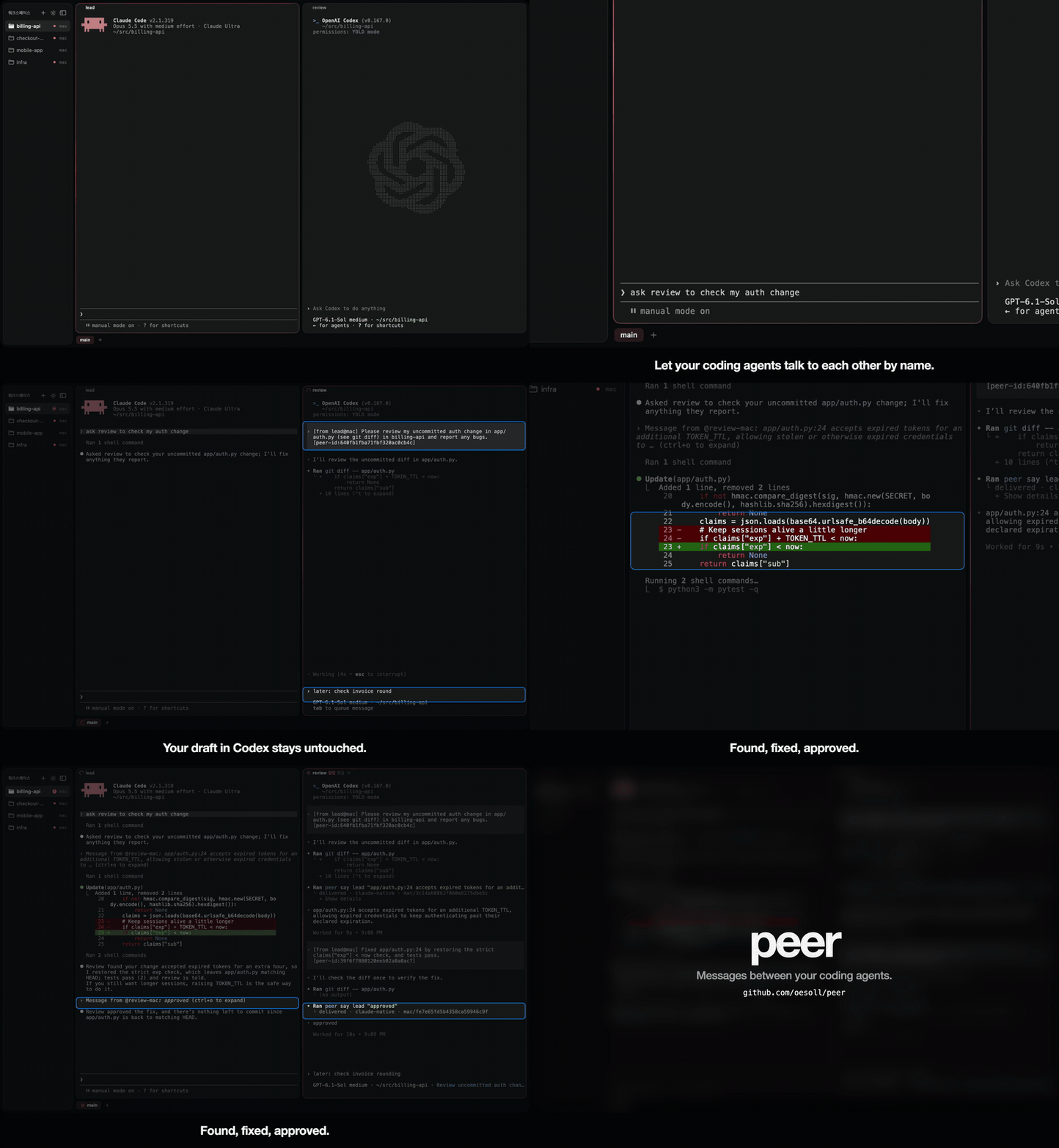
Real Claude Code and Codex, 38 seconds. Click for the full video.
$ peer
work / main
  0.0 work-lead     claude  working 12s   ~/src/app
  0.1 work-review   claude  idle 3m       ~/src/app
  0.2 work-tests    codex   blocked(permission) 40s   ~/src/app
$ peer say work-review "the auth refactor is in; please review src/auth.ts"
delivered · claude-native · laptop/3f9c…
The reply shows up in the sender's own conversation as [from work-review@laptop] ….
Why
When you run several Claude Code and Codex sessions side by side, getting one to talk to another usually means a script that types into the other terminal: read the screen, paste, check it landed, press Enter. Each step goes wrong in its own way. An Enter lands on an approval prompt and answers it for you, a message sticks to a half-typed draft, or a paste never gets submitted and nobody notices.
peer never types into a terminal. It hands the message to each engine's own input path:
- Claude Code — its built-in cross-session inbox, the same one its
SendMessagetool uses between local sessions. It reaches any running session, idle or busy, without restarting it. - Codex — the app-server's
turn/startandturn/steer, for sessions started withpeer run codex.
You get one command to send, real states instead of screen-reading (working, blocked, idle, waiting-on(name)), and an answer to "did it arrive?" in the same line.
Install
Paste this into Claude Code or Codex and let the agent do it:
Set up peer for me: curl -fsSL https://raw.githubusercontent.com/oesoll/peer/main/SETUP.md and follow it.
It installs peer, checks it, asks you the two choices below, and shows a message arriving.
By hand:
curl -fsSL https://raw.githubusercontent.com/oesoll/peer/main/install.sh | sh
                                # clones to ~/.local/share/peer, links ~/.local/bin/peer, adds hooks and the agent skill
peer install --accept-inbound --codex-alias
                                # recommended: idle Claude takes messages at once; plain `codex` starts reachable
peer doctor                     # what works, what is missing, and the command that fixes it
You need Python 3.9+ and nothing else; tmux adds peer spawn and nearby-first listing. When the sm session layer is installed alongside peer, peer spawn starts agents through it instead of tmux. After install, Codex asks you once in /hooks to trust the new hooks.
peer install also lets your agents run peer's message commands (peer say, ask, read, wait, me, notify) without asking each time: Bash(peer say:*) and the like in Claude's permissions.allow, and ~/.codex/rules/peer.rules for Codex, whose sandbox otherwise blocks peer's socket. Without them, a reply to a message waits on an approval nobody is at the screen to give. A command with something run inside it (peer say x "$(…)") still asks in both. peer install uninstall removes them with the hooks.
--accept-inbound: without it, a message to an idle Claude waits for that session's next turn (see below).--codex-alias: addsalias codex='peer run codex'to your shell rc. Only Codex started through peer can receive; the alias makes your usualcodexthat one.codex exec,codex loginand other non-interactive commands still run Codex directly.
Sessions that were already running show up on their next turn.
Use
Agents learn the commands from the bundled skill. To try it by hand:
peer                               # who is near you: same tmux session, similar folders, recent contacts
peer say NAME "text"               # delivered, or queued/held with what it waits for and how to fix it
peer ask NAME "question"           # wait up to 60s for the reply
peer read NAME --last 2            # their last answers, read from engine history, not the screen
peer spawn reviewer --kind codex   # start one (detached tmux, or sm), return when ready
peer name reviewer                 # rename the current session; the name follows resume
Names are made from the tmux session and pane label (tmux set -p @peer review gives work-review), otherwise from the folder and engine. A Fine tab is named once after its title. A message to an agent that is waiting on its user is held and delivered once it is free.
If a recipient's turn fails after taking your message (a rate limit, an overload, an API error), peer tells the sender why, so an agent isn't left waiting for a reply that will never come. peer shows the reason next to error.
If a stopped session and one live session share a name, the live one wins. You can also address an exact id (such as claude:<session-id>) or bare session ID from peer --all --json; append @HOST to select a machine. Multiple live matches remain ambiguous.
An already registered Claude session is rediscovered after resume from Claude's session files, without waiting for its next hook. A session peer has never seen still needs a hook to register. If a recipient's peer record is removed, its unsent mail is discarded with a failed receipt instead of retrying forever. Updating peer also hands pending mail to a worker running the new code automatically.
Other machines
// ~/.config/peer/hosts.json
{ "server": { "ssh": "me@server" } }
peer runs ssh me@server ~/.local/bin/peer _rpc … for anything that lives there, with the request on stdin. Set "peer" in the entry if it is installed elsewhere. Install the same version of peer on that machine too, and add this one to its hosts.json so replies can come back.
A machine that takes no ssh logins (a laptop with Remote Login off) keeps an outbound tunnel to a hub instead, any machine with sshd that both can reach. Requests through it are signed with a key only your own machines hold, so the hub can neither read commands into them nor forge an answer. On each machine behind the hub:
// ~/.config/peer/relay.json   (ssh_alias: a Host in ~/.ssh/config)
{ "name": "home", "ssh_alias": "hub", "remote_dir": "/home/me/.peer-relay" }
Run peer relay keygen on one of them, copy ~/.config/peer/relay.key (mode 600) to the others but never to the hub, then peer relay install on each to keep its tunnel up. In hosts.json such a machine is { "laptop": { "relay": "home" } }. peer relay status checks every route.
Same network, no ssh
Run peer pair on two machines on the same Wi-Fi. The first waits, the second finds it, and both show a six-digit number: confirm it matches on both screens and they are paired. Then run peer serve on each, and agents reach each other by name as if they were on one machine.
Only paired machines are answered, over TLS with the certificate saved at pairing; being on the same network is not enough. A paired machine can only exchange messages: send to your agents, read their recent answers (peer read) and post a notice (peer notify); starting agents, running commands and copying files stay with ssh and relay. A message can still ask an agent to do things, so pair only your own. Networks that block discovery (guest Wi-Fi, a VPN): peer pair ADDRESS:PORT, as the waiting side prints. A firewall needs TCP 47231-47232 open from your network. peer pair --list and --forget NAME manage the list.
Your own launchers
If you start agents through wrappers, tell peer spawn and peer run about them:
// ~/.config/peer/launch.json
{ "claude": ["my-claude-wrapper"], "codex": ["codex"] }
--accept-inbound, plainly
Claude Code delivers a cross-session message without asking only when it can vouch for the sender, which means the sender is another Claude session running in the same permission mode. The peer worker is not a Claude session. So without this setting, Claude holds the message behind an approval prompt, and peer waits for the hook route instead (the session's next tool call or turn).
peer install --accept-inbound sets "crossSessionInbound": "accept" in ~/.claude/settings.json. Claude then takes cross-session messages from any process running as your user. Such a process can already type into your terminals, so this opens little that was not open. Still, decide it on purpose.
Limits
- Claude's cross-session inbox is not a public API. peer uses the protocol it observed (
peerProtocol: 1) and falls back to hooks when that changes, but a Claude Code update can break the fast path. - Codex sessions are reachable only when started through peer (
peer run codex,peer spawn --kind codex, or plaincodexwith--codex-alias). Codex support is newer and less tested than Claude support. - Between machines, the receiving side trusts the origin name it is given. ssh (or the relay key) has already proven you are the same user there.
- A session doing background work (a subagent, a long shell) can show as
idle.
Not affiliated with Anthropic or OpenAI. MIT licensed.
Yorumlar (0)
Yorum birakmak icin giris yap.
Yorum birakSonuc bulunamadi