lauren
Health Uyari
- License — License: MIT
- Description — Repository has a description
- Active repo — Last push 0 days ago
- Low visibility — Only 8 GitHub stars
Code Basarisiz
- rm -rf — Recursive force deletion command in package.json
Permissions Gecti
- Permissions — No dangerous permissions requested
Bu listing icin henuz AI raporu yok.
Autonomous AI agent loop that keeps working through your project while you keep planning what comes next.
Lauren
Lauren is a live task queue for coding agents.
Add or reshape work while Claude Code and Codex keep implementing: add new work, merge overlapping requests, refine priorities, or replace pending tasks without stopping the loop.
npm install -g @ofux/lauren
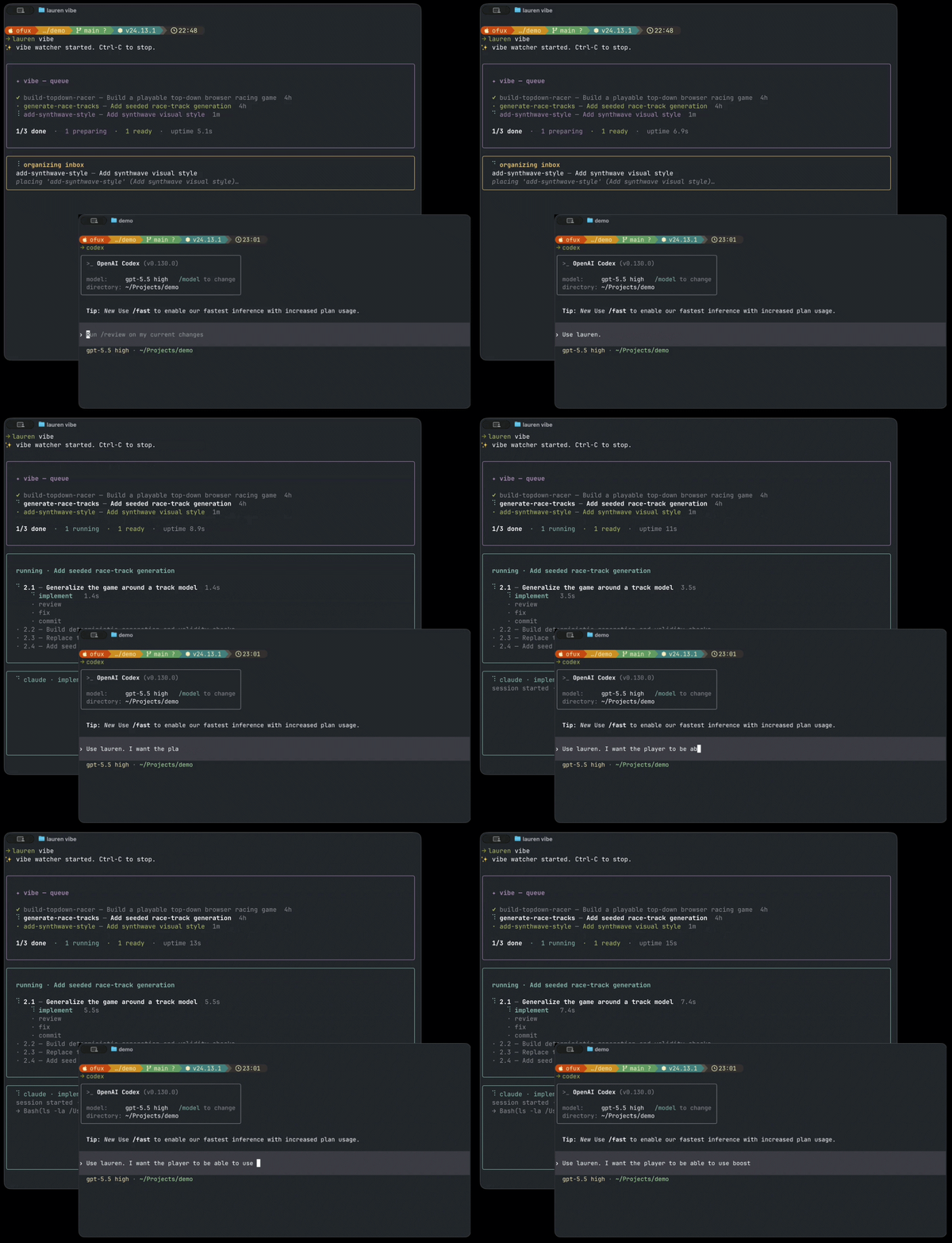
Lauren is inspired by Ralph, but built for projects that keep changing after the loop has started.
Why Lauren?
| Ralph-style loop | Lauren |
|---|---|
| Drains a fixed task list | Keeps the task list editable while work is running |
| Best for "finish this" | Best for "keep building while I keep steering" |
| One loop around one body of work | A queue that can absorb new ideas as they appear |
| Usually one agent path | Route implement, review, fix, merge, and queue decisions independently to Claude or Codex |
How it works
Trigger /lauren from Claude Code (or just type something like "Use lauren to build ...") to describe what you want next. The Lauren daemon, started with lauren vibe, asks an agent to integrate your request into the project TODO list. It decides whether to append, merge, refine, or replace pending tasks.
Once running, Lauren keeps looping through the TODO list and, for each task:
- create an isolated git worktree;
- ask the configured agent to implement the task (defaults to Claude);
- ask the configured agent to review the result (defaults to Codex);
- ask the configured agent to fix issues from the review (defaults to Claude);
- merge the work automatically, or open a PR depending on your configuration.
Each pipeline phase (and the merger conflict-resolver and brain placement
calls) can be routed to either claude or codex independently — see
the agents block in Configuration.
Implementation notes
(Idea credit: @trq212.)
While implementing (and addressing review feedback), the agent keeps a
running HTML file at .lauren/notes/<slug>.notes.html capturing the
decisions it had to make that weren't in the spec, anything it changed
from what the spec said, tradeoffs, and other things you should know.
In the lauren TUI, plans that have notes show a · notes marker next
to the row; press n to open the file in your browser.
Notes generation is on by default. To turn it off, set"notes_enabled": false in .lauren/config.json.
Requirements
- A clean Git working tree before running
lauren vibe
At least one of:
claudeon$PATH, authenticated and usable from the terminalcodexon$PATH, authenticated and usable from the terminal
Lauren runs against the current Git repository (or a parent folder containing
one or more git sub-repositories).
Run lauren from inside the project you want to change, not from the lauren install directory.
Install
npm install -g @ofux/lauren
From source:
git clone https://github.com/ofux/lauren.git
cd lauren
npm ci
npm run build
npm link
Check the install:
lauren --help
lauren vibe --help
Quick Start
Optional: add some specs (recommended if you're starting a new project)
lauren spec
This will help you create a solid (but simple) initial spec for your project.
Init
In the repository you want Lauren to modify, initialize Lauren to install the required skills (and Claude Code /lauren slash command):
lauren init
This asks which available agent CLI to use for each phase, writes.lauren/config.json, then installs both the Claude Code skill + /lauren
slash command (under .claude/) and the Codex skill (under.agents/skills/lauren/SKILL.md). Add --global to install the skills to~/.claude/ and ~/.agents/ instead; the config remains project-local. To
install only one side without the interactive config setup, uselauren init claude or lauren init codex.
Start the daemon
Start the daemon in another terminal:
lauren vibe
Start working
Then, in Claude Code, just type /lauren and describe what you want. In Codex, just type something like "Let's use lauren to build ..." in order to use the skill.
If you've been discussing with your agent about something and realize afterwards that you want to turn this into a lauren plan, just say so (e.g. "Add what we've just discussed about to lauren").
Behind the scenes, they will use the Lauren SKILL to create a proper plan (in the format expected by Lauren) and register it to the todo list.
Important: dirty state might prevent Lauren from being able to auto-merge on your main branch. I strongly recommend you to use git worktrees if you want to work in parallel of Lauren.
How to cancel a task
You can see the current state of the TODO-list with:
lauren
This will open a simple TUI showing what's in the queue, and will allow you to cancel some tasks.
Configuration
Settings live in .lauren/config.json in your project. All fields are optional;
missing fields fall back to the defaults shown below:
{
  "dev_branch": "main",
  "merge_mode": "auto",
  "notes_enabled": true,
  "worktrees": true,
  "agents": {
    "implement": "claude",
    "review": "codex",
    "fix": "claude",
    "merger": "claude",
    "brain": "claude"
  }
}
merge_mode controls how finished work is landed:
"auto"tries a linearrebasefirst, then falls back to a merge commit
if the rebase path fails."rebase"rebases the plan branch ontodev_branch, then fast-forwardsdev_branch."merge"merges the plan branch intodev_branchwith a merge commit."github-pr"opens a GitHub PR and waits for it to be merged, then fast-forwards the local checkout.
For local modes (auto, rebase, and merge), dirty files in your main
checkout only block Lauren when Git says they would be overwritten. Lauren
pauses the row, shows the files that need attention, and retries automatically
once the checkout is clean enough.
Each agents role accepts "claude" or "codex" and can be configured
independently. The three pipeline phases (implement, review, fix) cover
the per-plan run; merger is invoked when a local merge or rebase hits conflicts;brain runs the JSON placement / reorganize decisions over the queue.
worktrees defaults to true, which keeps each plan's implementation in an
isolated Git worktree before landing it. Set "worktrees": false to run the
pipeline directly in the current checkout instead. In-place mode only works
when Lauren is run inside a single Git repository, and it cannot be combined
with merge_mode: "github-pr".
When worktrees: false, merge_mode is ignored: there is no separatelauren/<slug> branch to land, so the row transitions implementing → done
directly on whatever branch is currently checked out. The setting is accepted
for forward-compatibility (so flipping worktrees back to true resumes the
configured strategy) but has no effect while in-place mode is on.
Yorumlar (0)
Yorum birakmak icin giris yap.
Yorum birakSonuc bulunamadi