claude-wall
Health Warn
- License — License: MIT
- Description — Repository has a description
- Active repo — Last push 0 days ago
- Low visibility — Only 7 GitHub stars
Code Warn
- network request — Outbound network request in extension/background.js
Permissions Pass
- Permissions — No dangerous permissions requested
This tool acts as a centralized web dashboard to monitor, manage, and orchestrate multiple AI coding agents (like Claude Code) running in tmux sessions. It includes features like remote permission approvals, cost tracking, and AI-assisted coordination.
Security Assessment
Overall Risk: Medium. The application inherently handles sensitive data, including your terminal streams and API keys. It provides a secrets management system to store bot tokens securely and uses standard file permissions (chmod 600) with UI masking. However, it makes outbound network requests, notably via a Chrome extension and native webhook integrations for third-party services like Telegram, Slack, and Discord. The `--public` flag, which binds the server to `0.0.0.0`, could easily expose your live terminal streams and agent controls to the internet if not secured properly behind strict firewall rules and authentication. There are no hardcoded secrets detected, and the tool does not request dangerous overarching system permissions.
Quality Assessment
The project is highly maintained, with its most recent code push happening today. It utilizes the permissive MIT license and includes a highly detailed README with clear installation instructions and signed macOS binaries. The primary concern is its extremely low visibility; having only 7 GitHub stars means the codebase has not undergone broad peer review or community testing.
Verdict
Use with caution — the project appears professionally built and actively updated, but its low community adoption combined with the inherent risks of streaming your terminal over the web necessitates thorough personal review before deploying in sensitive environments.
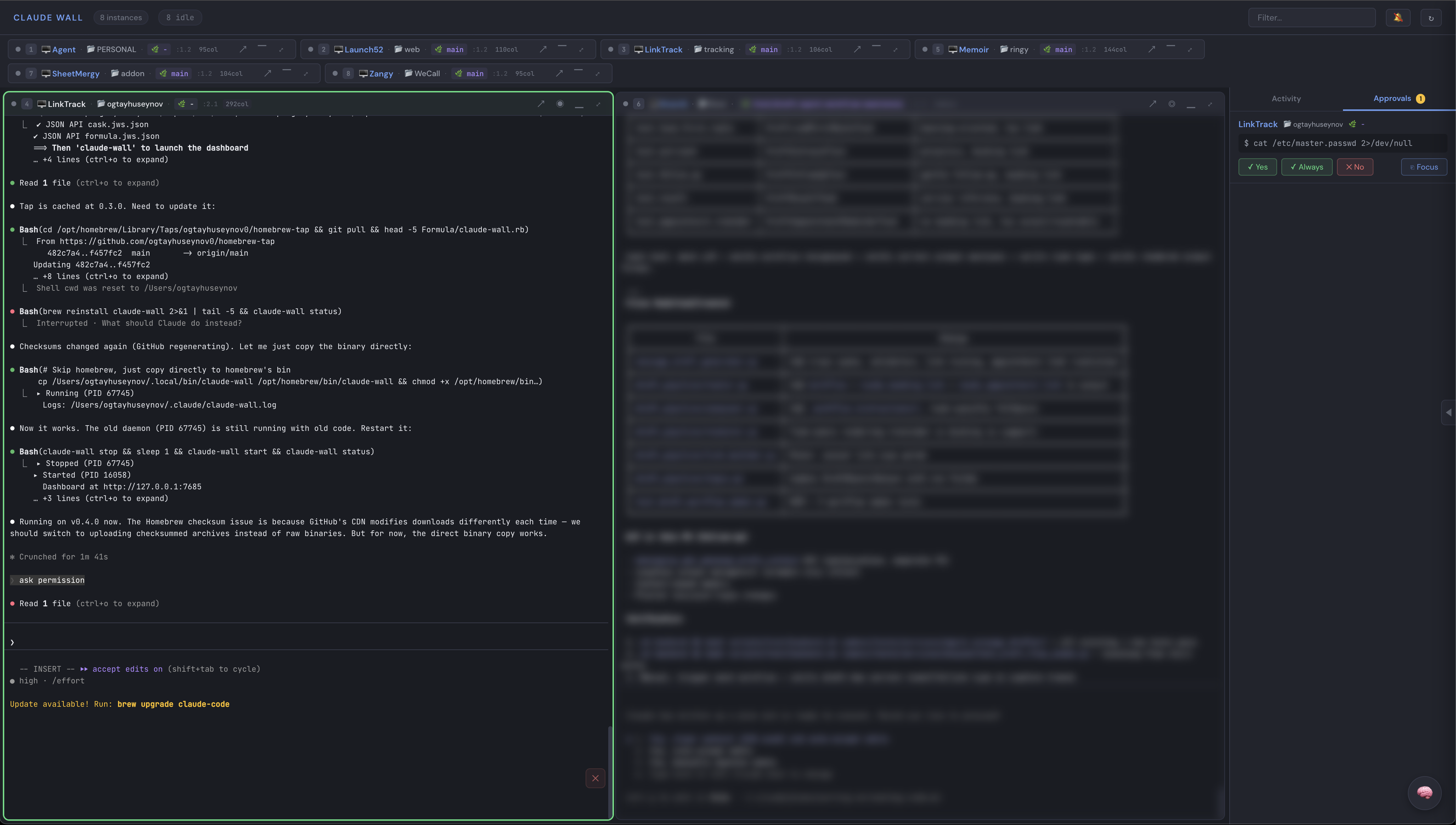
Mission control for Claude Code — monitor, orchestrate, and interact with all your AI coding agents from one dashboard
Claude Wall
Mission control for Claude Code — monitor, orchestrate, and interact with all your AI coding agents from one dashboard.
Features
- Web Dashboard — Real-time grid of all Claude Code instances in tmux
- Live Terminal Capture — 25fps streaming via tmux control mode (zero subprocess, ~2% CPU)
- Status Indicators — Idle (gray), working (green), permission needed (pulsing amber), error (red)
- Permission Mode Badge — Shows current mode: default, plan, acceptEdits, bypassPermissions
- Activity Feed — Chronological timeline of tool calls across all agents
- Approval Queue — One-click approve/deny pending permissions, with AskUserQuestion option buttons
- Telegram Bot — Approve permissions, answer questions, and send messages to agents from Telegram
- PM View — Project manager tab: see all agents' Claude Code tasks, progress bars, assign work
- Scheduled Tasks — Send recurring commands to agents on a timer with progress tracking
- Webhooks — Slack, Discord, Telegram, or generic HTTP webhooks for permission, error, and completion events
- Secrets Management — Secure storage for bot tokens and API keys (chmod 600, masked in UI)
- Voice Input — Real-time speech-to-text per tile via Web Speech API (auto-stops on silence)
- Mastermind AI — Orchestrator chat that reads, instructs, and coordinates all agents
- Cost Tracking — Per-session token usage and estimated cost breakdown (
/finance.html) - Chrome Extension — Send selected text or full page content to any agent
- Drag & Drop Files — Drop files onto tiles to send file paths to agents
- Hooks Integration — Native HTTP hooks (Claude Code 2.1+) with command fallback, 12 events
- Keyboard Shortcuts —
Ctrl+1-9focus tiles,Cmd+Kcommand palette,Ctrl+Tabcycle - Group Filter — Filter tiles by project group or search by name
- Daemon Mode — Runs in background with
start/stop/restart/status/logs - Remote Access —
--publicflag binds to0.0.0.0,--tokenfor authentication - Per-Pane Font Size — Increase/decrease font size per tile via dropdown (A-/A+)
- Blur Mode — Hide sensitive content via tile dropdown menu
- Drag to Reorder — Rearrange tiles, order persists across reloads
- Auto-detect — New/removed Claude instances appear automatically
- Sound Notifications — Browser alerts for permission requests and task completion
- Mobile Responsive — Usable from phone via Tailscale
- macOS Code Signing — Signed and notarized binaries, no Gatekeeper warnings
Install
Homebrew (macOS & Linux):
brew tap ogtayhuseynov0/tap
brew install claude-wall
Binary download:
# macOS (Apple Silicon)
curl -L https://github.com/ogtayhuseynov0/claude-wall/releases/latest/download/claude-wall-macos-arm64 -o ~/.local/bin/claude-wall
chmod +x ~/.local/bin/claude-wall

# macOS (Intel)
curl -L https://github.com/ogtayhuseynov0/claude-wall/releases/latest/download/claude-wall-macos-amd64 -o ~/.local/bin/claude-wall
chmod +x ~/.local/bin/claude-wall

# Linux (amd64)
curl -L https://github.com/ogtayhuseynov0/claude-wall/releases/latest/download/claude-wall-linux-amd64 -o ~/.local/bin/claude-wall
chmod +x ~/.local/bin/claude-wall
From source:
go install github.com/ogtayhuseynov0/claude-wall@latest
Quick Start
claude-wall init # install hooks + start dashboard + open browser
CLI
| Command | Description |
|---|---|
claude-wall init |
Install hooks + start dashboard + open browser |
claude-wall start |
Start dashboard in background |
claude-wall stop |
Stop dashboard |
claude-wall restart |
Restart dashboard |
claude-wall status |
Check if running |
claude-wall logs |
Tail the dashboard log file |
claude-wall open |
Open dashboard in browser |
claude-wall list |
List detected Claude Code agents |
claude-wall uninstall |
Remove hooks + stop dashboard |
Flags:
| Flag | Description |
|---|---|
--public |
Bind to 0.0.0.0 for Tailscale/remote access |
--port PORT |
Custom port (default: 7685) |
--token TOKEN |
Require authentication token (recommended with --public) |
--dry-run |
Preview init changes without applying them |
Daemon Mode
Claude Wall runs as a background daemon. The server persists across terminal sessions.
claude-wall start                        # start in background
claude-wall start --public --token s3cr3t  # remote access with auth
claude-wall status                       # check if running
claude-wall logs                         # tail log output
claude-wall restart                      # restart the daemon
claude-wall stop                         # stop the daemon
The PID is stored at ~/.claude-wall.pid and logs are written to ~/.claude/claude-wall.log.
Telegram Bot
Control your agents from your phone via Telegram. Approve permissions, answer questions, and send instructions — all without opening a terminal.
Setup:
- Create a bot via @BotFather and get the bot token
- Message your bot to get your chat ID (open
https://api.telegram.org/bot<TOKEN>/getUpdates) - In the dashboard: Webhooks tab → Secrets section → add
TELEGRAM_BOT_TOKENandTELEGRAM_CHAT_ID - Create a Telegram webhook using
$TELEGRAM_BOT_TOKENand$TELEGRAM_CHAT_ID
What you can do:
- Permission requests arrive with
[Yes] [Always] [No]inline buttons — tap to approve - AskUserQuestion shows the actual options as buttons — tap to select and approve in one step
- Reply to any notification to send text to that agent's pane
/agents— list active agents, pick one, then type a message to send/send AgentName your message here— send directly to an agent
The bot auto-starts when a Telegram webhook with valid credentials exists. Rich notifications include session name, folder, branch, and last user prompt.
PM View (Project Manager)
See what each Claude Code agent is working on. The PM tab reads Claude Code's internal task system (~/.claude/tasks/) and shows:
- Per-tile progress badge —
3/7in the tile header (completed/total) - PM tab in side panel — all agents grouped with progress bars
- Task list — expand any agent to see individual tasks (pending, in progress, completed)
- Continue button — send
/continueto any agent - Assign work — tap a pending task to send it to the agent
Scheduled Tasks
Send recurring commands to agents on a timer — review loops, test runs, periodic checks.
From the dashboard: Side panel → Sched tab → fill in agent, command, interval, max runs → Create.
From the API:
# Create a task: run /review-fix-loop every 10 min, max 5 attempts
curl -X POST http://localhost:7685/api/scheduler/create \
  -H "Content-Type: application/json" \
  -d '{"target":"RiverAI","command":"/review-fix-loop 617","intervalMin":10,"maxAttempts":5}'

# Pause / resume / stop / delete
curl -X POST http://localhost:7685/api/scheduler/{id}/pause
curl -X POST http://localhost:7685/api/scheduler/{id}/resume
curl -X POST http://localhost:7685/api/scheduler/{id}/stop
curl -X POST http://localhost:7685/api/scheduler/{id}/delete
Tasks wait for the agent to go idle before sending the next cycle. Progress shows as ⏱ 2/5 badge on the tile header. Tasks persist across server restarts.
Webhooks
Get notified in Slack, Discord, Telegram, or any HTTP endpoint when agents need attention.
From the dashboard: Side panel → Webhooks tab → add URL, select type, choose events → Create.
Supported types:
- Telegram — rich HTML notifications with inline action buttons (requires bot token + chat ID stored in Secrets)
- Slack — sends
{"text": "message"}to your webhook URL - Discord — sends
{"content": "message"}to your webhook URL - Generic — sends full JSON event payload to any HTTP endpoint
Events: permission (agent needs approval), error (agent failure), stopped (agent completed), task_completed (scheduled task finished)
Management: Enable/disable toggle, test button, delete with confirmation per webhook.
Webhooks are debounced (max 1 per event type per 30s) and persisted to ~/.claude/claude-wall-webhooks.json.
Secrets Management
Store sensitive values (bot tokens, API keys) securely on disk.
- Stored at
~/.claude/claude-wall-secrets.jsonwithchmod 600 - Values never returned to the browser — UI shows masked versions (e.g.
85****Cg) - Reference in webhook fields as
$SECRET_NAME— resolved server-side at send time - Add/delete from the Webhooks tab → Secrets section
Voice Input
Click the mic button on any tile to dictate text using your browser's speech recognition.
- Real-time transcription — words appear as you speak
- Auto-stops after 3 seconds of silence
- Text is typed into the pane without pressing Enter (review first)
- Click mic again to stop manually
- Works in Chrome and Edge (Web Speech API)
Dashboard Shortcuts
| Shortcut | Action |
|---|---|
Cmd+K |
Command palette |
Cmd+M |
Toggle Mastermind chat |
Ctrl+1-9 |
Focus tile by number |
Ctrl+Tab / Shift+Tab |
Cycle between tiles |
Ctrl+F |
Filter/search tiles |
| Double-click header | Expand tile fullscreen |
Escape |
Exit expanded view |
Mastermind AI
The brain button (or Cmd+M) opens an orchestrator chat that can:
- Summarize what all agents are doing
- Send instructions to any agent
- Approve/deny permissions
- Control dashboard UI (focus, zoom, minimize tiles)
- Coordinate multi-agent workflows
Model selector: Haiku (fast/cheap), Sonnet, or Opus per message. Uses claude -p — no separate API key needed.
Architecture
Browser <--WebSocket--> Go Server <--tmux -C--> tmux server
                          |
                     Hook Server <-- Claude Code HTTP hooks
                          |
                     Telegram Bot <--> Telegram API (long poll)
                          |
                     Mastermind --> claude CLI (orchestrator)
                          |
                     Scheduler --> timed commands to agents
- tmux Control Mode — persistent
tmux -Cconnection, zero subprocess spawning - Captures all panes at 25fps via protocol messages (not
exec.Command) - Content streamed to browsers via WebSocket (only sends diffs)
- Claude Code hooks push structured events (PreToolUse, Stop, PermissionRequest, etc.)
- Telegram bot enables remote approval and messaging via long-polling
- Mastermind AI gets full context and can control agents + dashboard UI
- Scheduler sends recurring commands to agents when they go idle
- CPU usage: ~2-5% for 10+ agents (vs 10%+ with subprocess polling)
Chrome Extension
Send text from any webpage to any Claude Code agent.
- Download
extension.zipfrom releases - Unzip, open
chrome://extensions, enable Developer mode - Click "Load unpacked", select the
extension/folder - Select text → right-click → Send selection to Agent
- Or right-click anywhere → Send page text to Agent (works on Notion, etc.)
Cost Tracking
Visit /finance.html (or click the cost button in the header) for:
- Total cost across all agents + mastermind
- Per-session breakdown: input/output/cache tokens, estimated cost, turns
- Data persists across restarts at
~/.claude/claude-wall-finance.json
Hooks
claude-wall init installs hooks that send real-time events to the dashboard:
- HTTP hooks (Claude Code 2.1+) — native, fast, no shell script
- Command hooks (fallback) — for older Claude Code versions
- 12 events tracked: PreToolUse, PostToolUse, PostToolUseFailure, Stop, StopFailure, PermissionRequest, Notification, SessionStart, SessionEnd, SubagentStart, SubagentStop, TaskCompleted
- Safe merge — never overrides existing hooks
claude-wall init --dry-runto preview changesclaude-wall uninstallremoves only claude-wall hooks
Requirements
- tmux 3.3+
- Claude Code running in tmux sessions
- Go 1.21+ (only for building from source)
License
Reviews (0)
Sign in to leave a review.
Leave a reviewNo results found