mimir
Health Warn
- License — License: Apache-2.0
- Description — Repository has a description
- Active repo — Last push 0 days ago
- Low visibility — Only 7 GitHub stars
Code Pass
- Code scan — Scanned 12 files during light audit, no dangerous patterns found
Permissions Pass
- Permissions — No dangerous permissions requested
No AI report is available for this listing yet.
Exam study companion plugin for you and your agents. Wisdom from the well brought to your fingertips.
Mimir: A head start, literally
Version 0.5.0 · early release, features and file layout may still change (roadmap, changelog)
Mimir is an exam study plugin for AI coding agents: Claude Code, Codex and Antigravity. It teaches you course material in your professor's style and remembers what you know across sessions.
What it does
- Starts from wherever you are. Type "exam tomorrow, help" and attach a photo of a past paper. Mimir starts drilling right away, with no setup.
- Sets the pace from the exam date. Far from the exam, Mimir teaches (Standard). Close to it, it drills question types ranked by marks and by how often they appeared in past papers (Urgent), shown as a table with nothing cut, and teaches each type with a short recipe before testing it. Tell it what an exam covers ("the midterm covers sessions 1–19") and, once you confirm the list, it drills only those types and lists the rest last. It picks the mode and tells you why. Sessions run until you say "end session".
- Follows your professor. Mimir reads the outline, slides and past papers, learns how the professor writes questions, and labels every question with where it came from. Answer keys are checked before you see them.
- Teaches in your language. Your course and exams can be in one language and the explanations in another. You choose both during setup.
- Remembers you. It keeps dated evidence of what you solved alone and with help, and picks up where you left off.
- Keeps your files on your machine. Everything lives in one folder (default
~/learning/). Generated pages work offline, and Mimir sends no telemetry. The course files Mimir reads are sent to your agent's model provider, like any other file your agent reads.
Install
You need Python 3.11 or newer (available as python3) and one of the agents below. For Codex and Antigravity, also install pdftotext (part of poppler: preinstalled on most Linux, brew install poppler on macOS) for the best PDF text; without it Mimir falls back to a simpler built-in reader.
Claude Code
/plugin marketplace add oguzdogmus/mimir
/plugin install mimir@mimir
Codex
codex plugin marketplace add oguzdogmus/mimir
codex plugin add mimir@mimir
Antigravity
Install the plugin, then always launch from your learning folder with the plugin directory added, and grant the permission requests for both directories:
agy plugin install https://github.com/oguzdogmus/mimir
mkdir -p ~/learning && cd ~/learning
agy --add-dir "$(realpath ~/.gemini/config/plugins/mimir)"
From a local clone (any agent): git clone https://github.com/oguzdogmus/mimir.git ~/mimir, then use ~/mimir in place of oguzdogmus/mimir or the GitHub URL above. To try it in Claude Code for one session without installing: claude --plugin-dir ~/mimir.
Quick start
- Run
mimir-setuponce to create your learning folder. - Drop course files (outline, slides, past papers) into
~/learning/_inbox/and runmimir-ingest. - Run
mimir-studyand tell it when your exam is.
Each command is a skill, 10 in all (listed under Commands). The rules every skill follows are plain files in the plugin's reference/ folder, not commands. Type a command like this:
| Agent | Format | Example |
|---|---|---|
| Claude Code | /mimir:<skill> |
/mimir:mimir-setup |
| Codex | $<skill> |
$mimir-setup |
| Antigravity | /<skill> |
/mimir-setup |
mimir-setup and mimir-ingest change your files, so they only run when you type the command yourself; asking in plain words ("set me up") does not start them. For every other command you can just say what you want ("quiz me on automata") and the agent picks the skill. Not sure which fits? Run mimir-help.
Commands
| Skill | What it is for |
|---|---|
mimir-setup |
One-time setup: your learning folder, languages and any exam dates you know. |
mimir-ingest |
File everything in your _inbox/ into course folders. |
mimir-study |
Study for an exam. Start here: "exam Friday, help" works, even with just a photo of a past paper. |
mimir-past-questions |
Drill a course's real past-paper questions, most marks and most often asked first. |
mimir-quiz |
Get quizzed at exam level in your professor's style, with checked answer keys. |
mimir-plan |
See what is left to study before your exam. |
mimir-forecast |
A ranked guess at the topics of your next exam, with the evidence. |
mimir-progress |
What Mimir believes you know in a course, with dated evidence. |
mimir-debrief |
After an exam: what was on it, and what that changes. |
mimir-help |
Tells you which command fits your situation. |
Your learning folder
mimir-ingest sorts what you drop in _inbox/ into one folder per course and term:
~/learning/
├── _inbox/                  drop new course files here
├── .state/profile.md        languages and exam dates
└── 2026-Fall/
    └── CS201 Theory/
        ├── INDEX.md         file list and topic map
        ├── outline/  slides/  past-papers/  notes/
        └── .state/          mastery, professor style, exam scope, forecast, session logs, generated pages
- Supported files: PDF; images (jpg, png, heic, webp, gif, tiff, bmp); text (md, txt, tex); documents (docx, pptx, odt, odp). Anything else is skipped and left in
_inbox/. - Large files cost usage. Mimir reads your documents through your agent, so big slide decks and scanned papers use a good share of your plan's tokens.
- Changing settings. Pick a different folder during setup. Its path is then stored in
~/.config/mimir/root. To change languages or exam dates later, edit.state/profile.md(plain Markdown), or tellmimir-studyyour new exam date. - Backups. Everything Mimir knows about you is in this folder. Copy it to back it up.
The layout may change before 1.0. See Roadmap.
Update or uninstall
Restart your agent after updating. Installed copies do not follow edits to a local clone; update or reinstall to pick them up.
| Agent | Update | Uninstall |
|---|---|---|
| Claude Code | claude plugin marketplace update mimir, then claude plugin update mimir@mimir |
claude plugin uninstall mimir@mimir |
| Codex | codex plugin marketplace upgrade mimir, then codex plugin add mimir@mimir |
codex plugin remove mimir@mimir |
| Antigravity | agy plugin uninstall mimir, then install again |
agy plugin uninstall mimir |
Uninstalling leaves your learning folder untouched.
How answer keys are checked
Before you see an answer key, a second agent, the checker, checks it. Mimir's scripts keep a check ledger for every session in the course's .state/checks/: each prepared question with its key, its label, the checker's verdict and reason. A question earns mastery credit only when the ledger shows a correct check for it.
- What the checker reads. One evidence pack per question set, written by the scripts: the questions and keys, the text of every cited PDF page and small notes file, the paths of longer files and scans, and the professor's notation from the course fingerprint. It reads the pack and the files named in it, nothing else.
- Real-paper labels. A question shown as
[real: <file>, p.<N>]has at least 8 words in a row of its wording on that page of the paper, checked by a script. A question from a scan says[real, from photo/scan, wording may be off]and shows the original beside it. - What the ledger proves, and what it does not. The ledger stops forgetting, not lying. A checker reply must carry a token that only the evidence pack holds, so an agent that skips the checker cannot settle a check by accident. But the tutor and the checker share one shell, so no script can tell who called it, and an agent that invents a checker reply stays invisible to the scripts. Only the live acceptance runs show that a real checker ran.
- Read-only checker, per agent. On Claude Code the agent enforces it: the checker has only Read, Grep and Glob, and no shell. On Codex it is a rule in the checker's instructions, because Codex cannot limit the tools of a helper it starts. On Antigravity it is a rule in the instructions too: Antigravity ties reading files outside its workspace to command access, and a helper given command access also gets write tools. When an agent has no helper at all, the tutor checks its own keys from the same pack and tells you once per session.
Compatibility
Tested with Claude Code, Codex and Antigravity. Cursor, Grok Build and Muse Code read the same skill format and may work, but are not tested yet.
So far live sessions have only been checked by hand on CachyOS (Arch Linux). Mimir uses only the Python standard library and each system's default file opener, so other Linux distributions should work. On other systems:
- Claude Code on Windows with Git Bash: the scripts are tested in CI; no session has been checked by hand.
- Codex and Antigravity on Windows: through WSL only; no session has been checked by hand.
- macOS: the scripts are tested in CI; no session has been checked by hand.
If something breaks on your system or agent, please open an issue.
Troubleshooting
Antigravity can't read Mimir's files. Launch with --add-dir as shown in Install and accept the permission requests. A skill symlink alone does not grant access to the plugin folder.
Antigravity through another app doesn't show Mimir's skills. If the app doesn't load plugins, link the skills in:
ln -s ~/.gemini/config/plugins/mimir/skills/mimir-* ~/.gemini/config/skills/
If that app doesn't expand slash commands either, run mimir-setup and mimir-ingest in the Antigravity CLI. The other commands work in plain words.
Roadmap
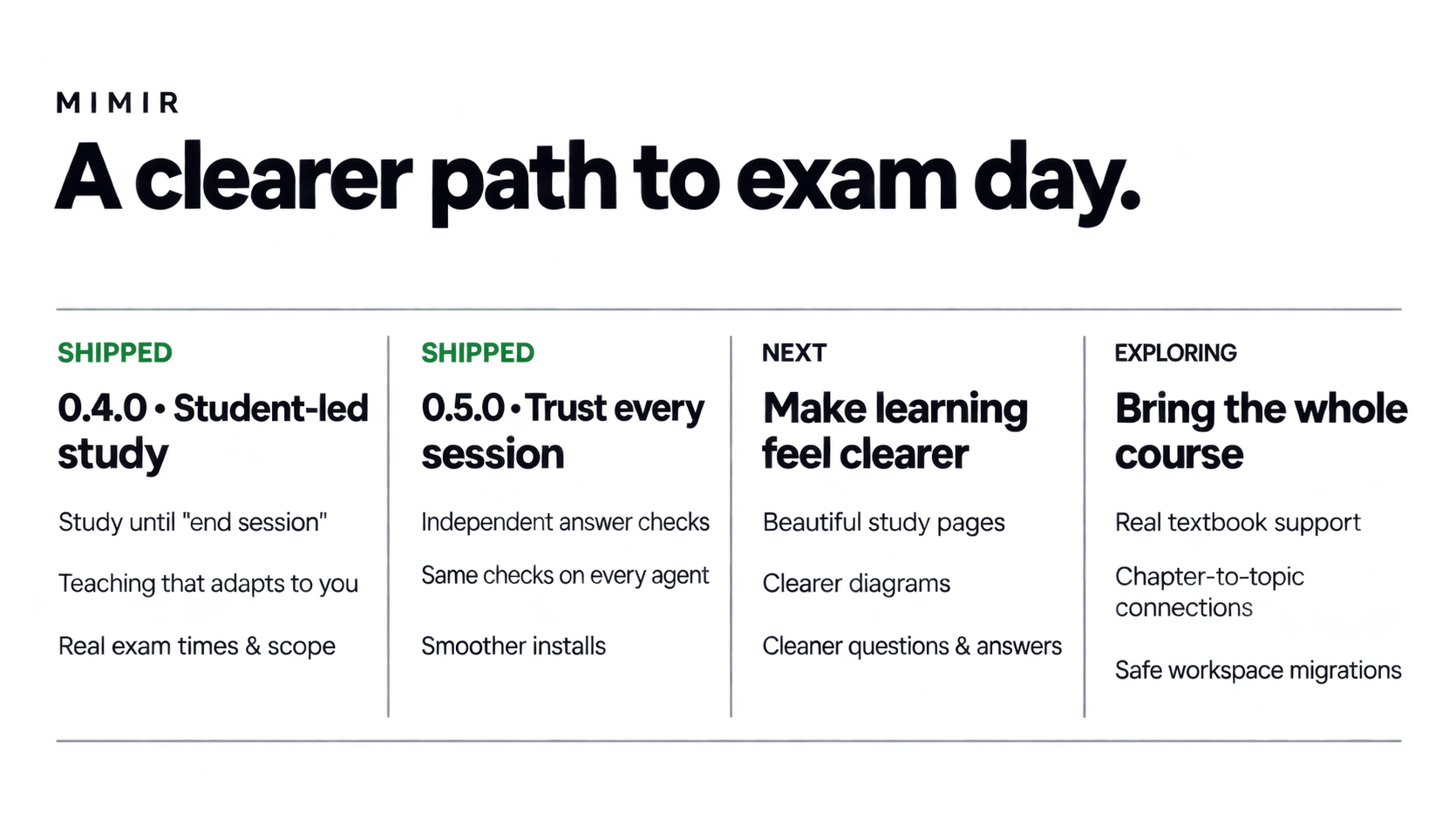
Priorities come from hands-on testing and may change. There are no promised dates. Until 1.0, expect changes to how sessions run and to the folder layout. What shipped in 0.4.0 is in the changelog.
- Next: trust every session. Answer keys checked on every agent (#23, #2), smoother installs (#3, #4), and live checks on macOS, Windows and WSL (
RELEASE.md). - Planned: make learning feel clearer. Better-looking pages and diagrams, cleaner question and answer formatting in chat (especially the Claude mobile and desktop apps).
- Exploring: bring the whole course. Real textbook support (today ingest files a textbook, but sessions never read it), chapters linked to course topics, and safe migrations when the folder layout changes.
Development
Run the tests from a clone with uv run --with pytest pytest tests -q. The manual cross-platform check before a release is in RELEASE.md. Issues and their labels are described in docs/agents/.
License
Mimir is open source under the Apache License 2.0. You can use, change and share it, including commercially, as long as you keep the LICENSE and NOTICE files and say which files you changed.
Credits
Math sheets use KaTeX (MIT license), vendored in assets/vendor/katex/.
mimir-help is modelled on Matt Pocock's ask-matt router skill.
Reviews (0)
Sign in to leave a review.
Leave a reviewNo results found