agent-lookout
Health Uyari
- License — License: MIT
- Description — Repository has a description
- Active repo — Last push 0 days ago
- Low visibility — Only 5 GitHub stars
Code Uyari
- process.env — Environment variable access in bin/agent-lookout.mjs
Permissions Gecti
- Permissions — No dangerous permissions requested
Bu listing icin henuz AI raporu yok.
A local dashboard for the AI agent sessions already running on your machine. Starts nothing, and sends nothing unless you set up email or a webhook.
Agent Lookout
Shows the AI agent sessions on your computer in one browser page, and which need you.



It finds Claude Code, Codex and Antigravity CLI sessions with no setup, and any agent that writes a status file. It never starts a session, stops one only when you press Stop and confirm, and answers a permission prompt only on Allow, Deny or a rule you added.
By default Agent Lookout sends nothing anywhere. The one exception: the Mac app's daily check on GitHub for a newer version, which Settings turns off. Email, a webhook, pushes to your phone through ntfy or Pushover, pull requests through your gh and other machines over your ssh stay off until you set them up. Privacy
Install · Download for Mac · Guide · Privacy · Changelog · For agents · Roadmap · Website
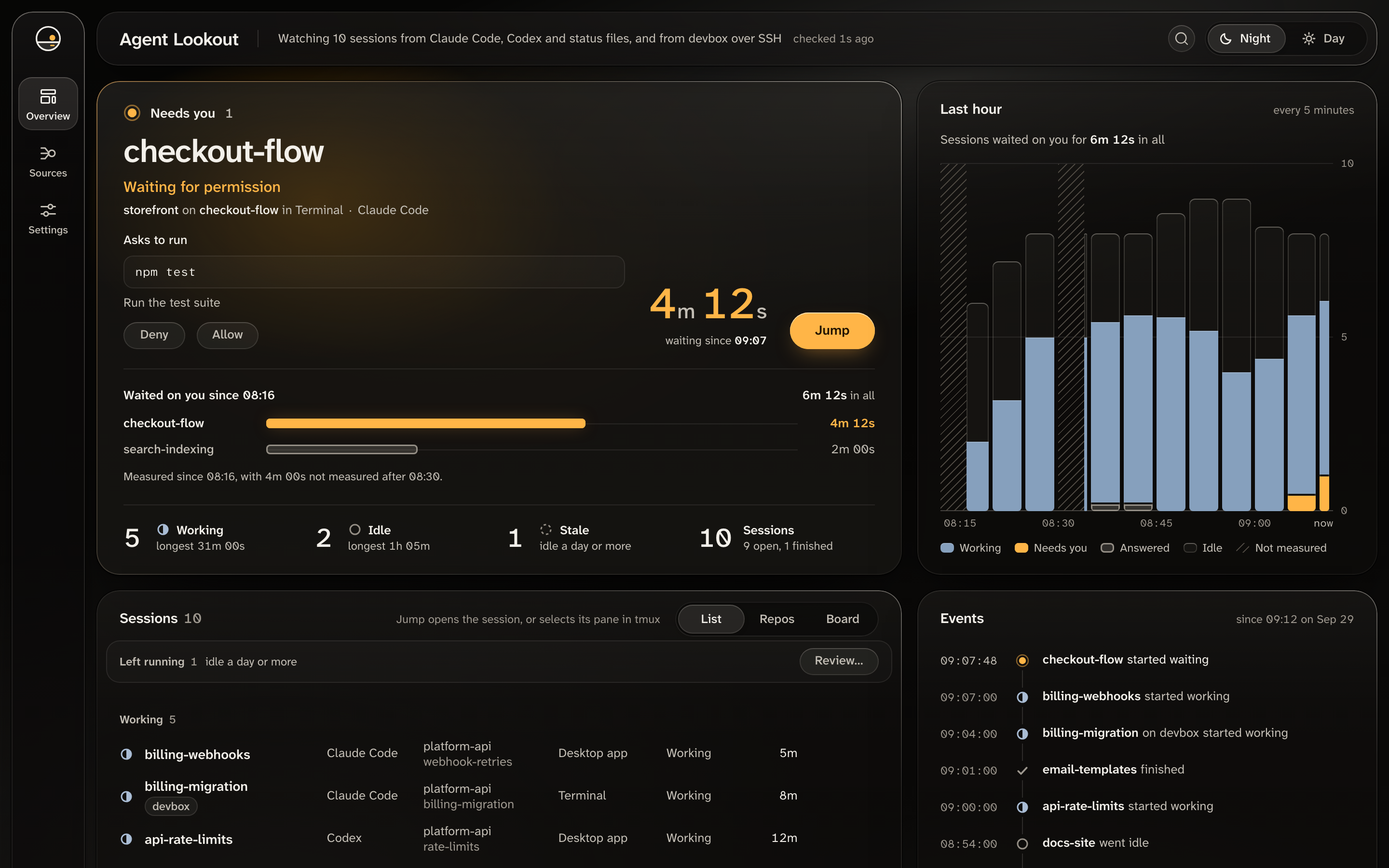
A Claude Code session asks to run npm test. With the Claude Code plugin, Allow or Deny answers it from the page, and Jump takes you to it in Terminal.
Install
Start it with npx or the Mac app. Add the Claude Code plugin to either one to answer permission prompts from the page.
With npx
You need Node.js 22.12 or newer, and Claude Code, Codex or the Antigravity CLI.
npx agent-lookout
The first time, npm asks Ok to proceed?. Then it prints:
Agent Lookout is running at http://127.0.0.1:4777
It listens on this machine only. Press Ctrl+C to stop.
Open http://127.0.0.1:4777. Your sessions appear within a few seconds. To check it from another terminal:
curl -s http://127.0.0.1:4777/api/health
It prints {"ok":true,"version":"…"}. If the port is in use, add --port 4778. If nothing appears, see No sessions appear. With npx covers running it in the background, stopping it, updating it and a global install.
Mac app
Download Agent-Lookout-<version>-mac-arm64.dmg for Apple silicon, or Agent-Lookout-<version>-mac-x64.dmg for Intel, from the latest release, open it and drag Agent Lookout to Applications. It needs macOS 13 Ventura or later, and no Node.js. It is not signed with an Apple Developer ID yet, so the first time you open it, go to System Settings › Privacy & Security and press Open Anyway.
Its icon in the menu bar shows how many sessions need you. It checks for a newer version about once a day and installs it when you press Install and Restart. Mac app has the steps.
Claude Code plugin
With Agent Lookout running, the plugin lets you press Allow or Deny on a Claude Code permission prompt from the page. In Claude Code, run:
/plugin marketplace add Olanetsoft/agent-lookout
/plugin install agent-lookout@agent-lookout
The prompt in the session still works, and whichever is answered first wins. Without Agent Lookout running, Claude Code asks as usual. Not on Windows. plugins/agent-lookout/README.md says what the hook does, and PRIVACY.md what it sends.
Install with your agent
A coding agent such as Claude Code or Codex can start it for you. Give it this prompt:
Start Agent Lookout on this computer. First check that node --version
prints v22.12.0 or later. Then run npx --yes agent-lookout in the
background and leave it running.
It should print "Agent Lookout is running at http://127.0.0.1:4777".
If it prints anything else, or says the port is in use, stop and tell
me what it printed.

Do not use sudo, and do not set up email, a webhook, phone pushes,
pull requests or other machines. You are done when
curl -s http://127.0.0.1:4777/api/health prints {"ok":true and a
version number. Tell me what it printed.
An agent's background command can end when its session does. If the page then says Agent Lookout has stopped updating, run npx agent-lookout yourself.
To run it from a clone, see From the repository.
What it does
| Part | What it does |
|---|---|
| Needs you | Lists the sessions waiting for permission or an answer, longest first, with what a Claude Code session asks. |
| Sessions | Lists the rest by status, by repository or on a board, with folder and branch. / searches every session. |
| Jump | Takes you to a Claude Code session in VS Code, its tmux pane, or its Terminal or iTerm2 tab. |
| Stop and Resume | Stop ends a Claude Code session, or those left running, after you confirm. Resume copies the command that reopens it. |
| Allow and Deny | Answers a Claude Code permission prompt from the page, or the Mac app's notification and menu bar, with the plugin. Rules you add can answer some for you. |
| Notifications and time rules | Tell you when a session waits, remind you of long waits and keep quiet hours. Off until turned on. |
| Pull requests, email, webhook | Show a session's pull request on github.com and its checks, through your gh, and email or post events to one address. Off until set up. |
| ntfy and Pushover | Push a wait, its reminders and what else you choose to your phone, with Send a test in Settings. Off until set up. |
| Another machine | Shows the sessions of another machine running Agent Lookout, through your ssh. Off until you name one. |
| Your own agents | Shows any other agent that writes one small JSON file per session. |
The Overview also charts the last hour and how long sessions waited on you, from history kept on this computer. The screen covers each part.
Supported agents and systems
Claude Code, Codex and the Antigravity CLI need no setup. Any other agent writes one small JSON file per session to ~/.agent-lookout/sessions. Your own agents.
| Agent | Needs you | Jump | Quiet for | Tokens | Stop | Answer |
|---|---|---|---|---|---|---|
| Claude Code | Yes | Partly | No | No | Partly | Partly |
| Codex | No | No | Yes | Yes | No | No |
| Antigravity CLI | Partly | No | Yes | No | No | No |
| Status files | Partly | No | Partly | No | No | No |
A Codex session waiting for approval shows as working, and so does an Antigravity CLI session waiting for an answer to a question. After 5 minutes its row says how long it has been quiet. An Antigravity CLI session needs you while agy asks you to approve a tool. Antigravity CLI support is new: it is built from what agy 1.3.1 documents and its program holds, and checked against one conversation. What each agent can report gives the reason for every Partly and No.
| macOS | Linux | Windows | |
|---|---|---|---|
Dashboard, status, mcp, email, webhook, pushes |
Yes | Yes | Yes |
| Jump to VS Code | Yes | Yes | Yes |
| Jump to a tmux pane | Yes | Yes | No |
| Jump to Terminal or iTerm2 | Yes | No | No |
| Stop, and ending sessions left running | Yes | Yes | No |
| Allow and Deny, permission rules | Yes | Yes | No |
| Resume | Yes | Yes | No |
| Notifications with no tab open | Yes | No | No |
| Mac app and menu bar | Yes | No | No |
Developed and used on macOS. On Linux and Windows, CI runs the tests and starts the app, and no one has used it on those desktops yet. On Linux · On Windows
In the terminal
npx agent-lookout status
2 need you · 3 working · 2 idle
checkout-flow    Waiting for permission  4m 12s
search-indexing  Asked you a question    31s
It exits with 0 when nothing needs you, 1 when a session does, and 2 when Agent Lookout is not running or not ready. --count prints the number alone, --json prints JSON, and --url asks another port. In the terminal shows it in a tmux status line and a shell prompt.
MCP server
agent-lookout mcp lets an AI agent ask which sessions need you. Its three tools, list_sessions, sessions_needing_you and sources, only read, and the agent's app usually hands their answers to its model. To add it to Claude Code for every folder:
claude mcp add --scope user agent-lookout -- npx -y agent-lookout mcp
{
  "mcpServers": {
    "agent-lookout": { "command": "npx", "args": ["-y", "agent-lookout", "mcp"] }
  }
}
For your agents covers a global install, Node installed with nvm, and another port.
Settings
Settings are environment variables, put before the command, as in AGENT_LOOKOUT_PORT=4778 npx agent-lookout. Each of AGENT_LOOKOUT_STOP=off, AGENT_LOOKOUT_ANSWER=off, AGENT_LOOKOUT_CLAUDE_FEED=off and AGENT_LOOKOUT_HISTORY=off turns one thing off: Stop, Allow and Deny with the rules, running claude agents, and history on disk. The theme, notifications and rules are in the page's Settings view. Settings you can change lists every setting.
Privacy
By default Agent Lookout sends nothing anywhere: no telemetry, analytics, crash reports or account. The one exception is the Mac app, which asks GitHub about once a day whether a newer version is out, sends nothing about your sessions, and stops when you turn it off in Settings. npx agent-lookout, npm start and npm run dev make no such check.
Each of these is off until you set it up:
- Email and the webhook, each to the one address you name.
- Pushes to your phone through ntfy, to the one topic you name, or Pushover, to the one user key you name.
- Pull requests, through your own
gh, withAGENT_LOOKOUT_PULL_REQUESTS=on. - Other machines, through your own
ssh, named inAGENT_LOOKOUT_REMOTES. - The MCP server, whose answers the agent's app hands to its model.
- The Claude Code plugin, which reaches Agent Lookout over a socket in
~/.agent-lookout.
Other programs make their own traffic. npx asks npm's registry for the package. claude agents, which Agent Lookout runs, may contact Anthropic as Claude Code does, and AGENT_LOOKOUT_CLAUDE_FEED=off stops Agent Lookout running it.
It listens on a loopback address only, 127.0.0.1 unless you set another, turns away requests from websites open in your browser, and has no password, so other programs and user accounts on this computer can use it as you can. The Mac app opens no port. PRIVACY.md lists every file it reads and every command it runs, and SECURITY.md what it guards against.
What it does not do yet
- It cannot send a session a message, and Resume only copies the command.
- Cloud sessions, Codex cloud tasks, browser chats and the Antigravity desktop app's conversations do not appear.
- Claude Code's and Codex's files are undocumented, and the Antigravity CLI's are documented only for its own agents, so an update can hide sessions. What breaks when Codex changes, and when Antigravity changes
- The Mac app is not signed with an Apple Developer ID yet, and there is no Linux or Windows app.
What it does not do yet has the details, and the milestones what is planned.
Questions
Can it act on a session without me?No. Stop needs a press and a confirm, and Allow and Deny need a press or a rule you added. AGENT_LOOKOUT_STOP=off and AGENT_LOOKOUT_ANSWER=off take them away.
Its files do not record when it waits for your approval, as far as Agent Lookout can read, so watch the Quiet for line instead. An Antigravity CLI session does show as needing you while agy asks you to approve a tool, which agy's own log records, but not while it waits for an answer to a question.
Can I run the Mac app and npx together?Yes. The app opens no port, so status and mcp need the npx copy. Turn notifications on in only one of them, as Mac app and npx together says.
Documentation
| I want to | Read |
|---|---|
| Install every way, update or stop it | docs/INSTALL.md |
| Learn each part of the screen | The screen |
| Change a setting | Settings you can change |
| Fix a problem | When something goes wrong |
| Show my own agent | Your own agents |
| See every file it reads and all it can send | PRIVACY.md |
| Know what it guards, or report a vulnerability | SECURITY.md |
| Call its local HTTP API | docs/API.md |
| Learn what each part of the code does, and why | docs/TOUR.md |
| See how the parts fit together | docs/ARCHITECTURE.md |
| Write tests | tests/README.md |
| Install or remove the Claude Code plugin | plugins/agent-lookout/README.md |
| See what changed | CHANGELOG.md |
| See what is planned | Milestones |
For coding agents
To set Agent Lookout up for someone:
- Run
npx --yes agent-lookoutin the background. It is ready whencurl -s http://127.0.0.1:4777/api/healthprints{"ok":true. npx agent-lookout status --jsonprints the counts and the sessions that need you, and exits with 0, 1 or 2 as above.GET /api/sessionslists every session. All routes answer on loopback only, and docs/API.md lists them.- Do not use
sudo, and do not set up email, a webhook, phone pushes, pull requests or other machines unless asked.
To change its code, read AGENTS.md first. It has the commands, the rules a change must keep and where tests go. Run npm run check before you finish. Codex, and Claude Code from version 2.1.277, read AGENTS.md on their own. If you keep a CLAUDE.md or CLAUDE.local.md of your own in the clone, which git ignores here, Claude Code reads that instead, so put the line @AGENTS.md in it.
Contributing
Bug reports, fixes and support for other agents are welcome. Open an issue first for anything larger than a fix.
git clone https://github.com/Olanetsoft/agent-lookout.git
cd agent-lookout
npm install
npx playwright install chromium
npm run dev then serves the page at http://localhost:5173, with the collector inside, until you press Ctrl+C. npm run check runs every check, and is the one to run before you finish.
src/collector/          Node: finds sessions and serves them on 127.0.0.1
src/dashboard/          The React page
src/core/               Shared logic, with no DOM and no Node APIs
src/cli/                The agent-lookout command: start, status and mcp
src/desktop/            The Mac app's main process
plugins/agent-lookout/  The Claude Code plugin's hook
tests/                  Every test, in unit/, integration/ and component/
site/                   The website
Start at src/core/sessions/session.ts. The full map is in docs/ARCHITECTURE.md. CONTRIBUTING.md covers setup, checks and adding an agent, and CODE_OF_CONDUCT.md how to work together. Ask questions in issues. Report a security problem privately, as SECURITY.md describes.
License
Agent Lookout is MIT licensed. The package's dist/THIRD-PARTY-LICENSES.md lists the licences of the libraries and fonts the dashboard and the command include. It is an unofficial project, not affiliated with or endorsed by Anthropic, OpenAI or any other agent maker. See DISCLAIMER.md.
Yorumlar (0)
Yorum birakmak icin giris yap.
Yorum birakSonuc bulunamadi