aictx
Health Gecti
- License — License: MIT
- Description — Repository has a description
- Active repo — Last push 0 days ago
- Community trust — 22 GitHub stars
Code Uyari
- network request — Outbound network request in docs/assets/github-stars.js
Permissions Gecti
- Permissions — No dangerous permissions requested
Bu listing icin henuz AI raporu yok.
Repo-local continuity runtime for AI coding agents. Preserves work state, decisions, failures, validation evidence and repo context across sessions, helping agents behave less like cold-start rookies.
AICTX




Operational continuity for AI coding agents.
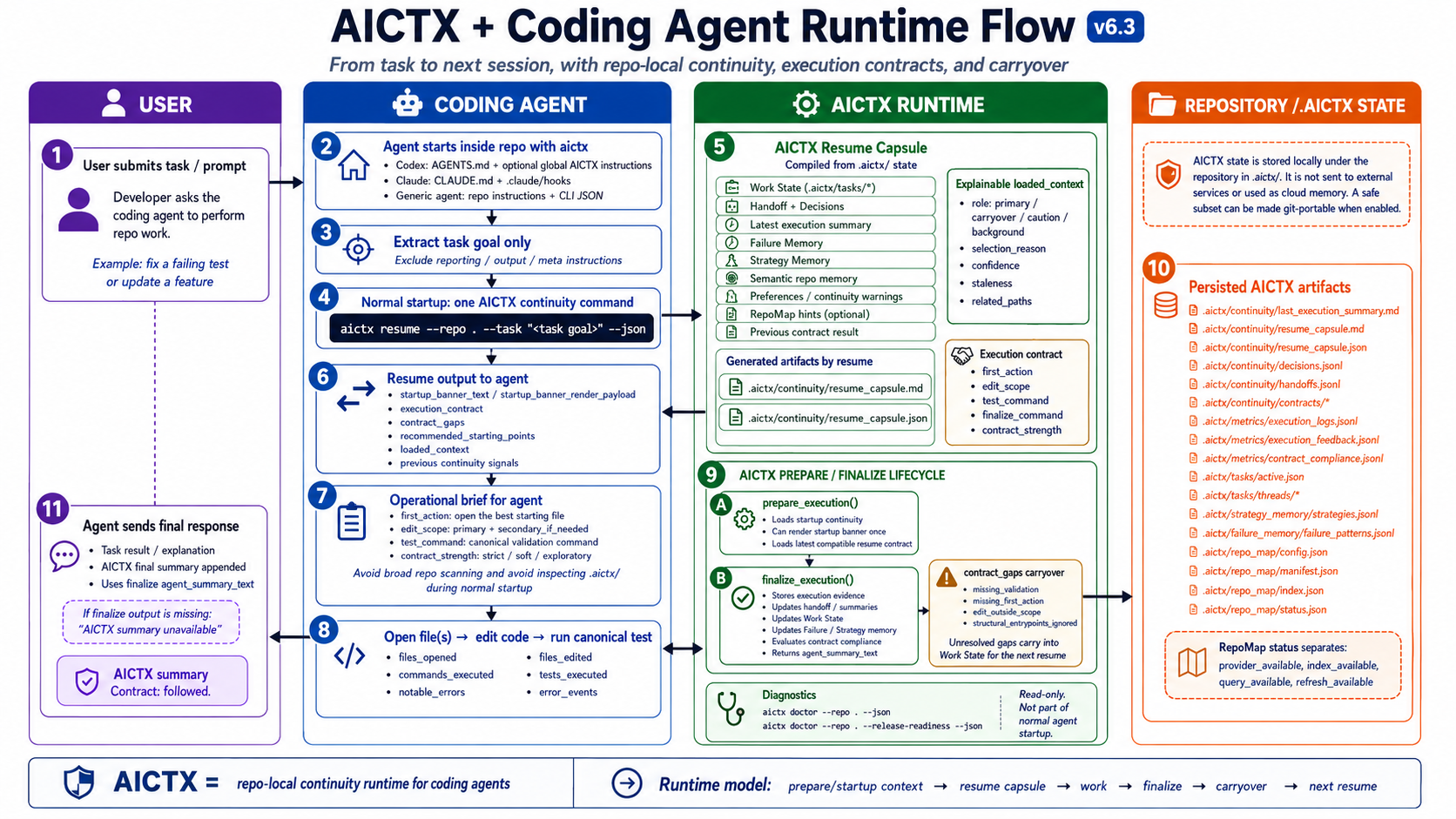
AICTX helps Codex, Claude, GitHub Copilot and other coding agents continue work across sessions by preserving the last useful execution state: active work, next actions, decisions, failures, validation evidence and repo context.
The next agent does not start from zero. It resumes from what actually happened.
Website: https://aictx.org
PyPI package: https://pypi.org/project/aictx/
CLI: aictx
It is a repo-local CLI/runtime layer for agent continuity. It stores inspectable artifacts under .aictx/ and exposes continuity through CLI commands, local MCP tools/resources/prompts, and generated agent instructions.
AICTX is Codex-first, GitHub Copilot-aware, Claude-aware, and generic-agent compatible.
Quickstart · Installation · Continuity View · Demo · Technical overview · Official project
The problem
Coding agents are powerful, but most sessions still start cold:
- they rediscover the same repository structure;
- they reopen broad docs before the relevant source or test;
- they repeat failed commands or stale assumptions;
- unfinished work depends on chat history instead of repo-local state.
AICTX makes that continuity repo-local, inspectable, and reusable.
Install
Install AICTX, then initialize the repository:
pip install aictx
aictx install
aictx init
aictx --version
After that, keep using your coding agent.
The generated repo instructions and hooks guide supported agents to call AICTX automatically. The normal user experience is:
install -> init -> use your coding agent
See Installation and Quickstart.
The operational continuity loop
resume useful context -> do the work -> finalize evidence -> next session continues
AICTX stores continuity locally under .aictx/, so it is inspectable, reviewable and not dependent on hidden chat history.
MCP server
AICTX can expose repo-local continuity as local MCP tools, resources and prompts.
Compatible agents can launch:
aictx mcp-server --repo . --profile full
The default aictx install / aictx init flow prepares AICTX MCP runtime metadata and repo-local MCP config through AICTX-managed, reversible setup. Sensitive client config is written as a managed <AICTX> block where the format supports comments, and as AICTX-managed JSON metadata in .mcp.json / .vscode/mcp.json. aictx clean / aictx uninstall remove only those managed entries and preserve user-authored MCP servers. Agents should prefer MCP tools when available and fall back to CLI commands otherwise.
See MCP.
Agent plugins
AICTX also ships Claude Code and Codex plugin artifacts.
The plugins are MCP-first and CLI-fallback: compatible agents should call AICTX MCP tools such as aictx_resume, aictx_finalize, and aictx_view; when MCP is unavailable they fall back to the AICTX CLI.
See Plugins.
What changes?
Without operational continuity
A new agent session starts cold.
It scans README, docs, Makefile and source files.
It rediscovers decisions.
It may repeat failed commands.
It asks for context that already existed.
With AICTX
The agent runs one resume command.
It sees active work, next action, known failures and validation path.
After work, it finalizes factual evidence for the next session.
AICTX turns disconnected agent sessions into a continuous operational workflow.
Inspect the continuity
aictx view --repo .
AICTX can render the current operational state of a repository as local Markdown and Mermaid:
.aictx/reports/continuity-view.md
.aictx/reports/continuity-map.mmd
Not hidden memory. Reviewable operational continuity.
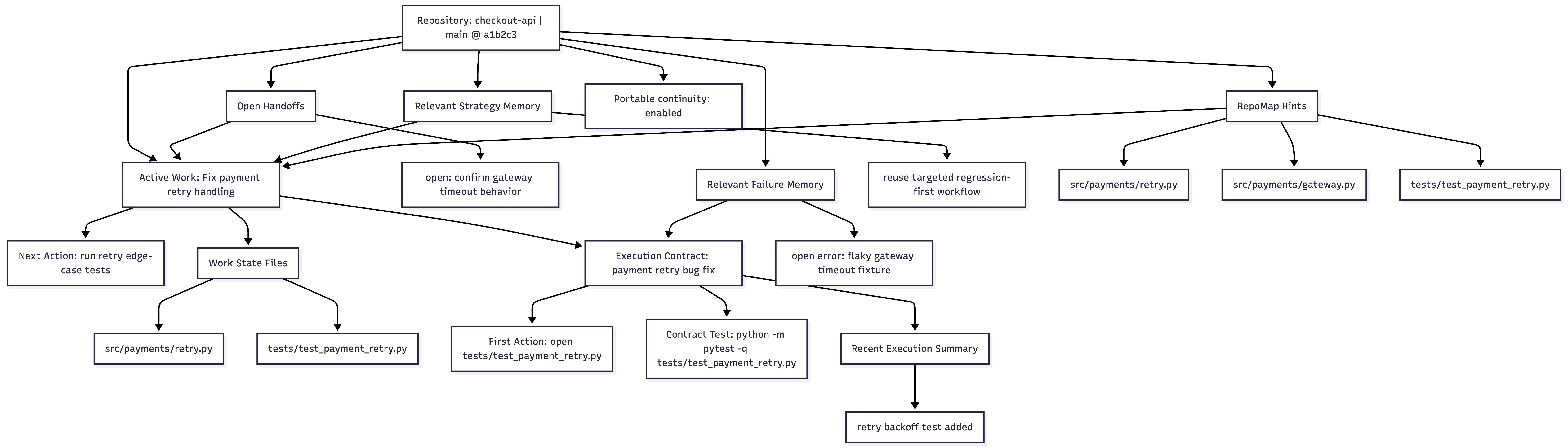
Continuity View documentation · Image asset
What AICTX preserves
AICTX focuses on operational facts that help the next agent continue useful work:
- active Work State and next action;
- execution summaries and handoffs;
- explicit decisions;
- known failures and resolved failure patterns;
- strategy hints from successful prior work;
- execution contracts and contract-compliance signals;
- optional RepoMap structural entry points;
- optional Git-portable continuity for small teams.
What AICTX is not
AICTX is not an autonomous coding agent, a cloud memory service, a vector database, a dashboard, a replacement for human review, or a guarantee of correctness, productivity gains or token savings.
It is a repo-local operational continuity layer used by cooperating coding agents.
Core capabilities
| Capability | What it does | Why it matters |
|---|---|---|
| Work State | Preserves active task, hypothesis, files, next action, risks, and verification state | The next session knows what was in progress |
| Failure Memory | Stores observed command/test/build/type/lint failures as structured patterns | Agents can avoid repeating known mistakes |
| RepoMap | Optional Tree-sitter structural map of files and symbols | Agents get compact structural entry points for “where should I look first?” |
| Strategy Memory | Reuses successful prior execution patterns | Known-good approaches can be suggested again |
| Handoff / Decisions | Keeps operational summaries and explicit project decisions | Architecture and intent survive session boundaries |
| Execution Summary | Captures what happened at finalize time | The next session starts from factual continuity |
| Continuity View | Generates .aictx/reports/continuity-view.md and .aictx/reports/continuity-map.mmd from repo-local continuity |
Users and agents can inspect active Work State, handoffs, failures, contracts, summaries, RepoMap hints, and portability in one deterministic Markdown/Mermaid view |
| Contract Compliance | Audits first action, edit scope, validation, and structural alignment | Gaps can carry over into Work State instead of disappearing |
| Doctor | Read-only repo/runtime diagnostic with aictx doctor --repo . --json; add --release-readiness for strict aictx release-gate checks |
Support uses a general repo diagnostic while releases keep stricter checks |
| Resume capsule | Compiles continuity into one agent brief | Agents do not need to discover AICTX internals at startup |
Supported agents
AICTX is runner-aware, not runner-locked.
- Codex-first:
AGENTS.md, optional global Codex setup, CLI/runtime JSON contract, MCP support, and Codex plugin artifacts. - Claude-aware:
CLAUDE.md,.claude/settings.json, hooks, MCP support, and Claude Code plugin artifacts. - GitHub Copilot: best-effort instruction hardening through
.github/copilot-instructions.md,.github/instructions/aictx.instructions.md, optional prompt files, and VS Code MCP config when supported. - Generic fallback: any agent that can read repo instructions, run CLI commands, consume JSON/Markdown, or connect to a local MCP server.
Documentation
Start here:
Core concepts:
- AI coding agent memory
- Repo-local continuity
- Operational continuity
- Failure memory for coding agents
- Work State
- RepoMap
- Failure Memory
- Strategy Memory
- Handoffs and Decisions
- Execution Summary
- Execution Contracts and Compliance
- Doctor diagnostics
Use cases and comparisons:
- Codex operational continuity
- Claude Code operational continuity
- GitHub Copilot operational continuity
- AICTX vs AGENTS.md
- AICTX vs long context
- AICTX vs vector databases
- AICTX vs chat history
Operations and trust:
Current limits
AICTX improves continuity only when agents or integrations cooperate with the runtime contract. File access, commands, tests, and failures are strongest when passed explicitly or captured through wrapped execution.
AICTX does not claim measured productivity gains, guaranteed speedups, or automatic correctness.
It makes operational continuity visible, inspectable, and reusable.
Yorumlar (0)
Yorum birakmak icin giris yap.
Yorum birakSonuc bulunamadi