prmarmot
Health Warn
- License — License: MIT
- Description — Repository has a description
- Active repo — Last push 0 days ago
- Low visibility — Only 7 GitHub stars
Code Pass
- Code scan — Scanned 12 files during light audit, no dangerous patterns found
Permissions Pass
- Permissions — No dangerous permissions requested
No AI report is available for this listing yet.
GitHub PR-review dashboard as a native desktop app (Rust + GPUI) — one glanceable table with a computed what-to-do-next Note per PR
PR Marmot
40 open pull requests. Which one needs you? Thought they were all green? One
is approved but blocked by failing CI and two unresolved comments. PR Marmot is a
desktop dashboard for GitHub pull requests, for macOS and Linux: the open ones
that involve you, across your repositories, with a plain-language Note on
each saying where it stands, kept there until that changes. You act on GitHub;
PR Marmot never changes anything there. Free and open source (MIT).
Built for leads, maintainers, and anyone whose coding agents open pull requests
for them.
Your GitHub token stays on your machine (in the keychain on macOS), with no PR
Marmot account, no server and no telemetry. The app talks only to GitHub, and
every line of it is here to read.
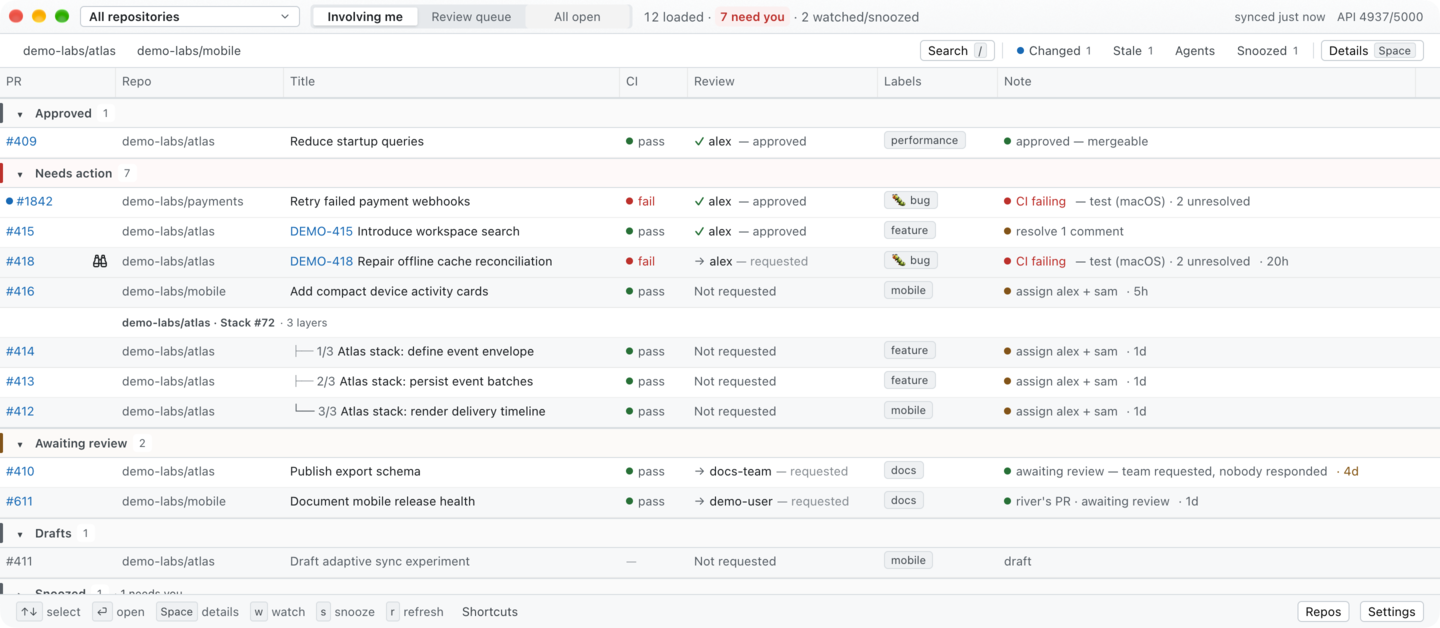
Involving me, across all repositories. Every repository, person and pull
request shown is fictional.
Get it
brew install --cask oliver-kriska/tap/prmarmot
Or, without Homebrew:
curl -fsSL https://raw.githubusercontent.com/oliver-kriska/prmarmot/main/install.sh | sh
Signed and notarized for Apple-silicon Macs. Linux and Intel Macs build from
source; see Install.
Three views
- Involving me — open PRs you opened, are assigned to, commented on or were
mentioned in, across your repositories, sorted by what they need (My PRs
for one repository). - Review queue — what was requested from you, and what nobody was asked to
review yet and is free to pick up. - All open — every open PR in one repository, whoever opened it, in the same
sections.
For scripts and coding agents, prmarmot-cli prints the same views as a table,
Markdown or JSON (schema in cli/schema/), watch streams one
event per line, and watch --pr OWNER/NAME#N --until ci-pass blocks until the
condition is met (prmarmot-cli skill install teaches your agent to use it).
See Terminal and agent CLI.
PR Marmot for iPad is coming to the App Store: free for seven days, then
bought once, with no subscription. Get notified:
github.com/oliver-kriska/prmarmot/discussions/8
What it does
A native desktop dashboard for deciding what to do next on GitHub pull
requests. PR Marmot turns CI, review requests, completed reviews, unresolved
comments, conflicts, labels, linked issues, and GitHub stacks into focused
views with a plain-language Note on every row.
- Involving me is the zero-config, all-repositories default. Your own PRs
keep actionable Notes; other authors' PRs use ownership-aware status Notes:
a teammate's PR with open threads nobody answered you on waits on its
author, and only the author replying to you makes it your turn.
Selecting one repository changes this queue to My PRs with the existing
authored behavior. - Review queue separates PRs that request your review from PRs with no
reviewer requested that are available for someone to pick up. - All open lists every open PR in one repository, whoever opened it, in
the same sections as the other views. A label or author filter goes to
GitHub's search, so it covers the whole repository, not just the PRs loaded
so far. - One name per section, in your order: a section is called the same in
every view, and Settings → Section order puts them in the order your
workflow needs. The header counts only what needs you in the view on screen. - Read-only by design: PR Marmot can open a PR or linked issue and copy its
URL, but it never assigns reviewers, comments, merges, or changes GitHub. - Signs in with your GitHub account: it uses your
GitHub CLI login when you have one, and otherwise
asks you to sign in with a one-time code or a token.
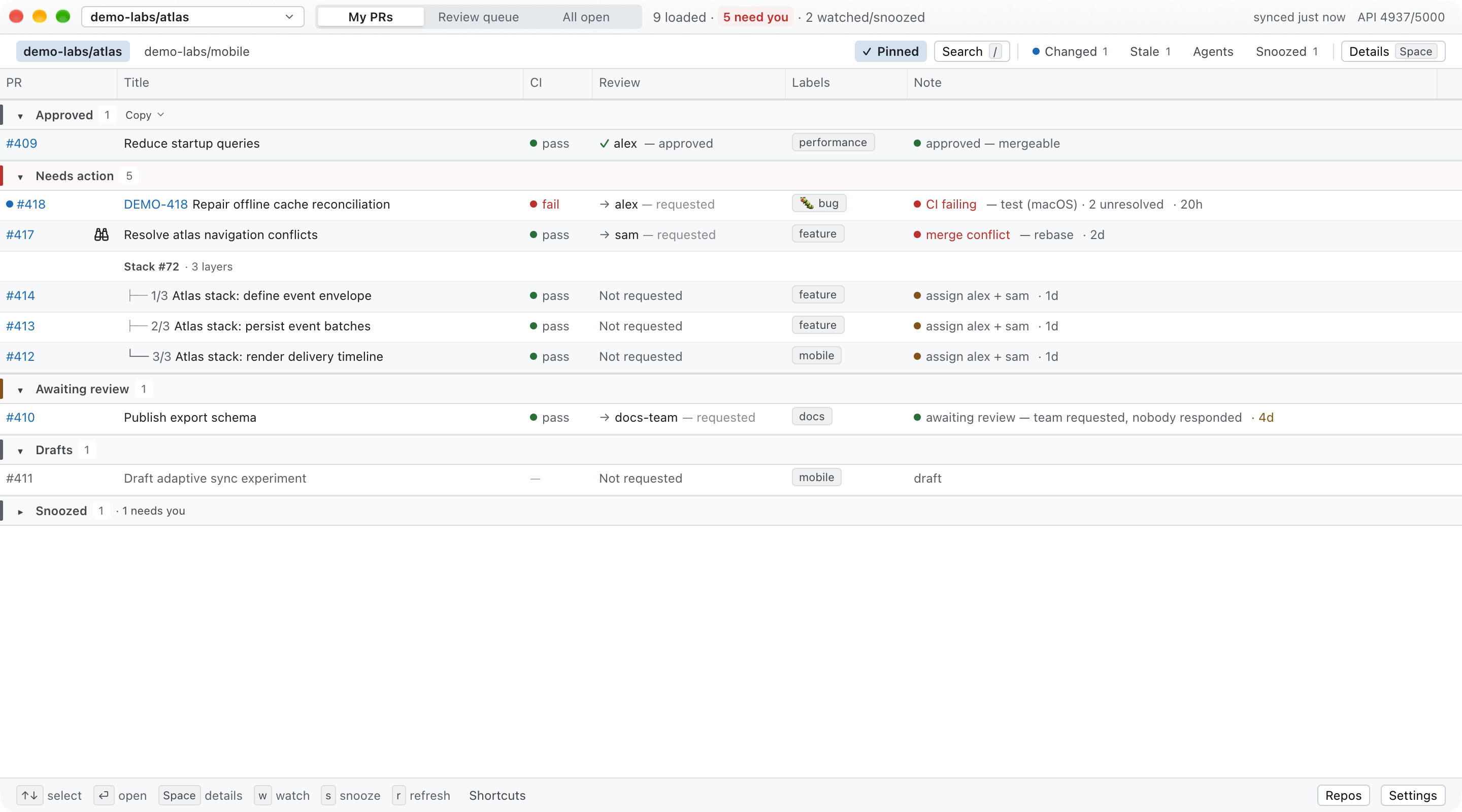
My PRs. All repositories, people, pull requests, labels, and statuses shown in
the screenshot are fictional.
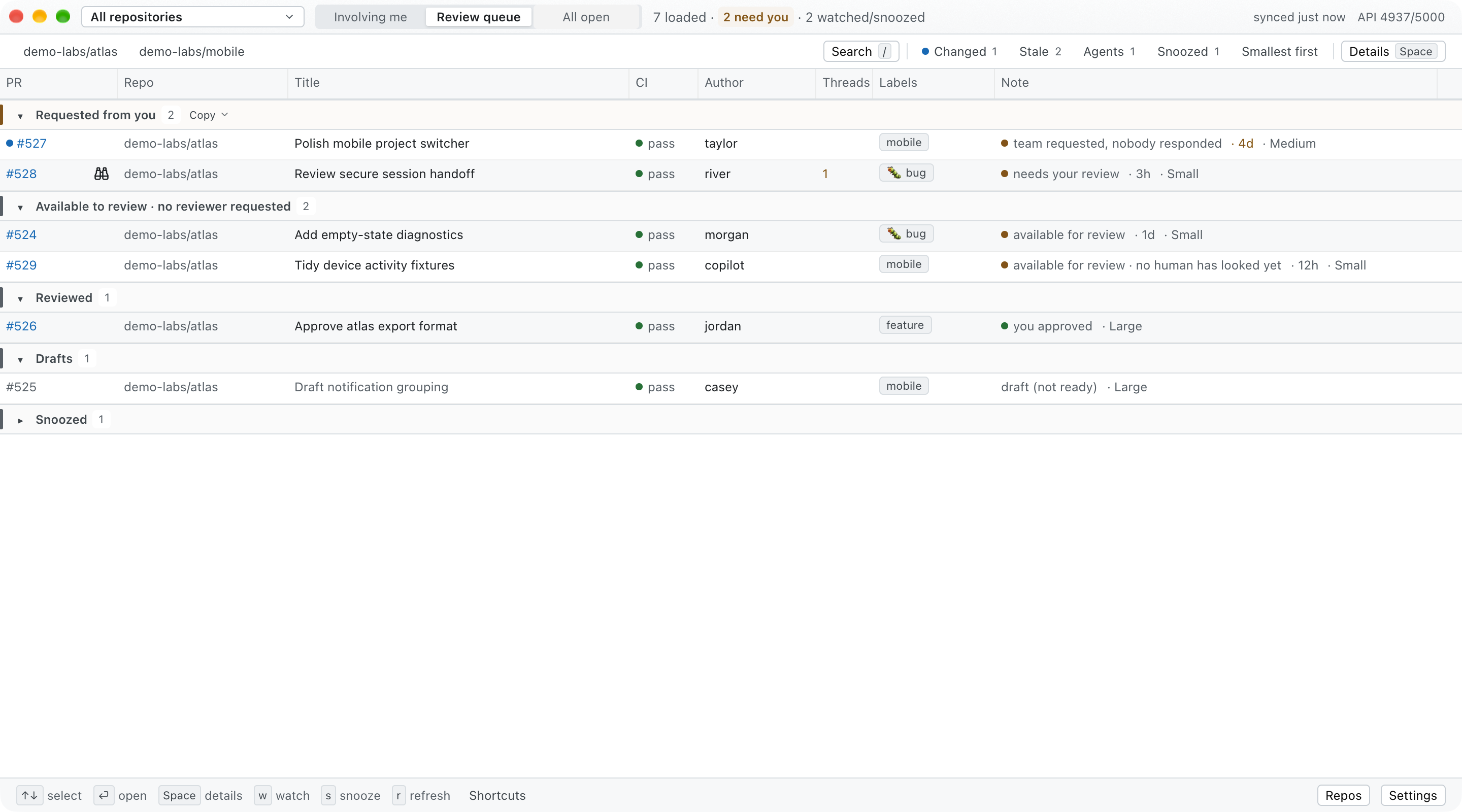
Review queue. The screenshot uses entirely fictional data. “Requested” means
your user was explicitly requested. “Available to review” means the PR has no
pending user or team review request; it is an optional pool, not an assignment.
Native GitHub stacks are grouped and ordered by layer, so dependent PRs can be
reviewed from the base upward. PRs without native stack metadata also form a
Branch tree when one targets another loaded PR's head branch in the same
repository, drawn with the same layer markers in parent-first order; Details
names each PR's parent. A dependency on a native-stack layer appears as
Based on #N, without adding a layer to GitHub's stack. A label such as backend, security, orfrontend supplies context at scan speed. Together, stack order and labels make
the available pool useful when choosing work that matches your area without
pretending GitHub assigned it to you.
Install
Requirements
None beyond the app itself. If you use the
GitHub CLI, PR Marmot uses its login and there is
nothing to set up:
gh auth login
Otherwise the sign-in screen appears when the window opens, offering Sign in
with GitHub (a one-time code you type at github.com), Use a token, and
Enterprise host. See Signing in.
Prebuilt releases are signed and notarized for Apple-silicon macOS. Linux
and Intel Mac users build from source for now.
Apple-silicon macOS
Run the installer from inside a GitHub checkout so it can detect that
repository, or pass the initial repository explicitly:
# Detect the repository from the current checkout
curl -fsSL https://raw.githubusercontent.com/oliver-kriska/prmarmot/main/install.sh | sh

# Or configure a repository explicitly (recommended for scripted installs)
curl -fsSL https://raw.githubusercontent.com/oliver-kriska/prmarmot/main/install.sh \
  | sh -s -- --repo owner/name
The installer downloads the latest macOS arm64 release, installs/Applications/prmarmot.app (~/Applications for accounts that cannot write/Applications; --dir <dir> to choose), verifies the published checksum,
Developer ID signature, notarization ticket, Gatekeeper acceptance, and that the
app is signed by PR Marmot's own Apple team (Gatekeeper accepts any notarized
developer), and creates the config file only when it can resolve an accessible
repository. It never overwrites an existing config, and it moves the installed
app aside rather than deleting it, so a failed install leaves the previous
version in place. It also links the bundled
terminal and agent CLI as ~/.local/bin/prmarmot-cli
(--bin-dir <dir> to choose another directory, --bin-dir "" to skip).
Or install the same signed artifact with Homebrew:
brew install --cask oliver-kriska/tap/prmarmot
The cask links prmarmot-cli into Homebrew's bin as well.
Every install path — the installer, Homebrew, and make install — uses the same/Applications/prmarmot.app, so a Mac has one PR Marmot. The installer andmake install remove an older copy that earlier versions put in~/Applications. Once Homebrew manages the app, update withbrew upgrade --cask prmarmot; the installer refuses and says so. If an app is
already in /Applications when you first install the cask, usebrew install --cask --force oliver-kriska/tap/prmarmot to replace it.
Updating? Quit the installed app before running the installer again.
The former app was named prboard. PR Marmot uses new app, binary, config, and
state names. Keep the old installation and data until the first PR Marmot
launch confirms the app's one-time storage migration; seepackaging/RELEASING.md.
Build from source
Requires Git, Rust through rustup (it installs the version rust-toolchain.toml
pins; dependency minimum 1.92, not tested), and the
platform dependencies required by GPUI. macOS additionally needs full Xcode and its Metal Toolchain. Linux
needs a working Vulkan stack plus fontconfig, xkbcommon, and the normal X11 or
Wayland development/runtime libraries.
curl -fsSL https://raw.githubusercontent.com/oliver-kriska/prmarmot/main/install.sh \
  | sh -s -- --from-source --repo owner/name
On macOS this installs /Applications/prmarmot.app, the same app the cask
manages, and links ~/.local/bin/prmarmot-cli into it (make install from a
checkout does the same, replacing a Homebrew-installed app until the nextbrew upgrade); on Linux it installs the prmarmot and prmarmot-cli binaries to~/.local/bin by default. There are no prebuilt Linux packages yet.
First run
- Launch PR Marmot from Spotlight/Finder on macOS, or run
prmarmoton Linux. - If prompted, sign in on the screen that appears (see
Signing in), or completegh auth loginin Terminal and click
Retry. Your token is never displayed. - The default All repositories scope shows open PRs involving your resolved
GitHub login. Pick a specific repository for its complete scoped result. - Switch between Involving me (or My PRs in one repo) and Review
queue in the title bar.
Click Settings in the bottom-right corner to edit reviewer suggestions,
the refresh interval, the theme, and the section order directly—no file
editing required.
Expand Advanced to configure issue links or copy the config-file path.
Save validates and applies changes without restarting; Cancel discards
your edits. Reviewer and issue-link changes reload the board, subject to the
GitHub rate-limit budget. Theme changes apply immediately on Save. Validation
errors appear beside the relevant fields and focus the first invalid input
(opening and scrolling Advanced when needed); a brief footer message confirms a
successful save.
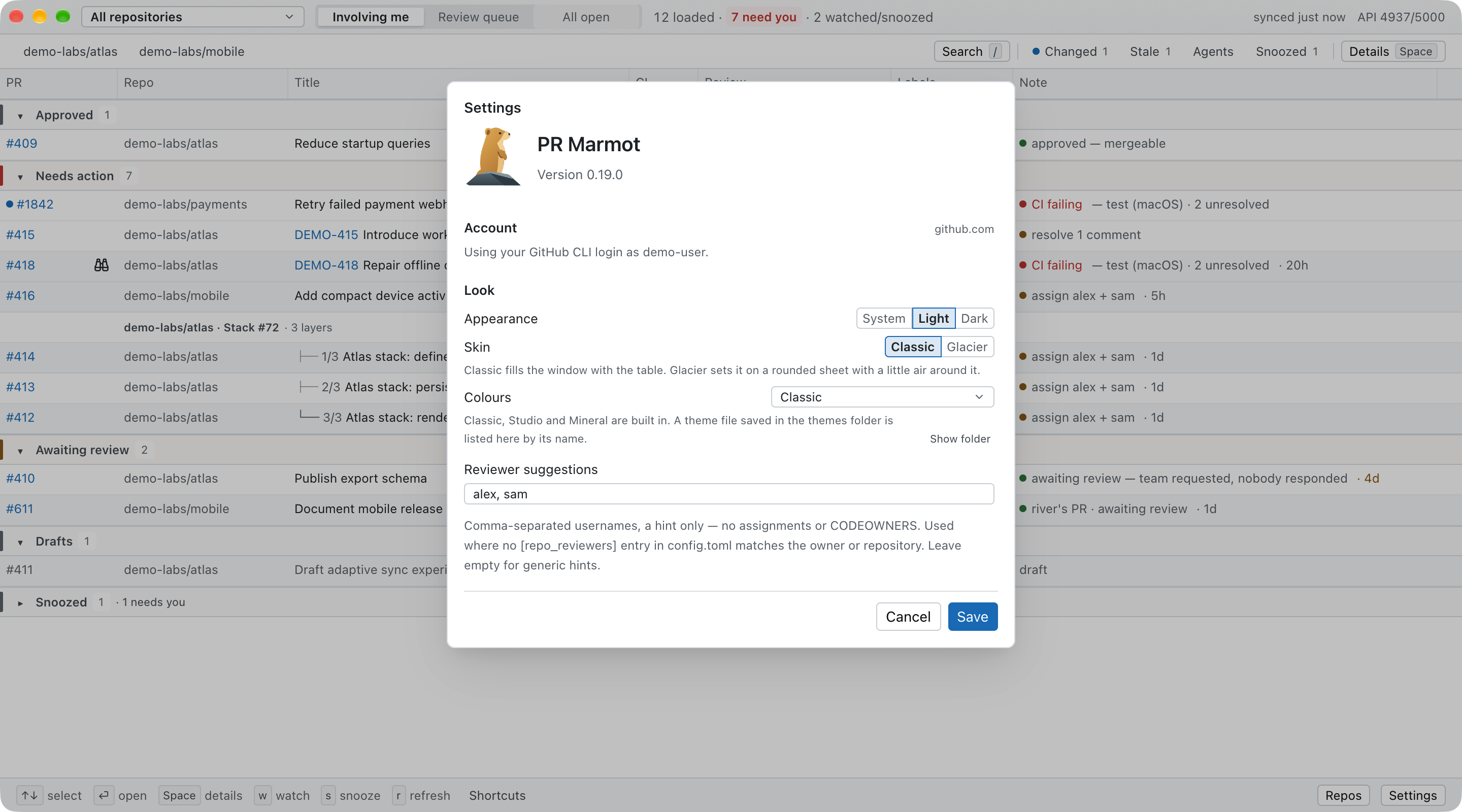
Settings shown with fictional reviewer names. Environment-controlled fields
are disabled and labeled; saving other settings leaves their file values alone.
Signing in
PR Marmot reads GitHub with your own token and nothing else: there is no PR
Marmot account, no server of ours in the path, and the token never leaves the
machine it was stored on.
Which sign-in PR Marmot uses. A token you chose on purpose comes first:
one set for the run with PRMARMOT_TOKEN, then a personal access token you
pasted (Use a token, or prmarmot-cli auth login --with-token). Next comes
your GitHub CLI login: when gh is signed in to the host, PR Marmot uses it
even if you also signed in with GitHub here. The GitHub CLI is an OAuth app
that organizations' OAuth-app restrictions don't apply to; PR Marmot's own
sign-in is subject to them, so preferring it would quietly hide repositories
in organizations that restrict OAuth apps. To use that sign-in anyway, set[auth] mode = "token" (or PRMARMOT_AUTH=token). Settings andprmarmot-cli auth status say which one is in use, and whether a stored token
is sitting unused.
Without a GitHub CLI login, there are three ways in, in the order the sign-in
screen offers them:
- Sign in with GitHub — GitHub's OAuth device flow, against PR Marmot's
own registration, so there is nothing to set up. The app shows an
eight-character code, you openhttps://github.com/login/deviceand type it,
and the app continues on its own. There is no client secret and no callback
URL, which is why it works with no server. It asks forrepoandread:org, and the token it stores keeps working until you sign out or
revoke it at
Authorized OAuth Apps. - Use a token — paste a personal access token. A classic token with
repoandread:orgreaches every organization you belong to, including
their private repositories and ones that restrict OAuth apps, and reads CI,
which a fine-grained token cannot. A fine-grained token needs Pull
requests: read and Metadata: read and covers one resource owner: a
token whose resource owner is you cannot see an organization's private
repositories — they simply do not appear, with no error to explain it. To
reach them, choose that organization as the resource owner when you create
the token — an organization can require an owner's approval, or block
fine-grained tokens altogether — and that token in turn leaves out your
personal ones. A fine-grained token also never reads check runs, so CI
shows as "hidden" and PR Marmot says so in one line. - Enterprise host — a GitHub Enterprise Server hostname. GHES supports the
device flow, but each instance is a separate app registration, so setclient_idfor it (below) or sign in with a token. On github.com you never
need aclient_id: the app carries its own.
The same three paths exist in the terminal:
prmarmot-cli auth login                     # device flow
gh auth token | prmarmot-cli auth login --with-token
prmarmot-cli auth login --host ghe.example.com
prmarmot-cli auth status
prmarmot-cli auth logout
Where the token is kept. macOS: the login keychain, servicedev.prmarmot.auth. Linux: $XDG_STATE_HOME/prmarmot/auth.json, mode 0600.
Set [auth] store = "file" to use the file on macOS too — worth doing if the
keychain prompts you once per binary, which it does because keychain access
control is per-application.
Disconnecting. Settings → Disconnect, or prmarmot-cli auth logout,
removes the token from this machine. Revoking PR Marmot's access at GitHub is a
separate step you take at https://github.com/settings/applications: doing it
from the app would need a client secret, and PR Marmot has none by design.
Environment overrides, highest precedence first: --host / --auth flags
(CLI), then PRMARMOT_HOST, GH_HOST, PRMARMOT_AUTH, PRMARMOT_CLIENT_ID,PRMARMOT_TOKEN, then the [auth] block in the config file. On the gh path
every gh call is told that host, so a GitHub Enterprise host set in PR Marmot
is the one gh queries, whatever gh's own default.PRMARMOT_AUTH takes auto (the default, in the order above), gh, device,
or token. PRMARMOT_TOKEN supplies a token for one run and is never written
to the store. It comes before a GitHub CLI login, which CI runners often have
through GH_TOKEN, so it is the right switch for CI:
PRMARMOT_TOKEN=$GITHUB_TOKEN prmarmot-cli mine --json
Configuration
The config file is:
$XDG_CONFIG_HOME/prmarmot/config.tomlwhenXDG_CONFIG_HOMEis an absolute
path;- otherwise
~/.config/prmarmot/config.toml.
Every setting is optional. With no scope or repository, the app opens all
repositories:
scope = "all"                            # all | repo; clean default is all
repo = "acme/widgets"                    # remembered specific repository
repos = ["acme/widgets", "acme/api"]    # extra repo-picker entries
pinned_repos = ["acme/widgets"]          # toolbar shortcuts, maximum 12
refresh_secs = 300                       # default 300; hard floor 30
theme = "system"                         # system | light | dark
colors = "classic"                       # classic | studio | mineral | a theme file's name
skin = "classic"                         # classic | glacier
view = "authored"                        # authored | review | all
notifications = true                    # transition alerts while app runs
notification_sound = true
notify_all_needs_action = false         # watched PRs still notify
dock_badge = true                       # macOS; no-op on Linux
automatic_update_checks = true          # latest stable release, at most daily
stale_after_days = 3                    # waiting this long for a reviewer is stale
agent_authors = ["copilot*"]            # agent-authored on top of GitHub's Bot accounts; * matches anything
section_order = ["available", "await"]  # these sections first, the rest in default order
details_position = "auto"               # auto | bottom | right

# Folded sections, per view (my_prs, involving_me, review, all_open).
# A view left out folds only Snoozed.
[collapsed_sections]
review = ["snoozed", "done"]

# Suggestions used only in the authored-PR “no reviewers” note.
default_reviewers = ["alice", "bob"]     # any repository without an entry below

[repo_reviewers]
"acme" = ["carol", "dave"]               # every repository owned by acme
"acme/api" = ["erin"]                    # this repository (wins over "acme")
"acme/sandbox" = []                      # suggest nobody here

[issue_link]
pattern = "PROJ-[0-9]+"                  # regex matched in PR titles
url_template = "https://linear.app/acme/issue/{id}"

[window]
width = 1440
height = 860

[auth]
host = "github.com"                      # or a GitHub Enterprise Server host
client_id = "Iv1.xxxxxxxxxxxx"           # only for a GHES host; public by design
mode = "auto"                            # auto (see Signing in) | gh | device | token
store = "auto"                           # auto (keychain on macOS) | keychain | file
Look
Three settings decide how the board looks, each on its own: Appearance
(theme: light, dark or the system's), Colours (colors) and Skin
(skin). The defaults draw the app exactly as it has always looked.
colors picks a colour set. Three are built in: classic, studio (cool,
layered) and mineral (warm stone and paper), each with a light and a dark
side that meet WCAG AA on every surface the board draws text on. To use your
own, save a theme file in the themes folder beside the config file
(~/.config/prmarmot/themes/) and set colors to the theme's name; Settings
lists every theme found there. The file is a
gpui-component theme
(JSON): a themes list, each with a name, a mode of light or dark,
and colors keyed like background, foreground, muted.foreground,primary.background, link, danger.background, table.hover.background.
A light and a dark theme of one name, or in one file, follow the appearance
together; a theme with one side only is drawn in that side's mode. A theme whose text falls under 4.5:1 contrast is still used, with a
warning in Settings; a file that can't be read is listed in the config banner.
Type size and corner radii are the app's own and no theme changes them.scripts/demo/theme-sample.json is a complete example.
skin decides how the elements are drawn. classic is the full-width table.glacier sets the table on an inset sheet with rounded corners and a shadow,
gives each section a rail and a count capsule in its tone, parts rows with a
hairline instead of zebra striping, marks the selected row with a rail, and
puts a failing check or a blocking note (a conflict, failing CI) in a capsule;
passing, approved, routine and waiting states stay a dot and a word, and an
approved section's rail is quiet too. The current repository, Pin, the quick
filters and the selected view all say "on" the same way: a tint of the link
colour under the text, a step bolder. The Title column gets the room its
longest title needs first; the Note column takes the rest and shortens its
tail, but never its first phrase. Both skins draw with any colour set. In
every look, the selected segment of a Settings control is filled, edged in
the link colour and set bolder, and with Studio, Mineral or a theme file the
Save button and the sign-in buttons take the set's own accent.
Appearance, Colours and Skin preview immediately in Settings. Preview on
board moves the same draft to a compact panel without losing your selection,
filters or unsaved fields. Cancel restores the original look without saving
or fetching; only Save persists it. Classic and Glacier have visual choices.
Glacier's chrome uses native blur and static grain on macOS, with opaque surfaces
on Linux or with Reduce Transparency. Tables and dialogs keep their theme
backgrounds. Short entrance transitions respect Reduce Motion and stop when
finished; nothing loops while idle.
What default_reviewers does—and does not do
default_reviewers and [repo_reviewers] are static hints. When one of
your non-draft PRs has no pending reviewer request and no qualifying
completed review, its Note can say, for example, “assign alice + bob.” PR Marmot
picks the list for the PR's repository ("owner/name"), else for its owner
("owner"), else default_reviewers; keys are case-insensitive, and an empty
list suggests nobody. It does not assign those people, validate that they
are suitable for the repository, read or implement CODEOWNERS, or infer GitHub
ownership. Settings edits default_reviewers; edit [repo_reviewers] in the
file. PRMARMOT_DEFAULT_REVIEWERS replaces only default_reviewers.
Issue links are optional and tracker-agnostic. {id} in url_template is
replaced with the first identifier matched by pattern; no tracker or project
prefix is built in. The template must be an http:// or https:// address
with {id} in it; anything else is reported in the config banner and ignored,
since the link is handed to the system's URL opener.
CLI options override environment variables, which override the config file:
PRMARMOT_REPOPRMARMOT_SCOPE(allorrepo)PRMARMOT_REFRESH_SECSPRMARMOT_THEMEPRMARMOT_DEFAULT_REVIEWERS(comma-separated)PRMARMOT_ISSUE_PATTERNandPRMARMOT_ISSUE_URL_TEMPLATE(use together)
Use --all-repos or --repo owner/name to choose scope explicitly. The app
persists scope and the last specific repository independently, plus theme,
starting view, window size, pinned repos,
and saved Settings back to valid TOML while preserving comments and unrelated
settings. It refuses to overwrite an unparseable config. Manual file edits
require a restart; changes saved in Settings do not.
Using PR Marmot
Every feature, with its limits and the version it shipped in, is listed in
FEATURES.md.
- Shortcuts: the footer opens the full keyboard reference. Character shortcuts
work from dashboard controls, but never while typing in search, the repo picker,
or Settings. Arrow keys, Enter, and Space belong to the focused control;
choosing a repository in the picker gives them back to the board. - Views: click Involving me (or My PRs) / Review queue /
All open, press1/2/3, or pressvto cycle. All open needs one
repository, so its tab is disabled while All repositories is selected. - Navigate:
↑/↓selects;Enteroroopens the PR;ycopies its
URL with a brief footer confirmation; double-clicking a row opens it. - Select several:
⇧-click a range,⌘-click (Ctrlon Linux) to add or
remove one,⇧↑/⇧↓to extend,⌘Afor every PR on screen. The footer
counts them;Enteropens them (up to 10),ycopies their URLs,Ycopies
them as a list,wandswatch or snooze them all, and the right-click menu
has the same with the four copy formats.Escgoes back to one row. - Inspect: press
Spaceor click Details;Esccloses the panel.
Select text in the panel and press⌘C(macOS) orCtrl+C(Linux) to copy it.
The Copy menu offers the PR number, title, URL, or all details without selecting text. - Share a group: hover a section header (e.g. Awaiting review) and click
Copy, or right-click the header. Copy list for Slack & docs pastes titled
links into Slack, Teams, Google Docs, email, Notion, Linear, and Jira; Copy
Markdown for GitHub is plain Markdown for GitHub, Discord, and editors; Copy
as table suits docs and slides; Copy URLs is one link per line. PressY
to copy the selected PR's group as a list. Copies respect the active search.
On Linux the list and table copy as plain text. - Pickup age: the Note ends with how long a PR has waited for a reviewer
(· 16h,· 3d), in amber once it has waitedstale_after_days(default
3). A PR requested from you counts from your latest review request (or, when
only your team was asked, the team's); your own PR counts from its
longest-standing pending request; an available PR, or yours with no reviewer
requested, counts from when it opened. Every wait starts no earlier than the
last "ready for review", and drafts and PRs someone already reviewed show
none. Requested from you, Available to review, and Awaiting
review list the longest wait first. When only a team was asked and nobody
has reviewed, the Note says "team requested, nobody responded"; with nobody
asked at all, your PR's Note says "no reviewers". - Evidence: "CI failing" names the failing checks ("CI failing — lint,
test (macOS)") and "changes requested" names who asked ("changes requested
by bob"), in the Note and the notification. Details' Checks line ends with
the failed checks, each one a link that opens its run, and its Unresolved
comments line with the files the open threads are on. The CLI's JSON
carriesfailed_checkswith each run's URL andunresolved_paths. "New
commits since your review" counts them ("3 new commits since your review",
"20+" past the newest 20 read). - Merge queue: a PR in its repository's merge queue says so instead of
"mergeable": "approved — in merge queue, position 2" while it waits,
"approved — merging" once the queue has it, and "approved — merge queue
couldn't merge it" when the queue gave up. GitHub merges a queued PR in
its turn, so nothing asks you to press merge. The CLI's JSON carriesmerge_queuewith the state and position. - Sections: a section has one name in every view. In Involving me
and All open, someone else's PR that nobody was asked to review and
nobody has reviewed is under Available to review, as in the Review
queue. Hover a section's title (Awaiting review, Needs action, …)
for one sentence on what puts a PR there. - Section order: by default, what is done leads (Approved), then what
needs you, then what waits, then Drafts. Settings → Section order
changes it for every view at once (up and down buttons, Reset to
default), saved assection_orderin the config file; the CLI follows it.
Each view shows the sections it has in that order, and Snoozed stays last. - Folding: click a section's header, or press
c, to fold it; a folded
section keeps its count and says what it holds ("1 failing CI · 1 merge
conflict", "longest wait 4d"). Each view remembers what you folded. - Quick filters: Needs you, Changed, Stale and Snoozed
beside Search narrow the board with one click, each with its count. - Details beside the table: on a window 1,480 px or wider, Details opens on
the right as a list of labels and values; narrower, it opens below. Settings
→ Details position can pin it to either place. - Size band: in the Review queue and All open, the Note ends with
how big the change is: Small (at most 100 changed lines and at most 10
files), Large (more than 400 lines or more than 30 files), or Medium
otherwise. Changed
lines are additions plus deletions, as GitHub counts them, so lockfiles and
generated files count too. A PR whose counts GitHub didn't report shows no
band. Hover the Note or open Details for the line and file counts. The band
is never turned into a time estimate. The thresholds follow Google's
small-change guidance
and the SmartBear/Cisco finding that reviews catch less beyond 200–400 lines.
Smallest first (Review queue toolbar) lists Requested from you and
Available to review by band, then by changed lines, then longest wait;
PRs without a band come last, and other sections keep their order. It lasts
until you quit. - Changes: a blue row marker survives restarts until you actually select the
PR; hover it to see what changed (new commits, CI, reviews, requests, comments).
Changed (with the count of changed PRs matching the search) filters the
loaded rows; a restored selection does not clear it. - Watch: press
won a selected PR. Watches are FIFO-bounded at 50 and are
refreshed through one batched GraphQL operation, including watched PRs outside
the active search. Notifications are semantic transitions, suppressed for the
first successful observation after launch and for the focused selected row. - Snooze: press
sfor one hour, until tomorrow (09:00 the next day, your
time zone, including daylight-saving changes), waiting on a person, waiting for terminal CI, or
review-again-when-changed; the digit on each choice picks it from the
keyboard. Snoozed rows move to a collapsed group and do not contribute
attention alerts or counts until they wake. Snoozed (with its count)
shows or collapses that group. - Search loaded rows: click Search, press
/, or press⌘F(Ctrl+F
on Linux, or Edit → Find). Words match PR number, repository, title,
author, label, issue, and Note; several words narrow together, and quotes keep
a phrase whole ("merge conflict"). The count beside the box says how many
loaded PRs match.label:NAME,author:LOGIN, andrepo:OWNER/NAMEkeep PRs whose label,
author, or repository is exactly that, ignoring case. Quote values with
spaces:label:"help wanted". After a space or Enter a term becomes a
chip. Words, labels, andis:stalemust all match; severalauthor:orrepo:chips keep PRs matching any one of them, as GitHub does.- In All open,
label:andauthor:chips are sent to GitHub's search
(one request, after you stop typing), solabel:bugfinds every open bug
PR in the repository and the header says "N match".author:dependabot
finds the bot's PRs too. Words andis:stalestill check only the loaded
PRs, and while more are left to load a line under the header says so. is:stalekeeps PRs that have waitedstale_after_daysor longer for a
reviewer (see Pickup age).is:agentkeeps PRs a coding agent or bot opened,is:humanthe ones a
person opened. GitHub'sBotaccounts count (Copilot, Claude, Dependabot
and the like);agent_authorsin config.toml adds logins or*patterns
for an account an agent opens PRs from. An agent's PR that no person has
reviewed reads "no human has looked yet" (aBotaccount's review does
not count, and a plain comment is not a review). The Agents button
beside Stale toggles the chip.- Click a label (in the table or in Details), an author, or a repository to
add it. +n lists the labels that didn't fit. - A chip's × removes it, and Backspace in an empty box removes the last one.
The × at the right clears the search. An empty search closes when you leave
it.
- Header: it shows how many PRs this view has loaded, how many of them
need you, and how many of them you watch or snoozed. "Need you" is the Dock
badge's rule counted over the view on screen, without snoozed PRs: your own
PRs under Needs action plus Requested from you. A teammate's PR under Needs
action and Available to review (nobody asked you) never count. All open
also says how many of the repository's open PRs are loaded ("60 of 759
open"). The Dock badge adds up My PRs and the Review queue, whichever view
is on screen. Hover the header for the explanation, including how many of
the PRs you follow, in any view, each refresh checked. The "need you"
count is a button: click it and the board keeps only those PRs, with a
check mark on the count and "29 of 30 loaded" in the toolbar; click it
again to see everything. It is lit in the tone of the most urgent of them
(red with failing CI or a conflict, amber otherwise) and grey when nothing
needs you. - Refresh:
rrefreshes immediately. Automatic refresh defaults to five
minutes and the header shows the last sync time and GitHub API budget. If the
initial load fails, click Retry; rate-limit pauses still wait for their budget.
Once the displayed snapshot is one refresh interval old, a banner above the
table says Showing older data, gives its age and the refresh status, and
warns that PRs may already have changed or merged. It stays until fresh data
arrives, including when a refresh fails or pauses. - Updates: by default PR Marmot checks the latest stable GitHub release on
launch and at most once per day. A header banner opens the verified release
page for direct installs. Homebrew installs stage a detached helper and quit
only after it starts; the helper upgrades theprmarmotcask after the app
exits, reopens it, and reports failures on the next launch. - Repositories: All repositories is always first in the searchable
picker. Choosing a repository performs a fresh repository-scoped request—it
never filters the truncated global page and pretends it is complete. Pin
adds an in-app shortcut and Pinned removes it. Up to 12 pins persist in
order. Pins do not fetch in the background, but a repository you come back
to shows the rows it had at once and refreshes them behind the table. - Theme:
tcycles system → light → dark. - Quit: use PR Marmot → Quit PR Marmot,
⌘Qon macOS, orCtrl+Qon Linux.
The global shortcut works even in Settings and text inputs, and closing the
window quits too.
Mutable attention state is stored separately from preferences under$XDG_STATE_HOME/prmarmot (or ~/.local/state/prmarmot), namespaced by GitHub host
and account. Writes are bounded, coalesced, and atomic. On macOS/Linux, board
and attention snapshots and their temporary files are owner-readable/writable
only (0600); startup also restricts existing regular snapshot files. These are
file permissions, not encryption. A corrupt or newer state
file is preserved and reported in the footer rather than overwritten. The board
itself is kept there too (board-<host>-<account>.json): the rows every queue
last loaded, so a launch shows them while the first refresh runs; a file another
version wrote is ignored. If the app ever panics, panics.log in the same
directory gets one line (time, version, thread, source location, never the
message), kept under 64 KiB.
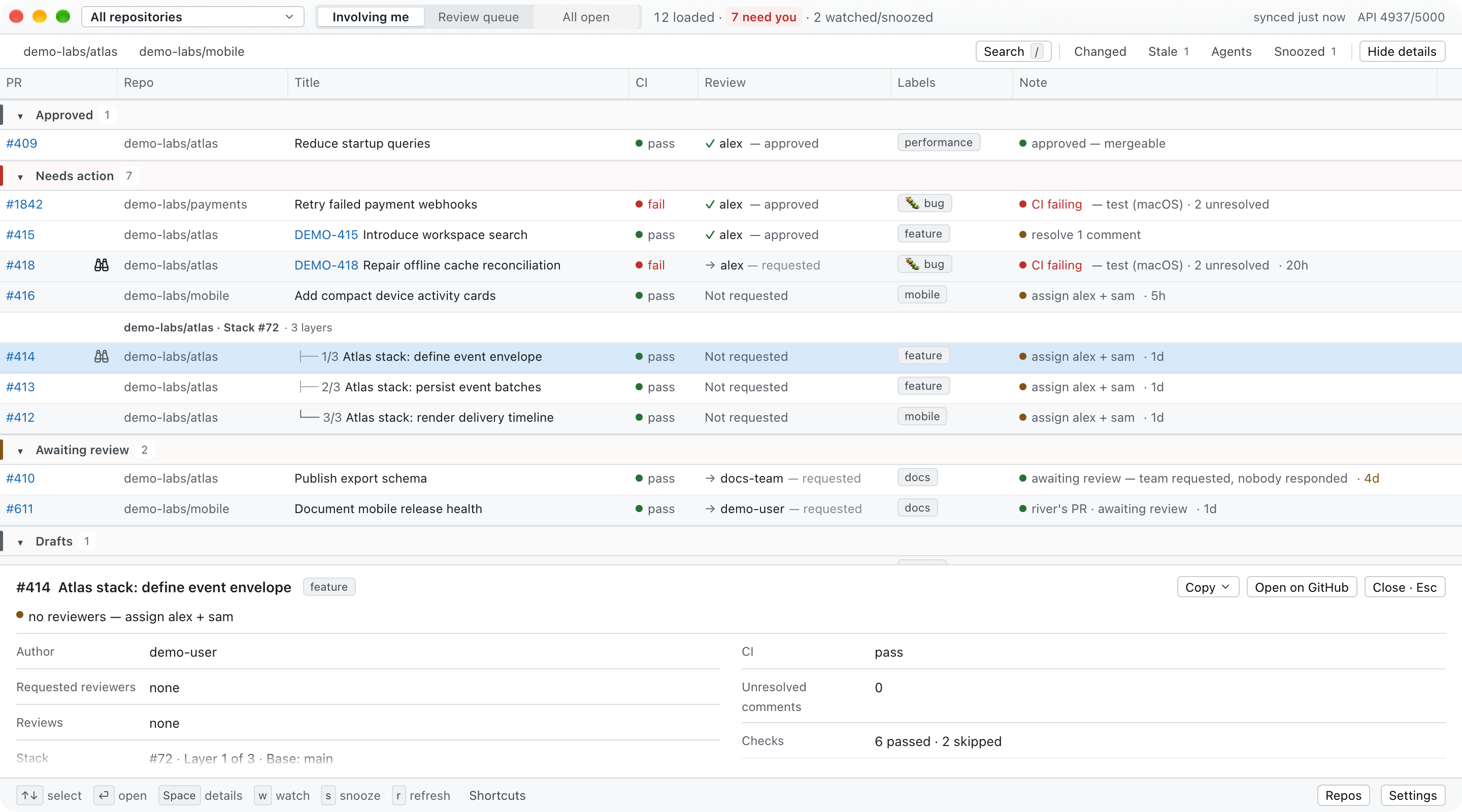
Select a row and open Details to inspect its loaded metadata: labels, the
Note, author, CI and its checks counted by state, reviewers, and reviews.
Scroll the panel for the rest,
including the stack layer and base branch. This example uses fictional data;
opening the panel makes no additional GitHub request.
Terminal and agent CLI
prmarmot-cli prints the same My PRs, Review queue, and All open
views in a terminal, as Markdown, or as JSON for coding agents. It uses the app's GraphQL
query, categorization, Notes, sections, stack grouping, config file, and
sign-in — either a token you stored with prmarmot-cli auth login or the gh
CLI's, see Signing in. It has no GPUI dependency, so it builds
without Metal. The CLI reads PR Marmot's watch and snooze state but never writes
it, and never clears a changed marker.
The app installers above already put it on PATH (the binary lives insideprmarmot.app, so app updates update it). Without the app:
cargo install --locked --git https://github.com/oliver-kriska/prmarmot prmarmot-cli
# or, from a checkout: make cli  (-> target/release/prmarmot-cli)
prmarmot-cli mine                      # My PRs (Involving me across all repositories)
prmarmot-cli mine --all-repos --authored   # only PRs you opened, in any repository
prmarmot-cli review --all-repos        # Review queue across repositories
prmarmot-cli mine --changed            # only PRs changed since you last looked, with what changed
prmarmot-cli review --stale            # only PRs that have waited too long for a reviewer
prmarmot-cli review --agent            # only PRs a coding agent or bot opened (--no-agent: a person's)
prmarmot-cli review --filter 'label:"help wanted" is:stale'   # the app's search, in the terminal
prmarmot-cli review --sort smallest    # small changes first, by the app's size band
prmarmot-cli all --repo acme/api --filter 'label:bug'   # every open bug PR in one repository
prmarmot-cli review --json | jq '.sections[] | select(.key == "todo") | .prs[].url'
prmarmot-cli watch review --events 1   # block until something in the queue changes
prmarmot-cli pr acme/api#42            # one PR in full: Note, evidence, reviews, checks, wait
prmarmot-cli report --since 1d         # standup: merged, opened, still needs you, awaiting review
prmarmot-cli watch --pr acme/api#42    # follow one PR until it merges or closes
prmarmot-cli watch --pr acme/api#42 --until ci-pass --timeout 30m   # wait for green CI
prmarmot-cli auth login                # sign in without the GitHub CLI
prmarmot-cli auth status               # which account and token this machine uses
Scope follows the app: --repo owner/name or --all-repos, thenPRMARMOT_REPO / PRMARMOT_SCOPE, then config.toml. A repository that doesn't
exist or that your gh account can't see is an error (exit 1), not an empty
list. all lists one repository's open PRs, so without one it exits 2 before
asking GitHub anything. --watched keeps only
PRs you watch in the app. --stale keeps only PRs that have waitedstale_after_days (default 3) or longer for a reviewer, by the app's
Pickup age rule; table and Markdown Notes end with the wait
(· waiting 3d, marked (stale)). In review and all, Notes also end with
the Size band (· Small). In review, --sort smallest lists the pickup
sections the
way Smallest first does (--sort wait, the default, lists the longest wait
first). --snoozed expands the Snoozed group, which is
otherwise shown as a count. --pages N loads up to five result pages, the same
cap as Load more.
--filter "<query>" runs the app's search box over the loaded PRs, with the
same grammar the desktop search field uses, so a saved query means one thing in
both places. Bare words match the number, repository, title, author, labels,
linked issue and Note; label:NAME, author:LOGIN, repo:OWNER/NAME,is:stale, is:agent and is:human match a whole field; quote a value that has spaces
(label:"help wanted"); every term must match, and matching ignores case.
Several author: or repo: terms keep PRs matching any one of them, as
GitHub's search does. is:stale uses the same stale_after_days as --stale.
In all, the label: and author: terms go to GitHub with the search, so
they cover the whole repository; words and is:stale check only the loaded
PRs, and the footer says so while more are left to load. The grammar lives inprmarmot-core and is pinned by a golden test, so the desktop app, the CLI and
future front ends cannot drift on what a query means.
Formats. The default is a width-aware table on a terminal and Markdown when
piped. --format markdown gives one GitHub-flavored table per section with
linked PRs. --json emits prmarmot-cli/board@1:
- Envelope:
viewer,mode(authored,review, orall),scope,sort(waitorsmallest),count,total(how many PRs GitHub's search
found, loaded or not; null forreview),truncated,more_pages_available,rate_limit, andsections. - Sections: each has a stable
key(approved,action,await,todo,available,done,draft,snoozed), alabel, anexplanation(what
puts a PR there, the app's hover text), and itsprsin display
order. - PRs: each carries the facts behind the row:
category,ci,conflict,review_decision,requested_reviewers,reviews,my_review,unresolved_threads(withunresolved_threads_cappedwhen the PR has more
threads than the newest 100 that were read,replied_threadsfor the ones
you answered last, andreturned_threadsfor the ones you opened on someone
else's PR that they answered),labels,issue,stack,base_pr(the unique
loaded parent PR number, independent of native stack membership, or null),
typedblockers, and the
plain-textnote.waiting_sinceis the pickup age's start (null when the
PR isn't waiting for a reviewer; for a PR its author's reply returned to
you, the moment of that reply) andstalesays whether it has waitedfilters.stale_after_daysor longer.sizehasband(small,medium,large),additions,deletions, andchanged_files, or is
null when GitHub didn't report the counts. It also has anattentionobject withwatched,snoozed,changed, andchanges. - Reviews:
reviewshas one standing review per other reviewer, andmy_reviewis yours (NONEif you haven't reviewed). A standing review is
the reviewer's latest, except that a later comment doesn't cancel an
approval or a change request. A later change request or a dismissal does.
The app's Review column and sections use the same rule.
Within @1, fields are only ever added, and a field's set of values can grow:
since v0.9.1, ci can be hidden, meaning the token may not read checks (a
fine-grained token never can). Treat a value you don't know as unknown rather
than as an error.
JSON Schema. Every format is described by JSON Schema (draft 2020-12):cli/schema/board-v1.schema.json for--json views, cli/schema/event-v1.schema.json
for each watch line, cli/schema/pr-v1.schema.json
for pr, and cli/schema/report-v1.schema.json
for report. The event, pr and report schemas reuse the board schema's PR object.
Because fields are only ever added within @1, the schemas accept fields they
don't list. Validate against them or generate types from them, but ignore
fields you don't know. The CLI's tests check its real output against every
schema and fail on any field the schemas don't describe.
Watch. prmarmot-cli watch [mine|review] polls at your refresh_secs
(default five minutes). --interval can override it but never goes below 30
seconds, because the CLI shares your GitHub API budget with the app. Each poll
is one request, the same as an app refresh. Changes are measured from one poll
to the next.
The first line is a ready event; each change after that is one line. Lines are
text on a terminal and NDJSON (prmarmot-cli/event@1) when piped:
type |
When | Payload |
|---|---|---|
ready |
first successful poll | count, scope, interval_secs, rate_limit; with --pr, also until and timeout_secs |
changed |
a semantic transition (commits, CI, conflict, reviews, requests, comments) | kind (merge_conflict, changes_requested, review_again, ci_passed, changed), title, body, changes, full pr |
added |
a PR entered the view | full pr |
removed |
a PR left the view | status (merged, closed, open, inaccessible, unknown) and pr summary |
rate_limited |
budget below the reserve or GitHub refused | retry_in_secs (clamped to 60–900) |
error |
a poll failed after ready |
message, retry_in_secs |
until |
last line of a --until or --timeout wait |
outcome (met, unmet, timeout), condition, reasons, until, timeout_secs, and pr as last seen |
When a PR is removed, the CLI spends one small extra request to learn whether
it was merged or closed. --events N exits after N changed/added/removed
events. --watched limits events to watched PRs. Snoozed PRs stay quiet unless
you pass --snoozed.
watch --pr owner/name#N (or the PR's URL) follows one pull request in any
repository instead of a view, one small request per poll. Its events are the
same; the stream ends with removed when the PR merges, closes, or becomes
inaccessible.
Waiting for a condition. With --pr, --until CONDITION turns the follow
into a wait whose exit code is the answer, so scripts and agents don't have to
parse events:
--until |
Met (exit 0) when | Unmet (exit 5) when |
|---|---|---|
ci-pass |
the checks are green (a cancelled or skipped check doesn't fail them), or the PR merged | CI fails |
approved |
GitHub's review decision is approved, or the PR merged. Without branch protection there is no decision, so the standing reviews decide: at least one approval, yours included, and no change requests. A comment after an approval doesn't cancel it | changes are requested |
mergeable |
approved, CI green, no conflict, not a draft, no unresolved comments (the board's "waiting on others" group), and GitHub reports a clean merge state (nothing blocking, branch up to date); or the PR merged | CI fails or changes are requested |
merged |
the PR merged | — |
- When a wait ends early: a merge ends any wait as met, because there is
nothing left to wait for. Theuntilevent then namesmergedas the
condition and lists the conditions that were never seen underreasons
(not_seen). Any condition is unmet once the PR closes without merging or
becomes inaccessible. Requested changes don't end aci-passwait. - PRs without checks: a PR with no checks never passes
ci-pass, so bound
that wait with--timeout. - Several conditions: repeat
--untilor comma-separate it
(--until approved,merged) to stop at whichever holds first. The wait is
unmet only once none of them can hold. - When it checks: conditions are checked on every poll, including the
first, at no extra requests. - Timeout:
--timeout 30m(also90s,2h,1h30m) gives up with exit 6.
The last check lands on the deadline when the 30-second floor allows it.--timeoutalso bounds a plain--prfollow. - The last line: the stream ends with an
untilevent naming the met
condition, or the reasons (ci_failed,changes_requested,closed,inaccessible), or the timeout. - Not with
--events:--untilcan't be combined with--events.
Exit codes: 0 ok, 1 GitHub, network, or file error, 2 usage error, 3 gh
missing or not signed in, 4 rate limited, 5 a --until condition can no
longer be met (CI failed, changes requested, or the PR closed without merging or
became inaccessible), 6 --timeout reached. Errors go to stderr; stdout carries only
the view or events.
Coding agents: the CLI embeds a skill,cli/skills/prmarmot-cli/SKILL.md. It
teaches an agent when to reach for the CLI, which JSON fields matter, how to wait
with watch, and what the CLI cannot do.
prmarmot-cli skill            # print it
prmarmot-cli skill install    # install to ~/.claude/skills/prmarmot-cli (or $CLAUDE_CONFIG_DIR/skills)
prmarmot-cli skill install --agent agents   # ~/.agents/skills: Codex, Copilot, Cursor, Gemini CLI, OpenCode, Amp
prmarmot-cli skill install --agent all      # both
skill install leaves an identical copy alone. It refuses to overwrite an
edited copy, a copy from another version, or a symlink unless you pass--force. --dir DIR installs into any other skills directory. After an
upgrade, rerun it with --force to refresh the installed copy.
Shell completions: prmarmot-cli completions SHELL prints a completion
script for commands, flags, and flag values such as --format, --until, and--agent. The Homebrew cask installs all three. install.sh andmake install link the bash or fish script for your login shell into the app,
so updates refresh it, and print the zsh line below. To install one yourself:
# bash (with bash-completion), or eval "$(prmarmot-cli completions bash)" in ~/.bashrc
prmarmot-cli completions bash > ~/.local/share/bash-completion/completions/prmarmot-cli
# zsh: a directory on $fpath, added before compinit in ~/.zshrc: fpath=(~/.zfunc $fpath)
mkdir -p ~/.zfunc && prmarmot-cli completions zsh > ~/.zfunc/_prmarmot-cli
# fish
prmarmot-cli completions fish > ~/.config/fish/completions/prmarmot-cli.fish
The scripts don't change between runs. Regenerate them after an upgrade so they
include any new flags.
Data and queue limits
Repository discovery runs once the first board has loaded (or when you open the
picker first), and Repos retries it. Discovery is
limited to 1,000 repositories (10 pages); configured, pinned, and current repos
remain available if discovery fails. GitHub permissions and organization SSO
determine what is visible.
Each initial involvement/authored search returns up to 60 PRs. In
all-repositories scope, candidates are limited to PRs involving your resolved
login, most recently updated first; PR Marmot never broadens this to arbitrary
other-authored public PRs.
Review queue uses one GraphQL operation with two search aliases: up to 60
explicitly requested PRs and 60 other-authored candidates, then keeps available
candidates only when they have no pending user or team reviewer request. Your
own PRs are excluded from the review queue. This is based on review requests,
not issue assignees.
All open needs one repository and searches repo:OWNER/NAME is:pr is:open,
most recently updated first, 60 PRs per page, plus any label: and author:
chips. The same request asks the Review queue's review-requested: search for
up to 100 PR ids, so Requested from you holds the same PRs in both views,
and costs 4 GraphQL points, like My PRs.
The header shows GitHub's total, so a filtered or truncated list is never
passed off as complete. Opening All open doesn't make other people's PRs
notify you or count on the Dock badge: only PRs you watch, your own, and those
requesting your review are followed.
GitHub stops a GraphQL request after about 10 seconds, and a page of 60 PRs
spread over many repositories can take longer. When GitHub gives up on a page,
PR Marmot asks again at once for 30 PRs, and that view loads 30 at a time,
Load more included, until you quit or change the repository.
A partial results notice means GitHub has another page. Load more can
advance each active search to a maximum of five pages: at most 300 authored
results or 600 review candidates before filtering and deduplication. An
available-candidate page can add no visible rows after filtering. Refreshing,
including automatic refresh, returns to page one; a failed page request keeps
the rows already loaded.
Pickup age comes from each PR's latest 10 review-request and ready-for-review
timeline events, fetched in the same request (the review-queue refresh costs 8
GraphQL points instead of 7; My PRs still costs 4). A request older than those
10 events counts from when the PR opened. The size band's additions,deletions, and changedFiles are plain fields and cost nothing; per-file
data (to leave lockfiles or generated files out) would need a request per PR,
so the band doesn't use it.
Search and Details operate on the loaded snapshot and make no per-PR request.
Reviewer, label, thread, and stack information is subject to the GraphQL
query's per-PR limits. The newest 60 reviews and newest 100 review threads are
read, and a PR with more threads shows its unresolved count as a minimum
("5+"). CI comes from the latest commit's checks counted by state, so a
cancelled or skipped check doesn't make it fail (GitHub's combined check status
reads failing for any cancelled check). A watched PR already seen merged is no longer fetched.
Native stack metadata takes precedence. Otherwise, branch trees match exact
base/head branch names within a repository, never labels, shared commits or
same-named branches in forks. Ambiguous parents and cycles are left ungrouped.
Only loaded PRs participate: Load more can connect a missing parent, and refresh
rebuilds the tree. Counts say "loaded PRs", not a complete stack size; related
PRs still stay in their own sections, with partial coverage shown.
Build and develop
Nix is optional. The Nix flake supplies Rust, Cargo, rustfmt, Clippy, gh, and
GPUI's Linux libraries. On macOS, the shell uses the active local Xcode for Clang,
the Apple SDK, libclang, Metal, and metallib.
The macOS Nix package uses GPUI's runtime shader compilation instead, sonix build does not need the external Xcode Metal compiler.
nix develop
gh auth login                    # first time, or when credentials have expired
cargo run -p prmarmot -- --repo owner/name

# Or build/run through the flake:
nix build
nix run . -- --repo owner/name
With direnv, direnv allow loads the same shell whenever you enter the
directory.
The workspace contains the GPUI app and three UI-independent crates:
core/holds GitHub transport, categorization, Notes, board layout, and change
detection.local/holds the config file and attention state, shared by the app and the
CLI.cli/isprmarmot-cli.
Current UI dependencies are gpui-component 0.6.1 and gpui-pre /gpui-pre-platform 0.3.5.
make check      # fmt check + clippy -D warnings + tests for core, local, cli (same as CI)
make build      # debug GPUI app build
make cli        # release build of prmarmot-cli (no Metal)
make verify     # full-workspace fmt, clippy, and tests
make hooks      # install repository git hooks
make check and CI intentionally compile only the GPUI-free crates, so they do
not need Metal. make build, make verify, and the pre-push hook compile the GPUI
binary and need the platform graphics toolchain. On macOS, if metal is
missing, run:
xcodebuild -downloadComponent MetalToolchain
Run without installing:
cargo run -- --repo owner/name
cargo run -- --repo owner/name --review
Build a local Mac app only after quitting any running installed instance:
make install
The categorization behavior is pinned against the original shell prototype by
golden tests in core/tests/parity.rs. Fix the port when parity fails; do not
change golden expectations to make a failing implementation pass.
Reproduce the screenshots
cargo build
scripts/demo.sh             # fictional Involving me (board.png: 1440×628 window)
scripts/demo.sh --review    # fictional Review queue
scripts/demo.sh --fail-once # exercise the initial error and Retry recovery
scripts/demo.sh --update-available # show a fictional stable update banner
scripts/demo.sh --update-failed    # show a fictional prior helper failure
scripts/demo.sh --self-test # validate the demo fixtures (Python 3 required)
scripts/demo.sh --dark      # the same, in the dark theme
scripts/demo.sh --skin glacier --colors mineral  # a look (also --theme-file FILE)
make capture                # every scene below, light and dark -> target/captures
make capture (macOS) runs scripts/capture.sh: it starts one demo instance per
scene (board, my-prs, review-queue, all-open, pr-details, settings), brings its window to
the front, sends any keys to that process only, and saves the window once the
demo data has answered and two captures in a row are identical. The settings
scene opens Settings with ⌘,. It stops when
the window is covered, and it refuses to run while a memory measurement is
running. Name scenes to capture only those (scripts/capture.sh pr-details), or
pass --light, --dark or --out DIR. --colors, --skin, --theme-file--width and --height go to the demo, and --suffix names the files after the look.
The demo runs the real UI with a local, fail-closed gh stand-in. It requires
Python 3 but no GitHub login or API requests, uses a temporary config, and never
reads or modifies your normal PR Marmot settings. Links are synthetic; do not use
the demo to act on real PRs. Quit its window when finished.
App icon and logo
The amber marmot standing watch on granite is the PR Marmot identity.icon.svg supplies the app icon; a simplifiedicon-small.svg preserves its silhouette
at 16 and 32 pixels. Transparent PNGs through 1024 pixels and the macOSprmarmot.icns are included. The README and app bundle use these same assets.
Light/dark wordmarks and monochrome marks are available in the
branding guide. Normal builds need no
icon-generation tools.
To regenerate the app icons on macOS with rsvg-convert (librsvg) installed:
scripts/generate-icons.sh
Memory and idle cost are measured, not assumed. A 37.4-hour unattended run of
the installed v0.9.1 averaged 106.7 MB of physical footprint (the number
Activity Monitor shows), with a p99 of 159 MB and a peak of 251 MB in a minute
that drew a frame. It ended lower than it started, used 0.01 % of one CPU core,
and drew no frame in 98 % of its minutes. Method, raw samples and the verdict:benchmarks/2026-09-20-memory-gate-v0.9.1.md.
That run covers Apple-silicon macOS. Linux is source-only and has not been
verified in the macOS development environment.
License
MIT — see LICENSE.
Reviews (0)
Sign in to leave a review.
Leave a reviewNo results found