agent-skills-manager
Health Uyari
- License — License: MIT
- Description — Repository has a description
- Active repo — Last push 0 days ago
- Low visibility — Only 5 GitHub stars
Code Basarisiz
- rm -rf — Recursive force deletion command in tests/preflight.sh
- exec() — Shell command execution in tests/test_agent_skills.py
- rm -rf — Recursive force deletion command in tests/test_agent_skills.py
Permissions Gecti
- Permissions — No dangerous permissions requested
Bu listing icin henuz AI raporu yok.
Every skill, plugin and MCP server Claude Code, OpenCode and Codex load, in one searchable list on your Omarchy bar — with what each one costs you in tokens on every turn, and the command that invokes it. An Omarchy Quattro bar widget.
Agent Skills Manager
Every skill, plugin and MCP server your coding agents load, in one list on your Omarchy bar.
Claude Code, OpenCode, Codex, Cursor and Pi each keep theirs somewhere else — ten skill roots, five
config files, and connectors that live nowhere on disk at all. None of the five will tell you what
the other four are loading.
This is that list: everything all five can load, with what it costs in tokens on every turn, which
agent can see it, and the command that invokes it — on your clipboard, in the spelling that agent
expects.
| Install | Update | Remove |
|---|---|---|
omarchy plugin add https://github.com/oliwier-xiao/agent-skills-manager.git --enable |
omarchy plugin update oliwier.agent-skills-manager |
omarchy plugin remove oliwier.agent-skills-manager |
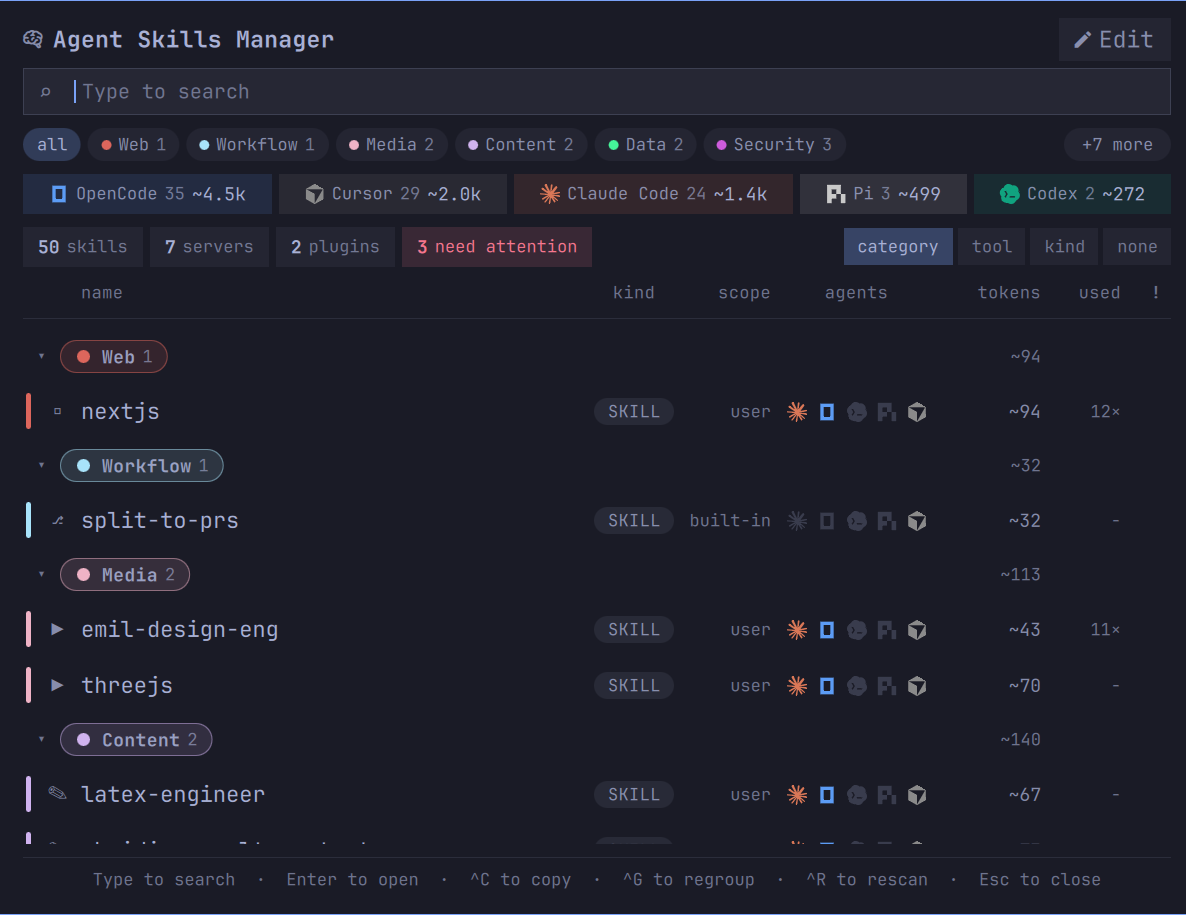
The boxes across the top count it by agent, by kind and by what is flagged, and each one is also a
filter. The agent boxes rarely agree, and the disagreement is the point:
| Agent | Items | Tokens, every turn |
|---|---|---|
| OpenCode | 35 | ~4.5k |
| Cursor | 29 | ~2.0k |
| Claude Code | 24 | ~1.4k |
| Pi | 3 | ~499 |
| Codex | 2 | ~272 |
One set of files, five bills. The agents read each other's directories, so most of what you
installed for one is being paid for by several.
An Omarchy 4 (Quattro) shell plugin (bar-widget). It needs omarchy-shell and python3, which a
stock Omarchy install already has.
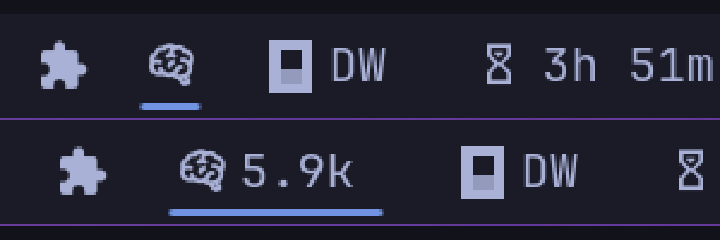
The mark is what you click. Beside it the bar can carry one figure, and the one worth carrying is
above: what every skill listing adds to every turn before you have typed a word, for the agent you
are actually running. The default is the mark alone, because a bar is contested space — leave the
label off and nothing runs until you open the panel.
To put the figure there, set Next to the bar icon to Always-on tokens in the widget's
settings, or from a terminal:
omarchy bar set oliwier.agent-skills-manager barLabel "Always-on tokens"
The bar picks it up without a restart. The same setting offers Skills enabled, which counts items
rather than cost, and Needs attention, which stays hidden until something is wrong.
Install
omarchy plugin add https://github.com/oliwier-xiao/agent-skills-manager.git --enable
--enable puts it straight on the bar and asks which side you want it on. Leave the flag off to
install it disabled, read the code first, and turn it on later with omarchy plugin enable oliwier.agent-skills-manager.
Update
omarchy plugin update oliwier.agent-skills-manager
omarchy restart shell
The restart is not optional. A QML component the shell has already built keeps the code it was built
from, so the widget goes on running the old version with nothing to tell you — the new files are on
disk and omarchy plugin list shows the new number. A known Quickshell component-cache limitation,
reported upstream several times over.
What it reads, what it writes
It reads the ten directories the five agents keep skills in, plus the skills inside installed Claude
Code plugins, the settings files that say which agent has what turned on, the MCP server
configuration, and /proc/<pid>/comm to see which agent is running.
| Root | Read by |
|---|---|
~/.claude/skills |
Claude Code, Cursor, OpenCode |
~/.config/opencode/skills |
OpenCode |
~/.codex/skills |
Codex, Cursor |
~/.agents/skills |
Codex, Cursor, OpenCode |
~/.cache/opencode/skills |
OpenCode |
~/.pi/agent/skills |
Pi |
~/.cursor/skills · skills-cursor · cloud-skills |
Cursor |
~/.grok/skills |
Cursor |
Those are the defaults, not the answer on every machine. OpenCode resolves its own through the
environment, and the panel follows rather than guessing:
| Variable | What it does |
|---|---|
XDG_CONFIG_HOME |
moves the config root, and the skills root with it |
OPENCODE_CONFIG_DIR |
adds a second root, takes none away |
XDG_CACHE_HOME · XDG_DATA_HOME |
move the fetched-skills root and the MCP token file |
OPENCODE_CONFIG · OPENCODE_CONFIG_CONTENT |
each merge a further configuration in |
Where opencode.jsonc sits beside opencode.json, the .jsonc is the one OpenCode loads — so it
is the one read here, and the other is reported as shadowed rather than quietly used instead.
Cursor is the greediest reader here and the reason a row can carry five marks: its own bundle names
nine skill directories, four of them other agents'. Pi reads nobody else's.
It writes two files, both its own and both under ~/.config/agent-skills:
| Path | What is in it |
|---|---|
categories.json |
the categories you filed things under, their order, and whether the placed by line is on |
descriptions.json |
your notes — your own words about a skill, which no agent ever reads |
Nothing else is written at all. No SKILL.md is opened for writing, no agent's configuration
file is touched, nothing is deleted or moved, and no other program is started — the helper contains
no subprocess. What an agent loads on its next turn is not this widget's to change, and the test
suite asserts that rather than promising it.
The panel
Each row says what the thing is, which agents see it, what it costs, and how often you have reached
for it. The coloured bar down the left is its category.
The name has a column of its own and the rest follow it from the left, so kind, scope andagents start at the same place on every row however long that row's name is. A name longer than
its column wraps to a second line and then elides; the row grows only when it wraps.
Inside a row
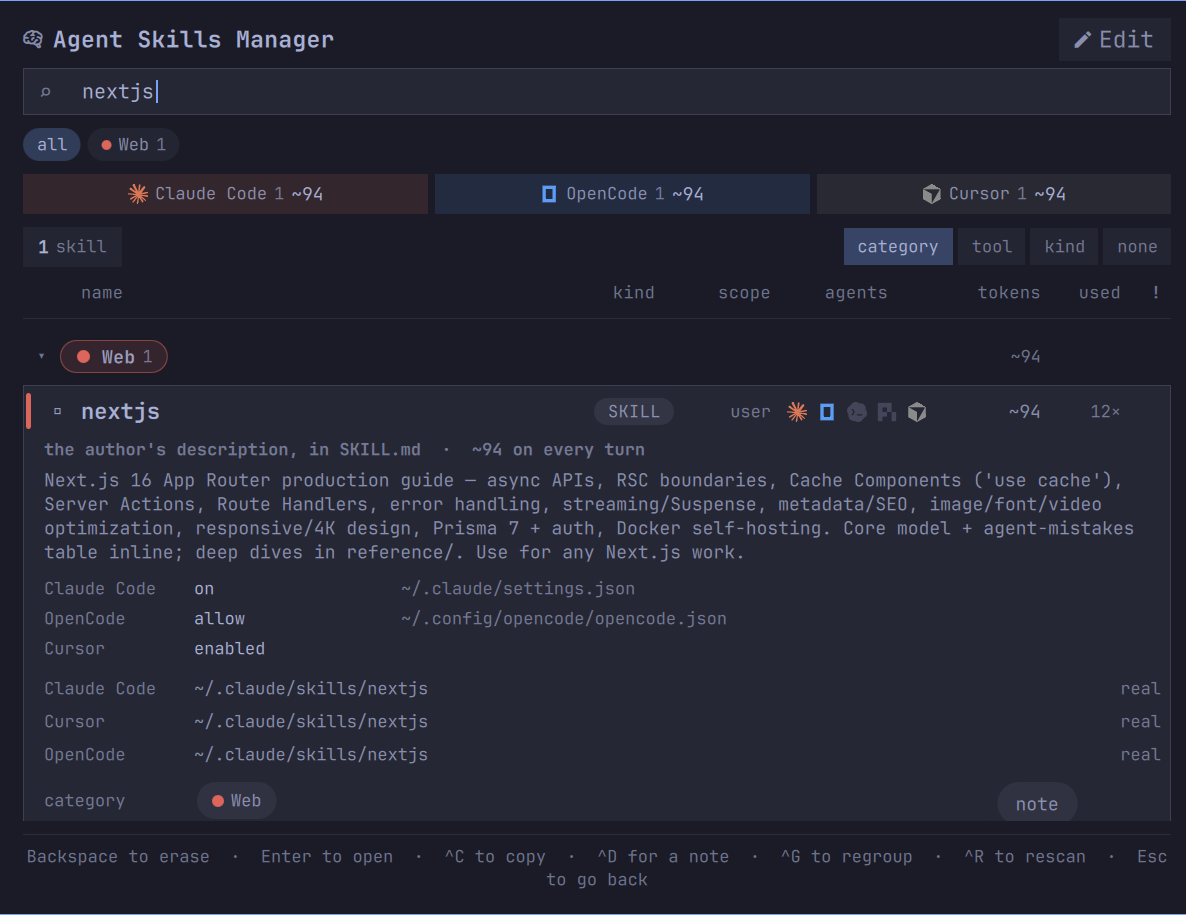
Open a row and it stops summarising. The description is the one the agents actually read — the text
costing you the tokens in the corner. Under it, the state each agent has this skill in and the
file that state is written in, so a claim on this panel is one you can go and check. Cursor's line
names no file, because Cursor ships no per-skill switch to name.
Then every path it is reachable from, marked real or symlink; its category, as a control you can
click; the invocation for each agent; how the category was chosen and how sure that was; the version
its author declared, where one is declared; the content hash the drift check compares; and the token
figure with the divisor that produced it. note sits in the corner.
Nothing is checked against anywhere upstream. A skill directory is not a checkout — no remote, no
recorded commit, usually no version — so there is no honest way to say a newer one exists, and the
panel does not pretend. Two copies of one name declaring different versions is drift, which is a
comparison between two things it can actually see.
Asking something else to check
update, beside note, is the way to ask anyway. It puts a prompt on your clipboard — for an
agent, not for a shell — carrying everything this panel read about that skill: its file, the version
its author declared, the content hash, which agents load it, and the commit it was installed at on
the one kind of row that records one. ^A does the same from the keyboard, for ask, because
asking is the whole of what happens here.
The instructions matter more than the facts. An agent told only to check for updates will find a
plausible repository, overwrite the file, and bury whatever you had edited into it. So the prompt
makes identifying the source a step that is allowed to fail — do not guess at a repository —
asks for what changed rather than a verdict, and requires your edits to be named before anything is
written.
It carries only the rules the skills in it can run into. Ask about a copy that records no commit and
the rule about comparing commits is not in the prompt at all: a line an agent has to read and
discard is a line spent, and the shorter the prompt the better the odds every line of it is obeyed.
One row in fifty-six can name its own source here. A skill installed as part of a Claude Code plugin
carries the commit Claude Code installed it at, because installed_plugins.json records one; that
row's prompt says so, and the question becomes what changed since this commit. Every other row
says it records none and sends the agent looking. That asymmetry is the truth about how skills
arrive: they are copied, and a copy remembers nothing.
All of them at once
Updates, beside Edit in the corner, asks the same question about everything currently
listed. It is the same prompt with more entries in it — one skill or fifty-six, the same four lines
each and the same rules — because a row deserving its own shape would have been two vocabularies
for one question, and the longer of the two would have been the one asking about less.
Currently listed is the operative phrase. Every filter on this panel narrows it: pick a
category, an agent, or type a search, and the question narrows with it, exactly as the counts do.
Filter to one shelf and you are asking about that shelf. With built-in skills hidden, which is the
default, they are not in the question either — you did not install them and cannot update them.
The button is gone while the category editor is open, because Edit has become Back and the list
behind it is not what you are looking at, and gone when nothing is listed, because there is nothing
to ask about.
One skill, five agents
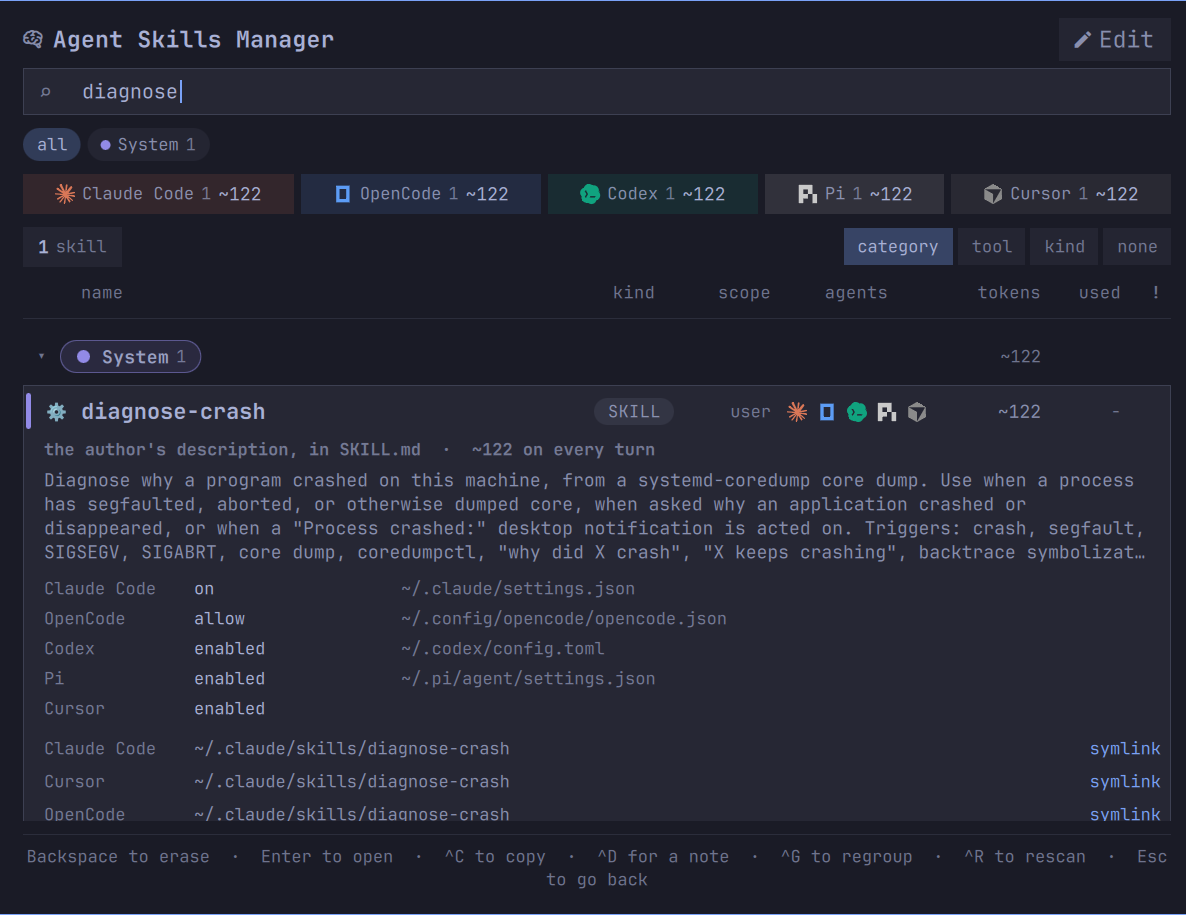
diagnose-crash is a single SKILL.md under /usr/share/omarchy, reached from ~/.claude/skills,~/.codex/skills, ~/.agents/skills and ~/.pi/agent/skills — and because OpenCode reads two of
those and Cursor reads three, all five agents load the same file. It is one row carrying five agent
marks, not five rows repeating themselves. Two copies that share a name and have stopped sharing
their contents are told apart by content hash and flagged as drift.
What gets flagged
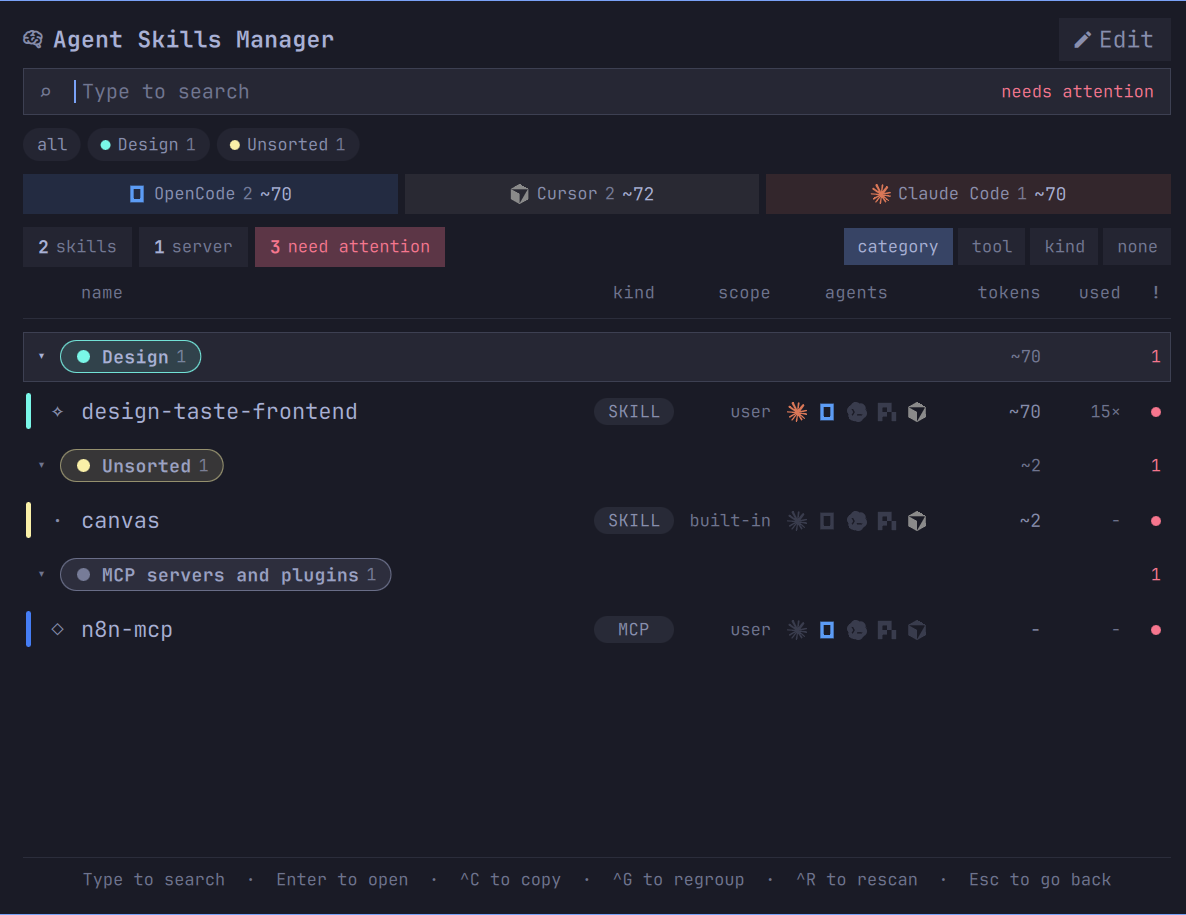
! shows only what needs looking at, and every count in the header narrows with it.
A skill answering to two names: the directory is taste-skill, the SKILL.md inside declaresname: design-taste-frontend, and Claude Code keys by the first while the other four key by the
second. Copy the wrong one and nothing happens, with no error to say why — so the row carries both,
against the agent each belongs to.
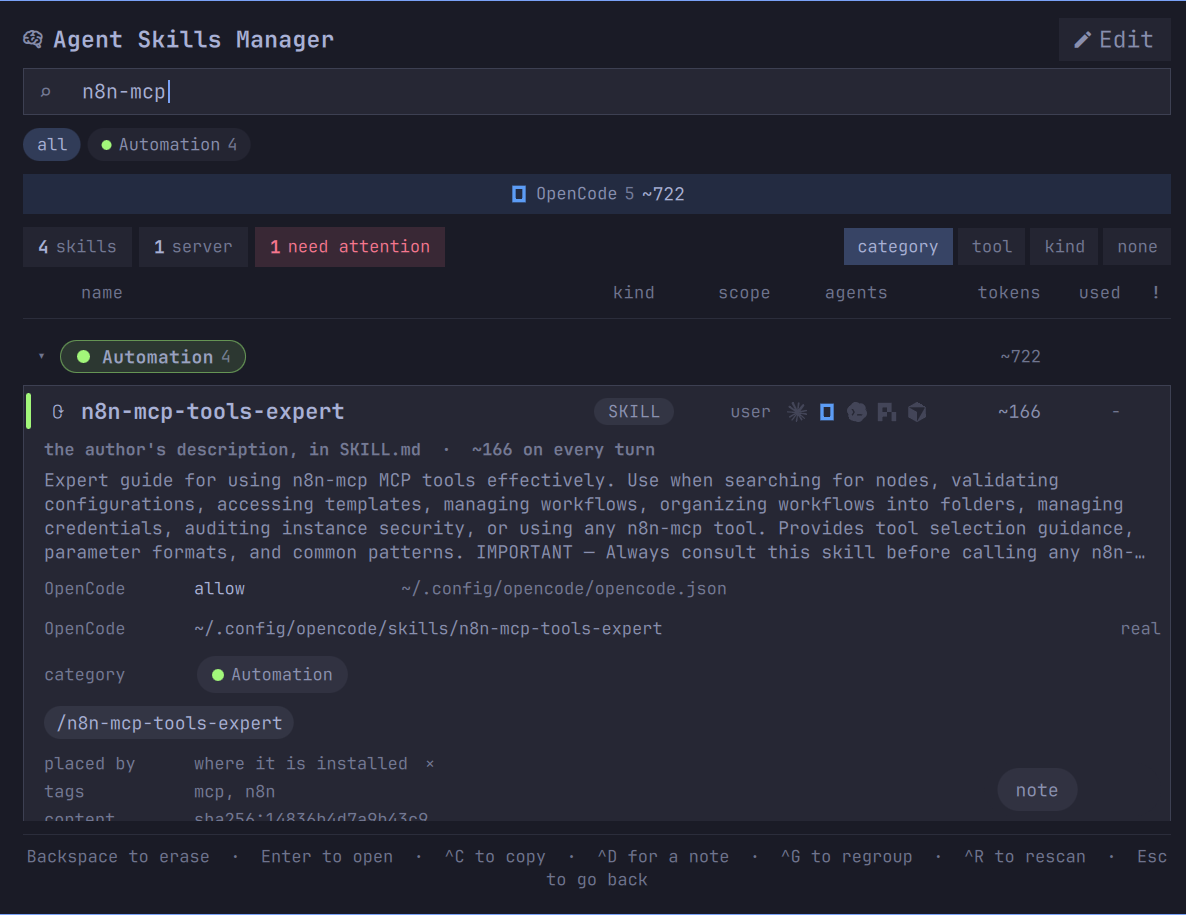
A server whose token has expired: n8n-mcp is remote, its stored credentials have run out, and
OpenCode will not say so until the moment you need it.
The list stays quiet about everything else. A category the classifier was unsure of is not a
problem, and is not reported as one.
Copying the command
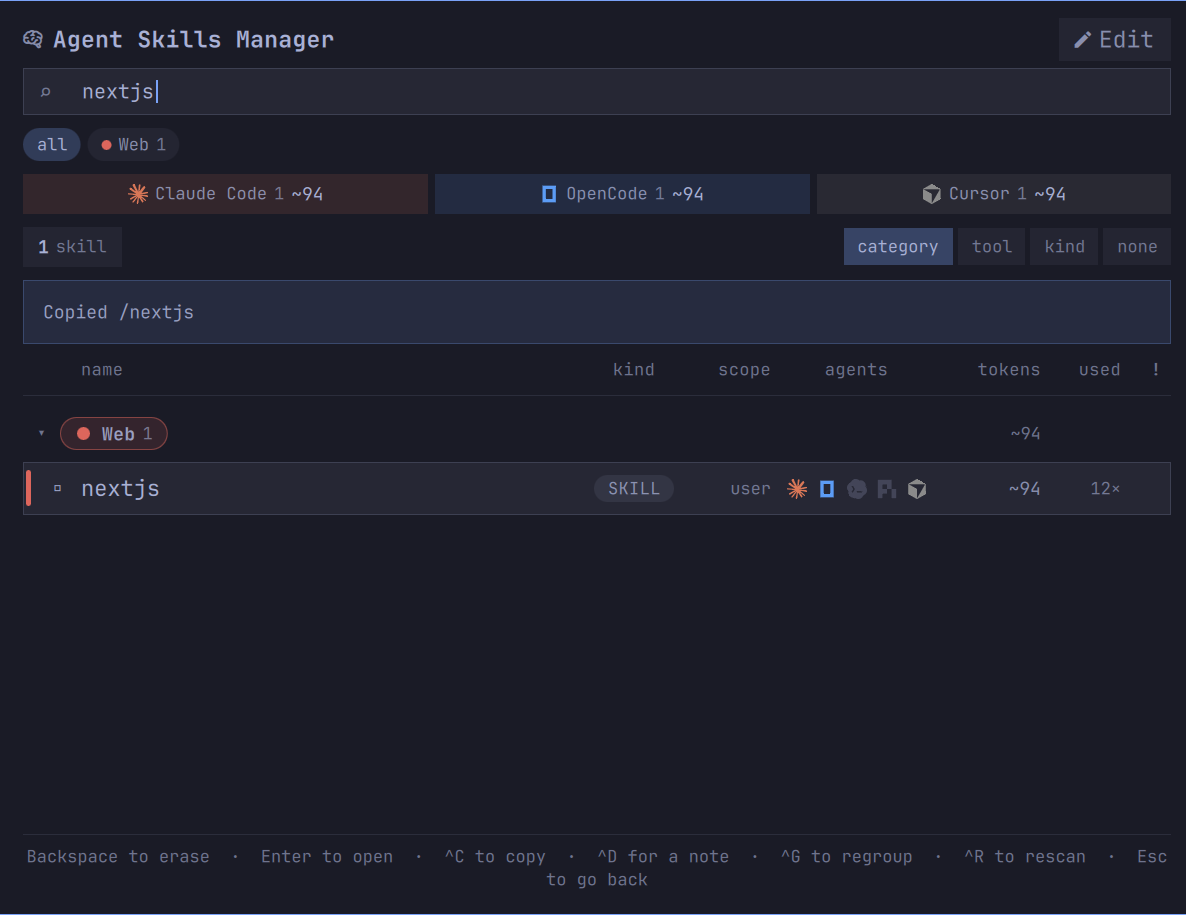
^C puts the invocation on your clipboard in the spelling the agent under the cursor expects. Five
agents, five spellings, and only Claude Code keys by the directory:
| Agent | Invocation |
|---|---|
| Claude Code | /<directory> |
| OpenCode | /<declared name> |
| Codex | $<declared name> |
| Cursor | /<declared name> |
| Pi | /skill:<declared name> |
Nothing is claimed until it happens: the panel writes, reads back, and says Copied only when the
read agrees. It says Sent to the clipboard where it had to shell out and cannot read the result
back, and if neither path was reachable it says so in red and prints the command for you to select
by hand.
A skill arriving inside a Claude Code plugin is addressed through it, so that row copies/impeccable:impeccable rather than /impeccable. Which version is read is not guessed either —
the cache can hold several, and installed_plugins.json records the one Claude Code actually
loaded.
Skills that take arguments
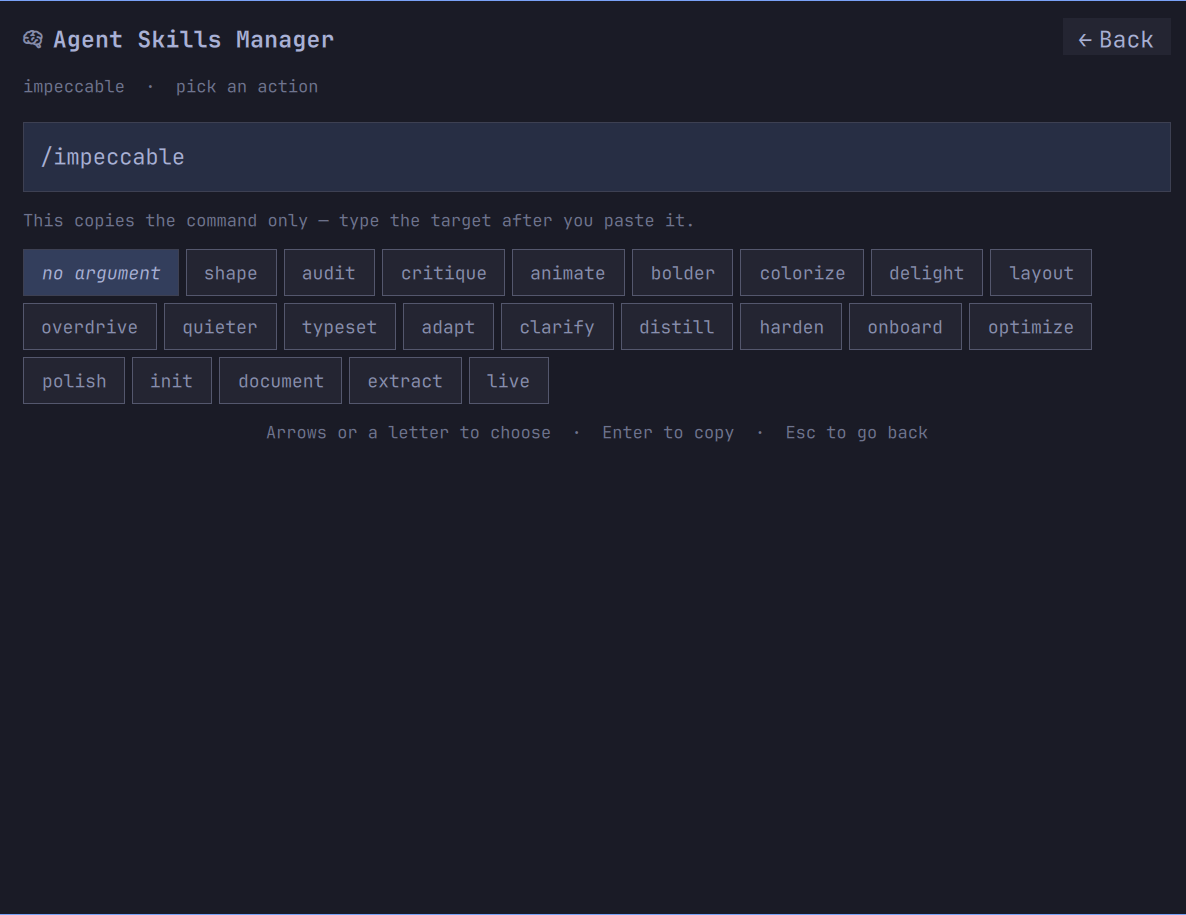
A skill that takes arguments says so in its frontmatter, in argument-hint. impeccable documents
twenty-two of them, so copying that row and getting /impeccable on its own is not what anybody
wanted. The row says 22 actions beside its name and ^C opens them as a grid instead.
The assembled command is drawn above the options at reading size and updates as you move, so what
will land on your clipboard is on screen before you press Enter. Arrows move; a letter jumps to the
next action starting with it. no argument is the first option, because sometimes the bare
command was the point. Rows without documented arguments copy straight through.
Categories
Which category a skill belongs in is the one thing about it that is yours, and there is nowhere in
any of the five agents to say so. Fourteen are guessed from the description, and a skill the rules
cannot place lands in Unsorted rather than being pushed into whichever one was the residual.
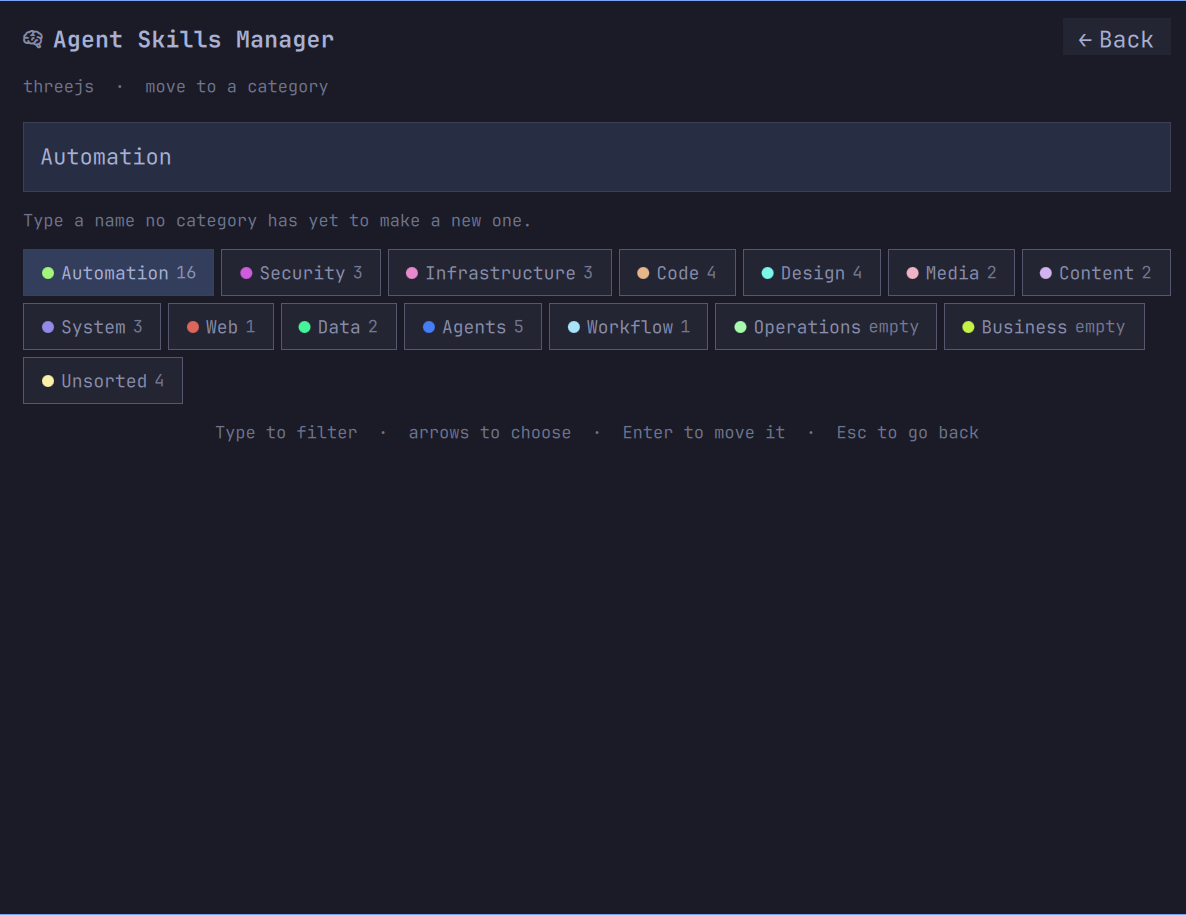
^M moves a row, and an expanded row shows its category as a control — so the correction sits next
to the thing being corrected. Type a name nothing answers to and it becomes a new one.
Its placed by line says how it was filed: the marketplace listing, the skill's own frontmatter,
where it is installed, its description and how sure that was, or you. Worth reading while you decide
whether to trust the filing, and repetition once you do — so the × at the end turns it off on
every card at once, and a show placed by chip in the category index is the way back.
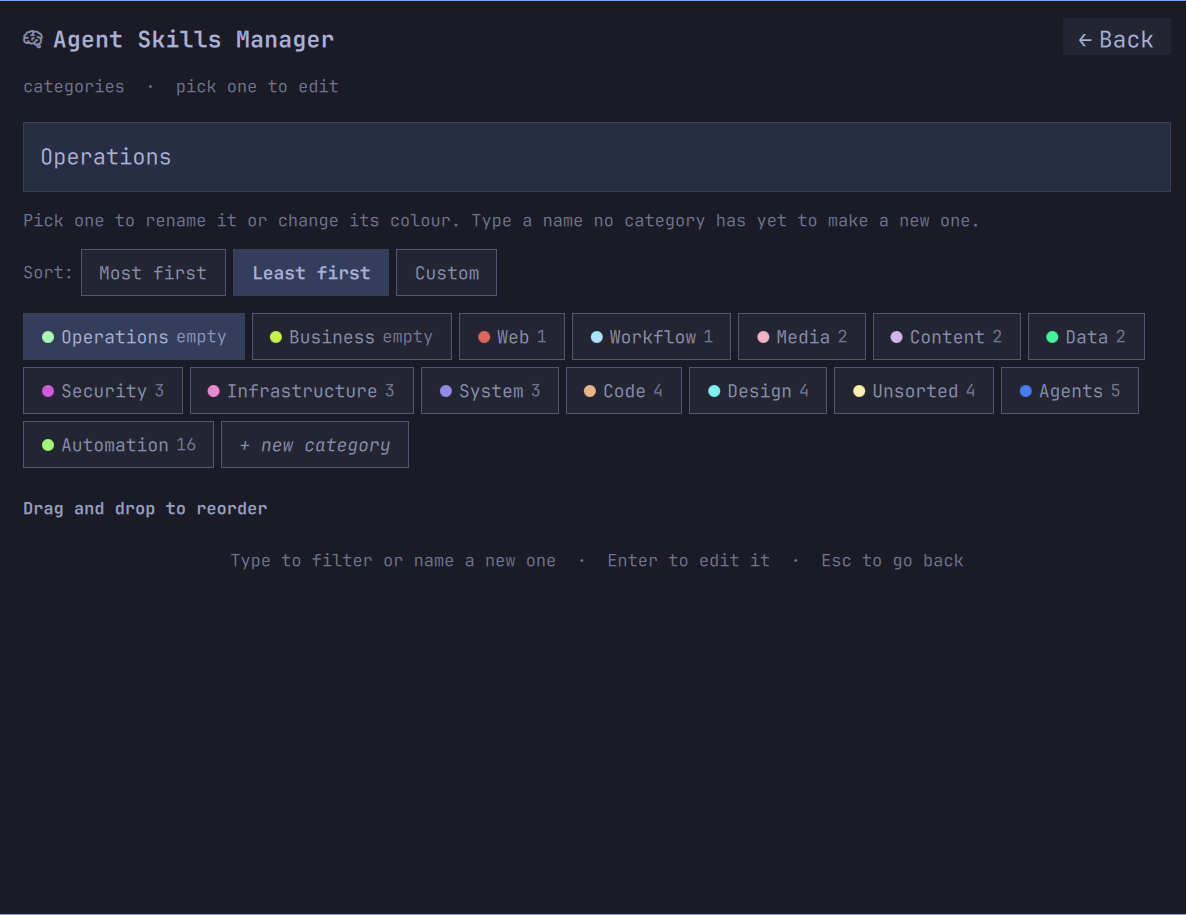
Edit, opposite the title, opens all of them at once with a standing + new category at the
end — the way in when the one you want is not on screen, or does not exist yet. ^E does the same
from the keyboard. Sort orders the shelves by size or by an order of your own, and the chips
themselves drag into place.
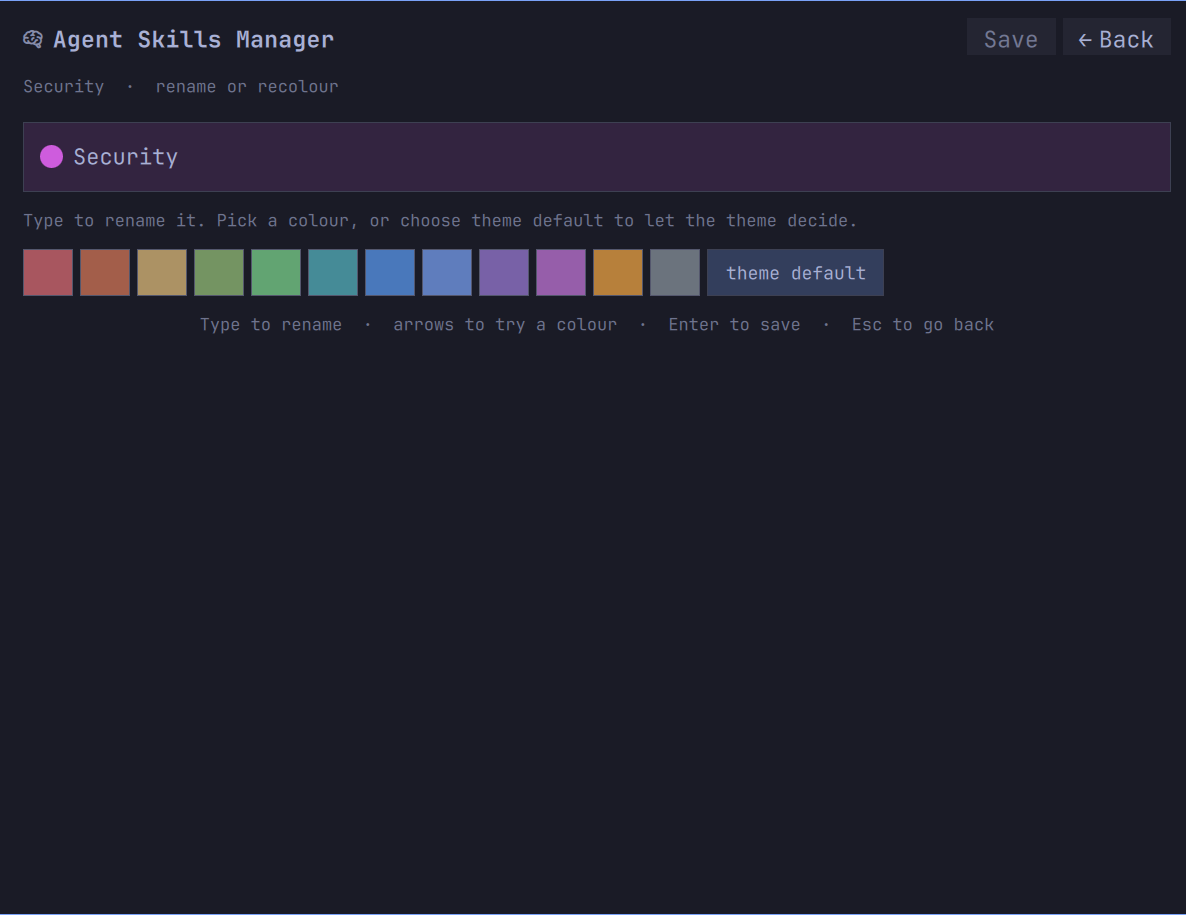
Pick one and you can rename it, recolour it, or clear the colour and fall back to the theme's.
Trying a colour on is not choosing one: swatches preview against the category's own name as you
arrow through them, and Save commits.
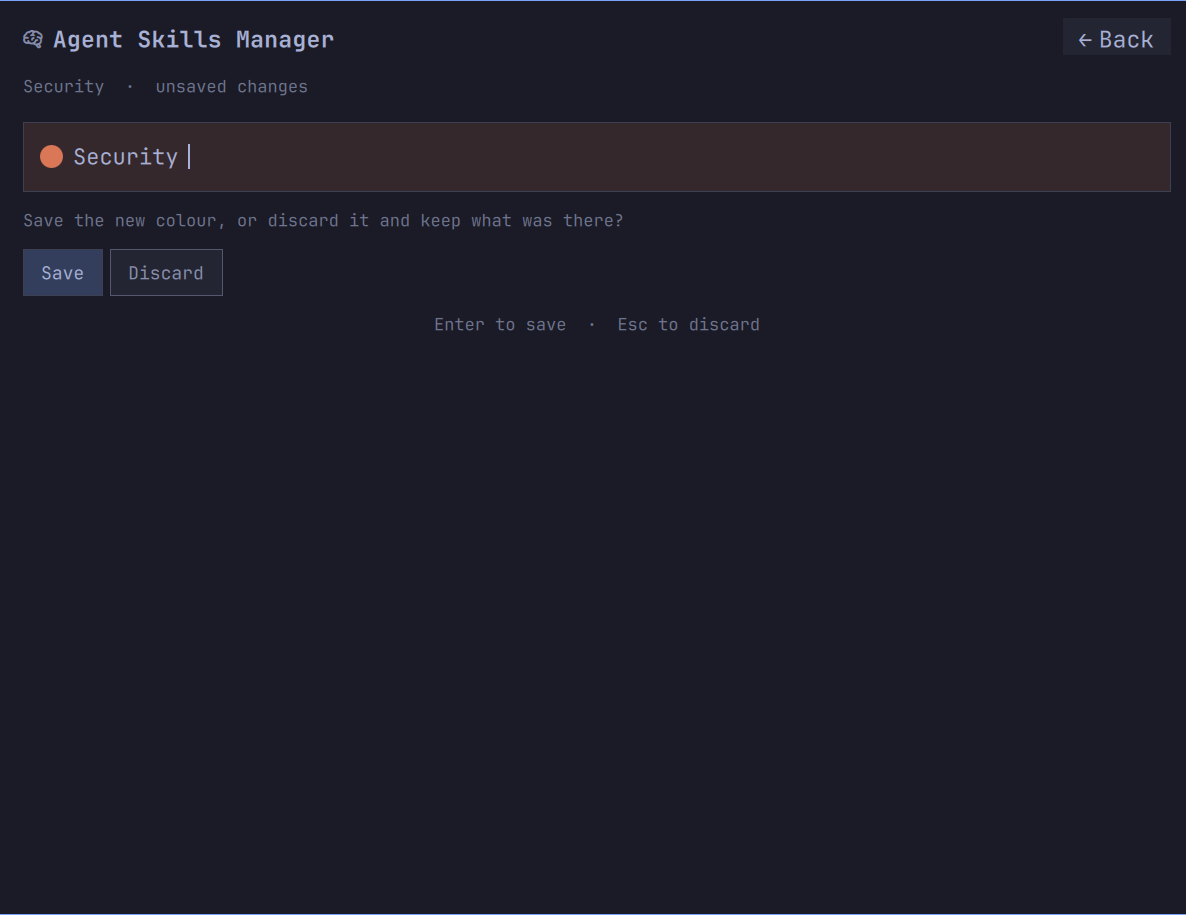
Backing out with something unsaved asks first, on the same surface, rather than dropping work you
had no way of knowing was still a draft.
Your own notes
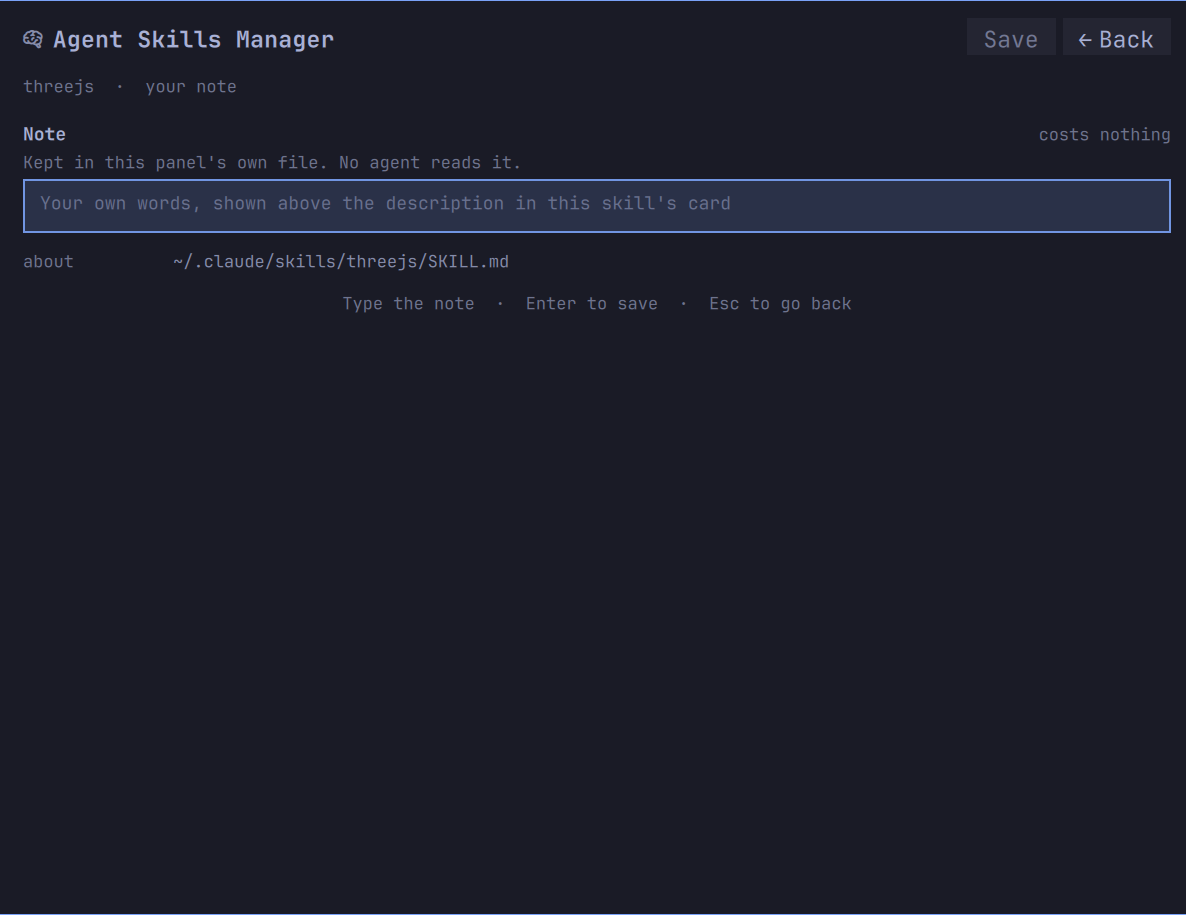
^D on an open row, or note in the corner of its card. It starts empty, it is drawn above the
description in that skill's card, no agent ever sees it, and it is in no figure anywhere. Write what
the skill is for in your own words, or in your own language — the search reads it too.
It is kept in this widget's own file and filed under the skill's name, so every copy of a name shows
the same note. Leaving the field empty clears it; that is the only way one goes.
The description underneath it is the file's own, shown as it stands and never written from here. If
one is costing you more than it earns, the file is SKILL.md in the path the card names, and your
editor is the right tool for it.
Search and filters
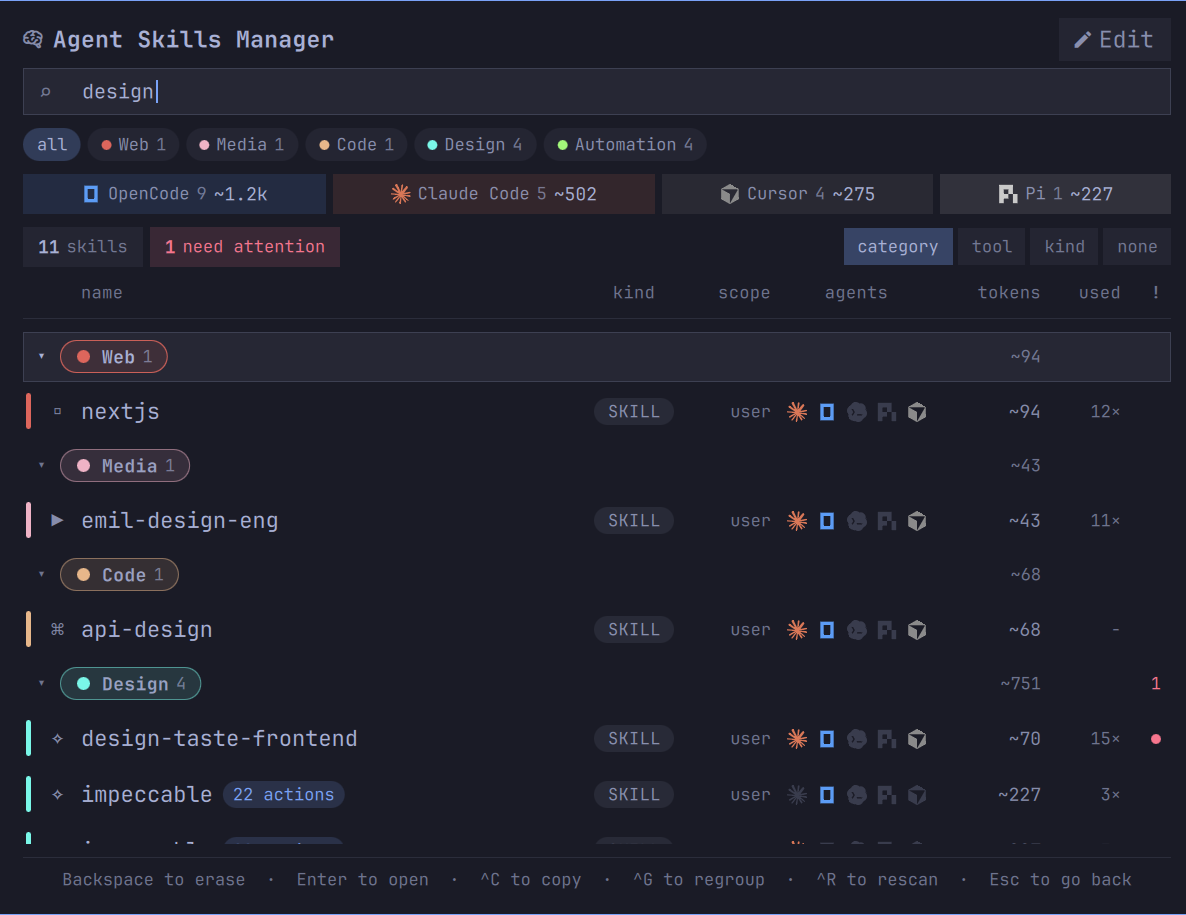
Every printable key goes to the search, including the first, so a skill starting with c or g is
reachable by typing it; commands take Ctrl. The search reads names, descriptions, your notes,
categories and tags. Every box along the top is a filter, and so is every category chip below them —
clicking the one already on turns it off, all clears them, and Escape does the same.
all stays on screen for as long as there is a filter to undo, even where the shelves it sits
beside have nothing left to show. Categories belong to skills alone, so filtering to servers empties
that row — and a filter you can set with the mouse and can only clear with the keyboard is a trap.
The counts stay honest as you narrow. Each dimension is counted with every filter except its own, so
picking servers leaves the skills box reading its real total rather than 0, and a box that would
filter to nothing is not drawn at all.
Grouping
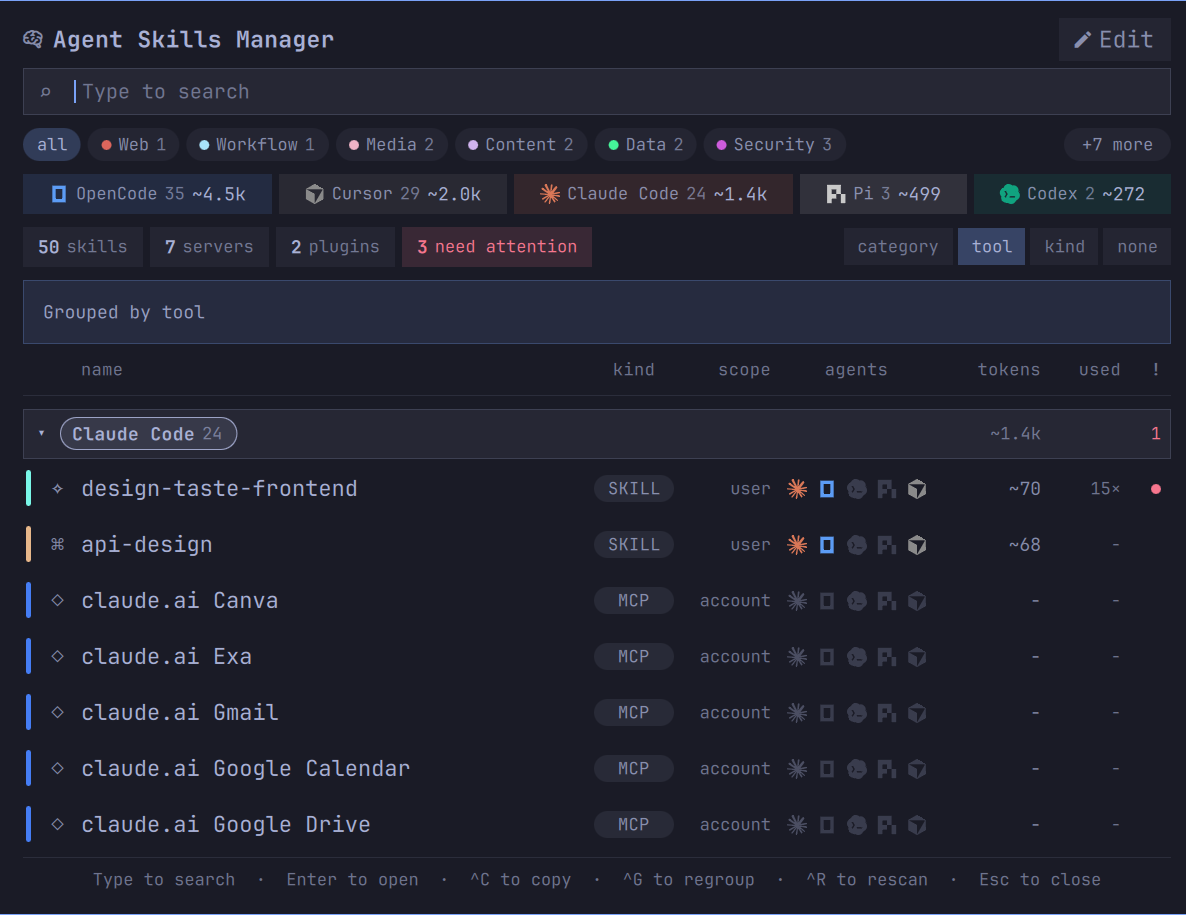
By category answers the question you open the panel with — where is the thing that does X. By tool
is right when you are about to switch agents and want to know what that one alone can see. By kind
separates skills from plugins from MCP servers. None gives one flat alphabetical list, which is the
fastest thing to type-search through.
Four boxes beside the counts take one click to any of them, and ^G cycles the same four. Fewer
than four once you have filtered, because a grouping you have already filtered by is not a grouping:
pick one agent, and grouping by tool is a heading over a list that is entirely that agent. Each box
steps aside for as long as its filter is on and comes back when you clear it.
MCP servers and plugins
MCP servers are listed beside skills because they load the same way and cost the same kind of money.
Local ones are read from the config files that declare them. Claude Code's account connectors are
not on disk at all; when they cannot be reached, the names Claude Code has recorded are shown with
the source that supplied them, and the row says so rather than inventing a state.
A server's command line can carry a credential, so anything secret-shaped in it — a header, a token
flag, a key in a URL — is replaced before it can be drawn. Servers are read-only in this version,
and every row says so where you would otherwise expect a switch.
The token figure
The length of the name, description and when-to-use joined, divided by four, rounded half up —
computed the way Claude Code's own extensions browser computes it. On this machine that reproduces
fourteen of the fifteen figures the browser shows, to the token. That is the number in each row, and
the per-agent total in the boxes at the top; a skill an agent can see is in its system prompt on
every turn whether or not you use it.
The setting offers a divisor of three instead, closer to how newer models tokenise dense technical
prose and therefore closer to what you are really paying; the default matches the browser so the two
agree.
Keys
| Key | What it does |
|---|---|
| type | search everything: names, descriptions, your notes, categories, tags |
Enter |
open the row, or fold and unfold a group header |
^C |
copy the invocation, or pick an action first if the skill documents any |
^M |
move the row to another category, or restyle the category under a group header |
^E |
open the categories: rename one, recolour it, or add one |
^O |
open where the skill is installed, in your file manager |
^D |
write your own note about the row |
^A |
copy a prompt asking an agent to check this skill against its source |
^G |
regroup by category, tool, kind or nothing |
^R |
read everything again |
! |
show only what needs attention, while the search is empty |
Esc |
back out one step: the open row, then the filters, then the search, then close |
Tab |
move to the next panel on the bar; Shift-Tab the previous |
Settings
Five, in the widget's own settings panel.
| Setting | Default | What it decides |
|---|---|---|
| Next to the bar icon | Nothing | whether the bar carries the always-on token figure for whichever agent is running, the number of skills, the count of what is flagged, or nothing |
| Group the list by | Category | the grouping the panel opens on |
| Show built-in skills | off | whether the skills each agent ships with are counted; you did not install them and cannot turn them off, so by default only your own things are |
| Estimate token cost as | chars/4 | the divisor, or hiding the figure entirely |
| Rescan every time the panel opens | on | turn it off only if you keep skills on a network mount, where a stat of every file is no longer free |
Requirements
Omarchy 4 with its Quickshell bar, and python3 at /usr/bin/python3 — the standard library only,
no Python package to install. The panel spawns that path outright rather than letting a shebang
search PATH; if yours is elsewhere, the panel opens empty while the helper still works in a
terminal.
Whichever of the five agents you actually use is the one you get rows for. An agent that is not
installed is one quiet line saying so, not an error.
Remove
omarchy plugin remove oliwier.agent-skills-manager
Your own files outlive it, so reinstalling later finds your filing and your notes again. To clear
them:
rm -rf ~/.config/agent-skills
That is the two files named above, and nothing else — every skill on the machine
is exactly where it was.
The command line
The panel draws; bin/agent-skills does every byte of the reading and both of the writes — the
category store and the description. It is worth running on its own, and it counts skills only, where
the panel's agent boxes count everything an agent loads.
bin/agent-skills doctor
agent-skills 1.0.0   scan 27.2 ms
skills            56
  claude          16   ~1406 tok always on
  codex            8   ~808 tok always on
  cursor          35   ~2520 tok always on
  opencode        34   ~4460 tok always on
  pi               3   ~499 tok always on
mcp servers       7
claude plugins    2
running now       claude, opencode
categories        automation 16, agents 10, code 5, design 4, unsorted 4, infra 3, security 3, system 3, content 2, data 2, media 2, web 1, workflow 1
bin/agent-skills scan prints the same inventory as one line of JSON, which is what the panel
reads; --pretty indents it and --divisor 3 re-costs it.
bin/agent-skills category writes only ~/.config/agent-skills/categories.json, and every verb is
a single named change to it:
bin/agent-skills category list
bin/agent-skills category create ui --label UI --color '#7AA2F7'
bin/agent-skills category assign nextjs ui
bin/agent-skills category unassign nextjs
bin/agent-skills category style ui --reset
bin/agent-skills category placed-by hide
bin/agent-skills describe note is the other write, and it goes to the widget's own store where no
agent reads it. Leave the text off to clear the note that is there:
bin/agent-skills describe note nextjs 'why I keep this'
bin/agent-skills describe note nextjs
Those two verbs are the whole of what this program writes. There is no third, and there is no
subprocess: scan and doctor read, and everything they report about a skill is reported as it
stands.
Every file read under a scanned root is opened once with O_NOFOLLOW and O_NONBLOCK and judged on
that descriptor rather than on its name, because omarchy-shell is one process for the whole
desktop and nothing read on its behalf may block or turn out to be larger than it said it was. A
file that is refused is reported as refused rather than treated as absent: an empty list and a list
that could not be read look identical and mean opposite things.
Development
Tests are plain unittest and need nothing that is not already here.
python3 -m unittest discover -s tests -v
tests/preflight.sh checks the repository against the marketplace's published rules — the
structural validator, the security baseline, and the recurring demands of its manual review — and
exits non-zero on any violation. It also runs qmllint with the qs module resolved, under a
per-file warning ceiling: a gate pointed at the wrong import path measures the import failure rather
than the document. CI runs it on every push, so meet it locally rather than on the branch.
License
MIT. See LICENSE.
Yorumlar (0)
Yorum birakmak icin giris yap.
Yorum birakSonuc bulunamadi