lumispec.ai
Health Uyari
- No license — Repository has no license file
- Description — Repository has a description
- Active repo — Last push 0 days ago
- Low visibility — Only 5 GitHub stars
Code Uyari
- network request — Outbound network request in data/templates.json
Permissions Gecti
- Permissions — No dangerous permissions requested
Bu listing icin henuz AI raporu yok.
Local-first AI workbench for llama.cpp models. Full chat UI with SSE streaming, multi-engine web search, sandboxed Python, self-aware source tools with diff previews, hot-loadable plugins, TaskMaster prompt decomposition, two-tier wiki RAG, and inline Chart.js/SVG applets. Runs entirely on your hardware.
lumispec.ai
A local-first AI workbench. Chat with your own LLM, point it at your codebase, your portfolio, the web, your travel plans — and let it do the work end to end.
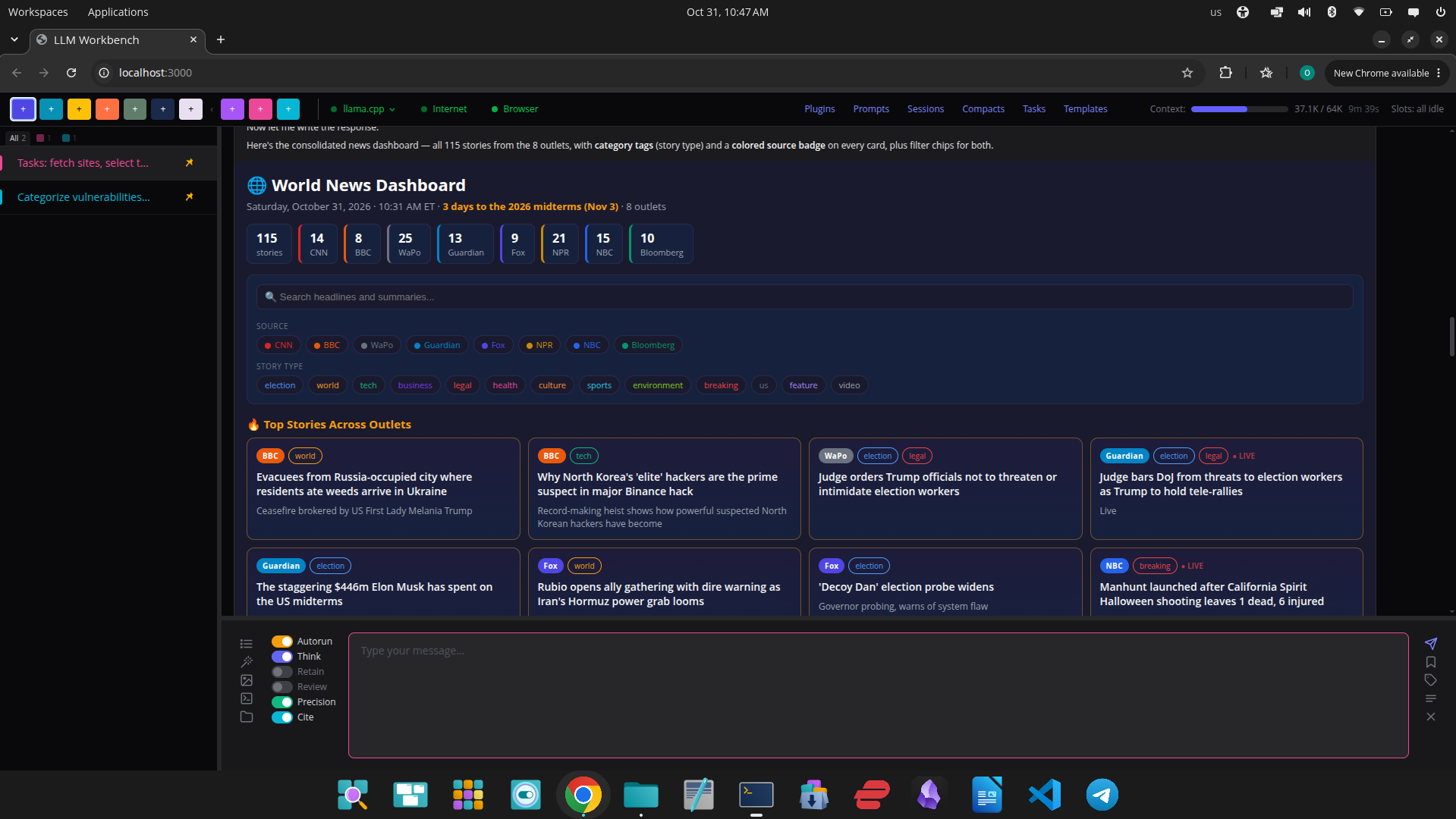
A task pipeline fetches eight outlets through Browser Search (web_fetch in a hidden tab of your own Chrome), and the model renders all 115 stories as an inline HTML applet with source badges, topic tags and filter chips.
Connect any llama.cpp-compatible model and get a full chat UI with web search, Python execution, code editing, interactive visualizations, deep E*TRADE integration, and a task-pipeline runner — all running on your hardware. No cloud dependencies, no telemetry, no per-token bill.
📚 v1.6.0 — Read a book with it
- Books (new, off by default) — point Lumispec at a folder of Markdown or text files, a single file, or a PDF. It indexes the book in the background, you make it the open book, and the assistant searches it before any other tool, answers from it, and names the section each answer rests on. Questions work before indexing finishes. Book only withholds every other tool, so the answer is "not in this book" instead of a web search. See "Add Books" below and
docs/BOOKS.md. - PDF books. A PDF is converted to Markdown in seconds — headings from the PDF's own outline, code fenced, running headers and page numbers dropped — then indexed; the card reports "Step 1 of 2" and "Step 2 of 2". 690 pages converted in 1.4 s. Needs PyMuPDF in the Python environment.
- Troubleshoot on any answer. Revise an answer against its own evidence instead of rerunning it. A red Troubleshoot on every assistant answer names the answer, quotes the text you selected, reports which tools failed, fell back or were truncated, and has the model read back what its tools actually returned before it corrects anything. Works on good runs too ("verify these numbers"). See
docs/TROUBLESHOOT.mdandreleases/1.6.0.md.
🛠 v1.5.8 — The model can troubleshoot its own applets
- Troubleshoot button. Under every applet: it fills the prompt with your problem line, what the browser saw inside the applet (JavaScript errors, failed fetches, rendered height, visible text) and the call that lets the model read back the code it wrote — earlier applets reach it only as
[Applet: html visualization], so a "fix" used to be a rewrite from memory. The new always-onconversation_readtool returns an earlier answer's applet source, tool results or reasoning. - An applet is never clipped. The frame is sized to the larger of what the applet asks for and what it renders. See
releases/1.5.8.md.
🔀 v1.5.7 — A running answer survives leaving its conversation
- Conversations keep running. Switching to another conversation or starting a new chat no longer aborts the turn in flight: it keeps going on its own slot, its live bubble is back when you return, and a pulsing dot in the sidebar marks every conversation that is working. Send, Stop and the timer follow the conversation on screen. A stopped turn is now stored with its reasoning and tool results instead of an empty message.
- Applets fit the chat area. Charts, SVGs and images are capped to the visible chat height (a Chart.js canvas used to render 1,763px tall in a 625px area), and the prompt box keeps the height you dragged it to. See
releases/1.5.7.md.
🧱 v1.5.6 — One tool result can no longer sink a turn
- Tool result limits.
treeis summarized over 300 files (layout with counts, first 300 paths, optionalpathfor one subdirectory); every tool result is capped at 50K chars; and the context wind-down now cuts the newest results too until the prompt fits. A 7,000-file tree used to make the next request 131K tokens against a 64K slot. Seereleases/1.5.6.md.
🐍 v1.5.5 — Python environment detected, per-answer token cap
- Python environment.
PYTHON_VENVmay be a venv, uv, pyenv or conda directory, or unset. The app detects which, activates it forrun_pythonandsource_run, and tells the model the install command that works there — apip installaimed at the system Python is refused with the right one. - Per-answer token cap.
LLAMA_MAX_COMPLETION_TOKENS(default 24576) bounds every streaming answer so a runaway ends in minutes, not at the context wall. - Template runs are titled "Template: name"; the template review no longer calls a clock static. See
releases/1.5.5.md.
📄 v1.5.4 — Templates reviewed on save, notes apart from the HTML, parse guard
- LLM review on save. Every saved template is audited and reviewed in the background; ⚡ runs it again. A review answer must still parse — the model broke the same regex literal twice in a day, and the guard kept the original.
- Author notes out of the HTML. A template's leading comment is stored as notes, shown to the model outside the code fence and never copied into the applet. Existing templates migrate on first load.
- Sidebar title filter and a
/api/yahooproxy for applets. Seereleases/1.5.4.md.
🎚 v1.5.3 — The research budget is a setting; Claude tool rounds fixed
- Research budget on the card. "Maximum 3 web_search calls and 3 web_fetch calls per user question" was a fixed sentence in the Web Research prompt that the model narrates back as its "budget" — nothing in the tool loop enforces it. It is now Max searches per question / Max fetches per question on both the Web Search & Fetch and Browser Search cards (0–10, default 3 / 3;
0removes that half of the sentence). Defaults leave the system prompt byte-identical. - Templates fetch every source they name. A
[template: name]refresh no longer weighs the budget against the template's own source list (the eight-outlet World NEWS template was about to be refilled from three); a failed source is reported, not filled from memory. - Claude backend tool rounds. Native
<invoke>/<parameter>calls are parsed instead of burning a repair round; calls dropped by the 4-per-round cap are named to the model so it can re-issue them (11 calls used to lose 7 unannounced);etrade_accountcalls are logged once. No reload. Seereleases/1.5.3.md.
🐛 v1.5.2 — Clipped pipeline hand-offs are no longer silent
- A task-pipeline step receives the previous step's output capped at 32K chars; a subtask group's outputs are merged before the cap, so a wide fan-out lost its last siblings whole and the model never said so (13 fetched outlets → 7½ received → "8 outlets" presented, 2026-11-03). The clip is now announced three ways: a server warning naming the cut and dropped sections, a persistent amber line under the step in the chat, and a
> ⚠notice at the top of the model's context telling it to state what is missing. Cap unchanged (MAX_PREV_RESULT_CHARS, now in.env.example). Also ships the World NEWS dashboard template from the screenshot above. No reload. Seereleases/1.5.2.md.
🐛 v1.5.1 — Bing fix
- Bing searches through Browser Search answered only the first word of every query (
count=10made Bing serve a stripped entity page). Dropped; ten correct results per query again. One-line patch, no reload. Seereleases/1.5.1.md.
✨ v1.5.0 — Your browser, read two new ways
- 👁️
web_fetchview: "text"(new) — besides the defaultarticleview (Readability, or the headline list on a front page), the model can ask for a page as it is laid out on screen: one line per visual row, hidden tooltips and labels excluded, grid cells joined with·. Built for web applications — a Gmail inbox row is 142 characters in text view versus ~500 as markdown, so "list my top 70 subjects" costs about three fetches instead of nineteen; Google News reads five times denser. When Chrome has not laid the page out (inactive tabs skip layout for virtualized lists), a computed-style walker reads it instead. - 🗂️ Tab Fetch (new, off by default) — open and prepare a page yourself (login, two-factor, a CAPTCHA you passed, filters, scrolling), then say "look at this" or "look at my Chase tab". With Let the assistant read my open tabs on, the model lists your open tabs and reads the one you named in place — never navigated, clicked, typed in, scrolled or closed. If two tabs could be the one you meant, it asks; each read asks for your approval unless you turn that off, and autorun never bypasses it. The hidden-tab fetch stays the default; an address you already have open is read from your tab instead of loaded again. Design:
docs/TAB_FETCH.md. Extension 0.7.0, reload required. Seereleases/1.5.0.md.
Everything else is as in v1.4.2:
✨ v1.4.2 — Web fetch fixes
- 🌐 Index pages as headline lists (fixed) — homepages, section fronts and date archives used to come back as summaries with every headline missing (Readability prunes link-wrapped headlines as "related links": NYT 0 of 91 kept, Reuters 0 of 90). They are now detected generically and rendered as
- [headline](url) — summarylines; article pages are untouched.<template>blocks that turned the NYT homepage into 0 chars are stripped first. - 🧩 Browser Search extension v0.5.0 (reload required) — strips scripts, styles and templates before its size cap (Gmail's inline CSS used to swallow the whole cap before the body), reads a page until its visible text stops growing instead of at the first 200 characters, and never trades a page Chrome rendered for a cookie-less HTTP re-fetch — which is how a signed-in Gmail became a "you are logged out" login screen. CAPTCHAs inside an iframe (DataDome) are named instead of reported as "11 chars of content".
- 📏 Max chars per fetched page (new setting) — default 4000 as before, 1000–50000, on both the Web Search & Fetch and Browser Search cards. Pages the extractor cannot read are saved under
logs/browser-debug/; a card toggle can save every fetch for parser work. - 🎨 Applets survive a dropped last token — an answer ending in
</applet(end-of-sequence sampled instead of the final>) now renders as the iframe it was meant to be. 🛠️ The tool-call parser repairs two Qwen3.8 shapes that once cost 17 wasted rounds and caps retries at 3.npm test: 34 tests. Seereleases/1.4.2.md.
Everything else is as in v1.4.1:
✨ v1.4.1 — Obsidian export
- 📓 Save to Obsidian (new) — turn on the Obsidian Export plugin and every conversation in the sidebar gets a vault icon. One click writes it into your Obsidian vault as a Markdown note: properties (session colour, model, tools used, token count), one heading per turn, tool calls folded into callouts, reasoning optional, charts and data files copied alongside as attachments. The card finds your vaults through Obsidian's own registry (native, Flatpak, Snap);
OBSIDIAN_VAULTpoints it at any folder instead. Manual and one-way: nothing syncs by itself, nothing in the note links back, nothing in the vault is ever deleted. Off by default. See "Add Obsidian export" below andreleases/1.4.1.md.
Everything else is as in v1.4.0:
✨ v1.4.0 highlights
- 🌐 Browser Search (new) —
web_searchandweb_fetchrun in a hidden tab of your own Chrome via a small extension: real cookies, real TLS fingerprint, so Google, Bing, Brave and bot-walled sites like Reuters answer like they do for a person. One engine at a time, bot walls outwaited, pages read as soon as they are interactive, every fallback to HTTP disclosed and a failed URL not re-fetched for 90 s. Result pages a parser cannot read are saved tologs/browser-debug/for selector repair — see "Keeping the search engines current". Requires installing the extension fromextension/README.md(Chrome/Edge/Brave, load unpacked). Off by default. - 🔌 Plugin supersession & live card status (new) — a plugin can replace another while enabled (the replaced slider grays out at its saved position and comes back exactly); cards can show a live status line and warn on enable. Browser Search uses all three.
- 🧮 Token-bounded tool loops — both loops measure the real prompt via
/tokenizeevery round and wind down at 80% of the live slot'sn_ctx. Truncated answers are marked, empty ones keep their tool results, and an empty pipeline step halts the run instead of poisoning the next one. - ⚡ Stable prompt prefix — the clock lives on the user message, not the system prompt, so llama-server's KV cache prefix survives across turns: ~6,400 processed prompt tokens per turn → ~80.
- 🧠 Retain toggle — send the model's own reasoning back as
reasoning_contentso it sees its prior thinking in later rounds and turns. Off by default. Seedocs/RETAIN.md. - 🔍 Route decision logging —
ROUTE_LOG=1writes a JSONL record per tool-loop routing decision; the finance fabrication guard no longer fires on grounded answers. - 📝 Cite mode — code-citation discipline that guards against documentation hallucination. When on (default), architectural claims in
.mdwrites and wiki entries require(file:line)citations: the diff preview soft-warns on uncited claims, andwiki_indexhard-refuses entries whose citations don't resolve on disk. Seedocs/KNOWLEDGE_HARDENING.md. - 🛠️ Self-aware code tools — point the assistant at any project (
SOURCE_DIR) and it can read, edit, write, delete, run tests, and use git on it. Every change shows a color-coded diff preview before applying. Git pushes always require approval; destructive ops (reset --hard,push --force,clean -f,rebase) are blocked. - 🌐 Three HTTP search engines, tiered fetch — Tavily, Keiro, and DuckDuckGo run in parallel and merge by URL. The default
autofetch mode tries a stealth HTTP fetch (got-scraping) and escalates to a shared, idle-closing Puppeteer browser only when a page is blocked or empty. This path stays the fallback when Browser Search is on. - 📊 E*TRADE brokerage — accounts, options chains with full Greeks, transactions, real-time quotes, gain/loss with cost basis. The LLM never does math itself — Python does.
- 🧮 Precision mode — auto-enabled for finance work; forces
run_pythonfor every calculation, blocksiterrows()/row loops, and refuses fabricated numbers. - 🧩 Plugin architecture — 8 hot-loadable plugin groups (core, web, browser, execution, source, travel, finance, wiki) with declarative dependencies and supersession. Toggle them at runtime from the Plugins panel.
- 🎯 TaskMaster + Task Pipeline — decompose any prompt into a bullet list, then run each step with bounded context (32K-char prior-result cap). Indented bullets are sibling-isolated; flat bullets chain. See
docs/TASKMASTER.md. - 🎨 Inline applets — the assistant emits SVG, Chart.js, and HTML visualizations that render right in the chat bubble (sandboxed iframes).
- 📚 Two-tier wiki RAG — your
docs/are summarized intowiki/for fast grep-first retrieval. Karpathy-style self-improving knowledge base. - 📌 Pinned conversations — survive server restarts; long sessions can be LLM-compacted into a structured summary.
- 🔒 100% local — your data never leaves the machine. Optional Claude API backend if you want it.
Full release notes: releases/1.6.0.md (latest) · releases/1.5.8.md · releases/1.5.7.md · releases/1.5.6.md · releases/1.5.5.md · releases/1.5.4.md · releases/1.5.3.md · releases/1.5.2.md · releases/1.5.1.md · releases/1.5.0.md · releases/1.4.2.md · releases/1.4.1.md · releases/1.4.0.md · releases/1.3.0.md · releases/1.2.0.md · releases/1.1.0.md · releases/1.0.0.md
🚀 Quick start
# 1. Clone and install
git clone [email protected]:ollls/lumispec.ai.git
cd lumispec.ai
npm install
npm run css:build              # build Tailwind once

# 2. Configure
cp .env.example .env           # then edit — see "Configuration" below

# 3. Start your LLM server (separate terminal — see "Choosing & running your model")
./llama.cpp/build/bin/llama-server \
  -hf unsloth/Qwen3.8-27B-GGUF:Q6_K_XL \
  --n-gpu-layers 99 --ctx-size 64000 --flash-attn on --jinja \
  --cache-type-k q8_0 --cache-type-v q8_0 \
  --spec-default --spec-type draft-mtp \
  --port 8080

# 4. Run the workbench
npm start                      # → http://localhost:3000
Requirements: Node.js 20+, a running llama.cpp server (or set LLM_BACKEND=claude and supply a key), and an NVIDIA GPU if you want fast local inference. Tested daily on an RTX 5090 with Qwen3.8-27B (dense, Q6_K_XL) at a 64K per-slot window.
Smaller GPUs work too — drop to an 8B model and a smaller --ctx-size; see the next section for the full launch scripts and what each flag buys you.
🧠 Choosing & running your model
Any llama.cpp-compatible GGUF works. The three launch scripts below are the ones actually used to develop this app on an RTX 5090 (32 GB); copy one into a file, chmod +x, and run it in a separate terminal before npm start. The server defaults to http://localhost:8080, matching the default LLAMA_URL.
✅ Qwen3.8-27B (recommended — this is what we run)
Qwen is the recommended backend — it's the most reliable with this app's prompt-based tool-calling
protocol and reasoning (reasoning_content) handling. This exact configuration is the one proven
stable over long multi-step tool flows on an RTX 5090; see the note below before adding flags to it.
#!/bin/bash
# Qwen3.8-27B on an RTX 5090
export CUDA_VISIBLE_DEVICES=0            # pin the RTX 5090

./llama.cpp/build/bin/llama-server \
  -hf unsloth/Qwen3.8-27B-GGUF:Q6_K_XL \
  --n-gpu-layers 99 \
  --ctx-size 64000 \
  --flash-attn on \
  --cache-type-k q8_0 \
  --cache-type-v q8_0 \
  --spec-default \
  --spec-type draft-mtp \
  --temp 1.0 \
  --top-p 0.95 \
  --top-k 20 \
  --min-p 0.0 \
  --jinja \
  --port 8080
Why these flags matter for this app:
| Flag | Why |
|---|---|
--ctx-size 64000 |
The whole context budget derives from this. In current llama.cpp builds it is the per-slot window, not a total to be divided — verified by feeding one slot a 56,001-token prompt untruncated. The tool loops read the live slot's n_ctx and start winding down at 80% (~51K tokens), trimming old tool results. Raise it and the budget follows — no code change, no .env edit. |
--cache-type-k q8_0 / --cache-type-v q8_0 |
Quantized KV cache — what makes a 64K window per slot fit alongside a Q6 27B. Requires --flash-attn on, so keep that explicit rather than relying on auto. |
--spec-default + --spec-type draft-mtp |
Multi-token-prediction speculative decoding. Long tool loops are the dominant workload here, and the speedup is most visible on them. |
--jinja |
Applies the model's own embedded chat template. Non-negotiable — see the warning below. |
Sampling values are Qwen's own recommendations (temp 1.0, top-p 0.95, top-k 20, min-p 0.0).
⚠️ On adding flags to this. A tuned variant of the above —
UD-Q6_K_XL,--ctx-size 65536,-np 1,--spec-draft-n-max 3,--cache-reuse 256— produced anNVRM: Xid 8GPU channel hang
under a tool-heavy session (2026-08-29 10:31, RC watchdog, llama-server killed, no reboot needed).
One fault is not a controlled experiment, andCRASH.mdrecords an earlierXid 79on a
different config, so the card's stability under sustained inference load is its own open question.
The point stands regardless: the block above is the one with hours of long multi-step flows
behind it. Change one flag at a time and watchjournalctl -k | grep Xid.
Note on slot count. This runs llama-server's default slot count (4 here), and each slot gets its
own full --ctx-size, so VRAM cost scales with slot count while the usable window per conversation
does not change. At 64K × 4 the card sits around 30.8 GB of 32 GB. Drop to -np 1 if you want that
headroom back; it does not shrink any single conversation's window.
🔸 Qwen3.8-27B Defiance (uncensored variant, 40 reasoning modes)
Same 27B Qwen3.8 architecture as above, different weights and a different chat template.ttindall/Qwen3.8-27B-Defiance-Uncensored-MTP-GGUF
packages two community pieces: HauhauCS's refusal-removed Qwen3.8-27B weights (byte-identical to the
upstream release) and DavidAU's "Turbo-Brilliance" chat template, which turns 40 named reasoning
constructs — coder, einstein (a 20-agent panel), socrates, house, joker, … — into a
one-word switch. Apache-2.0. The Q6_K_P quant is 25.9 GB.
⚠️ This model is uncensored. The weights have refusals removed and every mode's system turn
tells the model to answer without disclaimers. It will write what other models decline to. You are
responsible for what you generate.
#!/bin/bash
# run-defiance-server-5090.sh — Qwen3.8-27B Defiance Uncensored (MTP)
# Uses the MTP head fused into the main GGUF (blk.64.nextn.*).
# Do NOT add -hfd ...:FastMTP-32K: that draft has a 32K-trimmed vocab (FR-Spec)
# and needs d2t remapping that mainline draft-mtp does not support.
export CUDA_VISIBLE_DEVICES=0

TEMPLATE=./defiance-27b.jinja
if [ ! -f "$TEMPLATE" ]; then
  hf download ttindall/Qwen3.8-27B-Defiance-Uncensored-MTP-GGUF defiance-27b.jinja --local-dir .
fi

./llama.cpp/build/bin/llama-server \
  --jinja \
  --chat-template-file "$TEMPLATE" \
  -hf ttindall/Qwen3.8-27B-Defiance-Uncensored-MTP-GGUF:Q6_K_P \
  --n-gpu-layers 99 \
  --ctx-size 64000 \
  --flash-attn on \
  --cache-type-k q8_0 \
  --cache-type-v q8_0 \
  --spec-type draft-mtp \
  --spec-draft-n-max 3 \
  --spec-draft-p-min 0 \
  --reasoning on \
  --reasoning-format deepseek \
  --reasoning-budget 16384 \
  --temp 0.7 \
  --top-p 0.95 \
  --top-k 64 \
  --min-p 0.05 \
  --repeat-penalty 1.0 \
  --port 8080
Run it from the directory that contains llama.cpp/ — every path is relative. The first run
downloads the template with the hf CLI (pip install huggingface_hub) and pulls the 25.9 GB GGUF
into the Hugging Face cache.
What differs from the stock Qwen script, and why:
| Flag | Why |
|---|---|
--chat-template-file defiance-27b.jinja |
The modes live in the template, not the weights. The GGUF embeds an earlier copy; the file from the repo adds two post-release fixes (the preamble switch and a readable error for a bad mode name). Any other template drops every mode and you are left with plain uncensored Qwen. |
--spec-type draft-mtp with no draft model |
The MTP head is fused into the main GGUF as blk.64.nextn.*, so speculative decoding needs no second file. The repo also ships a FastMTP-32K draft GGUF — do not pass it via -hfd. Its vocabulary is trimmed to 32K entries (FR-Spec) and needs a draft-to-target token remap that mainline llama.cpp's draft-mtp does not implement. |
--spec-draft-n-max 3 / --spec-draft-p-min 0 |
The model card's recommended draft settings. Note these are explicit where the stock script uses --spec-default. |
--reasoning on + --reasoning-format deepseek |
Forces the thinking block on and returns it in message.reasoning_content — the exact field this app streams as the "Thinking" panel and sends back when Retain is on. |
--reasoning-budget 16384 |
Caps one response's thinking at 16K tokens. The app's 80% wind-down measures the prompt, not the current generation, so without this cap a single long think could still run the slot into the wall. |
temp 0.7, top-k 64, min-p 0.05, repeat-penalty 1.0 |
The model card's sampling. Different from Qwen's stock recommendations (temp 1.0, top-k 20, min-p 0.0), so don't carry the values across. |
Picking a mode. Type a tag anywhere in a user message: {REASON:coder} for thinking mode,{REASON:icoder} (an i prefix) for the faster instruct form without a thinking block,{REASON:help} for DavidAU's own menu. The template strips the tag, applies the last one it finds,
and keeps that mode for the rest of the chat. With no tag it runs xhigh, the stock Qwen3.8 default.
The modes, from the model card:
| Group | Modes |
|---|---|
| Native | xhigh (default), medium, low, off, help |
| Frameworks | omni, deeptree, hyper, socrates, logic, ultra |
| Frameworks, xhigh-boosted | xomni, xdeeptree, xhyper, xsocrates, xlogic, xeinstein, xspoon |
| Panels | einstein (20 agents), spoon (5 experts), holodeck |
| Specialists | prompt, 007, musk, curie, joe |
| Characters | pkd, neo, stark, matlock, house, vader, joker, quinn |
| Supers | brainstorm, business, coder, comedy, story, teacher |
How it fits this app:
- System prompt. The template prepends the mode's instructions to the app's own system prompt in
the same system turn, so the tool protocol, routing rules and precision rules are all still there.
It raises an error on any system message after the first; the app sends exactly one, so that is fine. - Mode cost.
xhighandlowadd one sentence;mediumadds nothing. The persona and super
modes (coder,teacher,house, …) are 2,500–3,600 tokens of system prompt on every turn.
Because that text lands in message one, switching modes mid-chat also invalidates the slot's KV
cache prefix — start a new chat when you switch, as the model card advises. - Tool calls. The template carries Qwen's native XML
<function=…>tool format, but this app
never sends atoolsarray — it uses its own prompt-based JSON<tool_call>protocol — so that
path is never rendered. Nothing changes on the app side. - Retain. The template renders
reasoning_contentfor every assistant message, same as stock
Qwen3.8, so the Retain toggle works unchanged.
⚠️ Not the proven-stable config. This script has far fewer long tool-flow hours behind it than
the stock Qwen block above. It also includes--spec-draft-n-max 3, one of the flags present in
the variant that produced theXid 8hang described in that section. The model author tested onlyIQ4_XSon a 24 GB card and has not runQ6_K_Pat all. The same rule applies: change one flag at
a time and watchjournalctl -k | grep Xid. If 25.9 GB of weights plus four 64K slots of q8 KV
cache does not fit your card, add-np 1or lower--ctx-size; the app's context budget follows
the live slot automatically.
🔹 Gemma (alternative)
You can run Gemma instead. It works, but Qwen is preferred for tool-heavy workflows — Gemma is noticeably less consistent at emitting well-formed <tool_call> blocks over long multi-round runs.
#!/bin/bash
export CUDA_VISIBLE_DEVICES=0            # pin the RTX 5090

./llama.cpp/build/bin/llama-server \
  -hf unsloth/gemma-4-26B-A4B-it-GGUF:UD-Q8_K_XL \
  --jinja \
  -ngl 99 \
  --parallel 1 \
  --ctx-size 60000 \
  --flash-attn on \
  --temp 1.0 \
  --top-p 0.95 \
  --top-k 64 \
  --host 0.0.0.0 \
  --port 8080
⚠️ Always pass
--jinja. It applies the model's own embedded chat template. Do not substitute--chat-template gemma— that forces llama.cpp's legacy built-in template, which mismatches newer Gemma models and causes leaked control tokens (e.g. stray<|channel|>/thoughtfragments) and occasional language flips in the output. If you add quantized KV cache (--cache-type-v q8_0) to any of these,--flash-attn onis required.
Lower --ctx-size if you run out of VRAM — the app adapts automatically, since the context budget is read from the live slot rather than hardcoded. Smaller GPUs can drop to unsloth/Qwen3-8B-GGUF:Q6_K at a 24–32K window.
🎬 First steps in the UI
- Pick a session — click one of the colored
+buttons in the top bar. Each color is a session type; you can save a per-color "session prompt" that auto-submits on every new chat of that color (e.g. "You are my daily briefing assistant"). - Type or paste a question. The assistant routes to the right tools automatically.
- Try a multi-step task — click the bullet-list icon, type a few lines starting with
-, hitCtrl+Enter. Indent withTabto make sibling-isolated subtasks. - Try Taskmaster — check the Taskmaster box, type a complex prompt normally, and the LLM rewrites it as a bullet list before running.
- Try an applet — ask for "a Chart.js bar chart of [some data]" and it'll render inline.
- Pin important chats — the 📌 button on a conversation persists it across restarts.
⚙️ Configuration
All settings go in .env. Only the LLM URL is required — everything else is optional and unlocks more features.
Minimum
LLAMA_URL=http://localhost:8080
PORT=3000
Add code-development tools
SOURCE_DIR=/path/to/your/project
SOURCE_TEST=npm test           # or pytest, cargo test, go test ./..., etc.
PYTHON_VENV=~/finance_venv     # optional: venv / uv / conda dir for run_python and source_run (unset = system python3)
LOCATION=New York, NY          # default location for {$location}, weather, travel
Add web search
Pick at least one of these in your .env:
KEIRO_API_KEY=keiro-...        # https://keirolabs.cloud
TAVILY_API_KEY=tvly-...        # https://tavily.com
DuckDuckGo needs no key but requires stealth or browser fetch mode.
Add Browser Search (optional — needs a Chrome extension)
Browser Search runs web_search / web_fetch in a hidden tab of your own Chrome (or Edge,
Brave, any Chromium browser), so Google, Bing, Brave and bot-walled sites answer like they do for a
person. It needs a small extension that you load yourself — there is no store listing:
- In the workbench, open Plugins: the Browser Search card shows an Install the extension box
with buttons that openchrome://extensionsin your Chrome, open theextension/folder, and
copy its path. Turn on Developer mode → Load unpacked → pick that folder (or drag it onto the
page). The card turns green a few seconds after the extension connects. The manual version,
plus verify, update and remove, is inextension/README.md. - Turn on Browser Search on the same card and pick one engine. The Browser dot in the top
bar is green while the extension is connected. - After every
git pull, glance at the card: if it says the extension is outdated, reload it
once onchrome://extensions(the extension changes rarely, but when it does the server knows).
Until you do, newer features answer "reload the extension" and the old read loop applies. - Tab Fetch (optional, off by default). To let the assistant read a page you already have
open — your bank after login, Gmail search results, a board you filtered by hand — switch on
Let the assistant read my open tabs on the same card, open the page, and say "look at this"
or "look at my Chase tab". It asks before each read (Confirm before reading a tab), asks
which tab when two could match, and never navigates, clicks or closes anything. Design:docs/TAB_FETCH.md.
No .env change is required. Three optional variables:
BROWSER_SEARCH_TOKEN=change-me          # shared secret; set the same value in the extension popup
BROWSER_SEARCH_TIMEOUT_MS=25000         # wait for the extension before falling back to HTTP
BROWSER_SEARCH_BROWSER=google-chrome    # browser the "Open chrome://extensions" button launches
Without the extension (or with Chrome closed) Browser Search falls back to the HTTP search above
and says so in every result.
Add Obsidian export (optional)
Turn on Obsidian Export in Plugins and a Save to Obsidian button appears on every
conversation in the sidebar. One click writes that conversation into your vault as a Markdown note —
frontmatter properties (session colour, model, tools used, token count), one heading per turn, tool
calls folded into callouts, charts and data files saved alongside as attachments. The card finds
your vaults through Obsidian's own registry (native, Flatpak and Snap installs); pick one, choose
the folder inside it (default Lumispec), and decide whether tool results and reasoning go in.
Saving is manual and one-way: nothing syncs by itself, the note never links back to the app, and
saving again overwrites the note with the conversation as it stands. Unpinning or deleting a
conversation leaves its note in place.
No Obsidian on this machine? Set the vault explicitly and the exporter writes plain Markdown there:
OBSIDIAN_VAULT=/path/to/any/folder
Design notes: docs/OBSIDIAN.md.
Add Books (optional)
Turn on Books in Plugins, type a path into Add a book and press Enter: a folder of.md / .txt files, one such file, or a .pdf. The book is added, opened, and indexed in the
background; the card shows progress. While a book is open the assistant answers from it first and
names the section. Tick Book only to withhold every other tool while the book is open. The
same works from chat: "add ~/books/sicp as a book called SICP", "open SICP", "close the book".
Your folder or file is never modified; the index lives in data/books/<id>/. PDFs need PyMuPDF
in the Python environment (PYTHON_VENV) — the card shows the install command if it is missing —
and a text layer (a scanned PDF needs OCR first). Full guide: docs/BOOKS.md.
Keeping the search engines current
Browser Search reads real search-result pages, so it depends on each engine's HTML. When an engine
redesigns its results page, its parser stops finding results. This is expected maintenance, not a
bug in your setup, and it is designed to be cheap:
- Nothing breaks for users. A parser that finds nothing triggers the HTTP fallback, and the
tool result says so:fallback: "Brave: no results (page saved to logs/browser-debug/…)". - The broken page is saved to
logs/browser-debug/<engine>-<timestamp>.htmlso the selectors
can be fixed against the real markup. The server cannot load these engines itself (Brave answers
it with HTTP 429), so this file is the only reliable view of what the browser saw. - The fix is one server-side table entry in
src/tools/plugin-browser.js(ENGINES), picked
up bynpm run dev's watch restart. No extension change, no reload on the user's side.
After pulling a new version, or whenever a search comes back with fallback: "<engine>: no results",
run one search per engine you use (DuckDuckGo, Brave, Bing, Google) and check that sources readsBrowser (<engine>, … ms) with no fallback key. DuckDuckGo's HTML endpoint, Google's organic
results and Bing's result list have been stable for years; Brave changes most often.
Add E*TRADE (optional)
- Register at developer.etrade.com
- Put credentials in
.env:ETRADE_CONSUMER_KEY=... ETRADE_CONSUMER_SECRET=... ETRADE_SANDBOX=true # use sandbox first - Click the E*TRADE indicator in the app and complete OAuth. Tokens stay in memory only — never written to disk.
Add hotels/travel (optional)
LITEAPI_KEY=sand_... # https://www.liteapi.travel
The full annotated .env.example covers Claude backend, terminal launcher, search base URLs, and more.
📚 Documentation
The README is a launchpad. Detailed docs live under docs/ and are mirrored into a compressed grep-friendly index under wiki/ (local-only, generated via wiki_index).
| Doc | What it covers |
|---|---|
docs/TASKMASTER.md |
TaskMaster decomposer vs. the Task Pipeline executor — accurate, code-grounded reference |
docs/WEB_RESEARCH.md |
Search engines, fetch modes, content extraction pipeline, Browser Search path |
extension/README.md |
Browser Search Chrome extension — install, verify, update, remove |
docs/WIKI_KNOWLEDGE.md |
Two-tier wiki RAG, build workflow, trust & verification rules |
docs/PLUGIN.md |
Plugin interface and how to add a new tool group |
docs/HELP.md |
User-facing help in plain language |
docs/FEATURES.md |
Full feature list |
docs/AUTO_DEPENDECY_FOR_PLUGINS.md |
Cross-plugin dependency cascade design |
docs/TOOL_MODULARIZATION.md |
History of the prompt-modularization refactor |
docs/KNOWLEDGE_HARDENING.md |
Cite mode design — documentation-hallucination guardrails |
docs/RETAIN.md |
Retain toggle design note — reasoning fed back as context, KV-prefix measurements |
docs/OBSIDIAN.md |
Obsidian export — vault discovery, note format, triggers, no-vault behaviour |
docs/TROUBLESHOOT.md |
Troubleshoot — revise any earlier answer against its own tool results; the turn report, your own wording, and using conversation_read to inspect, comment and correct |
docs/SERVICE_LIBRARY.md |
Service library proposal — per-plugin saved data calls, card list, applet endpoint (not started) |
docs/BOOKS.md |
Books — add a folder, file or PDF as a book, open it, chat against it; Book only, sections, limits |
releases/1.6.0.md |
v1.6.0 release notes (latest) — Books plugin, PDF books, Troubleshoot on any answer |
releases/1.5.8.md |
v1.5.8 release notes — Troubleshoot button, applet diagnostics, conversation_read, applets never clipped |
releases/1.5.7.md |
v1.5.7 release notes — concurrent conversations, stopped turns keep their work, applet fit |
releases/1.5.6.md |
v1.5.6 release notes — tool result limits: tree summary, executor ceiling, wind-down fit |
releases/1.5.5.md |
v1.5.5 release notes — Python environment detection, per-answer token cap, template titles |
releases/1.5.4.md |
v1.5.4 release notes — template review on save, notes apart from the HTML, parse guard |
releases/1.5.3.md |
v1.5.3 release notes — research budget setting, template sources exempt, Claude backend tool rounds |
releases/1.5.2.md |
v1.5.2 release notes — clipped pipeline hand-offs flagged, World NEWS template |
releases/1.5.1.md |
v1.5.1 release notes — Bing first-word fix |
releases/1.5.0.md |
v1.5.0 release notes — web_fetch text view, Tab Fetch, Browser Search extension 0.7.0 |
releases/1.4.2.md |
v1.4.2 release notes — web fetch fixes, Browser Search extension v0.5.0 |
releases/1.4.1.md |
v1.4.1 release notes — Obsidian export |
releases/1.4.0.md |
v1.4.0 release notes |
releases/1.3.0.md |
v1.3.0 release notes |
releases/1.2.0.md |
v1.2.0 release notes |
releases/1.1.0.md |
v1.1.0 release notes |
releases/1.0.0.md |
v1.0.0 release notes |
🧑💻 Development
npm run dev          # auto-reload server (--watch)
npm run css:watch    # rebuild Tailwind on change (separate terminal)
Tech stack: Node.js, Express 5, Tailwind CSS 4, vanilla JS frontend. No bundler, no framework, no build step beyond CSS. ES modules throughout.
🛡️ Safety defaults
- Confirmation required for
run_python,run_command, and any source-tool write (override with the Autorun checkbox per session) - Always confirm for
git push,git pull,git fetch, andsource_projectswitching — even with Autorun on - Always blocked:
git reset --hard,git push --force,git clean -f,git rebase - Sandboxed iframes for all applets (
sandbox="allow-scripts allow-same-origin") - Fabrication detector built into the finance plugin — refuses to present option Greeks or strike data without first calling the real E*TRADE chain endpoint
License
ISC
Yorumlar (0)
Yorum birakmak icin giris yap.
Yorum birakSonuc bulunamadi