lich
Health Pass
- License — License: AGPL-3.0
- Description — Repository has a description
- Active repo — Last push 0 days ago
- Community trust — 43 GitHub stars
Code Pass
- Code scan — Scanned 12 files during light audit, no dangerous patterns found
Permissions Pass
- Permissions — No dangerous permissions requested
No AI report is available for this listing yet.
A terminal-first ADE for the coding agents you already use: real PTYs, git worktrees, diffs and pull requests in one window

lich
English · Português (Brasil) · Español · 简体中文 · 日本語 · 한국어 · Русский
A terminal-first ADE for the coding agents you already use.
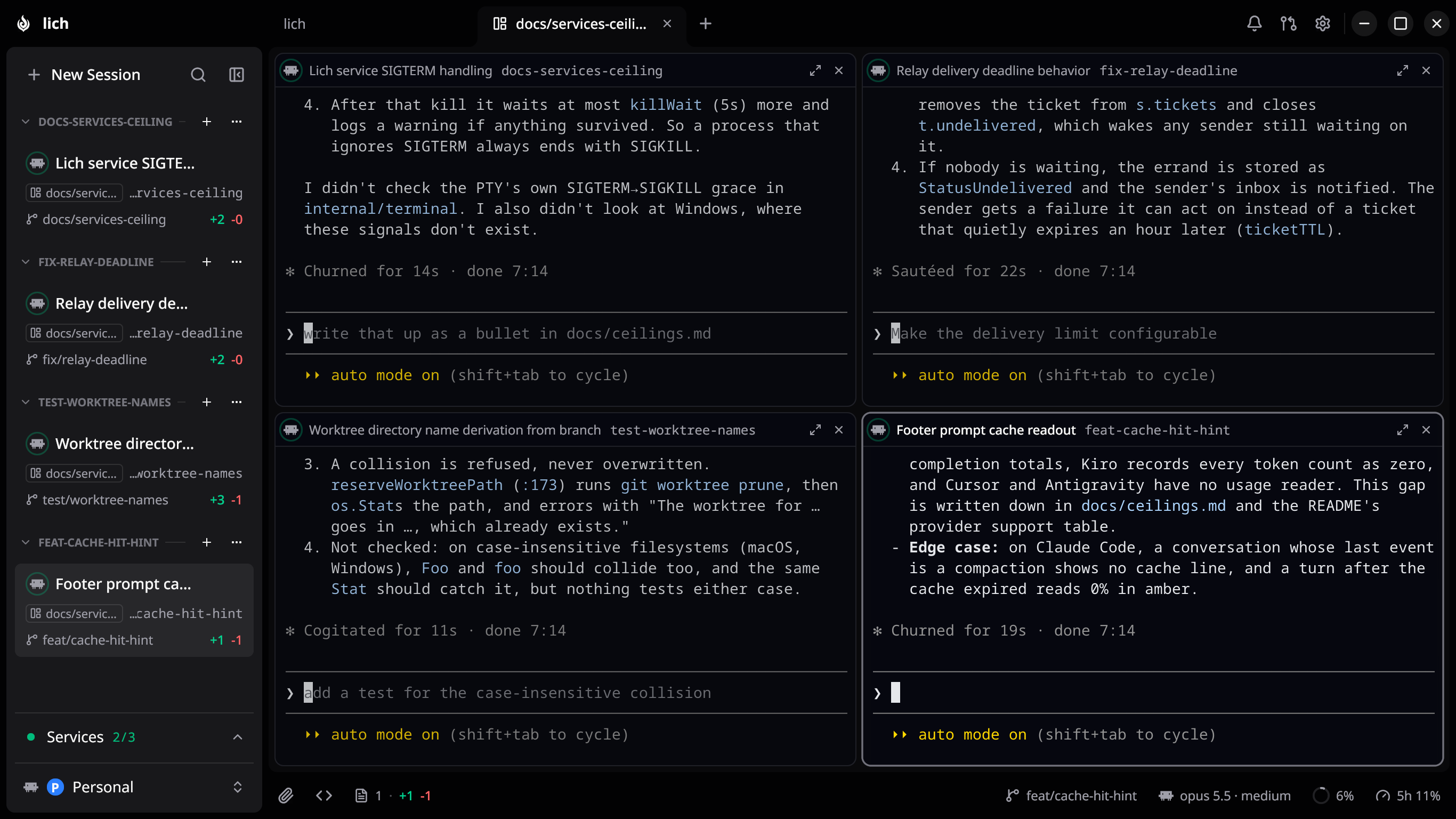
Open your projects, run agents like Claude Code, Codex and opencode in real terminals, and keep git — worktrees, diffs and pull requests — in view without leaving the window. One static Go binary, no Electron: the UI opens in lich's own embedded Chromium on Linux, Windows and macOS.





Why lich
lich lets you:
- Run the agent you already have. Claude Code,
Codex, Antigravity,
opencode, oh-my-pi,
Crush, the
Cursor CLI and the
Kiro CLI all run here the same way. Point lich
at each binary once, then pick the default or choose per session. What lich
can read back out of a session differs by provider, and
Provider support is the table. - Keep a real terminal. PTY-backed shells, several per project, rendered on
the GPU — searchable scrollback that survives a full page reload. Give one an
entrypoint —lazygit,k9s,pnpm dev— and it opens straight into that
tool every time, on Linux, macOS and Windows alike: no shell rc or PowerShell
profile is loaded first, so an entrypoint that works for you works for whoever
you share it with. The footer followscdand names the branch — and, for a
Claude Code, Codex or Kiro CLI session, the model and the context window in
use; for Claude Code, Codex, Antigravity, Cursor CLI and an OpenCode Go
subscription, how much of your plan's rolling window is left; if you ask, what
the session has spent, on the providers that record it. - Put one session to work for another. Hand a task to another card and its
own agent writes the answer back, whatever runs in either end: the agent
reaches the other sessions through tools handed at spawn — MCP for Claude
Code and Codex — or brought by the plugin. The whole surface doubles as thelichcommand in any shell,--jsonincluded, so a script can drive a
session with no agent in the loop (docs/cli.md). - Watch several of them at once. Put any session on a wall beside the one
you are in and lich lays the panes out itself, from how many there are and how
much room the window has — eight land four across on an ultrawide and two
across on a laptop. A session that handed work to others builds the wall around
it in one click. Each wall is named, a project keeps as many as you like, and
each gets a block in the sidebar you can fold, rename or take apart. - Branch off a worktree without the setup. Spin one up from any base
branch and lich seeds it with your gitignored.env*files, hands it a
dev-server port no other checkout and no process on the machine is using, and
runs your per-project setup script before the agent starts. Start it from the
checkout's uncommitted work and those changes come along, untracked files
included. - Run a session confined. An agent can open inside an OS sandbox: a fresh
empty home holding only that provider's own state, the rest of the machine
read-only, and write access to the checkout it was opened for. Your ssh keys,
your cloud credentials and every other repository on the disk are simply not
there — the counterweight to letting an agent skip permission prompts. Linux
runs bubblewrap and macOSsandbox-exec; it is not a boundary against hostile
code, anddocs/ceilings.mdsays what it does not stop. - Review the diff where you read it. A CodeMirror dock shows the working
changes beside a live file tree, folds the ones that only moved whitespace when
you ask it to, and shows a changed image or PDF before and after. Right-click a
selection to comment against those lines; the batch is pasted into the session
as a single prompt, unsent. Its Code tab browses the checkout and searches the
text of its files. - Ship the pull request from here. List the repository's open pull requests,
check one out into a worktree of its own, then read the diff, review it inline
and merge it — with the methods the base branch actually accepts. On a branch
with no pull request yet, Create with agent asks that branch's session to
open one, and nothing is sent until you press Enter.
Plus: themes you import as JSON or install from a git
repository, a Ctrl/Cmd+K palette that jumps by name or by what was said in
the conversation, a desktop notification when a session is waiting on you, andlich rage / lich doctor for when it will not start at all.
Development is active: bugs and feature requests belong in
Issues, and what changed in each
version is in CHANGELOG.md.
Provider support
Every provider is spawned in a real terminal, resumed by conversation id,
confined by the same sandbox and handed the same way of reaching your other
sessions. What differs is what lich can read back out of a session, because it
reads what each CLI writes down and no two of them write down the same things.
| What you get | Claude Code | Codex | Antigravity | opencode | oh-my-pi | Crush | Cursor CLI | Kiro CLI |
|---|---|---|---|---|---|---|---|---|
| Context window in the footer | yes | yes | no | no | no | no | no | yes |
| Cost in the footer | yes | yes | no | yes | yes | yes | no | credits |
| How much of your plan is left | yes | yes | yes | OpenCode Go only | no | no | yes | no |
| A turn your plan's usage limit stopped picks up again once the limit resets | yes | yes | no | its own retries | its own retries | no | no | no |
| Spinner while a turn runs, ring when it ends | yes | yes | yes | yes | yes | no | yes | yes |
| A pull request the agent opens shows on its card when the turn ends | yes | yes | yes | yes | yes | no, once the window regains focus | yes | yes |
| Repaints in the new look when you switch lich between a light and a dark theme | yes | no | no | yes | yes | no | yes | no |
| Bell when the agent is blocked on you | yes | yes | no | yes | no | no | no | no |
| Ctrl+Shift+Y jumps to the next session waiting on you | yes | yes | no | yes | no | no | no | no |
| The card says when the conversation is being compacted | yes | no | no | no | no | no | no | no |
| Sidebar filter by state: Waiting, Running, Unread | yes | yes | no Waiting | yes | no Waiting | no, always Idle | no Waiting | no Waiting |
Run by your agent inside another session (claude -p, cursor-agent -p), it stays out of that session's card |
yes | yes | yes | yes | yes | yes | yes | no |
| Machine kept out of idle sleep while a turn runs | yes | yes | yes | yes | yes | no | yes | yes |
| Review tab's Last turn, with the agent's recap | yes | yes | yes | yes | yes | no | yes | yes |
| Search the conversation from the palette | yes | yes | yes | yes | yes | yes | no | yes |
| Resume a conversation started outside lich, from the palette's History tab | yes | yes | yes | yes | yes | Linux; macOS and Windows untested | yes | yes |
| A long paste can land as editable text instead of a folded placeholder (Settings › Providers, off by default) | yes | no | no | yes | not measured | no, it becomes a paste_N.txt attachment |
no | yes |
| Fork a conversation into a new worktree, or in its own checkout in the native window | yes | yes | no | yes | no | no | no | no |
| Warned in the native window when you resume, from the agent's own app, a conversation another card has open | yes | on your next prompt | on your next prompt, untested | no | yes | at its next tool call | no | yes |
| Open a session at a chosen reasoning effort | yes | yes | yes | no | yes | no | in the model name | yes |
| Open a session with ultracode on | yes | no | no | no | no | no | no | no |
| Several accounts side by side as profiles, each with its own full login, and a session moved to another account carrying on in the same card (in the native window, experimental: Settings › Providers) | yes | yes, with its own plugins in each profile and Personal's settings shared by all of them | no | yes, logged in from a terminal card; a session cannot move to another profile, since its conversations sit in the database that holds the login | yes, logged in from a terminal card, with its settings shared by every profile | not measured | Linux and Windows (on macOS its login is in the Keychain), logged in from a terminal card, with mcp.json, hooks and skills shared by every profile |
Linux only (macOS keeps its login in the Keychain, and on Windows nothing moves it), logged in from a terminal card, with its conversations shared by every profile |
| A folder you trusted in your main account opens without the "trust this folder?" question in every other profile | yes | yes | no profiles | asks nothing | asks nothing | not measured | yes | asks nothing |
| A sandboxed session opens without the "trust this folder?" question | yes | yes | yes | asks nothing | asks nothing | yes, and it no longer asks to initialize the project | yes | asks nothing |
| A worktree of a folder you trusted opens without the "trust this folder?" question | yes | yes | yes | asks nothing | asks nothing | yes, and it no longer asks to initialize the project | yes | asks nothing |
Drive a running session from lich control or an agent: prompt, stop, model, effort, slash command |
yes | no | no | no | no | no | no | no |
| A message from another session arrives without being typed into the terminal | yes | no | no | no | no | no | no | no |
| A subagent the agent starts runs as a lich session with its own card, in the asking session's checkout, hands its full report back and closes once done; its own subagents get cards too, one level down | yes | no | no | no | no | no | no | no |
Ask a running session a side question without stopping it (lich ask) |
yes | no | no | no | no | no | no | no |
| Context, cost and plan usage as the CLI measured them itself | yes | no | no | no | no | no | no | no |
| The terminal's status line shows who the session owes an answer, who it is waiting on, and answers ready to collect | yes | no | no | no | no | no | no | no |
| Delegate privately from a subagent or workflow step | yes | yes | yes | yes | yes | yes | yes | yes |
| A resumed session keeps the model and effort it was on | model only | yes | no | model | yes | no | model | model; effort untested |
| A result still waits for you after you interrupt a wait for it | yes | yes | yes | yes | no | yes | yes | yes |
| A task you hand another session reports back "unanswered" as soon as that agent ends its turn without replying | yes | yes | yes | yes | yes | no, waits for the deadline | yes | yes |
| lich's own messages to the agent (handed tasks, results ready, notices) in the prompt language you pick | yes | yes | yes | yes | yes | yes | yes | yes |
| Told at spawn, in the prompt language, to fan work out as lich sessions rather than hidden subagents | yes | no | no | no | yes | no | no | no |
Every gap is deliberate, none of them is lich withholding something the CLI
reports, and docs/ceilings.md says what was measured behind
each one.
Install
One line — detects your distro, verifies the checksum, and installs the native
package and its dependencies through your package manager:
curl -fsSL https://raw.githubusercontent.com/omartelo/lich/main/install.sh | sh
| Platform | Get it | Needs at runtime |
|---|---|---|
| Linux | install.sh above, or AUR lich-bin (yay -S lich-bin) |
zenity, plus glibc 2.34 or newer for the window that ships in the package (Debian 12, Ubuntu 22.04, RHEL 9 and up) |
| macOS | brew install --cask lichdotdev/tap/lich |
nothing, the window ships in the app on Apple Silicon and Intel alike |
| Windows | installer or portable zip from Releases, or Scoop: scoop install https://github.com/omartelo/lich/releases/latest/download/lich.json |
nothing, the window ships with each |
Manual per-distro packages, the Linux tarball and the Windows portable zip: INSTALL.md. The
macOS and Windows binaries are unsigned — Gatekeeper and SmartScreen warn until
notarization/signing ship. Homebrew installs sidestep the Gatekeeper prompt;
a download from the Releases page needs its quarantine flag cleared by hand.
On macOS the cask installs Lich.app, so lich has its own icon in/Applications and in the Dock while it runs. Upgrading from the old formula
needs brew uninstall lich first — INSTALL.md says why.
Getting started
- Install and launch
lich. - Open a project — the
+in the tab strip lists what you closed recently
and opens your OS folder picker; point it at a git repository. - Point lich at your agent — the first launch lists the agents it found on
your machine; in Settings › Providers you can set each binary path and
choose the default. A project can follow it or choose a different provider
on the same screen. - Start a session — New Session spawns a terminal running your agent in
the project. Each checkout header also has a+menu for opening any enabled
provider or a plain terminal in that exact checkout; click the header itself
to collapse or expand its sessions. - Branch off a worktree (optional) — create one from any base branch;
lich seeds it and drops you into a fresh session.
Configuration
- Providers — set each provider's binary path and the default for all
projects in Settings › Providers. The open project's row there can override
that choice; Clear removes the override, so later changes to the default
flow through automatically. With no path set, a session runs the first of
the provider's binaries on your login shell'sPATH; in the native window the
Binary block names that file and its version, and lists any other versionPATHholds, whichlich doctoralso warns about. To pick one, set its path
in Binary (the settingprovider.<id>.bin, e.g.provider.codex.bin).
A provider's section opens
with how much of your plan is left, when lich can read it. What the footer
shows is set in Settings › Appearance by dragging its items; the cost
readout starts hidden, since the figure only means something when you are
billed per token. - Worktrees —
.lich/setup-worktree.shin the project checkout runs in a
new worktree's terminal ahead of the agent; the New worktree dialog shows it
and offers a detected suggestion when the repo ships none. A.worktreeincludefile tunes which gitignored files get copied over. - Session hooks — with the
lich plugin installed from Settings,
a session titles its own card and refreshes git the moment it writes a file. - Stability: which parts of lich are safe to script against, and which can
change in any release, is written down in docs/stability.md.
Privacy & updates
Everything runs on your machine. No account, no sign-in, no telemetry: the
backend is a token-authenticated loopback listener. On its own, lich goes to the
network for these and nothing else:
- Updates: a version check against GitHub Releases at startup and hourly,
and the lich plugin's release list on GitHub at startup. - Plan usage: each provider's own usage endpoint (Anthropic, OpenAI, Cursor,
OpenCode Go), with the login the session's CLI already uses, at most every five
minutes. Antigravity's plan is read fromagyitself. - Prices: LiteLLM's public price table on GitHub, once for a model the
bundled table does not know.
The Windows installer's build updates in place; a Homebrew, Scoop, AUR or Linux
package install updates through its package manager, and lich hands you the
command.
Settings › Help says what the log file carries — paths, project and branch names,
your gh login, never a session token — before you attach it to a bug report, andlich rage collects that report into one archive without uploading any of it.
Build from source
Pure-Go backend (Go 1.27, CGO_ENABLED=0) serving an embedded React 18 /
TypeScript / Vite frontend over a token-authenticated loopback listener (HTTP RPC
- WebSockets). Terminals are xterm.js with the WebGL addon; the code and diff
surfaces are CodeMirror 6. The Chromium shell is a decision record:docs/chromium-shell.md. Prerequisites are Go
1.27.0+, Node + pnpm and Task — no C toolchain
for the Go binary. The window (shell/, Rust on CEF) adds a Rust toolchain,
plus Chromium's dev libraries on Linux and MSVC on Windows;
CONTRIBUTING.md lists them.
task dev      # hot-reload dev mode (Vite on :9245)
task build    # production binary -> bin/lich
task run      # build + run
task test     # Go + frontend suites
Package a Linux release locally (needs
nfpm):
task package # .deb + .rpm + Arch .pkg.tar.zst in bin/
Adding another agent CLI to the eight lich runs is the one change that lands in a
dozen files across two repositories:docs/adding-a-provider.md is the map.
Sponsors
lich is written and maintained by one person. Sponsoring pays for the time that
goes into it and keeps the project independent: there is no paid tier of the app
and there will not be one.
Backers
Nobody yet.
License
AGPL-3.0-only © 2026 omartelo
lich is free software: you can use, study, modify and redistribute it under
the terms of the GNU Affero General Public License v3. Any distributed or
network-served derivative must be released under the same license. Releases
up to and including v0.9.0 remain MIT-licensed.
Reviews (0)
Sign in to leave a review.
Leave a reviewNo results found